Glama
refreshdotdev

WebEvalAgent MCP Server

Official

🚀 operative.sh web-eval-agent MCP サーバー

コーディングエージェントに自己デバッグを任せれば、もっとやるべきことがあるはずです。

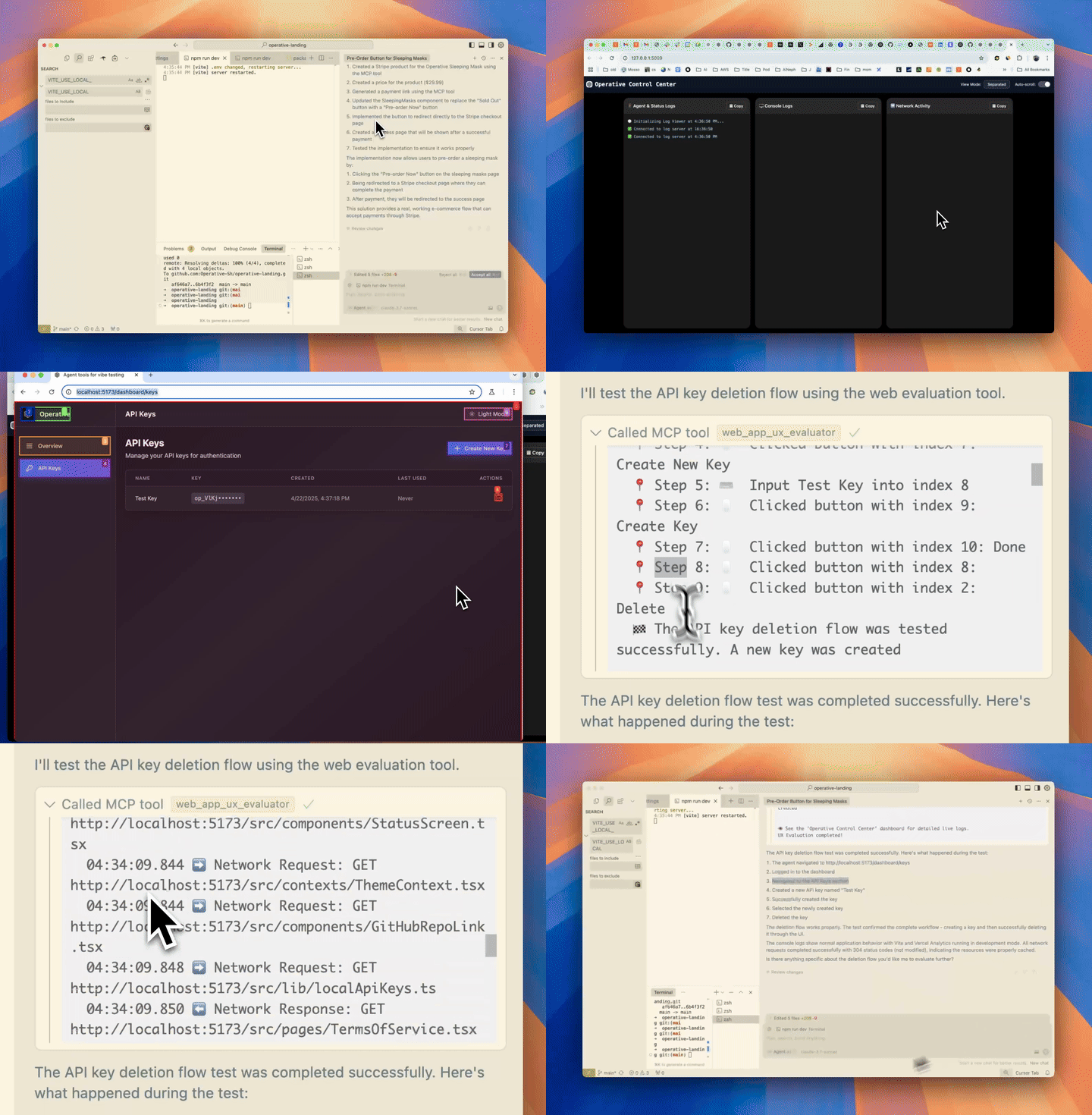
デモ

🔥 デバッグを強化

operative.shの MCP サーバーは、ブラウザベースのエージェントを起動して、コード エディター内で直接 Web アプリを自律的に実行およびデバッグします。

Related MCP server: agnt

⚡ 特徴

  • 🌐 BrowserUse を使用してウェブアプリを操作する(操作可能なバックエンドで 2 倍高速化)

  • 📊ネットワークトラフィックをキャプチャ- リクエストはインテリジェントにフィルタリングされ、コンテキストウィンドウに返されます

  • 🚨コンソールエラーを収集- ログとエラーをキャプチャします

  • 🤖自律デバッグ- カーソル エージェントは Web QA エージェント mcp サーバーを呼び出して、書き込んだコードがエンドツーエンドで期待どおりに動作するかどうかをテストします。

🧰 MCP ツールリファレンス

道具

目的

web_eval_agent

🤖 ブラウザを操作し、スクリーンショット、コンソールとネットワークのログをキャプチャし、豊富な UX レポートを返す自動 UX エバリュエーター。

setup_browser_state

🔒 対話型 (非ヘッドレス) ブラウザを開いて一度サインインできるようにします。保存された Cookie/ローカル ストレージは、後続のweb_eval_agent実行で再利用されます。

主な議論

  • web_eval_agent

    • url(必須) – 実行中のアプリのアドレス (例http://localhost:3000 )

    • task(必須) - テスト対象についての自然言語による説明(「サインアップフローを実行し、UX の問題があればメモする」)

    • headless_browser(オプション、デフォルトはfalse ) – ブラウザウィンドウを非表示にするにはtrueに設定します

  • setup_browser_state

    • url(オプション) – 最初に開くページ (ログイン画面に直接アクセスするのに便利)

これらのツールは、IDE チャットから直接起動できます。たとえば、次のようになります。

Evaluate my app at http://localhost:3000 – run web_eval_agent with the task "Try the full signup flow and report UX issues".

🏁 クイックスタート (macOS/Linux)

  1. 前提条件(通常は必要ありません):

  • 醸造: /bin/bash -c "$(curl -fsSL https://raw.githubusercontent.com/Homebrew/install/HEAD/install.sh)"

  • npm: ( brew install npm )

  • jq: brew install jq

  1. APIキー(無料)を取得した後、インストーラーを実行します。

curl -LSf https://operative.sh/install.sh -o install.sh && bash install.sh && rm install.sh
  1. お気に入りのIDEにアクセスし、再起動して変更を適用します

  2. チャットモードでプロンプトを送信して、Web評価エージェントツールを呼び出します。例:

Test my app on http://localhost:3000. Use web-eval-agent.

🛠️ 手動インストール

  1. operative.shでAPIキーを取得します

  2. uvをインストールする

curl -LsSf https://astral.sh/uv/install.sh | sh)
  1. Playwright をインストールします:

npm install -g chromium playwright && uvx --with playwright playwright install --with-deps
  1. 以下のJSONをAPIキーとともに関連するコードエディターに追加します。

  2. コードエディタを再起動します

🔃 更新中

  • uv cache clean

  • MCPサーバーを更新する

    "web-eval-agent": {
      "command": "uvx",
      "args": [
        "--refresh-package",
        "webEvalAgent",
        "--from",
        "git+https://github.com/Operative-Sh/web-eval-agent.git",
        "webEvalAgent"
      ],
      "env": {
        "OPERATIVE_API_KEY": "<YOUR_KEY>"
      }
    }

オペレーティブDiscordサーバー

🛠️ 手動インストール (Mac + Cursor/Cline/Windsurf)

  1. operative.shでAPIキーを取得します

  2. uvをインストールする

curl -LsSf https://astral.sh/uv/install.sh | sh)
  1. Playwright をインストールします:

npm install -g chromium playwright && uvx --with playwright playwright install --with-deps
  1. 以下のJSONをAPIキーとともに関連するコードエディターに追加します。

  2. コードエディタを再起動してください

手動インストール(Windows + カーソル/クライン/ウィンドサーフィン)

これを改良中です。問題がある場合は、問題を報告してください。

  1. これをすべてコードエディタターミナルで実行します

  2. curl -LSf https://operative.sh/install.sh -o install.sh && bash install.sh && rm install.sh

  3. operative.shでAPIキーを取得します

  4. uv をインストールします(curl -LsSf https://astral.sh/uv/install.sh | sh)

  5. uvx --from git+https://github.com/Operative-Sh/web-eval-agent.git playwright install

  6. コードエディターを再起動

🚨 問題点

  • コードエディターで更新が受信されない場合、最新バージョンに更新または再インストールしてください。最新のバージョンにするにはuv cache clean実行してください。

  • 何か問題がございましたら、お気軽にこのリポジトリまたは discord で Issue を開いてください。

  • 5/5 - 変更のない静的アプリがスクリーンキャストされない問題を修正しました。UV uv cleanと再起動で修正されます。

変更履歴

  • 4/29 - エージェントオーバーレイの更新 - ブラウザでエージェントの実行を一時停止/再生/停止

📋 MCP サーバー出力レポートの例

📊 Web Evaluation Report for http://localhost:5173 complete!
📝 Task: Test the API-key deletion flow by navigating to the API Keys section, deleting a key, and judging the UX.

🔍 Agent Steps
  📍 1. Navigate → http://localhost:5173
  📍 2. Click     "Login"        (button index 2)
  📍 3. Click     "API Keys"     (button index 4)
  📍 4. Click     "Create Key"   (button index 9)
  📍 5. Type      "Test API Key" (input index 2)
  📍 6. Click     "Done"         (button index 3)
  📍 7. Click     "Delete"       (button index 10)
  📍 8. Click     "Delete"       (confirm index 3)
🏁 Flow tested successfully – UX felt smooth and intuitive.

🖥️ Console Logs (10)
  1. [debug] [vite] connecting…
  2. [debug] [vite] connected.
  3. [info]  Download the React DevTools …
     …

🌐 Network Requests (10)
  1. GET /src/pages/SleepingMasks.tsx                   304
  2. GET /src/pages/MCPRegistryRegistry.tsx             304
     …

⏱️ Chronological Timeline
  01:16:23.293 🖥️ Console [debug] [vite] connecting…
  01:16:23.303 🖥️ Console [debug] [vite] connected.
  01:16:23.312 ➡️ GET /src/pages/SleepingMasks.tsx
  01:16:23.318 ⬅️ 304 /src/pages/SleepingMasks.tsx
     …
  01:17:45.038 🤖 🏁 Flow finished – deletion verified
  01:17:47.038 🤖 📋 Conclusion repeated above
👁️  See the "Operative Control Center" dashboard for live logs.

スターの歴史

星の歴史チャート


<3 @ operative.shで構築

Install Server
A
license - permissive license
A
quality
F
maintenance

Maintenance

Maintainers
Response time
Release cycle
Releases (12mo)
Commit activity
Issues opened vs closed

Resources

Unclaimed servers have limited discoverability.

Looking for Admin?

If you are the server author, to access and configure the admin panel.

Related MCP Servers

  • A
    license
    -
    quality
    D
    maintenance
    Enables AI assistants to debug frontend applications by providing direct access to browser DevTools, React state, DOM inspection, and runtime debugging capabilities. Bridges the gap between AI and complex web applications for autonomous debugging and issue resolution.
    1
    MIT
  • A
    license
    -
    quality
    A
    maintenance
    Bridges AI coding agents with the browser to provide visual debugging, real-time error capture, screenshot capabilities, DOM inspection, and interactive wireframing through a reverse proxy with injected developer tools.
    36
    5
    Apache 2.0
  • A
    license
    -
    quality
    C
    maintenance
    Enables AI assistants to control and inspect a live Chrome browser for automated web debugging, performance analysis, and Lighthouse audits. It allows agents to capture screenshots, monitor network requests, and measure Core Web Vitals using plain-English prompts.
    2,322,781
    Apache 2.0

View all related MCP servers

Related MCP Connectors

  • Live browser debugging for AI assistants — DOM, console, network via MCP.

  • AI QA tester — real browsers scan sites for bugs, SEO, perf, and accessibility issues via chat.

  • Browser-backed QA with evidence and fix-ready reports for coding agents.

View all MCP Connectors

Latest Blog Posts

MCP directory API

We provide all the information about MCP servers via our MCP API.

curl -X GET 'https://glama.ai/api/mcp/v1/servers/refreshdotdev/web-eval-agent'

If you have feedback or need assistance with the MCP directory API, please join our Discord server