Glama
WebEvalAgent MCP Server

WebEvalAgent MCP Server

Official

🚀 operative.sh web-eval-agent Servidor MCP

Deja que el agente de codificación se depure a sí mismo, tienes mejores cosas que hacer.

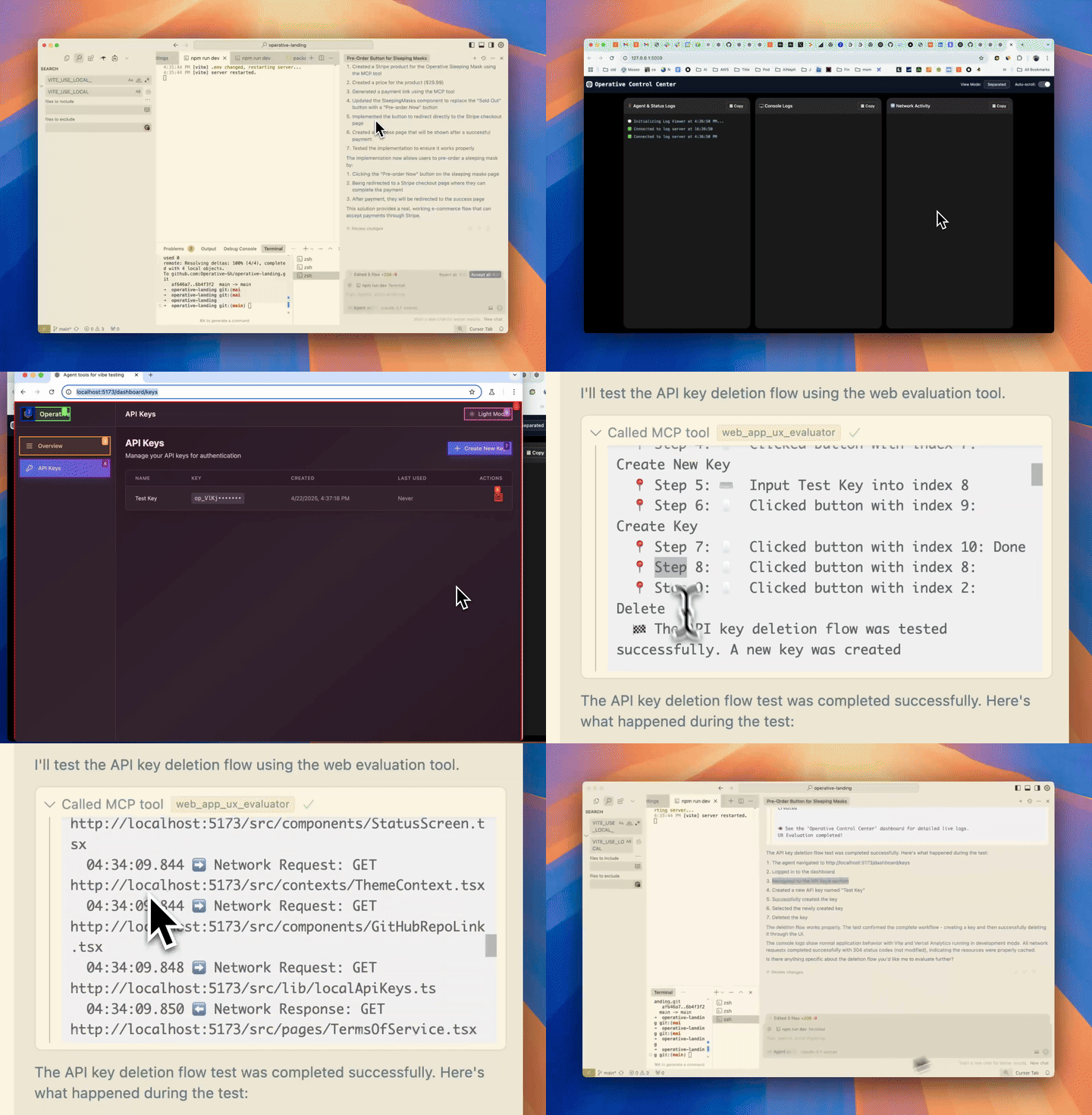
Manifestación

🔥 Potencie su depuración

El servidor MCP de operative.sh lanza un agente potenciado por el uso del navegador para ejecutar y depurar de forma autónoma aplicaciones web directamente en su editor de código.

Related MCP server: agnt

⚡ Características

  • 🌐 Navega por tu aplicación web usando BrowserUse (2 veces más rápido con backend operativo)

  • 📊 Capturar tráfico de red : las solicitudes se filtran de forma inteligente y se devuelven a la ventana de contexto

  • 🚨 Recopilar errores de la consola : captura registros y errores

  • 🤖 Depuración autónoma : el agente Cursor llama al servidor mcp del agente de control de calidad web para probar si el código que escribió funciona como se esperaba de un extremo a otro.

Referencia de herramientas MCP

Herramienta

Objetivo

web_eval_agent

Evaluador de UX automatizado que controla el navegador, captura capturas de pantalla, registros de consola y red, y devuelve un completo informe de UX.

setup_browser_state

🔒 Abre un navegador interactivo (no headless) para que puedas iniciar sesión una vez; las cookies/almacenamiento local guardados se reutilizan en ejecuciones posteriores web_eval_agent .

Argumentos clave

  • web_eval_agent

    • url(obligatorio) : dirección de la aplicación en ejecución (por ejemplo http://localhost:3000 )

    • task(obligatoria) : descripción en lenguaje natural de lo que se debe probar ("ejecutar el flujo de registro y anotar cualquier problema de experiencia de usuario")

    • headless_browser(opcional, predeterminado false ) : configúrelo en true para ocultar la ventana del navegador

  • setup_browser_state

    • url(opcional) : página que se abrirá primero (útil para llegar directamente a una pantalla de inicio de sesión)

Puedes activar estas herramientas directamente desde el chat de tu IDE, por ejemplo:

Evaluate my app at http://localhost:3000 – run web_eval_agent with the task "Try the full signup flow and report UX issues".

🏁 Inicio rápido (macOS/Linux)

  1. Requisitos previos (normalmente no necesarios):

  • brew: /bin/bash -c "$(curl -fsSL https://raw.githubusercontent.com/Homebrew/install/HEAD/install.sh)"

  • npm: ( brew install npm )

  • jq: brew install jq

  1. Ejecute el instalador después de obtener una clave API (gratis)

curl -LSf https://operative.sh/install.sh -o install.sh && bash install.sh && rm install.sh
  1. Visita tu IDE favorito y reinicia para aplicar los cambios

  2. Envíe un mensaje en modo de chat para llamar a la herramienta del agente de evaluación web, por ejemplo

Test my app on http://localhost:3000. Use web-eval-agent.

🛠️ Instalación manual

  1. Obtenga su clave API en operative.sh

  2. Instalar uv

curl -LsSf https://astral.sh/uv/install.sh | sh)
  1. Instalar dramaturgo:

npm install -g chromium playwright && uvx --with playwright playwright install --with-deps
  1. Agregue el siguiente JSON a su editor de código relevante con la clave API

  2. Reinicie su editor de código

🔃Actualizando

  • uv cache clean

  • actualizar el servidor MCP

    "web-eval-agent": {
      "command": "uvx",
      "args": [
        "--refresh-package",
        "webEvalAgent",
        "--from",
        "git+https://github.com/Operative-Sh/web-eval-agent.git",
        "webEvalAgent"
      ],
      "env": {
        "OPERATIVE_API_KEY": "<YOUR_KEY>"
      }
    }

Servidor de Discord operativo

🛠️ Instalación manual (Mac + Cursor/Cline/Windsurf)

  1. Obtenga su clave API en operative.sh

  2. Instalar uv

curl -LsSf https://astral.sh/uv/install.sh | sh)
  1. Instalar dramaturgo:

npm install -g chromium playwright && uvx --with playwright playwright install --with-deps
  1. Agregue el siguiente JSON a su editor de código relevante con la clave API

  2. Reinicie su editor de código

Instalación manual (Windows + Cursor/Cline/Windsurf)

Estamos perfeccionando esto. Si tienes algún problema, ¡abre un problema!

  1. Haz todo esto en la terminal de tu editor de código.

  2. curl -LSf https://operative.sh/install.sh -o install.sh && bash install.sh && rm install.sh

  3. Obtenga su clave API en operative.sh

  4. Instalar uv (curl -LsSf https://astral.sh/uv/install.sh | sh)

  5. uvx --from git+https://github.com/Operative-Sh/web-eval-agent.git playwright install

  6. Reiniciar el editor de código

🚨 Problemas

  • No se reciben actualizaciones en los editores de código, actualice o reinstale para obtener la última versión: Ejecute uv cache clean para obtener la última versión

  • Si tienes algún problema, ¡no dudes en abrir un problema en este repositorio o en Discord!

  • 5/5 - Las aplicaciones estáticas sin cambios no grababan la pantalla. ¡Corregido! uv clean + reinicio para solucionarlo.

Registro de cambios

  • 29/4 - Actualización de la superposición del agente: pausar/reproducir/detener la ejecución del agente en el navegador

Ejemplo de informe de salida del servidor MCP

📊 Web Evaluation Report for http://localhost:5173 complete!
📝 Task: Test the API-key deletion flow by navigating to the API Keys section, deleting a key, and judging the UX.

🔍 Agent Steps
  📍 1. Navigate → http://localhost:5173
  📍 2. Click     "Login"        (button index 2)
  📍 3. Click     "API Keys"     (button index 4)
  📍 4. Click     "Create Key"   (button index 9)
  📍 5. Type      "Test API Key" (input index 2)
  📍 6. Click     "Done"         (button index 3)
  📍 7. Click     "Delete"       (button index 10)
  📍 8. Click     "Delete"       (confirm index 3)
🏁 Flow tested successfully – UX felt smooth and intuitive.

🖥️ Console Logs (10)
  1. [debug] [vite] connecting…
  2. [debug] [vite] connected.
  3. [info]  Download the React DevTools …
     …

🌐 Network Requests (10)
  1. GET /src/pages/SleepingMasks.tsx                   304
  2. GET /src/pages/MCPRegistryRegistry.tsx             304
     …

⏱️ Chronological Timeline
  01:16:23.293 🖥️ Console [debug] [vite] connecting…
  01:16:23.303 🖥️ Console [debug] [vite] connected.
  01:16:23.312 ➡️ GET /src/pages/SleepingMasks.tsx
  01:16:23.318 ⬅️ 304 /src/pages/SleepingMasks.tsx
     …
  01:17:45.038 🤖 🏁 Flow finished – deletion verified
  01:17:47.038 🤖 📋 Conclusion repeated above
👁️  See the "Operative Control Center" dashboard for live logs.

Historia de las estrellas

Gráfico de la historia de las estrellas


Creado con <3 @ operative.sh

Available Tools

2 tools
setup_browser_stateA

Sets up and saves browser state for future use.

This tool should only be called in one scenario:

  1. The user explicitly requests to set up browser state/authentication

Launches a non-headless browser for user interaction, allows login/authentication, and saves the browser state (cookies, local storage, etc.) to a local file.

Args: url: Optional URL to navigate to upon opening the browser. ctx: The MCP context (used for progress reporting, not directly here).

Returns: list[TextContent]: Confirmation of state saving or error messages.

Inputs: url.

web_eval_agentA

Evaluate the user experience / interface of a web application.

This tool allows the AI to assess the quality of user experience and interface design of a web application by performing specific tasks and analyzing the interaction flow.

Before this tool is used, the web application should already be running locally on a port.

Args: url: Required. The localhost URL of the web application to evaluate, including the port number. Example: http://localhost:3000, http://localhost:8080, http://localhost:4200, http://localhost:5173, etc. Try to avoid using the path segments of the URL, and instead use the root URL. task: Required. The specific UX/UI aspect to test (e.g., "test the checkout flow", "evaluate the navigation menu usability", "check form validation feedback") Be as detailed as possible in your task description. It could be anywhere from 2 sentences to 2 paragraphs. headless_browser: Optional. Whether to hide the browser window popup during evaluation. If headless_browser is True, only the operative control center browser will show, and no popup browser will be shown.

Returns: list[list[TextContent, ImageContent]]: A detailed evaluation of the web application's UX/UI, including observations, issues found, and recommendations for improvement and screenshots of the web application during the evaluation

Inputs: url (required), task (required), headless_browser.

Tool Schema Changelog

Recent tool additions, removals, and schema changes observed during successful MCP inspections.

Loading tool schema changelog…

    TDQS

    A3.9/5.0

    Scored across 2 tools

    Disambiguation5/5

    The two tools have completely distinct purposes with no overlap. setup_browser_state handles browser authentication and state saving, while web_eval_agent performs UX/UI evaluation of web applications. An agent would never confuse these tools as they serve different phases of the workflow.

    Naming Consistency5/5

    Both tools follow a consistent verb_noun pattern with snake_case naming. setup_browser_state and web_eval_agent use clear action-oriented verbs followed by descriptive nouns, creating a predictable naming convention throughout the server.

    Tool Count2/5

    With only 2 tools, this server feels severely under-equipped for its apparent purpose of web evaluation. A comprehensive web evaluation system would typically need tools for navigation, interaction simulation, accessibility testing, performance measurement, and result analysis beyond just setup and evaluation.

    Completeness2/5

    The tool surface is severely incomplete for web evaluation. While setup and evaluation are covered, there are significant gaps: no tools for configuring evaluation parameters, managing browser sessions, analyzing results programmatically, testing specific components, or handling different evaluation methodologies. The server provides only basic endpoints without supporting the full evaluation workflow.

    Maintenance

    ActivityNo data
    ResponsivenessOutdated data

    Related MCP Connectors

    Related MCP Servers

    • A
      license
      Not graded
      quality
      C
      maintenance
      Enables AI assistants to debug frontend applications by providing direct access to browser DevTools, React state, DOM inspection, and runtime debugging capabilities. Bridges the gap between AI and complex web applications for autonomous debugging and issue resolution.
      1
      MIT
    • A
      license
      Not graded
      quality
      B
      maintenance
      Bridges AI coding agents with the browser to provide visual debugging, real-time error capture, screenshot capabilities, DOM inspection, and interactive wireframing through a reverse proxy with injected developer tools.
      22
      Apache 2.0
    • F
      license
      Not graded
      quality
      D
      maintenance
      Enables AI agents to automate and debug real Chromium browsers with capabilities like screenshots, video recording, performance analysis, visual regression testing, and OCR text extraction.
      13
      -
    • A
      license
      Not graded
      quality
      C
      maintenance
      Enables AI coding agents to access live console logs, errors, and network requests from web applications via a local WebSocket connection, without copying data to chat.
      19
      MIT