


A
licenseNot graded
qualityC
maintenanceTransforms any API into an intelligent MCP agent in seconds, enabling natural language interaction with APIs through the Model Context Protocol.
15
Apache 2.0

Click on "Deploy Server".
Wait a few minutes for the server to deploy. Once ready, it will show a "Started" state.
In the chat, type @ followed by the MCP server name and your instructions, e.g., "@Pega DX MCP Server Create a travel claim for John Smith with a $500 budget"
That's it! The server will respond to your query, and you can continue using it as needed.
Here is a step-by-step guide with screenshots.




This package transforms Pega Infinity™ interactions into intuitive, conversational experiences through the Model Context Protocol. By bridging Pega DX API with natural language interfaces, it enables GenAI Agents, IDEs, and other MCP-enabled tools to interact with Pega Infinity™ applications using simple, human-readable commands.
Related MCP server: YingDao RPA MCP Server
The Pega DX MCP Server is an experimental project exploring the intersection of Model Context Protocol and Pega Infinity™ capabilities. This is not an official Pegasystems product and is not generally available. All commands, parameters, and other features are subject to change or deprecation at any time, with or without notice. Do not use this MCP server for production functionality. This experiment demonstrates the potential of natural language interfaces for Pega Infinity™ interactions. We welcome feedback and contributions to help shape the future of GenAI-powered business automation.
🤖 Natural Language Interface - Demonstrates conversational case creation: "Create a travel claim for John"
🔌 Plug-and-Play Integration - Experimental compatibility with GenAI Agents, IDEs, and MCP-enabled tools
🧪 Innovation Prototype - Exploring enterprise-grade patterns with comprehensive error handling approaches
📡 API Integration Exploration - Investigating access to cases, assignments, attachments, and data operations
⚡ Performance Research - Experimenting with intelligent caching and optimization strategies
🛡️ Security Framework - Implementing OAuth 2.1 with PKCE and role-based access control patterns
Node.js (22+) and npm
Access to Pega Infinity™ (23+) with DX API enabled
OAuth 2.1 client credentials
# Install from npm (recommended)
npm install -g @marco-looy/pega-dx-mcpCompatible with Claude Desktop, Claude Code, Cline, and many other MCP-enabled applications. Add to your MCP client's configuration file:
{
  "mcpServers": {
    "pega-dx-mcp": {
      "command": "npx",
      "args": ["-y", "@marco-looy/pega-dx-mcp"],
      "env": {
        "PEGA_BASE_URL": "https://your-pega-instance.com",
        "PEGA_CLIENT_ID": "your-client-id",
        "PEGA_CLIENT_SECRET": "your-client-secret"
      }
    }
  }
}
Configuration file locations:
Claude Desktop: See Claude Desktop documentation how to add an MCP Server
Claude Code: See Claude Code documentation how to configure MCP Servers
Cline: See Cline documentation how to edit Cline MCP settings
TIP: Restart your MCP client and confirm the Pega DX MCP tools are available.
The Pega DX MCP Server bridges GenAI applications with Pega Infinity using the Model Context Protocol:
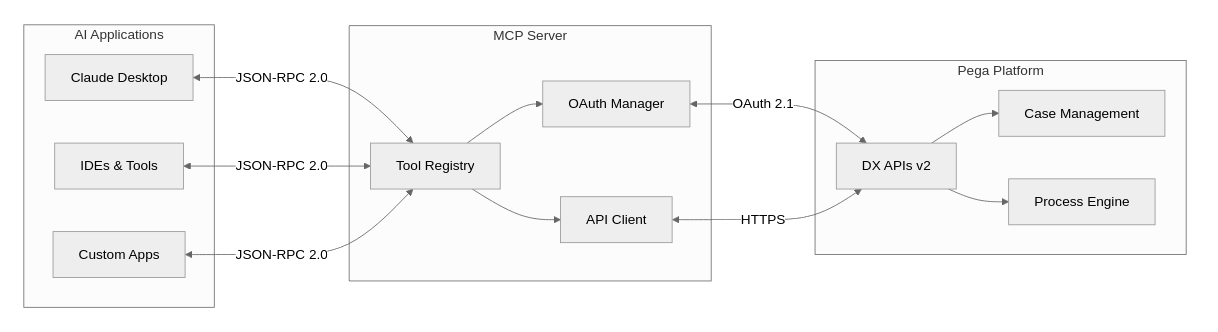
The Pega DX MCP Server provides 60+ comprehensive tools organized into 10+ functional categories. Each category can be enabled or disabled via environment variables for granular control.
Control which tool categories are loaded using environment variables in your MCP client configuration. All categories are enabled by default - set to "false" to disable:
Example - Only core case management tools enabled:
{
  "mcpServers": {
    "pega-dx-mcp": {
      "command": "npx",
      "args": ["-y", "@marco-looy/pega-dx-mcp"],
      "env": {
        "PEGA_BASE_URL": "https://your-pega-instance.com",
        "PEGA_CLIENT_ID": "your-client-id",
        "PEGA_CLIENT_SECRET": "your-client-secret",
        "PEGA_SERVICE_TOOLS": "true",
        "PEGA_CASETYPE_TOOLS": "true",
        "PEGA_CASE_TOOLS": "true",
        "PEGA_ASSIGNMENT_TOOLS": "false",
        "PEGA_ATTACHMENT_TOOLS": "false",
        "PEGA_DATAVIEW_TOOLS": "false",
        "PEGA_DOCUMENT_TOOLS": "false",
        "PEGA_FOLLOWER_TOOLS": "false",
        "PEGA_PARTICIPANT_TOOLS": "false",
        "PEGA_RELATED_CASE_TOOLS": "false",
        "PEGA_TAG_TOOLS": "false"
      }
    }
  }
}get_assignment - Get detailed assignment information
get_assignment_action - Get assignment action details and UI metadata
get_next_assignment - Get next work assignment for user
jump_to_step - Navigate to specific step in assignment flow
navigate_assignment_previous - Navigate to previous step in assignment
perform_assignment_action - Execute assignment actions
recalculate_assignment_fields - Recalculate assignment form fields
refresh_assignment_action - Refresh assignment action form data
save_assignment_action - Save assignment form data without executing
add_case_attachments - Attach files/URLs to cases
delete_attachment - Remove attachments from cases
get_attachment - Retrieve attachment content
get_attachment_categories - List available attachment categories
get_case_attachments - List all case attachments
update_attachment - Update attachment metadata
upload_attachment - Upload files as temporary attachments
add_optional_process - Add stage or case-wide optional processes
bulk_cases_patch - Perform actions on multiple cases
change_to_next_stage - Navigate case to next stage
change_to_stage - Navigate case to specific stage
create_case - Create new cases with content
delete_case - Delete cases in create stage
get_case - Retrieve detailed case information
get_case_action - Get case action details and metadata
get_case_ancestors - Get case ancestor hierarchy
get_case_descendants - Get case descendant hierarchy
get_case_stages - List case stages and processes
get_case_view - Get specific case view details
get_case_view_calculated_fields - Calculate case view fields
perform_bulk_action - Execute bulk case operations
perform_case_action - Execute case-wide actions
recalculate_case_action_fields - Recalculate case action fields
refresh_case_action - Refresh case action form data
release_case_lock - Release pessimistic case locks
get_case_type_action - Get case type action metadata
get_case_type_bulk_action - Get bulk action metadata for case types
get_case_types - List available case types
delete_data_record - Delete data records from savable data pages
get_data_objects - List available data objects
get_data_view_count - Get data view result counts
get_data_view_metadata - Get data view metadata and parameters
get_list_data_view - Query list data views with filtering
update_data_record_full - Fully update data records
update_data_record_partial - Partially update data records
get_document - Retrieve document content as base64
remove_case_document - Remove documents linked to cases
add_case_followers - Add users as case followers
delete_case_follower - Remove case followers
get_case_followers - List case followers
create_case_participant - Add participants to cases
delete_participant - Remove case participants
get_case_participants - List all case participants
get_participant - Get specific participant details
get_participant_role_details - Get participant role information
get_participant_roles - List available participant roles
update_participant - Update participant information
delete_related_case - Remove case relationships
get_related_cases - List related cases
relate_cases - Create case relationships
ping_pega_service - Test OAuth2 connectivity to Pega Infinity
add_case_tags - Add tags to cases
delete_case_tag - Remove specific case tags
get_case_tags - List case tags
Note: The following examples demonstrate envisioned capabilities and planned user experiences. These scenarios represent the experimental goals of this GenAI Innovation project and may not reflect current implementation status.
User: "Create a new insurance claim for policy #12345"
AI: I'll create a new insurance claim case. What type of claim is this?
User: "Auto accident claim"
AI: ✅ Created auto accident claim case INS-CLAIM-789
    Case ID: INS-CLAIM-789
    Policy: #12345
    Status: Open
Next step: Provide accident detailsUser: "What's my next assignment?"
AI: You have 3 pending assignments:
1. Review claim documentation (INS-CLAIM-789) - Due today
2. Approve travel request (TRAVEL-456) - Due tomorrow
3. Customer callback (SERVICE-123) - Due in 2 hours
User: "Let me work on the claim review"
AI: ✅ Opening claim documentation review for INS-CLAIM-789
[Displays relevant case data and required actions]# Pega Infinity Connection
PEGA_BASE_URL=https://your-pega-instance.com
# OAuth 2.1 Authentication
PEGA_CLIENT_ID=your-oauth-client-id
PEGA_CLIENT_SECRET=your-oauth-client-secretRegister OAuth Client in your Pega Infinity instance
Configure Scopes for API access
Set Redirect URIs if using authorization code flow
Update Environment with client credentials
For detailed setup instructions, see our Configuration Guide.
Join us in this exciting GenAI Innovation experiment! As an experimental project exploring the future of natural language interfaces for enterprise platforms, we welcome community participation in shaping this innovation journey.
🔬 Experiment Feedback - Share your experiences and insights from testing the prototype
💡 Innovation Ideas - Contribute to the GenAI Innovation roadmap with creative suggestions
🐛 Issue Reports - Help identify challenges in this experimental project
🔧 Code Contributions - Contribute to the codebase and proof-of-concept features
📖 Documentation - Help document learnings and experimental outcomes
🧪 Testing & Validation - Participate in testing new experimental capabilities
# Fork and clone the repository
git clone https://github.com/your-username/pega-dx-mcp.git
cd pega-dx-mcp

# Install dependencies
npm install

# Create a feature branch
git checkout -b feature/your-feature-name

# Make changes and test
npm test

# Submit pull requestFollow our Code of Conduct
Ensure tests pass and add new tests for features
Update documentation for any API changes
Use conventional commit messages
Licensed under the Apache License, Version 2.0. See LICENSE for details.
Attach files and/or URLs to a Pega case regardless of the context or stage of the case lifecycle. Can attach temporary uploaded files using their IDs (from upload_attachment tool), or add URL/link attachments directly. Supports multiple attachments in a single atomic operation - if any attachment fails, no attachments are added to the case.
| Name | Required | Description | Default |
|---|---|---|---|
| caseID | Yes | Case ID. Example: "MYORG-APP-WORK C-1001". Complete identifier including spaces."OSIEO3-DOCSAPP-WORK T-561003". a complete case identifier including spaces and special characters. | |
| attachments | Yes | Array of attachment objects to add to the case. Can contain file attachments (using temporary attachment IDs from upload_attachment tool) and/or URL attachments. All attachments must be successfully processed or none will be attached (atomic operation). | |
| sessionCredentials | No | Optional session-specific credentials. If not provided, uses environment variables. Supports two authentication modes: (1) OAuth mode - provide baseUrl, clientId, and clientSecret, or (2) Token mode - provide baseUrl and accessToken. |
Does the description disclose side effects, auth requirements, rate limits, or destructive behavior?
No annotations are provided, so the description carries full burden. It discloses atomicity (all-or-nothing) and hints at the 2-hour expiry of temporary attachments in the schema. However, it doesn't cover error handling, authentication details, idempotency, or required permissions. More behavioral context would be helpful.
Agents need to know what a tool does to the world before calling it. Descriptions should go beyond structured annotations to explain consequences.
Is the description appropriately sized, front-loaded, and free of redundancy?
The description is two concise sentences, front-loaded with the purpose and then key behavioral detail (atomicity). Every word earns its place. No redundancy.
Shorter descriptions cost fewer tokens and are easier for agents to parse. Every sentence should earn its place.
Given the tool's complexity, does the description cover enough for an agent to succeed on first attempt?
Given the complexity (nested objects, no output schema), the description is fairly complete. It covers the main functionality and atomicity. The parameter descriptions fill in details like temporary ID expiry. Could mention return value, but not critical.
Complex tools with many parameters or behaviors need more documentation. Simple tools need less. This dimension scales expectations accordingly.
Does the description clarify parameter syntax, constraints, interactions, or defaults beyond what the schema provides?
Schema coverage is 100% with detailed parameter descriptions. The main description adds complementary context (e.g., using IDs from upload_attachment, types of attachments). Since coverage is high, baseline is 3, and the description adds marginal value beyond the schema.
Input schemas describe structure but not intent. Descriptions should explain non-obvious parameter relationships and valid value ranges.
Does the description clearly state what the tool does and how it differs from similar tools?
The description clearly states the tool attaches files and/or URLs to a Pega case, regardless of context or stage. It distinguishes from siblings like upload_attachment (which uploads temporary files) and get/update/delete attachment tools. The verb 'attach' and resource 'case attachments' are specific.
Agents choose between tools based on descriptions. A clear purpose with a specific verb and resource helps agents select the right tool.
Does the description explain when to use this tool, when not to, or what alternatives exist?
The description explains when to use: for attaching temporary files (via IDs from upload_attachment) or URLs directly. It mentions atomicity ('if any attachment fails, no attachments are added'). It could be more explicit about when not to use, but provides clear context.
Agents often have multiple tools that could apply. Explicit usage guidance like "use X instead of Y when Z" prevents misuse.
Add multiple followers to a work object. Allows users to follow a case to receive notifications and updates about case progress.
| Name | Required | Description | Default |
|---|---|---|---|
| caseID | Yes | Case ID. Example: "MYORG-APP-WORK C-1001". Complete identifier including spaces."OSIEO3-DOCSAPP-WORK T-561003". a complete case identifier including spaces and special characters. | |
| users | Yes | Array of user objects to add as followers to the case. Each user object should contain user identification information. | |
| sessionCredentials | No | Optional session-specific credentials. If not provided, uses environment variables. Supports two authentication modes: (1) OAuth mode - provide baseUrl, clientId, and clientSecret, or (2) Token mode - provide baseUrl and accessToken. |
Does the description disclose side effects, auth requirements, rate limits, or destructive behavior?
With no annotations, the description carries full burden but only mentions the basic action. It does not disclose whether duplicates are handled, permissions required, or what happens on failure. This is minimal behavioral context.
Agents need to know what a tool does to the world before calling it. Descriptions should go beyond structured annotations to explain consequences.
Is the description appropriately sized, front-loaded, and free of redundancy?
Two concise sentences, no wasted words, front-loading the key information.
Shorter descriptions cost fewer tokens and are easier for agents to parse. Every sentence should earn its place.
Given the tool's complexity, does the description cover enough for an agent to succeed on first attempt?
Lacks details on return values, error handling, prerequisites (e.g., case existence), and whether followers are appended or replaced. Incomplete for a mutation tool with no output schema or annotations.
Complex tools with many parameters or behaviors need more documentation. Simple tools need less. This dimension scales expectations accordingly.
Does the description clarify parameter syntax, constraints, interactions, or defaults beyond what the schema provides?
Schema coverage is 100%, so each parameter is already described in the schema. The description adds little beyond restating the action; baseline 3 is appropriate.
Input schemas describe structure but not intent. Descriptions should explain non-obvious parameter relationships and valid value ranges.
Does the description clearly state what the tool does and how it differs from similar tools?
The description clearly states the action 'Add multiple followers' and the resource 'work object/case', distinguishing it from sibling tools like delete_case_follower and get_case_followers.
Agents choose between tools based on descriptions. A clear purpose with a specific verb and resource helps agents select the right tool.
Does the description explain when to use this tool, when not to, or what alternatives exist?
No explicit guidance on when to use this tool versus alternatives (e.g., adding followers individually or via other methods). The description only states what it does without context on prerequisites or exclusions.
Agents often have multiple tools that could apply. Explicit usage guidance like "use X instead of Y when Z" prevents misuse.
Add multiple tags to a case
| Name | Required | Description | Default |
|---|---|---|---|
| caseID | Yes | Case ID. Example: "MYORG-APP-WORK C-1001". Complete identifier including spaces."OSIEO3-DOCSAPP-WORK T-561003". a complete case identifier including spaces and special characters. | |
| tags | Yes | Array of tag objects to add to the case. Each tag object must contain a Name property. | |
| sessionCredentials | No | Optional session-specific credentials. If not provided, uses environment variables. Supports two authentication modes: (1) OAuth mode - provide baseUrl, clientId, and clientSecret, or (2) Token mode - provide baseUrl and accessToken. |
Does the description disclose side effects, auth requirements, rate limits, or destructive behavior?
No annotations are provided, so the description must bear the full burden of behavioral disclosure. It only states the action without explaining side effects (e.g., whether tags are appended or replaced), error conditions, or permission requirements. This lack of detail hinders agent understanding of the tool's impact.
Agents need to know what a tool does to the world before calling it. Descriptions should go beyond structured annotations to explain consequences.
Is the description appropriately sized, front-loaded, and free of redundancy?
The description is a single, concise sentence that communicates the core purpose without any fluff. Every word is necessary, and it is front-loaded with the key action and object.
Shorter descriptions cost fewer tokens and are easier for agents to parse. Every sentence should earn its place.
Given the tool's complexity, does the description cover enough for an agent to succeed on first attempt?
For a relatively simple write operation with detailed schema and clear siblings, the description is minimally complete. However, it lacks context on behavior (e.g., idempotency, overwrite behavior) that would fully inform an agent. An output schema could have compensated, but none exists.
Complex tools with many parameters or behaviors need more documentation. Simple tools need less. This dimension scales expectations accordingly.
Does the description clarify parameter syntax, constraints, interactions, or defaults beyond what the schema provides?
The input schema has 100% coverage with detailed descriptions for each parameter, including formats and constraints. The description adds no additional semantic value beyond the schema. With full schema coverage, a baseline score of 3 is appropriate.
Input schemas describe structure but not intent. Descriptions should explain non-obvious parameter relationships and valid value ranges.
Does the description clearly state what the tool does and how it differs from similar tools?
The description 'Add multiple tags to a case' clearly specifies the action (add), the object (tags), and the target (case). It effectively distinguishes the tool from siblings like delete_case_tag (removing tags) and get_case_tags (retrieving tags), which have inverse or different purposes.
Agents choose between tools based on descriptions. A clear purpose with a specific verb and resource helps agents select the right tool.
Does the description explain when to use this tool, when not to, or what alternatives exist?
The description implies usage context but does not explicitly state when to use this tool versus alternatives. Sibling names provide indirect differentiation, but no direct guidance on when to add vs delete or retrieve tags is provided. This is adequate but not explicit.
Agents often have multiple tools that could apply. Explicit usage guidance like "use X instead of Y when Z" prevents misuse.
Add stage or case-wide optional process and return details of the next assignment in the process. The API is invoked when a user tries to initiate an optional action listed under case actions which are configured and designed as a process under case wide actions or stage-only actions.
| Name | Required | Description | Default |
|---|---|---|---|
| caseID | Yes | Case ID. Example: "MYORG-APP-WORK C-1001". Complete identifier including spaces."MYORG-SERVICES-WORK S-293001". a complete case identifier including spaces and special characters. | |
| processID | Yes | Process ID - Name of the process which is the ID of a flow rule. Example: "UpdateContactDetails". ProcessID can be retrieved with a lookup for ID attribute under availableProcesses node of a DX API response. | |
| viewType | No | UI resources to return. "none" returns no uiResources, data.caseInfo.content contains the fields of the pyDetails view (default), "form" returns the form UI metadata (read-only review mode, without page-specific metadata) in the uiResources object, "page" returns the full page (read-only review mode) UI metadata in the uiResources object. | none |
| sessionCredentials | No | Optional session-specific credentials. If not provided, uses environment variables. Supports two authentication modes: (1) OAuth mode - provide baseUrl, clientId, and clientSecret, or (2) Token mode - provide baseUrl and accessToken. |
Does the description disclose side effects, auth requirements, rate limits, or destructive behavior?
No annotations exist, so description must cover behavioral traits. It describes the action as adding a process and returning details, but lacks warnings about side effects, permission requirements, or irreversible actions. This is insufficient for a mutation tool.
Agents need to know what a tool does to the world before calling it. Descriptions should go beyond structured annotations to explain consequences.
Is the description appropriately sized, front-loaded, and free of redundancy?
Two sentences, concise and front-loaded. First sentence conveys primary action and output. No unnecessary words.
Shorter descriptions cost fewer tokens and are easier for agents to parse. Every sentence should earn its place.
Given the tool's complexity, does the description cover enough for an agent to succeed on first attempt?
Given 4 parameters (including nested object) and no output schema, the description provides basic purpose and usage context but lacks details on return structure, error states, and behavioral nuances. Adequate but incomplete.
Complex tools with many parameters or behaviors need more documentation. Simple tools need less. This dimension scales expectations accordingly.
Does the description clarify parameter syntax, constraints, interactions, or defaults beyond what the schema provides?
All 4 parameters have descriptions in the schema (100% coverage). The description does not add extra meaning beyond schema, so baseline 3 applies. No parameter details in the description.
Input schemas describe structure but not intent. Descriptions should explain non-obvious parameter relationships and valid value ranges.
Does the description clearly state what the tool does and how it differs from similar tools?
The description clearly states the tool adds an optional process and returns next assignment details. It differentiates from siblings by specifying 'optional action' and 'case actions', but doesn't explicitly distinguish from similar tools like perform_case_action.
Agents choose between tools based on descriptions. A clear purpose with a specific verb and resource helps agents select the right tool.
Does the description explain when to use this tool, when not to, or what alternatives exist?
Provides context that it's invoked when a user tries to initiate an optional action, but no when-not-to-use or alternative tools referenced. Siblings include many action tools, but no guidance on choosing this one.
Agents often have multiple tools that could apply. Explicit usage guidance like "use X instead of Y when Z" prevents misuse.
Authenticate with Pega Infinity server using OAuth2 client credentials or direct access token. Stores the authentication token in session for use by other tools. This tool should be used before making API calls when you want to explicitly manage authentication.
| Name | Required | Description | Default |
|---|---|---|---|
| sessionCredentials | No | Optional session-specific credentials. If not provided, uses environment variables. Supports two authentication modes: (1) OAuth mode - provide baseUrl, clientId, and clientSecret, or (2) Token mode - provide baseUrl and accessToken. |
Does the description disclose side effects, auth requirements, rate limits, or destructive behavior?
No annotations are provided, so the description carries the burden. It mentions storing the authentication token in session, which is key behavior. It does not discuss side effects like overwriting existing sessions or rate limits; however, for an auth tool, this is adequate but not exhaustive.
Agents need to know what a tool does to the world before calling it. Descriptions should go beyond structured annotations to explain consequences.
Is the description appropriately sized, front-loaded, and free of redundancy?
The description is three sentences, front-loaded with the primary action (authenticate), and no unnecessary words. Every sentence adds value.
Shorter descriptions cost fewer tokens and are easier for agents to parse. Every sentence should earn its place.
Given the tool's complexity, does the description cover enough for an agent to succeed on first attempt?
Given no output schema and no annotations, the description covers the main behavior and usage context. It could mention error handling or session lifetime, but overall it is complete for a simple authentication tool.
Complex tools with many parameters or behaviors need more documentation. Simple tools need less. This dimension scales expectations accordingly.
Does the description clarify parameter syntax, constraints, interactions, or defaults beyond what the schema provides?
Schema coverage is 100%, so baseline is 3. The description does not add parameter-specific details beyond the schema, but the schema already provides good descriptions. Therefore, the description adds no extra value to parameter understanding.
Input schemas describe structure but not intent. Descriptions should explain non-obvious parameter relationships and valid value ranges.
Does the description clearly state what the tool does and how it differs from similar tools?
The description clearly states the tool authenticates with Pega Infinity using OAuth2 client credentials or direct access token, and stores the token in session. It distinguishes from sibling tools (which perform CRUD operations) by being a setup tool.
Agents choose between tools based on descriptions. A clear purpose with a specific verb and resource helps agents select the right tool.
Does the description explain when to use this tool, when not to, or what alternatives exist?
It says 'should be used before making API calls when you want to explicitly manage authentication,' providing clear context for use. It does not mention alternatives or when not to use it, but the guidance is sufficient.
Agents often have multiple tools that could apply. Explicit usage guidance like "use X instead of Y when Z" prevents misuse.
Perform case action on multiple cases simultaneously using PATCH /api/application/v2/cases endpoint. In Infinity, actions are performed synchronously. In Launchpad, actions are performed asynchronously in the background. Only supports case-wide actions that update cases directly - assignment-level actions like Transfer and Adjust Assignment SLA are not supported.
| Name | Required | Description | Default |
|---|---|---|---|
| actionID | Yes | Action ID for case/stage action (Example: "pyUpdateCaseDetails", "pyApproval"). CRITICAL: Action IDs are CASE-SENSITIVE and have no spaces even if display names do ("Edit details" → "pyUpdateCaseDetails"). Use get_case to find correct ID from availableActions array - use "ID" field not "name" field. This action must be a case-wide action that updates cases directly. | |
| cases | Yes | Array of case objects to perform the action on. Each case object must contain an ID property with the full case handle. Cannot be empty. | |
| runningMode | No | Execution mode for Launchpad only. "async" schedules the action to be performed in the background rather than immediately. Not applicable for Infinity which always executes synchronously. Currently, only async runningMode is implemented in Launchpad. | |
| content | No | A map of scalar properties and embedded page properties to be set during action execution. Same format as single case action content. | |
| pageInstructions | No | Optional list of page-related operations for embedded pages, page lists, or page groups. Required for setting embedded page references. | |
| attachments | No | A list of attachments to be added to specific attachment fields during action execution. | |
| sessionCredentials | No | Optional session-specific credentials. If not provided, uses environment variables. Supports two authentication modes: (1) OAuth mode - provide baseUrl, clientId, and clientSecret, or (2) Token mode - provide baseUrl and accessToken. |
Does the description disclose side effects, auth requirements, rate limits, or destructive behavior?
With no annotations, the description adds some behavioral context (sync/async per platform), but lacks details on error handling, partial failures, or idempotency, leaving gaps for a bulk mutation tool.
Agents need to know what a tool does to the world before calling it. Descriptions should go beyond structured annotations to explain consequences.
Is the description appropriately sized, front-loaded, and free of redundancy?
Three concise sentences: purpose, platform behavior, and scope limitation. No wasted words, well-structured.
Shorter descriptions cost fewer tokens and are easier for agents to parse. Every sentence should earn its place.
Given the tool's complexity, does the description cover enough for an agent to succeed on first attempt?
Adequate for a bulk action tool: covers main behavioral distinctions and scope, but lacks details on return values and error handling, which are not compensated by output schema or annotations.
Complex tools with many parameters or behaviors need more documentation. Simple tools need less. This dimension scales expectations accordingly.
Does the description clarify parameter syntax, constraints, interactions, or defaults beyond what the schema provides?
Schema coverage is 100% with detailed parameter descriptions; the tool description adds marginal high-level context that doesn't significantly enhance parameter understanding.
Input schemas describe structure but not intent. Descriptions should explain non-obvious parameter relationships and valid value ranges.
Does the description clearly state what the tool does and how it differs from similar tools?
The description clearly states it performs case actions on multiple cases via PATCH endpoint, and specifies the type of actions supported (case-wide, not assignment-level), distinguishing from single-case and other bulk tools.
Agents choose between tools based on descriptions. A clear purpose with a specific verb and resource helps agents select the right tool.
Does the description explain when to use this tool, when not to, or what alternatives exist?
It explicitly excludes assignment-level actions, guiding when not to use, but does not name explicit alternative tools like perform_case_action or get_case_type_bulk_action.
Agents often have multiple tools that could apply. Explicit usage guidance like "use X instead of Y when Z" prevents misuse.
Navigate a Pega case to its next stage in the primary stage sequence. Cannot be used when case is in alternate stage or already in final stage. If no eTag is provided, automatically fetches the latest eTag from the case action for seamless operation.
| Name | Required | Description | Default |
|---|---|---|---|
| caseID | Yes | Case ID. Example: "MYORG-APP-WORK C-1001". Complete identifier including spaces. | |
| eTag | No | Optional. Auto-fetched if omitted. For faster execution, use eTag from previous response. | |
| viewType | No | UI resources to return. "none" returns no UI resources (default), "form" returns form UI metadata in read-only review mode, "page" returns full page UI metadata in read-only review mode. | none |
| cleanupProcesses | No | Whether to clean up the processes, including assignments, of the stage being switched away from. Default is true. Set to false to opt out of this cleanup feature. | |
| sessionCredentials | No | Optional session-specific credentials. If not provided, uses environment variables. Supports two authentication modes: (1) OAuth mode - provide baseUrl, clientId, and clientSecret, or (2) Token mode - provide baseUrl and accessToken. |
Does the description disclose side effects, auth requirements, rate limits, or destructive behavior?
No annotations provided, so description must fully disclose behavior. It mentions auto-fetching eTag and cleanup processes but lacks details on side effects (e.g., case state changes, reversibility, required permissions). Insufficient for a mutation tool.
Agents need to know what a tool does to the world before calling it. Descriptions should go beyond structured annotations to explain consequences.
Is the description appropriately sized, front-loaded, and free of redundancy?
Three concise sentences: purpose, constraints, then a behavioral note on eTag. No filler, well front-loaded.
Shorter descriptions cost fewer tokens and are easier for agents to parse. Every sentence should earn its place.
Given the tool's complexity, does the description cover enough for an agent to succeed on first attempt?
Covers parameters and constraints but lacks broader context: no explanation of return value, failure modes, or how cleanupProcesses affects assignments. Without annotations, more behavioral context needed.
Complex tools with many parameters or behaviors need more documentation. Simple tools need less. This dimension scales expectations accordingly.
Does the description clarify parameter syntax, constraints, interactions, or defaults beyond what the schema provides?
Schema coverage is 100%, so baseline 3. Description adds minimal value: explains eTag auto-fetch and viewType enums, but mostly repeats schema. Adequate but not improved.
Input schemas describe structure but not intent. Descriptions should explain non-obvious parameter relationships and valid value ranges.
Does the description clearly state what the tool does and how it differs from similar tools?
Description clearly states verb 'navigate' and resource 'Pega case to its next stage', specifying the primary stage sequence. It distinguishes from siblings like 'change_to_stage' by limiting to next stage only, and explicitly excludes alternate stage and final stage.
Agents choose between tools based on descriptions. A clear purpose with a specific verb and resource helps agents select the right tool.
Does the description explain when to use this tool, when not to, or what alternatives exist?
Description gives clear when-to-use constraints: cannot use when in alternate stage or final stage. It doesn't explicitly name an alternative but context of siblings implies 'change_to_stage' for arbitrary stage changes. Slight gap in explicit alternatives.
Agents often have multiple tools that could apply. Explicit usage guidance like "use X instead of Y when Z" prevents misuse.
Change to a specified stage of a case based on stageID passed. Allows navigation to any valid stage (primary, alternate) within a case workflow. If no eTag is provided, automatically fetches the latest eTag from the case action for seamless operation.
| Name | Required | Description | Default |
|---|---|---|---|
| caseID | Yes | Case ID. Example: "MYORG-APP-WORK C-1001". Complete identifier including spaces. | |
| stageID | Yes | Stage ID to navigate to (Example: "PRIM1", "ALT1"). a valid stage identifier for the case type. | |
| eTag | No | Optional. Auto-fetched if omitted. For faster execution, use eTag from previous response. | |
| viewType | No | UI resources to return. "none" returns no UI resources (default), "form" returns form UI metadata in read-only review mode, "page" returns full page UI metadata in read-only review mode. | none |
| cleanupProcesses | No | Whether to clean up the processes, including assignments, of the stage being switched away from. Default is true. Set to false to opt out of this cleanup feature. | |
| sessionCredentials | No | Optional session-specific credentials. If not provided, uses environment variables. Supports two authentication modes: (1) OAuth mode - provide baseUrl, clientId, and clientSecret, or (2) Token mode - provide baseUrl and accessToken. |
Does the description disclose side effects, auth requirements, rate limits, or destructive behavior?
With no annotations, the description carries full burden. It discloses auto-fetching of eTag but omits critical behaviors like the default cleanup of processes (cleanupProcesses defaults to true) and prerequisites/permissions. The description lacks depth on side effects.
Agents need to know what a tool does to the world before calling it. Descriptions should go beyond structured annotations to explain consequences.
Is the description appropriately sized, front-loaded, and free of redundancy?
The description is concise with two sentences, front-loading the purpose. A bit more structure could help, but it is efficient and avoids verbosity.
Shorter descriptions cost fewer tokens and are easier for agents to parse. Every sentence should earn its place.
Given the tool's complexity, does the description cover enough for an agent to succeed on first attempt?
Given the complexity of 6 parameters including nested sessionCredentials and no output schema, the description is incomplete. It does not explain return values, error conditions, or the effect of the stage change on the case workflow.
Complex tools with many parameters or behaviors need more documentation. Simple tools need less. This dimension scales expectations accordingly.
Does the description clarify parameter syntax, constraints, interactions, or defaults beyond what the schema provides?
Schema coverage is 100% and the description adds moderate value beyond the schema (e.g., eTag auto-fetch behavior). However, for most parameters like caseID and viewType, the description adds little new information.
Input schemas describe structure but not intent. Descriptions should explain non-obvious parameter relationships and valid value ranges.
Does the description clearly state what the tool does and how it differs from similar tools?
The description clearly states 'Change to a specified stage of a case' using a specific verb and resource. It distinguishes itself from siblings like 'change_to_next_stage' by specifying 'based on stageID passed' and allowing navigation to any valid stage (primary, alternate).
Agents choose between tools based on descriptions. A clear purpose with a specific verb and resource helps agents select the right tool.
Does the description explain when to use this tool, when not to, or what alternatives exist?
The description implies usage for manual stage selection but does not explicitly state when to use this tool over alternatives like 'change_to_next_stage'. No when-not-to-use guidance is provided.
Agents often have multiple tools that could apply. Explicit usage guidance like "use X instead of Y when Z" prevents misuse.
Create a new Pega case. This is the FIRST step in case workflows. Automatically creates the initial assignment (returned in nextAssignmentInfo). Many case types accept empty content {}. If fields required, automatic field discovery provides guidance. Returns: caseID, assignmentID (in nextAssignmentInfo.ID), eTag. Next steps: use get_assignment with assignmentID to view form fields.
| Name | Required | Description | Default |
|---|---|---|---|
| caseTypeID | Yes | Case type ID (Example: "Org-App-Work-CaseType"). Use get_case_types to discover available types. | |
| parentCaseID | No | Parent case ID for child case creation | |
| processID | No | Starting process ID to use for case creation (Example: "pyStartCase"). Optional parameter that specifies which flow to use when creating the case. Some case types may require this to bypass initial validation. | |
| content | No | Field values for case creation (optional). Empty {} often works. If fields required, automatic discovery provides guidance. For embedded pages use pageInstructions. | |
| pageInstructions | No | Optional list of page-related operations for embedded pages, page lists, or page groups. Required for setting embedded page references (Example: Collection, Datasource). See Pega DX API documentation on page instructions for embedded pages. | |
| attachments | No | A list of attachments to be added to specific attachment fields (optional) | |
| viewType | No | UI resources to return. "none" returns no UI resources, "form" returns form UI metadata, "page" returns full page UI metadata | none |
| pageName | No | If provided, view metadata for specific page name will be returned (only used when viewType is "page") | |
| sessionCredentials | No | Optional session-specific credentials. If not provided, uses environment variables. Supports two authentication modes: (1) OAuth mode - provide baseUrl, clientId, and clientSecret, or (2) Token mode - provide baseUrl and accessToken. |
Does the description disclose side effects, auth requirements, rate limits, or destructive behavior?
No annotations are provided, so the description carries the full burden. It discloses creation of initial assignment, return values (caseID, assignmentID, eTag), and mentions auto-discovery. However, it does not discuss authorization needs, rate limits, error conditions, or side effects beyond creation. Adequate but not exhaustive.
Agents need to know what a tool does to the world before calling it. Descriptions should go beyond structured annotations to explain consequences.
Is the description appropriately sized, front-loaded, and free of redundancy?
The description is a single paragraph that front-loads the purpose, then logically flows to results, guidance on parameters, and next steps. Every sentence adds value with no redundancy or fluff. Efficient and well-structured.
Shorter descriptions cost fewer tokens and are easier for agents to parse. Every sentence should earn its place.
Given the tool's complexity, does the description cover enough for an agent to succeed on first attempt?
Given the tool's complexity (9 parameters, nested objects) and lack of output schema, the description covers purpose, key parameters, return values, and workflow. It lacks explicit error handling or prerequisites, but the guidance on content and next steps is thorough enough for an AI agent to use effectively.
Complex tools with many parameters or behaviors need more documentation. Simple tools need less. This dimension scales expectations accordingly.
Does the description clarify parameter syntax, constraints, interactions, or defaults beyond what the schema provides?
Schema description coverage is 100%, and the description adds significant meaning beyond the schema. It explains when to use empty content, provides an example for pageInstructions, details authentication modes for sessionCredentials, and clarifies the role of return values. This goes well beyond the schema definitions.
Input schemas describe structure but not intent. Descriptions should explain non-obvious parameter relationships and valid value ranges.
Does the description clearly state what the tool does and how it differs from similar tools?
The description clearly states the verb 'Create' and resource 'a new Pega case', and positions it as 'the FIRST step in case workflows'. This distinguishes it from sibling tools like get_case or update_case, providing clear purpose.
Agents choose between tools based on descriptions. A clear purpose with a specific verb and resource helps agents select the right tool.
Does the description explain when to use this tool, when not to, or what alternatives exist?
The description explains when to use this tool (as first step), provides guidance on content (many case types accept empty content, auto-discovery for required fields), and states next steps (use get_assignment). It lacks explicit when-not or comparisons to alternatives, but the workflow context is strong.
Agents often have multiple tools that could apply. Explicit usage guidance like "use X instead of Y when Z" prevents misuse.
Create a new participant in a Pega case with specified role and participant information. If no eTag is provided, automatically fetches the latest eTag from the case for seamless operation. Adds users to case access control with appropriate permissions and role assignments.
| Name | Required | Description | Default |
|---|---|---|---|
| caseID | Yes | Case ID. Example: "MYORG-APP-WORK C-1001". Complete identifier including spaces."ON6E5R-DIYRecipe-Work-RecipeCollection R-1008". a complete case identifier including spaces and special characters. | |
| eTag | No | Optional. Auto-fetched if omitted. For faster execution, use eTag from previous response. | |
| content | Yes | Participant information object containing user details such as name, email, phone, and other contact information. Structure matches Data-Party schema. | |
| participantRoleID | Yes | Role ID to assign to the participant. This determines the permissions and access level the participant will have for the case. | |
| viewType | No | UI resources to return. "form" returns form UI metadata, "none" returns no UI resources (default: "form") | form |
| pageInstructions | No | Optional list of page-related operations for embedded pages, page lists, or page groups. Required for setting embedded page references. | |
| sessionCredentials | No | Optional session-specific credentials. If not provided, uses environment variables. Supports two authentication modes: (1) OAuth mode - provide baseUrl, clientId, and clientSecret, or (2) Token mode - provide baseUrl and accessToken. |
Does the description disclose side effects, auth requirements, rate limits, or destructive behavior?
With no annotations, the description must disclose behavior. It mentions creating a participant and adding users to case access control. But it lacks details on prerequisites (e.g., required permissions), side effects (e.g., triggering workflows), or whether the operation is reversible. The eTag auto-fetch is a helpful behavioral detail.
Agents need to know what a tool does to the world before calling it. Descriptions should go beyond structured annotations to explain consequences.
Is the description appropriately sized, front-loaded, and free of redundancy?
The description is relatively concise with four sentences, each adding unique information. It is front-loaded with the primary purpose. While more details could be added, it does not contain unnecessary fluff.
Shorter descriptions cost fewer tokens and are easier for agents to parse. Every sentence should earn its place.
Given the tool's complexity, does the description cover enough for an agent to succeed on first attempt?
Given the complexity (7 parameters, nested objects, no output schema), the description covers the core functionality, eTag behavior, and access control implication. It lacks error handling or prerequisites (e.g., case ID format) but is reasonably complete for agent invocation.
Complex tools with many parameters or behaviors need more documentation. Simple tools need less. This dimension scales expectations accordingly.
Does the description clarify parameter syntax, constraints, interactions, or defaults beyond what the schema provides?
Schema description coverage is 100%, but the description adds significant value: for eTag it explains auto-fetch and performance benefit; for content it specifies the Data-Party schema; for participantRoleID it links to permissions; and for pageInstructions and sessionCredentials it provides detailed examples and modes. This exceeds what the schema alone provides.
Input schemas describe structure but not intent. Descriptions should explain non-obvious parameter relationships and valid value ranges.
Does the description clearly state what the tool does and how it differs from similar tools?
The description clearly states the tool creates a new participant in a Pega case with a specified role and participant information. It distinguishes from siblings like add_case_followers, update_participant, and delete_participant by focusing on creation and access control.
Agents choose between tools based on descriptions. A clear purpose with a specific verb and resource helps agents select the right tool.
Does the description explain when to use this tool, when not to, or what alternatives exist?
Provides some usage guidance, such as the auto-fetch behavior for eTag and the option to provide it for faster execution. However, it does not explicitly contrast with alternative tools like add_case_followers or update_participant, leaving room for confusion on when to use each.
Agents often have multiple tools that could apply. Explicit usage guidance like "use X instead of Y when Z" prevents misuse.
Remove the specified attachment from a case. The API validates user authentication and privileges to delete the attachment based on attachment category configuration. Users can delete attachments they uploaded or any attachment of categories they have delete privileges for. After successful deletion, the case history is updated. If an attachment is linked to multiple Link-Attachment objects, only the specific link is removed.
| Name | Required | Description | Default |
|---|---|---|---|
| attachmentID | Yes | Full ID of the attachment to delete. Format example: "LINK-ATTACHMENT ONNS8O-TESTAPP-WORK B-2001!20211115T061748.900 GMT". This is the complete Link-Attachment instance pzInsKey that uniquely identifies the attachment in the Pega system. The attachment must exist and the user must have delete privileges for the attachment category. | |
| sessionCredentials | No | Optional session-specific credentials. If not provided, uses environment variables. Supports two authentication modes: (1) OAuth mode - provide baseUrl, clientId, and clientSecret, or (2) Token mode - provide baseUrl and accessToken. |
Does the description disclose side effects, auth requirements, rate limits, or destructive behavior?
Discloses authentication, privilege validation, case history update, and behavior for multi-linked attachments. Without annotations, it adequately covers behavioral traits.
Agents need to know what a tool does to the world before calling it. Descriptions should go beyond structured annotations to explain consequences.
Is the description appropriately sized, front-loaded, and free of redundancy?
Four concise sentences with no waste, front-loaded with purpose. Every sentence adds value.
Shorter descriptions cost fewer tokens and are easier for agents to parse. Every sentence should earn its place.
Given the tool's complexity, does the description cover enough for an agent to succeed on first attempt?
Covers behavior and authentication but lacks mention of return value or error states, which is a gap given no output schema.
Complex tools with many parameters or behaviors need more documentation. Simple tools need less. This dimension scales expectations accordingly.
Does the description clarify parameter syntax, constraints, interactions, or defaults beyond what the schema provides?
Schema coverage is 100% with detailed descriptions. The tool description adds little beyond schema, meeting the baseline of 3.
Input schemas describe structure but not intent. Descriptions should explain non-obvious parameter relationships and valid value ranges.
Does the description clearly state what the tool does and how it differs from similar tools?
The description clearly states 'Remove the specified attachment from a case' with a specific verb and resource. It distinguishes from sibling tools like upload_attachment and update_attachment.
Agents choose between tools based on descriptions. A clear purpose with a specific verb and resource helps agents select the right tool.
Does the description explain when to use this tool, when not to, or what alternatives exist?
Provides context on who can delete and the effect on linked attachments, but lacks explicit when-not-to-use or alternatives. Clear enough given no sibling delete tools.
Agents often have multiple tools that could apply. Explicit usage guidance like "use X instead of Y when Z" prevents misuse.
Delete a case that is currently in the create stage
| Name | Required | Description | Default |
|---|---|---|---|
| caseID | Yes | Case ID. Example: "MYORG-APP-WORK C-1001". Complete identifier including spaces. | |
| sessionCredentials | No | Optional session-specific credentials. If not provided, uses environment variables. Supports two authentication modes: (1) OAuth mode - provide baseUrl, clientId, and clientSecret, or (2) Token mode - provide baseUrl and accessToken. |
Does the description disclose side effects, auth requirements, rate limits, or destructive behavior?
With no annotations, description carries full burden. It mentions the stage constraint but lacks info on consequences, irreversibility, or authentication needs. Destructive aspect is clear but minimal.
Agents need to know what a tool does to the world before calling it. Descriptions should go beyond structured annotations to explain consequences.
Is the description appropriately sized, front-loaded, and free of redundancy?
Single sentence with no waste, directly states action and condition. Perfectly concise and front-loaded.
Shorter descriptions cost fewer tokens and are easier for agents to parse. Every sentence should earn its place.
Given the tool's complexity, does the description cover enough for an agent to succeed on first attempt?
Given the tool's simplicity (1 required param, no output schema), description is mostly complete but lacks explanation of behavior when case not in create stage.
Complex tools with many parameters or behaviors need more documentation. Simple tools need less. This dimension scales expectations accordingly.
Does the description clarify parameter syntax, constraints, interactions, or defaults beyond what the schema provides?
Schema covers both caseID and sessionCredentials with detailed descriptions. Description adds no parameter information, meeting baseline for 100% coverage.
Input schemas describe structure but not intent. Descriptions should explain non-obvious parameter relationships and valid value ranges.
Does the description clearly state what the tool does and how it differs from similar tools?
Description clearly states verb (delete), resource (case), and condition (in create stage). Distinct from siblings like update_case or other delete tools, though could be more explicit about the restriction.
Agents choose between tools based on descriptions. A clear purpose with a specific verb and resource helps agents select the right tool.
Does the description explain when to use this tool, when not to, or what alternatives exist?
Implied usage for cases in create stage, but no explicit guidance on when not to use or what alternatives exist. For a delete operation, this is minimally adequate.
Agents often have multiple tools that could apply. Explicit usage guidance like "use X instead of Y when Z" prevents misuse.
Remove a follower from a case, ending their subscription to case notifications and updates. Removes the follower association between case and user.
| Name | Required | Description | Default |
|---|---|---|---|
| caseID | Yes | Case ID. Example: "MYORG-APP-WORK C-1001". Complete identifier including spaces."OSIEO3-DOCSAPP-WORK T-561003". a complete case identifier including spaces and special characters. | |
| followerID | Yes | User ID of the follower to remove from the case. This is the unique identifier for the user in the Pega system who will no longer follow the case. | |
| sessionCredentials | No | Optional session-specific credentials. If not provided, uses environment variables. Supports two authentication modes: (1) OAuth mode - provide baseUrl, clientId, and clientSecret, or (2) Token mode - provide baseUrl and accessToken. |
Does the description disclose side effects, auth requirements, rate limits, or destructive behavior?
No annotations are provided, so the description must carry the full burden. It states that the tool removes the follower association and ends their subscription. However, it does not disclose side effects (e.g., whether the user is notified, if the action is reversible, or required permissions).
Agents need to know what a tool does to the world before calling it. Descriptions should go beyond structured annotations to explain consequences.
Is the description appropriately sized, front-loaded, and free of redundancy?
The description is concise with two sentences. The first sentence front-loads the action and primary effect. The second sentence slightly rephrases but adds minimal new information. No wasted words.
Shorter descriptions cost fewer tokens and are easier for agents to parse. Every sentence should earn its place.
Given the tool's complexity, does the description cover enough for an agent to succeed on first attempt?
Given the simple nature of this write operation and the absence of an output schema, the description adequately covers the tool's purpose and immediate effect. It does not address error conditions or prerequisites, but for a straightforward removal action, it is sufficiently complete.
Complex tools with many parameters or behaviors need more documentation. Simple tools need less. This dimension scales expectations accordingly.
Does the description clarify parameter syntax, constraints, interactions, or defaults beyond what the schema provides?
The input schema has 100% coverage with detailed descriptions for caseID, followerID, and sessionCredentials. The description adds no additional meaning beyond what the schema already provides, so the baseline score of 3 is appropriate.
Input schemas describe structure but not intent. Descriptions should explain non-obvious parameter relationships and valid value ranges.
Does the description clearly state what the tool does and how it differs from similar tools?
The description uses the clear verb 'remove' and specifies the resource 'follower from a case'. It explicitly states the effect of ending notifications and removing the association, which distinguishes it from sibling tools like 'add_case_followers' and 'get_case_followers'.
Agents choose between tools based on descriptions. A clear purpose with a specific verb and resource helps agents select the right tool.
Does the description explain when to use this tool, when not to, or what alternatives exist?
The description does not explicitly state when to use this tool versus alternatives (e.g., delete_participant for other roles). However, the purpose is clear enough that an agent can infer it is for removing followers specifically, not other case participants.
Agents often have multiple tools that could apply. Explicit usage guidance like "use X instead of Y when Z" prevents misuse.
Delete a specific tag from a case by case ID and tag ID
| Name | Required | Description | Default |
|---|---|---|---|
| caseID | Yes | Case ID. Example: "MYORG-APP-WORK C-1001". Complete identifier including spaces."OSIEO3-DOCSAPP-WORK T-561003". a complete case identifier including spaces and special characters. | |
| tagID | Yes | Tag ID to be deleted from the case. This is the unique identifier of the specific tag to remove. | |
| sessionCredentials | No | Optional session-specific credentials. If not provided, uses environment variables. Supports two authentication modes: (1) OAuth mode - provide baseUrl, clientId, and clientSecret, or (2) Token mode - provide baseUrl and accessToken. |
Does the description disclose side effects, auth requirements, rate limits, or destructive behavior?
With no annotations, the description should disclose more behavioral traits. It only states the action without mentioning permanence, permissions, or side effects like whether the tag is deleted from the case only or globally.
Agents need to know what a tool does to the world before calling it. Descriptions should go beyond structured annotations to explain consequences.
Is the description appropriately sized, front-loaded, and free of redundancy?
Single sentence, front-loaded with verb and object, no redundant information. However, could be slightly more structured with a brief note on usage.
Shorter descriptions cost fewer tokens and are easier for agents to parse. Every sentence should earn its place.
Given the tool's complexity, does the description cover enough for an agent to succeed on first attempt?
Given no output schema and no annotations, the description fails to mention what the tool returns (success/failure messages) or behavior on errors (e.g., tag not found), making it incomplete for a deletion operation.
Complex tools with many parameters or behaviors need more documentation. Simple tools need less. This dimension scales expectations accordingly.
Does the description clarify parameter syntax, constraints, interactions, or defaults beyond what the schema provides?
Schema descriptions cover all parameters with examples and details, but the tool description adds no extra semantic value beyond what's already in the schema, resulting in a baseline score of 3.
Input schemas describe structure but not intent. Descriptions should explain non-obvious parameter relationships and valid value ranges.
Does the description clearly state what the tool does and how it differs from similar tools?
The description clearly states the verb 'Delete', the resource 'tag from a case', and the identifiers 'case ID and tag ID', distinguishing it from sibling tools like add_case_tags and get_case_tags.
Agents choose between tools based on descriptions. A clear purpose with a specific verb and resource helps agents select the right tool.
Does the description explain when to use this tool, when not to, or what alternatives exist?
Implies usage when a tag needs to be removed from a case, but lacks explicit guidance on prerequisites (e.g., tag must exist) or when not to use this tool vs alternatives.
Agents often have multiple tools that could apply. Explicit usage guidance like "use X instead of Y when Z" prevents misuse.
Delete a data record based on conditional save plan configured for a savable Data Page. Only supported on data object classes. Requires primary key(s) to uniquely identify the record to delete.
| Name | Required | Description | Default |
|---|---|---|---|
| dataViewID | Yes | ID of savable Data Page containing the record to delete. a valid data page identifier configured for delete operations. | |
| dataViewParameters | Yes | Primary key(s) as JSON string to uniquely identify the data record to delete. a valid JSON object containing key-value pairs. For example: "{\"CustomerID\": \"12345\"}" or "{\"OrderID\": \"O-1001\", \"CustomerID\": \"C-5678\"}". Note: String format like "CustomerID=12345" will cause validation errors. | |
| sessionCredentials | No | Optional session-specific credentials. If not provided, uses environment variables. Supports two authentication modes: (1) OAuth mode - provide baseUrl, clientId, and clientSecret, or (2) Token mode - provide baseUrl and accessToken. |
Does the description disclose side effects, auth requirements, rate limits, or destructive behavior?
With no annotations provided, the description carries full burden for behavioral disclosure. It states 'Delete' (destructive) but does not explain side effects, authorization requirements, rate limits, or implications of the 'conditional save plan'. This is insufficient for a destructive operation.
Agents need to know what a tool does to the world before calling it. Descriptions should go beyond structured annotations to explain consequences.
Is the description appropriately sized, front-loaded, and free of redundancy?
The description is two sentences, concise and front-loaded with the primary action. However, it could be slightly more structured to separate purpose from requirements. Overall, no waste.
Shorter descriptions cost fewer tokens and are easier for agents to parse. Every sentence should earn its place.
Given the tool's complexity, does the description cover enough for an agent to succeed on first attempt?
Given the lack of annotations and output schema, the description does not provide enough context about behavior (e.g., what happens on success/failure, handling of conditional save plan, or interaction with credentials). A delete operation with nested parameters needs more completeness.
Complex tools with many parameters or behaviors need more documentation. Simple tools need less. This dimension scales expectations accordingly.
Does the description clarify parameter syntax, constraints, interactions, or defaults beyond what the schema provides?
Schema coverage is 100%, and the schema already provides detailed descriptions for all parameters, including examples for dataViewParameters. The description adds 'Requires primary key(s)' which aligns with schema but does not add significant new meaning beyond structured data.
Input schemas describe structure but not intent. Descriptions should explain non-obvious parameter relationships and valid value ranges.
Does the description clearly state what the tool does and how it differs from similar tools?
The description clearly states 'Delete a data record' and specifies it is for savable Data Pages and data object classes, distinguishing it from other deletion tools like delete_case or delete_attachment. However, it could more explicitly differentiate from sibling tools like update_data_record_full.
Agents choose between tools based on descriptions. A clear purpose with a specific verb and resource helps agents select the right tool.
Does the description explain when to use this tool, when not to, or what alternatives exist?
The description mentions prerequisites (conditional save plan, primary keys) but does not provide guidance on when to use this tool versus alternatives (e.g., when to delete vs. update) or when not to use it. The context is implied but not explicit.
Agents often have multiple tools that could apply. Explicit usage guidance like "use X instead of Y when Z" prevents misuse.
Delete a participant from a Pega case by case ID and participant ID. If no eTag is provided, automatically fetches the latest eTag from the case for seamless operation. Requires an eTag value for optimistic locking to ensure data consistency. Returns success confirmation or detailed error information.
| Name | Required | Description | Default |
|---|---|---|---|
| caseID | Yes | Case ID. Example: "MYORG-APP-WORK C-1001". Complete identifier including spaces."ON6E5R-DIYRecipe-Work-RecipeCollection R-1008". a complete case identifier including spaces and special characters. | |
| participantID | Yes | Participant ID to remove from the case. This identifies the specific participant that will be deleted from the case participant list. | |
| eTag | No | Optional. Auto-fetched if omitted. For faster execution, use eTag from previous response. | |
| sessionCredentials | No | Optional session-specific credentials. If not provided, uses environment variables. Supports two authentication modes: (1) OAuth mode - provide baseUrl, clientId, and clientSecret, or (2) Token mode - provide baseUrl and accessToken. |
Does the description disclose side effects, auth requirements, rate limits, or destructive behavior?
No annotations are provided, so the description carries the full burden. It discloses the requirement for an eTag for optimistic locking, automatic fetching if omitted, and the return of success or error details. This provides adequate transparency about the tool's behavior.
Agents need to know what a tool does to the world before calling it. Descriptions should go beyond structured annotations to explain consequences.
Is the description appropriately sized, front-loaded, and free of redundancy?
The description is extremely concise: two sentences that are front-loaded with the core action, followed by essential details. Every sentence adds value without redundancy.
Shorter descriptions cost fewer tokens and are easier for agents to parse. Every sentence should earn its place.
Given the tool's complexity, does the description cover enough for an agent to succeed on first attempt?
Given the tool has 4 parameters including a nested sessionCredentials object, no output schema, and many siblings, the description adequately covers the core behavior, parameter usage, and outcomes. It could mention the response format explicitly, but the mention of 'success confirmation or detailed error information' is sufficient.
Complex tools with many parameters or behaviors need more documentation. Simple tools need less. This dimension scales expectations accordingly.
Does the description clarify parameter syntax, constraints, interactions, or defaults beyond what the schema provides?
Schema description coverage is 100%, so the baseline is 3. The description adds some context (e.g., auto-fetch eTag, seamless operation) but does not significantly enhance understanding beyond what the schema already provides for each parameter.
Input schemas describe structure but not intent. Descriptions should explain non-obvious parameter relationships and valid value ranges.
Does the description clearly state what the tool does and how it differs from similar tools?
The description clearly states the action (delete a participant), the target (Pega case by case ID and participant ID), and explicitly distinguishes from siblings like create_case_participant and update_participant by focusing on deletion with optimistic locking via eTag.
Agents choose between tools based on descriptions. A clear purpose with a specific verb and resource helps agents select the right tool.
Does the description explain when to use this tool, when not to, or what alternatives exist?
The description explains when to use the tool (to delete a participant from a case) and highlights convenience features like automatic eTag fetching. It does not explicitly mention when not to use it or compare with alternatives, but the purpose is clear enough.
Agents often have multiple tools that could apply. Explicit usage guidance like "use X instead of Y when Z" prevents misuse.
Diagnose Pega configuration and environment variables to troubleshoot connection issues. Shows what configuration the MCP server is using (without exposing secrets).
| Name | Required | Description | Default |
|---|---|---|---|
No parameters | |||
Does the description disclose side effects, auth requirements, rate limits, or destructive behavior?
No annotations, but the description discloses a key behavioral trait: 'without exposing secrets.' It implies a read-only diagnostic operation, which is sufficient for this simple tool.
Agents need to know what a tool does to the world before calling it. Descriptions should go beyond structured annotations to explain consequences.
Is the description appropriately sized, front-loaded, and free of redundancy?
Two sentences, both essential and front-loaded. No wasted words.
Shorter descriptions cost fewer tokens and are easier for agents to parse. Every sentence should earn its place.
Given the tool's complexity, does the description cover enough for an agent to succeed on first attempt?
For a simple diagnostic tool with no parameters or output schema, the description is complete: it explains purpose, usage context, and a behavioral constraint. Missing details about specific output format are acceptable.
Complex tools with many parameters or behaviors need more documentation. Simple tools need less. This dimension scales expectations accordingly.
Does the description clarify parameter syntax, constraints, interactions, or defaults beyond what the schema provides?
Input schema has zero parameters, so schema coverage is 100%. The description adds no parameter details because none exist, which is appropriate.
Input schemas describe structure but not intent. Descriptions should explain non-obvious parameter relationships and valid value ranges.
Does the description clearly state what the tool does and how it differs from similar tools?
The description clearly states the tool's purpose: 'Diagnose Pega configuration and environment variables to troubleshoot connection issues.' It distinguishes from siblings like ping_pega_service by focusing on configuration details.
Agents choose between tools based on descriptions. A clear purpose with a specific verb and resource helps agents select the right tool.
Does the description explain when to use this tool, when not to, or what alternatives exist?
Provides explicit context: 'to troubleshoot connection issues.' While it doesn't mention when not to use it or list alternatives, the context is clear and actionable.
Agents often have multiple tools that could apply. Explicit usage guidance like "use X instead of Y when Z" prevents misuse.
Get assignment details including form fields, required fields, available actions, and eTag. Used BETWEEN case creation and action performance. Returns form structure, action IDs, and eTag needed for subsequent operations. Required fields marked with "required": true in view config (uiResources.resources.views). Pessimistic locking may apply.
| Name | Required | Description | Default |
|---|---|---|---|
| assignmentID | Yes | Assignment ID from create_case (nextAssignmentInfo.ID) or perform_assignment_action. Format: ASSIGN-WORKLIST {caseID}!{processID}. Example: ASSIGN-WORKLIST PBANK-LOAN-WORK V-76003!REVIEW_FLOW | |
| viewType | No | UI resources to return. "form" (recommended): field metadata and view structure. "page": full page UI metadata. Both include required field markers in view config. | form |
| pageName | No | If provided, returns view metadata for the pageName view (only used when viewType is "page") | |
| sessionCredentials | No | Optional session-specific credentials. If not provided, uses environment variables. Supports two authentication modes: (1) OAuth mode - provide baseUrl, clientId, and clientSecret, or (2) Token mode - provide baseUrl and accessToken. |
Does the description disclose side effects, auth requirements, rate limits, or destructive behavior?
With no annotations provided, the description carries the full burden. It mentions 'Pessimistic locking may apply' and explains the eTag requirement, which are useful behavioral traits. However, it does not explicitly confirm that the operation is read-only.
Agents need to know what a tool does to the world before calling it. Descriptions should go beyond structured annotations to explain consequences.
Is the description appropriately sized, front-loaded, and free of redundancy?
The description is three sentences, front-loaded with the main purpose, and each sentence adds value without unnecessary detail. It is efficient and well-structured.
Shorter descriptions cost fewer tokens and are easier for agents to parse. Every sentence should earn its place.
Given the tool's complexity, does the description cover enough for an agent to succeed on first attempt?
Given 4 parameters, nested objects, and no output schema, the description adequately covers the return values ('form structure, action IDs, and eTag') and explains the viewType parameter. It could elaborate slightly on pageName but is generally complete.
Complex tools with many parameters or behaviors need more documentation. Simple tools need less. This dimension scales expectations accordingly.
Does the description clarify parameter syntax, constraints, interactions, or defaults beyond what the schema provides?
Schema description coverage is 100%, so the baseline is 3. The description adds some context (e.g., assignmentID format example, explanation of 'required' field markers), but most parameter details are already in the schema.
Input schemas describe structure but not intent. Descriptions should explain non-obvious parameter relationships and valid value ranges.
Does the description clearly state what the tool does and how it differs from similar tools?
The description clearly states 'Get assignment details including form fields, required fields, available actions, and eTag.' It also specifies the usage context 'BETWEEN case creation and action performance,' which distinguishes it from sibling tools like get_assignment_action and perform_assignment_action.
Agents choose between tools based on descriptions. A clear purpose with a specific verb and resource helps agents select the right tool.
Does the description explain when to use this tool, when not to, or what alternatives exist?
The description indicates the tool is used between case creation and action performance, providing context. However, it does not explicitly state when not to use it or name alternative tools such as get_assignment_action for action-specific details.
Agents often have multiple tools that could apply. Explicit usage guidance like "use X instead of Y when Z" prevents misuse.
Get detailed information about a specific action that can be performed on an assignment. Retrieves assignment action defined for an assignment step in a case process, including UI metadata and preprocessing execution. If the case type uses pessimistic locking and the client uses Constellation, this request may lock the case. Get details for ONE specific action. Often optional - most workflows use: get_assignment (all actions + eTag) → perform_assignment_action. Use this when you need action-specific details.
| Name | Required | Description | Default |
|---|---|---|---|
| assignmentID | Yes | Assignment ID. Format: ASSIGN-WORKLIST {caseID}!{processID}. Example: "ASSIGN-WORKLIST MYORG-APP-WORK C-1001!PROCESS" | |
| actionID | Yes | Action ID from assignment (Example: "pyApproval", "Submit"). CRITICAL: Action IDs are CASE-SENSITIVE and have no spaces even if display names do ("Complete Review" → "CompleteReview"). Use get_assignment to find correct ID from actions array - use "ID" field not "name" field. | |
| viewType | No | UI resources to return. "form" returns the form UI metadata (in read-only review mode, without page-specific metadata), "page" returns the full page (in read-only review mode) UI metadata in the uiResources object | page |
| excludeAdditionalActions | No | Whether to exclude additional action information. Set true if actions already retrieved. Default: false | |
| sessionCredentials | No | Optional session-specific credentials. If not provided, uses environment variables. Supports two authentication modes: (1) OAuth mode - provide baseUrl, clientId, and clientSecret, or (2) Token mode - provide baseUrl and accessToken. |
Does the description disclose side effects, auth requirements, rate limits, or destructive behavior?
Despite no annotations, the description adds important behavioral context: 'If the case type uses pessimistic locking and the client uses Constellation, this request may lock the case.' It also specifies that it retrieves details for ONE specific action. However, it does not explicitly state that the tool is read-only or idempotent, which would further improve transparency.
Agents need to know what a tool does to the world before calling it. Descriptions should go beyond structured annotations to explain consequences.
Is the description appropriately sized, front-loaded, and free of redundancy?
The description is concise (5 sentences) with no wasted words. It is front-loaded with purpose and usage, then covers parameters efficiently. Every sentence adds value.
Shorter descriptions cost fewer tokens and are easier for agents to parse. Every sentence should earn its place.
Given the tool's complexity, does the description cover enough for an agent to succeed on first attempt?
There is no output schema, yet the description only mentions 'including UI metadata and preprocessing execution' without detailing the response structure. For a tool retrieving detailed action info, it would benefit from outlining what fields or data are returned (e.g., similar to get_assignment). It is adequate but incomplete.
Complex tools with many parameters or behaviors need more documentation. Simple tools need less. This dimension scales expectations accordingly.
Does the description clarify parameter syntax, constraints, interactions, or defaults beyond what the schema provides?
Schema coverage is 100%, so baseline is 3. The description significantly enhances parameter understanding: explains actionID case sensitivity and relation to display names, gives example for assignmentID, clarifies viewType options, and describes sessionCredentials authentication modes. This goes well beyond the schema.
Input schemas describe structure but not intent. Descriptions should explain non-obvious parameter relationships and valid value ranges.
Does the description clearly state what the tool does and how it differs from similar tools?
The description clearly states 'Get detailed information about a specific action that can be performed on an assignment.' It uses a specific verb ('Get') and identifies the resource ('assignment action'). It also differentiates from sibling tools by outlining the typical workflow where get_assignment is preferred.
Agents choose between tools based on descriptions. A clear purpose with a specific verb and resource helps agents select the right tool.
Does the description explain when to use this tool, when not to, or what alternatives exist?
Provides explicit guidance: 'Often optional - most workflows use: get_assignment (all actions + eTag) → perform_assignment_action. Use this when you need action-specific details.' It also instructs to use get_assignment to find the correct action ID, setting clear usage context.
Agents often have multiple tools that could apply. Explicit usage guidance like "use X instead of Y when Z" prevents misuse.
Get the attachment content based on the attachmentID. Returns different content types: Base64 data for file type attachments, URL for URL type attachments, and HTML data for correspondence type attachments. The API validates the attachmentID and checks if the user has access to view the attachment before returning the content.
| Name | Required | Description | Default |
|---|---|---|---|
| attachmentID | Yes | Link-Attachment instance pzInsKey (attachment ID) to retrieve content for. Format example: "LINK-ATTACHMENT MYCO-PAC-WORK E-47009!20231016T062800.275 GMT". This is the complete instance handle key that uniquely identifies the attachment in the Pega system. The attachment must exist and be accessible to the current user. | |
| sessionCredentials | No | Optional session-specific credentials. If not provided, uses environment variables. Supports two authentication modes: (1) OAuth mode - provide baseUrl, clientId, and clientSecret, or (2) Token mode - provide baseUrl and accessToken. |
Does the description disclose side effects, auth requirements, rate limits, or destructive behavior?
No annotations are provided, so the description carries full burden. It discloses key behavioral traits: validation of attachmentID, access check, and different return types. This is sufficient for a read operation with no side effects.
Agents need to know what a tool does to the world before calling it. Descriptions should go beyond structured annotations to explain consequences.
Is the description appropriately sized, front-loaded, and free of redundancy?
Three sentences, each adding value: purpose, return types, validation/access check. No unnecessary words. Well-structured and front-loaded.
Shorter descriptions cost fewer tokens and are easier for agents to parse. Every sentence should earn its place.
Given the tool's complexity, does the description cover enough for an agent to succeed on first attempt?
No output schema exists, so description should explain return values. It does list return types but doesn't specify conditions for each (e.g., when is URL vs Base64). Also no error handling info. Adequate but has gaps.
Complex tools with many parameters or behaviors need more documentation. Simple tools need less. This dimension scales expectations accordingly.
Does the description clarify parameter syntax, constraints, interactions, or defaults beyond what the schema provides?
Schema coverage is 100%, so baseline is 3. The description does not add significant parameter details beyond what the schema provides (e.g., attachmentID format, sessionCredentials modes). The schema already has detailed descriptions.
Input schemas describe structure but not intent. Descriptions should explain non-obvious parameter relationships and valid value ranges.
Does the description clearly state what the tool does and how it differs from similar tools?
The description clearly states the tool's function: 'Get the attachment content based on the attachmentID.' It specifies the different content types (Base64, URL, HTML) based on attachment type, distinguishing it from sibling tools like get_attachment_categories or delete_attachment.
Agents choose between tools based on descriptions. A clear purpose with a specific verb and resource helps agents select the right tool.
Does the description explain when to use this tool, when not to, or what alternatives exist?
The description explains what the tool does but does not explicitly guide when to use it versus alternatives. It implies usage for retrieving attachment content, but does not mention when to use other tools like get_case_attachments for listing attachments.
Agents often have multiple tools that could apply. Explicit usage guidance like "use X instead of Y when Z" prevents misuse.
Retrieve the list of attachment categories available for a specific Pega case, filtered by attachment type (File or URL). Returns category metadata including user permissions (view, create, edit, delete) for each attachment category associated with the case type. The API uses the class name from the caseID to get attachment categories and filters them based on the type parameter. Only attachment categories configured in the Attachment Category rule are returned. Useful for understanding what attachment categories are available and what operations the current user can perform on each category.
| Name | Required | Description | Default |
|---|---|---|---|
| caseID | Yes | Case ID. Example: "MYORG-APP-WORK C-1001". Complete identifier including spaces."OSIEO3-DOCSAPP-WORK T-561003". The API uses the class name from this caseID to determine which attachment categories are associated with the case type. | |
| type | No | Filter for the attachment type to retrieve categories for. Case insensitive. "File" or "file" returns all attachment categories of type File. "URL" or "url" returns attachment categories of type URL. Default value is "File". The API returns attachment categories of either type File or type URL during a particular API call, not both simultaneously. | File |
| sessionCredentials | No | Optional session-specific credentials. If not provided, uses environment variables. Supports two authentication modes: (1) OAuth mode - provide baseUrl, clientId, and clientSecret, or (2) Token mode - provide baseUrl and accessToken. |
Does the description disclose side effects, auth requirements, rate limits, or destructive behavior?
No annotations are provided, so the description fully bears the burden of behavioral disclosure. It reveals that the API uses the class name from caseID to fetch categories, filters by type, and returns only configured categories. It also mentions permission details (view, create, edit, delete). No contradictions.
Agents need to know what a tool does to the world before calling it. Descriptions should go beyond structured annotations to explain consequences.
Is the description appropriately sized, front-loaded, and free of redundancy?
The description is reasonably concise and front-loaded with the core purpose. However, it includes some redundant phrasing (e.g., 'useful for understanding') that could be trimmed. Still, it is informative without being overly verbose.
Shorter descriptions cost fewer tokens and are easier for agents to parse. Every sentence should earn its place.
Given the tool's complexity, does the description cover enough for an agent to succeed on first attempt?
Given there is no output schema, the description adequately explains return values (category metadata with permissions). It covers filtering logic and parameter dependencies. The tool is straightforward, and the description provides sufficient context for an agent to invoke it correctly.
Complex tools with many parameters or behaviors need more documentation. Simple tools need less. This dimension scales expectations accordingly.
Does the description clarify parameter syntax, constraints, interactions, or defaults beyond what the schema provides?
Schema coverage is 100%, but the description adds meaningful context: e.g., explaining that the API derives class name from caseID, the case-insensitive filtering by type, and the default value for type. For sessionCredentials, it outlines authentication modes. This adds value beyond the schema.
Input schemas describe structure but not intent. Descriptions should explain non-obvious parameter relationships and valid value ranges.
Does the description clearly state what the tool does and how it differs from similar tools?
The description clearly states the tool retrieves attachment categories for a Pega case, filtered by type (File or URL), and returns metadata including permissions. It distinguishes itself from sibling tools like get_attachment and get_case_attachments which focus on attachments themselves rather than categories.
Agents choose between tools based on descriptions. A clear purpose with a specific verb and resource helps agents select the right tool.
Does the description explain when to use this tool, when not to, or what alternatives exist?
The description explains when to use the tool (to understand available attachment categories and user permissions) but does not explicitly state when not to use it or compare it to alternatives. However, it provides enough context for most use cases.
Agents often have multiple tools that could apply. Explicit usage guidance like "use X instead of Y when Z" prevents misuse.
Get comprehensive case information including status, stage, assignments, and available actions. Use AFTER workflow completion or for case overview. Not recommended immediately after create_case (redundant). For working on assignments, use get_assignment instead.
| Name | Required | Description | Default |
|---|---|---|---|
| caseID | Yes | Case ID. Example: "MYORG-APP-WORK C-1001". Complete identifier including spaces. | |
| viewType | No | UI resources to return. "none" returns no UI resources, "page" returns full page UI metadata | none |
| pageName | No | If provided, view metadata for specific page name will be returned (only used when viewType is "page") | |
| originChannel | No | Origin of this service. E.g. - Web, Mobile etc. | |
| sessionCredentials | No | Optional session-specific credentials. If not provided, uses environment variables. Supports two authentication modes: (1) OAuth mode - provide baseUrl, clientId, and clientSecret, or (2) Token mode - provide baseUrl and accessToken. |
Does the description disclose side effects, auth requirements, rate limits, or destructive behavior?
No annotations are provided, so the description carries full burden. While it indicates a read operation, it fails to disclose any behavioral traits such as side effects, required permissions, or data freshness. This is insufficient for an agent to fully understand the tool's behavior.
Agents need to know what a tool does to the world before calling it. Descriptions should go beyond structured annotations to explain consequences.
Is the description appropriately sized, front-loaded, and free of redundancy?
Three concise sentences, front-loaded with purpose and usage. No wasted words, each sentence adds clear value and is well structured for quick parsing.
Shorter descriptions cost fewer tokens and are easier for agents to parse. Every sentence should earn its place.
Given the tool's complexity, does the description cover enough for an agent to succeed on first attempt?
The description provides a good overview of output content but omits details about the viewType parameter, which controls UI resource inclusion. Additionally, the complex sessionCredentials object is not explained. Given the no output schema, more context on return structure would be beneficial.
Complex tools with many parameters or behaviors need more documentation. Simple tools need less. This dimension scales expectations accordingly.
Does the description clarify parameter syntax, constraints, interactions, or defaults beyond what the schema provides?
Schema coverage is 100%, so the baseline is 3. The description does not add meaningful extra detail beyond the schema; it mentions returned content but not parameter-specific guidance. Thus it meets the baseline without adding value.
Input schemas describe structure but not intent. Descriptions should explain non-obvious parameter relationships and valid value ranges.
Does the description clearly state what the tool does and how it differs from similar tools?
The description clearly states the tool retrieves comprehensive case information including status, stage, assignments, and available actions. It distinguishes itself from siblings by specifically mentioning get_assignment for assignments, making its purpose unambiguous.
Agents choose between tools based on descriptions. A clear purpose with a specific verb and resource helps agents select the right tool.
Does the description explain when to use this tool, when not to, or what alternatives exist?
The description provides explicit guidance: use after workflow completion or for case overview, not immediately after create_case (redundant), and for assignments use get_assignment. This clearly delineates when and when not to use the tool.
Agents often have multiple tools that could apply. Explicit usage guidance like "use X instead of Y when Z" prevents misuse.
Get detailed information about a case action, including view metadata and available actions
| Name | Required | Description | Default |
|---|---|---|---|
| caseID | Yes | Case ID. Example: "MYORG-APP-WORK C-1001". Complete identifier including spaces. | |
| actionID | Yes | Action ID for case/stage action (Example: "pyUpdateCaseDetails", "pyApproval"). CRITICAL: Action IDs are CASE-SENSITIVE and have no spaces even if display names do ("Edit details" → "pyUpdateCaseDetails"). Use get_case to find correct ID from availableActions array - use "ID" field not "name" field. | |
| viewType | No | UI resources to return. "none" returns no UI resources, "form" returns only form UI metadata, "page" returns full case page UI metadata | page |
| excludeAdditionalActions | No | When true, excludes information on all actions performable on the case. Set to true if action information was already retrieved in a previous call | |
| sessionCredentials | No | Optional session-specific credentials. If not provided, uses environment variables. Supports two authentication modes: (1) OAuth mode - provide baseUrl, clientId, and clientSecret, or (2) Token mode - provide baseUrl and accessToken. |
Does the description disclose side effects, auth requirements, rate limits, or destructive behavior?
No annotations are provided, so the description must carry the full burden. It only states "Get detailed information" without disclosing side effects, authentication dependencies (beyond sessionCredentials parameter), rate limits, or any operational constraints. The add of "view metadata and available actions" is minimal behavioral context.
Agents need to know what a tool does to the world before calling it. Descriptions should go beyond structured annotations to explain consequences.
Is the description appropriately sized, front-loaded, and free of redundancy?
The description is a single, front-loaded sentence that states the tool's purpose without any wasted words. It efficiently conveys the core function and key information returned.
Shorter descriptions cost fewer tokens and are easier for agents to parse. Every sentence should earn its place.
Given the tool's complexity, does the description cover enough for an agent to succeed on first attempt?
For a read-only retrieval tool with 5 parameters (including a nested sessionCredentials object), the description together with the schema covers the essential aspects. It mentions the key elements of the response (view metadata, available actions). However, the absence of an output schema could have been mitigated by a brief description of the return structure, which is not provided.
Complex tools with many parameters or behaviors need more documentation. Simple tools need less. This dimension scales expectations accordingly.
Does the description clarify parameter syntax, constraints, interactions, or defaults beyond what the schema provides?
The input schema has 100% coverage with detailed descriptions for all parameters, including examples for caseID and actionID. The description adds no further meaning beyond the schema, but given the high coverage, a baseline score of 3 is appropriate.
Input schemas describe structure but not intent. Descriptions should explain non-obvious parameter relationships and valid value ranges.
Does the description clearly state what the tool does and how it differs from similar tools?
The description clearly states the verb "Get" and the resource "case action", and specifies what information is returned: "detailed information, including view metadata and available actions". This distinguishes it from sibling tools like get_case (case-level) and get_assignment_action (assignment actions), making the purpose specific and actionable.
Agents choose between tools based on descriptions. A clear purpose with a specific verb and resource helps agents select the right tool.
Does the description explain when to use this tool, when not to, or what alternatives exist?
The description does not provide any guidance on when to use this tool versus its many siblings (e.g., get_case, get_assignment_action, perform_case_action). There is no mention of prerequisites, contextual conditions, or when to choose an alternative, leaving the agent without clear decision criteria.
Agents often have multiple tools that could apply. Explicit usage guidance like "use X instead of Y when Z" prevents misuse.
Get ancestor case hierarchy for a specific case. Retrieves ancestor hierarchy case list for the case ID passed in, showing the parent-child relationships up the case hierarchy chain. Each ancestor includes basic case information (ID, name) and HATEOAS navigation links.
| Name | Required | Description | Default |
|---|---|---|---|
| caseID | Yes | Case ID. Example: "MYORG-APP-WORK C-1001". Complete identifier including spaces."OSIEO3-DOCSAPP-WORK T-561003". a complete case identifier including spaces and special characters. The case must exist and be accessible to the current user. | |
| sessionCredentials | No | Optional session-specific credentials. If not provided, uses environment variables. Supports two authentication modes: (1) OAuth mode - provide baseUrl, clientId, and clientSecret, or (2) Token mode - provide baseUrl and accessToken. |
Does the description disclose side effects, auth requirements, rate limits, or destructive behavior?
No annotations are provided, so the description carries the full burden. It discloses that the tool reads ancestor hierarchy and returns basic info with links, which is adequate for a read operation. However, it does not mention any potential side effects or authorization constraints (though these are implied in the input schema).
Agents need to know what a tool does to the world before calling it. Descriptions should go beyond structured annotations to explain consequences.
Is the description appropriately sized, front-loaded, and free of redundancy?
The description is two sentences, front-loading the purpose and adding specific detail in the second sentence. No superfluous words.
Shorter descriptions cost fewer tokens and are easier for agents to parse. Every sentence should earn its place.
Given the tool's complexity, does the description cover enough for an agent to succeed on first attempt?
The tool is simple (get ancestor hierarchy) and the description explains the return content (basic info + HATEOAS links). Without an output schema, this is sufficient for an agent to understand the result. The input schema covers parameters completely.
Complex tools with many parameters or behaviors need more documentation. Simple tools need less. This dimension scales expectations accordingly.
Does the description clarify parameter syntax, constraints, interactions, or defaults beyond what the schema provides?
Input schema coverage is 100% with detailed descriptions for both parameters. The description adds little beyond the schema (e.g., 'for the case ID passed in'). Baseline 3 is appropriate since the schema already covers the meaning.
Input schemas describe structure but not intent. Descriptions should explain non-obvious parameter relationships and valid value ranges.
Does the description clearly state what the tool does and how it differs from similar tools?
The description clearly states the tool retrieves ancestor case hierarchy for a specific case, specifying it returns parent-child relationships and basic case info with HATEOAS links. This differentiates it from siblings like get_case_descendants and get_related_cases.
Agents choose between tools based on descriptions. A clear purpose with a specific verb and resource helps agents select the right tool.
Does the description explain when to use this tool, when not to, or what alternatives exist?
The description implies usage for retrieving hierarchical ancestors but does not explicitly state when to use vs alternatives or provide exclusion criteria. No guidance on prerequisites or context compared to other hierarchy tools.
Agents often have multiple tools that could apply. Explicit usage guidance like "use X instead of Y when Z" prevents misuse.
Get a comprehensive list of all attachments associated with a specific Pega case. Retrieves attachment metadata including file details, URLs, creation information, and available actions (download, edit, delete) for each attachment. Only attachments from categories selected in the Attachment Category rule are returned. Supports optional thumbnail retrieval for image attachments (gif, jpg, jpeg, png, and others) as base64 encoded strings.
| Name | Required | Description | Default |
|---|---|---|---|
| caseID | Yes | Case ID. Example: "MYORG-APP-WORK C-1001". Complete identifier including spaces. | |
| includeThumbnails | No | Whether to include thumbnails as base64 strings. For images: gif, jpg, jpeg, png. Default: false | |
| sessionCredentials | No | Optional session-specific credentials. If not provided, uses environment variables. Supports two authentication modes: (1) OAuth mode - provide baseUrl, clientId, and clientSecret, or (2) Token mode - provide baseUrl and accessToken. |
Does the description disclose side effects, auth requirements, rate limits, or destructive behavior?
No annotations provided, so the description bears the full disclosure burden. It details the metadata returned (file details, URLs, actions) and explains optional thumbnail retrieval with base64 encoding. It could mention read-only nature, but overall transparent.
Agents need to know what a tool does to the world before calling it. Descriptions should go beyond structured annotations to explain consequences.
Is the description appropriately sized, front-loaded, and free of redundancy?
Two sentences efficiently cover purpose and key details. No redundant information, front-loaded with the essential action.
Shorter descriptions cost fewer tokens and are easier for agents to parse. Every sentence should earn its place.
Given the tool's complexity, does the description cover enough for an agent to succeed on first attempt?
Given no annotations and no output schema, the description provides adequate context: return content, category filtering, thumbnail option. It does not explain sessionCredentials in description (covered by schema), nor address pagination, but is largely complete for a list-retrieval tool.
Complex tools with many parameters or behaviors need more documentation. Simple tools need less. This dimension scales expectations accordingly.
Does the description clarify parameter syntax, constraints, interactions, or defaults beyond what the schema provides?
Input schema has 100% description coverage. The description adds value by elaborating on the thumbnail parameter (e.g., file types, base64) beyond the schema. For caseID, it does not add much, but overall enhances understanding.
Input schemas describe structure but not intent. Descriptions should explain non-obvious parameter relationships and valid value ranges.
Does the description clearly state what the tool does and how it differs from similar tools?
The description clearly states the tool's function: 'Get a comprehensive list of all attachments associated with a specific Pega case.' It specifies the resource (attachments for a case) and distinguishes from siblings like 'get_attachment' (single attachment) and 'add_case_attachments'.
Agents choose between tools based on descriptions. A clear purpose with a specific verb and resource helps agents select the right tool.
Does the description explain when to use this tool, when not to, or what alternatives exist?
The description mentions that only attachments from selected categories are returned, but does not explicitly compare to alternatives like 'get_attachment' or provide when-to-use guidance. Usage context is implied but not clearly outlined.
Agents often have multiple tools that could apply. Explicit usage guidance like "use X instead of Y when Z" prevents misuse.
Get descendants of a case instance. This API loops through all the child cases recursively descending from the specific one, and returns the assignments and actions for each. If the current user does not have access to a given child case, they can only see limited information, and can not drill down into any child cases.
| Name | Required | Description | Default |
|---|---|---|---|
| caseID | Yes | Case ID. Example: "MYORG-APP-WORK C-1001". Complete identifier including spaces."OSIEO3-DOCSAPP-WORK T-561003". a complete case identifier including spaces and special characters. The case must exist and be accessible to the current user. | |
| sessionCredentials | No | Optional session-specific credentials. If not provided, uses environment variables. Supports two authentication modes: (1) OAuth mode - provide baseUrl, clientId, and clientSecret, or (2) Token mode - provide baseUrl and accessToken. |
Does the description disclose side effects, auth requirements, rate limits, or destructive behavior?
With no annotations, the description carries full burden and discloses recursive looping, return of assignments/actions, and access restrictions. However, it does not mention performance implications or error cases.
Agents need to know what a tool does to the world before calling it. Descriptions should go beyond structured annotations to explain consequences.
Is the description appropriately sized, front-loaded, and free of redundancy?
Two concise sentences with front-loaded purpose and subsequent detail. No redundant information, each sentence adds value.
Shorter descriptions cost fewer tokens and are easier for agents to parse. Every sentence should earn its place.
Given the tool's complexity, does the description cover enough for an agent to succeed on first attempt?
Covers purpose, behavior, and access nuances. Lacks details on output format and performance, but is reasonable given the tool's complexity and lack of output schema.
Complex tools with many parameters or behaviors need more documentation. Simple tools need less. This dimension scales expectations accordingly.
Does the description clarify parameter syntax, constraints, interactions, or defaults beyond what the schema provides?
Schema coverage is 100% with detailed parameter descriptions. The tool description adds no additional meaning beyond what the schema already provides, so baseline score of 3 is appropriate.
Input schemas describe structure but not intent. Descriptions should explain non-obvious parameter relationships and valid value ranges.
Does the description clearly state what the tool does and how it differs from similar tools?
The description clearly states the verb 'get' and the resource 'descendants of a case instance', and specifies the recursive behavior returning assignments and actions, distinguishing it from siblings like get_case_ancestors.
Agents choose between tools based on descriptions. A clear purpose with a specific verb and resource helps agents select the right tool.
Does the description explain when to use this tool, when not to, or what alternatives exist?
The description provides clear context on access limitations (limited info if unauthorized) which helps in deciding when to use, but does not explicitly mention alternatives or when not to use.
Agents often have multiple tools that could apply. Explicit usage guidance like "use X instead of Y when Z" prevents misuse.
Get the list of all the Case Followers. Retrieves information about users who are following a case to receive notifications and updates.
| Name | Required | Description | Default |
|---|---|---|---|
| caseID | Yes | Case ID. Example: "MYORG-APP-WORK C-1001". Complete identifier including spaces."OSIEO3-DOCSAPP-WORK T-561003". a complete case identifier including spaces and special characters. | |
| sessionCredentials | No | Optional session-specific credentials. If not provided, uses environment variables. Supports two authentication modes: (1) OAuth mode - provide baseUrl, clientId, and clientSecret, or (2) Token mode - provide baseUrl and accessToken. |
Does the description disclose side effects, auth requirements, rate limits, or destructive behavior?
No annotations provided; description only states 'Retrieves information' (implying read-only) but fails to disclose error behaviors, permissions, rate limits, or empty result handling. Insufficient for a retrieval tool.
Agents need to know what a tool does to the world before calling it. Descriptions should go beyond structured annotations to explain consequences.
Is the description appropriately sized, front-loaded, and free of redundancy?
Two concise sentences with front-loaded purpose. No redundant information, though could be slightly more efficient by merging the second sentence into the first.
Shorter descriptions cost fewer tokens and are easier for agents to parse. Every sentence should earn its place.
Given the tool's complexity, does the description cover enough for an agent to succeed on first attempt?
Adequate for a simple retrieval tool with 2 well-documented parameters, but lacks output format or behavior details (e.g., empty list vs. error). No output schema means description should compensate, but it does not fully address completeness.
Complex tools with many parameters or behaviors need more documentation. Simple tools need less. This dimension scales expectations accordingly.
Does the description clarify parameter syntax, constraints, interactions, or defaults beyond what the schema provides?
Input schema has 100% description coverage. Description adds minor value regarding caseID format ('Complete identifier including spaces') but does not significantly enhance understanding beyond schema. Baseline 3 is appropriate.
Input schemas describe structure but not intent. Descriptions should explain non-obvious parameter relationships and valid value ranges.
Does the description clearly state what the tool does and how it differs from similar tools?
Clear verb 'Get' and resource 'list of Case Followers' with explicit mention of retrieving users following a case. Differentiates from sibling tools like add_case_followers and delete_case_follower by focusing on read-only retrieval.
Agents choose between tools based on descriptions. A clear purpose with a specific verb and resource helps agents select the right tool.
Does the description explain when to use this tool, when not to, or what alternatives exist?
No explicit guidance on when to use this tool versus alternatives (e.g., when to fetch followers vs. add/delete). Only implies usage for receiving notifications, but lacks context on prerequisites or conditions.
Agents often have multiple tools that could apply. Explicit usage guidance like "use X instead of Y when Z" prevents misuse.
Get all participants associated with a specific Pega case. Returns comprehensive list of case participants with their roles, permissions, and contact information for case access management.
| Name | Required | Description | Default |
|---|---|---|---|
| caseID | Yes | Case ID. Example: "MYORG-APP-WORK C-1001". Complete identifier including spaces."ON6E5R-DIYRecipe-Work-RecipeCollection R-1008". a complete case identifier including spaces and special characters. | |
| sessionCredentials | No | Optional session-specific credentials. If not provided, uses environment variables. Supports two authentication modes: (1) OAuth mode - provide baseUrl, clientId, and clientSecret, or (2) Token mode - provide baseUrl and accessToken. |
Does the description disclose side effects, auth requirements, rate limits, or destructive behavior?
No annotations are provided, so the description carries full burden. It describes the return data and is functional, but does not explicitly state that the tool is read-only, or disclose auth requirements, rate limits, or potential exceptions like empty lists. Adequate but not thorough.
Agents need to know what a tool does to the world before calling it. Descriptions should go beyond structured annotations to explain consequences.
Is the description appropriately sized, front-loaded, and free of redundancy?
The description is a single, well-structured sentence that front-loads the action and result. No unnecessary words, every part contributes to understanding.
Shorter descriptions cost fewer tokens and are easier for agents to parse. Every sentence should earn its place.
Given the tool's complexity, does the description cover enough for an agent to succeed on first attempt?
For a read operation with 2 parameters (one nested) and no output schema, the description adequately covers the purpose and return content. It could mention that the list may be empty or that sessionCredentials are optional, but the schema already covers that. Overall, fairly complete.
Complex tools with many parameters or behaviors need more documentation. Simple tools need less. This dimension scales expectations accordingly.
Does the description clarify parameter syntax, constraints, interactions, or defaults beyond what the schema provides?
Schema coverage is 100%, so baseline is 3. The description does not add extra meaning beyond what the schema provides for the parameters; it focuses on return data. No additional parameter-specific context is given.
Input schemas describe structure but not intent. Descriptions should explain non-obvious parameter relationships and valid value ranges.
Does the description clearly state what the tool does and how it differs from similar tools?
The description clearly states the tool retrieves all participants for a specific Pega case and specifies the return includes roles, permissions, and contact information. This distinguishes it from sibling tools like get_participant (single participant) or get_participant_role_details (roles only).
Agents choose between tools based on descriptions. A clear purpose with a specific verb and resource helps agents select the right tool.
Does the description explain when to use this tool, when not to, or what alternatives exist?
The description implies usage for case access management but does not explicitly state when to use this tool versus alternatives like get_participant or create_case_participant. No exclusions or when-not-to-use guidance is provided.
Agents often have multiple tools that could apply. Explicit usage guidance like "use X instead of Y when Z" prevents misuse.
Get all cases created by authenticated user (V1 EXCLUSIVE - max 500 cases, oldest to newest). V2 users should use Data Views instead. Requires pxGetCases privilege.
| Name | Required | Description | Default |
|---|---|---|---|
| sessionCredentials | No | Optional session-specific credentials. If not provided, uses environment variables. Supports two authentication modes: (1) OAuth mode - provide baseUrl, clientId, and clientSecret, or (2) Token mode - provide baseUrl and accessToken. |
Does the description disclose side effects, auth requirements, rate limits, or destructive behavior?
Without annotations, the description covers key behaviors: V1-only, limit of 500, ordering, authentication, and privilege requirement. It could mention if pagination is supported or if the operation is read-only, but the constraints are well communicated.
Agents need to know what a tool does to the world before calling it. Descriptions should go beyond structured annotations to explain consequences.
Is the description appropriately sized, front-loaded, and free of redundancy?
Two sentences, front-loaded with key information (purpose, constraints, privilege), no wasted words.
Shorter descriptions cost fewer tokens and are easier for agents to parse. Every sentence should earn its place.
Given the tool's complexity, does the description cover enough for an agent to succeed on first attempt?
Given the tool has one parameter (credentials) and no output schema, the description adequately covers core functionality and constraints. Lacks details on error handling or output format, but sufficient for a simple retrieval tool.
Complex tools with many parameters or behaviors need more documentation. Simple tools need less. This dimension scales expectations accordingly.
Does the description clarify parameter syntax, constraints, interactions, or defaults beyond what the schema provides?
Schema coverage is 100% for the single parameter, so the schema already documents credentials thoroughly. The description adds no additional parameter meaning beyond what's in the schema.
Input schemas describe structure but not intent. Descriptions should explain non-obvious parameter relationships and valid value ranges.
Does the description clearly state what the tool does and how it differs from similar tools?
The description explicitly states the tool retrieves all cases for the authenticated user, with constraints (V1 exclusive, max 500, oldest to newest), and distinguishes from siblings by directing V2 users to Data Views.
Agents choose between tools based on descriptions. A clear purpose with a specific verb and resource helps agents select the right tool.
Does the description explain when to use this tool, when not to, or what alternatives exist?
The description clearly tells when to use (V1) and when not to use (V2), naming the alternative (Data Views), and mentions the required privilege (pxGetCases).
Agents often have multiple tools that could apply. Explicit usage guidance like "use X instead of Y when Z" prevents misuse.
Retrieve the stages list for a given case ID with processes, steps, and visited status information.
| Name | Required | Description | Default |
|---|---|---|---|
| caseID | Yes | Case ID. Example: "MYORG-APP-WORK C-1001". Complete identifier including spaces. | |
| sessionCredentials | No | Optional session-specific credentials. If not provided, uses environment variables. Supports two authentication modes: (1) OAuth mode - provide baseUrl, clientId, and clientSecret, or (2) Token mode - provide baseUrl and accessToken. |
Does the description disclose side effects, auth requirements, rate limits, or destructive behavior?
With no annotations, the description carries the full burden. It indicates the tool returns stages with processes, steps, and visited status, implying a read-only operation. However, it does not disclose behavioral traits like authentication requirements, error behavior for invalid case IDs, or whether the response is paginated.
Agents need to know what a tool does to the world before calling it. Descriptions should go beyond structured annotations to explain consequences.
Is the description appropriately sized, front-loaded, and free of redundancy?
The description is a single sentence that is concise and easily readable. It could be improved by adding a brief usage note, but it is appropriately sized.
Shorter descriptions cost fewer tokens and are easier for agents to parse. Every sentence should earn its place.
Given the tool's complexity, does the description cover enough for an agent to succeed on first attempt?
For a retrieval tool with no output schema and no annotations, the description is adequate but incomplete. It explains the input and output structure but does not mention authentication prerequisites (though sessionCredentials is optional) or potential constraints like case ID format specifics.
Complex tools with many parameters or behaviors need more documentation. Simple tools need less. This dimension scales expectations accordingly.
Does the description clarify parameter syntax, constraints, interactions, or defaults beyond what the schema provides?
Schema coverage is 100%, so the baseline is 3. The description adds no extra meaning beyond the schema for parameters; it only restates that the tool uses a case ID. The sessionCredentials parameter is well-documented in the schema itself.
Input schemas describe structure but not intent. Descriptions should explain non-obvious parameter relationships and valid value ranges.
Does the description clearly state what the tool does and how it differs from similar tools?
The description clearly states the tool retrieves a stages list for a given case ID, including processes, steps, and visited status. This is specific and distinguishes it from sibling tools like 'get_case' which retrieves basic case info.
Agents choose between tools based on descriptions. A clear purpose with a specific verb and resource helps agents select the right tool.
Does the description explain when to use this tool, when not to, or what alternatives exist?
The description provides no guidance on when to use this tool versus alternatives like 'get_case_action' or 'jump_to_step'. No context on prerequisites, exclusions, or scenarios where other tools are preferred.
Agents often have multiple tools that could apply. Explicit usage guidance like "use X instead of Y when Z" prevents misuse.
Get list of tags associated to a case
| Name | Required | Description | Default |
|---|---|---|---|
| caseID | Yes | Case ID. Example: "MYORG-APP-WORK C-1001". Complete identifier including spaces."OSIEO3-DOCSAPP-WORK T-561003". a complete case identifier including spaces and special characters. | |
| sessionCredentials | No | Optional session-specific credentials. If not provided, uses environment variables. Supports two authentication modes: (1) OAuth mode - provide baseUrl, clientId, and clientSecret, or (2) Token mode - provide baseUrl and accessToken. |
Does the description disclose side effects, auth requirements, rate limits, or destructive behavior?
No annotations provided. Description provides no behavioral context beyond the name, e.g., whether this is a read-only operation, what happens if case has no tags, or if case must exist. Minimal value added.
Agents need to know what a tool does to the world before calling it. Descriptions should go beyond structured annotations to explain consequences.
Is the description appropriately sized, front-loaded, and free of redundancy?
Single sentence, no unnecessary words. Could be restructured to include output details without sacrificing brevity.
Shorter descriptions cost fewer tokens and are easier for agents to parse. Every sentence should earn its place.
Given the tool's complexity, does the description cover enough for an agent to succeed on first attempt?
No output schema and description does not specify return format. Agent cannot know if tags are returned as array of strings or objects. Missing context for a simple retrieval tool.
Complex tools with many parameters or behaviors need more documentation. Simple tools need less. This dimension scales expectations accordingly.
Does the description clarify parameter syntax, constraints, interactions, or defaults beyond what the schema provides?
Schema has 100% coverage with detailed descriptions for both parameters, especially caseID with example. Tool description adds no additional parameter information, so score stays at baseline 3.
Input schemas describe structure but not intent. Descriptions should explain non-obvious parameter relationships and valid value ranges.
Does the description clearly state what the tool does and how it differs from similar tools?
Description clearly states verb 'get' and resource 'list of tags' associated to a case, distinguishing from siblings like add_case_tags. However, lacks detail on whether tags are simple strings or structured objects.
Agents choose between tools based on descriptions. A clear purpose with a specific verb and resource helps agents select the right tool.
Does the description explain when to use this tool, when not to, or what alternatives exist?
No guidance on when to use this tool versus alternatives. Does not mention prerequisites, such as ensuring case exists, nor when add_case_tags or delete_case_tag might be more appropriate.
Agents often have multiple tools that could apply. Explicit usage guidance like "use X instead of Y when Z" prevents misuse.
Get detailed information about a case action, including view metadata and available actions
| Name | Required | Description | Default |
|---|---|---|---|
| caseTypeID | Yes | ID of the case type for which the case action metadata is being retrieved, for example: Bug | |
| actionID | Yes | Action ID for case type action (Example: "pyUpdateCaseDetails", "pyApproval"). CRITICAL: Action IDs are CASE-SENSITIVE and have no spaces even if display names do ("Edit details" → "pyUpdateCaseDetails"). Use get_case_types to discover available case types and their supported actions. | |
| sessionCredentials | No | Optional session-specific credentials. If not provided, uses environment variables. Supports two authentication modes: (1) OAuth mode - provide baseUrl, clientId, and clientSecret, or (2) Token mode - provide baseUrl and accessToken. |
Does the description disclose side effects, auth requirements, rate limits, or destructive behavior?
With no annotations provided, the description must disclose behavioral traits. It states 'Get' implying read-only, but doesn't explicitly confirm no side effects, required permissions, or authentication details beyond what the schema implies.
Agents need to know what a tool does to the world before calling it. Descriptions should go beyond structured annotations to explain consequences.
Is the description appropriately sized, front-loaded, and free of redundancy?
The description is a single concise sentence that front-loads the action and includes key output elements ('view metadata and available actions'). No extraneous information.
Shorter descriptions cost fewer tokens and are easier for agents to parse. Every sentence should earn its place.
Given the tool's complexity, does the description cover enough for an agent to succeed on first attempt?
Given the complexity (nested objects, no output schema, many siblings), the description gives a general idea of returns but lacks specifics on output structure, authentication requirements, or preconditions.
Complex tools with many parameters or behaviors need more documentation. Simple tools need less. This dimension scales expectations accordingly.
Does the description clarify parameter syntax, constraints, interactions, or defaults beyond what the schema provides?
Schema coverage is 100% with well-described parameters. The tool description adds no additional meaning to the parameters, maintaining the baseline score of 3.
Input schemas describe structure but not intent. Descriptions should explain non-obvious parameter relationships and valid value ranges.
Does the description clearly state what the tool does and how it differs from similar tools?
The description clearly states the tool retrieves detailed information about a case action, including view metadata and available actions. It distinguishes itself from siblings like get_case_action and get_case_type_bulk_action via the focus on case type actions rather than instance-level actions.
Agents choose between tools based on descriptions. A clear purpose with a specific verb and resource helps agents select the right tool.
Does the description explain when to use this tool, when not to, or what alternatives exist?
The description provides no guidance on when to use this tool versus alternatives. While the parameter description for actionID suggests using get_case_types as a prerequisite, the tool description itself lacks explicit usage context or exclusion criteria.
Agents often have multiple tools that could apply. Explicit usage guidance like "use X instead of Y when Z" prevents misuse.
Get bulk action metadata for a specific case type and action ID
| Name | Required | Description | Default |
|---|---|---|---|
| caseTypeID | Yes | ID of the case type for which the case action metadata is being retrieved (Example: "Bug") | |
| actionID | Yes | Action ID for case type bulk action (Example: "Clone", "pyUpdateCaseDetails"). CRITICAL: Action IDs are CASE-SENSITIVE and have no spaces even if display names do ("Edit details" → "pyUpdateCaseDetails"). Use get_case_types to discover available case types and their supported actions. | |
| sessionCredentials | No | Optional session-specific credentials. If not provided, uses environment variables. Supports two authentication modes: (1) OAuth mode - provide baseUrl, clientId, and clientSecret, or (2) Token mode - provide baseUrl and accessToken. |
Does the description disclose side effects, auth requirements, rate limits, or destructive behavior?
No annotations are provided, so the description carries full burden. It does not disclose any behavioral traits beyond the basic 'get' operation, such as idempotency, rate limits, required permissions, or data retrieval limitations.
Agents need to know what a tool does to the world before calling it. Descriptions should go beyond structured annotations to explain consequences.
Is the description appropriately sized, front-loaded, and free of redundancy?
The main description is two concise sentences. Parameter descriptions are detailed but not verbose, each sentence adding necessary information. Structure is clean and focused.
Shorter descriptions cost fewer tokens and are easier for agents to parse. Every sentence should earn its place.
Given the tool's complexity, does the description cover enough for an agent to succeed on first attempt?
Given the tool has 3 parameters, no output schema, and a complex nested sessionCredentials object, the description is thorough. It explains purpose, parameters with examples and cross-references, and authentication modes, making it complete for invocation.
Complex tools with many parameters or behaviors need more documentation. Simple tools need less. This dimension scales expectations accordingly.
Does the description clarify parameter syntax, constraints, interactions, or defaults beyond what the schema provides?
Schema coverage is 100%, and the description adds significant value beyond the schema by providing examples, explaining case-sensitivity and format for actionID, and detailing authentication modes for sessionCredentials. This greatly aids correct parameter selection.
Input schemas describe structure but not intent. Descriptions should explain non-obvious parameter relationships and valid value ranges.
Does the description clearly state what the tool does and how it differs from similar tools?
The description clearly states the tool retrieves bulk action metadata for a specific case type and action ID, using a specific verb and resource. It is easily distinguishable from siblings like get_case_type_action (single action) and perform_bulk_action (execution).
Agents choose between tools based on descriptions. A clear purpose with a specific verb and resource helps agents select the right tool.
Does the description explain when to use this tool, when not to, or what alternatives exist?
The description does not explicitly state when to use this tool versus alternatives. It provides a usage hint for the actionID parameter ('Use get_case_types to discover...'), but lacks general guidance on context or exclusions.
Agents often have multiple tools that could apply. Explicit usage guidance like "use X instead of Y when Z" prevents misuse.
Get list of case types that the user can create in the application. Use returned classID as caseTypeID in create_case. create_case automatically discovers required fields if needed.
| Name | Required | Description | Default |
|---|---|---|---|
| sessionCredentials | No | Optional session-specific credentials. If not provided, uses environment variables. Supports two authentication modes: (1) OAuth mode - provide baseUrl, clientId, and clientSecret, or (2) Token mode - provide baseUrl and accessToken. |
Does the description disclose side effects, auth requirements, rate limits, or destructive behavior?
No annotations provided, so description carries full burden. It lacks disclosure of side effects, rate limits, authentication nuances beyond schema, or output behavior. Minimal behavioral detail.
Agents need to know what a tool does to the world before calling it. Descriptions should go beyond structured annotations to explain consequences.
Is the description appropriately sized, front-loaded, and free of redundancy?
Two concise sentences: first states purpose, second gives usage guidance. No redundancy, well front-loaded.
Shorter descriptions cost fewer tokens and are easier for agents to parse. Every sentence should earn its place.
Given the tool's complexity, does the description cover enough for an agent to succeed on first attempt?
No output schema, and description fails to detail return value structure (e.g., array fields). Does not cover error handling or empty results. Incomplete for a tool with one parameter and no output schema.
Complex tools with many parameters or behaviors need more documentation. Simple tools need less. This dimension scales expectations accordingly.
Does the description clarify parameter syntax, constraints, interactions, or defaults beyond what the schema provides?
Input schema has 100% coverage with detailed description of sessionCredentials. Tool description adds no further parameter semantics beyond referring to output usage, so baseline score applies.
Input schemas describe structure but not intent. Descriptions should explain non-obvious parameter relationships and valid value ranges.
Does the description clearly state what the tool does and how it differs from similar tools?
Description clearly states verb+resource: 'Get list of case types that the user can create.' It also distinguishes purpose by linking to create_case, differentiating from sibling get tools.
Agents choose between tools based on descriptions. A clear purpose with a specific verb and resource helps agents select the right tool.
Does the description explain when to use this tool, when not to, or what alternatives exist?
Explicitly says to use returned classID as caseTypeID in create_case, and notes that create_case auto-discovers required fields. Provides clear context for when to use, though no exclusion criteria.
Agents often have multiple tools that could apply. Explicit usage guidance like "use X instead of Y when Z" prevents misuse.
Get view details based on case ID and view name. Returns view metadata with customizable logic from pyUpgradeOnOpen Data Transform.
| Name | Required | Description | Default |
|---|---|---|---|
| caseID | Yes | Case ID. Example: "MYORG-APP-WORK C-1001". Complete identifier including spaces. | |
| viewID | Yes | Name of the view to retrieve | |
| sessionCredentials | No | Optional session-specific credentials. If not provided, uses environment variables. Supports two authentication modes: (1) OAuth mode - provide baseUrl, clientId, and clientSecret, or (2) Token mode - provide baseUrl and accessToken. |
Does the description disclose side effects, auth requirements, rate limits, or destructive behavior?
No annotations exist, so the description is the sole source for behavioral disclosure. It mentions returning metadata with customizable logic, implying a read-only operation, but does not explicitly state no side effects or authentication requirements.
Agents need to know what a tool does to the world before calling it. Descriptions should go beyond structured annotations to explain consequences.
Is the description appropriately sized, front-loaded, and free of redundancy?
The description is a single sentence that directly states the purpose and key details without any extraneous information.
Shorter descriptions cost fewer tokens and are easier for agents to parse. Every sentence should earn its place.
Given the tool's complexity, does the description cover enough for an agent to succeed on first attempt?
With no output schema, the description should explain return values more thoroughly. 'Returns view metadata with customizable logic' is vague and does not specify structure or content of the response.
Complex tools with many parameters or behaviors need more documentation. Simple tools need less. This dimension scales expectations accordingly.
Does the description clarify parameter syntax, constraints, interactions, or defaults beyond what the schema provides?
Schema description coverage is 100%, so the baseline is 3. The description adds minimal additional meaning beyond restating that it uses case ID and view name.
Input schemas describe structure but not intent. Descriptions should explain non-obvious parameter relationships and valid value ranges.
Does the description clearly state what the tool does and how it differs from similar tools?
The description clearly states the tool retrieves view details given a case ID and view name, using a specific verb and resource. However, it does not differentiate from the sibling tool 'get_case_view_calculated_fields'.
Agents choose between tools based on descriptions. A clear purpose with a specific verb and resource helps agents select the right tool.
Does the description explain when to use this tool, when not to, or what alternatives exist?
No guidance on when to use this tool versus alternatives (e.g., get_case_view_calculated_fields). No context on prerequisites or exclusions.
Agents often have multiple tools that could apply. Explicit usage guidance like "use X instead of Y when Z" prevents misuse.
Get calculated fields for a given case view. Retrieves only the requested calculated fields from the case view. All requested calculated fields in the request body must be included in the view. Any requested fields that are not part of the view will be filtered out.
| Name | Required | Description | Default |
|---|---|---|---|
| caseID | Yes | Case ID. Example: "MYORG-APP-WORK C-1001". Complete identifier including spaces."MYORG-SERVICES-WORK S-293001". a complete case identifier including spaces and special characters. | |
| viewID | Yes | Name of the view from which calculated fields are retrieved - ID of the view rule. This identifies the specific view containing the calculated fields to be evaluated. | |
| calculations | Yes | Object containing the fields data to retrieve their respective calculated values. Must contain a "fields" array with field objects. | |
| sessionCredentials | No | Optional session-specific credentials. If not provided, uses environment variables. Supports two authentication modes: (1) OAuth mode - provide baseUrl, clientId, and clientSecret, or (2) Token mode - provide baseUrl and accessToken. |
Does the description disclose side effects, auth requirements, rate limits, or destructive behavior?
With no annotations, the description carries the full burden. It discloses the filtering behavior (non-view fields are filtered out). However, it omits details about error handling, side effects, or whether the operation is read-only (implied by name but not stated).
Agents need to know what a tool does to the world before calling it. Descriptions should go beyond structured annotations to explain consequences.
Is the description appropriately sized, front-loaded, and free of redundancy?
The description is concise with three sentences, front-loading the main action and adding a behavioral note without superfluous words. It efficiently conveys the core functionality and an important constraint.
Shorter descriptions cost fewer tokens and are easier for agents to parse. Every sentence should earn its place.
Given the tool's complexity, does the description cover enough for an agent to succeed on first attempt?
Given the complexity (nested objects, no output schema), the description lacks information about the return format or typical use cases. It covers the input behavior but leaves the output unaddressed, which is a gap for completeness.
Complex tools with many parameters or behaviors need more documentation. Simple tools need less. This dimension scales expectations accordingly.
Does the description clarify parameter syntax, constraints, interactions, or defaults beyond what the schema provides?
Since schema description coverage is 100%, the baseline is 3. The description adds minimal extra meaning beyond the schema, only clarifying that fields not in the view are filtered. This slight addition does not significantly enhance parameter understanding.
Input schemas describe structure but not intent. Descriptions should explain non-obvious parameter relationships and valid value ranges.
Does the description clearly state what the tool does and how it differs from similar tools?
The description clearly states it retrieves calculated fields for a given case view, specifying the verb "Get" and the resource "calculated fields." It distinguishes from sibling tools like get_case_view by focusing on calculated fields and explaining that only requested fields are retrieved and non-view fields are filtered out.
Agents choose between tools based on descriptions. A clear purpose with a specific verb and resource helps agents select the right tool.
Does the description explain when to use this tool, when not to, or what alternatives exist?
The description does not explicitly guide when to use this tool versus alternatives. It lacks context about prerequisites (e.g., must have a view with calculated fields) and does not mention when other tools like get_case_view might be more appropriate.
Agents often have multiple tools that could apply. Explicit usage guidance like "use X instead of Y when Z" prevents misuse.
Retrieve list of available data objects with metadata and HATEOAS links. Can optionally filter by data object type (data or case).
| Name | Required | Description | Default |
|---|---|---|---|
| type | No | Filter for data object type. Returns "data" or "case" type objects. | |
| sessionCredentials | No | Optional session-specific credentials. If not provided, uses environment variables. Supports two authentication modes: (1) OAuth mode - provide baseUrl, clientId, and clientSecret, or (2) Token mode - provide baseUrl and accessToken. |
Does the description disclose side effects, auth requirements, rate limits, or destructive behavior?
With no annotations provided, the description must fully disclose behavioral traits. It indicates a read operation (retrieving a list) but does not mention authentication requirements (though implied by the input schema), pagination, rate limits, or possible errors. The behavioral transparency is insufficient for safe agent decision-making.
Agents need to know what a tool does to the world before calling it. Descriptions should go beyond structured annotations to explain consequences.
Is the description appropriately sized, front-loaded, and free of redundancy?
The description is two sentences with no unnecessary words. The main action and optional filter are front-loaded, making it easy to grasp quickly. Every sentence adds relevant information.
Shorter descriptions cost fewer tokens and are easier for agents to parse. Every sentence should earn its place.
Given the tool's complexity, does the description cover enough for an agent to succeed on first attempt?
Given that there is no output schema, the description should provide more detail about the return format (e.g., structure of metadata, nature of HATEOAS links). The tool has moderate complexity (nested authentication object) and 2 parameters. The description is minimal and does not fully cover what the agent needs to understand the tool's output and usage context.
Complex tools with many parameters or behaviors need more documentation. Simple tools need less. This dimension scales expectations accordingly.
Does the description clarify parameter syntax, constraints, interactions, or defaults beyond what the schema provides?
The input schema covers both parameters with full description coverage (100%). The description adds minimal value by restating the optional filtering for 'type' and provides no additional semantics for 'sessionCredentials' beyond what the schema already explains. Baseline 3 is appropriate.
Input schemas describe structure but not intent. Descriptions should explain non-obvious parameter relationships and valid value ranges.
Does the description clearly state what the tool does and how it differs from similar tools?
The description uses a specific verb ('Retrieve') and resource ('list of available data objects'), clearly indicating that the tool returns a list with metadata and HATEOAS links. It also mentions optional filtering by type, which helps distinguish it from more specific sibling tools like get_case or get_attachment. However, 'data objects' remains somewhat generic among siblings that also deal with data.
Agents choose between tools based on descriptions. A clear purpose with a specific verb and resource helps agents select the right tool.
Does the description explain when to use this tool, when not to, or what alternatives exist?
The description offers no explicit guidance on when to use this tool versus its siblings. It mentions optional filtering but does not state prerequisites, when not to use it, or alternative tools for specific data object types. The agent is left to infer usage from context.
Agents often have multiple tools that could apply. Explicit usage guidance like "use X instead of Y when Z" prevents misuse.
Retrieve the total count of results for a specified data view query without fetching the actual data. This is useful for pagination planning, understanding dataset sizes, and performance optimization before executing full data retrieval operations.
Supports the same comprehensive query capabilities as get_list_data_view:
Simple Count: Get total count of all records in a data view Example: { "dataViewID": "D_Employees" }
Count with Parameters: Count records with data view parameters for parameterized data views Example: { "dataViewID": "D_CustomerOrders", "dataViewParameters": { "CustomerID": "C-123", "Status": "Active" } }
Filtered Count: Count records matching specific filter criteria Example: { "dataViewID": "D_Employees", "query": { "filter": { "filterConditions": { "F1": { "lhs": {"field": "Department"}, "comparator": "EQ", "rhs": {"value": "IT"} } }, "logic": "F1" } } }
Distinct Count: Count unique combinations of selected fields Example: { "dataViewID": "D_Employees", "query": { "select": [{"field": "Department"}], "distinctResultsOnly": true } }
Aggregated Count: Count records with aggregation grouping Example: { "dataViewID": "D_Sales", "query": { "aggregations": { "TotalRevenue": { "field": "Revenue", "summaryFunction": "SUM" } }, "select": [{"aggregation": "TotalRevenue"}] } }
Filter comparators supported: boolean (IS_TRUE, IS_FALSE, IS_NULL, IS_NOT_NULL, EQ, NEQ), string (EQ, NEQ, IN, NOT_IN, IS_NULL, IS_NOT_NULL, STARTS_WITH, NOT_STARTS_WITH, ENDS_WITH, NOT_ENDS_WITH, CONTAINS, NOT_CONTAINS), number/date (EQ, NEQ, IN, NOT_IN, GT, GTE, LT, LTE, ISNULL, ISNOTNULL).
Aggregation functions: COUNT, MAX, MIN, DISTINCT_COUNT. For numbers: SUM, AVG.
Calculation functions: YEARS, QUARTERS, MONTHS, WEEKS, DAYS, HOURS, MONTHS_OF_YEAR, DAYS_OF_MONTH, DAYS_OF_WEEK, INTERVAL_GROUPING_FLOOR, INTERVAL_GROUPING_CEILING.
Note: Maximum result count is 5000 for queryable data views. The hasMoreResults field indicates if there are additional results beyond the count limit.
| Name | Required | Description | Default |
|---|---|---|---|
| dataViewID | Yes | Data view ID. Example: "D_CaseList" | |
| dataViewParameters | No | Parameters for parameterized data views. Key-value pairs. Example: {"CustomerID": "C-123"} | |
| query | No | Optional query configuration for filtering, aggregation, and field selection. Uses the same structure as get_list_data_view for consistency. | |
| paging | No | Optional pagination configuration that affects count calculation. Can specify either maxResultsToFetch or pageNumber/pageSize combination, but not both. | |
| sessionCredentials | No | Optional session-specific credentials. If not provided, uses environment variables. Supports two authentication modes: (1) OAuth mode - provide baseUrl, clientId, and clientSecret, or (2) Token mode - provide baseUrl and accessToken. |
Does the description disclose side effects, auth requirements, rate limits, or destructive behavior?
No annotations provided; description covers max results limit and hasMoreResults field, but does not explicitly state read-only nature or authentication implications beyond parameter descriptions.
Agents need to know what a tool does to the world before calling it. Descriptions should go beyond structured annotations to explain consequences.
Is the description appropriately sized, front-loaded, and free of redundancy?
Well-structured with numbered examples and clear sections. Slightly verbose due to many examples, but justified given the tool's complexity.
Shorter descriptions cost fewer tokens and are easier for agents to parse. Every sentence should earn its place.
Given the tool's complexity, does the description cover enough for an agent to succeed on first attempt?
No output schema; description mentions hasMoreResults but does not specify the exact return structure (e.g., count field name, type). Lacks details on response format for success/error.
Complex tools with many parameters or behaviors need more documentation. Simple tools need less. This dimension scales expectations accordingly.
Does the description clarify parameter syntax, constraints, interactions, or defaults beyond what the schema provides?
Schema coverage is 100%, but description adds significant value with extensive examples for all query configurations, covering aggregation, filter, calculation, and paging use cases.
Input schemas describe structure but not intent. Descriptions should explain non-obvious parameter relationships and valid value ranges.
Does the description clearly state what the tool does and how it differs from similar tools?
The description clearly states the tool retrieves a total count without fetching data, and distinguishes from get_list_data_view. Examples reinforce purpose.
Agents choose between tools based on descriptions. A clear purpose with a specific verb and resource helps agents select the right tool.
Does the description explain when to use this tool, when not to, or what alternatives exist?
Explicitly mentions use cases like pagination planning and performance optimization. Implicitly contrasts with get_list_data_view via 'same comprehensive query capabilities,' but does not explicitly state when not to use.
Agents often have multiple tools that could apply. Explicit usage guidance like "use X instead of Y when Z" prevents misuse.
Retrieve data view metadata which includes data view parameters and list of queryable fields. Supports both queryable and non-queryable data views.
| Name | Required | Description | Default |
|---|---|---|---|
| dataViewID | Yes | ID of the data view to retrieve metadata for. Example: "D_CaseList", "D_WorkBasket" | |
| sessionCredentials | No | Optional session-specific credentials. If not provided, uses environment variables. Supports two authentication modes: (1) OAuth mode - provide baseUrl, clientId, and clientSecret, or (2) Token mode - provide baseUrl and accessToken. |
Does the description disclose side effects, auth requirements, rate limits, or destructive behavior?
No annotations are provided, and the description does not disclose behavioral traits such as side effects, authentication requirements, or whether it's read-only.
Agents need to know what a tool does to the world before calling it. Descriptions should go beyond structured annotations to explain consequences.
Is the description appropriately sized, front-loaded, and free of redundancy?
Two concise sentences that front-load the purpose and add a supporting detail, with no unnecessary words.
Shorter descriptions cost fewer tokens and are easier for agents to parse. Every sentence should earn its place.
Given the tool's complexity, does the description cover enough for an agent to succeed on first attempt?
Lacks output schema, and the description only vaguely mentions what metadata includes. Could be more complete about the return format or structure, but given the high schema coverage, it is marginally adequate.
Complex tools with many parameters or behaviors need more documentation. Simple tools need less. This dimension scales expectations accordingly.
Does the description clarify parameter syntax, constraints, interactions, or defaults beyond what the schema provides?
Schema has 100% coverage with detailed parameter descriptions, so the baseline is 3. The description adds context about supporting both data view types but does not add significant parameter semantics beyond the schema.
Input schemas describe structure but not intent. Descriptions should explain non-obvious parameter relationships and valid value ranges.
Does the description clearly state what the tool does and how it differs from similar tools?
The description clearly states the tool retrieves data view metadata, including parameters and queryable fields, which is distinct from siblings like get_list_data_view (listing) and get_data_view_count (counting).
Agents choose between tools based on descriptions. A clear purpose with a specific verb and resource helps agents select the right tool.
Does the description explain when to use this tool, when not to, or what alternatives exist?
Mentions support for both queryable and non-queryable data views, which implies when to use, but lacks explicit guidance on when not to use or alternatives.
Agents often have multiple tools that could apply. Explicit usage guidance like "use X instead of Y when Z" prevents misuse.
Get contents of a document as base64 encoded string. Downloads document content based on the documentID parameter. The API validates the documentID and checks if the user has access to view the document before returning the base64 encoded content.
| Name | Required | Description | Default |
|---|---|---|---|
| documentID | Yes | Document ID to retrieve content for. This is the unique identifier that identifies the specific document in the Pega system. The document must exist and be accessible to the current user. | |
| sessionCredentials | No | Optional session-specific credentials. If not provided, uses environment variables. Supports two authentication modes: (1) OAuth mode - provide baseUrl, clientId, and clientSecret, or (2) Token mode - provide baseUrl and accessToken. |
Does the description disclose side effects, auth requirements, rate limits, or destructive behavior?
With no annotations provided, the description must carry the burden of behavioral disclosure. It states the tool validates the documentID, checks user access, and returns base64 content, which gives basic insight into its behavior. However, it omits details like error handling for invalid IDs or unauthorized access, idempotency, or whether the operation is read-only. The description is adequate but not complete.
Agents need to know what a tool does to the world before calling it. Descriptions should go beyond structured annotations to explain consequences.
Is the description appropriately sized, front-loaded, and free of redundancy?
The description is three sentences, each sentence adds meaningful information: purpose, mechanism, and validation flow. No redundant words or unnecessary details. It is concise and efficiently communicates the core functionality.
Shorter descriptions cost fewer tokens and are easier for agents to parse. Every sentence should earn its place.
Given the tool's complexity, does the description cover enough for an agent to succeed on first attempt?
Given the simplicity of the tool (2 parameters, 1 required, no output schema), the description is largely complete. It covers what the tool does, the key parameter, and the behavior (validation, access check, output format). It could mention error responses or size limits, but overall it provides sufficient context for an agent to effectively use the tool.
Complex tools with many parameters or behaviors need more documentation. Simple tools need less. This dimension scales expectations accordingly.
Does the description clarify parameter syntax, constraints, interactions, or defaults beyond what the schema provides?
Schema description coverage is 100%, meaning the schema already provides detailed descriptions for each parameter (documentID and sessionCredentials). The tool description adds only minor context about validation and access checking. Since the schema carries the load, the description's contribution is minimal, justifying a baseline score of 3.
Input schemas describe structure but not intent. Descriptions should explain non-obvious parameter relationships and valid value ranges.
Does the description clearly state what the tool does and how it differs from similar tools?
The description clearly states the tool retrieves document content as a base64 string, using the verb 'get' and 'downloads'. It specifies the resource is a document and mentions validation and access checks. However, it does not distinguish itself from the sibling tool 'get_attachment', which likely serves a similar role for attachments, missing an opportunity for differentiation.
Agents choose between tools based on descriptions. A clear purpose with a specific verb and resource helps agents select the right tool.
Does the description explain when to use this tool, when not to, or what alternatives exist?
The description provides no guidance on when to use this tool versus alternatives like 'get_attachment' or other retrieval tools. It does not mention prerequisites, limitations, or when not to use it. The tool exists among many siblings with similar purposes, but no context is given for appropriate selection.
Agents often have multiple tools that could apply. Explicit usage guidance like "use X instead of Y when Z" prevents misuse.
Retrieve list type data view with advanced querying capabilities. Supports 4 distinct use cases:
Standard Data Retrieval: Get data with pagination, filtering, and sorting Example: { "dataViewID": "D_Employees", "query": { "select": [{"field": "Name"}, {"field": "Age"}], "filter": { "filterConditions": { "F1": { "lhs": {"field": "Department"}, "comparator": "EQ", "rhs": {"value": "IT"} } }, "logic": "F1" } }, "paging": { "pageSize": 100 } }
Aggregated Data: Get aggregated data with optional grouping Example: { "dataViewID": "D_Employees", "query": { "aggregations": { "AvgAge": { "field": "age", "summaryFunction": "AVG" } }, "select": [{"field": "Department"}] }, "paging": { "maxResultsToFetch": 2000 } }
Distinct Values: Get unique values from filtered lists Example: { "dataViewID": "D_Employees", "query": { "select": [{"field": "Department"}], "distinctResultsOnly": true }, "paging": { "maxResultsToFetch": 1000 } }
Non-queryable Data Views: Simple data retrieval without querying Example: { "dataViewID": "D_SimpleData", "dataViewParameters": { "param1": "value1", "param2": "value2" } }
Filter comparators supported: boolean (IS_TRUE, IS_FALSE, IS_NULL, IS_NOT_NULL, EQ, NEQ), string (EQ, NEQ, IN, NOT_IN, IS_NULL, IS_NOT_NULL, STARTS_WITH, NOT_STARTS_WITH, ENDS_WITH, NOT_ENDS_WITH, CONTAINS, NOT_CONTAINS), number/date (EQ, NEQ, IN, NOT_IN, GT, GTE, LT, LTE, ISNULL, ISNOTNULL).
Aggregation functions: COUNT, MAX, MIN, DISTINCT_COUNT. For numbers: SUM, AVG.
| Name | Required | Description | Default |
|---|---|---|---|
| dataViewID | Yes | Data view ID. Example: "D_CaseList" | |
| dataViewParameters | No | Parameters for parameterized data views. Key-value pairs. Example: {"CustomerID": "C-123"} | |
| query | No | Optional query object for filtering, sorting, aggregation, and field selection. If not specified, retrieves data as a regular data view. | |
| paging | No | Optional pagination configuration. Can specify either maxResultsToFetch or pageNumber/pageSize combination, but not both. | |
| useExtendedTimeout | No | Optional flag that works only if the data view is sourced by a report definition. When set to true, increases timeout to 45 seconds. Otherwise, timeout is 10 seconds. | |
| sessionCredentials | No | Optional session-specific credentials. If not provided, uses environment variables. Supports two authentication modes: (1) OAuth mode - provide baseUrl, clientId, and clientSecret, or (2) Token mode - provide baseUrl and accessToken. |
Does the description disclose side effects, auth requirements, rate limits, or destructive behavior?
With no annotations provided, the description carries full burden. It discloses key behavioral traits: supported use cases, filter comparators, aggregation functions, paging limitations, extended timeout conditions, and authentication modes. It also notes constraints like distinctResultsOnly cannot be used with aggregation.
Agents need to know what a tool does to the world before calling it. Descriptions should go beyond structured annotations to explain consequences.
Is the description appropriately sized, front-loaded, and free of redundancy?
The description is well-structured with numbered use cases, tables for comparators, and clear examples. It is somewhat lengthy but every section adds value. It front-loads the purpose and provides progressive detail.
Shorter descriptions cost fewer tokens and are easier for agents to parse. Every sentence should earn its place.
Given the tool's complexity, does the description cover enough for an agent to succeed on first attempt?
Given the complexity (6 parameters, nested objects, no output schema), the description is comprehensive. It covers all use cases, explains each parameter, and provides examples. However, it does not explicitly describe the return format or structure of the response, which would be helpful.
Complex tools with many parameters or behaviors need more documentation. Simple tools need less. This dimension scales expectations accordingly.
Does the description clarify parameter syntax, constraints, interactions, or defaults beyond what the schema provides?
Schema coverage is 100%, so baseline is 3. The description adds significant value by providing extensive examples, enumerating supported comparators and aggregation functions, and explaining parameter interactions (e.g., paging modes, authentication options). This goes beyond the schema descriptions.
Input schemas describe structure but not intent. Descriptions should explain non-obvious parameter relationships and valid value ranges.
Does the description clearly state what the tool does and how it differs from similar tools?
The description clearly states the tool's purpose: 'Retrieve list type data view with advanced querying capabilities.' It then enumerates four distinct use cases with concrete examples, making it easy for an agent to understand exactly what the tool does and how it differs from siblings like get_data_view_count or get_data_view_metadata.
Agents choose between tools based on descriptions. A clear purpose with a specific verb and resource helps agents select the right tool.
Does the description explain when to use this tool, when not to, or what alternatives exist?
While the description provides detailed examples and use cases, it does not explicitly guide when to use this tool versus alternatives like get_data_view_count for counts or other data retrieval tools. Usage is implied but not contrasted with siblings.
Agents often have multiple tools that could apply. Explicit usage guidance like "use X instead of Y when Z" prevents misuse.
Get detailed information about the next assignment to be performed by the requestor. Uses Get Next Work functionality to fetch the assignment most suitable for the current user.
| Name | Required | Description | Default |
|---|---|---|---|
| viewType | No | UI resources to return. "form" returns only assignment UI metadata in uiResources object, "page" returns full page (read-only review mode) UI metadata in uiResources object | page |
| pageName | No | If provided, view metadata for specific page name will be returned (only used when viewType is "page") | |
| sessionCredentials | No | Optional session-specific credentials. If not provided, uses environment variables. Supports two authentication modes: (1) OAuth mode - provide baseUrl, clientId, and clientSecret, or (2) Token mode - provide baseUrl and accessToken. |
Does the description disclose side effects, auth requirements, rate limits, or destructive behavior?
No annotations provided, and the description only mentions it uses 'Get Next Work' functionality. Lacks disclosure of authentication requirements, idempotency, or error handling.
Agents need to know what a tool does to the world before calling it. Descriptions should go beyond structured annotations to explain consequences.
Is the description appropriately sized, front-loaded, and free of redundancy?
Two concise sentences front-loading the purpose with no wasted words.
Shorter descriptions cost fewer tokens and are easier for agents to parse. Every sentence should earn its place.
Given the tool's complexity, does the description cover enough for an agent to succeed on first attempt?
Given full schema coverage and no output schema, the description adequately defines the tool's function but could clarify return details beyond 'detailed information'.
Complex tools with many parameters or behaviors need more documentation. Simple tools need less. This dimension scales expectations accordingly.
Does the description clarify parameter syntax, constraints, interactions, or defaults beyond what the schema provides?
Input schema has 100% coverage with good descriptions. The tool description does not add additional meaning beyond what the schema already provides.
Input schemas describe structure but not intent. Descriptions should explain non-obvious parameter relationships and valid value ranges.
Does the description clearly state what the tool does and how it differs from similar tools?
Description clearly states it retrieves the next assignment for the requestor using Get Next Work, but does not differentiate from sibling tools like get_assignment.
Agents choose between tools based on descriptions. A clear purpose with a specific verb and resource helps agents select the right tool.
Does the description explain when to use this tool, when not to, or what alternatives exist?
No guidance on when to use this tool versus alternatives (e.g., get_assignment). No exclusions or prerequisites provided.
Agents often have multiple tools that could apply. Explicit usage guidance like "use X instead of Y when Z" prevents misuse.
Get detailed information about a specific participant in a Pega case by case ID and participant ID. Returns participant details including personal information, contact details, and optional UI resources for form display.
| Name | Required | Description | Default |
|---|---|---|---|
| caseID | Yes | Case ID. Example: "MYORG-APP-WORK C-1001". Complete identifier including spaces."ON6E5R-DIYRecipe-Work-RecipeCollection R-1008". a complete case identifier including spaces and special characters. | |
| participantID | Yes | Participant ID to get details for. This identifies the specific participant within the case whose information you want to retrieve. | |
| viewType | No | UI resources to return. "form" returns form UI metadata in uiResources object for display purposes, "none" returns no UI resources. Default: "form". | form |
| sessionCredentials | No | Optional session-specific credentials. If not provided, uses environment variables. Supports two authentication modes: (1) OAuth mode - provide baseUrl, clientId, and clientSecret, or (2) Token mode - provide baseUrl and accessToken. |
Does the description disclose side effects, auth requirements, rate limits, or destructive behavior?
No annotations are provided, and the description does not disclose whether the operation is read-only, any side effects, authentication requirements, rate limits, or data sensitivity. The description only mentions return data.
Agents need to know what a tool does to the world before calling it. Descriptions should go beyond structured annotations to explain consequences.
Is the description appropriately sized, front-loaded, and free of redundancy?
The description is two sentences, front-loading the purpose and required parameters, then the return contents. No unnecessary words.
Shorter descriptions cost fewer tokens and are easier for agents to parse. Every sentence should earn its place.
Given the tool's complexity, does the description cover enough for an agent to succeed on first attempt?
For a read tool with 4 parameters and no output schema, the description covers the basics but omits error handling, prerequisites (e.g., case existence), and output structure details that would help an agent understand the response.
Complex tools with many parameters or behaviors need more documentation. Simple tools need less. This dimension scales expectations accordingly.
Does the description clarify parameter syntax, constraints, interactions, or defaults beyond what the schema provides?
Schema coverage is 100% (all parameters documented in schema). The description merely summarizes the parameters already detailed in the schema, adding no additional semantic value beyond restating the purpose.
Input schemas describe structure but not intent. Descriptions should explain non-obvious parameter relationships and valid value ranges.
Does the description clearly state what the tool does and how it differs from similar tools?
The description clearly states the tool retrieves detailed participant information using case ID and participant ID, distinguishing it from siblings like create_case_participant, delete_participant, update_participant, and get_participant_roles.
Agents choose between tools based on descriptions. A clear purpose with a specific verb and resource helps agents select the right tool.
Does the description explain when to use this tool, when not to, or what alternatives exist?
No guidance on when to use this tool versus alternatives (e.g., get_participant_roles for roles only). No exclusion criteria or context provided.
Agents often have multiple tools that could apply. Explicit usage guidance like "use X instead of Y when Z" prevents misuse.
Get detailed information about a specific participant role in a Pega case, including role configuration, permissions, and user details. Returns participant role metadata with optional UI resources.
| Name | Required | Description | Default |
|---|---|---|---|
| caseID | Yes | Case ID. Example: "MYORG-APP-WORK C-1001". Complete identifier including spaces."ON6E5R-DIYRecipe-Work-RecipeCollection R-1008". a complete case identifier including spaces and special characters. | |
| participantRoleID | Yes | Participant role ID to get details for. This identifies the specific role within the case that you want detailed information about. | |
| viewType | No | UI resources to return. "form" returns form UI metadata in uiResources object, "none" returns no UI resources. Default: "form". | form |
| sessionCredentials | No | Optional session-specific credentials. If not provided, uses environment variables. Supports two authentication modes: (1) OAuth mode - provide baseUrl, clientId, and clientSecret, or (2) Token mode - provide baseUrl and accessToken. |
Does the description disclose side effects, auth requirements, rate limits, or destructive behavior?
With no annotations, the description fails to disclose important behavioral traits such as authentication requirements, side effects, or error behavior. It only mentions the return of metadata with optional UI resources.
Agents need to know what a tool does to the world before calling it. Descriptions should go beyond structured annotations to explain consequences.
Is the description appropriately sized, front-loaded, and free of redundancy?
The description is concise at two sentences, front-loaded with purpose, and contains no extraneous information.
Shorter descriptions cost fewer tokens and are easier for agents to parse. Every sentence should earn its place.
Given the tool's complexity, does the description cover enough for an agent to succeed on first attempt?
Given the complexity (4 params, nested object, no output schema), the description is somewhat complete but lacks details on return structure, error cases, and prerequisites. It mentions role configuration, permissions, and user details but is vague.
Complex tools with many parameters or behaviors need more documentation. Simple tools need less. This dimension scales expectations accordingly.
Does the description clarify parameter syntax, constraints, interactions, or defaults beyond what the schema provides?
Although schema coverage is 100%, the description adds minimal new meaning beyond the schema. For sessionCredentials, schema already provides detailed info. The description hints at return content but not at parameter semantics.
Input schemas describe structure but not intent. Descriptions should explain non-obvious parameter relationships and valid value ranges.
Does the description clearly state what the tool does and how it differs from similar tools?
The description clearly states it gets detailed information about a specific participant role, including role configuration, permissions, and user details. However, it does not differentiate from sibling tools like get_participant or get_participant_roles.
Agents choose between tools based on descriptions. A clear purpose with a specific verb and resource helps agents select the right tool.
Does the description explain when to use this tool, when not to, or what alternatives exist?
No guidance is provided on when to use this tool versus alternatives. The description does not mention prerequisites, context, or when not to use it.
Agents often have multiple tools that could apply. Explicit usage guidance like "use X instead of Y when Z" prevents misuse.
Retrieve list of participant roles for a specific Pega case. Returns available roles that can be assigned to case participants for access control and permission management.
| Name | Required | Description | Default |
|---|---|---|---|
| caseID | Yes | Case ID. Example: "MYORG-APP-WORK C-1001". Complete identifier including spaces."ON6E5R-DIYRecipe-Work-RecipeCollection R-1008". a complete case identifier including spaces and special characters. | |
| sessionCredentials | No | Optional session-specific credentials. If not provided, uses environment variables. Supports two authentication modes: (1) OAuth mode - provide baseUrl, clientId, and clientSecret, or (2) Token mode - provide baseUrl and accessToken. |
Does the description disclose side effects, auth requirements, rate limits, or destructive behavior?
The description indicates a read-only operation but lacks details on authentication needs, permissions required, or any side effects.
Agents need to know what a tool does to the world before calling it. Descriptions should go beyond structured annotations to explain consequences.
Is the description appropriately sized, front-loaded, and free of redundancy?
Two concise sentences that convey the purpose without extraneous information.
Shorter descriptions cost fewer tokens and are easier for agents to parse. Every sentence should earn its place.
Given the tool's complexity, does the description cover enough for an agent to succeed on first attempt?
Adequate for a simple retrieval tool; mentions the purpose and domain but could elaborate on return value structure or relationship to sibling tools.
Complex tools with many parameters or behaviors need more documentation. Simple tools need less. This dimension scales expectations accordingly.
Does the description clarify parameter syntax, constraints, interactions, or defaults beyond what the schema provides?
Schema coverage is 100%, and the description adds no additional parameter semantics beyond what the schema already provides.
Input schemas describe structure but not intent. Descriptions should explain non-obvious parameter relationships and valid value ranges.
Does the description clearly state what the tool does and how it differs from similar tools?
The description clearly states it retrieves a list of participant roles for a specific Pega case, distinguishing it from sibling tools like get_participant or get_participant_role_details.
Agents choose between tools based on descriptions. A clear purpose with a specific verb and resource helps agents select the right tool.
Does the description explain when to use this tool, when not to, or what alternatives exist?
No guidance on when to use this tool versus alternatives, or any prerequisites or constraints.
Agents often have multiple tools that could apply. Explicit usage guidance like "use X instead of Y when Z" prevents misuse.
Jump to the specified step within an assignment's navigation flow and return the details of the step based on step ID passed. Additional "navigation" node will be returned under "uiResources" to build navigation breadcrumb. This is useful for multi-step assignments, screen flows, and complex processes where you need to navigate directly to a specific step rather than progressing sequentially. To discover valid step IDs: use get_assignment to see current step context, check navigation breadcrumb information for available steps, or examine the assignment's process flow. Step IDs typically follow formats like "SubProcessSF1_ASSIGNMENT66" or "ProcessStep_123".
| Name | Required | Description | Default |
|---|---|---|---|
| assignmentID | Yes | Assignment ID. Format: ASSIGN-WORKLIST {caseID}!{processID}. Example: "ASSIGN-WORKLIST MYORG-APP-WORK C-1001!PROCESS""ASSIGN-WORKLIST MYORG-SERVICES-WORK S-293001!APPROVAL_FLOW". This is the complete assignment identifier that uniquely identifies the specific assignment instance containing the navigation steps. | |
| stepID | Yes | Navigation step path to jump to within the assignment. This identifies the specific step in the assignment's navigation flow. Examples: "SubProcessSF1_ASSIGNMENT66", "ProcessStep_123", "ReviewStep_1". To find valid step IDs: use get_assignment to see current navigation context, examine the assignment's process definition, or check previous navigation responses for available step identifiers. | |
| eTag | No | Optional. Auto-fetched if omitted. For faster execution, use eTag from previous response. | |
| content | No | Optional map of scalar properties and embedded page properties to be set during the navigation to the specified step. Only fields that are part of the assignment's view can be modified. Field names should match the property names defined in the Pega application. Example: {"ReviewComments": "Approved with conditions", "Priority": "High"}. Values will be applied when jumping to the target step. | |
| pageInstructions | No | Optional list of page-related operations for embedded pages, page lists, or page groups. Required for setting embedded page references. Only pages included in the assignment's view can be modified. | |
| attachments | No | Optional list of attachments to be added to or deleted from specific attachment fields during the step navigation. Each attachment entry specifies the operation (add/delete) and attachment details. Only attachment fields included in the assignment's view can be modified during navigation. | |
| viewType | No | Type of view data to return in the response. "none" returns no UI resources (default), "form" returns form UI metadata in read-only review mode without page-specific metadata, "page" returns full page UI metadata in read-only review mode. The response will include navigation breadcrumb information under uiResources.navigation regardless of viewType to support navigation UI construction. | form |
| sessionCredentials | No | Optional session-specific credentials. If not provided, uses environment variables. Supports two authentication modes: (1) OAuth mode - provide baseUrl, clientId, and clientSecret, or (2) Token mode - provide baseUrl and accessToken. |
Does the description disclose side effects, auth requirements, rate limits, or destructive behavior?
No annotations are provided, so the description carries the full burden. It discloses that navigation can set optional content and page instructions, implying potential side effects. However, it does not explicitly state whether the operation is read-only or destructive, or mention any safety or error conditions.
Agents need to know what a tool does to the world before calling it. Descriptions should go beyond structured annotations to explain consequences.
Is the description appropriately sized, front-loaded, and free of redundancy?
The description is front-loaded with the core purpose and includes necessary details. While it is somewhat lengthy, each sentence serves a purpose, such as explaining step ID discovery and viewType behavior. Minor redundancy could be trimmed.
Shorter descriptions cost fewer tokens and are easier for agents to parse. Every sentence should earn its place.
Given the tool's complexity, does the description cover enough for an agent to succeed on first attempt?
Given the complexity (8 parameters, nested objects, no output schema), the description covers usage and parameter semantics but does not describe the return structure beyond 'navigation breadcrumb' and 'step details'. Missing error handling or expected behavior for invalid steps. Adequate but not comprehensive.
Complex tools with many parameters or behaviors need more documentation. Simple tools need less. This dimension scales expectations accordingly.
Does the description clarify parameter syntax, constraints, interactions, or defaults beyond what the schema provides?
Schema coverage is 100%, but the description adds significant meaning beyond schema field names. It explains step ID formats, eTag for performance, content mapping, page instructions for embedded pages, attachments, viewType options, and session credentials. This helps agents understand each parameter's role.
Input schemas describe structure but not intent. Descriptions should explain non-obvious parameter relationships and valid value ranges.
Does the description clearly state what the tool does and how it differs from similar tools?
The description clearly states the tool's action: 'Jump to the specified step within an assignment's navigation flow and return the details of the step.' It distinguishes from progressive sequential navigation and mentions additional navigation breadcrumb data. The purpose is specific and actionable.
Agents choose between tools based on descriptions. A clear purpose with a specific verb and resource helps agents select the right tool.
Does the description explain when to use this tool, when not to, or what alternatives exist?
The description explains when to use (multi-step assignments, screen flows, complex processes) and how to discover valid step IDs (via get_assignment, breadcrumb, process definition). It does not explicitly state when not to use, but the guidance is clear and helpful.
Agents often have multiple tools that could apply. Explicit usage guidance like "use X instead of Y when Z" prevents misuse.
Perform an assignment action to submit completed work and progress workflow. This is the FINAL step after all required fields are filled. Auto-fetches eTag if not provided. Returns updated case with either nextAssignmentInfo (more work) or confirmationNote (workflow complete). Local actions stay at current assignment; connector actions progress to next assignment.
| Name | Required | Description | Default |
|---|---|---|---|
| assignmentID | Yes | Assignment ID. Format: ASSIGN-WORKLIST {caseID}!{processID}. Example: "ASSIGN-WORKLIST MYORG-APP-WORK C-1001!PROCESS""ASSIGN-WORKLIST O1UGTM-TESTAPP13-WORK T-35005!APPROVAL_FLOW". This is the complete assignment identifier that uniquely identifies the specific assignment instance. | |
| actionID | Yes | Action ID from assignment (Example: "pyApproval", "Submit"). CRITICAL: Action IDs are CASE-SENSITIVE and have no spaces even if display names do ("Complete Review" → "CompleteReview"). Use get_assignment to find correct ID from actions array - use "ID" field not "name" field. | |
| eTag | No | Optional. Auto-fetched if omitted. For faster execution, use eTag from previous response. | |
| content | No | Field values to submit. ALL required fields must have valid values (see get_assignment to identify required fields with "required": true). Only fields in the assignment action view can be modified. | |
| pageInstructions | No | Optional list of page-related operations for embedded pages, page lists, or page groups. Required for setting embedded page references. Only pages included in the assignment action's view can be modified. | |
| attachments | No | Optional list of binary file attachments to upload inline during action execution. NOTE: This is NOT the correct way to link a previously uploaded temporary attachment (from upload_attachment) to an attachment field in the form. For that use case, use pageInstructions with instruction "REPLACE", target ".FieldName", and content {"ID": "temporary-attachment-id"} instead. | |
| viewType | No | Type of UI resources to return in the response. "none" returns no UI resources (default), "form" returns form UI metadata in read-only review mode without page-specific metadata, "page" returns full page UI metadata in read-only review mode. Use "form" or "page" when you need UI structure information for displaying the results. | none |
| originChannel | No | Optional origin channel identifier for this service request. Indicates the source of the request for tracking and audit purposes. Examples: "Web", "Mobile", "WebChat". Default value is "Web" if not specified. | |
| sessionCredentials | No | Optional session-specific credentials. If not provided, uses environment variables. Supports two authentication modes: (1) OAuth mode - provide baseUrl, clientId, and clientSecret, or (2) Token mode - provide baseUrl and accessToken. |
Does the description disclose side effects, auth requirements, rate limits, or destructive behavior?
Discloses key behaviors: auto-fetches eTag if not provided, returns updated case with either nextAssignmentInfo (more work) or confirmationNote (workflow complete), and explains local vs connector action progression. Since no annotations exist, description fully covers behavioral aspects.
Agents need to know what a tool does to the world before calling it. Descriptions should go beyond structured annotations to explain consequences.
Is the description appropriately sized, front-loaded, and free of redundancy?
Description is comprehensive yet well-structured. It front-loads the purpose and then details parameters. While relatively long, every sentence adds value and avoids redundancy. Could be slightly more concise, but still efficient.
Shorter descriptions cost fewer tokens and are easier for agents to parse. Every sentence should earn its place.
Given the tool's complexity, does the description cover enough for an agent to succeed on first attempt?
Given the complexity (9 parameters with nested objects, no output schema), the description covers usage, parameter behavior, return outcomes, and edge cases (eTag auto-fetch, attachment vs pageInstructions). It explains the two possible results (nextAssignmentInfo or confirmationNote) and handles all necessary context for the agent.
Complex tools with many parameters or behaviors need more documentation. Simple tools need less. This dimension scales expectations accordingly.
Does the description clarify parameter syntax, constraints, interactions, or defaults beyond what the schema provides?
With 100% schema coverage, baseline is 3 but description adds significant value: explains assignmentID format with examples, actionID case-sensitivity and ID vs name, eTag optionality, content requirement, pageInstructions usage with examples, and a crucial clarification about attachments (not for linking temporary uploads). Greatly enhances understanding.
Input schemas describe structure but not intent. Descriptions should explain non-obvious parameter relationships and valid value ranges.
Does the description clearly state what the tool does and how it differs from similar tools?
Description clearly states the tool performs an assignment action to submit work and progress workflow, specifying it's the final step after filling required fields. It distinguishes itself from sibling tools like get_assignment by being the action execution step.
Agents choose between tools based on descriptions. A clear purpose with a specific verb and resource helps agents select the right tool.
Does the description explain when to use this tool, when not to, or what alternatives exist?
Explicitly says to use after all required fields are filled and notes auto-fetch of eTag. Provides context for when it's appropriate (final step) but does not explicitly list when not to use or alternative tools like save_assignment_action.
Agents often have multiple tools that could apply. Explicit usage guidance like "use X instead of Y when Z" prevents misuse.
Perform case action on multiple cases simultaneously (bulk operation). Executes the specified action on all cases provided in the request. In Infinity, actions are performed synchronously. In Launchpad, actions are performed asynchronously in the background. NOTE: Only supports case-wide actions that update cases directly - assignment-level actions like Transfer and Adjust Assignment SLA are not supported.
| Name | Required | Description | Default |
|---|---|---|---|
| actionID | Yes | Action ID for case/stage action (Example: "pyUpdateCaseDetails", "pyApproval"). CRITICAL: Action IDs are CASE-SENSITIVE and have no spaces even if display names do ("Edit details" → "pyUpdateCaseDetails"). Use get_case to find correct ID from availableActions array - use "ID" field not "name" field. This action must be a case-wide action that updates cases directly. | |
| cases | Yes | Array of case objects to perform the action on. Each case object must contain an ID property with the full case handle. | |
| runningMode | No | Execution mode for Launchpad only. "async" schedules the action to be performed in the background rather than immediately. Not applicable for Infinity which always executes synchronously. Note: As of Launchpad 4.3, there is no way to check the status of asynchronous bulk action processing. | |
| content | No | A map of scalar properties and embedded page properties to be set during action execution. Same format as single case action content. | |
| pageInstructions | No | Optional list of page-related operations for embedded pages, page lists, or page groups. Required for setting embedded page references. | |
| attachments | No | A list of attachments to be added to specific attachment fields during action execution. | |
| sessionCredentials | No | Optional session-specific credentials. If not provided, uses environment variables. Supports two authentication modes: (1) OAuth mode - provide baseUrl, clientId, and clientSecret, or (2) Token mode - provide baseUrl and accessToken. |
Does the description disclose side effects, auth requirements, rate limits, or destructive behavior?
No annotations provided, so description carries full burden. It clearly explains synchronous vs asynchronous behavior, action ID case sensitivity and space rules, and explicitly lists unsupported action types. Does not describe return value or error behavior, but given complexity, this is adequate.
Agents need to know what a tool does to the world before calling it. Descriptions should go beyond structured annotations to explain consequences.
Is the description appropriately sized, front-loaded, and free of redundancy?
Description is lengthy but well-structured with clear sections. It is front-loaded with main purpose and behavior. Every sentence adds value, but could be slightly more concise without losing information.
Shorter descriptions cost fewer tokens and are easier for agents to parse. Every sentence should earn its place.
Given the tool's complexity, does the description cover enough for an agent to succeed on first attempt?
Given the tool's complexity (7 parameters, nested objects, async/sync modes, platform differences), the description covers all aspects including limitations and best practices. No output schema, but behavior is sufficiently explained.
Complex tools with many parameters or behaviors need more documentation. Simple tools need less. This dimension scales expectations accordingly.
Does the description clarify parameter syntax, constraints, interactions, or defaults beyond what the schema provides?
Schema coverage is 100%, but description adds substantial value: explains actionID case sensitivity and example, integration with get_case; explains runningMode limitations; provides detailed pageInstructions with examples; describes sessionCredentials auth modes. This goes beyond schema to enhance understanding.
Input schemas describe structure but not intent. Descriptions should explain non-obvious parameter relationships and valid value ranges.
Does the description clearly state what the tool does and how it differs from similar tools?
The description clearly states the tool performs a case action on multiple cases simultaneously. It uses specific verb 'Perform' and resource 'case action on multiple cases', and distinguishes from sibling tools like 'perform_case_action' (single case) and 'bulk_cases_patch' (different operation).
Agents choose between tools based on descriptions. A clear purpose with a specific verb and resource helps agents select the right tool.
Does the description explain when to use this tool, when not to, or what alternatives exist?
Explicitly says when to use (bulk operation on multiple cases) and when not (assignment-level actions like Transfer are not supported). Provides context on synchronous vs asynchronous behavior for Infinity vs Launchpad. Also directs to use get_case to find correct action ID.
Agents often have multiple tools that could apply. Explicit usage guidance like "use X instead of Y when Z" prevents misuse.
Perform an action on a Pega case, updating case data and progressing the workflow. Takes the case ID and action ID as parameters, along with optional content, page instructions, and attachments. If no eTag is provided, automatically fetches the latest eTag from the case action. For manual eTag management, provide an eTag value from a previous get_case_action call. The API handles pre-processing logic, merges request data into the case, performs the action, and validates the results.
| Name | Required | Description | Default |
|---|---|---|---|
| caseID | Yes | Case ID. Example: "MYORG-APP-WORK C-1001". Complete identifier including spaces."ON6E5R-DIYRecipe-Work-RecipeCollection R-1008". a complete case identifier including spaces and special characters. | |
| actionID | Yes | Action ID for case/stage action (Example: "pyUpdateCaseDetails", "pyApproval"). CRITICAL: Action IDs are CASE-SENSITIVE and have no spaces even if display names do ("Edit details" → "pyUpdateCaseDetails"). Use get_case to find correct ID from availableActions array - use "ID" field not "name" field. | |
| eTag | No | Optional. Auto-fetched if omitted. For faster execution, use eTag from previous response. | |
| content | No | Optional map of scalar and embedded page values to be set to the fields included in the case action's view. Only fields that are part of the submitted case action's view can be modified. Field names should match the property names defined in the Pega application. Example: {"CustomerName": "John Doe", "Priority": "High", "Status": "InProgress"}. Values will overwrite any settings made from pre-processing Data Transforms. | |
| pageInstructions | No | Optional list of page-related operations for embedded pages, page lists, or page groups. Required for setting embedded page references. Only pages included in the case action's view can be modified. | |
| attachments | No | Optional list of binary file attachments to upload inline during action execution. NOTE: This is NOT the correct way to link a previously uploaded temporary attachment (from upload_attachment) to an attachment field in the form. For that use case, use pageInstructions with instruction "REPLACE", target ".FieldName", and content {"ID": "temporary-attachment-id"} instead. | |
| viewType | No | Type of UI resources to return in the response. "none" returns no UI resources (default), "form" returns form UI metadata in read-only review mode without page-specific metadata, "page" returns full page UI metadata in read-only review mode. Use "form" or "page" when you need UI structure information for displaying the results. | none |
| skipRoboticAutomation | No | When set to true, post processing robotic automation is skipped while submitting the form. When set to false, post processing robotic automation is considered while submitting the form. Default: false. Use true when robotic automation failures are preventing form submission. | |
| originChannel | No | Optional origin channel identifier for this service request. Indicates the source of the request for tracking and audit purposes. Examples: "Web", "Mobile", "WebChat". Default value is "Web" if not specified. | |
| sessionCredentials | No | Optional session-specific credentials. If not provided, uses environment variables. Supports two authentication modes: (1) OAuth mode - provide baseUrl, clientId, and clientSecret, or (2) Token mode - provide baseUrl and accessToken. |
Does the description disclose side effects, auth requirements, rate limits, or destructive behavior?
No annotations are provided, so the description carries the full burden. It outlines the process (pre-processing, data merging, validation), notes action ID case sensitivity, eTag behavior, and attachment handling. It is transparent about the API workflow, though it does not detail potential side effects or authentication requirements beyond the sessionCredentials parameter.
Agents need to know what a tool does to the world before calling it. Descriptions should go beyond structured annotations to explain consequences.
Is the description appropriately sized, front-loaded, and free of redundancy?
The description is well-structured, starting with purpose then detailing parameters and behavior. While moderately long, each sentence adds value and the structure is logical. Minor improvement would be to tighten some explanations.
Shorter descriptions cost fewer tokens and are easier for agents to parse. Every sentence should earn its place.
Given the tool's complexity, does the description cover enough for an agent to succeed on first attempt?
Given no annotations and no output schema, the description covers the tool's functionality well, including parameter nuances, workflow steps, and authentication via sessionCredentials. It does not explain the return value format or prerequisites, but for a tool with 10 parameters and nested objects, it is sufficiently complete.
Complex tools with many parameters or behaviors need more documentation. Simple tools need less. This dimension scales expectations accordingly.
Does the description clarify parameter syntax, constraints, interactions, or defaults beyond what the schema provides?
Schema coverage is 100%, so baseline is 3. The description adds significant extra value for many parameters: eTag (auto-fetch vs manual), actionID (case sensitivity, source), attachments (usage guidance), pageInstructions (examples, instruction types), content (example), and others. This greatly enhances understanding beyond the schema.
Input schemas describe structure but not intent. Descriptions should explain non-obvious parameter relationships and valid value ranges.
Does the description clearly state what the tool does and how it differs from similar tools?
The description clearly states the verb (perform) and resource (case action) with 'Perform an action on a Pega case, updating case data and progressing the workflow.' It distinguishes from sibling tools like perform_assignment_action by focusing on case actions, but could explicitly contrast to avoid ambiguity.
Agents choose between tools based on descriptions. A clear purpose with a specific verb and resource helps agents select the right tool.
Does the description explain when to use this tool, when not to, or what alternatives exist?
The description explains parameter usage (e.g., eTag auto-fetch) but does not provide explicit guidance on when to use this tool versus alternatives like perform_assignment_action. Some context is given, but no exclusions or situational advice.
Agents often have multiple tools that could apply. Explicit usage guidance like "use X instead of Y when Z" prevents misuse.
Test connectivity and system availability of Pega Infinity server using existing authentication. Makes a lightweight API call to verify the server is responding. Use authenticate_pega tool first if you need to establish authentication.
| Name | Required | Description | Default |
|---|---|---|---|
| sessionCredentials | No | Optional session-specific credentials. If not provided, uses environment variables. Supports two authentication modes: (1) OAuth mode - provide baseUrl, clientId, and clientSecret, or (2) Token mode - provide baseUrl and accessToken. |
Does the description disclose side effects, auth requirements, rate limits, or destructive behavior?
No annotations provided. Description mentions 'lightweight API call' and 'using existing authentication', but does not detail response format or error handling. Still adequately transparent for a connectivity test.
Agents need to know what a tool does to the world before calling it. Descriptions should go beyond structured annotations to explain consequences.
Is the description appropriately sized, front-loaded, and free of redundancy?
Two concise sentences: first defines purpose, second gives usage guidance. No redundant words, front-loaded with key information.
Shorter descriptions cost fewer tokens and are easier for agents to parse. Every sentence should earn its place.
Given the tool's complexity, does the description cover enough for an agent to succeed on first attempt?
Given no output schema and the presence of sibling tools, the description sufficiently covers purpose, usage context, and prerequisite. Could mention expected response (e.g., success/failure indicator) for completeness.
Complex tools with many parameters or behaviors need more documentation. Simple tools need less. This dimension scales expectations accordingly.
Does the description clarify parameter syntax, constraints, interactions, or defaults beyond what the schema provides?
Schema has 100% description coverage for the nested sessionCredentials parameter. The tool description adds no additional meaning beyond what the schema already provides. Baseline 3 is appropriate.
Input schemas describe structure but not intent. Descriptions should explain non-obvious parameter relationships and valid value ranges.
Does the description clearly state what the tool does and how it differs from similar tools?
Clearly states the verb 'Test connectivity and system availability' and resource 'Pega Infinity server'. Distinguishes from sibling 'authenticate_pega' by specifying authentication prerequisites.
Agents choose between tools based on descriptions. A clear purpose with a specific verb and resource helps agents select the right tool.
Does the description explain when to use this tool, when not to, or what alternatives exist?
Explicitly instructs to use 'authenticate_pega' first if authentication is needed, providing clear when-to-use vs. alternative guidance.
Agents often have multiple tools that could apply. Explicit usage guidance like "use X instead of Y when Z" prevents misuse.
Recalculate calculated fields & whens for the current assignment action form. If no eTag is provided, automatically fetches the latest eTag from the assignment for seamless operation. Executes field calculations and when conditions based on current form state and user input. Supports recalculating specific fields and when conditions, merging content updates, and applying page instructions during the calculation process. The API validates assignment and action IDs, processes calculation requests, and returns updated field values and states.
| Name | Required | Description | Default |
|---|---|---|---|
| assignmentID | Yes | Assignment ID. Format: ASSIGN-WORKLIST {caseID}!{processID}. Example: "ASSIGN-WORKLIST MYORG-APP-WORK C-1001!PROCESS" | |
| actionID | Yes | Action ID from assignment (Example: "pyApproval", "Submit"). CRITICAL: Action IDs are CASE-SENSITIVE and have no spaces even if display names do ("Complete Review" → "CompleteReview"). Use get_assignment to find correct ID from actions array - use "ID" field not "name" field. | |
| eTag | No | Optional. Auto-fetched if omitted. For faster execution, use eTag from previous response. | |
| calculations | Yes | Required object containing fields and when conditions to recalculate. Must contain at least one of fields or whens arrays. | |
| content | No | Optional map of scalar properties and embedded page properties to be merged into the case during the recalculation process. Field values provided here will be available for use in calculations. Only fields that are present in the assignment action's view can be effectively utilized in calculations. | |
| pageInstructions | No | Optional list of page-related operations for embedded pages, page lists, or page groups. Required for setting embedded page references. Only pages included in the assignment's view can be modified. | |
| sessionCredentials | No | Optional session-specific credentials. If not provided, uses environment variables. Supports two authentication modes: (1) OAuth mode - provide baseUrl, clientId, and clientSecret, or (2) Token mode - provide baseUrl and accessToken. |
Does the description disclose side effects, auth requirements, rate limits, or destructive behavior?
With no annotations, the description effectively discloses key behaviors: automatic eTag fetching, supported operations (recalculating fields/whens, merging content, applying page instructions), validation of IDs, and returning updated values. It could mention auth requirements or side effects but is fairly transparent.
Agents need to know what a tool does to the world before calling it. Descriptions should go beyond structured annotations to explain consequences.
Is the description appropriately sized, front-loaded, and free of redundancy?
The description is concise at 6 sentences, front-loaded with the core purpose. Each sentence adds value with minimal redundancy, though some details (e.g., API validation) could be considered verbose.
Shorter descriptions cost fewer tokens and are easier for agents to parse. Every sentence should earn its place.
Given the tool's complexity, does the description cover enough for an agent to succeed on first attempt?
Given the complexity (7 parameters, nested objects, no output schema), the description covers main features, eTag handling, and return type. It lacks specifics on error conditions and exact response format but provides a solid overview.
Complex tools with many parameters or behaviors need more documentation. Simple tools need less. This dimension scales expectations accordingly.
Does the description clarify parameter syntax, constraints, interactions, or defaults beyond what the schema provides?
Schema coverage is 100%, so baseline is 3. The description summarizes parameters (eTag auto-fetch, content merge, pageInstructions) but does not add significant new meaning beyond the schema's definitions. It provides a helpful overview but no extra detail.
Input schemas describe structure but not intent. Descriptions should explain non-obvious parameter relationships and valid value ranges.
Does the description clearly state what the tool does and how it differs from similar tools?
The description clearly states the tool recalculates calculated fields and whens for the current assignment action form, specifying the resource (assignment action form) and action (recalculate). It distinguishes from sibling recalculate_case_action_fields by scope (assignment vs case).
Agents choose between tools based on descriptions. A clear purpose with a specific verb and resource helps agents select the right tool.
Does the description explain when to use this tool, when not to, or what alternatives exist?
The description implies usage for assignment action forms but does not explicitly state when to use or when not to use this tool vs alternatives like recalculate_case_action_fields. No exclusions or alternative recommendations are provided.
Agents often have multiple tools that could apply. Explicit usage guidance like "use X instead of Y when Z" prevents misuse.
Recalculate calculated fields & whens for the current case action form. If no eTag is provided, automatically fetches the latest eTag from the case action for seamless operation. Executes field calculations and when conditions based on current form state and user input. Supports recalculating specific fields and when conditions, merging content updates, and applying page instructions during the calculation process. The API validates case and action IDs, processes calculation requests, and returns updated field values and states.
| Name | Required | Description | Default |
|---|---|---|---|
| caseID | Yes | Case ID. Example: "MYORG-APP-WORK C-1001". Complete identifier including spaces."ON6E5R-DIYRecipe-Work-RecipeCollection R-1008". a complete case identifier including spaces and special characters. | |
| actionID | Yes | Action ID for case/stage action (Example: "pyUpdateCaseDetails", "pyApproval"). CRITICAL: Action IDs are CASE-SENSITIVE and have no spaces even if display names do ("Edit details" → "pyUpdateCaseDetails"). Use get_case to find correct ID from availableActions array - use "ID" field not "name" field. | |
| eTag | No | Optional. Auto-fetched if omitted. For faster execution, use eTag from previous response. | |
| calculations | Yes | Required object containing fields and when conditions to recalculate. Must contain at least one of fields or whens arrays. | |
| content | No | Optional map of scalar properties and embedded page properties to be merged into the case during the recalculation process. Field values provided here will be available for use in calculations. Only fields that are present in the case action's view can be effectively utilized in calculations. | |
| pageInstructions | No | Optional list of page-related operations for embedded pages, page lists, or page groups. Required for setting embedded page references. | |
| originChannel | No | Optional origin channel identifier for this service request. Indicates the source of the request for tracking and audit purposes. Examples: "Web", "Mobile", "WebChat". Default value is "Web" if not specified. | |
| sessionCredentials | No | Optional session-specific credentials. If not provided, uses environment variables. Supports two authentication modes: (1) OAuth mode - provide baseUrl, clientId, and clientSecret, or (2) Token mode - provide baseUrl and accessToken. |
Does the description disclose side effects, auth requirements, rate limits, or destructive behavior?
With no annotations, the description carries the full burden. It discloses validation of IDs, processing of calculations, merging content, and page instructions. It does not contradict annotations. However, it omits potential side effects like persistence or locking, but overall provides good behavioral context.
Agents need to know what a tool does to the world before calling it. Descriptions should go beyond structured annotations to explain consequences.
Is the description appropriately sized, front-loaded, and free of redundancy?
The description is somewhat lengthy but each sentence contributes value. It is well-structured with the main purpose front-loaded. Minor verbosity but overall efficient.
Shorter descriptions cost fewer tokens and are easier for agents to parse. Every sentence should earn its place.
Given the tool's complexity, does the description cover enough for an agent to succeed on first attempt?
No output schema is provided, and the description only vaguely mentions returning updated field values/states. For a complex tool with nested parameters, more detail on return structure would improve completeness. Sibling tools further highlight this gap.
Complex tools with many parameters or behaviors need more documentation. Simple tools need less. This dimension scales expectations accordingly.
Does the description clarify parameter syntax, constraints, interactions, or defaults beyond what the schema provides?
Schema description coverage is 100%, but the description adds meaningful context beyond the schema. It explains the purpose of each parameter (e.g., pageInstructions for embedded pages with examples), enhancing understanding for agents.
Input schemas describe structure but not intent. Descriptions should explain non-obvious parameter relationships and valid value ranges.
Does the description clearly state what the tool does and how it differs from similar tools?
The description clearly states the tool recalculates calculated fields and whens for the current case action form, specifying a specific verb ('recalculate') and resource ('case action fields'). It distinguishes from siblings like recalculate_assignment_fields by focusing on case action context.
Agents choose between tools based on descriptions. A clear purpose with a specific verb and resource helps agents select the right tool.
Does the description explain when to use this tool, when not to, or what alternatives exist?
The description explains the process and auto-fetching behavior but does not explicitly state when to use this tool over alternatives or provide exclusions. Implicitly it's for recalculating after user input, but lacks clear guidance.
Agents often have multiple tools that could apply. Explicit usage guidance like "use X instead of Y when Z" prevents misuse.
Refresh assignment action form data with updated values after property changes, execute Data Transforms, and handle table row operations in modals. Supports form refresh settings configured in Flow Action rules, generative AI form filling, and embedded list operations with comprehensive validation and preprocessing execution. The API validates assignment and action IDs, retrieves view data, and returns information about fields affected by the refresh action. Supports Pega Infinity '25 features including table row operations in modals. OPTIONAL tool for progressive filling (multiple calls OK). Use refresh for partial updates with validation; use perform_assignment_action for final submission. Same eTag across refresh calls; NEW eTag after perform.
| Name | Required | Description | Default |
|---|---|---|---|
| assignmentID | Yes | Assignment ID. Format: ASSIGN-WORKLIST {caseID}!{processID}. Example: "ASSIGN-WORKLIST MYORG-APP-WORK C-1001!PROCESS" | |
| actionID | Yes | Action ID from assignment (Example: "pyApproval", "Submit"). CRITICAL: Action IDs are CASE-SENSITIVE and have no spaces even if display names do ("Complete Review" → "CompleteReview"). Use get_assignment to find correct ID from actions array - use "ID" field not "name" field. | |
| refreshFor | No | Property name that triggers refresh when changed. Executes Data Transform from form refresh settings. | |
| fillFormWithAI | No | Whether to fill form with AI-generated sample values. Requires EnableGenerativeAI toggle. Default: false | |
| operation | No | String value indicating table row operation type for embedded list properties using modals (Pega Infinity '25+ feature). "showRow" is used when a row is being added or edited in a modal, triggering preprocessing of the interestPageActionID Action. "submitRow" is used when a row is being submitted, triggering validation and post-processing of the interestPageActionID Action. Only supported for table row operations in modals. | |
| interestPage | No | Target page specification for table row operations on embedded list properties. Example: ".OrderItems(1)" to target the first item in the OrderItems page list. This parameter is required when operation parameter is specified. Used with interestPageActionID to identify the specific embedded page and action for modal-based table operations. | |
| interestPageActionID | No | Action ID for the embedded list operation Action rule. Example: "EmbeddedAction". This specifies the Flow Action rule that defines the preprocessing, validation, and post-processing logic for the table row operation. Required when operation parameter is specified. Only fields present in this Action's view can be modified during pre/post-processing. | |
| content | No | Map of scalar properties and embedded page properties to be merged into the case during the refresh operation. Field values provided here will overwrite any settings made from preprocessing Data Transforms. Only fields that are present in the assignment action's view and are editable can be effectively updated. Non-visible fields cannot be set and updates to them may be lost in subsequent operations. | |
| pageInstructions | No | Optional list of page-related operations for embedded pages, page lists, or page groups. Required for setting embedded page references. Only pages included in the assignment action's view can be modified. | |
| sessionCredentials | No | Optional session-specific credentials. If not provided, uses environment variables. Supports two authentication modes: (1) OAuth mode - provide baseUrl, clientId, and clientSecret, or (2) Token mode - provide baseUrl and accessToken. |
Does the description disclose side effects, auth requirements, rate limits, or destructive behavior?
No annotations provided, so description carries full burden. It discloses validation of IDs, view data retrieval, execution of Data Transforms, and that field values overwrite preprocessing. Notes non-visible fields cannot be set and eTag behavior. Lacks explicit mention of mutation or auth needs, but overall transparent.
Agents need to know what a tool does to the world before calling it. Descriptions should go beyond structured annotations to explain consequences.
Is the description appropriately sized, front-loaded, and free of redundancy?
Single paragraph, well-structured: purpose first, then details, then usage. Each sentence adds value. Could be broken into multiple paragraphs for readability, but concise enough.
Shorter descriptions cost fewer tokens and are easier for agents to parse. Every sentence should earn its place.
Given the tool's complexity, does the description cover enough for an agent to succeed on first attempt?
Given 10 parameters, nested objects, no output schema, description is remarkably complete. Covers all parameters, usage scenarios, eTag behavior, limitations (non-visible fields). Missing return format but not expected without output schema.
Complex tools with many parameters or behaviors need more documentation. Simple tools need less. This dimension scales expectations accordingly.
Does the description clarify parameter syntax, constraints, interactions, or defaults beyond what the schema provides?
Schema coverage is 100%, baseline 3. Description adds significant value: actionID case sensitivity and ID retrieval method, refreshFor trigger, operation enum context, interestPage and interestPageActionID explained, content overwrite behavior, pageInstructions with examples. Goes beyond schema.
Input schemas describe structure but not intent. Descriptions should explain non-obvious parameter relationships and valid value ranges.
Does the description clearly state what the tool does and how it differs from similar tools?
Description clearly states 'Refresh assignment action form data' and distinguishes from 'perform_assignment_action' for final submission. It lists specific capabilities: execute Data Transforms, handle table row operations, and progressive filling. This differentiates it from siblings like get_assignment_action.
Agents choose between tools based on descriptions. A clear purpose with a specific verb and resource helps agents select the right tool.
Does the description explain when to use this tool, when not to, or what alternatives exist?
Explicitly states 'Use refresh for partial updates with validation; use perform_assignment_action for final submission' and 'OPTIONAL tool for progressive filling (multiple calls OK)'. Also mentions eTag consistency across refreshes, providing clear when-to-use and when-not-to-use guidance with sibling reference.
Agents often have multiple tools that could apply. Explicit usage guidance like "use X instead of Y when Z" prevents misuse.
Refresh case action form data with updated values after property changes, execute Data Transforms, and handle table row operations in modals. If no eTag is provided, automatically fetches the latest eTag from the case action for seamless operation. Supports form refresh settings configured in Flow Action rules, generative AI form filling, and embedded list operations with comprehensive validation and preprocessing execution. The API validates case and action IDs, retrieves view data, and returns information about fields affected by the refresh action. Supports Pega Infinity '25 features including table row operations in modals.
| Name | Required | Description | Default |
|---|---|---|---|
| caseID | Yes | Case ID. Example: "MYORG-APP-WORK C-1001". Complete identifier including spaces. | |
| actionID | Yes | Action ID for case/stage action (Example: "pyUpdateCaseDetails", "pyApproval"). CRITICAL: Action IDs are CASE-SENSITIVE and have no spaces even if display names do ("Edit details" → "pyUpdateCaseDetails"). Use get_case to find correct ID from availableActions array - use "ID" field not "name" field. | |
| eTag | No | Optional. Auto-fetched if omitted. For faster execution, use eTag from previous response. | |
| refreshFor | No | Property name that triggers refresh when changed. Executes Data Transform from form refresh settings. | |
| fillFormWithAI | No | Whether to fill form with AI-generated sample values. Requires EnableGenerativeAI toggle. Default: false | |
| operation | No | String value indicating table row operation type for embedded list properties using modals (Pega Infinity '25+ feature). "showRow" is used when a row is being added or edited in a modal, triggering preprocessing of the interestPageActionID Action. "submitRow" is used when a row is being submitted, triggering validation and post-processing of the interestPageActionID Action. Only supported for table row operations in modals. | |
| content | No | Map of scalar properties and embedded page properties to be merged into the case during the refresh operation. Field values provided here will overwrite any settings made from preprocessing Data Transforms. Only fields that are present in the case action's view and are editable can be effectively updated. Non-visible fields cannot be set and updates to them may be lost in subsequent operations. | |
| pageInstructions | No | Optional list of page-related operations for embedded pages, page lists, or page groups. Required for setting embedded page references. | |
| contextData | No | Boolean value to fetch contextData or full view response. When true, returns only context data for improved performance. When false or not provided, returns the full view response including UI metadata. Default: false. | |
| interestPage | No | Target page specification for table row operations on embedded list properties. Example: ".OrderItems(1)" to target the first item in the OrderItems page list. This parameter is required when operation parameter is specified. Used with interestPageActionID to identify the specific embedded page and action for modal-based table operations. | |
| interestPageActionID | No | Action ID for the embedded list operation Action rule. Example: "EmbeddedAction". This specifies the Flow Action rule that defines the preprocessing, validation, and post-processing logic for the table row operation. Required when operation parameter is specified. Only fields present in this Action's view can be modified during pre/post-processing. | |
| originChannel | No | Optional origin channel identifier for this service request. Indicates the source of the request for tracking and audit purposes. Examples: "Web", "Mobile", "WebChat". Default value is "Web" if not specified. | |
| sessionCredentials | No | Optional session-specific credentials. If not provided, uses environment variables. Supports two authentication modes: (1) OAuth mode - provide baseUrl, clientId, and clientSecret, or (2) Token mode - provide baseUrl and accessToken. |
Does the description disclose side effects, auth requirements, rate limits, or destructive behavior?
With no annotations provided, the description carries the full burden of transparency. It discloses key behavioral traits: validation of case and action IDs, auto-fetching of eTag if missing, execution of Data Transforms, and support for modal table operations. It also notes that field values override preprocessing Data Transforms, indicating mutability. However, it does not mention error behavior, idempotency, or rate limits, which are minor gaps.
Agents need to know what a tool does to the world before calling it. Descriptions should go beyond structured annotations to explain consequences.
Is the description appropriately sized, front-loaded, and free of redundancy?
The description is a single paragraph of about 4-5 sentences, concise and front-loaded with the main purpose. While it packs a lot of information, it remains readable. It could benefit from more structured formatting (e.g., bullet points for features), but it is not overly verbose.
Shorter descriptions cost fewer tokens and are easier for agents to parse. Every sentence should earn its place.
Given the tool's complexity, does the description cover enough for an agent to succeed on first attempt?
Given the tool's complexity (13 parameters, no output schema, nested objects), the description provides a good overview but lacks specificity about the response format. It only says 'returns information about fields affected by the refresh action,' which is vague. It does not cover error scenarios or guarantee of completeness, leaving some gaps for a complex operation.
Complex tools with many parameters or behaviors need more documentation. Simple tools need less. This dimension scales expectations accordingly.
Does the description clarify parameter syntax, constraints, interactions, or defaults beyond what the schema provides?
Schema coverage is 100%, so baseline is 3. The description adds value beyond the schema by explaining high-level concepts like 'form refresh settings configured in Flow Action rules' and 'generative AI form filling', which contextualize parameters like 'refreshFor' and 'fillFormWithAI'. It does not repeat schema descriptions but enriches understanding of the tool's operation.
Input schemas describe structure but not intent. Descriptions should explain non-obvious parameter relationships and valid value ranges.
Does the description clearly state what the tool does and how it differs from similar tools?
The description clearly states the tool's purpose: 'Refresh case action form data with updated values after property changes, execute Data Transforms, and handle table row operations in modals.' It identifies the specific resource (case action form data) and the primary verbs (refresh, execute, handle). While there is a sibling tool 'refresh_assignment_action', the description distinguishes this by focusing on case actions and mentioning Pega Infinity '25 features, making the purpose specific and distinct.
Agents choose between tools based on descriptions. A clear purpose with a specific verb and resource helps agents select the right tool.
Does the description explain when to use this tool, when not to, or what alternatives exist?
The description provides context for when to use the tool (after property changes to refresh form) but does not explicitly state when not to use it or mention alternatives. For example, it does not differentiate from 'refresh_assignment_action' or 'perform_case_action' which might be similar. The guidelines are implied rather than explicit, leaving room for confusion.
Agents often have multiple tools that could apply. Explicit usage guidance like "use X instead of Y when Z" prevents misuse.
Create relationships between cases by relating a set of case instances to a primary case
| Name | Required | Description | Default |
|---|---|---|---|
| caseID | Yes | Primary case ID to relate other cases to. Example: "ON6E5R-DIYRecipe-Work-RecipeCollection R-1008". a complete case identifier including spaces and special characters. | |
| cases | Yes | Array of case objects to relate to the primary case. Each case must have an ID property. | |
| sessionCredentials | No | Optional session-specific credentials. If not provided, uses environment variables. Supports two authentication modes: (1) OAuth mode - provide baseUrl, clientId, and clientSecret, or (2) Token mode - provide baseUrl and accessToken. |
Does the description disclose side effects, auth requirements, rate limits, or destructive behavior?
No annotations are provided, so the description carries full burden. It fails to disclose whether relationships are bidirectional, idempotent, or require specific permissions. It does not mention side effects or recovery actions.
Agents need to know what a tool does to the world before calling it. Descriptions should go beyond structured annotations to explain consequences.
Is the description appropriately sized, front-loaded, and free of redundancy?
Single sentence concisely captures the purpose without extraneous information. It is front-loaded with the verb and resource.
Shorter descriptions cost fewer tokens and are easier for agents to parse. Every sentence should earn its place.
Given the tool's complexity, does the description cover enough for an agent to succeed on first attempt?
Given the complexity (nested objects, no output schema) and sibling tools, the description is insufficient. It does not explain what 'relating' means operationally, the return value, or error conditions, leaving the agent underinformed.
Complex tools with many parameters or behaviors need more documentation. Simple tools need less. This dimension scales expectations accordingly.
Does the description clarify parameter syntax, constraints, interactions, or defaults beyond what the schema provides?
Schema description coverage is 100%, so baseline is 3. The description adds context with examples for 'caseID' and clarifies the 'cases' parameter structure, but does not significantly extend beyond the schema.
Input schemas describe structure but not intent. Descriptions should explain non-obvious parameter relationships and valid value ranges.
Does the description clearly state what the tool does and how it differs from similar tools?
The description clearly states the verb 'Create relationships' and specifies the resource ('cases'), and distinguishes from sibling tools like 'create_case' (creates new case) and 'delete_related_case' (removes relationships).
Agents choose between tools based on descriptions. A clear purpose with a specific verb and resource helps agents select the right tool.
Does the description explain when to use this tool, when not to, or what alternatives exist?
No explicit when-to-use or when-not-to-use guidance is provided. It does not mention prerequisites (e.g., cases must exist) or contrast with alternatives like 'get_related_cases' or 'create_case'.
Agents often have multiple tools that could apply. Explicit usage guidance like "use X instead of Y when Z" prevents misuse.
Release pessimistic lock on a Pega case and clean up any cached or pending updates. Used when canceling case operations that require locking.
| Name | Required | Description | Default |
|---|---|---|---|
| caseID | Yes | Case ID. Example: "MYORG-APP-WORK C-1001". Complete identifier including spaces."OSIEO3-DOCSAPP-WORK T-561003". a complete case identifier including spaces and special characters. | |
| viewType | No | UI resources to return. "none" returns no view metadata or fields (default), "page" returns the full page UI metadata. | none |
| sessionCredentials | No | Optional session-specific credentials. If not provided, uses environment variables. Supports two authentication modes: (1) OAuth mode - provide baseUrl, clientId, and clientSecret, or (2) Token mode - provide baseUrl and accessToken. |
Does the description disclose side effects, auth requirements, rate limits, or destructive behavior?
With no annotations provided, the description must fully disclose behavioral traits. It indicates the tool releases a lock and cleans up updates, implying a destructive action, but does not clarify side effects like error handling, idempotency, or prerequisites. Key behavioral details are missing, making it insufficient for safe invocation.
Agents need to know what a tool does to the world before calling it. Descriptions should go beyond structured annotations to explain consequences.
Is the description appropriately sized, front-loaded, and free of redundancy?
The description is extremely concise: one sentence defining the action and one sentence on usage context. Every word earns its place without redundancy or fluff.
Shorter descriptions cost fewer tokens and are easier for agents to parse. Every sentence should earn its place.
Given the tool's complexity, does the description cover enough for an agent to succeed on first attempt?
Given the tool has 3 parameters (one nested complex) and no output schema, the description is too brief. It omits return value information, error conditions, and behavioral guarantees (e.g., idempotency). A lock release tool needs more completeness to guide the agent.
Complex tools with many parameters or behaviors need more documentation. Simple tools need less. This dimension scales expectations accordingly.
Does the description clarify parameter syntax, constraints, interactions, or defaults beyond what the schema provides?
Schema coverage is 100% with detailed parameter descriptions. The tool description adds no additional semantic value beyond the schema for the parameters. For high schema coverage, baseline 3 is appropriate.
Input schemas describe structure but not intent. Descriptions should explain non-obvious parameter relationships and valid value ranges.
Does the description clearly state what the tool does and how it differs from similar tools?
The description explicitly states the tool releases a pessimistic lock on a Pega case and cleans up cached/pending updates, clearly identifying the action and resource. This distinguishes it from sibling tools like 'perform_case_action' or 'update_case' which don't focus on lock management.
Agents choose between tools based on descriptions. A clear purpose with a specific verb and resource helps agents select the right tool.
Does the description explain when to use this tool, when not to, or what alternatives exist?
The description mentions it is 'used when canceling case operations that require locking', providing some context. However, it does not specify when NOT to use it, nor does it mention alternatives (e.g., other locking/unlocking tools that might exist). The guidance is implied but lacks explicit exclusions.
Agents often have multiple tools that could apply. Explicit usage guidance like "use X instead of Y when Z" prevents misuse.
Remove a document that is linked to a specific Pega case. This operation permanently removes the link between the document and the case. The document ID and case ID must both be valid and the user must have appropriate permissions to remove documents from the case.
| Name | Required | Description | Default |
|---|---|---|---|
| caseID | Yes | Case ID. Example: "MYORG-APP-WORK C-1001". Complete identifier including spaces. | |
| documentID | Yes | Document ID. Unique identifier in Pega system. | |
| sessionCredentials | No | Optional session-specific credentials. If not provided, uses environment variables. Supports two authentication modes: (1) OAuth mode - provide baseUrl, clientId, and clientSecret, or (2) Token mode - provide baseUrl and accessToken. |
Does the description disclose side effects, auth requirements, rate limits, or destructive behavior?
No annotations provided, so description bears full burden. It discloses permanence and permission requirements but does not specify what happens to the document (e.g., is it deleted or just unlinked?), nor side effects, error handling, or idempotency.
Agents need to know what a tool does to the world before calling it. Descriptions should go beyond structured annotations to explain consequences.
Is the description appropriately sized, front-loaded, and free of redundancy?
Two concise sentences: first defines the core purpose, second adds prerequisites. No redundant information. Front-loaded with action and resource.
Shorter descriptions cost fewer tokens and are easier for agents to parse. Every sentence should earn its place.
Given the tool's complexity, does the description cover enough for an agent to succeed on first attempt?
Covers core action and prerequisites but lacks details on return values, error handling, and what happens if the link doesn't exist. No output schema exacerbates the gap. For a removal tool, basic behavioral completeness is missing.
Complex tools with many parameters or behaviors need more documentation. Simple tools need less. This dimension scales expectations accordingly.
Does the description clarify parameter syntax, constraints, interactions, or defaults beyond what the schema provides?
Schema description coverage is 100%, so the description adds only marginal value beyond the schema (reiterating validity and permissions). It does not provide new semantic details for the parameters beyond what is already in the input schema.
Input schemas describe structure but not intent. Descriptions should explain non-obvious parameter relationships and valid value ranges.
Does the description clearly state what the tool does and how it differs from similar tools?
Description uses specific verb 'remove' and resource 'document linked to a case', clearly distinguishing from sibling tools like delete_attachment or delete_case. It explicitly states the operation removes the link, not the document itself.
Agents choose between tools based on descriptions. A clear purpose with a specific verb and resource helps agents select the right tool.
Does the description explain when to use this tool, when not to, or what alternatives exist?
Description mentions prerequisites (valid IDs, permissions) but does not provide explicit when-to-use or when-not-to-use guidance compared to alternatives. No mention of alternative tools for similar tasks (e.g., update_attachment or delete_case).
Agents often have multiple tools that could apply. Explicit usage guidance like "use X instead of Y when Z" prevents misuse.
Save assignment action form data without executing the action. Implements "Save for later" functionality that preserves form data in progress so changes will not be lost when returned to the assignment. If no eTag is provided, automatically fetches the latest eTag from the assignment for seamless operation. Available for Connector actions like Collect info steps, screen flow assignments and customized approval steps. Required field validations are ignored - only server-side validations (dictionary validations) are performed. The saved form data can be retrieved later when the assignment is reopened for continued editing or action execution.
| Name | Required | Description | Default |
|---|---|---|---|
| assignmentID | Yes | Assignment ID. Format: ASSIGN-WORKLIST {caseID}!{processID}. Example: "ASSIGN-WORKLIST MYORG-APP-WORK C-1001!PROCESS""ASSIGN-WORKLIST PBANK-LOAN-WORK V-76003!REVIEW_FLOW". This uniquely identifies the specific assignment instance where form data will be saved. | |
| actionID | Yes | Action ID from assignment (Example: "pyApproval", "Submit"). CRITICAL: Action IDs are CASE-SENSITIVE and have no spaces even if display names do ("Complete Review" → "CompleteReview"). Use get_assignment to find correct ID from actions array - use "ID" field not "name" field. | |
| eTag | No | Optional. Auto-fetched if omitted. For faster execution, use eTag from previous response. | |
| content | No | Optional map of scalar properties and embedded page properties containing form data to be saved. Only fields that are part of the assignment action's view can be saved. Field names should match the property names defined in the Pega application. Example: {"CustomerName": "John Doe", "RequestAmount": 5000, "Comments": "Initial request details"}. This data will be preserved and available when the assignment is reopened. | |
| pageInstructions | No | Optional list of page-related operations for embedded pages, page lists, or page groups. Required for setting embedded page references. Only pages included in the assignment action's view can be modified. | |
| attachments | No | Optional list of attachments to be added to specific attachment fields included in the assignment action's view during the save operation. Each attachment entry specifies the attachment details and target field. Only attachment fields included in the assignment action's view can be modified during save. | |
| originChannel | No | Optional origin channel identifier for this service request. Indicates the source of the save request for tracking and audit purposes. Examples: "Web", "Mobile", "WebChat". Default value is "Web" if not specified. | |
| sessionCredentials | No | Optional session-specific credentials. If not provided, uses environment variables. Supports two authentication modes: (1) OAuth mode - provide baseUrl, clientId, and clientSecret, or (2) Token mode - provide baseUrl and accessToken. |
Does the description disclose side effects, auth requirements, rate limits, or destructive behavior?
The description discloses key behavioral traits: required field validations are ignored, only server-side validations are performed, eTag auto-fetches if omitted, and the tool is available for specific action types. Since no annotations are provided, the description carries full burden and covers most important behaviors, though it does not mention concurrency or error handling.
Agents need to know what a tool does to the world before calling it. Descriptions should go beyond structured annotations to explain consequences.
Is the description appropriately sized, front-loaded, and free of redundancy?
The description is a single, information-dense paragraph with no wasted sentences. The first sentence immediately states the core purpose. While it could be more structured with bullet points, it remains concise and readable. Every sentence adds value.
Shorter descriptions cost fewer tokens and are easier for agents to parse. Every sentence should earn its place.
Given the tool's complexity, does the description cover enough for an agent to succeed on first attempt?
Given the tool's complexity (8 parameters, nested objects, no output schema), the description covers purpose, usage context, validation behavior, eTag handling, and supported action types. It lacks explicit return value description, but the focus is on the save action itself. Overall, it is sufficiently complete for an AI agent to understand how to use the tool.
Complex tools with many parameters or behaviors need more documentation. Simple tools need less. This dimension scales expectations accordingly.
Does the description clarify parameter syntax, constraints, interactions, or defaults beyond what the schema provides?
With 100% schema description coverage, the baseline is 3. The description adds meaningful context beyond schema: it clarifies that only fields part of the assignment action's view can be saved, gives detailed examples for pageInstructions and attachments, and explains the eTag auto-fetch behavior. This enhances understanding beyond the parameter descriptions.
Input schemas describe structure but not intent. Descriptions should explain non-obvious parameter relationships and valid value ranges.
Does the description clearly state what the tool does and how it differs from similar tools?
The description clearly states the tool saves assignment action form data without executing the action, implementing 'Save for later' functionality. It specifies the target resource (assignment action form data) and the verb (save), and distinguishes it from sibling tools like perform_assignment_action by emphasizing it does not execute.
Agents choose between tools based on descriptions. A clear purpose with a specific verb and resource helps agents select the right tool.
Does the description explain when to use this tool, when not to, or what alternatives exist?
The description explains when to use the tool: for saving form data in progress for Connector actions like Collect info steps, screen flow assignments, and customized approval steps. It implicitly contrasts with perform_assignment_action. However, it does not explicitly state when not to use it or list alternative tools for specific scenarios.
Agents often have multiple tools that could apply. Explicit usage guidance like "use X instead of Y when Z" prevents misuse.
Updates the name and category of an existing attachment for a given attachmentID. The API only updates the title and category of an existing attachment. It does not update the filename and URL. The system verifies user access to the attachment category before allowing the update.
| Name | Required | Description | Default |
|---|---|---|---|
| attachmentID | Yes | Full ID of the Attachment, Link-Attachment instance pzInsKey (attachment ID) to update. Format example: "LINK-ATTACHMENT OSIEO3-TESTAPP03-WORK T-672011!20240104T100246.978 GMT". This is the complete instance handle key that uniquely identifies the attachment in the Pega system. The attachment must exist and be accessible to the current user. | |
| name | Yes | New name of the attachment. This will be the display name shown for the attachment in the case. a non-empty string. | |
| category | Yes | New attachment category. a valid attachment category that exists in the system and that the user has edit permissions for. The category determines the attachment type and associated permissions. | |
| sessionCredentials | No | Optional session-specific credentials. If not provided, uses environment variables. Supports two authentication modes: (1) OAuth mode - provide baseUrl, clientId, and clientSecret, or (2) Token mode - provide baseUrl and accessToken. |
Does the description disclose side effects, auth requirements, rate limits, or destructive behavior?
With no annotations, the description fully carries the burden. It discloses limitations (only updates title/category, not filename/URL) and an authorization check (verifies user access to category). No contradiction.
Agents need to know what a tool does to the world before calling it. Descriptions should go beyond structured annotations to explain consequences.
Is the description appropriately sized, front-loaded, and free of redundancy?
Three concise sentences, front-loaded with purpose, then limitations, then security. No wasted words.
Shorter descriptions cost fewer tokens and are easier for agents to parse. Every sentence should earn its place.
Given the tool's complexity, does the description cover enough for an agent to succeed on first attempt?
Covers purpose, limitations, and security check. Missing description of return value or success indication, but given that there is no output schema, this is a minor gap.
Complex tools with many parameters or behaviors need more documentation. Simple tools need less. This dimension scales expectations accordingly.
Does the description clarify parameter syntax, constraints, interactions, or defaults beyond what the schema provides?
Schema descriptions cover 100% of parameters, so baseline is 3. The description adds minimal extra parameter meaning beyond stating what fields are updated, which is already implied by the parameter names.
Input schemas describe structure but not intent. Descriptions should explain non-obvious parameter relationships and valid value ranges.
Does the description clearly state what the tool does and how it differs from similar tools?
Description clearly states the tool updates the name and category of an existing attachment, using specific verbs and resource. Siblings like add_case_attachments, delete_attachment, and upload_attachment have different purposes, so this tool is well-distinguished.
Agents choose between tools based on descriptions. A clear purpose with a specific verb and resource helps agents select the right tool.
Does the description explain when to use this tool, when not to, or what alternatives exist?
Provides clear context on what the tool updates and does not update (filename/URL). However, it does not explicitly state when to use this tool versus alternatives like add_case_attachments or upload_attachment.
Agents often have multiple tools that could apply. Explicit usage guidance like "use X instead of Y when Z" prevents misuse.
Update a Pega case by directly modifying case properties. V1 EXCLUSIVE - only available in Traditional DX API. V2 uses perform_case_action instead. If eTag is not provided, automatically fetches the latest eTag from the case for seamless operation. Performs case-wide or stage-wide local action (defaults to pyUpdateCaseDetails if actionID not specified).
| Name | Required | Description | Default |
|---|---|---|---|
| caseID | Yes | Case ID. Example: "MYORG-APP-WORK C-1001". Complete identifier including spaces. | |
| content | Yes | Map of case properties to update. Only valid case properties can be set. Example: {"Status": "Approved", "Priority": "High"}. Empty object is valid for action-only updates. | |
| actionID | No | Action ID to perform. Default: pyUpdateCaseDetails. Example: "ApproveCase" | |
| eTag | No | Optional. Auto-fetched if omitted. For faster execution, use eTag from previous response. | |
| pageInstructions | No | Optional list of page-related operations for embedded pages, page lists, or page groups. Required for setting embedded page references. | |
| attachments | No | Optional list of attachments to add to the case during update. | |
| sessionCredentials | No | Optional session-specific credentials. If not provided, uses environment variables. Supports two authentication modes: (1) OAuth mode - provide baseUrl, clientId, and clientSecret, or (2) Token mode - provide baseUrl and accessToken. |
Does the description disclose side effects, auth requirements, rate limits, or destructive behavior?
With no annotations, description carries full burden. Discloses auto-fetch of eTag, default actionID, and local action scope, but does not address side effects, error conditions, or reversibility.
Agents need to know what a tool does to the world before calling it. Descriptions should go beyond structured annotations to explain consequences.
Is the description appropriately sized, front-loaded, and free of redundancy?
Three sentences, each adding unique value: purpose, version distinction, auto-fetch behavior, default action. No redundancy or fluff.
Shorter descriptions cost fewer tokens and are easier for agents to parse. Every sentence should earn its place.
Given the tool's complexity, does the description cover enough for an agent to succeed on first attempt?
Given 7 parameters including nested objects and no output schema, description covers core usage but lacks details on return format, error handling, or success indicators. Adequate but not comprehensive.
Complex tools with many parameters or behaviors need more documentation. Simple tools need less. This dimension scales expectations accordingly.
Does the description clarify parameter syntax, constraints, interactions, or defaults beyond what the schema provides?
Schema covers 100% of parameters. Description adds value by explaining eTag auto-fetch, default actionID, and that content can be empty for action-only updates. Adds context beyond schema.
Input schemas describe structure but not intent. Descriptions should explain non-obvious parameter relationships and valid value ranges.
Does the description clearly state what the tool does and how it differs from similar tools?
Clear verb 'Update' and resource 'Pega case', with explicit differentiation from V2 API and sibling tools like perform_case_action. 'Modifying case properties' further specifies scope.
Agents choose between tools based on descriptions. A clear purpose with a specific verb and resource helps agents select the right tool.
Does the description explain when to use this tool, when not to, or what alternatives exist?
Explicitly states 'V1 EXCLUSIVE' and directs V2 users to perform_case_action. Provides alternative guidance but lacks explicit when-not-to-use scenarios besides version restriction.
Agents often have multiple tools that could apply. Explicit usage guidance like "use X instead of Y when Z" prevents misuse.
Fully update an existing data record based on conditional save plan configured for a savable Data Page. Overrides the entire data record with the provided data object.
| Name | Required | Description | Default |
|---|---|---|---|
| dataViewID | Yes | ID of savable Data Page to update. a valid, existing data view identifier. | |
| data | Yes | Data object containing all properties to update in the data record. This will replace the entire existing record. | |
| sessionCredentials | No | Optional session-specific credentials. If not provided, uses environment variables. Supports two authentication modes: (1) OAuth mode - provide baseUrl, clientId, and clientSecret, or (2) Token mode - provide baseUrl and accessToken. |
Does the description disclose side effects, auth requirements, rate limits, or destructive behavior?
With no annotations, the description carries the full burden. It mentions overriding the entire record but does not disclose behavioral traits such as authentication requirements, destructive nature, error handling, or what happens if the record does not exist. The reference to a conditional save plan adds context but is insufficient for full transparency.
Agents need to know what a tool does to the world before calling it. Descriptions should go beyond structured annotations to explain consequences.
Is the description appropriately sized, front-loaded, and free of redundancy?
The description is concise, consisting of two sentences that front-load the core action and the data object role. Every word is meaningful, and the structure is efficient.
Shorter descriptions cost fewer tokens and are easier for agents to parse. Every sentence should earn its place.
Given the tool's complexity, does the description cover enough for an agent to succeed on first attempt?
Given the tool has no output schema and no annotations, the description covers the main action but lacks details on return values, error conditions, or additional behavioral context. The mention of a conditional save plan introduces a concept that is not explained further, leaving some gaps for a comprehensive understanding.
Complex tools with many parameters or behaviors need more documentation. Simple tools need less. This dimension scales expectations accordingly.
Does the description clarify parameter syntax, constraints, interactions, or defaults beyond what the schema provides?
The input schema covers all three parameters with clear descriptions. The 'data' parameter description notes that it replaces the entire record, aligning with the tool's purpose. Since schema coverage is 100%, the baseline is met, but the description adds minimal extra meaning beyond the schema.
Input schemas describe structure but not intent. Descriptions should explain non-obvious parameter relationships and valid value ranges.
Does the description clearly state what the tool does and how it differs from similar tools?
The description clearly states the tool performs a full update of an existing data record, overriding the entire record with a provided data object. It distinguishes from the sibling tool 'update_data_record_partial' by emphasizing the full replacement nature.
Agents choose between tools based on descriptions. A clear purpose with a specific verb and resource helps agents select the right tool.
Does the description explain when to use this tool, when not to, or what alternatives exist?
The description implies usage for full updates but does not explicitly state when to use this tool versus the partial update sibling. No prerequisites or context for the conditional save plan are provided, leaving the agent to infer usage from the name and description.
Agents often have multiple tools that could apply. Explicit usage guidance like "use X instead of Y when Z" prevents misuse.
Partially update an existing data record based on conditional save plan configured for a savable Data Page. Only updates the provided fields, leaving other fields unchanged. Note: Not supported for PEGA System of records.
| Name | Required | Description | Default |
|---|---|---|---|
| dataViewID | Yes | ID of savable Data Page to update. a valid, existing data view identifier. | |
| data | Yes | Data object containing properties to update in the data record. Only the specified properties will be updated, other fields remain unchanged. | |
| eTag | No | Optional. Auto-fetched if omitted. For faster execution, use eTag from previous response. | |
| pageInstructions | No | Optional list of page-related operations for embedded pages, page lists, or page groups. Required for setting embedded page references. | |
| sessionCredentials | No | Optional session-specific credentials. If not provided, uses environment variables. Supports two authentication modes: (1) OAuth mode - provide baseUrl, clientId, and clientSecret, or (2) Token mode - provide baseUrl and accessToken. |
Does the description disclose side effects, auth requirements, rate limits, or destructive behavior?
No annotations provided, so the description discloses key behaviors: partial update leaves other fields unchanged and not supported for PEGA System of records. Could mention side effects or prerequisites but sufficient.
Agents need to know what a tool does to the world before calling it. Descriptions should go beyond structured annotations to explain consequences.
Is the description appropriately sized, front-loaded, and free of redundancy?
Two concise sentences, no extraneous information, front-loaded with the core purpose.
Shorter descriptions cost fewer tokens and are easier for agents to parse. Every sentence should earn its place.
Given the tool's complexity, does the description cover enough for an agent to succeed on first attempt?
Adequately describes partial update behavior and limitation, but lacks output schema or return value description, which is a gap for an update tool with no output schema.
Complex tools with many parameters or behaviors need more documentation. Simple tools need less. This dimension scales expectations accordingly.
Does the description clarify parameter syntax, constraints, interactions, or defaults beyond what the schema provides?
Schema has 100% coverage with detailed parameter descriptions; the tool description adds marginal context (conditional save plan, PEGA limitation) but no parameter-specific semantics beyond schema.
Input schemas describe structure but not intent. Descriptions should explain non-obvious parameter relationships and valid value ranges.
Does the description clearly state what the tool does and how it differs from similar tools?
The description clearly states it partially updates a data record based on a conditional save plan for a savable Data Page, distinguishing it from full updates.
Agents choose between tools based on descriptions. A clear purpose with a specific verb and resource helps agents select the right tool.
Does the description explain when to use this tool, when not to, or what alternatives exist?
Implied usage via sibling tool 'update_data_record_full' for partial updates, but no explicit when-to-use or when-not-to-use guidance is provided.
Agents often have multiple tools that could apply. Explicit usage guidance like "use X instead of Y when Z" prevents misuse.
Update participant details in a Pega case by case ID and participant ID. If no eTag is provided, automatically fetches the latest eTag from the case for seamless operation. Allows updating participant information such as contact details, personal information, and other properties. Requires an eTag value for optimistic locking and returns updated participant details with optional UI resources.
| Name | Required | Description | Default |
|---|---|---|---|
| caseID | Yes | Case ID. Example: "MYORG-APP-WORK C-1001". Complete identifier including spaces."ON6E5R-DIYRecipe-Work-RecipeCollection R-1008". a complete case identifier including spaces and special characters. | |
| participantID | Yes | Participant ID to update. This identifies the specific participant within the case whose information will be modified. | |
| eTag | No | Optional. Auto-fetched if omitted. For faster execution, use eTag from previous response. | |
| content | No | Optional participant data object with properties to update. Can include personal information like pyFirstName, pyLastName, pyEmail1, pyPhoneNumber, etc. Only provided properties will be updated - others remain unchanged. | |
| pageInstructions | No | Optional list of page-related operations for embedded pages, page lists, or page groups. Required for setting embedded page references. | |
| viewType | No | Type of view data to return after update. "form" returns form UI metadata in uiResources object for display purposes, "none" returns no UI resources. Default: "form". | form |
| sessionCredentials | No | Optional session-specific credentials. If not provided, uses environment variables. Supports two authentication modes: (1) OAuth mode - provide baseUrl, clientId, and clientSecret, or (2) Token mode - provide baseUrl and accessToken. |
Does the description disclose side effects, auth requirements, rate limits, or destructive behavior?
No annotations provided, so description bears the burden. It discloses optimistic locking via eTag, partial updates (only provided properties changed), and return of updated details with UI resources. However, it lacks details on side effects, concurrency guarantees, or access requirements.
Agents need to know what a tool does to the world before calling it. Descriptions should go beyond structured annotations to explain consequences.
Is the description appropriately sized, front-loaded, and free of redundancy?
Four sentences, each serving a distinct purpose: purpose, eTag behavior, updateable fields, and requirement/return. No filler, well front-loaded.
Shorter descriptions cost fewer tokens and are easier for agents to parse. Every sentence should earn its place.
Given the tool's complexity, does the description cover enough for an agent to succeed on first attempt?
Given the tool has 7 parameters with nested objects and no output schema, the description covers core behavior (update, eTag, partial updates, pageInstructions, return with UI). It omits error handling and response structure details, but remains fairly complete for a mutation tool.
Complex tools with many parameters or behaviors need more documentation. Simple tools need less. This dimension scales expectations accordingly.
Does the description clarify parameter syntax, constraints, interactions, or defaults beyond what the schema provides?
Schema coverage is 100%, but description adds value beyond schema: explains eTag auto-fetch, partial update behavior for content, and the purpose of pageInstructions usage. This elevates it above the baseline 3.
Input schemas describe structure but not intent. Descriptions should explain non-obvious parameter relationships and valid value ranges.
Does the description clearly state what the tool does and how it differs from similar tools?
The description uses specific verb 'Update' and resource 'participant details in a Pega case', clearly distinguishing it from sibling tools like create_case_participant and delete_participant.
Agents choose between tools based on descriptions. A clear purpose with a specific verb and resource helps agents select the right tool.
Does the description explain when to use this tool, when not to, or what alternatives exist?
The description explains the eTag auto-fetch behavior for convenience, but does not provide explicit when-to-use vs. alternatives or mention restrictions like required permissions.
Agents often have multiple tools that could apply. Explicit usage guidance like "use X instead of Y when Z" prevents misuse.
Upload a file to Pega as a temporary attachment that can later be linked to cases. Creates a temporary attachment instance that auto-expires after 2 hours if not linked. Supports multiple input methods for cross-client compatibility.
| Name | Required | Description | Default |
|---|---|---|---|
| filePath | No | Path to file on local filesystem (preferred for desktop clients like Cline). Example: "/home/user/document.pdf" or "C:\Users\user\file.txt" | |
| fileContent | No | Base64-encoded file content (for web clients or when file system access is restricted). Use this when filePath is not available. | |
| fileUrl | No | URL to file that can be fetched (http://, https://, file://, data:// schemes). Alternative when direct file access is not possible. | |
| fileName | No | Original filename with extension (required when using fileContent or fileUrl). Example: "report.pdf", "image.jpg" | |
| mimeType | No | MIME type override (auto-detected from filename/content if not provided). Example: "application/pdf", "image/jpeg" | |
| appendUniqueIdToFileName | No | Whether to append a unique identifier to the filename to prevent naming conflicts. Pega will add timestamp-based unique ID to filename. | |
| contextID | No | Case ID to associate the upload with at storage level. Example: "MYORG-APP-WORK C-1001". Recommended when uploading a file that will be linked to a specific case via perform_assignment_action. | |
| sessionCredentials | No | Optional session-specific credentials. If not provided, uses environment variables. Supports two authentication modes: (1) OAuth mode - provide baseUrl, clientId, and clientSecret, or (2) Token mode - provide baseUrl and accessToken. |
Does the description disclose side effects, auth requirements, rate limits, or destructive behavior?
With no annotations, the description carries full burden. It adds the auto-expiry behavior and multiple input methods, but does not disclose authentication requirements, return values, or side effects. The schema descriptions cover some behaviors, but the description itself is minimal.
Agents need to know what a tool does to the world before calling it. Descriptions should go beyond structured annotations to explain consequences.
Is the description appropriately sized, front-loaded, and free of redundancy?
The description is three sentences, front-loaded with purpose and key behavioral detail, with no wasted words. It earns its place.
Shorter descriptions cost fewer tokens and are easier for agents to parse. Every sentence should earn its place.
Given the tool's complexity, does the description cover enough for an agent to succeed on first attempt?
Given the complexity (8 params, nested objects, no output schema), the description lacks return value information, error handling, and authentication context. It provides the auto-expiry detail but is insufficient for full understanding.
Complex tools with many parameters or behaviors need more documentation. Simple tools need less. This dimension scales expectations accordingly.
Does the description clarify parameter syntax, constraints, interactions, or defaults beyond what the schema provides?
Schema description coverage is 100%, so baseline is 3. The description does not add significant meaning beyond the schema; the mention of 'multiple input methods' is already evident from the parameters.
Input schemas describe structure but not intent. Descriptions should explain non-obvious parameter relationships and valid value ranges.
Does the description clearly state what the tool does and how it differs from similar tools?
The description clearly states the tool uploads a file as a temporary attachment that can later be linked to cases, with an explicit verb and resource. It distinguishes from sibling tools like add_case_attachments by noting the temporary nature and auto-expiry.
Agents choose between tools based on descriptions. A clear purpose with a specific verb and resource helps agents select the right tool.
Does the description explain when to use this tool, when not to, or what alternatives exist?
The description provides clear context by stating the attachment is temporary and expires after 2 hours if not linked, implying it should be used for uploads intended for later linking. However, it does not explicitly name alternatives or state when not to use it, leaving some ambiguity.
Agents often have multiple tools that could apply. Explicit usage guidance like "use X instead of Y when Z" prevents misuse.
Recent tool additions, removals, and schema changes observed during successful MCP inspections.
v0.1.17perform_assignment_action1 field changedInput schema / properties / attachments / descriptionPrevious value: -"Optional list of attachments to be added to or deleted from specific attachment fields included in the assignment action's view. Each attachment entry specifies the operation (add/delete) and attachment details. Only attachment fields included in the assignment action's view can be modified."New value: +"Optional list of binary file attachments to upload inline during action execution. NOTE: This is NOT the correct way to link a previously uploaded temporary attachment (from upload_attachment) to an attachment field in the form. For that use case, use pageInstructions with instruction \"REPLACE\", target \".FieldName\", and content {\"ID\": \"temporary-attachment-id\"} instead."perform_case_action1 field changedInput schema / properties / attachments / descriptionPrevious value: -"Optional list of attachments to be added to or deleted from specific attachment fields included in the case action's view. Each attachment entry specifies the operation (add/delete) and attachment details. Only attachment fields included in the case action's view can be modified."New value: +"Optional list of binary file attachments to upload inline during action execution. NOTE: This is NOT the correct way to link a previously uploaded temporary attachment (from upload_attachment) to an attachment field in the form. For that use case, use pageInstructions with instruction \"REPLACE\", target \".FieldName\", and content {\"ID\": \"temporary-attachment-id\"} instead."recalculate_assignment_fieldsupload_attachment1 field changedInput schema / properties / contextIDAdded value: +{
+ "description": "Case ID to associate the upload with at storage level. Example: \"MYORG-APP-WORK C-1001\". Recommended when uploading a file that will be linked to a specific case via perform_assignment_action.",
+ "type": "string"
+}v1.0.0add_case_attachments4 fields changedInput schema / properties / attachments / items / properties / type / descriptionPrevious value: -"Attachment type. Must be \"File\" for file attachments or \"URL\" for URL/link attachments."New value: +"Attachment type. \"File\" for file attachments or \"URL\" for URL/link attachments."Input schema / properties / attachments / items / properties / url / descriptionPrevious value: -"URL/link to attach to the case (required for URL type). Example: \"https://www.google.com\". Must be a valid URL format."New value: +"URL/link to attach to the case (required for URL type). Example: \"https://www.google.com\". a valid URL format."Input schema / properties / caseID / descriptionPrevious value: -"Full case handle (case ID) to attach files/URLs to. Example: \"OSIEO3-DOCSAPP-WORK T-561003\". Must be a complete case identifier including spaces and special characters."New value: +"Case ID. Example: \"MYORG-APP-WORK C-1001\". Complete identifier including spaces.\"OSIEO3-DOCSAPP-WORK T-561003\". a complete case identifier including spaces and special characters."Input schema / properties / sessionCredentialsAdded value: +{
+ "description": "Optional session-specific credentials. If not provided, uses environment variables. Supports two authentication modes: (1) OAuth mode - provide baseUrl, clientId, and clientSecret, or (2) Token mode - provide baseUrl and accessToken.",
+ "properties": {
+ "accessToken": {
+ "description": "Direct access token (required for token mode)",
+ "type": "string"
+ },
+ "apiVersion": {
+ "default": "v2",
+ "description": "API version (optional, defaults to v2)",
+ "type": "string"
+ },
+ "baseUrl": {
+ "description": "Pega base URL (required if providing credentials)",
+ "type": "string"
+ },
+ "clientId": {
+ "description": "OAuth2 client ID (required for OAuth mode)",
+ "type": "string"
+ },
+ "clientSecret": {
+ "description": "OAuth2 client secret (required for OAuth mode)",
+ "type": "string"
+ },
+ "sessionId": {
+ "description": "Optional session ID. If not provided, a new session will be created.",
+ "type": "string"
+ },
+ "tokenExpiry": {
+ "description": "Token expiry in seconds from now (optional for token mode)",
+ "type": "number"
+ }
+ },
+ "type": "object"
+}add_case_followers2 fields changedInput schema / properties / caseID / descriptionPrevious value: -"Full case handle (case ID) to add followers to. Example: \"OSIEO3-DOCSAPP-WORK T-561003\". Must be a complete case identifier including spaces and special characters."New value: +"Case ID. Example: \"MYORG-APP-WORK C-1001\". Complete identifier including spaces.\"OSIEO3-DOCSAPP-WORK T-561003\". a complete case identifier including spaces and special characters."Input schema / properties / sessionCredentialsAdded value: +{
+ "description": "Optional session-specific credentials. If not provided, uses environment variables. Supports two authentication modes: (1) OAuth mode - provide baseUrl, clientId, and clientSecret, or (2) Token mode - provide baseUrl and accessToken.",
+ "properties": {
+ "accessToken": {
+ "description": "Direct access token (required for token mode)",
+ "type": "string"
+ },
+ "apiVersion": {
+ "default": "v2",
+ "description": "API version (optional, defaults to v2)",
+ "type": "string"
+ },
+ "baseUrl": {
+ "description": "Pega base URL (required if providing credentials)",
+ "type": "string"
+ },
+ "clientId": {
+ "description": "OAuth2 client ID (required for OAuth mode)",
+ "type": "string"
+ },
+ "clientSecret": {
+ "description": "OAuth2 client secret (required for OAuth mode)",
+ "type": "string"
+ },
+ "sessionId": {
+ "description": "Optional session ID. If not provided, a new session will be created.",
+ "type": "string"
+ },
+ "tokenExpiry": {
+ "description": "Token expiry in seconds from now (optional for token mode)",
+ "type": "number"
+ }
+ },
+ "type": "object"
+}add_case_tags2 fields changedInput schema / properties / caseID / descriptionPrevious value: -"Full case handle (case ID) to add tags to. Example: \"OSIEO3-DOCSAPP-WORK T-561003\". Must be a complete case identifier including spaces and special characters."New value: +"Case ID. Example: \"MYORG-APP-WORK C-1001\". Complete identifier including spaces.\"OSIEO3-DOCSAPP-WORK T-561003\". a complete case identifier including spaces and special characters."Input schema / properties / sessionCredentialsAdded value: +{
+ "description": "Optional session-specific credentials. If not provided, uses environment variables. Supports two authentication modes: (1) OAuth mode - provide baseUrl, clientId, and clientSecret, or (2) Token mode - provide baseUrl and accessToken.",
+ "properties": {
+ "accessToken": {
+ "description": "Direct access token (required for token mode)",
+ "type": "string"
+ },
+ "apiVersion": {
+ "default": "v2",
+ "description": "API version (optional, defaults to v2)",
+ "type": "string"
+ },
+ "baseUrl": {
+ "description": "Pega base URL (required if providing credentials)",
+ "type": "string"
+ },
+ "clientId": {
+ "description": "OAuth2 client ID (required for OAuth mode)",
+ "type": "string"
+ },
+ "clientSecret": {
+ "description": "OAuth2 client secret (required for OAuth mode)",
+ "type": "string"
+ },
+ "sessionId": {
+ "description": "Optional session ID. If not provided, a new session will be created.",
+ "type": "string"
+ },
+ "tokenExpiry": {
+ "description": "Token expiry in seconds from now (optional for token mode)",
+ "type": "number"
+ }
+ },
+ "type": "object"
+}add_optional_process3 fields changedInput schema / properties / caseID / descriptionPrevious value: -"Full case handle (case ID) to add optional process to. Example: \"MYORG-SERVICES-WORK S-293001\". Must be a complete case identifier including spaces and special characters."New value: +"Case ID. Example: \"MYORG-APP-WORK C-1001\". Complete identifier including spaces.\"MYORG-SERVICES-WORK S-293001\". a complete case identifier including spaces and special characters."Input schema / properties / sessionCredentialsAdded value: +{
+ "description": "Optional session-specific credentials. If not provided, uses environment variables. Supports two authentication modes: (1) OAuth mode - provide baseUrl, clientId, and clientSecret, or (2) Token mode - provide baseUrl and accessToken.",
+ "properties": {
+ "accessToken": {
+ "description": "Direct access token (required for token mode)",
+ "type": "string"
+ },
+ "apiVersion": {
+ "default": "v2",
+ "description": "API version (optional, defaults to v2)",
+ "type": "string"
+ },
+ "baseUrl": {
+ "description": "Pega base URL (required if providing credentials)",
+ "type": "string"
+ },
+ "clientId": {
+ "description": "OAuth2 client ID (required for OAuth mode)",
+ "type": "string"
+ },
+ "clientSecret": {
+ "description": "OAuth2 client secret (required for OAuth mode)",
+ "type": "string"
+ },
+ "sessionId": {
+ "description": "Optional session ID. If not provided, a new session will be created.",
+ "type": "string"
+ },
+ "tokenExpiry": {
+ "description": "Token expiry in seconds from now (optional for token mode)",
+ "type": "number"
+ }
+ },
+ "type": "object"
+}Input schema / properties / viewType / descriptionPrevious value: -"Type of view data to return. \"none\" returns no uiResources, data.caseInfo.content contains the fields of the pyDetails view (default), \"form\" returns the form UI metadata (read-only review mode, without page-specific metadata) in the uiResources object, \"page\" returns the full page (read-only review mode) UI metadata in the uiResources object."New value: +"UI resources to return. \"none\" returns no uiResources, data.caseInfo.content contains the fields of the pyDetails view (default), \"form\" returns the form UI metadata (read-only review mode, without page-specific metadata) in the uiResources object, \"page\" returns the full page (read-only review mode) UI metadata in the uiResources object."authenticate_pegabulk_cases_patch7 fields changedInput schema / properties / actionID / descriptionPrevious value: -"ID of the case action to be performed on all specified cases (e.g., \"pyUpdateCaseDetails\"). This action must be a case-wide action that updates cases directly."New value: +"Action ID for case/stage action (Example: \"pyUpdateCaseDetails\", \"pyApproval\"). CRITICAL: Action IDs are CASE-SENSITIVE and have no spaces even if display names do (\"Edit details\" → \"pyUpdateCaseDetails\"). Use get_case to find correct ID from availableActions array - use \"ID\" field not \"name\" field. This action must be a case-wide action that updates cases directly."Input schema / properties / cases / items / properties / ID / descriptionPrevious value: -"Full case handle (e.g., \"ON6E5R-DIYRECIPE-WORK-RECIPECOLLECTION R-1008\")"New value: +"Case ID. Example: \"MYORG-APP-WORK C-1001\". Complete identifier including spaces."Input schema / properties / pageInstructions / descriptionPrevious value: -"A list of page-related operations to be performed on embedded pages, page lists, or page group properties during action execution."New value: +"Optional list of page-related operations for embedded pages, page lists, or page groups. Required for setting embedded page references."Input schema / properties / pageInstructions / items / descriptionAdded value: +"Page operation for embedded pages. Use REPLACE instruction to set embedded page references with full object including pzInsKey. Example: {\"instruction\": \"REPLACE\", \"target\": \"PageName\", \"content\": {\"Property\": \"value\", \"pyID\": \"ID-123\", \"pzInsKey\": \"CLASS-NAME ID-123\"}}"Input schema / properties / pageInstructions / items / propertiesAdded value: +{
+ "content": {
+ "description": "Content to set on the embedded page (required for UPDATE and REPLACE)",
+ "type": "object"
+ },
+ "instruction": {
+ "description": "Page instruction type. UPDATE (add fields to page), REPLACE (replace entire page), DELETE (remove page), APPEND (add item to page list), INSERT (insert item in page list), MOVE (reorder page list items)",
+ "enum": [
+ "UPDATE",
+ "REPLACE",
+ "DELETE",
+ "APPEND",
+ "INSERT",
+ "MOVE"
+ ],
+ "type": "string"
+ },
+ "target": {
+ "description": "Target embedded page name",
+ "type": "string"
+ }
+}Input schema / properties / pageInstructions / items / requiredAdded value: +[
+ "instruction",
+ "target"
+]Input schema / properties / sessionCredentialsAdded value: +{
+ "description": "Optional session-specific credentials. If not provided, uses environment variables. Supports two authentication modes: (1) OAuth mode - provide baseUrl, clientId, and clientSecret, or (2) Token mode - provide baseUrl and accessToken.",
+ "properties": {
+ "accessToken": {
+ "description": "Direct access token (required for token mode)",
+ "type": "string"
+ },
+ "apiVersion": {
+ "default": "v2",
+ "description": "API version (optional, defaults to v2)",
+ "type": "string"
+ },
+ "baseUrl": {
+ "description": "Pega base URL (required if providing credentials)",
+ "type": "string"
+ },
+ "clientId": {
+ "description": "OAuth2 client ID (required for OAuth mode)",
+ "type": "string"
+ },
+ "clientSecret": {
+ "description": "OAuth2 client secret (required for OAuth mode)",
+ "type": "string"
+ },
+ "sessionId": {
+ "description": "Optional session ID. If not provided, a new session will be created.",
+ "type": "string"
+ },
+ "tokenExpiry": {
+ "description": "Token expiry in seconds from now (optional for token mode)",
+ "type": "number"
+ }
+ },
+ "type": "object"
+}change_to_next_stage5 fields changedInput schema / properties / caseID / descriptionPrevious value: -"Full case handle (e.g., \"MYORG-SERVICES-WORK S-293001\"). Must be a complete case identifier including spaces and special characters."New value: +"Case ID. Example: \"MYORG-APP-WORK C-1001\". Complete identifier including spaces."Input schema / properties / eTag / descriptionPrevious value: -"eTag unique value representing the most recent save date time (pxSaveDateTime) of the case. Required for optimistic locking to prevent concurrent modifications. Obtained from previous case operations."New value: +"Optional. Auto-fetched if omitted. For faster execution, use eTag from previous response."Input schema / properties / sessionCredentialsAdded value: +{
+ "description": "Optional session-specific credentials. If not provided, uses environment variables. Supports two authentication modes: (1) OAuth mode - provide baseUrl, clientId, and clientSecret, or (2) Token mode - provide baseUrl and accessToken.",
+ "properties": {
+ "accessToken": {
+ "description": "Direct access token (required for token mode)",
+ "type": "string"
+ },
+ "apiVersion": {
+ "default": "v2",
+ "description": "API version (optional, defaults to v2)",
+ "type": "string"
+ },
+ "baseUrl": {
+ "description": "Pega base URL (required if providing credentials)",
+ "type": "string"
+ },
+ "clientId": {
+ "description": "OAuth2 client ID (required for OAuth mode)",
+ "type": "string"
+ },
+ "clientSecret": {
+ "description": "OAuth2 client secret (required for OAuth mode)",
+ "type": "string"
+ },
+ "sessionId": {
+ "description": "Optional session ID. If not provided, a new session will be created.",
+ "type": "string"
+ },
+ "tokenExpiry": {
+ "description": "Token expiry in seconds from now (optional for token mode)",
+ "type": "number"
+ }
+ },
+ "type": "object"
+}Input schema / properties / viewType / descriptionPrevious value: -"Type of view data to return. \"none\" returns no UI resources (default), \"form\" returns form UI metadata in read-only review mode, \"page\" returns full page UI metadata in read-only review mode."New value: +"UI resources to return. \"none\" returns no UI resources (default), \"form\" returns form UI metadata in read-only review mode, \"page\" returns full page UI metadata in read-only review mode."Input schema / requiredPrevious value: -[
- "caseID",
- "eTag"
-]New value: +[
+ "caseID"
+]change_to_stage6 fields changedInput schema / properties / caseID / descriptionPrevious value: -"Full case handle (e.g., \"MYORG-SERVICES-WORK S-293001\"). Must be a complete case identifier including spaces and special characters."New value: +"Case ID. Example: \"MYORG-APP-WORK C-1001\". Complete identifier including spaces."Input schema / properties / eTag / descriptionPrevious value: -"eTag unique value representing the most recent save date time (pxSaveDateTime) of the case. Required for optimistic locking to prevent concurrent modifications. Obtained from previous case operations."New value: +"Optional. Auto-fetched if omitted. For faster execution, use eTag from previous response."Input schema / properties / sessionCredentialsAdded value: +{
+ "description": "Optional session-specific credentials. If not provided, uses environment variables. Supports two authentication modes: (1) OAuth mode - provide baseUrl, clientId, and clientSecret, or (2) Token mode - provide baseUrl and accessToken.",
+ "properties": {
+ "accessToken": {
+ "description": "Direct access token (required for token mode)",
+ "type": "string"
+ },
+ "apiVersion": {
+ "default": "v2",
+ "description": "API version (optional, defaults to v2)",
+ "type": "string"
+ },
+ "baseUrl": {
+ "description": "Pega base URL (required if providing credentials)",
+ "type": "string"
+ },
+ "clientId": {
+ "description": "OAuth2 client ID (required for OAuth mode)",
+ "type": "string"
+ },
+ "clientSecret": {
+ "description": "OAuth2 client secret (required for OAuth mode)",
+ "type": "string"
+ },
+ "sessionId": {
+ "description": "Optional session ID. If not provided, a new session will be created.",
+ "type": "string"
+ },
+ "tokenExpiry": {
+ "description": "Token expiry in seconds from now (optional for token mode)",
+ "type": "number"
+ }
+ },
+ "type": "object"
+}Input schema / properties / stageID / descriptionPrevious value: -"Stage ID to navigate to (e.g., \"PRIM1\", \"ALT1\"). Must be a valid stage identifier for the case type."New value: +"Stage ID to navigate to (Example: \"PRIM1\", \"ALT1\"). a valid stage identifier for the case type."Input schema / properties / viewType / descriptionPrevious value: -"Type of view data to return. \"none\" returns no UI resources (default), \"form\" returns form UI metadata in read-only review mode, \"page\" returns full page UI metadata in read-only review mode."New value: +"UI resources to return. \"none\" returns no UI resources (default), \"form\" returns form UI metadata in read-only review mode, \"page\" returns full page UI metadata in read-only review mode."Input schema / requiredPrevious value: -[
- "caseID",
- "stageID",
- "eTag"
-]New value: +[
+ "caseID",
+ "stageID"
+]create_case13 fields changedInput schema / properties / caseTypeID / descriptionPrevious value: -"The class of the case being created (required)"New value: +"Case type ID (Example: \"Org-App-Work-CaseType\"). Use get_case_types to discover available types."Input schema / properties / content / descriptionPrevious value: -"A map of scalar properties and embedded page properties to be set upon case creation (optional). If not provided, the tool will discover available fields and return guidance with examples."New value: +"Field values for case creation (optional). Empty {} often works. If fields required, automatic discovery provides guidance. For embedded pages use pageInstructions."Input schema / properties / pageInstructions / descriptionPrevious value: -"A list of page-related operations to be performed on embedded pages, page lists, or page group properties (optional)"New value: +"Optional list of page-related operations for embedded pages, page lists, or page groups. Required for setting embedded page references (Example: Collection, Datasource). See Pega DX API documentation on page instructions for embedded pages."Input schema / properties / pageInstructions / items / descriptionPrevious value: -"Page operation object with instruction type and target"New value: +"Page operation for embedded pages. IMPORTANT: Use REPLACE instruction to set embedded page references like Collection or Datasource with full object including pzInsKey. Example: {\"instruction\": \"REPLACE\", \"target\": \"Collection\", \"content\": {\"CollectionName\": \"knowledge\", \"pyID\": \"DC-1\", \"pzInsKey\": \"PEGAFW-QNA-WORK DC-1\"}}"Input schema / properties / pageInstructions / items / properties / contentAdded value: +{
+ "description": "Content to set on the embedded page (required for UPDATE and REPLACE)",
+ "type": "object"
+}Input schema / properties / pageInstructions / items / properties / instruction / descriptionPrevious value: -"The type of page instruction to perform"New value: +"Page instruction type. UPDATE (add fields to page), REPLACE (replace entire page), DELETE (remove page), APPEND (add item to page list), INSERT (insert item in page list), MOVE (reorder page list items)"Input schema / properties / pageInstructions / items / properties / instruction / enumAdded value: +[
+ "UPDATE",
+ "REPLACE",
+ "DELETE",
+ "APPEND",
+ "INSERT",
+ "MOVE"
+]Input schema / properties / pageInstructions / items / properties / target / descriptionPrevious value: -"The target page or page list for the instruction"New value: +"Target embedded page name (Example: \"Collection\", \"Datasource\")"Input schema / properties / pageInstructions / items / requiredAdded value: +[
+ "instruction",
+ "target"
+]Input schema / properties / parentCaseID / descriptionPrevious value: -"The ID of the case serving as the parent case (optional)"New value: +"Parent case ID for child case creation"Input schema / properties / processIDAdded value: +{
+ "description": "Starting process ID to use for case creation (Example: \"pyStartCase\"). Optional parameter that specifies which flow to use when creating the case. Some case types may require this to bypass initial validation.",
+ "type": "string"
+}Input schema / properties / sessionCredentialsAdded value: +{
+ "description": "Optional session-specific credentials. If not provided, uses environment variables. Supports two authentication modes: (1) OAuth mode - provide baseUrl, clientId, and clientSecret, or (2) Token mode - provide baseUrl and accessToken.",
+ "properties": {
+ "accessToken": {
+ "description": "Direct access token (required for token mode)",
+ "type": "string"
+ },
+ "apiVersion": {
+ "default": "v2",
+ "description": "API version (optional, defaults to v2)",
+ "type": "string"
+ },
+ "baseUrl": {
+ "description": "Pega base URL (required if providing credentials)",
+ "type": "string"
+ },
+ "clientId": {
+ "description": "OAuth2 client ID (required for OAuth mode)",
+ "type": "string"
+ },
+ "clientSecret": {
+ "description": "OAuth2 client secret (required for OAuth mode)",
+ "type": "string"
+ },
+ "sessionId": {
+ "description": "Optional session ID. If not provided, a new session will be created.",
+ "type": "string"
+ },
+ "tokenExpiry": {
+ "description": "Token expiry in seconds from now (optional for token mode)",
+ "type": "number"
+ }
+ },
+ "type": "object"
+}Input schema / properties / viewType / descriptionPrevious value: -"Type of view data to return. \"none\" returns no UI resources, \"form\" returns form UI metadata, \"page\" returns full page UI metadata"New value: +"UI resources to return. \"none\" returns no UI resources, \"form\" returns form UI metadata, \"page\" returns full page UI metadata"create_case_participant12 fields changedInput schema / properties / caseID / descriptionPrevious value: -"Full case handle (case ID) to add participant to. Example: \"ON6E5R-DIYRecipe-Work-RecipeCollection R-1008\". Must be a complete case identifier including spaces and special characters."New value: +"Case ID. Example: \"MYORG-APP-WORK C-1001\". Complete identifier including spaces.\"ON6E5R-DIYRecipe-Work-RecipeCollection R-1008\". a complete case identifier including spaces and special characters."Input schema / properties / eTag / descriptionPrevious value: -"Required eTag unique value for optimistic locking from a previous case or participant API call. Prevents concurrent modification conflicts."New value: +"Optional. Auto-fetched if omitted. For faster execution, use eTag from previous response."Input schema / properties / pageInstructions / descriptionPrevious value: -"Optional list of page-related operations for embedded pages, page lists, or page groups included in the participant creation view."New value: +"Optional list of page-related operations for embedded pages, page lists, or page groups. Required for setting embedded page references."Input schema / properties / pageInstructions / items / descriptionPrevious value: -"Page operation object with instruction type and target"New value: +"Page operation for embedded pages. Use REPLACE instruction to set embedded page references with full object including pzInsKey. Example: {\"instruction\": \"REPLACE\", \"target\": \"PageName\", \"content\": {\"Property\": \"value\", \"pyID\": \"ID-123\", \"pzInsKey\": \"CLASS-NAME ID-123\"}}"Input schema / properties / pageInstructions / items / properties / contentAdded value: +{
+ "description": "Content to set on the embedded page (required for UPDATE and REPLACE)",
+ "type": "object"
+}Input schema / properties / pageInstructions / items / properties / instruction / descriptionPrevious value: -"The type of page instruction to perform"New value: +"Page instruction type. UPDATE (add fields to page), REPLACE (replace entire page), DELETE (remove page), APPEND (add item to page list), INSERT (insert item in page list), MOVE (reorder page list items)"Input schema / properties / pageInstructions / items / properties / instruction / enumAdded value: +[
+ "UPDATE",
+ "REPLACE",
+ "DELETE",
+ "APPEND",
+ "INSERT",
+ "MOVE"
+]Input schema / properties / pageInstructions / items / properties / target / descriptionPrevious value: -"The target page or page list for the instruction"New value: +"Target embedded page name"Input schema / properties / pageInstructions / items / requiredAdded value: +[
+ "instruction",
+ "target"
+]Input schema / properties / sessionCredentialsAdded value: +{
+ "description": "Optional session-specific credentials. If not provided, uses environment variables. Supports two authentication modes: (1) OAuth mode - provide baseUrl, clientId, and clientSecret, or (2) Token mode - provide baseUrl and accessToken.",
+ "properties": {
+ "accessToken": {
+ "description": "Direct access token (required for token mode)",
+ "type": "string"
+ },
+ "apiVersion": {
+ "default": "v2",
+ "description": "API version (optional, defaults to v2)",
+ "type": "string"
+ },
+ "baseUrl": {
+ "description": "Pega base URL (required if providing credentials)",
+ "type": "string"
+ },
+ "clientId": {
+ "description": "OAuth2 client ID (required for OAuth mode)",
+ "type": "string"
+ },
+ "clientSecret": {
+ "description": "OAuth2 client secret (required for OAuth mode)",
+ "type": "string"
+ },
+ "sessionId": {
+ "description": "Optional session ID. If not provided, a new session will be created.",
+ "type": "string"
+ },
+ "tokenExpiry": {
+ "description": "Token expiry in seconds from now (optional for token mode)",
+ "type": "number"
+ }
+ },
+ "type": "object"
+}Input schema / properties / viewType / descriptionPrevious value: -"Type of view data to return. \"form\" returns form UI metadata, \"none\" returns no UI resources (default: \"form\")"New value: +"UI resources to return. \"form\" returns form UI metadata, \"none\" returns no UI resources (default: \"form\")"Input schema / requiredPrevious value: -[
- "caseID",
- "eTag",
- "content",
- "participantRoleID"
-]New value: +[
+ "caseID",
+ "content",
+ "participantRoleID"
+]delete_attachment1 field changedInput schema / properties / sessionCredentialsAdded value: +{
+ "description": "Optional session-specific credentials. If not provided, uses environment variables. Supports two authentication modes: (1) OAuth mode - provide baseUrl, clientId, and clientSecret, or (2) Token mode - provide baseUrl and accessToken.",
+ "properties": {
+ "accessToken": {
+ "description": "Direct access token (required for token mode)",
+ "type": "string"
+ },
+ "apiVersion": {
+ "default": "v2",
+ "description": "API version (optional, defaults to v2)",
+ "type": "string"
+ },
+ "baseUrl": {
+ "description": "Pega base URL (required if providing credentials)",
+ "type": "string"
+ },
+ "clientId": {
+ "description": "OAuth2 client ID (required for OAuth mode)",
+ "type": "string"
+ },
+ "clientSecret": {
+ "description": "OAuth2 client secret (required for OAuth mode)",
+ "type": "string"
+ },
+ "sessionId": {
+ "description": "Optional session ID. If not provided, a new session will be created.",
+ "type": "string"
+ },
+ "tokenExpiry": {
+ "description": "Token expiry in seconds from now (optional for token mode)",
+ "type": "number"
+ }
+ },
+ "type": "object"
+}delete_case2 fields changedInput schema / properties / caseID / descriptionPrevious value: -"Full case handle (e.g.,ON6E5R-DIYRECIPE-WORK-RECIPECOLLECTION R-1008)"New value: +"Case ID. Example: \"MYORG-APP-WORK C-1001\". Complete identifier including spaces."Input schema / properties / sessionCredentialsAdded value: +{
+ "description": "Optional session-specific credentials. If not provided, uses environment variables. Supports two authentication modes: (1) OAuth mode - provide baseUrl, clientId, and clientSecret, or (2) Token mode - provide baseUrl and accessToken.",
+ "properties": {
+ "accessToken": {
+ "description": "Direct access token (required for token mode)",
+ "type": "string"
+ },
+ "apiVersion": {
+ "default": "v2",
+ "description": "API version (optional, defaults to v2)",
+ "type": "string"
+ },
+ "baseUrl": {
+ "description": "Pega base URL (required if providing credentials)",
+ "type": "string"
+ },
+ "clientId": {
+ "description": "OAuth2 client ID (required for OAuth mode)",
+ "type": "string"
+ },
+ "clientSecret": {
+ "description": "OAuth2 client secret (required for OAuth mode)",
+ "type": "string"
+ },
+ "sessionId": {
+ "description": "Optional session ID. If not provided, a new session will be created.",
+ "type": "string"
+ },
+ "tokenExpiry": {
+ "description": "Token expiry in seconds from now (optional for token mode)",
+ "type": "number"
+ }
+ },
+ "type": "object"
+}delete_case_follower2 fields changedInput schema / properties / caseID / descriptionPrevious value: -"Full case handle (case ID) to remove follower from. Example: \"OSIEO3-DOCSAPP-WORK T-561003\". Must be a complete case identifier including spaces and special characters."New value: +"Case ID. Example: \"MYORG-APP-WORK C-1001\". Complete identifier including spaces.\"OSIEO3-DOCSAPP-WORK T-561003\". a complete case identifier including spaces and special characters."Input schema / properties / sessionCredentialsAdded value: +{
+ "description": "Optional session-specific credentials. If not provided, uses environment variables. Supports two authentication modes: (1) OAuth mode - provide baseUrl, clientId, and clientSecret, or (2) Token mode - provide baseUrl and accessToken.",
+ "properties": {
+ "accessToken": {
+ "description": "Direct access token (required for token mode)",
+ "type": "string"
+ },
+ "apiVersion": {
+ "default": "v2",
+ "description": "API version (optional, defaults to v2)",
+ "type": "string"
+ },
+ "baseUrl": {
+ "description": "Pega base URL (required if providing credentials)",
+ "type": "string"
+ },
+ "clientId": {
+ "description": "OAuth2 client ID (required for OAuth mode)",
+ "type": "string"
+ },
+ "clientSecret": {
+ "description": "OAuth2 client secret (required for OAuth mode)",
+ "type": "string"
+ },
+ "sessionId": {
+ "description": "Optional session ID. If not provided, a new session will be created.",
+ "type": "string"
+ },
+ "tokenExpiry": {
+ "description": "Token expiry in seconds from now (optional for token mode)",
+ "type": "number"
+ }
+ },
+ "type": "object"
+}delete_case_tag2 fields changedInput schema / properties / caseID / descriptionPrevious value: -"Full case handle (case ID) to delete tag from. Example: \"OSIEO3-DOCSAPP-WORK T-561003\". Must be a complete case identifier including spaces and special characters."New value: +"Case ID. Example: \"MYORG-APP-WORK C-1001\". Complete identifier including spaces.\"OSIEO3-DOCSAPP-WORK T-561003\". a complete case identifier including spaces and special characters."Input schema / properties / sessionCredentialsAdded value: +{
+ "description": "Optional session-specific credentials. If not provided, uses environment variables. Supports two authentication modes: (1) OAuth mode - provide baseUrl, clientId, and clientSecret, or (2) Token mode - provide baseUrl and accessToken.",
+ "properties": {
+ "accessToken": {
+ "description": "Direct access token (required for token mode)",
+ "type": "string"
+ },
+ "apiVersion": {
+ "default": "v2",
+ "description": "API version (optional, defaults to v2)",
+ "type": "string"
+ },
+ "baseUrl": {
+ "description": "Pega base URL (required if providing credentials)",
+ "type": "string"
+ },
+ "clientId": {
+ "description": "OAuth2 client ID (required for OAuth mode)",
+ "type": "string"
+ },
+ "clientSecret": {
+ "description": "OAuth2 client secret (required for OAuth mode)",
+ "type": "string"
+ },
+ "sessionId": {
+ "description": "Optional session ID. If not provided, a new session will be created.",
+ "type": "string"
+ },
+ "tokenExpiry": {
+ "description": "Token expiry in seconds from now (optional for token mode)",
+ "type": "number"
+ }
+ },
+ "type": "object"
+}delete_data_record3 fields changedInput schema / properties / dataViewID / descriptionPrevious value: -"ID of savable Data Page containing the record to delete. Must be a valid data page identifier configured for delete operations."New value: +"ID of savable Data Page containing the record to delete. a valid data page identifier configured for delete operations."Input schema / properties / dataViewParameters / descriptionPrevious value: -"Primary key(s) as input to uniquely identify the data record to delete. The exact format depends on the data page configuration and may include multiple key-value pairs. For example: \"CustomerID=12345\" or \"OrderID=O-1001&CustomerID=C-5678\"."New value: +"Primary key(s) as JSON string to uniquely identify the data record to delete. a valid JSON object containing key-value pairs. For example: \"{\\\"CustomerID\\\": \\\"12345\\\"}\" or \"{\\\"OrderID\\\": \\\"O-1001\\\", \\\"CustomerID\\\": \\\"C-5678\\\"}\". Note: String format like \"CustomerID=12345\" will cause validation errors."Input schema / properties / sessionCredentialsAdded value: +{
+ "description": "Optional session-specific credentials. If not provided, uses environment variables. Supports two authentication modes: (1) OAuth mode - provide baseUrl, clientId, and clientSecret, or (2) Token mode - provide baseUrl and accessToken.",
+ "properties": {
+ "accessToken": {
+ "description": "Direct access token (required for token mode)",
+ "type": "string"
+ },
+ "apiVersion": {
+ "default": "v2",
+ "description": "API version (optional, defaults to v2)",
+ "type": "string"
+ },
+ "baseUrl": {
+ "description": "Pega base URL (required if providing credentials)",
+ "type": "string"
+ },
+ "clientId": {
+ "description": "OAuth2 client ID (required for OAuth mode)",
+ "type": "string"
+ },
+ "clientSecret": {
+ "description": "OAuth2 client secret (required for OAuth mode)",
+ "type": "string"
+ },
+ "sessionId": {
+ "description": "Optional session ID. If not provided, a new session will be created.",
+ "type": "string"
+ },
+ "tokenExpiry": {
+ "description": "Token expiry in seconds from now (optional for token mode)",
+ "type": "number"
+ }
+ },
+ "type": "object"
+}delete_participant4 fields changedInput schema / properties / caseID / descriptionPrevious value: -"Full case handle (case ID) to remove participant from. Example: \"ON6E5R-DIYRecipe-Work-RecipeCollection R-1008\". Must be a complete case identifier including spaces and special characters."New value: +"Case ID. Example: \"MYORG-APP-WORK C-1001\". Complete identifier including spaces.\"ON6E5R-DIYRecipe-Work-RecipeCollection R-1008\". a complete case identifier including spaces and special characters."Input schema / properties / eTag / descriptionPrevious value: -"Required eTag unique value for optimistic locking. This must be obtained from a previous GET request (get_participant, get_case_participants, etc.) and represents the current state of the participant data. Used to prevent concurrent modification conflicts."New value: +"Optional. Auto-fetched if omitted. For faster execution, use eTag from previous response."Input schema / properties / sessionCredentialsAdded value: +{
+ "description": "Optional session-specific credentials. If not provided, uses environment variables. Supports two authentication modes: (1) OAuth mode - provide baseUrl, clientId, and clientSecret, or (2) Token mode - provide baseUrl and accessToken.",
+ "properties": {
+ "accessToken": {
+ "description": "Direct access token (required for token mode)",
+ "type": "string"
+ },
+ "apiVersion": {
+ "default": "v2",
+ "description": "API version (optional, defaults to v2)",
+ "type": "string"
+ },
+ "baseUrl": {
+ "description": "Pega base URL (required if providing credentials)",
+ "type": "string"
+ },
+ "clientId": {
+ "description": "OAuth2 client ID (required for OAuth mode)",
+ "type": "string"
+ },
+ "clientSecret": {
+ "description": "OAuth2 client secret (required for OAuth mode)",
+ "type": "string"
+ },
+ "sessionId": {
+ "description": "Optional session ID. If not provided, a new session will be created.",
+ "type": "string"
+ },
+ "tokenExpiry": {
+ "description": "Token expiry in seconds from now (optional for token mode)",
+ "type": "number"
+ }
+ },
+ "type": "object"
+}Input schema / requiredPrevious value: -[
- "caseID",
- "participantID",
- "eTag"
-]New value: +[
+ "caseID",
+ "participantID"
+]delete_related_case3 fields changedInput schema / properties / caseID / descriptionPrevious value: -"Primary case ID from which to remove the related case. Example: \"ON6E5R-DIYRecipe-Work-RecipeCollection R-1008\". Must be a complete case identifier including spaces and special characters."New value: +"Primary case ID from which to remove the related case. Example: \"ON6E5R-DIYRecipe-Work-RecipeCollection R-1008\". a complete case identifier including spaces and special characters."Input schema / properties / related_caseID / descriptionPrevious value: -"Related case ID to be removed from the primary case. Example: \"ON6E5R-DIYRecipe-Work-RecipeCollection R-1009\". Must be a complete case identifier including spaces and special characters."New value: +"Related case ID to be removed from the primary case. Example: \"ON6E5R-DIYRecipe-Work-RecipeCollection R-1009\". a complete case identifier including spaces and special characters."Input schema / properties / sessionCredentialsAdded value: +{
+ "description": "Optional session-specific credentials. If not provided, uses environment variables. Supports two authentication modes: (1) OAuth mode - provide baseUrl, clientId, and clientSecret, or (2) Token mode - provide baseUrl and accessToken.",
+ "properties": {
+ "accessToken": {
+ "description": "Direct access token (required for token mode)",
+ "type": "string"
+ },
+ "apiVersion": {
+ "default": "v2",
+ "description": "API version (optional, defaults to v2)",
+ "type": "string"
+ },
+ "baseUrl": {
+ "description": "Pega base URL (required if providing credentials)",
+ "type": "string"
+ },
+ "clientId": {
+ "description": "OAuth2 client ID (required for OAuth mode)",
+ "type": "string"
+ },
+ "clientSecret": {
+ "description": "OAuth2 client secret (required for OAuth mode)",
+ "type": "string"
+ },
+ "sessionId": {
+ "description": "Optional session ID. If not provided, a new session will be created.",
+ "type": "string"
+ },
+ "tokenExpiry": {
+ "description": "Token expiry in seconds from now (optional for token mode)",
+ "type": "number"
+ }
+ },
+ "type": "object"
+}diagnose_pega_configget_assignment4 fields changedInput schema / properties / assignmentID / descriptionPrevious value: -"Full handle of an assignment. Example: ASSIGN-WORKLIST PBANK-LOAN-WORK V-76003!REVIEW_FLOW"New value: +"Assignment ID from create_case (nextAssignmentInfo.ID) or perform_assignment_action. Format: ASSIGN-WORKLIST {caseID}!{processID}. Example: ASSIGN-WORKLIST PBANK-LOAN-WORK V-76003!REVIEW_FLOW"Input schema / properties / sessionCredentialsAdded value: +{
+ "description": "Optional session-specific credentials. If not provided, uses environment variables. Supports two authentication modes: (1) OAuth mode - provide baseUrl, clientId, and clientSecret, or (2) Token mode - provide baseUrl and accessToken.",
+ "properties": {
+ "accessToken": {
+ "description": "Direct access token (required for token mode)",
+ "type": "string"
+ },
+ "apiVersion": {
+ "default": "v2",
+ "description": "API version (optional, defaults to v2)",
+ "type": "string"
+ },
+ "baseUrl": {
+ "description": "Pega base URL (required if providing credentials)",
+ "type": "string"
+ },
+ "clientId": {
+ "description": "OAuth2 client ID (required for OAuth mode)",
+ "type": "string"
+ },
+ "clientSecret": {
+ "description": "OAuth2 client secret (required for OAuth mode)",
+ "type": "string"
+ },
+ "sessionId": {
+ "description": "Optional session ID. If not provided, a new session will be created.",
+ "type": "string"
+ },
+ "tokenExpiry": {
+ "description": "Token expiry in seconds from now (optional for token mode)",
+ "type": "number"
+ }
+ },
+ "type": "object"
+}Input schema / properties / viewType / defaultPrevious value: -"page"New value: +"form"Input schema / properties / viewType / descriptionPrevious value: -"Type of view data to return. \"form\" returns only assignment UI metadata in uiResources object, \"page\" returns full page (read-only review mode) UI metadata in uiResources object"New value: +"UI resources to return. \"form\" (recommended): field metadata and view structure. \"page\": full page UI metadata. Both include required field markers in view config."get_assignment_action5 fields changedInput schema / properties / actionID / descriptionPrevious value: -"Name of the action to be retrieved - ID of the flow action rule. Example: Verify, Approve, Reject"New value: +"Action ID from assignment (Example: \"pyApproval\", \"Submit\"). CRITICAL: Action IDs are CASE-SENSITIVE and have no spaces even if display names do (\"Complete Review\" → \"CompleteReview\"). Use get_assignment to find correct ID from actions array - use \"ID\" field not \"name\" field."Input schema / properties / assignmentID / descriptionPrevious value: -"Full handle of the assignment. Example: ASSIGN-WORKLIST O1UGTM-TESTAPP13-WORK T-36004!APPROVAL_FLOW"New value: +"Assignment ID. Format: ASSIGN-WORKLIST {caseID}!{processID}. Example: \"ASSIGN-WORKLIST MYORG-APP-WORK C-1001!PROCESS\""Input schema / properties / excludeAdditionalActions / descriptionPrevious value: -"When true, excludes information on all actions performable on the case. Set to true if action information was already retrieved in a previous call. When false, response includes data.caseInfo.availableActions and data.caseInfo.assignments.actions fields"New value: +"Whether to exclude additional action information. Set true if actions already retrieved. Default: false"Input schema / properties / sessionCredentialsAdded value: +{
+ "description": "Optional session-specific credentials. If not provided, uses environment variables. Supports two authentication modes: (1) OAuth mode - provide baseUrl, clientId, and clientSecret, or (2) Token mode - provide baseUrl and accessToken.",
+ "properties": {
+ "accessToken": {
+ "description": "Direct access token (required for token mode)",
+ "type": "string"
+ },
+ "apiVersion": {
+ "default": "v2",
+ "description": "API version (optional, defaults to v2)",
+ "type": "string"
+ },
+ "baseUrl": {
+ "description": "Pega base URL (required if providing credentials)",
+ "type": "string"
+ },
+ "clientId": {
+ "description": "OAuth2 client ID (required for OAuth mode)",
+ "type": "string"
+ },
+ "clientSecret": {
+ "description": "OAuth2 client secret (required for OAuth mode)",
+ "type": "string"
+ },
+ "sessionId": {
+ "description": "Optional session ID. If not provided, a new session will be created.",
+ "type": "string"
+ },
+ "tokenExpiry": {
+ "description": "Token expiry in seconds from now (optional for token mode)",
+ "type": "number"
+ }
+ },
+ "type": "object"
+}Input schema / properties / viewType / descriptionPrevious value: -"Type of view data to return. \"form\" returns the form UI metadata (in read-only review mode, without page-specific metadata), \"page\" returns the full page (in read-only review mode) UI metadata in the uiResources object"New value: +"UI resources to return. \"form\" returns the form UI metadata (in read-only review mode, without page-specific metadata), \"page\" returns the full page (in read-only review mode) UI metadata in the uiResources object"get_attachment1 field changedInput schema / properties / sessionCredentialsAdded value: +{
+ "description": "Optional session-specific credentials. If not provided, uses environment variables. Supports two authentication modes: (1) OAuth mode - provide baseUrl, clientId, and clientSecret, or (2) Token mode - provide baseUrl and accessToken.",
+ "properties": {
+ "accessToken": {
+ "description": "Direct access token (required for token mode)",
+ "type": "string"
+ },
+ "apiVersion": {
+ "default": "v2",
+ "description": "API version (optional, defaults to v2)",
+ "type": "string"
+ },
+ "baseUrl": {
+ "description": "Pega base URL (required if providing credentials)",
+ "type": "string"
+ },
+ "clientId": {
+ "description": "OAuth2 client ID (required for OAuth mode)",
+ "type": "string"
+ },
+ "clientSecret": {
+ "description": "OAuth2 client secret (required for OAuth mode)",
+ "type": "string"
+ },
+ "sessionId": {
+ "description": "Optional session ID. If not provided, a new session will be created.",
+ "type": "string"
+ },
+ "tokenExpiry": {
+ "description": "Token expiry in seconds from now (optional for token mode)",
+ "type": "number"
+ }
+ },
+ "type": "object"
+}get_attachment_categories2 fields changedInput schema / properties / caseID / descriptionPrevious value: -"Full case handle (case ID) to retrieve attachment categories for. Must be the complete case identifier including spaces and special characters. Example: \"OSIEO3-DOCSAPP-WORK T-561003\". The API uses the class name from this caseID to determine which attachment categories are associated with the case type."New value: +"Case ID. Example: \"MYORG-APP-WORK C-1001\". Complete identifier including spaces.\"OSIEO3-DOCSAPP-WORK T-561003\". The API uses the class name from this caseID to determine which attachment categories are associated with the case type."Input schema / properties / sessionCredentialsAdded value: +{
+ "description": "Optional session-specific credentials. If not provided, uses environment variables. Supports two authentication modes: (1) OAuth mode - provide baseUrl, clientId, and clientSecret, or (2) Token mode - provide baseUrl and accessToken.",
+ "properties": {
+ "accessToken": {
+ "description": "Direct access token (required for token mode)",
+ "type": "string"
+ },
+ "apiVersion": {
+ "default": "v2",
+ "description": "API version (optional, defaults to v2)",
+ "type": "string"
+ },
+ "baseUrl": {
+ "description": "Pega base URL (required if providing credentials)",
+ "type": "string"
+ },
+ "clientId": {
+ "description": "OAuth2 client ID (required for OAuth mode)",
+ "type": "string"
+ },
+ "clientSecret": {
+ "description": "OAuth2 client secret (required for OAuth mode)",
+ "type": "string"
+ },
+ "sessionId": {
+ "description": "Optional session ID. If not provided, a new session will be created.",
+ "type": "string"
+ },
+ "tokenExpiry": {
+ "description": "Token expiry in seconds from now (optional for token mode)",
+ "type": "number"
+ }
+ },
+ "type": "object"
+}get_case3 fields changedInput schema / properties / caseID / descriptionPrevious value: -"Full case handle (e.g.,ON6E5R-DIYRECIPE-WORK-RECIPECOLLECTION R-1008)"New value: +"Case ID. Example: \"MYORG-APP-WORK C-1001\". Complete identifier including spaces."Input schema / properties / sessionCredentialsAdded value: +{
+ "description": "Optional session-specific credentials. If not provided, uses environment variables. Supports two authentication modes: (1) OAuth mode - provide baseUrl, clientId, and clientSecret, or (2) Token mode - provide baseUrl and accessToken.",
+ "properties": {
+ "accessToken": {
+ "description": "Direct access token (required for token mode)",
+ "type": "string"
+ },
+ "apiVersion": {
+ "default": "v2",
+ "description": "API version (optional, defaults to v2)",
+ "type": "string"
+ },
+ "baseUrl": {
+ "description": "Pega base URL (required if providing credentials)",
+ "type": "string"
+ },
+ "clientId": {
+ "description": "OAuth2 client ID (required for OAuth mode)",
+ "type": "string"
+ },
+ "clientSecret": {
+ "description": "OAuth2 client secret (required for OAuth mode)",
+ "type": "string"
+ },
+ "sessionId": {
+ "description": "Optional session ID. If not provided, a new session will be created.",
+ "type": "string"
+ },
+ "tokenExpiry": {
+ "description": "Token expiry in seconds from now (optional for token mode)",
+ "type": "number"
+ }
+ },
+ "type": "object"
+}Input schema / properties / viewType / descriptionPrevious value: -"Type of view data to return. \"none\" returns no UI resources, \"page\" returns full page UI metadata"New value: +"UI resources to return. \"none\" returns no UI resources, \"page\" returns full page UI metadata"get_case_action5 fields changedInput schema / properties / actionID / descriptionPrevious value: -"Flow action name of a case/stage action that the client requests"New value: +"Action ID for case/stage action (Example: \"pyUpdateCaseDetails\", \"pyApproval\"). CRITICAL: Action IDs are CASE-SENSITIVE and have no spaces even if display names do (\"Edit details\" → \"pyUpdateCaseDetails\"). Use get_case to find correct ID from availableActions array - use \"ID\" field not \"name\" field."Input schema / properties / caseID / descriptionPrevious value: -"Full case handle (e.g.,ON6E5R-DIYRECIPE-WORK-RECIPECOLLECTION R-1008)"New value: +"Case ID. Example: \"MYORG-APP-WORK C-1001\". Complete identifier including spaces."Input schema / properties / sessionCredentialsAdded value: +{
+ "description": "Optional session-specific credentials. If not provided, uses environment variables. Supports two authentication modes: (1) OAuth mode - provide baseUrl, clientId, and clientSecret, or (2) Token mode - provide baseUrl and accessToken.",
+ "properties": {
+ "accessToken": {
+ "description": "Direct access token (required for token mode)",
+ "type": "string"
+ },
+ "apiVersion": {
+ "default": "v2",
+ "description": "API version (optional, defaults to v2)",
+ "type": "string"
+ },
+ "baseUrl": {
+ "description": "Pega base URL (required if providing credentials)",
+ "type": "string"
+ },
+ "clientId": {
+ "description": "OAuth2 client ID (required for OAuth mode)",
+ "type": "string"
+ },
+ "clientSecret": {
+ "description": "OAuth2 client secret (required for OAuth mode)",
+ "type": "string"
+ },
+ "sessionId": {
+ "description": "Optional session ID. If not provided, a new session will be created.",
+ "type": "string"
+ },
+ "tokenExpiry": {
+ "description": "Token expiry in seconds from now (optional for token mode)",
+ "type": "number"
+ }
+ },
+ "type": "object"
+}Input schema / properties / viewType / descriptionPrevious value: -"Type of view data to return. \"form\" returns only form UI metadata, \"page\" returns full case page UI metadata"New value: +"UI resources to return. \"none\" returns no UI resources, \"form\" returns only form UI metadata, \"page\" returns full case page UI metadata"Input schema / properties / viewType / enumPrevious value: -[
- "form",
- "page"
-]New value: +[
+ "none",
+ "form",
+ "page"
+]get_case_ancestors2 fields changedInput schema / properties / caseID / descriptionPrevious value: -"Full case handle (case ID) to retrieve ancestors from. Example: \"OSIEO3-DOCSAPP-WORK T-561003\". Must be a complete case identifier including spaces and special characters. The case must exist and be accessible to the current user."New value: +"Case ID. Example: \"MYORG-APP-WORK C-1001\". Complete identifier including spaces.\"OSIEO3-DOCSAPP-WORK T-561003\". a complete case identifier including spaces and special characters. The case must exist and be accessible to the current user."Input schema / properties / sessionCredentialsAdded value: +{
+ "description": "Optional session-specific credentials. If not provided, uses environment variables. Supports two authentication modes: (1) OAuth mode - provide baseUrl, clientId, and clientSecret, or (2) Token mode - provide baseUrl and accessToken.",
+ "properties": {
+ "accessToken": {
+ "description": "Direct access token (required for token mode)",
+ "type": "string"
+ },
+ "apiVersion": {
+ "default": "v2",
+ "description": "API version (optional, defaults to v2)",
+ "type": "string"
+ },
+ "baseUrl": {
+ "description": "Pega base URL (required if providing credentials)",
+ "type": "string"
+ },
+ "clientId": {
+ "description": "OAuth2 client ID (required for OAuth mode)",
+ "type": "string"
+ },
+ "clientSecret": {
+ "description": "OAuth2 client secret (required for OAuth mode)",
+ "type": "string"
+ },
+ "sessionId": {
+ "description": "Optional session ID. If not provided, a new session will be created.",
+ "type": "string"
+ },
+ "tokenExpiry": {
+ "description": "Token expiry in seconds from now (optional for token mode)",
+ "type": "number"
+ }
+ },
+ "type": "object"
+}get_case_attachments3 fields changedInput schema / properties / caseID / descriptionPrevious value: -"Full case handle (case ID) to retrieve attachments from. Example: \"ON6E5R-DIYRecipe-Work-RecipeCollection R-1008\". Must be a complete case identifier including spaces and special characters. The case must exist and be accessible to the current user."New value: +"Case ID. Example: \"MYORG-APP-WORK C-1001\". Complete identifier including spaces."Input schema / properties / includeThumbnails / descriptionPrevious value: -"When set to true, thumbnails are added as part of the response as base64 encoded strings. Thumbnails are available for images of the following types: gif, jpg, jpeg, png, and others. Default: false. Note: Enabling thumbnails significantly increases response size."New value: +"Whether to include thumbnails as base64 strings. For images: gif, jpg, jpeg, png. Default: false"Input schema / properties / sessionCredentialsAdded value: +{
+ "description": "Optional session-specific credentials. If not provided, uses environment variables. Supports two authentication modes: (1) OAuth mode - provide baseUrl, clientId, and clientSecret, or (2) Token mode - provide baseUrl and accessToken.",
+ "properties": {
+ "accessToken": {
+ "description": "Direct access token (required for token mode)",
+ "type": "string"
+ },
+ "apiVersion": {
+ "default": "v2",
+ "description": "API version (optional, defaults to v2)",
+ "type": "string"
+ },
+ "baseUrl": {
+ "description": "Pega base URL (required if providing credentials)",
+ "type": "string"
+ },
+ "clientId": {
+ "description": "OAuth2 client ID (required for OAuth mode)",
+ "type": "string"
+ },
+ "clientSecret": {
+ "description": "OAuth2 client secret (required for OAuth mode)",
+ "type": "string"
+ },
+ "sessionId": {
+ "description": "Optional session ID. If not provided, a new session will be created.",
+ "type": "string"
+ },
+ "tokenExpiry": {
+ "description": "Token expiry in seconds from now (optional for token mode)",
+ "type": "number"
+ }
+ },
+ "type": "object"
+}get_case_descendants2 fields changedInput schema / properties / caseID / descriptionPrevious value: -"Full case handle (case ID) to retrieve descendants from. Example: \"OSIEO3-DOCSAPP-WORK T-561003\". Must be a complete case identifier including spaces and special characters. The case must exist and be accessible to the current user."New value: +"Case ID. Example: \"MYORG-APP-WORK C-1001\". Complete identifier including spaces.\"OSIEO3-DOCSAPP-WORK T-561003\". a complete case identifier including spaces and special characters. The case must exist and be accessible to the current user."Input schema / properties / sessionCredentialsAdded value: +{
+ "description": "Optional session-specific credentials. If not provided, uses environment variables. Supports two authentication modes: (1) OAuth mode - provide baseUrl, clientId, and clientSecret, or (2) Token mode - provide baseUrl and accessToken.",
+ "properties": {
+ "accessToken": {
+ "description": "Direct access token (required for token mode)",
+ "type": "string"
+ },
+ "apiVersion": {
+ "default": "v2",
+ "description": "API version (optional, defaults to v2)",
+ "type": "string"
+ },
+ "baseUrl": {
+ "description": "Pega base URL (required if providing credentials)",
+ "type": "string"
+ },
+ "clientId": {
+ "description": "OAuth2 client ID (required for OAuth mode)",
+ "type": "string"
+ },
+ "clientSecret": {
+ "description": "OAuth2 client secret (required for OAuth mode)",
+ "type": "string"
+ },
+ "sessionId": {
+ "description": "Optional session ID. If not provided, a new session will be created.",
+ "type": "string"
+ },
+ "tokenExpiry": {
+ "description": "Token expiry in seconds from now (optional for token mode)",
+ "type": "number"
+ }
+ },
+ "type": "object"
+}get_case_followers2 fields changedInput schema / properties / caseID / descriptionPrevious value: -"Full case handle (case ID) to retrieve followers for. Example: \"OSIEO3-DOCSAPP-WORK T-561003\". Must be a complete case identifier including spaces and special characters."New value: +"Case ID. Example: \"MYORG-APP-WORK C-1001\". Complete identifier including spaces.\"OSIEO3-DOCSAPP-WORK T-561003\". a complete case identifier including spaces and special characters."Input schema / properties / sessionCredentialsAdded value: +{
+ "description": "Optional session-specific credentials. If not provided, uses environment variables. Supports two authentication modes: (1) OAuth mode - provide baseUrl, clientId, and clientSecret, or (2) Token mode - provide baseUrl and accessToken.",
+ "properties": {
+ "accessToken": {
+ "description": "Direct access token (required for token mode)",
+ "type": "string"
+ },
+ "apiVersion": {
+ "default": "v2",
+ "description": "API version (optional, defaults to v2)",
+ "type": "string"
+ },
+ "baseUrl": {
+ "description": "Pega base URL (required if providing credentials)",
+ "type": "string"
+ },
+ "clientId": {
+ "description": "OAuth2 client ID (required for OAuth mode)",
+ "type": "string"
+ },
+ "clientSecret": {
+ "description": "OAuth2 client secret (required for OAuth mode)",
+ "type": "string"
+ },
+ "sessionId": {
+ "description": "Optional session ID. If not provided, a new session will be created.",
+ "type": "string"
+ },
+ "tokenExpiry": {
+ "description": "Token expiry in seconds from now (optional for token mode)",
+ "type": "number"
+ }
+ },
+ "type": "object"
+}get_case_participants2 fields changedInput schema / properties / caseID / descriptionPrevious value: -"Full case handle (case ID) to retrieve participants from. Example: \"ON6E5R-DIYRecipe-Work-RecipeCollection R-1008\". Must be a complete case identifier including spaces and special characters."New value: +"Case ID. Example: \"MYORG-APP-WORK C-1001\". Complete identifier including spaces.\"ON6E5R-DIYRecipe-Work-RecipeCollection R-1008\". a complete case identifier including spaces and special characters."Input schema / properties / sessionCredentialsAdded value: +{
+ "description": "Optional session-specific credentials. If not provided, uses environment variables. Supports two authentication modes: (1) OAuth mode - provide baseUrl, clientId, and clientSecret, or (2) Token mode - provide baseUrl and accessToken.",
+ "properties": {
+ "accessToken": {
+ "description": "Direct access token (required for token mode)",
+ "type": "string"
+ },
+ "apiVersion": {
+ "default": "v2",
+ "description": "API version (optional, defaults to v2)",
+ "type": "string"
+ },
+ "baseUrl": {
+ "description": "Pega base URL (required if providing credentials)",
+ "type": "string"
+ },
+ "clientId": {
+ "description": "OAuth2 client ID (required for OAuth mode)",
+ "type": "string"
+ },
+ "clientSecret": {
+ "description": "OAuth2 client secret (required for OAuth mode)",
+ "type": "string"
+ },
+ "sessionId": {
+ "description": "Optional session ID. If not provided, a new session will be created.",
+ "type": "string"
+ },
+ "tokenExpiry": {
+ "description": "Token expiry in seconds from now (optional for token mode)",
+ "type": "number"
+ }
+ },
+ "type": "object"
+}get_case_stages2 fields changedInput schema / properties / caseID / descriptionPrevious value: -"Full case handle (e.g.,ON6E5R-DIYRECIPE-WORK-RECIPECOLLECTION R-1008)"New value: +"Case ID. Example: \"MYORG-APP-WORK C-1001\". Complete identifier including spaces."Input schema / properties / sessionCredentialsAdded value: +{
+ "description": "Optional session-specific credentials. If not provided, uses environment variables. Supports two authentication modes: (1) OAuth mode - provide baseUrl, clientId, and clientSecret, or (2) Token mode - provide baseUrl and accessToken.",
+ "properties": {
+ "accessToken": {
+ "description": "Direct access token (required for token mode)",
+ "type": "string"
+ },
+ "apiVersion": {
+ "default": "v2",
+ "description": "API version (optional, defaults to v2)",
+ "type": "string"
+ },
+ "baseUrl": {
+ "description": "Pega base URL (required if providing credentials)",
+ "type": "string"
+ },
+ "clientId": {
+ "description": "OAuth2 client ID (required for OAuth mode)",
+ "type": "string"
+ },
+ "clientSecret": {
+ "description": "OAuth2 client secret (required for OAuth mode)",
+ "type": "string"
+ },
+ "sessionId": {
+ "description": "Optional session ID. If not provided, a new session will be created.",
+ "type": "string"
+ },
+ "tokenExpiry": {
+ "description": "Token expiry in seconds from now (optional for token mode)",
+ "type": "number"
+ }
+ },
+ "type": "object"
+}get_case_tags2 fields changedInput schema / properties / caseID / descriptionPrevious value: -"Full case handle (case ID) to retrieve tags from. Example: \"OSIEO3-DOCSAPP-WORK T-561003\". Must be a complete case identifier including spaces and special characters."New value: +"Case ID. Example: \"MYORG-APP-WORK C-1001\". Complete identifier including spaces.\"OSIEO3-DOCSAPP-WORK T-561003\". a complete case identifier including spaces and special characters."Input schema / properties / sessionCredentialsAdded value: +{
+ "description": "Optional session-specific credentials. If not provided, uses environment variables. Supports two authentication modes: (1) OAuth mode - provide baseUrl, clientId, and clientSecret, or (2) Token mode - provide baseUrl and accessToken.",
+ "properties": {
+ "accessToken": {
+ "description": "Direct access token (required for token mode)",
+ "type": "string"
+ },
+ "apiVersion": {
+ "default": "v2",
+ "description": "API version (optional, defaults to v2)",
+ "type": "string"
+ },
+ "baseUrl": {
+ "description": "Pega base URL (required if providing credentials)",
+ "type": "string"
+ },
+ "clientId": {
+ "description": "OAuth2 client ID (required for OAuth mode)",
+ "type": "string"
+ },
+ "clientSecret": {
+ "description": "OAuth2 client secret (required for OAuth mode)",
+ "type": "string"
+ },
+ "sessionId": {
+ "description": "Optional session ID. If not provided, a new session will be created.",
+ "type": "string"
+ },
+ "tokenExpiry": {
+ "description": "Token expiry in seconds from now (optional for token mode)",
+ "type": "number"
+ }
+ },
+ "type": "object"
+}get_case_type_action2 fields changedInput schema / properties / actionID / descriptionPrevious value: -"Flow action name of a case/stage action that the client requests"New value: +"Action ID for case type action (Example: \"pyUpdateCaseDetails\", \"pyApproval\"). CRITICAL: Action IDs are CASE-SENSITIVE and have no spaces even if display names do (\"Edit details\" → \"pyUpdateCaseDetails\"). Use get_case_types to discover available case types and their supported actions."Input schema / properties / sessionCredentialsAdded value: +{
+ "description": "Optional session-specific credentials. If not provided, uses environment variables. Supports two authentication modes: (1) OAuth mode - provide baseUrl, clientId, and clientSecret, or (2) Token mode - provide baseUrl and accessToken.",
+ "properties": {
+ "accessToken": {
+ "description": "Direct access token (required for token mode)",
+ "type": "string"
+ },
+ "apiVersion": {
+ "default": "v2",
+ "description": "API version (optional, defaults to v2)",
+ "type": "string"
+ },
+ "baseUrl": {
+ "description": "Pega base URL (required if providing credentials)",
+ "type": "string"
+ },
+ "clientId": {
+ "description": "OAuth2 client ID (required for OAuth mode)",
+ "type": "string"
+ },
+ "clientSecret": {
+ "description": "OAuth2 client secret (required for OAuth mode)",
+ "type": "string"
+ },
+ "sessionId": {
+ "description": "Optional session ID. If not provided, a new session will be created.",
+ "type": "string"
+ },
+ "tokenExpiry": {
+ "description": "Token expiry in seconds from now (optional for token mode)",
+ "type": "number"
+ }
+ },
+ "type": "object"
+}get_case_type_bulk_action3 fields changedInput schema / properties / actionID / descriptionPrevious value: -"ID of the action for which the metadata is being retrieved (e.g., \"Clone\")"New value: +"Action ID for case type bulk action (Example: \"Clone\", \"pyUpdateCaseDetails\"). CRITICAL: Action IDs are CASE-SENSITIVE and have no spaces even if display names do (\"Edit details\" → \"pyUpdateCaseDetails\"). Use get_case_types to discover available case types and their supported actions."Input schema / properties / caseTypeID / descriptionPrevious value: -"ID of the case type for which the case action metadata is being retrieved (e.g., \"Bug\")"New value: +"ID of the case type for which the case action metadata is being retrieved (Example: \"Bug\")"Input schema / properties / sessionCredentialsAdded value: +{
+ "description": "Optional session-specific credentials. If not provided, uses environment variables. Supports two authentication modes: (1) OAuth mode - provide baseUrl, clientId, and clientSecret, or (2) Token mode - provide baseUrl and accessToken.",
+ "properties": {
+ "accessToken": {
+ "description": "Direct access token (required for token mode)",
+ "type": "string"
+ },
+ "apiVersion": {
+ "default": "v2",
+ "description": "API version (optional, defaults to v2)",
+ "type": "string"
+ },
+ "baseUrl": {
+ "description": "Pega base URL (required if providing credentials)",
+ "type": "string"
+ },
+ "clientId": {
+ "description": "OAuth2 client ID (required for OAuth mode)",
+ "type": "string"
+ },
+ "clientSecret": {
+ "description": "OAuth2 client secret (required for OAuth mode)",
+ "type": "string"
+ },
+ "sessionId": {
+ "description": "Optional session ID. If not provided, a new session will be created.",
+ "type": "string"
+ },
+ "tokenExpiry": {
+ "description": "Token expiry in seconds from now (optional for token mode)",
+ "type": "number"
+ }
+ },
+ "type": "object"
+}get_case_types1 field changedInput schema / properties / sessionCredentialsAdded value: +{
+ "description": "Optional session-specific credentials. If not provided, uses environment variables. Supports two authentication modes: (1) OAuth mode - provide baseUrl, clientId, and clientSecret, or (2) Token mode - provide baseUrl and accessToken.",
+ "properties": {
+ "accessToken": {
+ "description": "Direct access token (required for token mode)",
+ "type": "string"
+ },
+ "apiVersion": {
+ "default": "v2",
+ "description": "API version (optional, defaults to v2)",
+ "type": "string"
+ },
+ "baseUrl": {
+ "description": "Pega base URL (required if providing credentials)",
+ "type": "string"
+ },
+ "clientId": {
+ "description": "OAuth2 client ID (required for OAuth mode)",
+ "type": "string"
+ },
+ "clientSecret": {
+ "description": "OAuth2 client secret (required for OAuth mode)",
+ "type": "string"
+ },
+ "sessionId": {
+ "description": "Optional session ID. If not provided, a new session will be created.",
+ "type": "string"
+ },
+ "tokenExpiry": {
+ "description": "Token expiry in seconds from now (optional for token mode)",
+ "type": "number"
+ }
+ },
+ "type": "object"
+}get_case_view2 fields changedInput schema / properties / caseID / descriptionPrevious value: -"Full case handle (e.g.,ON6E5R-DIYRECIPE-WORK-RECIPECOLLECTION R-1008)"New value: +"Case ID. Example: \"MYORG-APP-WORK C-1001\". Complete identifier including spaces."Input schema / properties / sessionCredentialsAdded value: +{
+ "description": "Optional session-specific credentials. If not provided, uses environment variables. Supports two authentication modes: (1) OAuth mode - provide baseUrl, clientId, and clientSecret, or (2) Token mode - provide baseUrl and accessToken.",
+ "properties": {
+ "accessToken": {
+ "description": "Direct access token (required for token mode)",
+ "type": "string"
+ },
+ "apiVersion": {
+ "default": "v2",
+ "description": "API version (optional, defaults to v2)",
+ "type": "string"
+ },
+ "baseUrl": {
+ "description": "Pega base URL (required if providing credentials)",
+ "type": "string"
+ },
+ "clientId": {
+ "description": "OAuth2 client ID (required for OAuth mode)",
+ "type": "string"
+ },
+ "clientSecret": {
+ "description": "OAuth2 client secret (required for OAuth mode)",
+ "type": "string"
+ },
+ "sessionId": {
+ "description": "Optional session ID. If not provided, a new session will be created.",
+ "type": "string"
+ },
+ "tokenExpiry": {
+ "description": "Token expiry in seconds from now (optional for token mode)",
+ "type": "number"
+ }
+ },
+ "type": "object"
+}get_case_view_calculated_fields3 fields changedInput schema / properties / calculations / properties / fields / items / properties / name / descriptionPrevious value: -"Name of the calculated field to retrieve. Can include property references starting with dot notation (e.g., \".LoanEligibilityCheckListCountAll\")."New value: +"Name of the calculated field to retrieve. Can include property references starting with dot notation (Example: \".LoanEligibilityCheckListCountAll\")."Input schema / properties / caseID / descriptionPrevious value: -"Full case handle (case ID) to retrieve calculated fields from. Example: \"MYORG-SERVICES-WORK S-293001\". Must be a complete case identifier including spaces and special characters."New value: +"Case ID. Example: \"MYORG-APP-WORK C-1001\". Complete identifier including spaces.\"MYORG-SERVICES-WORK S-293001\". a complete case identifier including spaces and special characters."Input schema / properties / sessionCredentialsAdded value: +{
+ "description": "Optional session-specific credentials. If not provided, uses environment variables. Supports two authentication modes: (1) OAuth mode - provide baseUrl, clientId, and clientSecret, or (2) Token mode - provide baseUrl and accessToken.",
+ "properties": {
+ "accessToken": {
+ "description": "Direct access token (required for token mode)",
+ "type": "string"
+ },
+ "apiVersion": {
+ "default": "v2",
+ "description": "API version (optional, defaults to v2)",
+ "type": "string"
+ },
+ "baseUrl": {
+ "description": "Pega base URL (required if providing credentials)",
+ "type": "string"
+ },
+ "clientId": {
+ "description": "OAuth2 client ID (required for OAuth mode)",
+ "type": "string"
+ },
+ "clientSecret": {
+ "description": "OAuth2 client secret (required for OAuth mode)",
+ "type": "string"
+ },
+ "sessionId": {
+ "description": "Optional session ID. If not provided, a new session will be created.",
+ "type": "string"
+ },
+ "tokenExpiry": {
+ "description": "Token expiry in seconds from now (optional for token mode)",
+ "type": "number"
+ }
+ },
+ "type": "object"
+}get_casesget_data_objects2 fields changedInput schema / properties / sessionCredentialsAdded value: +{
+ "description": "Optional session-specific credentials. If not provided, uses environment variables. Supports two authentication modes: (1) OAuth mode - provide baseUrl, clientId, and clientSecret, or (2) Token mode - provide baseUrl and accessToken.",
+ "properties": {
+ "accessToken": {
+ "description": "Direct access token (required for token mode)",
+ "type": "string"
+ },
+ "apiVersion": {
+ "default": "v2",
+ "description": "API version (optional, defaults to v2)",
+ "type": "string"
+ },
+ "baseUrl": {
+ "description": "Pega base URL (required if providing credentials)",
+ "type": "string"
+ },
+ "clientId": {
+ "description": "OAuth2 client ID (required for OAuth mode)",
+ "type": "string"
+ },
+ "clientSecret": {
+ "description": "OAuth2 client secret (required for OAuth mode)",
+ "type": "string"
+ },
+ "sessionId": {
+ "description": "Optional session ID. If not provided, a new session will be created.",
+ "type": "string"
+ },
+ "tokenExpiry": {
+ "description": "Token expiry in seconds from now (optional for token mode)",
+ "type": "number"
+ }
+ },
+ "type": "object"
+}Input schema / properties / type / descriptionPrevious value: -"Optional filter for data object type. \"data\" returns data type objects, \"case\" returns case type objects. If not provided, returns all data objects."New value: +"Filter for data object type. Returns \"data\" or \"case\" type objects."get_data_view_count3 fields changedInput schema / properties / dataViewID / descriptionPrevious value: -"ID of the data view to count results for. Must be a valid data view identifier that exists in the Pega system. Example: \"D_Employees\", \"D_CustomerList\""New value: +"Data view ID. Example: \"D_CaseList\""Input schema / properties / dataViewParameters / descriptionPrevious value: -"Optional parameters for parameterized data views. Key-value pairs where keys are parameter names and values are parameter values. Example: {\"CustomerID\": \"C-123\", \"Status\": \"Active\"}"New value: +"Parameters for parameterized data views. Key-value pairs. Example: {\"CustomerID\": \"C-123\"}"Input schema / properties / sessionCredentialsAdded value: +{
+ "description": "Optional session-specific credentials. If not provided, uses environment variables. Supports two authentication modes: (1) OAuth mode - provide baseUrl, clientId, and clientSecret, or (2) Token mode - provide baseUrl and accessToken.",
+ "properties": {
+ "accessToken": {
+ "description": "Direct access token (required for token mode)",
+ "type": "string"
+ },
+ "apiVersion": {
+ "default": "v2",
+ "description": "API version (optional, defaults to v2)",
+ "type": "string"
+ },
+ "baseUrl": {
+ "description": "Pega base URL (required if providing credentials)",
+ "type": "string"
+ },
+ "clientId": {
+ "description": "OAuth2 client ID (required for OAuth mode)",
+ "type": "string"
+ },
+ "clientSecret": {
+ "description": "OAuth2 client secret (required for OAuth mode)",
+ "type": "string"
+ },
+ "sessionId": {
+ "description": "Optional session ID. If not provided, a new session will be created.",
+ "type": "string"
+ },
+ "tokenExpiry": {
+ "description": "Token expiry in seconds from now (optional for token mode)",
+ "type": "number"
+ }
+ },
+ "type": "object"
+}get_data_view_metadata1 field changedInput schema / properties / sessionCredentialsAdded value: +{
+ "description": "Optional session-specific credentials. If not provided, uses environment variables. Supports two authentication modes: (1) OAuth mode - provide baseUrl, clientId, and clientSecret, or (2) Token mode - provide baseUrl and accessToken.",
+ "properties": {
+ "accessToken": {
+ "description": "Direct access token (required for token mode)",
+ "type": "string"
+ },
+ "apiVersion": {
+ "default": "v2",
+ "description": "API version (optional, defaults to v2)",
+ "type": "string"
+ },
+ "baseUrl": {
+ "description": "Pega base URL (required if providing credentials)",
+ "type": "string"
+ },
+ "clientId": {
+ "description": "OAuth2 client ID (required for OAuth mode)",
+ "type": "string"
+ },
+ "clientSecret": {
+ "description": "OAuth2 client secret (required for OAuth mode)",
+ "type": "string"
+ },
+ "sessionId": {
+ "description": "Optional session ID. If not provided, a new session will be created.",
+ "type": "string"
+ },
+ "tokenExpiry": {
+ "description": "Token expiry in seconds from now (optional for token mode)",
+ "type": "number"
+ }
+ },
+ "type": "object"
+}get_document1 field changedInput schema / properties / sessionCredentialsAdded value: +{
+ "description": "Optional session-specific credentials. If not provided, uses environment variables. Supports two authentication modes: (1) OAuth mode - provide baseUrl, clientId, and clientSecret, or (2) Token mode - provide baseUrl and accessToken.",
+ "properties": {
+ "accessToken": {
+ "description": "Direct access token (required for token mode)",
+ "type": "string"
+ },
+ "apiVersion": {
+ "default": "v2",
+ "description": "API version (optional, defaults to v2)",
+ "type": "string"
+ },
+ "baseUrl": {
+ "description": "Pega base URL (required if providing credentials)",
+ "type": "string"
+ },
+ "clientId": {
+ "description": "OAuth2 client ID (required for OAuth mode)",
+ "type": "string"
+ },
+ "clientSecret": {
+ "description": "OAuth2 client secret (required for OAuth mode)",
+ "type": "string"
+ },
+ "sessionId": {
+ "description": "Optional session ID. If not provided, a new session will be created.",
+ "type": "string"
+ },
+ "tokenExpiry": {
+ "description": "Token expiry in seconds from now (optional for token mode)",
+ "type": "number"
+ }
+ },
+ "type": "object"
+}get_list_data_view3 fields changedInput schema / properties / dataViewID / descriptionPrevious value: -"ID of the data view to retrieve data from. Must be a valid data view identifier that exists in the Pega system. Example: \"D_Employees\", \"D_CustomerList\""New value: +"Data view ID. Example: \"D_CaseList\""Input schema / properties / dataViewParameters / descriptionPrevious value: -"Optional parameters for the data view if it has mandatory parameters. Key-value pairs where keys are parameter names and values are parameter values. Example: {\"param1\": \"value1\", \"param2\": \"value2\"}"New value: +"Parameters for parameterized data views. Key-value pairs. Example: {\"CustomerID\": \"C-123\"}"Input schema / properties / sessionCredentialsAdded value: +{
+ "description": "Optional session-specific credentials. If not provided, uses environment variables. Supports two authentication modes: (1) OAuth mode - provide baseUrl, clientId, and clientSecret, or (2) Token mode - provide baseUrl and accessToken.",
+ "properties": {
+ "accessToken": {
+ "description": "Direct access token (required for token mode)",
+ "type": "string"
+ },
+ "apiVersion": {
+ "default": "v2",
+ "description": "API version (optional, defaults to v2)",
+ "type": "string"
+ },
+ "baseUrl": {
+ "description": "Pega base URL (required if providing credentials)",
+ "type": "string"
+ },
+ "clientId": {
+ "description": "OAuth2 client ID (required for OAuth mode)",
+ "type": "string"
+ },
+ "clientSecret": {
+ "description": "OAuth2 client secret (required for OAuth mode)",
+ "type": "string"
+ },
+ "sessionId": {
+ "description": "Optional session ID. If not provided, a new session will be created.",
+ "type": "string"
+ },
+ "tokenExpiry": {
+ "description": "Token expiry in seconds from now (optional for token mode)",
+ "type": "number"
+ }
+ },
+ "type": "object"
+}get_next_assignment2 fields changedInput schema / properties / sessionCredentialsAdded value: +{
+ "description": "Optional session-specific credentials. If not provided, uses environment variables. Supports two authentication modes: (1) OAuth mode - provide baseUrl, clientId, and clientSecret, or (2) Token mode - provide baseUrl and accessToken.",
+ "properties": {
+ "accessToken": {
+ "description": "Direct access token (required for token mode)",
+ "type": "string"
+ },
+ "apiVersion": {
+ "default": "v2",
+ "description": "API version (optional, defaults to v2)",
+ "type": "string"
+ },
+ "baseUrl": {
+ "description": "Pega base URL (required if providing credentials)",
+ "type": "string"
+ },
+ "clientId": {
+ "description": "OAuth2 client ID (required for OAuth mode)",
+ "type": "string"
+ },
+ "clientSecret": {
+ "description": "OAuth2 client secret (required for OAuth mode)",
+ "type": "string"
+ },
+ "sessionId": {
+ "description": "Optional session ID. If not provided, a new session will be created.",
+ "type": "string"
+ },
+ "tokenExpiry": {
+ "description": "Token expiry in seconds from now (optional for token mode)",
+ "type": "number"
+ }
+ },
+ "type": "object"
+}Input schema / properties / viewType / descriptionPrevious value: -"Type of view data to return. \"form\" returns only assignment UI metadata in uiResources object, \"page\" returns full page (read-only review mode) UI metadata in uiResources object"New value: +"UI resources to return. \"form\" returns only assignment UI metadata in uiResources object, \"page\" returns full page (read-only review mode) UI metadata in uiResources object"get_participant3 fields changedInput schema / properties / caseID / descriptionPrevious value: -"Full case handle (case ID) to retrieve participant from. Example: \"ON6E5R-DIYRecipe-Work-RecipeCollection R-1008\". Must be a complete case identifier including spaces and special characters."New value: +"Case ID. Example: \"MYORG-APP-WORK C-1001\". Complete identifier including spaces.\"ON6E5R-DIYRecipe-Work-RecipeCollection R-1008\". a complete case identifier including spaces and special characters."Input schema / properties / sessionCredentialsAdded value: +{
+ "description": "Optional session-specific credentials. If not provided, uses environment variables. Supports two authentication modes: (1) OAuth mode - provide baseUrl, clientId, and clientSecret, or (2) Token mode - provide baseUrl and accessToken.",
+ "properties": {
+ "accessToken": {
+ "description": "Direct access token (required for token mode)",
+ "type": "string"
+ },
+ "apiVersion": {
+ "default": "v2",
+ "description": "API version (optional, defaults to v2)",
+ "type": "string"
+ },
+ "baseUrl": {
+ "description": "Pega base URL (required if providing credentials)",
+ "type": "string"
+ },
+ "clientId": {
+ "description": "OAuth2 client ID (required for OAuth mode)",
+ "type": "string"
+ },
+ "clientSecret": {
+ "description": "OAuth2 client secret (required for OAuth mode)",
+ "type": "string"
+ },
+ "sessionId": {
+ "description": "Optional session ID. If not provided, a new session will be created.",
+ "type": "string"
+ },
+ "tokenExpiry": {
+ "description": "Token expiry in seconds from now (optional for token mode)",
+ "type": "number"
+ }
+ },
+ "type": "object"
+}Input schema / properties / viewType / descriptionPrevious value: -"Type of view data to return. \"form\" returns form UI metadata in uiResources object for display purposes, \"none\" returns no UI resources. Default: \"form\"."New value: +"UI resources to return. \"form\" returns form UI metadata in uiResources object for display purposes, \"none\" returns no UI resources. Default: \"form\"."get_participant_role_details3 fields changedInput schema / properties / caseID / descriptionPrevious value: -"Full case handle (case ID) to retrieve participant role details from. Example: \"ON6E5R-DIYRecipe-Work-RecipeCollection R-1008\". Must be a complete case identifier including spaces and special characters."New value: +"Case ID. Example: \"MYORG-APP-WORK C-1001\". Complete identifier including spaces.\"ON6E5R-DIYRecipe-Work-RecipeCollection R-1008\". a complete case identifier including spaces and special characters."Input schema / properties / sessionCredentialsAdded value: +{
+ "description": "Optional session-specific credentials. If not provided, uses environment variables. Supports two authentication modes: (1) OAuth mode - provide baseUrl, clientId, and clientSecret, or (2) Token mode - provide baseUrl and accessToken.",
+ "properties": {
+ "accessToken": {
+ "description": "Direct access token (required for token mode)",
+ "type": "string"
+ },
+ "apiVersion": {
+ "default": "v2",
+ "description": "API version (optional, defaults to v2)",
+ "type": "string"
+ },
+ "baseUrl": {
+ "description": "Pega base URL (required if providing credentials)",
+ "type": "string"
+ },
+ "clientId": {
+ "description": "OAuth2 client ID (required for OAuth mode)",
+ "type": "string"
+ },
+ "clientSecret": {
+ "description": "OAuth2 client secret (required for OAuth mode)",
+ "type": "string"
+ },
+ "sessionId": {
+ "description": "Optional session ID. If not provided, a new session will be created.",
+ "type": "string"
+ },
+ "tokenExpiry": {
+ "description": "Token expiry in seconds from now (optional for token mode)",
+ "type": "number"
+ }
+ },
+ "type": "object"
+}Input schema / properties / viewType / descriptionPrevious value: -"Type of view data to return. \"form\" returns form UI metadata in uiResources object, \"none\" returns no UI resources. Default: \"form\"."New value: +"UI resources to return. \"form\" returns form UI metadata in uiResources object, \"none\" returns no UI resources. Default: \"form\"."get_participant_roles2 fields changedInput schema / properties / caseID / descriptionPrevious value: -"Full case handle (case ID) to retrieve participant roles for. Example: \"ON6E5R-DIYRecipe-Work-RecipeCollection R-1008\". Must be a complete case identifier including spaces and special characters."New value: +"Case ID. Example: \"MYORG-APP-WORK C-1001\". Complete identifier including spaces.\"ON6E5R-DIYRecipe-Work-RecipeCollection R-1008\". a complete case identifier including spaces and special characters."Input schema / properties / sessionCredentialsAdded value: +{
+ "description": "Optional session-specific credentials. If not provided, uses environment variables. Supports two authentication modes: (1) OAuth mode - provide baseUrl, clientId, and clientSecret, or (2) Token mode - provide baseUrl and accessToken.",
+ "properties": {
+ "accessToken": {
+ "description": "Direct access token (required for token mode)",
+ "type": "string"
+ },
+ "apiVersion": {
+ "default": "v2",
+ "description": "API version (optional, defaults to v2)",
+ "type": "string"
+ },
+ "baseUrl": {
+ "description": "Pega base URL (required if providing credentials)",
+ "type": "string"
+ },
+ "clientId": {
+ "description": "OAuth2 client ID (required for OAuth mode)",
+ "type": "string"
+ },
+ "clientSecret": {
+ "description": "OAuth2 client secret (required for OAuth mode)",
+ "type": "string"
+ },
+ "sessionId": {
+ "description": "Optional session ID. If not provided, a new session will be created.",
+ "type": "string"
+ },
+ "tokenExpiry": {
+ "description": "Token expiry in seconds from now (optional for token mode)",
+ "type": "number"
+ }
+ },
+ "type": "object"
+}get_related_cases2 fields changedInput schema / properties / caseID / descriptionPrevious value: -"Full case handle to retrieve related cases for. Example: \"ON6E5R-DIYRecipe-Work-RecipeCollection R-1008\". Must be a complete case identifier including spaces and special characters."New value: +"Case ID. Example: \"MYORG-APP-WORK C-1001\". Complete identifier including spaces."Input schema / properties / sessionCredentialsAdded value: +{
+ "description": "Optional session-specific credentials. If not provided, uses environment variables. Supports two authentication modes: (1) OAuth mode - provide baseUrl, clientId, and clientSecret, or (2) Token mode - provide baseUrl and accessToken.",
+ "properties": {
+ "accessToken": {
+ "description": "Direct access token (required for token mode)",
+ "type": "string"
+ },
+ "apiVersion": {
+ "default": "v2",
+ "description": "API version (optional, defaults to v2)",
+ "type": "string"
+ },
+ "baseUrl": {
+ "description": "Pega base URL (required if providing credentials)",
+ "type": "string"
+ },
+ "clientId": {
+ "description": "OAuth2 client ID (required for OAuth mode)",
+ "type": "string"
+ },
+ "clientSecret": {
+ "description": "OAuth2 client secret (required for OAuth mode)",
+ "type": "string"
+ },
+ "sessionId": {
+ "description": "Optional session ID. If not provided, a new session will be created.",
+ "type": "string"
+ },
+ "tokenExpiry": {
+ "description": "Token expiry in seconds from now (optional for token mode)",
+ "type": "number"
+ }
+ },
+ "type": "object"
+}jump_to_step11 fields changedInput schema / properties / assignmentID / descriptionPrevious value: -"Full handle of the assignment to navigate within. Format: ASSIGN-WORKLIST {caseID}!{processID}. Example: \"ASSIGN-WORKLIST MYORG-SERVICES-WORK S-293001!APPROVAL_FLOW\". This is the complete assignment identifier that uniquely identifies the specific assignment instance containing the navigation steps."New value: +"Assignment ID. Format: ASSIGN-WORKLIST {caseID}!{processID}. Example: \"ASSIGN-WORKLIST MYORG-APP-WORK C-1001!PROCESS\"\"ASSIGN-WORKLIST MYORG-SERVICES-WORK S-293001!APPROVAL_FLOW\". This is the complete assignment identifier that uniquely identifies the specific assignment instance containing the navigation steps."Input schema / properties / eTag / descriptionPrevious value: -"Required eTag unique value representing the most recent save date time (pxSaveDateTime) of the case. This must be equal to the eTag header from the response of the most recent assignment update request, or from a get_assignment or get_assignment_action request. Used for optimistic locking to prevent concurrent modification conflicts during navigation."New value: +"Optional. Auto-fetched if omitted. For faster execution, use eTag from previous response."Input schema / properties / pageInstructions / descriptionPrevious value: -"Optional list of page-related operations to be performed on embedded pages, page lists, or page groups during the step navigation. These operations allow manipulation of complex data structures within the assignment. Each instruction specifies the operation type and target page structure. Only pages included in the assignment's view can be modified."New value: +"Optional list of page-related operations for embedded pages, page lists, or page groups. Required for setting embedded page references. Only pages included in the assignment's view can be modified."Input schema / properties / pageInstructions / items / descriptionPrevious value: -"Page operation object with instruction type and target"New value: +"Page operation for embedded pages. Use REPLACE instruction to set embedded page references with full object including pzInsKey. Example: {\"instruction\": \"REPLACE\", \"target\": \"PageName\", \"content\": {\"Property\": \"value\", \"pyID\": \"ID-123\", \"pzInsKey\": \"CLASS-NAME ID-123\"}}"Input schema / properties / pageInstructions / items / properties / contentAdded value: +{
+ "description": "Content to set on the embedded page (required for UPDATE and REPLACE)",
+ "type": "object"
+}Input schema / properties / pageInstructions / items / properties / instruction / descriptionPrevious value: -"The type of page instruction to perform"New value: +"Page instruction type. UPDATE (add fields to page), REPLACE (replace entire page), DELETE (remove page), APPEND (add item to page list), INSERT (insert item in page list), MOVE (reorder page list items)"Input schema / properties / pageInstructions / items / properties / instruction / enumAdded value: +[
+ "UPDATE",
+ "REPLACE",
+ "DELETE",
+ "APPEND",
+ "INSERT",
+ "MOVE"
+]Input schema / properties / pageInstructions / items / properties / target / descriptionPrevious value: -"The target page or page list for the instruction"New value: +"Target embedded page name"Input schema / properties / pageInstructions / items / requiredAdded value: +[
+ "instruction",
+ "target"
+]Input schema / properties / sessionCredentialsAdded value: +{
+ "description": "Optional session-specific credentials. If not provided, uses environment variables. Supports two authentication modes: (1) OAuth mode - provide baseUrl, clientId, and clientSecret, or (2) Token mode - provide baseUrl and accessToken.",
+ "properties": {
+ "accessToken": {
+ "description": "Direct access token (required for token mode)",
+ "type": "string"
+ },
+ "apiVersion": {
+ "default": "v2",
+ "description": "API version (optional, defaults to v2)",
+ "type": "string"
+ },
+ "baseUrl": {
+ "description": "Pega base URL (required if providing credentials)",
+ "type": "string"
+ },
+ "clientId": {
+ "description": "OAuth2 client ID (required for OAuth mode)",
+ "type": "string"
+ },
+ "clientSecret": {
+ "description": "OAuth2 client secret (required for OAuth mode)",
+ "type": "string"
+ },
+ "sessionId": {
+ "description": "Optional session ID. If not provided, a new session will be created.",
+ "type": "string"
+ },
+ "tokenExpiry": {
+ "description": "Token expiry in seconds from now (optional for token mode)",
+ "type": "number"
+ }
+ },
+ "type": "object"
+}Input schema / requiredPrevious value: -[
- "assignmentID",
- "stepID",
- "eTag"
-]New value: +[
+ "assignmentID",
+ "stepID"
+]navigate_assignment_previous12 fields changedInput schema / properties / assignmentID / descriptionPrevious value: -"Full handle of the assignment to navigate. Format: ASSIGN-WORKLIST {caseID}!{processID}. Example: \"ASSIGN-WORKLIST PBANK-LOAN-WORK V-76003!REVIEW_FLOW\". Must be a complete assignment identifier that uniquely identifies the specific assignment instance."New value: +"Assignment ID. Format: ASSIGN-WORKLIST {caseID}!{processID}. Example: \"ASSIGN-WORKLIST MYORG-APP-WORK C-1001!PROCESS\"\"ASSIGN-WORKLIST PBANK-LOAN-WORK V-76003!REVIEW_FLOW\". a complete assignment identifier that uniquely identifies the specific assignment instance."Input schema / properties / eTag / descriptionPrevious value: -"Required eTag unique value representing the most recent save date time (pxSaveDateTime) of the case. Must be obtained from a previous assignment API call (get_assignment, get_assignment_action, etc.). Used for optimistic locking to prevent concurrent modification conflicts."New value: +"Optional. Auto-fetched if omitted. For faster execution, use eTag from previous response."Input schema / properties / pageInstructions / descriptionPrevious value: -"Optional list of page-related operations to be performed on embedded pages, page lists, or page groups during navigation. Each instruction specifies the operation type and target page structure. Only pages included in the assignment view can be modified."New value: +"Optional list of page-related operations for embedded pages, page lists, or page groups. Required for setting embedded page references. Only pages included in the assignment view can be modified."Input schema / properties / pageInstructions / items / descriptionPrevious value: -"Page operation object with instruction type and target"New value: +"Page operation for embedded pages. Use REPLACE instruction to set embedded page references with full object including pzInsKey. Example: {\"instruction\": \"REPLACE\", \"target\": \"PageName\", \"content\": {\"Property\": \"value\", \"pyID\": \"ID-123\", \"pzInsKey\": \"CLASS-NAME ID-123\"}}"Input schema / properties / pageInstructions / items / properties / contentAdded value: +{
+ "description": "Content to set on the embedded page (required for UPDATE and REPLACE)",
+ "type": "object"
+}Input schema / properties / pageInstructions / items / properties / instruction / descriptionPrevious value: -"The type of page instruction to perform"New value: +"Page instruction type. UPDATE (add fields to page), REPLACE (replace entire page), DELETE (remove page), APPEND (add item to page list), INSERT (insert item in page list), MOVE (reorder page list items)"Input schema / properties / pageInstructions / items / properties / instruction / enumAdded value: +[
+ "UPDATE",
+ "REPLACE",
+ "DELETE",
+ "APPEND",
+ "INSERT",
+ "MOVE"
+]Input schema / properties / pageInstructions / items / properties / target / descriptionPrevious value: -"The target page or page list for the instruction"New value: +"Target embedded page name"Input schema / properties / pageInstructions / items / requiredAdded value: +[
+ "instruction",
+ "target"
+]Input schema / properties / sessionCredentialsAdded value: +{
+ "description": "Optional session-specific credentials. If not provided, uses environment variables. Supports two authentication modes: (1) OAuth mode - provide baseUrl, clientId, and clientSecret, or (2) Token mode - provide baseUrl and accessToken.",
+ "properties": {
+ "accessToken": {
+ "description": "Direct access token (required for token mode)",
+ "type": "string"
+ },
+ "apiVersion": {
+ "default": "v2",
+ "description": "API version (optional, defaults to v2)",
+ "type": "string"
+ },
+ "baseUrl": {
+ "description": "Pega base URL (required if providing credentials)",
+ "type": "string"
+ },
+ "clientId": {
+ "description": "OAuth2 client ID (required for OAuth mode)",
+ "type": "string"
+ },
+ "clientSecret": {
+ "description": "OAuth2 client secret (required for OAuth mode)",
+ "type": "string"
+ },
+ "sessionId": {
+ "description": "Optional session ID. If not provided, a new session will be created.",
+ "type": "string"
+ },
+ "tokenExpiry": {
+ "description": "Token expiry in seconds from now (optional for token mode)",
+ "type": "number"
+ }
+ },
+ "type": "object"
+}Input schema / properties / viewType / descriptionPrevious value: -"Type of view data to return. \"none\" returns no UI resources (default), \"form\" returns form UI metadata in read-only review mode, \"page\" returns full page UI metadata in read-only review mode. Navigation breadcrumb information is included under uiResources when not \"none\"."New value: +"UI resources to return. \"none\" returns no UI resources (default), \"form\" returns form UI metadata in read-only review mode, \"page\" returns full page UI metadata in read-only review mode. Navigation breadcrumb information is included under uiResources when not \"none\"."Input schema / requiredPrevious value: -[
- "assignmentID",
- "eTag"
-]New value: +[
+ "assignmentID"
+]perform_assignment_action14 fields changedInput schema / properties / actionID / descriptionPrevious value: -"Name of the assignment action to perform - ID of the flow action rule to be executed on the assignment. This corresponds to a specific flow action configured in the Pega application. Example: \"CompleteVerification\", \"Approve\", \"Reject\"."New value: +"Action ID from assignment (Example: \"pyApproval\", \"Submit\"). CRITICAL: Action IDs are CASE-SENSITIVE and have no spaces even if display names do (\"Complete Review\" → \"CompleteReview\"). Use get_assignment to find correct ID from actions array - use \"ID\" field not \"name\" field."Input schema / properties / assignmentID / descriptionPrevious value: -"Full handle of the assignment to perform the action on. Format: ASSIGN-WORKLIST {caseID}!{processID}. Example: \"ASSIGN-WORKLIST O1UGTM-TESTAPP13-WORK T-35005!APPROVAL_FLOW\". This is the complete assignment identifier that uniquely identifies the specific assignment instance."New value: +"Assignment ID. Format: ASSIGN-WORKLIST {caseID}!{processID}. Example: \"ASSIGN-WORKLIST MYORG-APP-WORK C-1001!PROCESS\"\"ASSIGN-WORKLIST O1UGTM-TESTAPP13-WORK T-35005!APPROVAL_FLOW\". This is the complete assignment identifier that uniquely identifies the specific assignment instance."Input schema / properties / attachments / items / propertiesRemoved value: -{
- "fileContent": {
- "description": "Base64 encoded file content",
- "type": "string"
- },
- "fileName": {
- "description": "Name of the attachment file",
- "type": "string"
- },
- "mimeType": {
- "description": "MIME type of the attachment",
- "type": "string"
- }
-}Input schema / properties / content / descriptionPrevious value: -"Optional map of scalar and embedded page values to be set to the fields included in the assignment action's view. Only fields that are part of the submitted assignment action's view can be modified. Field names should match the property names defined in the Pega application. Example: {\"EmployeeName\": \"Celine\", \"EmployeeAge\": 55, \"EmployeeStatus\": \"Active\"}. Values will overwrite any settings made from pre-processing Data Transforms."New value: +"Field values to submit. ALL required fields must have valid values (see get_assignment to identify required fields with \"required\": true). Only fields in the assignment action view can be modified."Input schema / properties / eTag / descriptionPrevious value: -"Required eTag unique value representing the most recent save date time (pxSaveDateTime) of the case. This must be equal to the eTag header from the response of the most recent case update request, or from a get_assignment_action request for this assignment. Used for optimistic locking to prevent concurrent modification conflicts."New value: +"Optional. Auto-fetched if omitted. For faster execution, use eTag from previous response."Input schema / properties / pageInstructions / descriptionPrevious value: -"Optional list of page-related operations to be performed on embedded pages, page lists, or page groups included in the assignment action's view. These operations allow manipulation of complex data structures within the case. Each instruction specifies the operation type and target page structure. Only pages included in the assignment action's view can be modified."New value: +"Optional list of page-related operations for embedded pages, page lists, or page groups. Required for setting embedded page references. Only pages included in the assignment action's view can be modified."Input schema / properties / pageInstructions / items / descriptionPrevious value: -"Page operation object with instruction type and target"New value: +"Page operation for embedded pages. Use REPLACE instruction to set embedded page references with full object including pzInsKey. Example: {\"instruction\": \"REPLACE\", \"target\": \"PageName\", \"content\": {\"Property\": \"value\", \"pyID\": \"ID-123\", \"pzInsKey\": \"CLASS-NAME ID-123\"}}"Input schema / properties / pageInstructions / items / properties / contentAdded value: +{
+ "description": "Content to set on the embedded page (required for UPDATE and REPLACE)",
+ "type": "object"
+}Input schema / properties / pageInstructions / items / properties / instruction / descriptionPrevious value: -"The type of page instruction to perform"New value: +"Page instruction type. UPDATE (add fields to page), REPLACE (replace entire page), DELETE (remove page), APPEND (add item to page list), INSERT (insert item in page list), MOVE (reorder page list items)"Input schema / properties / pageInstructions / items / properties / instruction / enumAdded value: +[
+ "UPDATE",
+ "REPLACE",
+ "DELETE",
+ "APPEND",
+ "INSERT",
+ "MOVE"
+]Input schema / properties / pageInstructions / items / properties / target / descriptionPrevious value: -"The target page or page list for the instruction"New value: +"Target embedded page name"Input schema / properties / pageInstructions / items / requiredAdded value: +[
+ "instruction",
+ "target"
+]Input schema / properties / sessionCredentialsAdded value: +{
+ "description": "Optional session-specific credentials. If not provided, uses environment variables. Supports two authentication modes: (1) OAuth mode - provide baseUrl, clientId, and clientSecret, or (2) Token mode - provide baseUrl and accessToken.",
+ "properties": {
+ "accessToken": {
+ "description": "Direct access token (required for token mode)",
+ "type": "string"
+ },
+ "apiVersion": {
+ "default": "v2",
+ "description": "API version (optional, defaults to v2)",
+ "type": "string"
+ },
+ "baseUrl": {
+ "description": "Pega base URL (required if providing credentials)",
+ "type": "string"
+ },
+ "clientId": {
+ "description": "OAuth2 client ID (required for OAuth mode)",
+ "type": "string"
+ },
+ "clientSecret": {
+ "description": "OAuth2 client secret (required for OAuth mode)",
+ "type": "string"
+ },
+ "sessionId": {
+ "description": "Optional session ID. If not provided, a new session will be created.",
+ "type": "string"
+ },
+ "tokenExpiry": {
+ "description": "Token expiry in seconds from now (optional for token mode)",
+ "type": "number"
+ }
+ },
+ "type": "object"
+}Input schema / requiredPrevious value: -[
- "assignmentID",
- "actionID",
- "eTag"
-]New value: +[
+ "assignmentID",
+ "actionID"
+]perform_bulk_action7 fields changedInput schema / properties / actionID / descriptionPrevious value: -"ID of the case action to be performed on all specified cases (e.g., \"pyUpdateCaseDetails\"). This action must be a case-wide action that updates cases directly."New value: +"Action ID for case/stage action (Example: \"pyUpdateCaseDetails\", \"pyApproval\"). CRITICAL: Action IDs are CASE-SENSITIVE and have no spaces even if display names do (\"Edit details\" → \"pyUpdateCaseDetails\"). Use get_case to find correct ID from availableActions array - use \"ID\" field not \"name\" field. This action must be a case-wide action that updates cases directly."Input schema / properties / cases / items / properties / ID / descriptionPrevious value: -"Full case handle (e.g., \"ON6E5R-DIYRECIPE-WORK-RECIPECOLLECTION R-1008\")"New value: +"Case ID. Example: \"MYORG-APP-WORK C-1001\". Complete identifier including spaces."Input schema / properties / pageInstructions / descriptionPrevious value: -"A list of page-related operations to be performed on embedded pages, page lists, or page group properties during action execution."New value: +"Optional list of page-related operations for embedded pages, page lists, or page groups. Required for setting embedded page references."Input schema / properties / pageInstructions / items / descriptionAdded value: +"Page operation for embedded pages. Use REPLACE instruction to set embedded page references with full object including pzInsKey. Example: {\"instruction\": \"REPLACE\", \"target\": \"PageName\", \"content\": {\"Property\": \"value\", \"pyID\": \"ID-123\", \"pzInsKey\": \"CLASS-NAME ID-123\"}}"Input schema / properties / pageInstructions / items / propertiesAdded value: +{
+ "content": {
+ "description": "Content to set on the embedded page (required for UPDATE and REPLACE)",
+ "type": "object"
+ },
+ "instruction": {
+ "description": "Page instruction type. UPDATE (add fields to page), REPLACE (replace entire page), DELETE (remove page), APPEND (add item to page list), INSERT (insert item in page list), MOVE (reorder page list items)",
+ "enum": [
+ "UPDATE",
+ "REPLACE",
+ "DELETE",
+ "APPEND",
+ "INSERT",
+ "MOVE"
+ ],
+ "type": "string"
+ },
+ "target": {
+ "description": "Target embedded page name",
+ "type": "string"
+ }
+}Input schema / properties / pageInstructions / items / requiredAdded value: +[
+ "instruction",
+ "target"
+]Input schema / properties / sessionCredentialsAdded value: +{
+ "description": "Optional session-specific credentials. If not provided, uses environment variables. Supports two authentication modes: (1) OAuth mode - provide baseUrl, clientId, and clientSecret, or (2) Token mode - provide baseUrl and accessToken.",
+ "properties": {
+ "accessToken": {
+ "description": "Direct access token (required for token mode)",
+ "type": "string"
+ },
+ "apiVersion": {
+ "default": "v2",
+ "description": "API version (optional, defaults to v2)",
+ "type": "string"
+ },
+ "baseUrl": {
+ "description": "Pega base URL (required if providing credentials)",
+ "type": "string"
+ },
+ "clientId": {
+ "description": "OAuth2 client ID (required for OAuth mode)",
+ "type": "string"
+ },
+ "clientSecret": {
+ "description": "OAuth2 client secret (required for OAuth mode)",
+ "type": "string"
+ },
+ "sessionId": {
+ "description": "Optional session ID. If not provided, a new session will be created.",
+ "type": "string"
+ },
+ "tokenExpiry": {
+ "description": "Token expiry in seconds from now (optional for token mode)",
+ "type": "number"
+ }
+ },
+ "type": "object"
+}perform_case_action9 fields changedInput schema / properties / actionID / descriptionPrevious value: -"Name of the case or stage wide optional action to be performed - ID of the flow action rule. This corresponds to a specific flow action configured in the Pega application. Example: \"pyUpdateCaseDetails\", \"CompleteReview\", \"Approve\"."New value: +"Action ID for case/stage action (Example: \"pyUpdateCaseDetails\", \"pyApproval\"). CRITICAL: Action IDs are CASE-SENSITIVE and have no spaces even if display names do (\"Edit details\" → \"pyUpdateCaseDetails\"). Use get_case to find correct ID from availableActions array - use \"ID\" field not \"name\" field."Input schema / properties / caseID / descriptionPrevious value: -"Full case handle (case ID) to perform the action on. Format: {OrgID}-{AppName}-{CaseType} {CaseNumber}. Example: \"ON6E5R-DIYRecipe-Work-RecipeCollection R-1008\". Must be a complete case identifier including spaces and special characters."New value: +"Case ID. Example: \"MYORG-APP-WORK C-1001\". Complete identifier including spaces.\"ON6E5R-DIYRecipe-Work-RecipeCollection R-1008\". a complete case identifier including spaces and special characters."Input schema / properties / eTag / descriptionPrevious value: -"Required eTag unique value representing the most recent save date time (pxSaveDateTime) of the case. This must be equal to the eTag header from the response of the most recent case update request, or from a get_case_action request for this case action. Used for optimistic locking to prevent concurrent modification conflicts."New value: +"Optional. Auto-fetched if omitted. For faster execution, use eTag from previous response."Input schema / properties / pageInstructions / descriptionPrevious value: -"Optional list of page-related operations to be performed on embedded pages, page lists, or page groups included in the case action's view. These operations allow manipulation of complex data structures within the case. Each instruction specifies the operation type and target page structure. Only pages included in the case action's view can be modified."New value: +"Optional list of page-related operations for embedded pages, page lists, or page groups. Required for setting embedded page references. Only pages included in the case action's view can be modified."Input schema / properties / pageInstructions / items / descriptionAdded value: +"Page operation for embedded pages. Use REPLACE instruction to set embedded page references with full object including pzInsKey. Example: {\"instruction\": \"REPLACE\", \"target\": \"PageName\", \"content\": {\"Property\": \"value\", \"pyID\": \"ID-123\", \"pzInsKey\": \"CLASS-NAME ID-123\"}}"Input schema / properties / pageInstructions / items / propertiesAdded value: +{
+ "content": {
+ "description": "Content to set on the embedded page (required for UPDATE and REPLACE)",
+ "type": "object"
+ },
+ "instruction": {
+ "description": "Page instruction type. UPDATE (add fields to page), REPLACE (replace entire page), DELETE (remove page), APPEND (add item to page list), INSERT (insert item in page list), MOVE (reorder page list items)",
+ "enum": [
+ "UPDATE",
+ "REPLACE",
+ "DELETE",
+ "APPEND",
+ "INSERT",
+ "MOVE"
+ ],
+ "type": "string"
+ },
+ "target": {
+ "description": "Target embedded page name",
+ "type": "string"
+ }
+}Input schema / properties / pageInstructions / items / requiredAdded value: +[
+ "instruction",
+ "target"
+]Input schema / properties / sessionCredentialsAdded value: +{
+ "description": "Optional session-specific credentials. If not provided, uses environment variables. Supports two authentication modes: (1) OAuth mode - provide baseUrl, clientId, and clientSecret, or (2) Token mode - provide baseUrl and accessToken.",
+ "properties": {
+ "accessToken": {
+ "description": "Direct access token (required for token mode)",
+ "type": "string"
+ },
+ "apiVersion": {
+ "default": "v2",
+ "description": "API version (optional, defaults to v2)",
+ "type": "string"
+ },
+ "baseUrl": {
+ "description": "Pega base URL (required if providing credentials)",
+ "type": "string"
+ },
+ "clientId": {
+ "description": "OAuth2 client ID (required for OAuth mode)",
+ "type": "string"
+ },
+ "clientSecret": {
+ "description": "OAuth2 client secret (required for OAuth mode)",
+ "type": "string"
+ },
+ "sessionId": {
+ "description": "Optional session ID. If not provided, a new session will be created.",
+ "type": "string"
+ },
+ "tokenExpiry": {
+ "description": "Token expiry in seconds from now (optional for token mode)",
+ "type": "number"
+ }
+ },
+ "type": "object"
+}Input schema / requiredPrevious value: -[
- "caseID",
- "actionID",
- "eTag"
-]New value: +[
+ "caseID",
+ "actionID"
+]ping_pega_service1 field changedInput schema / properties / sessionCredentialsAdded value: +{
+ "description": "Optional session-specific credentials. If not provided, uses environment variables. Supports two authentication modes: (1) OAuth mode - provide baseUrl, clientId, and clientSecret, or (2) Token mode - provide baseUrl and accessToken.",
+ "properties": {
+ "accessToken": {
+ "description": "Direct access token (required for token mode)",
+ "type": "string"
+ },
+ "apiVersion": {
+ "default": "v2",
+ "description": "API version (optional, defaults to v2)",
+ "type": "string"
+ },
+ "baseUrl": {
+ "description": "Pega base URL (required if providing credentials)",
+ "type": "string"
+ },
+ "clientId": {
+ "description": "OAuth2 client ID (required for OAuth mode)",
+ "type": "string"
+ },
+ "clientSecret": {
+ "description": "OAuth2 client secret (required for OAuth mode)",
+ "type": "string"
+ },
+ "sessionId": {
+ "description": "Optional session ID. If not provided, a new session will be created.",
+ "type": "string"
+ },
+ "tokenExpiry": {
+ "description": "Token expiry in seconds from now (optional for token mode)",
+ "type": "number"
+ }
+ },
+ "type": "object"
+}recalculate_assignment_fieldsrecalculate_case_action_fields11 fields changedInput schema / properties / actionID / descriptionPrevious value: -"Name of the case action - ID of the flow action rule. This corresponds to the Flow Action rule configured in the Pega application where field calculations are defined. Example: \"pyUpdateCaseDetails\", \"CompleteReview\", \"Approve\"."New value: +"Action ID for case/stage action (Example: \"pyUpdateCaseDetails\", \"pyApproval\"). CRITICAL: Action IDs are CASE-SENSITIVE and have no spaces even if display names do (\"Edit details\" → \"pyUpdateCaseDetails\"). Use get_case to find correct ID from availableActions array - use \"ID\" field not \"name\" field."Input schema / properties / calculations / properties / fields / items / properties / name / descriptionPrevious value: -"Name of the field to recalculate. Must be a valid property reference within the case action view."New value: +"Name of the field to recalculate. a valid property reference within the case action view."Input schema / properties / calculations / properties / whens / items / properties / name / descriptionPrevious value: -"Name of the when condition to recalculate. Must be a valid when rule reference accessible within the case action context."New value: +"Name of the when condition to recalculate. a valid when rule reference accessible within the case action context."Input schema / properties / caseID / descriptionPrevious value: -"Full case handle (case ID) to perform field recalculation on. Format: {OrgID}-{AppName}-{CaseType} {CaseNumber}. Example: \"ON6E5R-DIYRecipe-Work-RecipeCollection R-1008\". Must be a complete case identifier including spaces and special characters."New value: +"Case ID. Example: \"MYORG-APP-WORK C-1001\". Complete identifier including spaces.\"ON6E5R-DIYRecipe-Work-RecipeCollection R-1008\". a complete case identifier including spaces and special characters."Input schema / properties / eTag / descriptionPrevious value: -"Required eTag unique value representing the most recent save date time (pxSaveDateTime) of the case. This must be equal to the eTag header from the response of the most recent case update request, or from a get_case_action request for this case action. Used for optimistic locking to prevent concurrent modification conflicts."New value: +"Optional. Auto-fetched if omitted. For faster execution, use eTag from previous response."Input schema / properties / pageInstructions / descriptionPrevious value: -"Optional list of page-related operations to be performed on embedded pages, page lists, or page group properties before recalculation. These operations allow manipulation of complex data structures that may affect calculation results. Each instruction specifies the operation type and target page structure."New value: +"Optional list of page-related operations for embedded pages, page lists, or page groups. Required for setting embedded page references."Input schema / properties / pageInstructions / items / descriptionAdded value: +"Page operation for embedded pages. Use REPLACE instruction to set embedded page references with full object including pzInsKey. Example: {\"instruction\": \"REPLACE\", \"target\": \"PageName\", \"content\": {\"Property\": \"value\", \"pyID\": \"ID-123\", \"pzInsKey\": \"CLASS-NAME ID-123\"}}"Input schema / properties / pageInstructions / items / propertiesAdded value: +{
+ "content": {
+ "description": "Content to set on the embedded page (required for UPDATE and REPLACE)",
+ "type": "object"
+ },
+ "instruction": {
+ "description": "Page instruction type. UPDATE (add fields to page), REPLACE (replace entire page), DELETE (remove page), APPEND (add item to page list), INSERT (insert item in page list), MOVE (reorder page list items)",
+ "enum": [
+ "UPDATE",
+ "REPLACE",
+ "DELETE",
+ "APPEND",
+ "INSERT",
+ "MOVE"
+ ],
+ "type": "string"
+ },
+ "target": {
+ "description": "Target embedded page name",
+ "type": "string"
+ }
+}Input schema / properties / pageInstructions / items / requiredAdded value: +[
+ "instruction",
+ "target"
+]Input schema / properties / sessionCredentialsAdded value: +{
+ "description": "Optional session-specific credentials. If not provided, uses environment variables. Supports two authentication modes: (1) OAuth mode - provide baseUrl, clientId, and clientSecret, or (2) Token mode - provide baseUrl and accessToken.",
+ "properties": {
+ "accessToken": {
+ "description": "Direct access token (required for token mode)",
+ "type": "string"
+ },
+ "apiVersion": {
+ "default": "v2",
+ "description": "API version (optional, defaults to v2)",
+ "type": "string"
+ },
+ "baseUrl": {
+ "description": "Pega base URL (required if providing credentials)",
+ "type": "string"
+ },
+ "clientId": {
+ "description": "OAuth2 client ID (required for OAuth mode)",
+ "type": "string"
+ },
+ "clientSecret": {
+ "description": "OAuth2 client secret (required for OAuth mode)",
+ "type": "string"
+ },
+ "sessionId": {
+ "description": "Optional session ID. If not provided, a new session will be created.",
+ "type": "string"
+ },
+ "tokenExpiry": {
+ "description": "Token expiry in seconds from now (optional for token mode)",
+ "type": "number"
+ }
+ },
+ "type": "object"
+}Input schema / requiredPrevious value: -[
- "caseID",
- "actionID",
- "eTag",
- "calculations"
-]New value: +[
+ "caseID",
+ "actionID",
+ "calculations"
+]refresh_assignment_action9 fields changedInput schema / properties / actionID / descriptionPrevious value: -"Name of the assignment action - ID of the flow action rule. This corresponds to the Flow Action rule configured in the Pega application where form refresh settings are defined. Example: CompleteVerification, Approve, Reject."New value: +"Action ID from assignment (Example: \"pyApproval\", \"Submit\"). CRITICAL: Action IDs are CASE-SENSITIVE and have no spaces even if display names do (\"Complete Review\" → \"CompleteReview\"). Use get_assignment to find correct ID from actions array - use \"ID\" field not \"name\" field."Input schema / properties / assignmentID / descriptionPrevious value: -"Full handle of an assignment. Example: ASSIGN-WORKLIST MYORG-SERVICES-WORK S-293001!APPROVAL_FLOW. This uniquely identifies the specific assignment instance where the refresh action will be performed."New value: +"Assignment ID. Format: ASSIGN-WORKLIST {caseID}!{processID}. Example: \"ASSIGN-WORKLIST MYORG-APP-WORK C-1001!PROCESS\""Input schema / properties / fillFormWithAI / descriptionPrevious value: -"Boolean value indicating whether to fill form with sample values using generative AI. This parameter works in conjunction with the EnableGenerativeAI toggle. When EnableGenerativeAI is turned on and fillFormWithAI=true, the system will attempt to generate appropriate form values using AI. Default: false."New value: +"Whether to fill form with AI-generated sample values. Requires EnableGenerativeAI toggle. Default: false"Input schema / properties / pageInstructions / descriptionPrevious value: -"List of page-related operations to be performed on embedded pages, page lists, or page group properties included in the assignment action's view during the refresh. These operations allow manipulation of complex data structures within the assignment. Each instruction specifies the operation type and target page structure. Only pages included in the assignment action's view can be modified."New value: +"Optional list of page-related operations for embedded pages, page lists, or page groups. Required for setting embedded page references. Only pages included in the assignment action's view can be modified."Input schema / properties / pageInstructions / items / descriptionAdded value: +"Page operation for embedded pages. Use REPLACE instruction to set embedded page references with full object including pzInsKey. Example: {\"instruction\": \"REPLACE\", \"target\": \"PageName\", \"content\": {\"Property\": \"value\", \"pyID\": \"ID-123\", \"pzInsKey\": \"CLASS-NAME ID-123\"}}"Input schema / properties / pageInstructions / items / propertiesAdded value: +{
+ "content": {
+ "description": "Content to set on the embedded page (required for UPDATE and REPLACE)",
+ "type": "object"
+ },
+ "instruction": {
+ "description": "Page instruction type. UPDATE (add fields to page), REPLACE (replace entire page), DELETE (remove page), APPEND (add item to page list), INSERT (insert item in page list), MOVE (reorder page list items)",
+ "enum": [
+ "UPDATE",
+ "REPLACE",
+ "DELETE",
+ "APPEND",
+ "INSERT",
+ "MOVE"
+ ],
+ "type": "string"
+ },
+ "target": {
+ "description": "Target embedded page name",
+ "type": "string"
+ }
+}Input schema / properties / pageInstructions / items / requiredAdded value: +[
+ "instruction",
+ "target"
+]Input schema / properties / refreshFor / descriptionPrevious value: -"Name of the property which, when changed, triggers refresh after executing the Data Transform configured under form refresh settings of the flow action. When provided, the corresponding Data Transform is executed to provide updated default values. Replaces the deprecated pyRefreshData Data Transform approach. Only change property events are supported in form refresh settings."New value: +"Property name that triggers refresh when changed. Executes Data Transform from form refresh settings."Input schema / properties / sessionCredentialsAdded value: +{
+ "description": "Optional session-specific credentials. If not provided, uses environment variables. Supports two authentication modes: (1) OAuth mode - provide baseUrl, clientId, and clientSecret, or (2) Token mode - provide baseUrl and accessToken.",
+ "properties": {
+ "accessToken": {
+ "description": "Direct access token (required for token mode)",
+ "type": "string"
+ },
+ "apiVersion": {
+ "default": "v2",
+ "description": "API version (optional, defaults to v2)",
+ "type": "string"
+ },
+ "baseUrl": {
+ "description": "Pega base URL (required if providing credentials)",
+ "type": "string"
+ },
+ "clientId": {
+ "description": "OAuth2 client ID (required for OAuth mode)",
+ "type": "string"
+ },
+ "clientSecret": {
+ "description": "OAuth2 client secret (required for OAuth mode)",
+ "type": "string"
+ },
+ "sessionId": {
+ "description": "Optional session ID. If not provided, a new session will be created.",
+ "type": "string"
+ },
+ "tokenExpiry": {
+ "description": "Token expiry in seconds from now (optional for token mode)",
+ "type": "number"
+ }
+ },
+ "type": "object"
+}refresh_case_action11 fields changedInput schema / properties / actionID / descriptionPrevious value: -"Name of the case action - ID of the flow action rule. This corresponds to the Flow Action rule configured in the Pega application where form refresh settings are defined. Example: \"pyUpdateCaseDetails\", \"CompleteReview\", \"Approve\"."New value: +"Action ID for case/stage action (Example: \"pyUpdateCaseDetails\", \"pyApproval\"). CRITICAL: Action IDs are CASE-SENSITIVE and have no spaces even if display names do (\"Edit details\" → \"pyUpdateCaseDetails\"). Use get_case to find correct ID from availableActions array - use \"ID\" field not \"name\" field."Input schema / properties / caseID / descriptionPrevious value: -"Full case handle (case ID) to perform refresh on. Format: {OrgID}-{AppName}-{CaseType} {CaseNumber}. Example: \"ON6E5R-DIYRecipe-Work-RecipeCollection R-1008\". Must be a complete case identifier including spaces and special characters."New value: +"Case ID. Example: \"MYORG-APP-WORK C-1001\". Complete identifier including spaces."Input schema / properties / eTag / descriptionPrevious value: -"Required eTag unique value representing the most recent save date time (pxSaveDateTime) of the case. This must be equal to the eTag header from the response of the most recent case update request, or from a get_case_action request for this case action. Used for optimistic locking to prevent concurrent modification conflicts."New value: +"Optional. Auto-fetched if omitted. For faster execution, use eTag from previous response."Input schema / properties / fillFormWithAI / descriptionPrevious value: -"Boolean value indicating whether to fill form with sample values using generative AI. This parameter works in conjunction with the EnableGenerativeAI toggle. When EnableGenerativeAI is turned on and fillFormWithAI=true, the system will attempt to generate appropriate form values using AI. Default: false."New value: +"Whether to fill form with AI-generated sample values. Requires EnableGenerativeAI toggle. Default: false"Input schema / properties / pageInstructions / descriptionPrevious value: -"List of page-related operations to be performed on embedded pages, page lists, or page group properties included in the case action's view during the refresh. These operations allow manipulation of complex data structures within the case. Each instruction specifies the operation type and target page structure. Only pages included in the case action's view can be modified."New value: +"Optional list of page-related operations for embedded pages, page lists, or page groups. Required for setting embedded page references."Input schema / properties / pageInstructions / items / descriptionAdded value: +"Page operation for embedded pages. Use REPLACE instruction to set embedded page references with full object including pzInsKey. Example: {\"instruction\": \"REPLACE\", \"target\": \"PageName\", \"content\": {\"Property\": \"value\", \"pyID\": \"ID-123\", \"pzInsKey\": \"CLASS-NAME ID-123\"}}"Input schema / properties / pageInstructions / items / propertiesAdded value: +{
+ "content": {
+ "description": "Content to set on the embedded page (required for UPDATE and REPLACE)",
+ "type": "object"
+ },
+ "instruction": {
+ "description": "Page instruction type. UPDATE (add fields to page), REPLACE (replace entire page), DELETE (remove page), APPEND (add item to page list), INSERT (insert item in page list), MOVE (reorder page list items)",
+ "enum": [
+ "UPDATE",
+ "REPLACE",
+ "DELETE",
+ "APPEND",
+ "INSERT",
+ "MOVE"
+ ],
+ "type": "string"
+ },
+ "target": {
+ "description": "Target embedded page name",
+ "type": "string"
+ }
+}Input schema / properties / pageInstructions / items / requiredAdded value: +[
+ "instruction",
+ "target"
+]Input schema / properties / refreshFor / descriptionPrevious value: -"Name of the property which, when changed, triggers refresh after executing the Data Transform configured under form refresh settings of the flow action. When provided, the corresponding Data Transform is executed to provide updated default values. Replaces the deprecated pyRefreshData Data Transform approach. Only change property events are supported in form refresh settings."New value: +"Property name that triggers refresh when changed. Executes Data Transform from form refresh settings."Input schema / properties / sessionCredentialsAdded value: +{
+ "description": "Optional session-specific credentials. If not provided, uses environment variables. Supports two authentication modes: (1) OAuth mode - provide baseUrl, clientId, and clientSecret, or (2) Token mode - provide baseUrl and accessToken.",
+ "properties": {
+ "accessToken": {
+ "description": "Direct access token (required for token mode)",
+ "type": "string"
+ },
+ "apiVersion": {
+ "default": "v2",
+ "description": "API version (optional, defaults to v2)",
+ "type": "string"
+ },
+ "baseUrl": {
+ "description": "Pega base URL (required if providing credentials)",
+ "type": "string"
+ },
+ "clientId": {
+ "description": "OAuth2 client ID (required for OAuth mode)",
+ "type": "string"
+ },
+ "clientSecret": {
+ "description": "OAuth2 client secret (required for OAuth mode)",
+ "type": "string"
+ },
+ "sessionId": {
+ "description": "Optional session ID. If not provided, a new session will be created.",
+ "type": "string"
+ },
+ "tokenExpiry": {
+ "description": "Token expiry in seconds from now (optional for token mode)",
+ "type": "number"
+ }
+ },
+ "type": "object"
+}Input schema / requiredPrevious value: -[
- "caseID",
- "actionID",
- "eTag"
-]New value: +[
+ "caseID",
+ "actionID"
+]relate_cases2 fields changedInput schema / properties / caseID / descriptionPrevious value: -"Primary case ID to relate other cases to. Example: \"ON6E5R-DIYRecipe-Work-RecipeCollection R-1008\". Must be a complete case identifier including spaces and special characters."New value: +"Primary case ID to relate other cases to. Example: \"ON6E5R-DIYRecipe-Work-RecipeCollection R-1008\". a complete case identifier including spaces and special characters."Input schema / properties / sessionCredentialsAdded value: +{
+ "description": "Optional session-specific credentials. If not provided, uses environment variables. Supports two authentication modes: (1) OAuth mode - provide baseUrl, clientId, and clientSecret, or (2) Token mode - provide baseUrl and accessToken.",
+ "properties": {
+ "accessToken": {
+ "description": "Direct access token (required for token mode)",
+ "type": "string"
+ },
+ "apiVersion": {
+ "default": "v2",
+ "description": "API version (optional, defaults to v2)",
+ "type": "string"
+ },
+ "baseUrl": {
+ "description": "Pega base URL (required if providing credentials)",
+ "type": "string"
+ },
+ "clientId": {
+ "description": "OAuth2 client ID (required for OAuth mode)",
+ "type": "string"
+ },
+ "clientSecret": {
+ "description": "OAuth2 client secret (required for OAuth mode)",
+ "type": "string"
+ },
+ "sessionId": {
+ "description": "Optional session ID. If not provided, a new session will be created.",
+ "type": "string"
+ },
+ "tokenExpiry": {
+ "description": "Token expiry in seconds from now (optional for token mode)",
+ "type": "number"
+ }
+ },
+ "type": "object"
+}release_case_lock3 fields changedInput schema / properties / caseID / descriptionPrevious value: -"Full case handle (case ID) to release lock from. Example: \"OSIEO3-DOCSAPP-WORK T-561003\". Must be a complete case identifier including spaces and special characters."New value: +"Case ID. Example: \"MYORG-APP-WORK C-1001\". Complete identifier including spaces.\"OSIEO3-DOCSAPP-WORK T-561003\". a complete case identifier including spaces and special characters."Input schema / properties / sessionCredentialsAdded value: +{
+ "description": "Optional session-specific credentials. If not provided, uses environment variables. Supports two authentication modes: (1) OAuth mode - provide baseUrl, clientId, and clientSecret, or (2) Token mode - provide baseUrl and accessToken.",
+ "properties": {
+ "accessToken": {
+ "description": "Direct access token (required for token mode)",
+ "type": "string"
+ },
+ "apiVersion": {
+ "default": "v2",
+ "description": "API version (optional, defaults to v2)",
+ "type": "string"
+ },
+ "baseUrl": {
+ "description": "Pega base URL (required if providing credentials)",
+ "type": "string"
+ },
+ "clientId": {
+ "description": "OAuth2 client ID (required for OAuth mode)",
+ "type": "string"
+ },
+ "clientSecret": {
+ "description": "OAuth2 client secret (required for OAuth mode)",
+ "type": "string"
+ },
+ "sessionId": {
+ "description": "Optional session ID. If not provided, a new session will be created.",
+ "type": "string"
+ },
+ "tokenExpiry": {
+ "description": "Token expiry in seconds from now (optional for token mode)",
+ "type": "number"
+ }
+ },
+ "type": "object"
+}Input schema / properties / viewType / descriptionPrevious value: -"Type of view data to return. \"none\" returns no view metadata or fields (default), \"page\" returns the full page UI metadata."New value: +"UI resources to return. \"none\" returns no view metadata or fields (default), \"page\" returns the full page UI metadata."remove_case_document3 fields changedInput schema / properties / caseID / descriptionPrevious value: -"Full case handle (case ID) from which to remove the document. Must be a complete case identifier including spaces and special characters. Example: \"ON6E5R-DIYRecipe-Work-RecipeCollection R-1008\". The case must exist and be accessible to the current user."New value: +"Case ID. Example: \"MYORG-APP-WORK C-1001\". Complete identifier including spaces."Input schema / properties / documentID / descriptionPrevious value: -"Document ID to be removed from the case. This is the unique identifier that identifies the specific document in the Pega system. The document must exist, be linked to the specified case, and be accessible to the current user."New value: +"Document ID. Unique identifier in Pega system."Input schema / properties / sessionCredentialsAdded value: +{
+ "description": "Optional session-specific credentials. If not provided, uses environment variables. Supports two authentication modes: (1) OAuth mode - provide baseUrl, clientId, and clientSecret, or (2) Token mode - provide baseUrl and accessToken.",
+ "properties": {
+ "accessToken": {
+ "description": "Direct access token (required for token mode)",
+ "type": "string"
+ },
+ "apiVersion": {
+ "default": "v2",
+ "description": "API version (optional, defaults to v2)",
+ "type": "string"
+ },
+ "baseUrl": {
+ "description": "Pega base URL (required if providing credentials)",
+ "type": "string"
+ },
+ "clientId": {
+ "description": "OAuth2 client ID (required for OAuth mode)",
+ "type": "string"
+ },
+ "clientSecret": {
+ "description": "OAuth2 client secret (required for OAuth mode)",
+ "type": "string"
+ },
+ "sessionId": {
+ "description": "Optional session ID. If not provided, a new session will be created.",
+ "type": "string"
+ },
+ "tokenExpiry": {
+ "description": "Token expiry in seconds from now (optional for token mode)",
+ "type": "number"
+ }
+ },
+ "type": "object"
+}save_assignment_action12 fields changedInput schema / properties / actionID / descriptionPrevious value: -"Name of the assignment action - ID of the flow action rule for which form data is being saved. This corresponds to the Flow Action rule configured in the Pega application where the save functionality is available. Example: \"CompleteVerification\", \"CollectInformation\"."New value: +"Action ID from assignment (Example: \"pyApproval\", \"Submit\"). CRITICAL: Action IDs are CASE-SENSITIVE and have no spaces even if display names do (\"Complete Review\" → \"CompleteReview\"). Use get_assignment to find correct ID from actions array - use \"ID\" field not \"name\" field."Input schema / properties / assignmentID / descriptionPrevious value: -"Full handle of the assignment to save form data for. Format: ASSIGN-WORKLIST {caseID}!{processID}. Example: \"ASSIGN-WORKLIST PBANK-LOAN-WORK V-76003!REVIEW_FLOW\". This uniquely identifies the specific assignment instance where form data will be saved."New value: +"Assignment ID. Format: ASSIGN-WORKLIST {caseID}!{processID}. Example: \"ASSIGN-WORKLIST MYORG-APP-WORK C-1001!PROCESS\"\"ASSIGN-WORKLIST PBANK-LOAN-WORK V-76003!REVIEW_FLOW\". This uniquely identifies the specific assignment instance where form data will be saved."Input schema / properties / eTag / descriptionPrevious value: -"Required eTag unique value representing the most recent save date time (pxSaveDateTime) of the case. This must be equal to the eTag header from the response of the most recent case update request, or from a get_assignment_action request for this assignment. Used for optimistic locking to prevent concurrent modification conflicts."New value: +"Optional. Auto-fetched if omitted. For faster execution, use eTag from previous response."Input schema / properties / pageInstructions / descriptionPrevious value: -"Optional list of page-related operations to be performed on embedded pages, page lists, or page groups included in the assignment action's view during the save operation. These operations allow manipulation of complex data structures within the assignment. Each instruction specifies the operation type and target page structure."New value: +"Optional list of page-related operations for embedded pages, page lists, or page groups. Required for setting embedded page references. Only pages included in the assignment action's view can be modified."Input schema / properties / pageInstructions / items / descriptionPrevious value: -"Page operation object with instruction type and target"New value: +"Page operation for embedded pages. Use REPLACE instruction to set embedded page references with full object including pzInsKey. Example: {\"instruction\": \"REPLACE\", \"target\": \"PageName\", \"content\": {\"Property\": \"value\", \"pyID\": \"ID-123\", \"pzInsKey\": \"CLASS-NAME ID-123\"}}"Input schema / properties / pageInstructions / items / properties / contentAdded value: +{
+ "description": "Content to set on the embedded page (required for UPDATE and REPLACE)",
+ "type": "object"
+}Input schema / properties / pageInstructions / items / properties / instruction / descriptionPrevious value: -"The type of page instruction to perform"New value: +"Page instruction type. UPDATE (add fields to page), REPLACE (replace entire page), DELETE (remove page), APPEND (add item to page list), INSERT (insert item in page list), MOVE (reorder page list items)"Input schema / properties / pageInstructions / items / properties / instruction / enumAdded value: +[
+ "UPDATE",
+ "REPLACE",
+ "DELETE",
+ "APPEND",
+ "INSERT",
+ "MOVE"
+]Input schema / properties / pageInstructions / items / properties / target / descriptionPrevious value: -"The target page or page list for the instruction"New value: +"Target embedded page name"Input schema / properties / pageInstructions / items / requiredAdded value: +[
+ "instruction",
+ "target"
+]Input schema / properties / sessionCredentialsAdded value: +{
+ "description": "Optional session-specific credentials. If not provided, uses environment variables. Supports two authentication modes: (1) OAuth mode - provide baseUrl, clientId, and clientSecret, or (2) Token mode - provide baseUrl and accessToken.",
+ "properties": {
+ "accessToken": {
+ "description": "Direct access token (required for token mode)",
+ "type": "string"
+ },
+ "apiVersion": {
+ "default": "v2",
+ "description": "API version (optional, defaults to v2)",
+ "type": "string"
+ },
+ "baseUrl": {
+ "description": "Pega base URL (required if providing credentials)",
+ "type": "string"
+ },
+ "clientId": {
+ "description": "OAuth2 client ID (required for OAuth mode)",
+ "type": "string"
+ },
+ "clientSecret": {
+ "description": "OAuth2 client secret (required for OAuth mode)",
+ "type": "string"
+ },
+ "sessionId": {
+ "description": "Optional session ID. If not provided, a new session will be created.",
+ "type": "string"
+ },
+ "tokenExpiry": {
+ "description": "Token expiry in seconds from now (optional for token mode)",
+ "type": "number"
+ }
+ },
+ "type": "object"
+}Input schema / requiredPrevious value: -[
- "assignmentID",
- "actionID",
- "eTag"
-]New value: +[
+ "assignmentID",
+ "actionID"
+]update_attachment3 fields changedInput schema / properties / category / descriptionPrevious value: -"New attachment category. Must be a valid attachment category that exists in the system and that the user has edit permissions for. The category determines the attachment type and associated permissions."New value: +"New attachment category. a valid attachment category that exists in the system and that the user has edit permissions for. The category determines the attachment type and associated permissions."Input schema / properties / name / descriptionPrevious value: -"New name of the attachment. This will be the display name shown for the attachment in the case. Must be a non-empty string."New value: +"New name of the attachment. This will be the display name shown for the attachment in the case. a non-empty string."Input schema / properties / sessionCredentialsAdded value: +{
+ "description": "Optional session-specific credentials. If not provided, uses environment variables. Supports two authentication modes: (1) OAuth mode - provide baseUrl, clientId, and clientSecret, or (2) Token mode - provide baseUrl and accessToken.",
+ "properties": {
+ "accessToken": {
+ "description": "Direct access token (required for token mode)",
+ "type": "string"
+ },
+ "apiVersion": {
+ "default": "v2",
+ "description": "API version (optional, defaults to v2)",
+ "type": "string"
+ },
+ "baseUrl": {
+ "description": "Pega base URL (required if providing credentials)",
+ "type": "string"
+ },
+ "clientId": {
+ "description": "OAuth2 client ID (required for OAuth mode)",
+ "type": "string"
+ },
+ "clientSecret": {
+ "description": "OAuth2 client secret (required for OAuth mode)",
+ "type": "string"
+ },
+ "sessionId": {
+ "description": "Optional session ID. If not provided, a new session will be created.",
+ "type": "string"
+ },
+ "tokenExpiry": {
+ "description": "Token expiry in seconds from now (optional for token mode)",
+ "type": "number"
+ }
+ },
+ "type": "object"
+}update_caseupdate_data_record_full2 fields changedInput schema / properties / dataViewID / descriptionPrevious value: -"ID of savable Data Page to update. Must be a valid, existing data view identifier."New value: +"ID of savable Data Page to update. a valid, existing data view identifier."Input schema / properties / sessionCredentialsAdded value: +{
+ "description": "Optional session-specific credentials. If not provided, uses environment variables. Supports two authentication modes: (1) OAuth mode - provide baseUrl, clientId, and clientSecret, or (2) Token mode - provide baseUrl and accessToken.",
+ "properties": {
+ "accessToken": {
+ "description": "Direct access token (required for token mode)",
+ "type": "string"
+ },
+ "apiVersion": {
+ "default": "v2",
+ "description": "API version (optional, defaults to v2)",
+ "type": "string"
+ },
+ "baseUrl": {
+ "description": "Pega base URL (required if providing credentials)",
+ "type": "string"
+ },
+ "clientId": {
+ "description": "OAuth2 client ID (required for OAuth mode)",
+ "type": "string"
+ },
+ "clientSecret": {
+ "description": "OAuth2 client secret (required for OAuth mode)",
+ "type": "string"
+ },
+ "sessionId": {
+ "description": "Optional session ID. If not provided, a new session will be created.",
+ "type": "string"
+ },
+ "tokenExpiry": {
+ "description": "Token expiry in seconds from now (optional for token mode)",
+ "type": "number"
+ }
+ },
+ "type": "object"
+}update_data_record_partial7 fields changedInput schema / properties / dataViewID / descriptionPrevious value: -"ID of savable Data Page to update. Must be a valid, existing data view identifier."New value: +"ID of savable Data Page to update. a valid, existing data view identifier."Input schema / properties / eTag / descriptionPrevious value: -"eTag unique value for optimistic locking. Used to ensure the record has not been modified since the last read. Recommended for concurrent access scenarios."New value: +"Optional. Auto-fetched if omitted. For faster execution, use eTag from previous response."Input schema / properties / pageInstructions / descriptionPrevious value: -"Optional list of page-related operations to be performed on embedded pages, page lists, or page group properties during the update."New value: +"Optional list of page-related operations for embedded pages, page lists, or page groups. Required for setting embedded page references."Input schema / properties / pageInstructions / items / descriptionAdded value: +"Page operation for embedded pages. Use REPLACE instruction to set embedded page references with full object including pzInsKey. Example: {\"instruction\": \"REPLACE\", \"target\": \"PageName\", \"content\": {\"Property\": \"value\", \"pyID\": \"ID-123\", \"pzInsKey\": \"CLASS-NAME ID-123\"}}"Input schema / properties / pageInstructions / items / propertiesAdded value: +{
+ "content": {
+ "description": "Content to set on the embedded page (required for UPDATE and REPLACE)",
+ "type": "object"
+ },
+ "instruction": {
+ "description": "Page instruction type. UPDATE (add fields to page), REPLACE (replace entire page), DELETE (remove page), APPEND (add item to page list), INSERT (insert item in page list), MOVE (reorder page list items)",
+ "enum": [
+ "UPDATE",
+ "REPLACE",
+ "DELETE",
+ "APPEND",
+ "INSERT",
+ "MOVE"
+ ],
+ "type": "string"
+ },
+ "target": {
+ "description": "Target embedded page name",
+ "type": "string"
+ }
+}Input schema / properties / pageInstructions / items / requiredAdded value: +[
+ "instruction",
+ "target"
+]Input schema / properties / sessionCredentialsAdded value: +{
+ "description": "Optional session-specific credentials. If not provided, uses environment variables. Supports two authentication modes: (1) OAuth mode - provide baseUrl, clientId, and clientSecret, or (2) Token mode - provide baseUrl and accessToken.",
+ "properties": {
+ "accessToken": {
+ "description": "Direct access token (required for token mode)",
+ "type": "string"
+ },
+ "apiVersion": {
+ "default": "v2",
+ "description": "API version (optional, defaults to v2)",
+ "type": "string"
+ },
+ "baseUrl": {
+ "description": "Pega base URL (required if providing credentials)",
+ "type": "string"
+ },
+ "clientId": {
+ "description": "OAuth2 client ID (required for OAuth mode)",
+ "type": "string"
+ },
+ "clientSecret": {
+ "description": "OAuth2 client secret (required for OAuth mode)",
+ "type": "string"
+ },
+ "sessionId": {
+ "description": "Optional session ID. If not provided, a new session will be created.",
+ "type": "string"
+ },
+ "tokenExpiry": {
+ "description": "Token expiry in seconds from now (optional for token mode)",
+ "type": "number"
+ }
+ },
+ "type": "object"
+}update_participant8 fields changedInput schema / properties / caseID / descriptionPrevious value: -"Full case handle (case ID) containing the participant to update. Example: \"ON6E5R-DIYRecipe-Work-RecipeCollection R-1008\". Must be a complete case identifier including spaces and special characters."New value: +"Case ID. Example: \"MYORG-APP-WORK C-1001\". Complete identifier including spaces.\"ON6E5R-DIYRecipe-Work-RecipeCollection R-1008\". a complete case identifier including spaces and special characters."Input schema / properties / eTag / descriptionPrevious value: -"Required eTag unique value for optimistic locking. This must be obtained from a previous GET request (get_participant, get_case_participants, etc.) and represents the current state of the participant data. Used to prevent concurrent modification conflicts."New value: +"Optional. Auto-fetched if omitted. For faster execution, use eTag from previous response."Input schema / properties / pageInstructions / descriptionPrevious value: -"Optional page-related operations for embedded pages, page lists, or page groups. Used for complex data structure manipulation within the participant record."New value: +"Optional list of page-related operations for embedded pages, page lists, or page groups. Required for setting embedded page references."Input schema / properties / pageInstructions / items / descriptionPrevious value: -"Page instruction object for embedded page operations"New value: +"Page operation for embedded pages. Use REPLACE instruction to set embedded page references with full object including pzInsKey. Example: {\"instruction\": \"REPLACE\", \"target\": \"PageName\", \"content\": {\"Property\": \"value\", \"pyID\": \"ID-123\", \"pzInsKey\": \"CLASS-NAME ID-123\"}}"Input schema / properties / pageInstructions / items / propertiesAdded value: +{
+ "content": {
+ "description": "Content to set on the embedded page (required for UPDATE and REPLACE)",
+ "type": "object"
+ },
+ "instruction": {
+ "description": "Page instruction type. UPDATE (add fields to page), REPLACE (replace entire page), DELETE (remove page), APPEND (add item to page list), INSERT (insert item in page list), MOVE (reorder page list items)",
+ "enum": [
+ "UPDATE",
+ "REPLACE",
+ "DELETE",
+ "APPEND",
+ "INSERT",
+ "MOVE"
+ ],
+ "type": "string"
+ },
+ "target": {
+ "description": "Target embedded page name",
+ "type": "string"
+ }
+}Input schema / properties / pageInstructions / items / requiredAdded value: +[
+ "instruction",
+ "target"
+]Input schema / properties / sessionCredentialsAdded value: +{
+ "description": "Optional session-specific credentials. If not provided, uses environment variables. Supports two authentication modes: (1) OAuth mode - provide baseUrl, clientId, and clientSecret, or (2) Token mode - provide baseUrl and accessToken.",
+ "properties": {
+ "accessToken": {
+ "description": "Direct access token (required for token mode)",
+ "type": "string"
+ },
+ "apiVersion": {
+ "default": "v2",
+ "description": "API version (optional, defaults to v2)",
+ "type": "string"
+ },
+ "baseUrl": {
+ "description": "Pega base URL (required if providing credentials)",
+ "type": "string"
+ },
+ "clientId": {
+ "description": "OAuth2 client ID (required for OAuth mode)",
+ "type": "string"
+ },
+ "clientSecret": {
+ "description": "OAuth2 client secret (required for OAuth mode)",
+ "type": "string"
+ },
+ "sessionId": {
+ "description": "Optional session ID. If not provided, a new session will be created.",
+ "type": "string"
+ },
+ "tokenExpiry": {
+ "description": "Token expiry in seconds from now (optional for token mode)",
+ "type": "number"
+ }
+ },
+ "type": "object"
+}Input schema / requiredPrevious value: -[
- "caseID",
- "participantID",
- "eTag"
-]New value: +[
+ "caseID",
+ "participantID"
+]upload_attachment1 field changedInput schema / properties / sessionCredentialsAdded value: +{
+ "description": "Optional session-specific credentials. If not provided, uses environment variables. Supports two authentication modes: (1) OAuth mode - provide baseUrl, clientId, and clientSecret, or (2) Token mode - provide baseUrl and accessToken.",
+ "properties": {
+ "accessToken": {
+ "description": "Direct access token (required for token mode)",
+ "type": "string"
+ },
+ "apiVersion": {
+ "default": "v2",
+ "description": "API version (optional, defaults to v2)",
+ "type": "string"
+ },
+ "baseUrl": {
+ "description": "Pega base URL (required if providing credentials)",
+ "type": "string"
+ },
+ "clientId": {
+ "description": "OAuth2 client ID (required for OAuth mode)",
+ "type": "string"
+ },
+ "clientSecret": {
+ "description": "OAuth2 client secret (required for OAuth mode)",
+ "type": "string"
+ },
+ "sessionId": {
+ "description": "Optional session ID. If not provided, a new session will be created.",
+ "type": "string"
+ },
+ "tokenExpiry": {
+ "description": "Token expiry in seconds from now (optional for token mode)",
+ "type": "number"
+ }
+ },
+ "type": "object"
+}add_case_attachmentsadd_case_followersadd_case_tagsadd_optional_processbulk_cases_patchchange_to_next_stagechange_to_stagecreate_casecreate_case_participantdelete_attachmentdelete_casedelete_case_followerdelete_case_tagdelete_data_recorddelete_participantdelete_related_caseget_assignmentget_assignment_actionget_attachmentget_attachment_categoriesget_caseget_case_actionget_case_ancestorsget_case_attachmentsget_case_descendantsget_case_followersget_case_participantsget_case_stagesget_case_tagsget_case_type_actionget_case_type_bulk_actionget_case_typesget_case_viewget_case_view_calculated_fieldsget_data_objectsget_data_view_countget_data_view_metadataget_documentget_list_data_viewget_next_assignmentget_participantget_participant_role_detailsget_participant_rolesget_related_casesjump_to_stepnavigate_assignment_previousperform_assignment_actionperform_bulk_actionperform_case_actionping_pega_servicerecalculate_assignment_fieldsrecalculate_case_action_fieldsrefresh_assignment_actionrefresh_case_actionrelate_casesrelease_case_lockremove_case_documentsave_assignment_actionupdate_attachmentupdate_data_record_fullupdate_data_record_partialupdate_participantupload_attachmentScored across 67 tools
Many tools are clearly distinct, but there are some overlapping purposes (e.g., 'bulk_cases_patch' vs 'perform_bulk_action', 'get_case_action' vs 'get_case_type_action') and similar-sounding tools for different versions (e.g., 'update_case' V1 vs 'perform_case_action' V2) that could cause agent confusion.
Most tools follow a verb_noun pattern (e.g., 'create_case', 'get_assignment'), but a few deviate (e.g., 'jump_to_step', 'navigate_assignment_previous'). The pattern is generally predictable and readable.
With 67 tools, the server is excessively large for typical use cases. While the Pega domain is broad, this many tools creates cognitive overload and reduces coherence.
The tool set covers nearly all lifecycle operations for cases, assignments, attachments, participants, data views, and more. Minor gaps exist, such as a dedicated 'list assignments for case' tool, but overall coverage is comprehensive.
An AI concierge that turns static forms into adaptive AI conversations. From any MCP client.
Let AI agents query data and act across all your business apps via MCP.
Zero-setup MCP gateway securely connecting AI to your tools with authentication and workflows
Integrate Connext AI into agentic workflows, enabling Connext product-aware assistance.