A
licenseA
qualityD
maintenanceEnables fetching and analyzing Zendesk support tickets and Help Center articles for trend analysis, knowledge base management, and drafting new articles.
4
33 npm
MIT

Provides a comprehensive integration for managing Zendesk tickets and comments, including tools for searching tickets with custom filters, drafting responses, and accessing Help Center articles as a knowledge base.
Click on "Deploy Server".
Wait a few minutes for the server to deploy. Once ready, it will show a "Started" state.
In the chat, type @ followed by the MCP server name and your instructions, e.g., "@Zendesk MCP Server search for open tickets related to billing issues"
That's it! The server will respond to your query, and you can continue using it as needed.
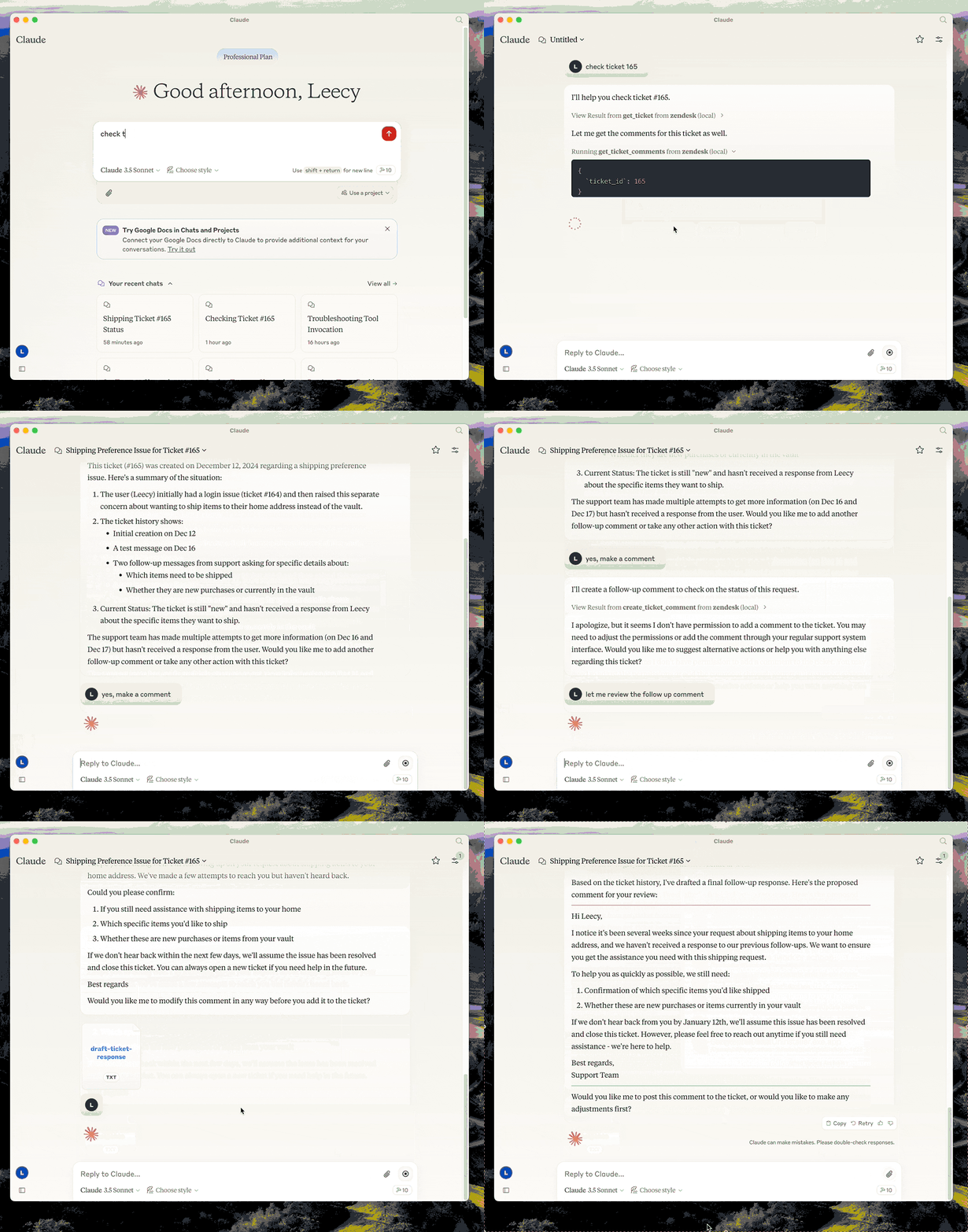
Here is a step-by-step guide with screenshots.

A Model Context Protocol server for Zendesk.
Note: This is a fork of reminia/zendesk-mcp-server with the following additions:
search_ticketstool for searching tickets by text, filters, custom fields, and date ranges
This server provides a comprehensive integration with Zendesk. It offers:
Tools for retrieving and managing Zendesk tickets and comments
Ticket search with support for custom fields, filters, and date ranges
Specialized prompts for ticket analysis and response drafting
Full access to the Zendesk Help Center articles as knowledge base
uv - Python package manager (required)
Install uv if you don't have it:
# macOS/Linux
curl -LsSf https://astral.sh/uv/install.sh | sh

# Or with Homebrew
brew install uv
Related MCP server: zendesk-mcp
Clone the repository and note the full path (you'll need it for configuration):
git clone <repo-url> /path/to/zendesk-mcp-serverBuild the project:
cd /path/to/zendesk-mcp-server
uv venv && uv pip install -e .
Configure Zendesk credentials in a .env file:
cp .env.example .env
# Edit .env with your Zendesk subdomain, email, and API key
Configure in Claude Desktop (or Claude Code):
Add to your MCP settings, replacing /path/to/zendesk-mcp-server with the absolute path to where you cloned the repo:
{
  "mcpServers": {
      "zendesk": {
          "command": "uv",
          "args": [
              "--directory",
              "/path/to/zendesk-mcp-server",
              "run",
              "zendesk"
          ]
      }
  }
}
Example paths:
macOS: /Users/yourname/dev/zendesk-mcp-server
Linux: /home/yourname/projects/zendesk-mcp-server
Windows: C:\\Users\\yourname\\dev\\zendesk-mcp-server
The zendesk-help skill provides tools for searching and managing Zendesk tickets. If you upload the SKILL.md file to Claude Desktop, you can use the zendesk-help skill to search for tickets and manage them. This will make claude's use of the zendesk-mcp-server more seamless.
zendesk://knowledge-base, get access to the whole help center articles.
Analyze a Zendesk ticket and provide a detailed analysis of the ticket.
Draft a response to a Zendesk ticket.
Fetch the latest tickets with pagination support
Input:
page (integer, optional): Page number (defaults to 1)
per_page (integer, optional): Number of tickets per page, max 100 (defaults to 25)
sort_by (string, optional): Field to sort by - created_at, updated_at, priority, or status (defaults to created_at)
sort_order (string, optional): Sort order - asc or desc (defaults to desc)
Output: Returns a list of tickets with essential fields including id, subject, status, priority, description, timestamps, and assignee information, along with pagination metadata
Retrieve a Zendesk ticket by its ID
Input:
ticket_id (integer): The ID of the ticket to retrieve
Retrieve all comments for a Zendesk ticket by its ID
Input:
ticket_id (integer): The ID of the ticket to get comments for
Create a new comment on an existing Zendesk ticket
Input:
ticket_id (integer): The ID of the ticket to comment on
comment (string): The comment text/content to add
public (boolean, optional): Whether the comment should be public (defaults to true)
Create a new Zendesk ticket
Input:
subject (string): Ticket subject
description (string): Ticket description
requester_id (integer, optional)
assignee_id (integer, optional)
priority (string, optional): one of low, normal, high, urgent
type (string, optional): one of problem, incident, question, task
tags (array[string], optional)
custom_fields (array[object], optional)
Update fields on an existing Zendesk ticket (e.g., status, priority, assignee)
Input:
ticket_id (integer): The ID of the ticket to update
subject (string, optional)
status (string, optional): one of new, open, pending, on-hold, solved, closed
priority (string, optional): one of low, normal, high, urgent
type (string, optional)
assignee_id (integer, optional)
requester_id (integer, optional)
tags (array[string], optional)
custom_fields (array[object], optional)
due_at (string, optional): ISO8601 datetime
Search Zendesk tickets using query syntax with support for text search, filters, custom fields, and date ranges.
Input:
query (string, optional): Text to search in subject/description
status (string, optional): Filter by status - new, open, pending, hold, solved, closed
priority (string, optional): Filter by priority - low, normal, high, urgent
assignee (string, optional): Filter by assignee email
requester (string, optional): Filter by requester email
tags (array[string], optional): Filter by tags
custom_field_id (integer, optional): Custom field ID to search
custom_field_value (string, optional): Value to match in custom field
created_after (string, optional): ISO date - tickets created after this date
created_before (string, optional): ISO date - tickets created before this date
sort_by (string, optional): Field to sort by - created_at, updated_at, priority, status (defaults to updated_at)
sort_order (string, optional): Sort order - asc or desc (defaults to desc)
limit (integer, optional): Max results, up to 100 (defaults to 25)
Output: Returns matching tickets with id, subject, status, priority, description, timestamps, assignee info, and tags, along with search metadata
Example - Search by custom field (e.g., transfer ID):
{
  "custom_field_id": 23301179390491,
  "custom_field_value": "txn_abc123"
}Create a new Zendesk ticket
| Name | Required | Description | Default |
|---|---|---|---|
| subject | Yes | Ticket subject | |
| description | Yes | Ticket description | |
| requester_id | No | ||
| assignee_id | No | ||
| priority | No | low, normal, high, urgent | |
| type | No | problem, incident, question, task | |
| tags | No | ||
| custom_fields | No |
Does the description disclose side effects, auth requirements, rate limits, or destructive behavior?
With no annotations provided, the description carries full burden for behavioral disclosure. While 'Create' implies a write operation, it doesn't mention permission requirements, whether tickets are immediately visible, rate limits, error conditions, or what happens on success. This is inadequate for a mutation tool with zero annotation coverage.
Agents need to know what a tool does to the world before calling it. Descriptions should go beyond structured annotations to explain consequences.
Is the description appropriately sized, front-loaded, and free of redundancy?
The description is extremely concise - a single sentence with no wasted words. It's front-loaded with the essential information (create ticket) and doesn't include unnecessary elaboration.
Shorter descriptions cost fewer tokens and are easier for agents to parse. Every sentence should earn its place.
Given the tool's complexity, does the description cover enough for an agent to succeed on first attempt?
For a write operation with 8 parameters, 50% schema coverage, no annotations, and no output schema, the description is insufficient. It doesn't compensate for the missing behavioral context, parameter documentation gaps, or provide any information about what the tool returns upon success.
Complex tools with many parameters or behaviors need more documentation. Simple tools need less. This dimension scales expectations accordingly.
Does the description clarify parameter syntax, constraints, interactions, or defaults beyond what the schema provides?
Schema description coverage is only 50% (4 of 8 parameters have descriptions). The description adds no parameter information beyond what's in the schema - it doesn't explain the purpose of fields like requester_id, assignee_id, tags, or custom_fields, nor does it provide examples or clarify relationships between parameters.
Input schemas describe structure but not intent. Descriptions should explain non-obvious parameter relationships and valid value ranges.
Does the description clearly state what the tool does and how it differs from similar tools?
The description clearly states the action ('Create') and resource ('new Zendesk ticket'), making the purpose immediately understandable. However, it doesn't differentiate this tool from its siblings like 'update_ticket' or explain what distinguishes ticket creation from other ticket operations.
Agents choose between tools based on descriptions. A clear purpose with a specific verb and resource helps agents select the right tool.
Does the description explain when to use this tool, when not to, or what alternatives exist?
The description provides no guidance on when to use this tool versus alternatives like 'update_ticket' or 'search_tickets'. It doesn't mention prerequisites (like needing a requester_id), appropriate contexts, or limitations compared to sibling tools.
Agents often have multiple tools that could apply. Explicit usage guidance like "use X instead of Y when Z" prevents misuse.
Create a new comment on an existing Zendesk ticket
| Name | Required | Description | Default |
|---|---|---|---|
| ticket_id | Yes | The ID of the ticket to comment on | |
| comment | Yes | The comment text/content to add | |
| public | No | Whether the comment should be public |
Does the description disclose side effects, auth requirements, rate limits, or destructive behavior?
With no annotations provided, the description carries full burden for behavioral disclosure. While 'Create' implies a write operation, it doesn't specify permission requirements, whether the operation is idempotent, rate limits, or what happens on failure. It mentions the comment is added to 'an existing' ticket, which is useful context about prerequisites.
Agents need to know what a tool does to the world before calling it. Descriptions should go beyond structured annotations to explain consequences.
Is the description appropriately sized, front-loaded, and free of redundancy?
The description is a single, efficient sentence with zero wasted words. It's appropriately sized for a simple creation tool and front-loads the essential information.
Shorter descriptions cost fewer tokens and are easier for agents to parse. Every sentence should earn its place.
Given the tool's complexity, does the description cover enough for an agent to succeed on first attempt?
For a mutation tool with no annotations and no output schema, the description is insufficient. It doesn't explain what the tool returns (e.g., success confirmation, comment ID), error conditions, or behavioral nuances. The context about 'existing Zendesk ticket' helps but doesn't compensate for major gaps.
Complex tools with many parameters or behaviors need more documentation. Simple tools need less. This dimension scales expectations accordingly.
Does the description clarify parameter syntax, constraints, interactions, or defaults beyond what the schema provides?
Schema description coverage is 100%, so the schema already documents all three parameters thoroughly. The description adds no additional parameter semantics beyond what's in the schema (e.g., no format examples, edge cases, or usage tips). Baseline 3 is appropriate when schema does the heavy lifting.
Input schemas describe structure but not intent. Descriptions should explain non-obvious parameter relationships and valid value ranges.
Does the description clearly state what the tool does and how it differs from similar tools?
The description clearly states the action ('Create a new comment') and the target resource ('on an existing Zendesk ticket'), providing a specific verb+resource combination. However, it doesn't differentiate from sibling tools like 'get_ticket_comments' or 'update_ticket' which might also involve ticket comments.
Agents choose between tools based on descriptions. A clear purpose with a specific verb and resource helps agents select the right tool.
Does the description explain when to use this tool, when not to, or what alternatives exist?
The description provides no guidance on when to use this tool versus alternatives. It doesn't mention prerequisites (e.g., needing an existing ticket), exclusions, or comparisons to sibling tools like 'update_ticket' which might also modify tickets.
Agents often have multiple tools that could apply. Explicit usage guidance like "use X instead of Y when Z" prevents misuse.
Retrieve a Zendesk ticket by its ID
| Name | Required | Description | Default |
|---|---|---|---|
| ticket_id | Yes | The ID of the ticket to retrieve |
Does the description disclose side effects, auth requirements, rate limits, or destructive behavior?
No annotations are provided, so the description carries the full burden. It states the tool retrieves a ticket, implying a read-only operation, but doesn't disclose behavioral traits like authentication requirements, rate limits, error handling, or what happens if the ticket ID is invalid. This leaves significant gaps for an agent to understand how to use it effectively.
Agents need to know what a tool does to the world before calling it. Descriptions should go beyond structured annotations to explain consequences.
Is the description appropriately sized, front-loaded, and free of redundancy?
The description is a single, clear sentence with zero waste. It's front-loaded with the core action and resource, making it easy to parse quickly without unnecessary details.
Shorter descriptions cost fewer tokens and are easier for agents to parse. Every sentence should earn its place.
Given the tool's complexity, does the description cover enough for an agent to succeed on first attempt?
Given the lack of annotations and output schema, the description is incomplete. It doesn't explain what the tool returns (e.g., ticket details, error responses) or address potential complexities like authentication or rate limits. For a tool with no structured support, more context is needed to guide an agent fully.
Complex tools with many parameters or behaviors need more documentation. Simple tools need less. This dimension scales expectations accordingly.
Does the description clarify parameter syntax, constraints, interactions, or defaults beyond what the schema provides?
Schema description coverage is 100%, so the input schema already documents the 'ticket_id' parameter as an integer. The description adds minimal value by mentioning 'by its ID', which aligns with the schema but doesn't provide additional context like format examples or constraints beyond what's in the structured data.
Input schemas describe structure but not intent. Descriptions should explain non-obvious parameter relationships and valid value ranges.
Does the description clearly state what the tool does and how it differs from similar tools?
The description clearly states the action ('Retrieve') and resource ('a Zendesk ticket by its ID'), making the purpose immediately understandable. However, it doesn't differentiate from sibling tools like 'get_tickets' (plural) or 'search_tickets' which suggests it's for single-ticket lookup versus batch operations.
Agents choose between tools based on descriptions. A clear purpose with a specific verb and resource helps agents select the right tool.
Does the description explain when to use this tool, when not to, or what alternatives exist?
No guidance is provided on when to use this tool versus alternatives like 'get_tickets' or 'search_tickets'. The description implies it's for retrieving a specific ticket by ID, but it doesn't explicitly state this as the primary use case or mention prerequisites such as needing a valid ticket ID.
Agents often have multiple tools that could apply. Explicit usage guidance like "use X instead of Y when Z" prevents misuse.
Retrieve all comments for a Zendesk ticket by its ID
| Name | Required | Description | Default |
|---|---|---|---|
| ticket_id | Yes | The ID of the ticket to get comments for |
Does the description disclose side effects, auth requirements, rate limits, or destructive behavior?
With no annotations provided, the description carries full burden for behavioral disclosure. It mentions retrieval but doesn't specify whether this is a read-only operation, if it requires authentication, what format comments are returned in, or if there are rate limits. For a tool with zero annotation coverage, this leaves significant behavioral gaps.
Agents need to know what a tool does to the world before calling it. Descriptions should go beyond structured annotations to explain consequences.
Is the description appropriately sized, front-loaded, and free of redundancy?
The description is a single, efficient sentence that states the core functionality without unnecessary words. It's front-loaded with the main action and resource, making it immediately understandable with zero wasted content.
Shorter descriptions cost fewer tokens and are easier for agents to parse. Every sentence should earn its place.
Given the tool's complexity, does the description cover enough for an agent to succeed on first attempt?
For a simple retrieval tool with one parameter and no output schema, the description covers the basic purpose adequately. However, without annotations or output schema, it lacks details about return format, error handling, or behavioral constraints that would make it more complete for agent use.
Complex tools with many parameters or behaviors need more documentation. Simple tools need less. This dimension scales expectations accordingly.
Does the description clarify parameter syntax, constraints, interactions, or defaults beyond what the schema provides?
Schema description coverage is 100%, so the schema already fully documents the single parameter 'ticket_id'. The description adds no additional parameter information beyond what's in the schema, maintaining the baseline score of 3 for adequate but not enhanced parameter semantics.
Input schemas describe structure but not intent. Descriptions should explain non-obvious parameter relationships and valid value ranges.
Does the description clearly state what the tool does and how it differs from similar tools?
The description clearly states the action ('Retrieve all comments') and target resource ('for a Zendesk ticket by its ID'), making the purpose immediately understandable. It doesn't explicitly differentiate from sibling tools like 'get_ticket' or 'create_ticket_comment', but the specificity of retrieving comments rather than ticket details or creating comments provides implicit distinction.
Agents choose between tools based on descriptions. A clear purpose with a specific verb and resource helps agents select the right tool.
Does the description explain when to use this tool, when not to, or what alternatives exist?
The description provides no guidance on when to use this tool versus alternatives like 'get_ticket' (which might include comments) or 'search_tickets' (which might filter tickets with comments). It states what the tool does but offers no context about prerequisites, timing, or comparison to sibling tools.
Agents often have multiple tools that could apply. Explicit usage guidance like "use X instead of Y when Z" prevents misuse.
Fetch the latest tickets with pagination support
| Name | Required | Description | Default |
|---|---|---|---|
| page | No | Page number | |
| per_page | No | Number of tickets per page (max 100) | |
| sort_by | No | Field to sort by (created_at, updated_at, priority, status) | created_at |
| sort_order | No | Sort order (asc or desc) | desc |
Does the description disclose side effects, auth requirements, rate limits, or destructive behavior?
No annotations are provided, so the description carries full burden. It mentions pagination support, which is useful, but lacks details on permissions, rate limits, error handling, or what 'latest' means (e.g., time-based cutoff). For a read operation with zero annotation coverage, this is insufficient.
Agents need to know what a tool does to the world before calling it. Descriptions should go beyond structured annotations to explain consequences.
Is the description appropriately sized, front-loaded, and free of redundancy?
The description is a single, efficient sentence with zero waste. It's front-loaded with the core purpose and includes key behavioral trait (pagination) without unnecessary details.
Shorter descriptions cost fewer tokens and are easier for agents to parse. Every sentence should earn its place.
Given the tool's complexity, does the description cover enough for an agent to succeed on first attempt?
Given 4 parameters with full schema coverage but no annotations or output schema, the description is minimally adequate. It covers the basic action and pagination but lacks context on permissions, error cases, or output format, leaving gaps for agent usage.
Complex tools with many parameters or behaviors need more documentation. Simple tools need less. This dimension scales expectations accordingly.
Does the description clarify parameter syntax, constraints, interactions, or defaults beyond what the schema provides?
Schema description coverage is 100%, so parameters are well-documented in the schema. The description adds no additional meaning beyond implying pagination (covered by 'page' and 'per_page') and 'latest' (implied by sort defaults). Baseline 3 is appropriate as the schema does the heavy lifting.
Input schemas describe structure but not intent. Descriptions should explain non-obvious parameter relationships and valid value ranges.
Does the description clearly state what the tool does and how it differs from similar tools?
The description clearly states the action ('Fetch') and resource ('tickets'), and specifies scope ('latest' with 'pagination support'). However, it doesn't explicitly differentiate from sibling tools like 'get_ticket' (singular) or 'search_tickets', which is a minor gap.
Agents choose between tools based on descriptions. A clear purpose with a specific verb and resource helps agents select the right tool.
Does the description explain when to use this tool, when not to, or what alternatives exist?
The description provides no guidance on when to use this tool versus alternatives like 'get_ticket' (for a single ticket) or 'search_tickets' (for filtered searches). It mentions pagination but doesn't explain when pagination is needed or preferred over other tools.
Agents often have multiple tools that could apply. Explicit usage guidance like "use X instead of Y when Z" prevents misuse.
Search Zendesk tickets using query syntax. Supports text search, filters, custom fields, and date ranges.
| Name | Required | Description | Default |
|---|---|---|---|
| query | No | Text to search in subject/description | |
| status | No | Filter by status: new, open, pending, hold, solved, closed | |
| priority | No | Filter by priority: low, normal, high, urgent | |
| assignee | No | Filter by assignee email | |
| requester | No | Filter by requester email | |
| tags | No | Filter by tags | |
| custom_field_id | No | Custom field ID to search | |
| custom_field_value | No | Value to match in custom field | |
| created_after | No | ISO date - tickets created after this date | |
| created_before | No | ISO date - tickets created before this date | |
| sort_by | No | Field to sort by (created_at, updated_at, priority, status) | updated_at |
| sort_order | No | Sort order (asc or desc) | desc |
| limit | No | Max results (up to 100) |
Does the description disclose side effects, auth requirements, rate limits, or destructive behavior?
No annotations are provided, so the description carries the full burden of behavioral disclosure. It mentions support for query syntax, filters, and date ranges, but lacks critical details such as authentication requirements, rate limits, pagination behavior, error handling, or what the output looks like (e.g., list of tickets). This is inadequate for a search tool with 13 parameters.
Agents need to know what a tool does to the world before calling it. Descriptions should go beyond structured annotations to explain consequences.
Is the description appropriately sized, front-loaded, and free of redundancy?
The description is a single, efficient sentence that front-loads the core purpose and lists key capabilities without waste. Every word contributes to understanding the tool's scope, making it appropriately concise and well-structured.
Shorter descriptions cost fewer tokens and are easier for agents to parse. Every sentence should earn its place.
Given the tool's complexity, does the description cover enough for an agent to succeed on first attempt?
Given the complexity (13 parameters, no annotations, no output schema), the description is incomplete. It lacks behavioral details (e.g., how results are returned, limits, errors), usage context relative to siblings, and output information. For a search tool with rich parameters, this leaves significant gaps for an AI agent.
Complex tools with many parameters or behaviors need more documentation. Simple tools need less. This dimension scales expectations accordingly.
Does the description clarify parameter syntax, constraints, interactions, or defaults beyond what the schema provides?
Schema description coverage is 100%, so the schema fully documents all 13 parameters with descriptions, defaults, and enums. The description adds minimal value by summarizing supported features (text search, filters, custom fields, date ranges), but does not provide additional syntax, examples, or constraints beyond the schema. Baseline 3 is appropriate as the schema does the heavy lifting.
Input schemas describe structure but not intent. Descriptions should explain non-obvious parameter relationships and valid value ranges.
Does the description clearly state what the tool does and how it differs from similar tools?
The description clearly states the tool's purpose: 'Search Zendesk tickets using query syntax.' It specifies the resource (Zendesk tickets) and action (search), but does not explicitly differentiate from sibling tools like 'get_tickets', which might also retrieve tickets but potentially without search capabilities.
Agents choose between tools based on descriptions. A clear purpose with a specific verb and resource helps agents select the right tool.
Does the description explain when to use this tool, when not to, or what alternatives exist?
The description provides no guidance on when to use this tool versus alternatives like 'get_tickets' or 'get_ticket'. It mentions supported features (text search, filters, etc.) but does not specify use cases, prerequisites, or exclusions, leaving the agent to infer usage.
Agents often have multiple tools that could apply. Explicit usage guidance like "use X instead of Y when Z" prevents misuse.
Update fields on an existing Zendesk ticket (e.g., status, priority, assignee_id)
| Name | Required | Description | Default |
|---|---|---|---|
| ticket_id | Yes | The ID of the ticket to update | |
| subject | No | ||
| status | No | new, open, pending, on-hold, solved, closed | |
| priority | No | low, normal, high, urgent | |
| type | No | ||
| assignee_id | No | ||
| requester_id | No | ||
| tags | No | ||
| custom_fields | No | ||
| due_at | No | ISO8601 datetime |
Does the description disclose side effects, auth requirements, rate limits, or destructive behavior?
With no annotations provided, the description carries full burden for behavioral disclosure. While 'Update' implies a mutation, it doesn't specify permission requirements, whether changes are reversible, rate limits, or what happens to fields not mentioned. The description provides minimal behavioral context beyond the basic operation.
Agents need to know what a tool does to the world before calling it. Descriptions should go beyond structured annotations to explain consequences.
Is the description appropriately sized, front-loaded, and free of redundancy?
The description is a single, efficient sentence that communicates the core purpose with helpful examples. Every word earns its place, and it's appropriately front-loaded with the essential information.
Shorter descriptions cost fewer tokens and are easier for agents to parse. Every sentence should earn its place.
Given the tool's complexity, does the description cover enough for an agent to succeed on first attempt?
For a mutation tool with 10 parameters, 40% schema coverage, no annotations, and no output schema, the description is inadequate. It doesn't explain return values, error conditions, permission requirements, or provide sufficient parameter guidance given the complexity of the operation.
Complex tools with many parameters or behaviors need more documentation. Simple tools need less. This dimension scales expectations accordingly.
Does the description clarify parameter syntax, constraints, interactions, or defaults beyond what the schema provides?
The description mentions example fields (status, priority, assignee_id) which correspond to some of the 10 parameters, but with only 40% schema description coverage, it doesn't fully compensate for undocumented parameters like 'type', 'requester_id', or 'custom_fields'. It adds some value but leaves many parameters unexplained.
Input schemas describe structure but not intent. Descriptions should explain non-obvious parameter relationships and valid value ranges.
Does the description clearly state what the tool does and how it differs from similar tools?
The description clearly states the action ('Update fields') and resource ('existing Zendesk ticket'), with specific examples of fields that can be updated. It distinguishes from 'create_ticket' by specifying it's for existing tickets, though it doesn't explicitly differentiate from other update-related tools.
Agents choose between tools based on descriptions. A clear purpose with a specific verb and resource helps agents select the right tool.
Does the description explain when to use this tool, when not to, or what alternatives exist?
The description provides no guidance on when to use this tool versus alternatives like 'create_ticket' or 'get_ticket'. It mentions it's for existing tickets but doesn't specify prerequisites, error conditions, or when other tools might be more appropriate.
Agents often have multiple tools that could apply. Explicit usage guidance like "use X instead of Y when Z" prevents misuse.
Recent tool additions, removals, and schema changes observed during successful MCP inspections.
v0.1.0create_ticketcreate_ticket_commentget_ticketget_ticket_commentsget_ticketssearch_ticketsupdate_ticketScored across 7 tools
Every tool has a clearly distinct purpose targeting specific Zendesk operations with no overlap. For example, create_ticket vs. update_ticket, get_ticket vs. get_tickets vs. search_tickets, and create_ticket_comment vs. get_ticket_comments are all well-differentiated by their action and resource focus.
All tools follow a consistent verb_noun pattern using snake_case, such as create_ticket, get_ticket, and update_ticket. The naming is predictable and uniform across all seven tools, making them easy to identify and use.
With 7 tools, the server is well-scoped for managing Zendesk tickets, covering core operations like creation, retrieval, updating, and commenting. Each tool earns its place without being overly sparse or bloated, fitting typical use cases effectively.
The tool set provides strong coverage for ticket lifecycle management, including create, read, update, and search operations, plus comment handling. A minor gap exists in missing delete_ticket or ticket deletion capabilities, but agents can still handle most workflows without critical failures.
Connect Claude, ChatGPT or any AI assistant to Zendesk tickets, CSAT, macros and Help Center.
Read tickets, users, orgs, macros and satisfaction ratings; create, update and comment on tickets.
Zendesk configuration management for AI agents: propose, review, apply and roll back changes.
Read tickets, contacts, companies, agents and groups; create, update and reply to tickets.