
Zendesk MCP Server
# Zendesk MCP Server
[](https://opensource.org/licenses/Apache-2.0)
A Model Context Protocol server for Zendesk.
> **Note:** This is a fork of [reminia/zendesk-mcp-server](https://github.com/reminia/zendesk-mcp-server) with the following additions:
> - `search_tickets` tool for searching tickets by text, filters, custom fields, and date ranges
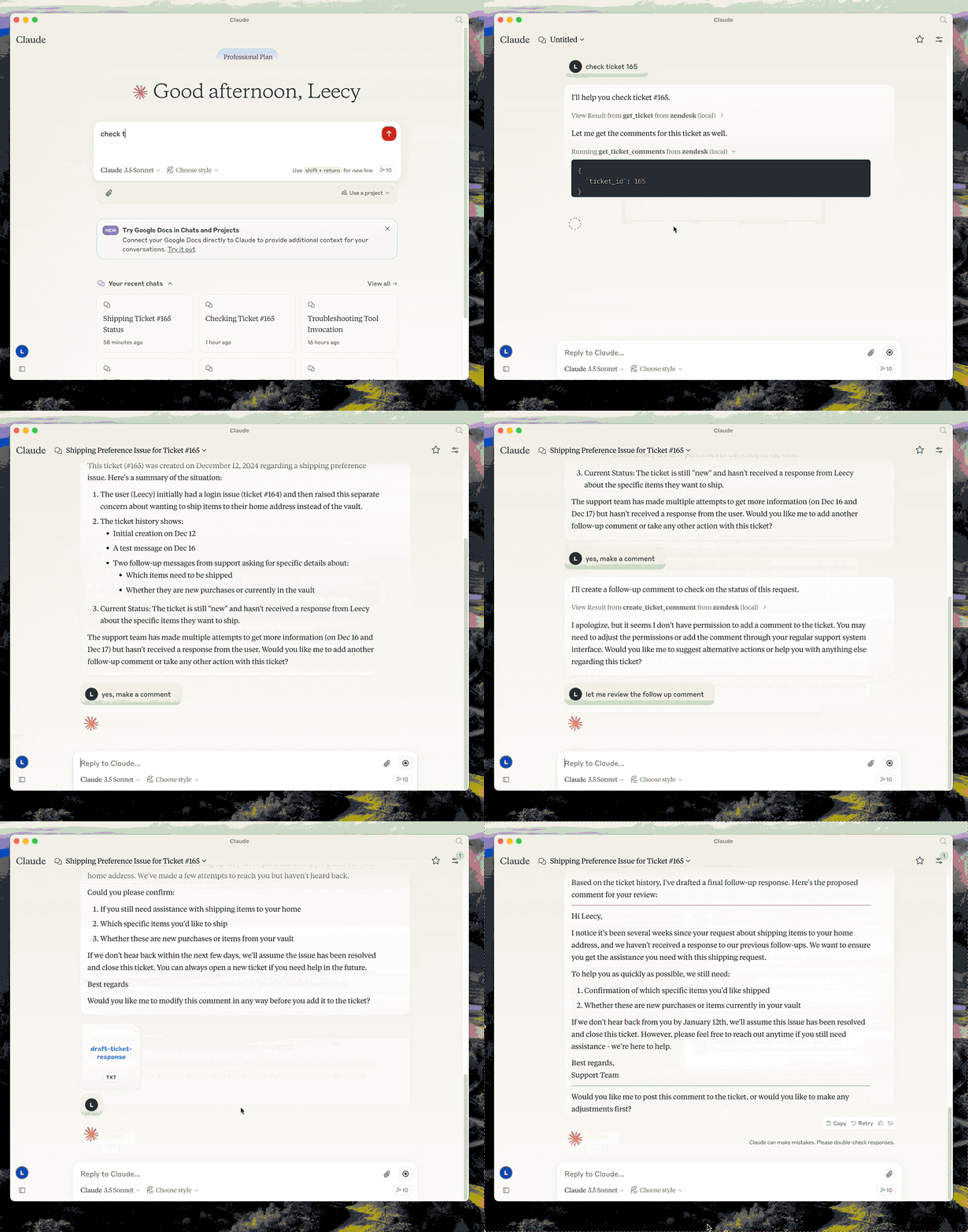
This server provides a comprehensive integration with Zendesk. It offers:
- Tools for retrieving and managing Zendesk tickets and comments
- **Ticket search** with support for custom fields, filters, and date ranges
- Specialized prompts for ticket analysis and response drafting
- Full access to the Zendesk Help Center articles as knowledge base
## Prerequisites
- **[uv](https://docs.astral.sh/uv/)** - Python package manager (required)
Install uv if you don't have it:
```bash
# macOS/Linux
curl -LsSf https://astral.sh/uv/install.sh | sh
# Or with Homebrew
brew install uv
```
## Setup
1. **Clone the repository** and note the full path (you'll need it for configuration):
```bash
git clone <repo-url> /path/to/zendesk-mcp-server
```
2. **Build the project:**
```bash
cd /path/to/zendesk-mcp-server
uv venv && uv pip install -e .
```
3. **Configure Zendesk credentials** in a `.env` file:
```bash
cp .env.example .env
# Edit .env with your Zendesk subdomain, email, and API key
```
4. **Configure in Claude Desktop** (or Claude Code):
Add to your MCP settings, replacing `/path/to/zendesk-mcp-server` with the **absolute path** to where you cloned the repo:
```json
{
"mcpServers": {
"zendesk": {
"command": "uv",
"args": [
"--directory",
"/path/to/zendesk-mcp-server",
"run",
"zendesk"
]
}
}
}
```
**Example paths:**
- macOS: `/Users/yourname/dev/zendesk-mcp-server`
- Linux: `/home/yourname/projects/zendesk-mcp-server`
- Windows: `C:\\Users\\yourname\\dev\\zendesk-mcp-server`
## zendesk-help Skill
The `zendesk-help` skill provides tools for searching and managing Zendesk tickets. If you upload the `SKILL.md` file to Claude Desktop, you can use the `zendesk-help` skill to search for tickets and manage them. This will make claude's use of the zendesk-mcp-server more seamless.
## Resources
- zendesk://knowledge-base, get access to the whole help center articles.
## Prompts
### analyze-ticket
Analyze a Zendesk ticket and provide a detailed analysis of the ticket.
### draft-ticket-response
Draft a response to a Zendesk ticket.
## Tools
### get_tickets
Fetch the latest tickets with pagination support
- Input:
- `page` (integer, optional): Page number (defaults to 1)
- `per_page` (integer, optional): Number of tickets per page, max 100 (defaults to 25)
- `sort_by` (string, optional): Field to sort by - created_at, updated_at, priority, or status (defaults to created_at)
- `sort_order` (string, optional): Sort order - asc or desc (defaults to desc)
- Output: Returns a list of tickets with essential fields including id, subject, status, priority, description, timestamps, and assignee information, along with pagination metadata
### get_ticket
Retrieve a Zendesk ticket by its ID
- Input:
- `ticket_id` (integer): The ID of the ticket to retrieve
### get_ticket_comments
Retrieve all comments for a Zendesk ticket by its ID
- Input:
- `ticket_id` (integer): The ID of the ticket to get comments for
### create_ticket_comment
Create a new comment on an existing Zendesk ticket
- Input:
- `ticket_id` (integer): The ID of the ticket to comment on
- `comment` (string): The comment text/content to add
- `public` (boolean, optional): Whether the comment should be public (defaults to true)
### create_ticket
Create a new Zendesk ticket
- Input:
- `subject` (string): Ticket subject
- `description` (string): Ticket description
- `requester_id` (integer, optional)
- `assignee_id` (integer, optional)
- `priority` (string, optional): one of `low`, `normal`, `high`, `urgent`
- `type` (string, optional): one of `problem`, `incident`, `question`, `task`
- `tags` (array[string], optional)
- `custom_fields` (array[object], optional)
### update_ticket
Update fields on an existing Zendesk ticket (e.g., status, priority, assignee)
- Input:
- `ticket_id` (integer): The ID of the ticket to update
- `subject` (string, optional)
- `status` (string, optional): one of `new`, `open`, `pending`, `on-hold`, `solved`, `closed`
- `priority` (string, optional): one of `low`, `normal`, `high`, `urgent`
- `type` (string, optional)
- `assignee_id` (integer, optional)
- `requester_id` (integer, optional)
- `tags` (array[string], optional)
- `custom_fields` (array[object], optional)
- `due_at` (string, optional): ISO8601 datetime
### search_tickets
Search Zendesk tickets using query syntax with support for text search, filters, custom fields, and date ranges.
- Input:
- `query` (string, optional): Text to search in subject/description
- `status` (string, optional): Filter by status - `new`, `open`, `pending`, `hold`, `solved`, `closed`
- `priority` (string, optional): Filter by priority - `low`, `normal`, `high`, `urgent`
- `assignee` (string, optional): Filter by assignee email
- `requester` (string, optional): Filter by requester email
- `tags` (array[string], optional): Filter by tags
- `custom_field_id` (integer, optional): Custom field ID to search
- `custom_field_value` (string, optional): Value to match in custom field
- `created_after` (string, optional): ISO date - tickets created after this date
- `created_before` (string, optional): ISO date - tickets created before this date
- `sort_by` (string, optional): Field to sort by - `created_at`, `updated_at`, `priority`, `status` (defaults to `updated_at`)
- `sort_order` (string, optional): Sort order - `asc` or `desc` (defaults to `desc`)
- `limit` (integer, optional): Max results, up to 100 (defaults to 25)
- Output: Returns matching tickets with id, subject, status, priority, description, timestamps, assignee info, and tags, along with search metadata
- Example - Search by custom field (e.g., transfer ID):
```json
{
"custom_field_id": 23301179390491,
"custom_field_value": "txn_abc123"
}
```
TDQS
Scored across 7 tools
Every tool has a clearly distinct purpose targeting specific Zendesk operations with no overlap. For example, create_ticket vs. update_ticket, get_ticket vs. get_tickets vs. search_tickets, and create_ticket_comment vs. get_ticket_comments are all well-differentiated by their action and resource focus.
All tools follow a consistent verb_noun pattern using snake_case, such as create_ticket, get_ticket, and update_ticket. The naming is predictable and uniform across all seven tools, making them easy to identify and use.
With 7 tools, the server is well-scoped for managing Zendesk tickets, covering core operations like creation, retrieval, updating, and commenting. Each tool earns its place without being overly sparse or bloated, fitting typical use cases effectively.
The tool set provides strong coverage for ticket lifecycle management, including create, read, update, and search operations, plus comment handling. A minor gap exists in missing delete_ticket or ticket deletion capabilities, but agents can still handle most workflows without critical failures.