GCP MCP
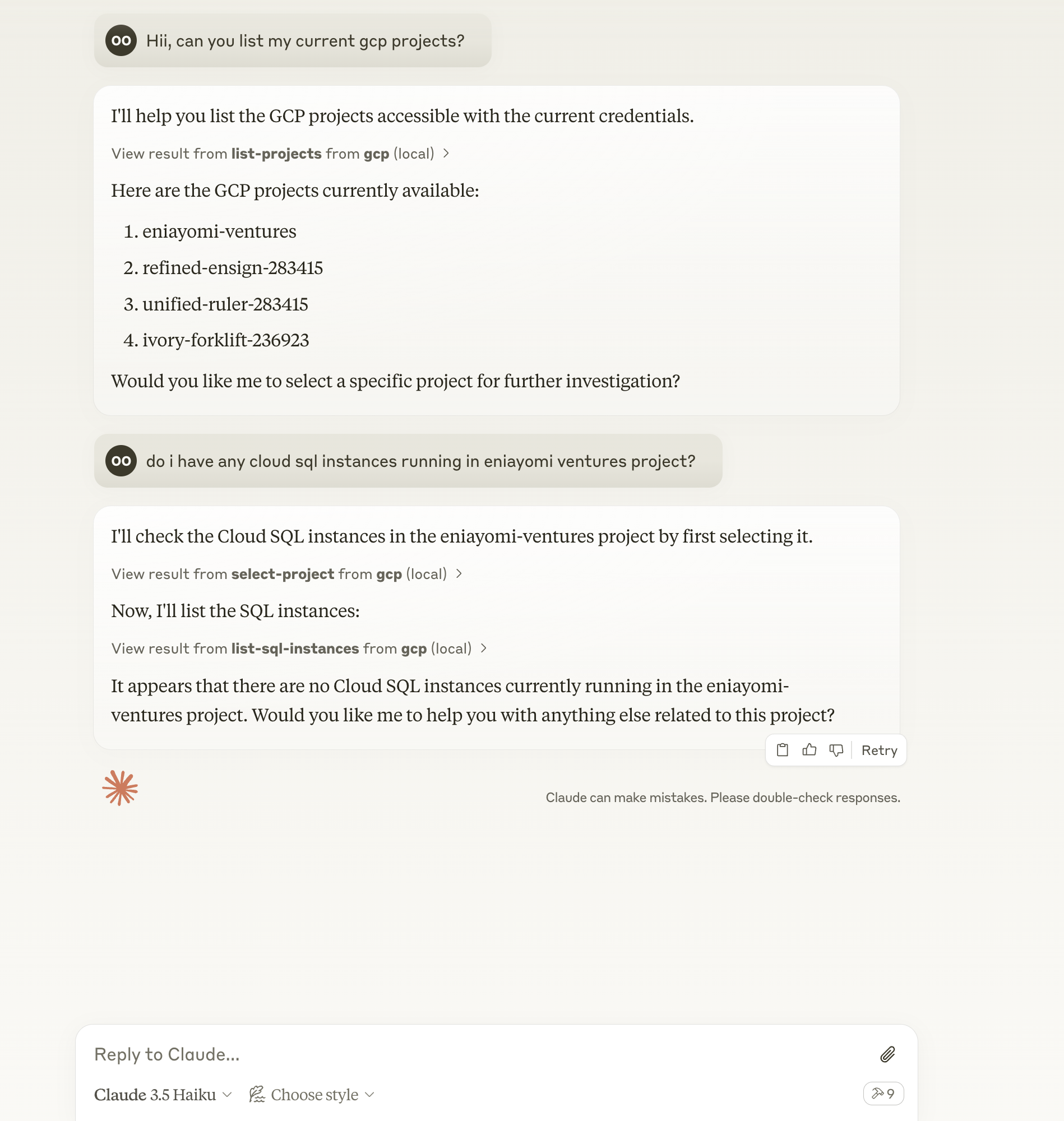
The GCP MCP server enables AI assistants like Claude to interact with your Google Cloud Platform environment using natural language.
Query and manage GCP resources: List and modify projects, clusters, SQL instances, storage buckets, Cloud Functions, Cloud Run services, and BigQuery datasets/tables
Execute custom code: Run TypeScript code using Google Cloud Client Libraries for advanced GCP interactions
Billing insights: Retrieve billing information, cost forecasts, and budget details
Project selection: Choose specific GCP projects for targeted operations
Multi-region support: Work seamlessly across different GCP regions
Secure operations: Uses your local GCP credentials without exposing them
Log management: Fetch and filter Cloud Logging entries for debugging
Error handling: Automatically retry failed operations for improved reliability
Enables querying and management of Google Cloud Platform resources including Compute Engine, Cloud Storage, Cloud Functions, Cloud Run, BigQuery, Cloud SQL, GKE, Cloud Logging, Cloud Billing and Resource Manager using natural language.
Provides tools for listing and managing Google Kubernetes Engine (GKE) clusters across different regions.
Click on "Install Server".
Wait a few minutes for the server to deploy. Once ready, it will show a "Started" state.
In the chat, type
@followed by the MCP server name and your instructions, e.g., "@GCP MCPlist all Cloud Storage buckets in my current project"
That's it! The server will respond to your query, and you can continue using it as needed.
Here is a step-by-step guide with screenshots.
GCP MCP
A Model Context Protocol (MCP) server that enables AI assistants like Claude to interact with your Google Cloud Platform environment. This allows for natural language querying and management of your GCP resources during conversations.

Features
๐ Query and modify GCP resources using natural language
โ๏ธ Support for multiple GCP projects
๐ Multi-region support
๐ Secure credential handling (no credentials are exposed to external services)
๐โโ๏ธ Local execution with your GCP credentials
๐ Automatic retries for improved reliability
Related MCP server: Kubectl MCP Tool
Prerequisites
Node.js
Claude Desktop/Cursor/Windsurf
GCP credentials configured locally (application default credentials)
Installation
Clone the repository:
git clone https://github.com/eniayomi/gcp-mcp
cd gcp-mcpInstall dependencies:
npm installConfiguration
Claude Desktop
Open Claude desktop app and go to Settings -> Developer -> Edit Config
Add the following entry to your
claude_desktop_config.json:
via npm:
{
"mcpServers": {
"gcp": {
"command": "sh",
"args": ["-c", "npx -y gcp-mcp"]
}
}
}If you installed from source:
{
"mcpServers": {
"gcp": {
"command": "npm",
"args": [
"--silent",
"--prefix",
"/path/to/gcp-mcp",
"start"
]
}
}
}Replace /path/to/gcp-mcp with the actual path to your project directory if using source installation.
Cursor
Open Cursor and go to Settings (โ,)
Navigate to AI -> Model Context Protocol
Add a new MCP configuration:
{
"gcp": {
"command": "npx -y gcp-mcp"
}
}Windsurf
Open
~/.windsurf/config.json(create if it doesn't exist)Add the MCP configuration:
{
"mcpServers": {
"gcp": {
"command": "npx -y gcp-mcp"
}
}
}GCP Setup
Set up GCP credentials:
Set up application default credentials using
gcloud auth application-default login
Refresh your AI assistant (Claude Desktop/Cursor/Windsurf)
Usage
Start by selecting a project or asking questions like:
"List all GCP projects I have access to"
"Show me all Cloud SQL instances in project X"
"What's my current billing status?"
"Show me the logs from my Cloud Run services"
"List all GKE clusters in us-central1"
"Show me all Cloud Storage buckets in project X"
"What Cloud Functions are deployed in us-central1?"
"List all Cloud Run services"
"Show me BigQuery datasets and tables"
Available Tools
run-gcp-code: Execute GCP API calls using TypeScript codelist-projects: List all accessible GCP projectsselect-project: Select a GCP project for subsequent operationsget-billing-info: Get billing information for the current projectget-cost-forecast: Get cost forecast for the current projectget-billing-budget: Get billing budgets for the current projectlist-gke-clusters: List all GKE clusters in the current projectlist-sql-instances: List all Cloud SQL instances in the current projectget-logs: Get Cloud Logging entries for the current project
Example Interactions
List available projects:
List all GCP projects I have access toSelect a project:
Use project my-project-idCheck billing status:
What's my current billing status?View logs:
Show me the last 10 log entries from my projectSupported Services
Google Compute Engine
Cloud Storage
Cloud Functions
Cloud Run
BigQuery
Cloud SQL
Google Kubernetes Engine (GKE)
Cloud Logging
Cloud Billing
Resource Manager
More coming soon...
Troubleshooting
To see logs:
tail -n 50 -f ~/Library/Logs/Claude/mcp-server-gcp.logCommon issues:
Authentication errors: Ensure you've run
gcloud auth application-default loginPermission errors: Check IAM roles for your account
API errors: Verify that required APIs are enabled in your project
Contributing
Contributions are welcome! Please feel free to submit a Pull Request.
License
MIT
Available Tools
9 toolsget-billing-budgetC
Get billing budgets for the current project
| Name | Required | Description | Default |
|---|---|---|---|
| projectId | No | Project ID to get budgets for (defaults to selected project) |
TDQS
Does the description disclose side effects, auth requirements, rate limits, or destructive behavior?
No annotations are provided, so the description bears full responsibility for behavioral disclosure. It does not state whether the operation is read-only, if any side effects occur, or permission requirements. Only a basic action is indicated.
Agents need to know what a tool does to the world before calling it. Descriptions should go beyond structured annotations to explain consequences.
Is the description appropriately sized, front-loaded, and free of redundancy?
The description is a single, clear sentence with no extraneous words. It is appropriately sized for the tool's simplicity.
Shorter descriptions cost fewer tokens and are easier for agents to parse. Every sentence should earn its place.
Given the tool's complexity, does the description cover enough for an agent to succeed on first attempt?
For a simple read tool with one optional parameter, the description provides minimal but adequate context. However, it lacks information about the output format or behavior when no budgets exist.
Complex tools with many parameters or behaviors need more documentation. Simple tools need less. This dimension scales expectations accordingly.
Does the description clarify parameter syntax, constraints, interactions, or defaults beyond what the schema provides?
Schema coverage is 100% with a parameter description that clarifies the optional projectId. The description adds no further meaning beyond the schema, meeting baseline expectations.
Input schemas describe structure but not intent. Descriptions should explain non-obvious parameter relationships and valid value ranges.
Does the description clearly state what the tool does and how it differs from similar tools?
The description clearly states it retrieves billing budgets for the current project, using a specific verb and resource. It distinguishes from sibling tools like get-billing-info and get-cost-forecast, though not explicitly.
Agents choose between tools based on descriptions. A clear purpose with a specific verb and resource helps agents select the right tool.
Does the description explain when to use this tool, when not to, or what alternatives exist?
No guidance is provided on when to use this tool versus alternatives. The description does not mention prerequisites, context for use, or exclusion criteria.
Agents often have multiple tools that could apply. Explicit usage guidance like "use X instead of Y when Z" prevents misuse.
get-billing-infoC
Get billing information for the current project
| Name | Required | Description | Default |
|---|---|---|---|
| projectId | No | Project ID to get billing info for (defaults to selected project) |
TDQS
Does the description disclose side effects, auth requirements, rate limits, or destructive behavior?
No annotations are provided, so the description carries full burden. It states the tool retrieves billing info but does not disclose whether it is read-only, what data is included, required permissions, or potential costs. Minimal behavioral context.
Agents need to know what a tool does to the world before calling it. Descriptions should go beyond structured annotations to explain consequences.
Is the description appropriately sized, front-loaded, and free of redundancy?
Single sentence, no wasted words. However, it is so minimal that it omits potentially useful details; conciseness is good but not excellent given the lack of additional context.
Shorter descriptions cost fewer tokens and are easier for agents to parse. Every sentence should earn its place.
Given the tool's complexity, does the description cover enough for an agent to succeed on first attempt?
No output schema, yet the description does not explain what billing information is returned (e.g., fields, format). With sibling billing tools, more context would help differentiate. Incomplete for typical agent needs.
Complex tools with many parameters or behaviors need more documentation. Simple tools need less. This dimension scales expectations accordingly.
Does the description clarify parameter syntax, constraints, interactions, or defaults beyond what the schema provides?
Schema description coverage is 100% (the only parameter 'projectId' is described clearly). The description adds no extra meaning beyond the schema, so baseline score of 3 applies.
Input schemas describe structure but not intent. Descriptions should explain non-obvious parameter relationships and valid value ranges.
Does the description clearly state what the tool does and how it differs from similar tools?
The description clearly states the action ('Get billing information') and the target resource ('current project'). It distinguishes from siblings like get-billing-budget and get-cost-forecast by not mentioning budgets or forecasts, but does not explicitly differentiate.
Agents choose between tools based on descriptions. A clear purpose with a specific verb and resource helps agents select the right tool.
Does the description explain when to use this tool, when not to, or what alternatives exist?
No guidance on when to use this tool versus alternatives like get-billing-budget or get-cost-forecast. The description implies it is for general billing info, but fails to specify scenarios or exclusions.
Agents often have multiple tools that could apply. Explicit usage guidance like "use X instead of Y when Z" prevents misuse.
get-cost-forecastB
Get cost forecast for the current project
| Name | Required | Description | Default |
|---|---|---|---|
| months | No | Number of months to forecast (default: 3) | |
| projectId | No | Project ID to get forecast for (defaults to selected project) |
TDQS
Does the description disclose side effects, auth requirements, rate limits, or destructive behavior?
Without annotations, the description must carry the burden of behavioral disclosure. It only states it gets a forecast, implying read-only, but lacks details on output format, authorization needs, rate limits, or any side effects. This is insufficient for safe agent invocation.
Agents need to know what a tool does to the world before calling it. Descriptions should go beyond structured annotations to explain consequences.
Is the description appropriately sized, front-loaded, and free of redundancy?
The description is a single sentence, front-loading the core action. It is concise and efficiently communicates the purpose, though it may be too brief for complex usage.
Shorter descriptions cost fewer tokens and are easier for agents to parse. Every sentence should earn its place.
Given the tool's complexity, does the description cover enough for an agent to succeed on first attempt?
Given the tool's simplicity (2 optional params, no output schema), the description is too minimal. It fails to explain return values, how the forecast is calculated, or dependencies like project selection. An agent lacks sufficient context to confidently invoke the tool.
Complex tools with many parameters or behaviors need more documentation. Simple tools need less. This dimension scales expectations accordingly.
Does the description clarify parameter syntax, constraints, interactions, or defaults beyond what the schema provides?
Schema coverage is 100%, so baseline is 3. The description adds no new meaning beyond the schema; the param descriptions already explain 'months' and 'projectId'. No additional context is provided about defaults or interactions.
Input schemas describe structure but not intent. Descriptions should explain non-obvious parameter relationships and valid value ranges.
Does the description clearly state what the tool does and how it differs from similar tools?
The description clearly states the action (Get) and resource (cost forecast) with a specific scope (current project). It distinguishes from siblings like 'get-billing-budget' and 'get-billing-info' by focusing on forecasting, which is a distinct concept.
Agents choose between tools based on descriptions. A clear purpose with a specific verb and resource helps agents select the right tool.
Does the description explain when to use this tool, when not to, or what alternatives exist?
The description provides no guidance on when to use this tool versus alternatives such as 'get-billing-budget' or 'get-billing-info'. There is no mention of prerequisites, limitations, or context for usage.
Agents often have multiple tools that could apply. Explicit usage guidance like "use X instead of Y when Z" prevents misuse.
get-logsB
Get Cloud Logging entries for the current project
| Name | Required | Description | Default |
|---|---|---|---|
| filter | No | Filter for the log entries (see Cloud Logging query syntax) | |
| pageSize | No | Maximum number of entries to return (default: 10) |
TDQS
Does the description disclose side effects, auth requirements, rate limits, or destructive behavior?
With no annotations provided, the description carries full burden. It discloses basic action but lacks details on authentication, rate limits, pagination behavior, or what specific log entries are returned. No mention of response format or error conditions.
Agents need to know what a tool does to the world before calling it. Descriptions should go beyond structured annotations to explain consequences.
Is the description appropriately sized, front-loaded, and free of redundancy?
The description is a single sentence with no redundant words. It is front-loaded and efficient.
Shorter descriptions cost fewer tokens and are easier for agents to parse. Every sentence should earn its place.
Given the tool's complexity, does the description cover enough for an agent to succeed on first attempt?
Despite low complexity and a complete schema, the description omits details about return values (no output schema), filter syntax (though referenced in schema), and potential constraints. Could be more complete for an agent to use confidently.
Complex tools with many parameters or behaviors need more documentation. Simple tools need less. This dimension scales expectations accordingly.
Does the description clarify parameter syntax, constraints, interactions, or defaults beyond what the schema provides?
Schema coverage is 100%; both filter and pageSize have descriptions. The tool description adds no extra meaning beyond the schema, so baseline 3 is appropriate.
Input schemas describe structure but not intent. Descriptions should explain non-obvious parameter relationships and valid value ranges.
Does the description clearly state what the tool does and how it differs from similar tools?
The description clearly states the action ('Get'), the resource ('Cloud Logging entries'), and the scope ('for the current project'). It is specific and distinguishes itself from sibling tools like get-billing-budget or list-projects.
Agents choose between tools based on descriptions. A clear purpose with a specific verb and resource helps agents select the right tool.
Does the description explain when to use this tool, when not to, or what alternatives exist?
The description gives an implied usage (want logs? use this), but provides no explicit guidance on when to use this tool versus alternatives, nor any prerequisites or exclusions.
Agents often have multiple tools that could apply. Explicit usage guidance like "use X instead of Y when Z" prevents misuse.
list-gke-clustersB
List all GKE clusters in the current project
| Name | Required | Description | Default |
|---|---|---|---|
| location | No | Location (region or zone) to list clusters from (defaults to all locations) |
TDQS
Does the description disclose side effects, auth requirements, rate limits, or destructive behavior?
No annotations provided, and the description does not disclose any behavioral traits such as required permissions, rate limits, or side effects. It merely states the action without transparency into its operation.
Agents need to know what a tool does to the world before calling it. Descriptions should go beyond structured annotations to explain consequences.
Is the description appropriately sized, front-loaded, and free of redundancy?
The description is a single sentence that is to the point and efficient. It could be slightly expanded for clarity but is not wasteful.
Shorter descriptions cost fewer tokens and are easier for agents to parse. Every sentence should earn its place.
Given the tool's complexity, does the description cover enough for an agent to succeed on first attempt?
Given the absence of an output schema, the description should hint at what the tool returns (e.g., a list of cluster names, locations, etc.). It does not, leaving the agent uncertain about the response format.
Complex tools with many parameters or behaviors need more documentation. Simple tools need less. This dimension scales expectations accordingly.
Does the description clarify parameter syntax, constraints, interactions, or defaults beyond what the schema provides?
Schema description coverage is 100% (the 'location' parameter is documented in the schema). The description does not add any additional meaning beyond the schema baseline.
Input schemas describe structure but not intent. Descriptions should explain non-obvious parameter relationships and valid value ranges.
Does the description clearly state what the tool does and how it differs from similar tools?
The verb 'List' and resource 'GKE clusters' are specific. It clearly states the scope ('in the current project'), which distinguishes it from sibling tools that deal with billing, logs, or SQL instances.
Agents choose between tools based on descriptions. A clear purpose with a specific verb and resource helps agents select the right tool.
Does the description explain when to use this tool, when not to, or what alternatives exist?
No guidance on when to use this tool versus alternatives or when not to use it. It only states what it does, leaving the agent to infer usage context.
Agents often have multiple tools that could apply. Explicit usage guidance like "use X instead of Y when Z" prevents misuse.
list-projectsA
List all GCP projects accessible with current credentials
| Name | Required | Description | Default |
|---|---|---|---|
No parameters | |||
TDQS
Does the description disclose side effects, auth requirements, rate limits, or destructive behavior?
No annotations are provided, so the description carries the full burden. It discloses the tool is read-only and credential-bound, but lacks details on pagination, rate limits, or authentication specifics beyond 'current credentials'.
Agents need to know what a tool does to the world before calling it. Descriptions should go beyond structured annotations to explain consequences.
Is the description appropriately sized, front-loaded, and free of redundancy?
The description is a single, clear sentence with no redundant information. It is appropriately front-loaded and concise.
Shorter descriptions cost fewer tokens and are easier for agents to parse. Every sentence should earn its place.
Given the tool's complexity, does the description cover enough for an agent to succeed on first attempt?
For a simple list tool with no parameters and no output schema, the description is adequate. However, adding context about typical use (e.g., output format, pagination) would improve completeness.
Complex tools with many parameters or behaviors need more documentation. Simple tools need less. This dimension scales expectations accordingly.
Does the description clarify parameter syntax, constraints, interactions, or defaults beyond what the schema provides?
The input schema has zero parameters (100% coverage), so baseline is 4. The description does not add parameter semantics because none exist; it correctly focuses on the tool's purpose.
Input schemas describe structure but not intent. Descriptions should explain non-obvious parameter relationships and valid value ranges.
Does the description clearly state what the tool does and how it differs from similar tools?
The description clearly states the verb 'list', resource 'GCP projects', and scope 'accessible with current credentials'. It distinguishes from sibling tools like get-billing-budget, list-gke-clusters, etc., which focus on specific resources or operations.
Agents choose between tools based on descriptions. A clear purpose with a specific verb and resource helps agents select the right tool.
Does the description explain when to use this tool, when not to, or what alternatives exist?
The description implies usage for initial project discovery but does not explicitly state when to use or not use this tool versus alternatives like select-project or get-billing-info. No exclusion or context guidance is provided.
Agents often have multiple tools that could apply. Explicit usage guidance like "use X instead of Y when Z" prevents misuse.
list-sql-instancesB
List all Cloud SQL instances in the current project
| Name | Required | Description | Default |
|---|---|---|---|
No parameters | |||
TDQS
Does the description disclose side effects, auth requirements, rate limits, or destructive behavior?
With no annotations, the description should disclose behavioral traits like permissions or rate limits, but only states it lists instances, leaving critical gaps.
Agents need to know what a tool does to the world before calling it. Descriptions should go beyond structured annotations to explain consequences.
Is the description appropriately sized, front-loaded, and free of redundancy?
Single, front-loaded sentence with no redundant information, perfect conciseness.
Shorter descriptions cost fewer tokens and are easier for agents to parse. Every sentence should earn its place.
Given the tool's complexity, does the description cover enough for an agent to succeed on first attempt?
For a tool with no parameters or output schema, the description omits details about return format, filtering, or prerequisites, leaving incompleteness.
Complex tools with many parameters or behaviors need more documentation. Simple tools need less. This dimension scales expectations accordingly.
Does the description clarify parameter syntax, constraints, interactions, or defaults beyond what the schema provides?
No parameters exist, and the description adds context that it lists all instances, which is clear. Baseline for 0 params is 4.
Input schemas describe structure but not intent. Descriptions should explain non-obvious parameter relationships and valid value ranges.
Does the description clearly state what the tool does and how it differs from similar tools?
The description explicitly states the verb (list), resource (Cloud SQL instances), and scope (current project), clearly distinguishing it from siblings like list-gke-clusters.
Agents choose between tools based on descriptions. A clear purpose with a specific verb and resource helps agents select the right tool.
Does the description explain when to use this tool, when not to, or what alternatives exist?
No guidance on when to use this tool versus alternatives, nor any conditions or exclusions.
Agents often have multiple tools that could apply. Explicit usage guidance like "use X instead of Y when Z" prevents misuse.
run-gcp-codeD
Run GCP code
| Name | Required | Description | Default |
|---|---|---|---|
| code | Yes | Your job is to answer questions about GCP environment by writing Javascript/TypeScript code using Google Cloud Client Libraries. The code must adhere to a few rules: - Must use promises and async/await - Think step-by-step before writing the code, approach it logically - Must be written in TypeScript using official Google Cloud client libraries - Avoid hardcoded values like project IDs - Code written should be as parallel as possible enabling the fastest and most optimal execution - Code should handle errors gracefully, especially when doing multiple API calls - Each error should be handled and logged with a reason, script should continue to run despite errors - Data returned from GCP APIs must be returned as JSON containing only the minimal amount of data needed to answer the question - All extra data must be filtered out - Code MUST "return" a value: string, number, boolean or JSON object - If code does not return anything, it will be considered as FAILED - Whenever tool/function call fails, retry it 3 times before giving up - When listing resources, ensure pagination is handled correctly - Do not include any comments in the code - Try to write code that returns as few data as possible to answer without any additional processing required Be concise, professional and to the point. Do not give generic advice, always reply with detailed & contextual data sourced from the current GCP environment. | |
| region | No | Region to use (if not provided, us-central1 is used) | |
| projectId | No | GCP project ID to use | |
| reasoning | Yes | The reasoning behind the code |
TDQS
Does the description disclose side effects, auth requirements, rate limits, or destructive behavior?
No annotations are provided, and the description gives no information about side effects, execution context, permissions, or whether the tool is read-only or destructive. The code parameter has detailed rules, but these are about writing code, not the tool's behavior. This leaves a significant transparency gap.
Agents need to know what a tool does to the world before calling it. Descriptions should go beyond structured annotations to explain consequences.
Is the description appropriately sized, front-loaded, and free of redundancy?
The description is a single short sentence, which is concise but severely under-specified. It does not earn its place because it fails to convey the tool's purpose or usage. The lack of structure and detail makes it insufficient for an AI agent.
Shorter descriptions cost fewer tokens and are easier for agents to parse. Every sentence should earn its place.
Given the tool's complexity, does the description cover enough for an agent to succeed on first attempt?
The tool has 4 parameters (2 required), no output schema, and no annotations. The description is only 'Run GCP code', providing no context about return values, error handling, execution environment, or how the code output is used. This is completely inadequate for proper tool selection and invocation.
Complex tools with many parameters or behaviors need more documentation. Simple tools need less. This dimension scales expectations accordingly.
Does the description clarify parameter syntax, constraints, interactions, or defaults beyond what the schema provides?
Schema description coverage is 100%, so the baseline is 3. The tool description itself adds no extra meaning to the parametersโit merely states 'Run GCP code'. The schema already describes each parameter in detail, so the description does not compensate beyond the baseline.
Input schemas describe structure but not intent. Descriptions should explain non-obvious parameter relationships and valid value ranges.
Does the description clearly state what the tool does and how it differs from similar tools?
The description 'Run GCP code' is extremely vague; it does not specify what the tool does with the code, what environment executes it, or how it differs from sibling tools that retrieve specific GCP information. A clear verb and resource are missing, making it ambiguous for an AI agent.
Agents choose between tools based on descriptions. A clear purpose with a specific verb and resource helps agents select the right tool.
Does the description explain when to use this tool, when not to, or what alternatives exist?
The description provides no guidance on when to use this tool versus alternatives. Sibling tools like get-billing-info or list-projects are for specific queries, but no comparison or exclusions are given. The agent is left without context for appropriate invocation.
Agents often have multiple tools that could apply. Explicit usage guidance like "use X instead of Y when Z" prevents misuse.
select-projectB
Selects GCP project to use for subsequent interactions
| Name | Required | Description | Default |
|---|---|---|---|
| region | No | Region to use (if not provided, us-central1 is used) | |
| projectId | Yes | ID of the GCP project to select |
TDQS
Does the description disclose side effects, auth requirements, rate limits, or destructive behavior?
No annotations are provided, so the description must carry the full burden. It indicates a side effect (selecting a project for subsequent interactions) but lacks details about persistence, required permissions, or whether the selection is session-wide or global.
Agents need to know what a tool does to the world before calling it. Descriptions should go beyond structured annotations to explain consequences.
Is the description appropriately sized, front-loaded, and free of redundancy?
The description is a single, front-loaded sentence that immediately conveys the core purpose. It is concise without being overly terse, though a few more words could improve clarity without harming conciseness.
Shorter descriptions cost fewer tokens and are easier for agents to parse. Every sentence should earn its place.
Given the tool's complexity, does the description cover enough for an agent to succeed on first attempt?
Given the complexity of a state-changing tool and the absence of an output schema or annotations, the description is incomplete. It does not explain what 'subsequent interactions' means, how the selected project is scoped, or if there is a way to unset the selection.
Complex tools with many parameters or behaviors need more documentation. Simple tools need less. This dimension scales expectations accordingly.
Does the description clarify parameter syntax, constraints, interactions, or defaults beyond what the schema provides?
The input schema has 100% coverage, with both parameters documented. The description does not add further meaning beyond the schema; it merely restates the purpose of the projectId. For region, the schema already specifies the default, and the description does not elaborate.
Input schemas describe structure but not intent. Descriptions should explain non-obvious parameter relationships and valid value ranges.
Does the description clearly state what the tool does and how it differs from similar tools?
The description clearly states the action ('Selects') and the resource ('GCP project'), and specifies the context ('for subsequent interactions'). It effectively distinguishes from sibling tools like list-projects, which only list projects without setting the active one.
Agents choose between tools based on descriptions. A clear purpose with a specific verb and resource helps agents select the right tool.
Does the description explain when to use this tool, when not to, or what alternatives exist?
No guidance is provided on when to use this tool versus alternatives, nor are there any exclusions or prerequisites mentioned. The description implies it should be used before other actions, but this is not explicit.
Agents often have multiple tools that could apply. Explicit usage guidance like "use X instead of Y when Z" prevents misuse.
Tool Schema Changelog
Recent tool additions, removals, and schema changes observed during successful MCP inspections. Dates show when Glama detected each change.
9 tool updates
v1.0.0- Added
get-billing-budget - Added
get-billing-info - Added
get-cost-forecast - Added
get-logs - Added
list-gke-clusters - Added
list-projects - Added
list-sql-instances - Added
run-gcp-code - Added
select-project
TDQS
Tools are mostly distinct: billing-related tools (budget, info, forecast) are clearly separate, and list/select tools for different resources are unambiguous. The only potential confusion is 'run-gcp-code' which is vague but still distinct from other tools.
All tool names follow a consistent verb-noun pattern with hyphens (e.g., get-billing-budget, list-gke-clusters, select-project). The naming convention is uniform and predictable.
The server has 9 tools, which is an appropriate size for a focused GCP management server. It covers several key areas without being overwhelming.
The tool surface is limited to reading and listing operations for select GCP services (billing, logs, GKE, SQL, projects). Missing CRUD operations for resources, compute, storage, IAM, and other common GCP tasks. The vague 'run-gcp-code' tool does not compensate for these gaps.
Maintenance
Resources
Unclaimed servers have limited discoverability.
Looking for Admin?
If you are the server author, to access and configure the admin panel.
Related MCP Connectors
The Google GKE MCP server is a managed Model Context Protocol server that provides AI applications with tools to manage Google Kubernetes Engine (GKE) clusters and Kubernetes resources. It exposes a structured, discoverable interface that allows AI agents to interact with GKE and Kubernetes APIs, enabling them to inspect cluster configurations, retrieve Kubernetes resource YAMLs, monitor operations like cluster upgrades, diagnose issues, and optimize costsโall without needing to parse text output or use complex kubectl commands.
The Google Compute Engine MCP server is a fully-managed Model Context Protocol server that provides tools to manage Google Compute Engine resources through AI agents. It enables capabilities including instance management (creating, starting, stopping, resetting, listing), disk management, handling instance templates and group managers, viewing machine and accelerator types, managing images, and accessing reservation and commitment information. The server operates as a zero-deployment, enterprise-grade endpoint at https://compute.googleapis.com/mcp with built-in IAM-based security.
A comprehensive Model Context Protocol (MCP) server that enables AI assistants to interact with yoโฆ
The BigQuery remote MCP server is a fully managed service that uses the Model Context Protocol to connect AI applications and LLMs to BigQuery data sources. It provides secure, standardized tools for AI agents to list datasets and tables, retrieve schemas, generate and execute SQL queries through natural language, and analyze dataโenabling direct access to enterprise analytics data without requiring manual SQL coding.
Related MCP Servers
- AlicenseCqualityDmaintenanceA Model Context Protocol server that connects to Google Cloud services, allowing users to query logs, interact with Spanner databases, and analyze Cloud Monitoring metrics through natural language interaction.405482Apache 2.0
- AlicenseNot gradedqualityDmaintenanceA Model Context Protocol server that enables AI assistants to interact with Kubernetes clusters through natural language, supporting core Kubernetes operations, monitoring, security, and diagnostics.94956MIT
- FlicenseCqualityDmaintenanceA Model Context Protocol server allowing Claude AI to interact with AWS resources through natural language, enabling users to query and manage AWS services without using the traditional AWS Console or CLI.36-
- AlicenseCqualityDmaintenanceA Model Context Protocol server implementation that enables AI assistants like Claude to perform Google searches and retrieve web data directly through natural language requests.1389168MIT
Latest Blog Posts
- Who's Calling? MCP Hosts Are an Identity Blind Spot (And the Spec Knows It)By Om-Shree-0709 on .mcpAgent IdentityOAuth 2.1
- Your AI Chatbot Just Exposed Your CEO's Salary to an InternBy Om-Shree-0709 on .Agent IdentityMCP SecurityOAuth Delegation
- Why MCP Servers Need Execution Sandboxing (And Why Your Current Stack Isn't Enough)By Om-Shree-0709 on .Agentic AiPrompt InjectionWebAssembly
MCP directory API
We provide all the information about MCP servers via our MCP API.
curl -X GET 'https://glama.ai/api/mcp/v1/servers/eniayomi/gcp-mcp'
If you have feedback or need assistance with the MCP directory API, please join our Discord server