GCP MCP
GCP MCP
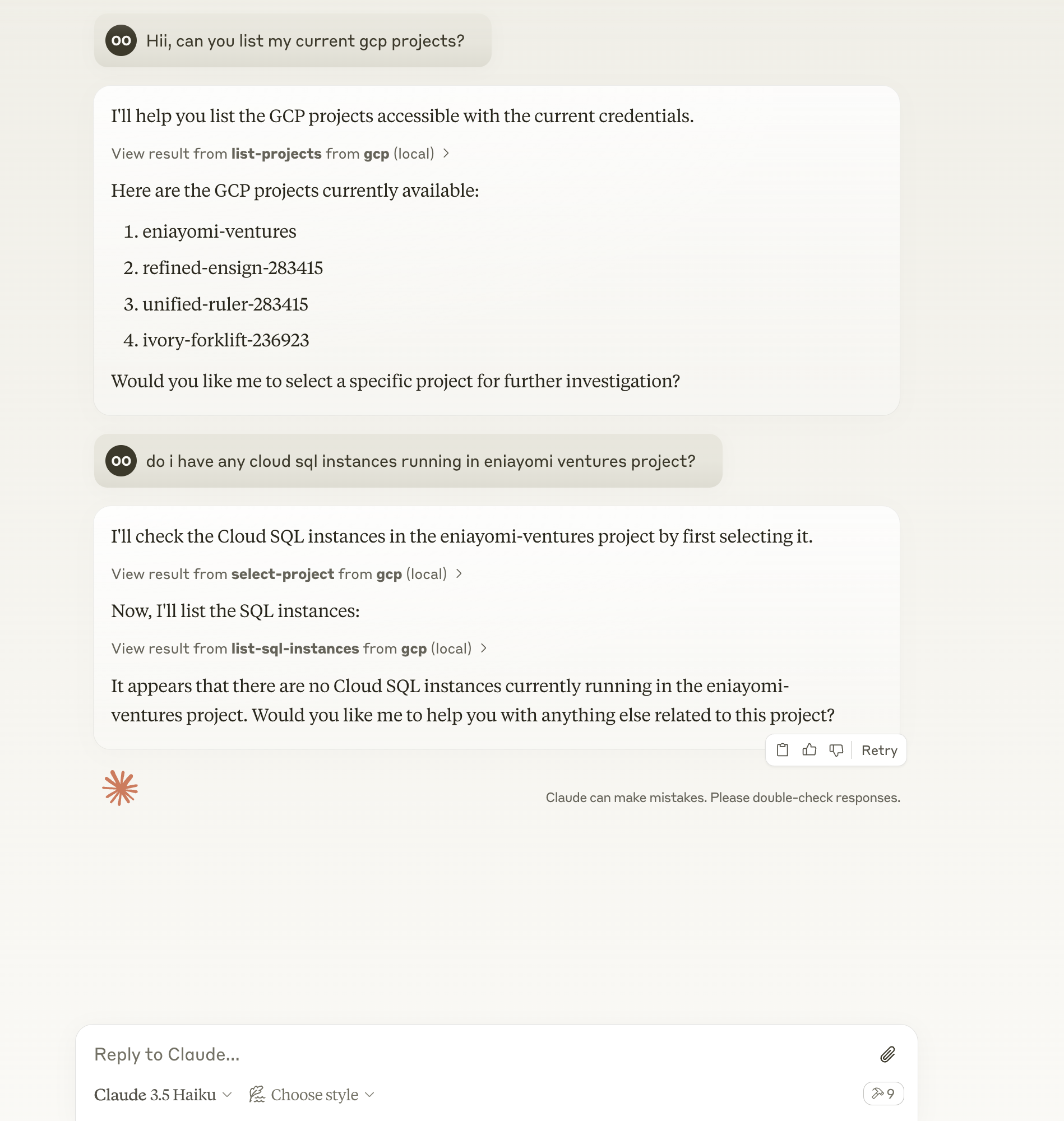
ClaudeのようなAIアシスタントがGoogle Cloud Platform環境と対話できるようにするModel Context Protocol(MCP)サーバー。これにより、会話中に自然言語によるクエリやGCPリソースの管理が可能になります。

特徴
🔍 自然言語を使用して GCP リソースをクエリおよび変更する
☁️ 複数の GCP プロジェクトのサポート
🌐 マルチリージョンサポート
🔐 安全な資格情報の取り扱い(資格情報は外部サービスに公開されません)
🏃♂️ GCP 認証情報を使用したローカル実行
🔄 信頼性向上のための自動再試行
Related MCP server: Kubectl MCP Tool
前提条件
Node.js
クロード デスクトップ/カーソル/ウィンドサーフィン
ローカルに構成された GCP 認証情報 (アプリケーションのデフォルト認証情報)
インストール
リポジトリをクローンします。
git clone https://github.com/eniayomi/gcp-mcp
cd gcp-mcp依存関係をインストールします:
npm install構成
クロードデスクトップ
Claudeデスクトップアプリを開き、「設定」->「開発者」->「設定の編集」に移動します。
claude_desktop_config.jsonに次のエントリを追加します。
npm経由:
{
"mcpServers": {
"gcp": {
"command": "sh",
"args": ["-c", "npx -y gcp-mcp"]
}
}
}ソースからインストールした場合:
{
"mcpServers": {
"gcp": {
"command": "npm",
"args": [
"--silent",
"--prefix",
"/path/to/gcp-mcp",
"start"
]
}
}
}ソース インストールを使用する場合は/path/to/gcp-mcpプロジェクト ディレクトリへの実際のパスに置き換えます。
カーソル
カーソルを開いて設定に移動します(⌘,)
AI -> モデルコンテキストプロトコルに移動します
新しい MCP 構成を追加します。
{
"gcp": {
"command": "npx -y gcp-mcp"
}
}ウィンドサーフィン
~/.windsurf/config.jsonを開きます(存在しない場合は作成します)MCP 構成を追加します。
{
"mcpServers": {
"gcp": {
"command": "npx -y gcp-mcp"
}
}
}GCPのセットアップ
GCP 認証情報を設定します。
gcloud auth application-default loginを使用してアプリケーションのデフォルト認証情報を設定する
AIアシスタント(Claude Desktop/Cursor/Windsurf)をリフレッシュ
使用法
プロジェクトを選択するか、次のような質問をすることから始めます。
「アクセスできるすべての GCP プロジェクトを一覧表示する」
「プロジェクト X のすべての Cloud SQL インスタンスを表示」
「現在の請求状況はどうなっていますか?」
「Cloud Run サービスのログを表示してください」
「us-central1 内のすべての GKE クラスタを一覧表示する」
「プロジェクト X のすべての Cloud Storage バケットを表示」
「us-central1 にはどのような Cloud Functions がデプロイされていますか?」
「すべての Cloud Run サービスを一覧表示する」
「BigQuery のデータセットとテーブルを表示」
利用可能なツール
run-gcp-code: TypeScript コードを使用して GCP API 呼び出しを実行するlist-projects: アクセス可能なすべての GCP プロジェクトを一覧表示するselect-project: 後続の操作のために GCP プロジェクトを選択しますget-billing-info: 現在のプロジェクトの請求情報を取得するget-cost-forecast: 現在のプロジェクトのコスト予測を取得するget-billing-budget: 現在のプロジェクトの請求予算を取得するlist-gke-clusters: 現在のプロジェクト内のすべての GKE クラスタを一覧表示するlist-sql-instances: 現在のプロジェクト内のすべての Cloud SQL インスタンスを一覧表示しますget-logs: 現在のプロジェクトの Cloud Logging エントリを取得する
やり取りの例
利用可能なプロジェクトの一覧:
List all GCP projects I have access toプロジェクトを選択してください:
Use project my-project-id請求ステータスを確認する:
What's my current billing status?ログを表示:
Show me the last 10 log entries from my projectサポートされているサービス
Google コンピューティング エンジン
クラウドストレージ
クラウド関数
クラウドラン
ビッグクエリ
クラウドSQL
Google Kubernetes Engine (GKE)
クラウドロギング
クラウド課金
リソースマネージャー
すぐにさらに追加されます...
トラブルシューティング
ログを表示するには:
tail -n 50 -f ~/Library/Logs/Claude/mcp-server-gcp.logよくある問題:
認証エラー:
gcloud auth application-default loginを実行したことを確認してください権限エラー: アカウントのIAMロールを確認してください
APIエラー: プロジェクトで必要なAPIが有効になっていることを確認してください
貢献
貢献を歓迎します!お気軽にプルリクエストを送信してください。
ライセンス
マサチューセッツ工科大学
Available Tools
9 toolsget-billing-budgetC
Get billing budgets for the current project
Inputs: projectId.
get-billing-infoC
Get billing information for the current project
Inputs: projectId.
get-cost-forecastB
Get cost forecast for the current project
Inputs: months, projectId.
get-logsB
Get Cloud Logging entries for the current project
Inputs: filter, pageSize.
list-gke-clustersB
List all GKE clusters in the current project
Inputs: location.
list-projectsA
List all GCP projects accessible with current credentials
Inputs: no named parameters.
list-sql-instancesB
List all Cloud SQL instances in the current project
Inputs: no named parameters.
run-gcp-codeD
Run GCP code
Inputs: code (required), reasoning (required), region, projectId.
select-projectB
Selects GCP project to use for subsequent interactions
Inputs: projectId (required), region.
Tool Schema Changelog
Recent tool additions, removals, and schema changes observed during successful MCP inspections.
Loading tool schema changelog…
TDQS
Scored across 9 tools
Tools are mostly distinct: billing-related tools (budget, info, forecast) are clearly separate, and list/select tools for different resources are unambiguous. The only potential confusion is 'run-gcp-code' which is vague but still distinct from other tools.
All tool names follow a consistent verb-noun pattern with hyphens (e.g., get-billing-budget, list-gke-clusters, select-project). The naming convention is uniform and predictable.
The server has 9 tools, which is an appropriate size for a focused GCP management server. It covers several key areas without being overwhelming.
The tool surface is limited to reading and listing operations for select GCP services (billing, logs, GKE, SQL, projects). Missing CRUD operations for resources, compute, storage, IAM, and other common GCP tasks. The vague 'run-gcp-code' tool does not compensate for these gaps.
Related MCP Connectors
The Google GKE MCP server is a managed Model Context Protocol server that provides AI applications with tools to manage Google Kubernetes Engine (GKE) clusters and Kubernetes resources. It exposes a structured, discoverable interface that allows AI agents to interact with GKE and Kubernetes APIs, enabling them to inspect cluster configurations, retrieve Kubernetes resource YAMLs, monitor operations like cluster upgrades, diagnose issues, and optimize costs—all without needing to parse text output or use complex kubectl commands.
The Google Compute Engine MCP server is a fully-managed Model Context Protocol server that provides tools to manage Google Compute Engine resources through AI agents. It enables capabilities including instance management (creating, starting, stopping, resetting, listing), disk management, handling instance templates and group managers, viewing machine and accelerator types, managing images, and accessing reservation and commitment information. The server operates as a zero-deployment, enterprise-grade endpoint at https://compute.googleapis.com/mcp with built-in IAM-based security.
A comprehensive Model Context Protocol (MCP) server that enables AI assistants to interact with yo…
The BigQuery remote MCP server is a fully managed service that uses the Model Context Protocol to connect AI applications and LLMs to BigQuery data sources. It provides secure, standardized tools for AI agents to list datasets and tables, retrieve schemas, generate and execute SQL queries through natural language, and analyze data—enabling direct access to enterprise analytics data without requiring manual SQL coding.
Related MCP Servers
- AlicenseCqualityDmaintenanceA Model Context Protocol server that connects to Google Cloud services, allowing users to query logs, interact with Spanner databases, and analyze Cloud Monitoring metrics through natural language interaction.4080Apache 2.0
- AlicenseNot gradedqualityCmaintenanceA Model Context Protocol server that enables AI assistants to interact with Kubernetes clusters through natural language, supporting core Kubernetes operations, monitoring, security, and diagnostics.280 npm976MIT
- AlicenseCqualityDmaintenanceA Model Context Protocol server allowing Claude AI to interact with AWS resources through natural language, enabling users to query and manage AWS services without using the traditional AWS Console or CLI.36ISC
- AlicenseCqualityCmaintenanceA Model Context Protocol server implementation that enables AI assistants like Claude to perform Google searches and retrieve web data directly through natural language requests.1704 npm170MIT