GCP MCP
气相色谱法 (GCP) 气相色谱法
模型上下文协议 (MCP) 服务器,使 Claude 等 AI 助手能够与您的 Google Cloud Platform 环境进行交互。这允许在对话过程中使用自然语言查询和管理您的 GCP 资源。

特征
🔍 使用自然语言查询和修改 GCP 资源
☁️ 支持多个 GCP 项目
🌐 多区域支持
🔐 安全凭证处理(不会向外部服务公开任何凭证)
🏃♂️ 使用您的 GCP 凭据进行本地执行
🔄 自动重试以提高可靠性
Related MCP server: Kubectl MCP Tool
先决条件
Node.js
Claude 桌面/光标/风帆冲浪
本地配置的 GCP 凭据(应用程序默认凭据)
安装
克隆存储库:
git clone https://github.com/eniayomi/gcp-mcp
cd gcp-mcp安装依赖项:
npm install配置
克劳德桌面
打开 Claude 桌面应用程序并转到“设置”->“开发者”->“编辑配置”
将以下条目添加到您的
claude_desktop_config.json中:
通过 npm:
{
"mcpServers": {
"gcp": {
"command": "sh",
"args": ["-c", "npx -y gcp-mcp"]
}
}
}如果您从源代码安装:
{
"mcpServers": {
"gcp": {
"command": "npm",
"args": [
"--silent",
"--prefix",
"/path/to/gcp-mcp",
"start"
]
}
}
}如果使用源安装,请将/path/to/gcp-mcp替换为项目目录的实际路径。
光标
打开 Cursor 并转到“设置”(⌘,)
导航至 AI -> 模型上下文协议
添加新的 MCP 配置:
{
"gcp": {
"command": "npx -y gcp-mcp"
}
}风帆冲浪
打开
~/.windsurf/config.json(如果不存在则创建)添加 MCP 配置:
{
"mcpServers": {
"gcp": {
"command": "npx -y gcp-mcp"
}
}
}GCP 设置
设置 GCP 凭据:
使用
gcloud auth application-default login设置应用程序默认凭据
刷新你的人工智能助手(Claude Desktop/Cursor/Windsurf)
用法
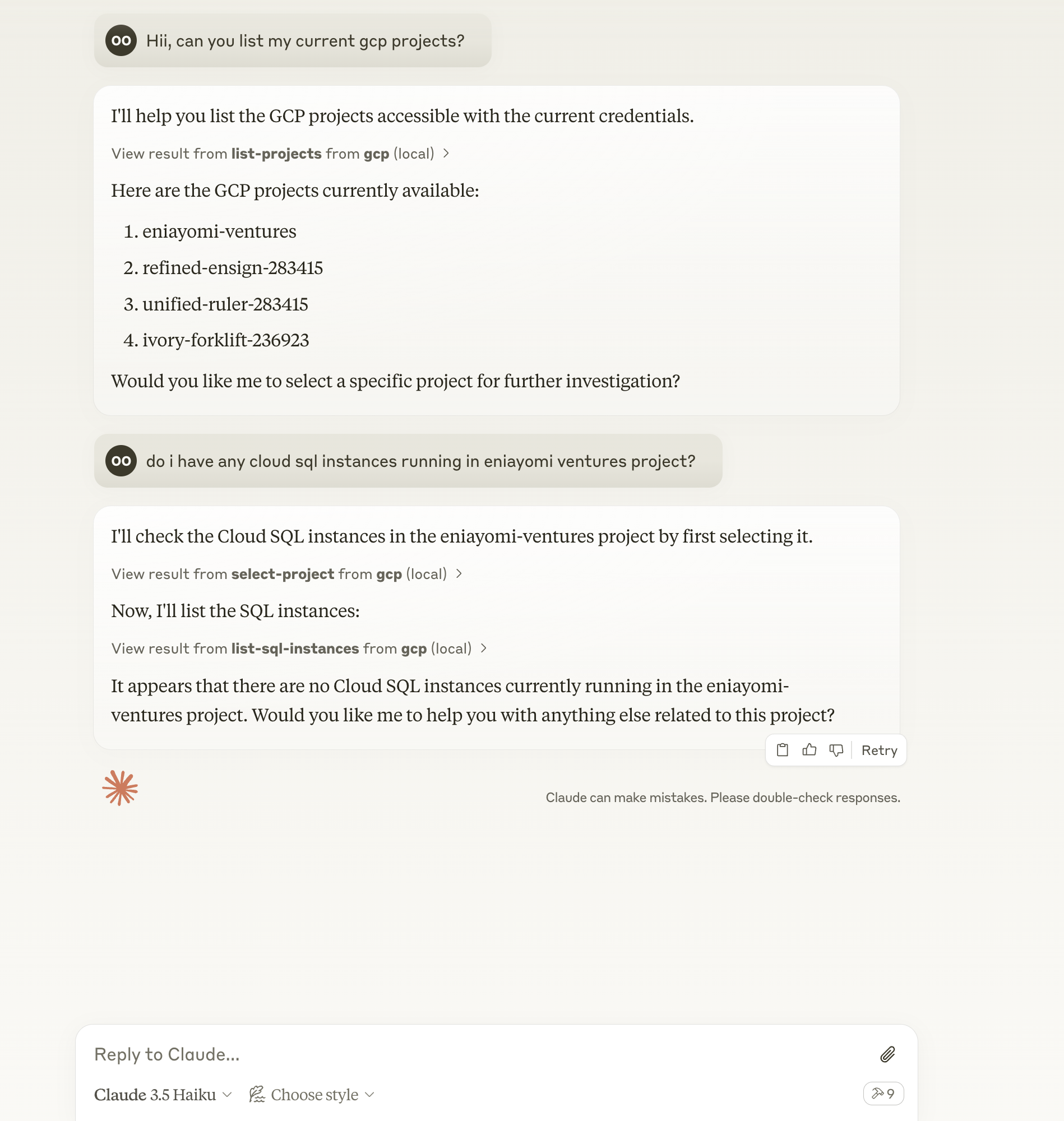
首先选择一个项目或提出以下问题:
“列出我有权访问的所有 GCP 项目”
“显示项目 X 中的所有 Cloud SQL 实例”
“我目前的账单状态是什么?”
“显示我的 Cloud Run 服务的日志”
“列出 us-central1 中的所有 GKE 集群”
“显示项目 X 中的所有 Cloud Storage 存储桶”
“us-central1 中部署了哪些云功能?”
“列出所有 Cloud Run 服务”
“向我展示 BigQuery 数据集和表格”
可用工具
run-gcp-code:使用 TypeScript 代码执行 GCP API 调用list-projects:列出所有可访问的 GCP 项目select-project:选择一个 GCP 项目进行后续操作get-billing-info:获取当前项目的账单信息get-cost-forecast:获取当前项目的成本预测get-billing-budget:获取当前项目的计费预算list-gke-clusters:列出当前项目中的所有 GKE 集群list-sql-instances:列出当前项目中的所有 Cloud SQL 实例get-logs:获取当前项目的 Cloud Logging 条目
交互示例
列出可用项目:
List all GCP projects I have access to选择一个项目:
Use project my-project-id检查账单状态:
What's my current billing status?查看日志:
Show me the last 10 log entries from my project支持的服务
Google 计算引擎
云存储
云函数
云运行
BigQuery
云端 SQL
谷歌 Kubernetes 引擎 (GKE)
云日志
云计费
资源管理器
更多内容即将推出...
故障排除
查看日志:
tail -n 50 -f ~/Library/Logs/Claude/mcp-server-gcp.log常见问题:
身份验证错误:确保您已运行
gcloud auth application-default login权限错误:检查您账户的 IAM 角色
API 错误:验证项目中是否启用了所需的 API
贡献
欢迎贡献代码!欢迎提交 Pull 请求。
执照
麻省理工学院
Maintenance
Resources
Unclaimed servers have limited discoverability.
Looking for Admin?
If you are the server author, to access and configure the admin panel.
Related MCP Servers
- AlicenseCqualityDmaintenanceA Model Context Protocol server that connects to Google Cloud services, allowing users to query logs, interact with Spanner databases, and analyze Cloud Monitoring metrics through natural language interaction.4014882Apache 2.0
- Alicense-qualityCmaintenanceA Model Context Protocol server that enables AI assistants to interact with Kubernetes clusters through natural language, supporting core Kubernetes operations, monitoring, security, and diagnostics.115947MIT
- FlicenseCqualityDmaintenanceA Model Context Protocol server allowing Claude AI to interact with AWS resources through natural language, enabling users to query and manage AWS services without using the traditional AWS Console or CLI.36
- AlicenseCqualityFmaintenanceA Model Context Protocol server implementation that enables AI assistants like Claude to perform Google searches and retrieve web data directly through natural language requests.169168MIT
Related MCP Connectors
A comprehensive Model Context Protocol (MCP) server that enables AI assistants to interact with yo…
A Model Context Protocol server for Wix AI tools
MCP server for AI agents to plan, verify, and deploy Cloudflare-native apps.
Latest Blog Posts
- Who's Calling? MCP Hosts Are an Identity Blind Spot (And the Spec Knows It)By Om-Shree-0709 on .mcpAgent IdentityOAuth 2.1
- Your AI Chatbot Just Exposed Your CEO's Salary to an InternBy Om-Shree-0709 on .Agent IdentityMCP SecurityOAuth Delegation
- Why MCP Servers Need Execution Sandboxing (And Why Your Current Stack Isn't Enough)By Om-Shree-0709 on .Agentic AiPrompt InjectionWebAssembly
MCP directory API
We provide all the information about MCP servers via our MCP API.
curl -X GET 'https://glama.ai/api/mcp/v1/servers/eniayomi/gcp-mcp'
If you have feedback or need assistance with the MCP directory API, please join our Discord server