GCP MCP
Ein Model Context Protocol (MCP)-Server, der KI-Assistenten wie Claude die Interaktion mit Ihrer Google Cloud Platform-Umgebung ermöglicht. Dies ermöglicht Abfragen in natürlicher Sprache und die Verwaltung Ihrer GCP-Ressourcen während Konversationen.
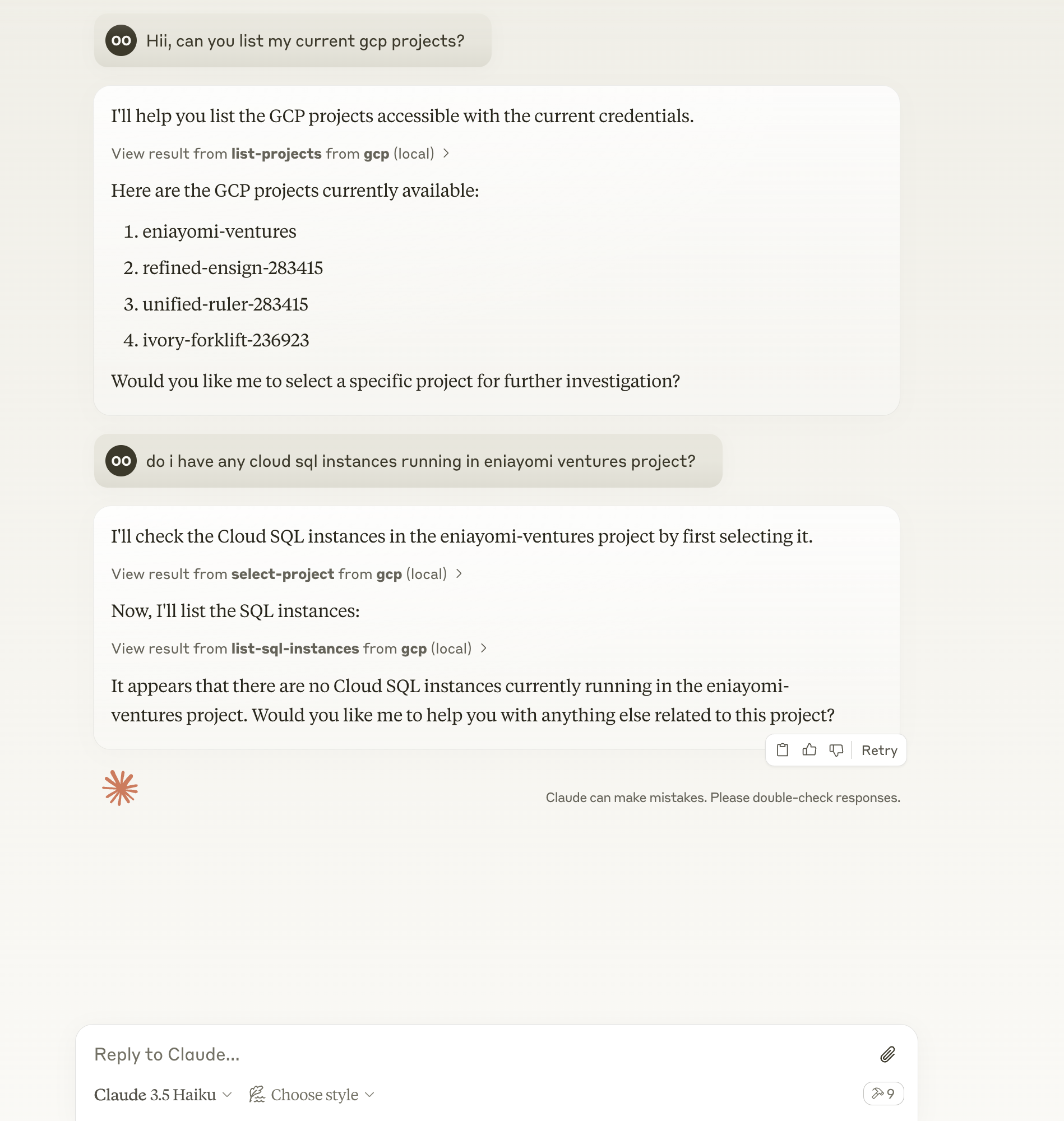
Merkmale
🔍 GCP-Ressourcen mithilfe natürlicher Sprache abfragen und ändern
☁️ Unterstützung für mehrere GCP-Projekte
🌐 Unterstützung mehrerer Regionen
🔐 Sichere Handhabung der Anmeldeinformationen (es werden keine Anmeldeinformationen an externe Dienste weitergegeben)
🏃♂️ Lokale Ausführung mit Ihren GCP-Anmeldeinformationen
🔄 Automatische Wiederholungsversuche für verbesserte Zuverlässigkeit
Related MCP server: Kubectl MCP Tool
Voraussetzungen
Installation
Klonen Sie das Repository:
git clone https://github.com/eniayomi/gcp-mcp
cd gcp-mcp
Installieren Sie Abhängigkeiten:
Konfiguration
Claude Desktop
Öffnen Sie die Claude-Desktop-App und gehen Sie zu Einstellungen -> Entwickler -> Konfiguration bearbeiten
Fügen Sie den folgenden Eintrag zu Ihrer claude_desktop_config.json hinzu:
über npm:
{
  "mcpServers": {
    "gcp": {
      "command": "sh",
      "args": ["-c", "npx -y gcp-mcp"]
    }
  }
}
Wenn Sie die Installation aus der Quelle durchgeführt haben:
{
  "mcpServers": {
    "gcp": {
      "command": "npm",
      "args": [
        "--silent",
        "--prefix",
        "/path/to/gcp-mcp",
        "start"
      ]
    }
  }
}
Ersetzen Sie /path/to/gcp-mcp durch den tatsächlichen Pfad zu Ihrem Projektverzeichnis, wenn Sie die Quellinstallation verwenden.
Cursor
Öffnen Sie Cursor und gehen Sie zu Einstellungen (⌘,)
Navigieren Sie zu AI -> Model Context Protocol
Fügen Sie eine neue MCP-Konfiguration hinzu:
{
  "gcp": {
    "command": "npx -y gcp-mcp"
  }
}
Windsurf
Öffnen Sie ~/.windsurf/config.json (erstellen Sie es, falls es nicht existiert)
Fügen Sie die MCP-Konfiguration hinzu:
{
  "mcpServers": {
    "gcp": {
      "command": "npx -y gcp-mcp"
    }
  }
}
GCP-Einrichtung
Richten Sie die GCP-Anmeldeinformationen ein:
Aktualisieren Sie Ihren KI-Assistenten (Claude Desktop/Cursor/Windsurf)
Verwendung
Wählen Sie zunächst ein Projekt aus oder stellen Sie Fragen wie:
„Alle GCP-Projekte auflisten, auf die ich Zugriff habe“
„Zeigen Sie mir alle Cloud SQL-Instanzen im Projekt X“
„Wie ist mein aktueller Rechnungsstatus?“
„Zeigen Sie mir die Protokolle meiner Cloud Run-Dienste“
„Liste alle GKE-Cluster in us-central1 auf“
„Zeigen Sie mir alle Cloud Storage-Buckets in Projekt X“
„Welche Cloud-Funktionen werden in us-central1 bereitgestellt?“
„Alle Cloud Run-Dienste auflisten“
„Zeigen Sie mir BigQuery-Datensätze und -Tabellen“
Verfügbare Tools
run-gcp-code : Führen Sie GCP-API-Aufrufe mit TypeScript-Code aus
list-projects : Listet alle zugänglichen GCP-Projekte auf
select-project : Wählen Sie ein GCP-Projekt für nachfolgende Vorgänge aus
get-billing-info : Rechnungsinformationen für das aktuelle Projekt abrufen
get-cost-forecast : Kostenprognose für das aktuelle Projekt abrufen
get-billing-budget : Ruft die Abrechnungsbudgets für das aktuelle Projekt ab
list-gke-clusters : Listet alle GKE-Cluster im aktuellen Projekt auf
list-sql-instances : Listet alle Cloud SQL-Instanzen im aktuellen Projekt auf
get-logs : Ruft Cloud Logging-Einträge für das aktuelle Projekt ab
Beispielinteraktionen
Liste der verfügbaren Projekte:
List all GCP projects I have access to
Wählen Sie ein Projekt aus:
Use project my-project-id
Rechnungsstatus prüfen:
What's my current billing status?
Protokolle anzeigen:
Show me the last 10 log entries from my project
Unterstützte Dienste
Fehlerbehebung
So zeigen Sie Protokolle an:
tail -n 50 -f ~/Library/Logs/Claude/mcp-server-gcp.log
Häufige Probleme:
Authentifizierungsfehler: Stellen Sie sicher, dass Sie gcloud auth application-default login ausgeführt haben.
Berechtigungsfehler: Überprüfen Sie die IAM-Rollen für Ihr Konto
API-Fehler: Überprüfen Sie, ob die erforderlichen APIs in Ihrem Projekt aktiviert sind
Beitragen
Beiträge sind willkommen! Senden Sie gerne einen Pull Request.
Lizenz
MIT
