Glama

다중 모델 어드바이저

(锵锵사인행)

대장간 배지

여러 Ollama 모델을 쿼리하고 그 응답을 결합하여 단일 질문에 대한 다양한 AI 관점을 제공하는 모델 컨텍스트 프로토콜(MCP) 서버입니다. 이를 통해 Claude가 여러 관점을 자신의 관점과 결합하여 더욱 포괄적인 답변을 제공할 수 있는 "자문 위원회" 방식이 구축됩니다.

지엑스피1

Related MCP server: mcp-second-opinion

특징

  • 단일 질문으로 여러 Ollama 모델 쿼리

  • 각 모델에 다른 역할/페르소나를 할당합니다.

  • 시스템에서 사용 가능한 모든 Ollama 모델을 확인하세요

  • 각 모델에 맞게 시스템 프롬프트를 사용자 정의합니다.

  • 환경 변수를 통해 구성

  • 데스크톱용 Claude와 완벽하게 통합

필수 조건

  • Node.js 16.x 이상

  • Ollama가 설치되고 실행 중입니다( Ollama 설치 참조)

  • 데스크톱용 Claude(전체 자문 경험용)

설치

Smithery를 통해 설치

Smithery를 통해 Claude Desktop용 multi-ai-advisor-mcp를 자동으로 설치하려면:

npx -y @smithery/cli install @YuChenSSR/multi-ai-advisor-mcp --client claude

수동 설치

  1. 이 저장소를 복제하세요:

    git clone https://github.com/YuChenSSR/multi-ai-advisor-mcp.git 
    cd multi-ai-advisor-mcp
  2. 종속성 설치:

    npm install
  3. 프로젝트를 빌드하세요:

    npm run build
  4. 필요한 Ollama 모델을 설치하세요:

    ollama pull gemma3:1b
    ollama pull llama3.2:1b
    ollama pull deepseek-r1:1.5b

구성

원하는 구성으로 프로젝트 루트에 .env 파일을 만듭니다.

# Server configuration
SERVER_NAME=multi-model-advisor
SERVER_VERSION=1.0.0
DEBUG=true

# Ollama configuration
OLLAMA_API_URL=http://localhost:11434
DEFAULT_MODELS=gemma3:1b,llama3.2:1b,deepseek-r1:1.5b

# System prompts for each model
GEMMA_SYSTEM_PROMPT=You are a creative and innovative AI assistant. Think outside the box and offer novel perspectives.
LLAMA_SYSTEM_PROMPT=You are a supportive and empathetic AI assistant focused on human well-being. Provide considerate and balanced advice.
DEEPSEEK_SYSTEM_PROMPT=You are a logical and analytical AI assistant. Think step-by-step and explain your reasoning clearly.

데스크톱용 Claude에 연결

  1. Claude for Desktop 구성 파일을 찾으세요.

    • MacOS: ~/Library/Application Support/Claude/claude_desktop_config.json

    • Windows: %APPDATA%\Claude\claude_desktop_config.json

  2. 파일을 편집하여 Multi-Model Advisor MCP 서버를 추가합니다.

{
  "mcpServers": {
    "multi-model-advisor": {
      "command": "node",
      "args": ["/absolute/path/to/multi-ai-advisor-mcp/build/index.js"]
    }
  }
}
  1. /absolute/path/to/ 프로젝트 디렉토리의 실제 경로로 바꾸세요.

  2. 데스크톱용 Claude를 다시 시작하세요

용법

Claude for Desktop에 연결하면 여러 가지 방법으로 Multi-Model Advisor를 사용할 수 있습니다.

사용 가능한 모델 목록

시스템에서 사용 가능한 모든 모델을 볼 수 있습니다.

Show me which Ollama models are available on my system

이렇게 하면 설치된 모든 Ollama 모델이 표시되고 기본값으로 구성된 모델이 표시됩니다.

기본 사용법

Claude에게 다중 모델 자문을 사용해 달라고 요청하기만 하면 됩니다.

what are the most important skills for success in today's job market, 
you can use gemma3:1b, llama3.2:1b, deepseek-r1:1.5b to help you 

클로드는 모든 기본 모델을 쿼리하고 다양한 관점을 기반으로 합성된 응답을 제공합니다.
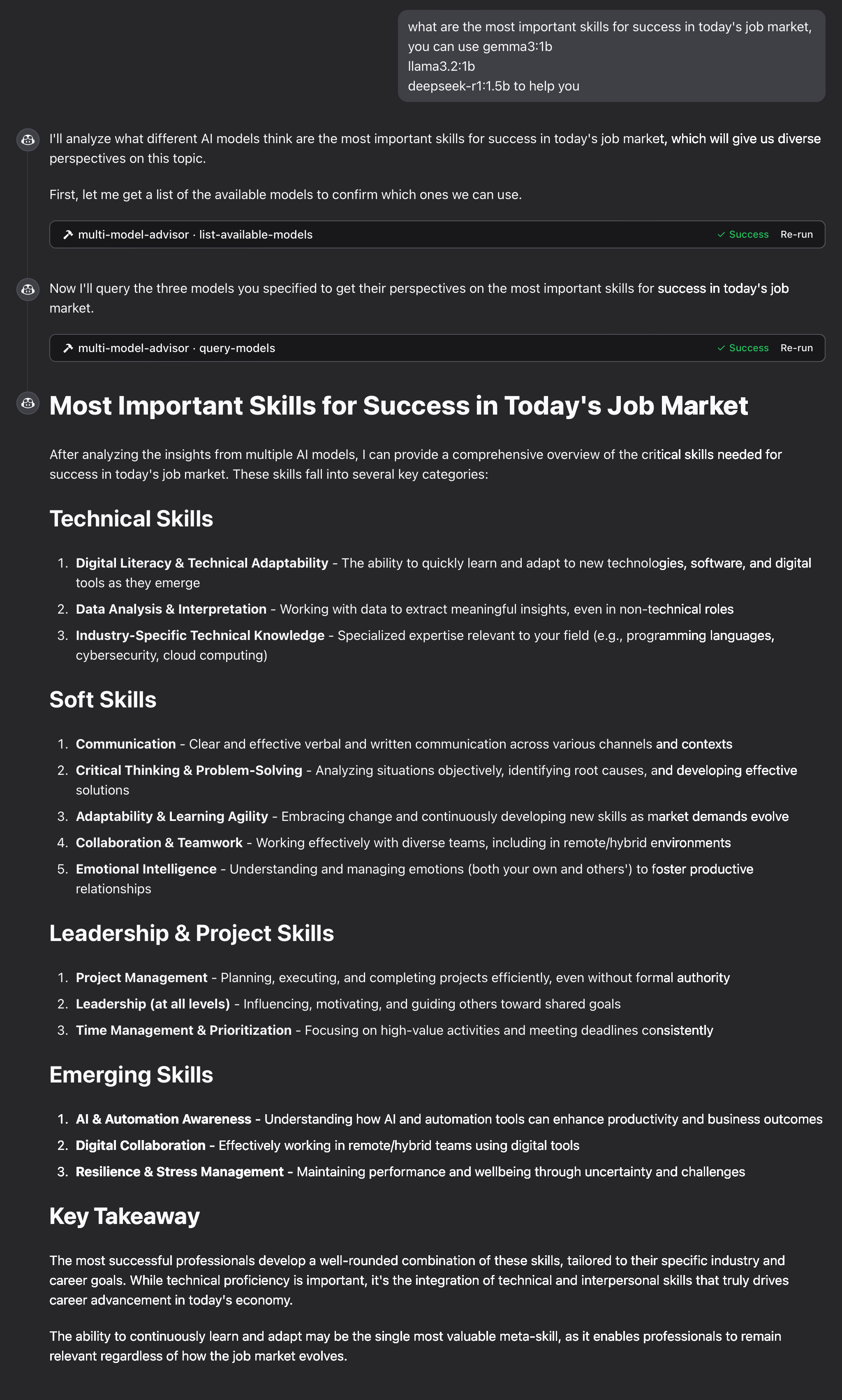
예

작동 원리

  1. MCP 서버는 두 가지 도구를 제공합니다.

    • list-available-models : 시스템의 모든 Ollama 모델을 표시합니다.

    • query-models : 질문을 사용하여 여러 모델을 쿼리합니다.

  2. 클로드에게 다중 모델 자문가에 관해 질문할 때:

    • Claude는 query-models 도구를 사용하기로 결정했습니다.

    • 서버는 귀하의 질문을 여러 Ollama 모델로 전송합니다.

    • 각 모델은 자신의 관점으로 대응합니다.

    • Claude는 모든 응답을 받고 포괄적인 답변을 종합합니다.

  3. 각 모델에는 서로 다른 "페르소나" 또는 역할이 할당되어 다양한 관점을 장려합니다.

문제 해결

올라마 연결 문제

서버가 Ollama에 연결할 수 없는 경우:

  • Ollama가 실행 중인지 확인하세요( ollama serve )

  • .env 파일에서 OLLAMA_API_URL이 올바른지 확인하세요.

  • 브라우저에서 http://localhost:11434에 접속하여 Ollama가 응답하는지 확인하세요.

모델을 찾을 수 없습니다

모델이 사용 불가능하다고 보고된 경우:

  • ollama pull <model-name> 사용하여 모델을 끌어왔는지 확인하세요.

  • ollama list 사용하여 정확한 모델 이름을 확인하세요

  • list-available-models 도구를 사용하여 사용 가능한 모든 모델을 확인하세요.

Claude가 MCP 도구를 표시하지 않음

Claude에 도구가 나타나지 않는 경우:

  • 구성을 업데이트한 후 Claude를 다시 시작했는지 확인하세요.

  • claude_desktop_config.json의 절대 경로가 올바른지 확인하세요.

  • 오류 메시지는 Claude의 로그에서 확인하세요.

램이 부족해요

일부 관리자의 AI 모델이 더 큰 모델을 선택했지만, 이를 실행할 메모리가 부족할 수 있습니다. 더 작은 모델을 지정하거나( 기본 사용 방법 참조) 메모리를 업그레이드해 보세요.

특허

MIT 라이센스

자세한 내용은 이 프로젝트 저장소 의 LICENSE 파일을 참조하세요.

기여하다

기여를 환영합니다! 풀 리퀘스트를 제출해 주세요.

Available Tools

2 tools
list-available-modelsB

List all available models in Ollama that can be used with query-models

ParametersJSON Schema
NameRequiredDescriptionDefault

No parameters

TDQS

B3.4/5.0
Behavior2/5

Does the description disclose side effects, auth requirements, rate limits, or destructive behavior?

No annotations are provided, so the description carries the full burden of behavioral disclosure. It states it 'List all available models' but doesn't describe what 'available' means (e.g., locally installed, remote, with status), how results are returned (e.g., format, pagination), or any constraints (e.g., permissions, rate limits). This leaves significant gaps in understanding the tool's behavior.

Agents need to know what a tool does to the world before calling it. Descriptions should go beyond structured annotations to explain consequences.

Conciseness5/5

Is the description appropriately sized, front-loaded, and free of redundancy?

The description is a single, efficient sentence that directly states the tool's purpose and references the sibling tool. It is front-loaded with the core action and resource, with no wasted words or unnecessary elaboration, making it highly concise and well-structured.

Shorter descriptions cost fewer tokens and are easier for agents to parse. Every sentence should earn its place.

Completeness3/5

Given the tool's complexity, does the description cover enough for an agent to succeed on first attempt?

Given the tool has 0 parameters, no annotations, and no output schema, the description is minimally adequate by stating what it does. However, it lacks details on behavior (e.g., output format, what 'available' entails) and doesn't leverage the low complexity to provide more context, making it incomplete for fully informed use without additional assumptions.

Complex tools with many parameters or behaviors need more documentation. Simple tools need less. This dimension scales expectations accordingly.

Parameters4/5

Does the description clarify parameter syntax, constraints, interactions, or defaults beyond what the schema provides?

The input schema has 0 parameters with 100% coverage, so no parameter documentation is needed. The description doesn't add parameter details, which is appropriate here. A baseline of 4 is applied as it effectively handles the lack of parameters without introducing confusion or redundancy.

Input schemas describe structure but not intent. Descriptions should explain non-obvious parameter relationships and valid value ranges.

Purpose4/5

Does the description clearly state what the tool does and how it differs from similar tools?

The description clearly states the verb 'List' and the resource 'all available models in Ollama', which provides a specific purpose. It distinguishes from the sibling tool 'query-models' by indicating these models are 'used with' it, though it doesn't explicitly differentiate their functions beyond that implied relationship.

Agents choose between tools based on descriptions. A clear purpose with a specific verb and resource helps agents select the right tool.

Usage Guidelines3/5

Does the description explain when to use this tool, when not to, or what alternatives exist?

The description implies usage by mentioning the sibling tool 'query-models', suggesting this tool is for discovering models to use with it. However, it lacks explicit guidance on when to use this tool versus alternatives or any prerequisites, leaving usage context somewhat inferred rather than clearly stated.

Agents often have multiple tools that could apply. Explicit usage guidance like "use X instead of Y when Z" prevents misuse.

query-modelsB

Query multiple AI models via Ollama and get their responses to compare perspectives

ParametersJSON Schema
NameRequiredDescriptionDefault
questionYesThe question to ask all models
modelsNoArray of model names to query (defaults to configured models)
system_promptNoOptional system prompt to provide context to all models (overridden by model_system_prompts if provided)
model_system_promptsNoOptional object mapping model names to specific system prompts

TDQS

B3.4/5.0
Behavior2/5

Does the description disclose side effects, auth requirements, rate limits, or destructive behavior?

No annotations are provided, so the description carries the full burden of behavioral disclosure. It mentions querying multiple models and getting responses for comparison, but fails to disclose critical behavioral traits such as whether this is a read-only operation, potential rate limits, authentication needs, error handling, or the format of responses. For a tool with no annotations and complex functionality, this is a significant gap.

Agents need to know what a tool does to the world before calling it. Descriptions should go beyond structured annotations to explain consequences.

Conciseness5/5

Is the description appropriately sized, front-loaded, and free of redundancy?

The description is a single, well-structured sentence that efficiently conveys the core functionality without waste. It is front-loaded with the main action ('query multiple AI models') and includes essential context ('via Ollama', 'to compare perspectives'), making every word earn its place.

Shorter descriptions cost fewer tokens and are easier for agents to parse. Every sentence should earn its place.

Completeness2/5

Given the tool's complexity, does the description cover enough for an agent to succeed on first attempt?

Given the tool's complexity (querying multiple models with optional prompts), lack of annotations, and no output schema, the description is incomplete. It does not explain return values, error conditions, or behavioral constraints, leaving significant gaps for an AI agent to understand how to invoke and interpret results effectively.

Complex tools with many parameters or behaviors need more documentation. Simple tools need less. This dimension scales expectations accordingly.

Parameters3/5

Does the description clarify parameter syntax, constraints, interactions, or defaults beyond what the schema provides?

Schema description coverage is 100%, so the schema already documents all parameters thoroughly. The description adds minimal value beyond the schema by implying the tool queries 'multiple' models and compares responses, but does not provide additional semantics, syntax, or format details for parameters. Baseline 3 is appropriate when the schema does the heavy lifting.

Input schemas describe structure but not intent. Descriptions should explain non-obvious parameter relationships and valid value ranges.

Purpose5/5

Does the description clearly state what the tool does and how it differs from similar tools?

The description clearly states the tool's purpose with specific verbs ('query multiple AI models', 'get their responses') and resources ('via Ollama'), and distinguishes it from the sibling tool 'list-available-models' by focusing on querying rather than listing models. It explicitly mentions the comparative aspect ('to compare perspectives'), which adds valuable context beyond basic querying.

Agents choose between tools based on descriptions. A clear purpose with a specific verb and resource helps agents select the right tool.

Usage Guidelines3/5

Does the description explain when to use this tool, when not to, or what alternatives exist?

The description implies usage for comparing model responses to a question, but provides no explicit guidance on when to use this tool versus alternatives (e.g., querying a single model) or any prerequisites. It mentions 'defaults to configured models' for the models parameter, which offers some contextual hint, but lacks clear when/when-not directives or named alternatives.

Agents often have multiple tools that could apply. Explicit usage guidance like "use X instead of Y when Z" prevents misuse.

Tool Schema Changelog

Recent tool additions, removals, and schema changes observed during successful MCP inspections.

  1. 1 tool updatev1.0.0
    • Changedlist-available-models1 field changed
      • removedInput schema / additionalProperties
        Removed value: -false
  2. 2 tool updates
    • First observedlist-available-models
    • First observedquery-models

TDQS

B3.4/5.0

Scored across 2 tools

Disambiguation5/5

The two tools have clearly distinct purposes: one lists available models, while the other queries models for responses. There is no overlap in functionality, making it easy for an agent to choose the correct tool for each task without confusion.

Naming Consistency4/5

Both tools use a verb_noun pattern (list-available-models and query-models), which is consistent and readable. However, the hyphenation in 'list-available-models' slightly deviates from the simpler 'query-models', but overall the naming is predictable and follows a clear convention.

Tool Count2/5

With only 2 tools, the server feels thin for its purpose of advising on multiple models. While the tools cover listing and querying, the scope suggests potential gaps in operations like model management or comparison analysis, making the count too low for a comprehensive multi-model advisory system.

Completeness2/5

The tool surface is significantly incomplete for a multi-model advisor. It lacks operations such as managing models (e.g., adding or removing models), comparing responses in a structured way, or handling model configurations. This will likely cause agent failures when trying to perform full advisory workflows beyond basic listing and querying.

Maintenance

ActivityInactive
ResponsivenessNo issues

Related MCP Connectors

Related MCP Servers