Multi-Model Advisor
Asesor Multimodelo
(El hombre que lleva el bolso de compras)
Un servidor de Protocolo de Contexto de Modelo (MCP) que consulta múltiples modelos de Ollama y combina sus respuestas, proporcionando diversas perspectivas de IA sobre una misma pregunta. Esto crea un enfoque de "consejo de asesores" donde Claude puede sintetizar múltiples puntos de vista junto con los suyos para proporcionar respuestas más completas.
graph TD
A[Start] --> B[Worker Local AI 1 Opinion]
A --> C[Worker Local AI 2 Opinion]
A --> D[Worker Local AI 3 Opinion]
B --> E[Manager AI]
C --> E
D --> E
E --> F[Decision Made]Related MCP server: mcp-second-opinion
Características
Consultar múltiples modelos de Ollama con una sola pregunta
Asignar diferentes roles/personajes a cada modelo
Ver todos los modelos de Ollama disponibles en su sistema
Personalice las indicaciones del sistema para cada modelo
Configurar mediante variables de entorno
Se integra perfectamente con Claude for Desktop
Prerrequisitos
Node.js 16.x o superior
Ollama instalado y funcionando (ver Instalación de Ollama )
Claude para escritorio (para una experiencia de asesoramiento completa)
Instalación
Instalación mediante herrería
Para instalar multi-ai-advisor-mcp para Claude Desktop automáticamente a través de Smithery :
npx -y @smithery/cli install @YuChenSSR/multi-ai-advisor-mcp --client claudeInstalación manual
Clonar este repositorio:
git clone https://github.com/YuChenSSR/multi-ai-advisor-mcp.git cd multi-ai-advisor-mcpInstalar dependencias:
npm installConstruir el proyecto:
npm run buildInstalar los modelos Ollama necesarios:
ollama pull gemma3:1b ollama pull llama3.2:1b ollama pull deepseek-r1:1.5b
Configuración
Cree un archivo .env en la raíz del proyecto con la configuración deseada:
# Server configuration
SERVER_NAME=multi-model-advisor
SERVER_VERSION=1.0.0
DEBUG=true
# Ollama configuration
OLLAMA_API_URL=http://localhost:11434
DEFAULT_MODELS=gemma3:1b,llama3.2:1b,deepseek-r1:1.5b
# System prompts for each model
GEMMA_SYSTEM_PROMPT=You are a creative and innovative AI assistant. Think outside the box and offer novel perspectives.
LLAMA_SYSTEM_PROMPT=You are a supportive and empathetic AI assistant focused on human well-being. Provide considerate and balanced advice.
DEEPSEEK_SYSTEM_PROMPT=You are a logical and analytical AI assistant. Think step-by-step and explain your reasoning clearly.Conectarse a Claude para escritorio
Localice el archivo de configuración de Claude for Desktop:
MacOS:
~/Library/Application Support/Claude/claude_desktop_config.jsonVentanas:
%APPDATA%\Claude\claude_desktop_config.json
Edite el archivo para agregar el servidor MCP de Multi-Model Advisor:
{
"mcpServers": {
"multi-model-advisor": {
"command": "node",
"args": ["/absolute/path/to/multi-ai-advisor-mcp/build/index.js"]
}
}
}Reemplace
/absolute/path/to/con la ruta real al directorio de su proyectoReiniciar Claude para escritorio
Uso
Una vez conectado a Claude for Desktop, puede utilizar el Asesor Multimodelo de varias maneras:
Lista de modelos disponibles
Puedes ver todos los modelos disponibles en tu sistema:
Show me which Ollama models are available on my systemEsto mostrará todos los modelos de Ollama instalados e indicará cuáles están configurados como predeterminados.
Uso básico
Simplemente pídale a Claude que utilice el asesor multimodelo:
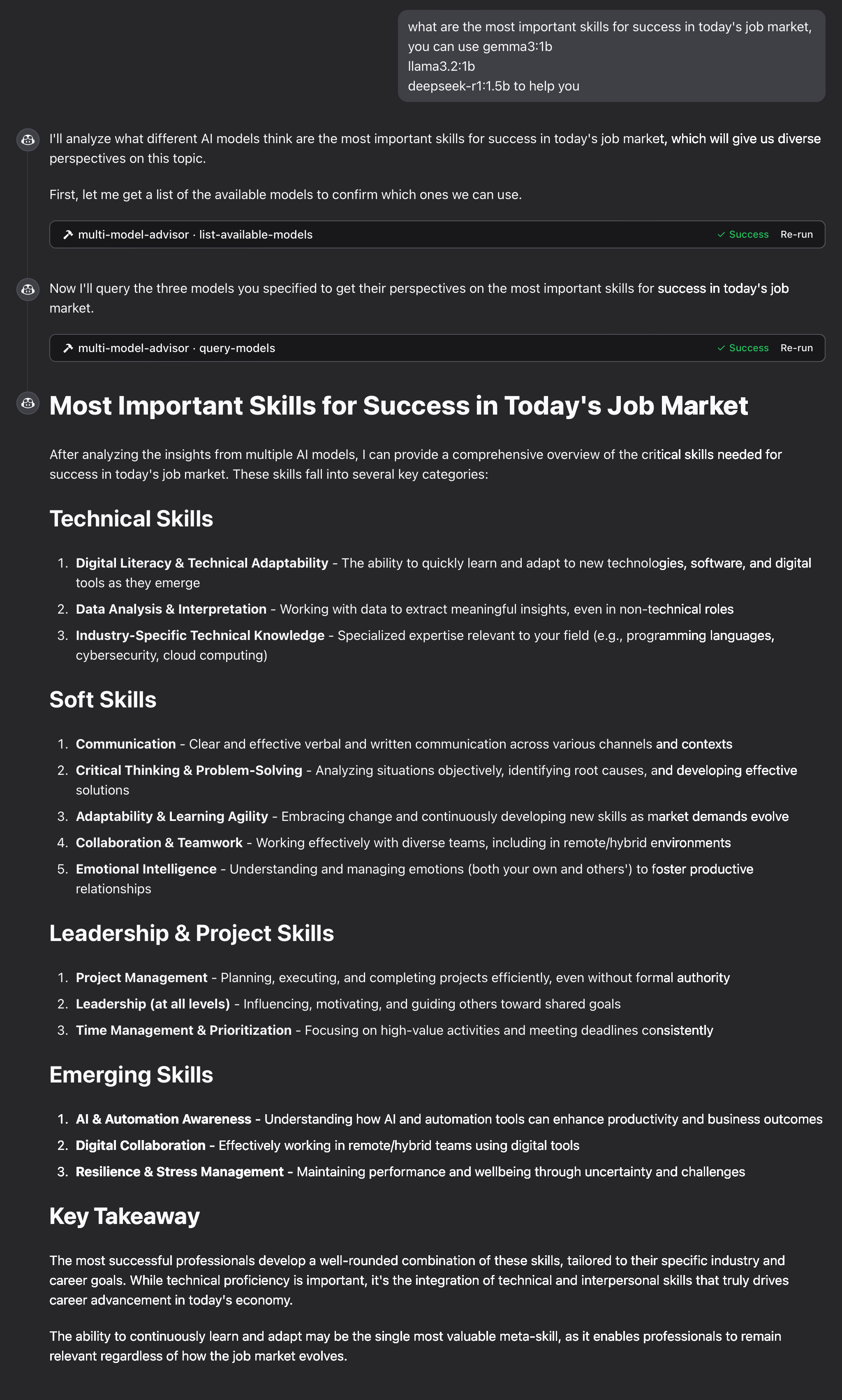
what are the most important skills for success in today's job market,
you can use gemma3:1b, llama3.2:1b, deepseek-r1:1.5b to help you Claude cuestionará todos los modelos predeterminados y proporcionará una respuesta sintetizada basada en sus diferentes perspectivas.
Cómo funciona
El servidor MCP expone dos herramientas:
list-available-models: muestra todos los modelos de Ollama en su sistemaquery-models: Consulta múltiples modelos con una pregunta
Cuando le haces una pregunta a Claude refiriéndose al asesor multimodelo:
Claude decide utilizar la herramienta
query-modelsEl servidor envía tu pregunta a múltiples modelos de Ollama
Cada modelo responde con su perspectiva
Claude recibe todas las respuestas y sintetiza una respuesta completa.
A cada modelo se le puede asignar una “persona” o rol diferente, lo que fomenta diversas perspectivas.
Solución de problemas
Problemas de conexión de Ollama
Si el servidor no puede conectarse a Ollama:
Asegúrese de que Ollama se esté ejecutando (
ollama serve)Verifique que la OLLAMA_API_URL sea correcta en su archivo .env
Intente acceder a http://localhost:11434 en su navegador para verificar que Ollama esté respondiendo
Modelo no encontrado
Si un modelo se informa como no disponible:
Comprueba que has extraído el modelo usando
ollama pull <model-name>Verifique el nombre exacto del modelo usando
ollama listUtilice la herramienta de
list-available-modelspara ver todos los modelos disponibles
Claude no muestra las herramientas MCP
Si las herramientas no aparecen en Claude:
Asegúrese de haber reiniciado Claude después de actualizar la configuración
Verifique que la ruta absoluta en claude_desktop_config.json sea correcta
Mire los registros de Claude para ver los mensajes de error
La RAM no es suficiente
Es posible que los modelos de IA de algunos administradores hayan elegido modelos más grandes, pero no hay suficiente memoria para ejecutarlos. Puede intentar especificar un modelo más pequeño (consulte Uso básico ) o aumentar la memoria.
Licencia
Licencia MIT
Para obtener más detalles, consulte el archivo LICENCIA en este repositorio del proyecto.
Contribuyendo
¡Agradecemos sus contribuciones! No dude en enviar una solicitud de incorporación de cambios.
Available Tools
2 toolslist-available-modelsB
List all available models in Ollama that can be used with query-models
| Name | Required | Description | Default |
|---|---|---|---|
No parameters | |||
TDQS
Does the description disclose side effects, auth requirements, rate limits, or destructive behavior?
No annotations are provided, so the description carries the full burden of behavioral disclosure. It states it 'List all available models' but doesn't describe what 'available' means (e.g., locally installed, remote, with status), how results are returned (e.g., format, pagination), or any constraints (e.g., permissions, rate limits). This leaves significant gaps in understanding the tool's behavior.
Agents need to know what a tool does to the world before calling it. Descriptions should go beyond structured annotations to explain consequences.
Is the description appropriately sized, front-loaded, and free of redundancy?
The description is a single, efficient sentence that directly states the tool's purpose and references the sibling tool. It is front-loaded with the core action and resource, with no wasted words or unnecessary elaboration, making it highly concise and well-structured.
Shorter descriptions cost fewer tokens and are easier for agents to parse. Every sentence should earn its place.
Given the tool's complexity, does the description cover enough for an agent to succeed on first attempt?
Given the tool has 0 parameters, no annotations, and no output schema, the description is minimally adequate by stating what it does. However, it lacks details on behavior (e.g., output format, what 'available' entails) and doesn't leverage the low complexity to provide more context, making it incomplete for fully informed use without additional assumptions.
Complex tools with many parameters or behaviors need more documentation. Simple tools need less. This dimension scales expectations accordingly.
Does the description clarify parameter syntax, constraints, interactions, or defaults beyond what the schema provides?
The input schema has 0 parameters with 100% coverage, so no parameter documentation is needed. The description doesn't add parameter details, which is appropriate here. A baseline of 4 is applied as it effectively handles the lack of parameters without introducing confusion or redundancy.
Input schemas describe structure but not intent. Descriptions should explain non-obvious parameter relationships and valid value ranges.
Does the description clearly state what the tool does and how it differs from similar tools?
The description clearly states the verb 'List' and the resource 'all available models in Ollama', which provides a specific purpose. It distinguishes from the sibling tool 'query-models' by indicating these models are 'used with' it, though it doesn't explicitly differentiate their functions beyond that implied relationship.
Agents choose between tools based on descriptions. A clear purpose with a specific verb and resource helps agents select the right tool.
Does the description explain when to use this tool, when not to, or what alternatives exist?
The description implies usage by mentioning the sibling tool 'query-models', suggesting this tool is for discovering models to use with it. However, it lacks explicit guidance on when to use this tool versus alternatives or any prerequisites, leaving usage context somewhat inferred rather than clearly stated.
Agents often have multiple tools that could apply. Explicit usage guidance like "use X instead of Y when Z" prevents misuse.
query-modelsB
Query multiple AI models via Ollama and get their responses to compare perspectives
| Name | Required | Description | Default |
|---|---|---|---|
| question | Yes | The question to ask all models | |
| models | No | Array of model names to query (defaults to configured models) | |
| system_prompt | No | Optional system prompt to provide context to all models (overridden by model_system_prompts if provided) | |
| model_system_prompts | No | Optional object mapping model names to specific system prompts |
TDQS
Does the description disclose side effects, auth requirements, rate limits, or destructive behavior?
No annotations are provided, so the description carries the full burden of behavioral disclosure. It mentions querying multiple models and getting responses for comparison, but fails to disclose critical behavioral traits such as whether this is a read-only operation, potential rate limits, authentication needs, error handling, or the format of responses. For a tool with no annotations and complex functionality, this is a significant gap.
Agents need to know what a tool does to the world before calling it. Descriptions should go beyond structured annotations to explain consequences.
Is the description appropriately sized, front-loaded, and free of redundancy?
The description is a single, well-structured sentence that efficiently conveys the core functionality without waste. It is front-loaded with the main action ('query multiple AI models') and includes essential context ('via Ollama', 'to compare perspectives'), making every word earn its place.
Shorter descriptions cost fewer tokens and are easier for agents to parse. Every sentence should earn its place.
Given the tool's complexity, does the description cover enough for an agent to succeed on first attempt?
Given the tool's complexity (querying multiple models with optional prompts), lack of annotations, and no output schema, the description is incomplete. It does not explain return values, error conditions, or behavioral constraints, leaving significant gaps for an AI agent to understand how to invoke and interpret results effectively.
Complex tools with many parameters or behaviors need more documentation. Simple tools need less. This dimension scales expectations accordingly.
Does the description clarify parameter syntax, constraints, interactions, or defaults beyond what the schema provides?
Schema description coverage is 100%, so the schema already documents all parameters thoroughly. The description adds minimal value beyond the schema by implying the tool queries 'multiple' models and compares responses, but does not provide additional semantics, syntax, or format details for parameters. Baseline 3 is appropriate when the schema does the heavy lifting.
Input schemas describe structure but not intent. Descriptions should explain non-obvious parameter relationships and valid value ranges.
Does the description clearly state what the tool does and how it differs from similar tools?
The description clearly states the tool's purpose with specific verbs ('query multiple AI models', 'get their responses') and resources ('via Ollama'), and distinguishes it from the sibling tool 'list-available-models' by focusing on querying rather than listing models. It explicitly mentions the comparative aspect ('to compare perspectives'), which adds valuable context beyond basic querying.
Agents choose between tools based on descriptions. A clear purpose with a specific verb and resource helps agents select the right tool.
Does the description explain when to use this tool, when not to, or what alternatives exist?
The description implies usage for comparing model responses to a question, but provides no explicit guidance on when to use this tool versus alternatives (e.g., querying a single model) or any prerequisites. It mentions 'defaults to configured models' for the models parameter, which offers some contextual hint, but lacks clear when/when-not directives or named alternatives.
Agents often have multiple tools that could apply. Explicit usage guidance like "use X instead of Y when Z" prevents misuse.
Tool Schema Changelog
Recent tool additions, removals, and schema changes observed during successful MCP inspections.
1 tool update
v1.0.0- Changed
list-available-models1 field changed- removed
Input schema / additionalPropertiesRemoved value: -false
2 tool updates
- First observed
list-available-models - First observed
query-models
TDQS
Scored across 2 tools
The two tools have clearly distinct purposes: one lists available models, while the other queries models for responses. There is no overlap in functionality, making it easy for an agent to choose the correct tool for each task without confusion.
Both tools use a verb_noun pattern (list-available-models and query-models), which is consistent and readable. However, the hyphenation in 'list-available-models' slightly deviates from the simpler 'query-models', but overall the naming is predictable and follows a clear convention.
With only 2 tools, the server feels thin for its purpose of advising on multiple models. While the tools cover listing and querying, the scope suggests potential gaps in operations like model management or comparison analysis, making the count too low for a comprehensive multi-model advisory system.
The tool surface is significantly incomplete for a multi-model advisor. It lacks operations such as managing models (e.g., adding or removing models), comparing responses in a structured way, or handling model configurations. This will likely cause agent failures when trying to perform full advisory workflows beyond basic listing and querying.
Maintenance
Related MCP Connectors
MCP server for AI dialogue using various LLM models via AceDataCloud
MCP server for building and testing AI agents with multi-model experimentation and insights.
MCP server for OpenAI API (chat completions, image generation, embeddings) via AceDataCloud
An MCP server that integrates with Discord to provide AI-powered features.
Related MCP Servers
- AlicenseAqualityAmaintenanceAn MCP server that acts as a bridge to query multiple OpenAI-compatible LLMs with MCP tool access. Just like rubber duck debugging, explain your problems to various AI "ducks" who can actually research and get different perspectives!12552 npm178MIT
- AlicenseNot gradedqualityDmaintenanceAn MCP server that queries a panel of LLMs from different providers via OpenRouter and returns their answers side by side, optionally synthesizing them to highlight disagreements.8 npm1MIT
- AlicenseBqualityDmaintenanceA universal MCP server that integrates with local Ollama instances, enabling AI-powered chat, model management, and text generation from any MCP-compatible IDE or application.676 npm3MIT
- AlicenseAqualityCmaintenanceAn MCP server that enables multiple AI models (ChatGPT, Gemini, Claude, Grok) to discuss, debate, and reach consensus via browser automation.71MIT