Multi-Model Advisor
The Multi-Model Advisor server enables querying multiple AI models to get diverse perspectives on a single question. You can:
List Available Models: View all Ollama models installed on your system
Query Multiple Models: Send a question to multiple models and receive their individual responses for comparison
Customize Model Roles: Assign specific system prompts or personas to each model for diverse viewpoints
Apply General Prompts: Provide an optional overarching system prompt for context across all queried models
Model Selection: Specify which models to query during a question
Environment Configuration: Configure settings via environment variables, including default models and system prompts
Seamless Integration: Works with Claude for Desktop to synthesize model responses into comprehensive answers
Uses .ENV files for configuration, allowing customization of server settings, Ollama configuration, and system prompts for each model.
Includes support for Mermaid diagrams to visualize the workflow of how multiple AI models contribute to the advisory system.
Runs as a Node.js application with the server exposing tools for listing available models and querying multiple models simultaneously.
Connects to locally running Ollama models to query multiple AI perspectives on a single question, with support for customizing system prompts and assigning different roles to each model.
Click on "Install Server".
Wait a few minutes for the server to deploy. Once ready, it will show a "Started" state.
In the chat, type
@followed by the MCP server name and your instructions, e.g., "@Multi-Model AdvisorWhat are the pros and cons of remote work from multiple AI perspectives?"
That's it! The server will respond to your query, and you can continue using it as needed.
Here is a step-by-step guide with screenshots.
Multi-Model Advisor
(锵锵四人行)
A Model Context Protocol (MCP) server that queries multiple Ollama models and combines their responses, providing diverse AI perspectives on a single question. This creates a "council of advisors" approach where Claude can synthesize multiple viewpoints alongside its own to provide more comprehensive answers.
graph TD
A[Start] --> B[Worker Local AI 1 Opinion]
A --> C[Worker Local AI 2 Opinion]
A --> D[Worker Local AI 3 Opinion]
B --> E[Manager AI]
C --> E
D --> E
E --> F[Decision Made]Related MCP server: mcp-second-opinion
Features
Query multiple Ollama models with a single question
Assign different roles/personas to each model
View all available Ollama models on your system
Customize system prompts for each model
Configure via environment variables
Integrate seamlessly with Claude for Desktop
Prerequisites
Node.js 16.x or higher
Ollama installed and running (see Ollama installation)
Claude for Desktop (for the complete advisory experience)
Installation
Installing via Smithery
To install multi-ai-advisor-mcp for Claude Desktop automatically via Smithery:
npx -y @smithery/cli install @YuChenSSR/multi-ai-advisor-mcp --client claudeManual Installation
Clone this repository:
git clone https://github.com/YuChenSSR/multi-ai-advisor-mcp.git cd multi-ai-advisor-mcpInstall dependencies:
npm installBuild the project:
npm run buildInstall required Ollama models:
ollama pull gemma3:1b ollama pull llama3.2:1b ollama pull deepseek-r1:1.5b
Configuration
Create a .env file in the project root with your desired configuration:
# Server configuration
SERVER_NAME=multi-model-advisor
SERVER_VERSION=1.0.0
DEBUG=true
# Ollama configuration
OLLAMA_API_URL=http://localhost:11434
DEFAULT_MODELS=gemma3:1b,llama3.2:1b,deepseek-r1:1.5b
# System prompts for each model
GEMMA_SYSTEM_PROMPT=You are a creative and innovative AI assistant. Think outside the box and offer novel perspectives.
LLAMA_SYSTEM_PROMPT=You are a supportive and empathetic AI assistant focused on human well-being. Provide considerate and balanced advice.
DEEPSEEK_SYSTEM_PROMPT=You are a logical and analytical AI assistant. Think step-by-step and explain your reasoning clearly.Connect to Claude for Desktop
Locate your Claude for Desktop configuration file:
MacOS:
~/Library/Application Support/Claude/claude_desktop_config.jsonWindows:
%APPDATA%\Claude\claude_desktop_config.json
Edit the file to add the Multi-Model Advisor MCP server:
{
"mcpServers": {
"multi-model-advisor": {
"command": "node",
"args": ["/absolute/path/to/multi-ai-advisor-mcp/build/index.js"]
}
}
}Replace
/absolute/path/to/with the actual path to your project directoryRestart Claude for Desktop
Usage
Once connected to Claude for Desktop, you can use the Multi-Model Advisor in several ways:
List Available Models
You can see all available models on your system:
Show me which Ollama models are available on my systemThis will display all installed Ollama models and indicate which ones are configured as defaults.
Basic Usage
Simply ask Claude to use the multi-model advisor:
what are the most important skills for success in today's job market,
you can use gemma3:1b, llama3.2:1b, deepseek-r1:1.5b to help you Claude will query all default models and provide a synthesized response based on their different perspectives.
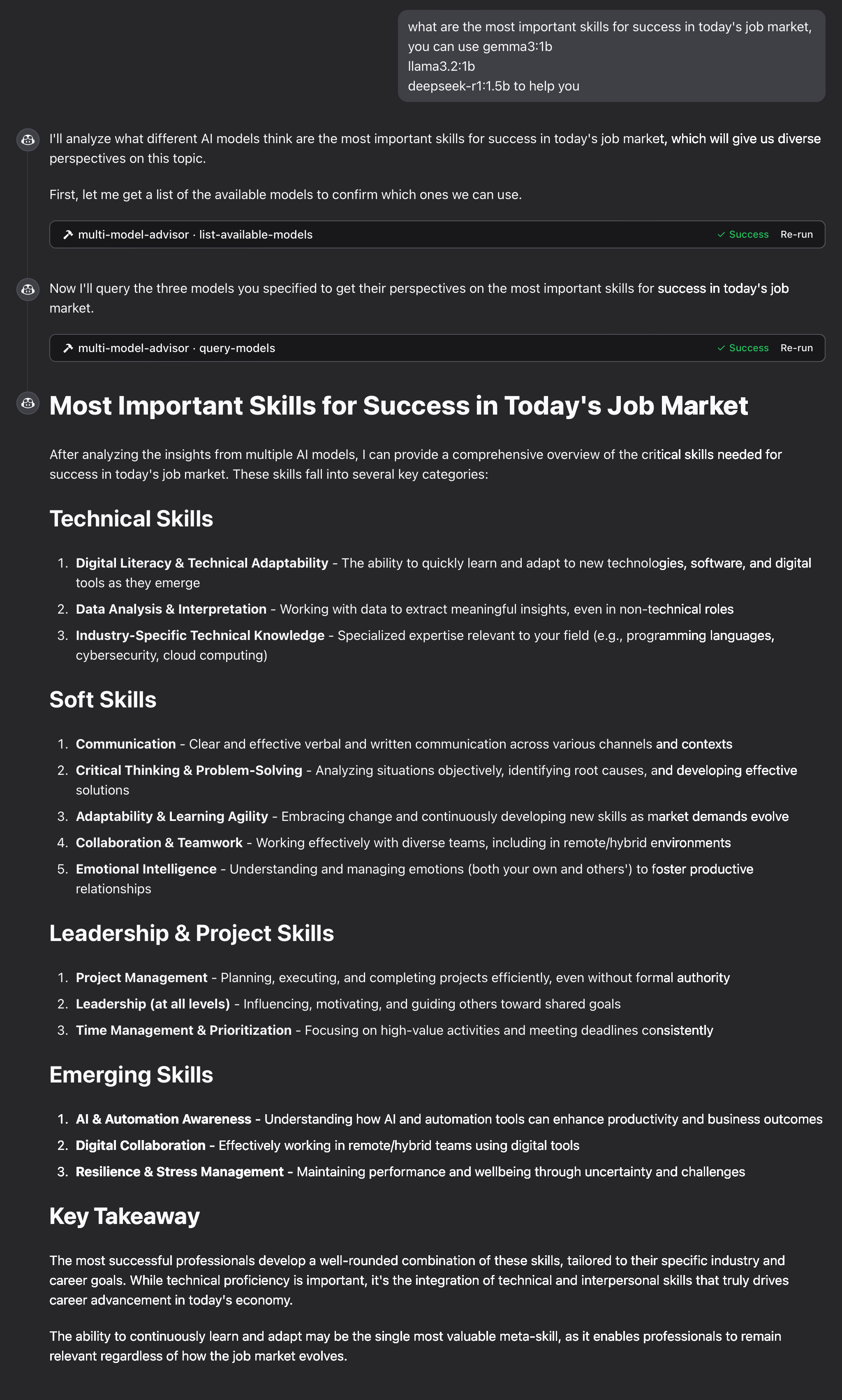
How It Works
The MCP server exposes two tools:
list-available-models: Shows all Ollama models on your systemquery-models: Queries multiple models with a question
When you ask Claude a question referring to the multi-model advisor:
Claude decides to use the
query-modelstoolThe server sends your question to multiple Ollama models
Each model responds with its perspective
Claude receives all responses and synthesizes a comprehensive answer
Each model can have a different "persona" or role assigned, encouraging diverse perspectives.
Troubleshooting
Ollama Connection Issues
If the server can't connect to Ollama:
Ensure Ollama is running (
ollama serve)Check that the OLLAMA_API_URL is correct in your .env file
Try accessing http://localhost:11434 in your browser to verify Ollama is responding
Model Not Found
If a model is reported as unavailable:
Check that you've pulled the model using
ollama pull <model-name>Verify the exact model name using
ollama listUse the
list-available-modelstool to see all available models
Claude Not Showing MCP Tools
If the tools don't appear in Claude:
Ensure you've restarted Claude after updating the configuration
Check the absolute path in claude_desktop_config.json is correct
Look at Claude's logs for error messages
RAM is not enough
Some managers' AI models may have chosen larger models, but there is not enough memory to run them. You can try specifying a smaller model (see the Basic Usage) or upgrading the memory.
License
MIT License
For more details, please see the LICENSE file in this project repository
Contributing
Contributions are welcome! Please feel free to submit a Pull Request.
Available Tools
2 toolslist-available-modelsB
List all available models in Ollama that can be used with query-models
| Name | Required | Description | Default |
|---|---|---|---|
No parameters | |||
TDQS
Does the description disclose side effects, auth requirements, rate limits, or destructive behavior?
No annotations are provided, so the description carries the full burden of behavioral disclosure. It states it 'List all available models' but doesn't describe what 'available' means (e.g., locally installed, remote, with status), how results are returned (e.g., format, pagination), or any constraints (e.g., permissions, rate limits). This leaves significant gaps in understanding the tool's behavior.
Agents need to know what a tool does to the world before calling it. Descriptions should go beyond structured annotations to explain consequences.
Is the description appropriately sized, front-loaded, and free of redundancy?
The description is a single, efficient sentence that directly states the tool's purpose and references the sibling tool. It is front-loaded with the core action and resource, with no wasted words or unnecessary elaboration, making it highly concise and well-structured.
Shorter descriptions cost fewer tokens and are easier for agents to parse. Every sentence should earn its place.
Given the tool's complexity, does the description cover enough for an agent to succeed on first attempt?
Given the tool has 0 parameters, no annotations, and no output schema, the description is minimally adequate by stating what it does. However, it lacks details on behavior (e.g., output format, what 'available' entails) and doesn't leverage the low complexity to provide more context, making it incomplete for fully informed use without additional assumptions.
Complex tools with many parameters or behaviors need more documentation. Simple tools need less. This dimension scales expectations accordingly.
Does the description clarify parameter syntax, constraints, interactions, or defaults beyond what the schema provides?
The input schema has 0 parameters with 100% coverage, so no parameter documentation is needed. The description doesn't add parameter details, which is appropriate here. A baseline of 4 is applied as it effectively handles the lack of parameters without introducing confusion or redundancy.
Input schemas describe structure but not intent. Descriptions should explain non-obvious parameter relationships and valid value ranges.
Does the description clearly state what the tool does and how it differs from similar tools?
The description clearly states the verb 'List' and the resource 'all available models in Ollama', which provides a specific purpose. It distinguishes from the sibling tool 'query-models' by indicating these models are 'used with' it, though it doesn't explicitly differentiate their functions beyond that implied relationship.
Agents choose between tools based on descriptions. A clear purpose with a specific verb and resource helps agents select the right tool.
Does the description explain when to use this tool, when not to, or what alternatives exist?
The description implies usage by mentioning the sibling tool 'query-models', suggesting this tool is for discovering models to use with it. However, it lacks explicit guidance on when to use this tool versus alternatives or any prerequisites, leaving usage context somewhat inferred rather than clearly stated.
Agents often have multiple tools that could apply. Explicit usage guidance like "use X instead of Y when Z" prevents misuse.
query-modelsB
Query multiple AI models via Ollama and get their responses to compare perspectives
| Name | Required | Description | Default |
|---|---|---|---|
| question | Yes | The question to ask all models | |
| models | No | Array of model names to query (defaults to configured models) | |
| system_prompt | No | Optional system prompt to provide context to all models (overridden by model_system_prompts if provided) | |
| model_system_prompts | No | Optional object mapping model names to specific system prompts |
TDQS
Does the description disclose side effects, auth requirements, rate limits, or destructive behavior?
No annotations are provided, so the description carries the full burden of behavioral disclosure. It mentions querying multiple models and getting responses for comparison, but fails to disclose critical behavioral traits such as whether this is a read-only operation, potential rate limits, authentication needs, error handling, or the format of responses. For a tool with no annotations and complex functionality, this is a significant gap.
Agents need to know what a tool does to the world before calling it. Descriptions should go beyond structured annotations to explain consequences.
Is the description appropriately sized, front-loaded, and free of redundancy?
The description is a single, well-structured sentence that efficiently conveys the core functionality without waste. It is front-loaded with the main action ('query multiple AI models') and includes essential context ('via Ollama', 'to compare perspectives'), making every word earn its place.
Shorter descriptions cost fewer tokens and are easier for agents to parse. Every sentence should earn its place.
Given the tool's complexity, does the description cover enough for an agent to succeed on first attempt?
Given the tool's complexity (querying multiple models with optional prompts), lack of annotations, and no output schema, the description is incomplete. It does not explain return values, error conditions, or behavioral constraints, leaving significant gaps for an AI agent to understand how to invoke and interpret results effectively.
Complex tools with many parameters or behaviors need more documentation. Simple tools need less. This dimension scales expectations accordingly.
Does the description clarify parameter syntax, constraints, interactions, or defaults beyond what the schema provides?
Schema description coverage is 100%, so the schema already documents all parameters thoroughly. The description adds minimal value beyond the schema by implying the tool queries 'multiple' models and compares responses, but does not provide additional semantics, syntax, or format details for parameters. Baseline 3 is appropriate when the schema does the heavy lifting.
Input schemas describe structure but not intent. Descriptions should explain non-obvious parameter relationships and valid value ranges.
Does the description clearly state what the tool does and how it differs from similar tools?
The description clearly states the tool's purpose with specific verbs ('query multiple AI models', 'get their responses') and resources ('via Ollama'), and distinguishes it from the sibling tool 'list-available-models' by focusing on querying rather than listing models. It explicitly mentions the comparative aspect ('to compare perspectives'), which adds valuable context beyond basic querying.
Agents choose between tools based on descriptions. A clear purpose with a specific verb and resource helps agents select the right tool.
Does the description explain when to use this tool, when not to, or what alternatives exist?
The description implies usage for comparing model responses to a question, but provides no explicit guidance on when to use this tool versus alternatives (e.g., querying a single model) or any prerequisites. It mentions 'defaults to configured models' for the models parameter, which offers some contextual hint, but lacks clear when/when-not directives or named alternatives.
Agents often have multiple tools that could apply. Explicit usage guidance like "use X instead of Y when Z" prevents misuse.
TDQS
The two tools have clearly distinct purposes: one lists available models, while the other queries models for responses. There is no overlap in functionality, making it easy for an agent to choose the correct tool for each task without confusion.
Both tools use a verb_noun pattern (list-available-models and query-models), which is consistent and readable. However, the hyphenation in 'list-available-models' slightly deviates from the simpler 'query-models', but overall the naming is predictable and follows a clear convention.
With only 2 tools, the server feels thin for its purpose of advising on multiple models. While the tools cover listing and querying, the scope suggests potential gaps in operations like model management or comparison analysis, making the count too low for a comprehensive multi-model advisory system.
The tool surface is significantly incomplete for a multi-model advisor. It lacks operations such as managing models (e.g., adding or removing models), comparing responses in a structured way, or handling model configurations. This will likely cause agent failures when trying to perform full advisory workflows beyond basic listing and querying.
Maintenance
Resources
Unclaimed servers have limited discoverability.
Looking for Admin?
If you are the server author, to access and configure the admin panel.
Related MCP Connectors
MCP server for AI dialogue using various LLM models via AceDataCloud
MCP server for building and testing AI agents with multi-model experimentation and insights.
Hosted MCP server connecting claude.ai, ChatGPT and other AI apps to your own computer
An MCP server that integrates with Discord to provide AI-powered features.
Related MCP Servers
- AlicenseAqualityAmaintenanceAn MCP server that acts as a bridge to query multiple OpenAI-compatible LLMs with MCP tool access. Just like rubber duck debugging, explain your problems to various AI "ducks" who can actually research and get different perspectives!12294175MIT
- AlicenseNot gradedqualityBmaintenanceAn MCP server that queries a panel of LLMs from different providers via OpenRouter and returns their answers side by side, optionally synthesizing them to highlight disagreements.121MIT
- AlicenseBqualityDmaintenanceA universal MCP server that integrates with local Ollama instances, enabling AI-powered chat, model management, and text generation from any MCP-compatible IDE or application.61223MIT
- AlicenseAqualityCmaintenanceAn MCP server that enables multiple AI models (ChatGPT, Gemini, Claude, Grok) to discuss, debate, and reach consensus via browser automation.7MIT
Latest Blog Posts
- Who's Calling? MCP Hosts Are an Identity Blind Spot (And the Spec Knows It)By Om-Shree-0709 on .mcpAgent IdentityOAuth 2.1
- Your AI Chatbot Just Exposed Your CEO's Salary to an InternBy Om-Shree-0709 on .Agent IdentityMCP SecurityOAuth Delegation
- Why MCP Servers Need Execution Sandboxing (And Why Your Current Stack Isn't Enough)By Om-Shree-0709 on .Agentic AiPrompt InjectionWebAssembly
MCP directory API
We provide all the information about MCP servers via our MCP API.
curl -X GET 'https://glama.ai/api/mcp/v1/servers/YuChenSSR/multi-ai-advisor-mcp'
If you have feedback or need assistance with the MCP directory API, please join our Discord server