Multi-Model Advisor
マルチモデルアドバイザー
(锵锵四人行)
モデルコンテキストプロトコル(MCP)サーバーは、複数のOllamaモデルにクエリを実行し、それらの応答を統合することで、単一の質問に対して多様なAIの視点を提供します。これにより、「アドバイザー評議会」のようなアプローチが実現し、Claudeは自身の視点に加えて複数の視点を統合することで、より包括的な回答を提供できます。
graph TD
A[Start] --> B[Worker Local AI 1 Opinion]
A --> C[Worker Local AI 2 Opinion]
A --> D[Worker Local AI 3 Opinion]
B --> E[Manager AI]
C --> E
D --> E
E --> F[Decision Made]Related MCP server: mcp-second-opinion
特徴
1つの質問で複数のOllamaモデルをクエリする
各モデルに異なる役割/ペルソナを割り当てる
システムで利用可能なすべてのOllamaモデルを表示します
各モデルのシステムプロンプトをカスタマイズする
環境変数で設定する
Claude for Desktopとシームレスに統合
前提条件
Node.js 16.x 以上
Ollama がインストールされ、実行中である ( Ollama のインストールを参照)
Claude for Desktop(完全なアドバイザリエクスペリエンスを実現)
インストール
Smithery経由でインストール
Smithery経由で Claude Desktop 用の multi-ai-advisor-mcp を自動的にインストールするには:
npx -y @smithery/cli install @YuChenSSR/multi-ai-advisor-mcp --client claude手動インストール
このリポジトリをクローンします:
git clone https://github.com/YuChenSSR/multi-ai-advisor-mcp.git cd multi-ai-advisor-mcp依存関係をインストールします:
npm installプロジェクトをビルドします。
npm run build必要な Ollama モデルをインストールします。
ollama pull gemma3:1b ollama pull llama3.2:1b ollama pull deepseek-r1:1.5b
構成
希望する構成でプロジェクト ルートに.envファイルを作成します。
# Server configuration
SERVER_NAME=multi-model-advisor
SERVER_VERSION=1.0.0
DEBUG=true
# Ollama configuration
OLLAMA_API_URL=http://localhost:11434
DEFAULT_MODELS=gemma3:1b,llama3.2:1b,deepseek-r1:1.5b
# System prompts for each model
GEMMA_SYSTEM_PROMPT=You are a creative and innovative AI assistant. Think outside the box and offer novel perspectives.
LLAMA_SYSTEM_PROMPT=You are a supportive and empathetic AI assistant focused on human well-being. Provide considerate and balanced advice.
DEEPSEEK_SYSTEM_PROMPT=You are a logical and analytical AI assistant. Think step-by-step and explain your reasoning clearly.デスクトップ版Claudeに接続
Claude for Desktop の構成ファイルを見つけます。
MacOS:
~/Library/Application Support/Claude/claude_desktop_config.jsonWindows:
%APPDATA%\Claude\claude_desktop_config.json
ファイルを編集して、Multi-Model Advisor MCP サーバーを追加します。
{
"mcpServers": {
"multi-model-advisor": {
"command": "node",
"args": ["/absolute/path/to/multi-ai-advisor-mcp/build/index.js"]
}
}
}/absolute/path/to/プロジェクトディレクトリへの実際のパスに置き換えます。デスクトップ版のClaudeを再起動
使用法
Claude for Desktop に接続すると、Multi-Model Advisor をいくつかの方法で使用できるようになります。
利用可能なモデルの一覧
システムで利用可能なすべてのモデルを確認できます。
Show me which Ollama models are available on my systemこれにより、インストールされているすべての Ollama モデルが表示され、どれがデフォルトとして設定されているかが示されます。
基本的な使い方
Claude にマルチモデル アドバイザーを使用するように依頼するだけです。
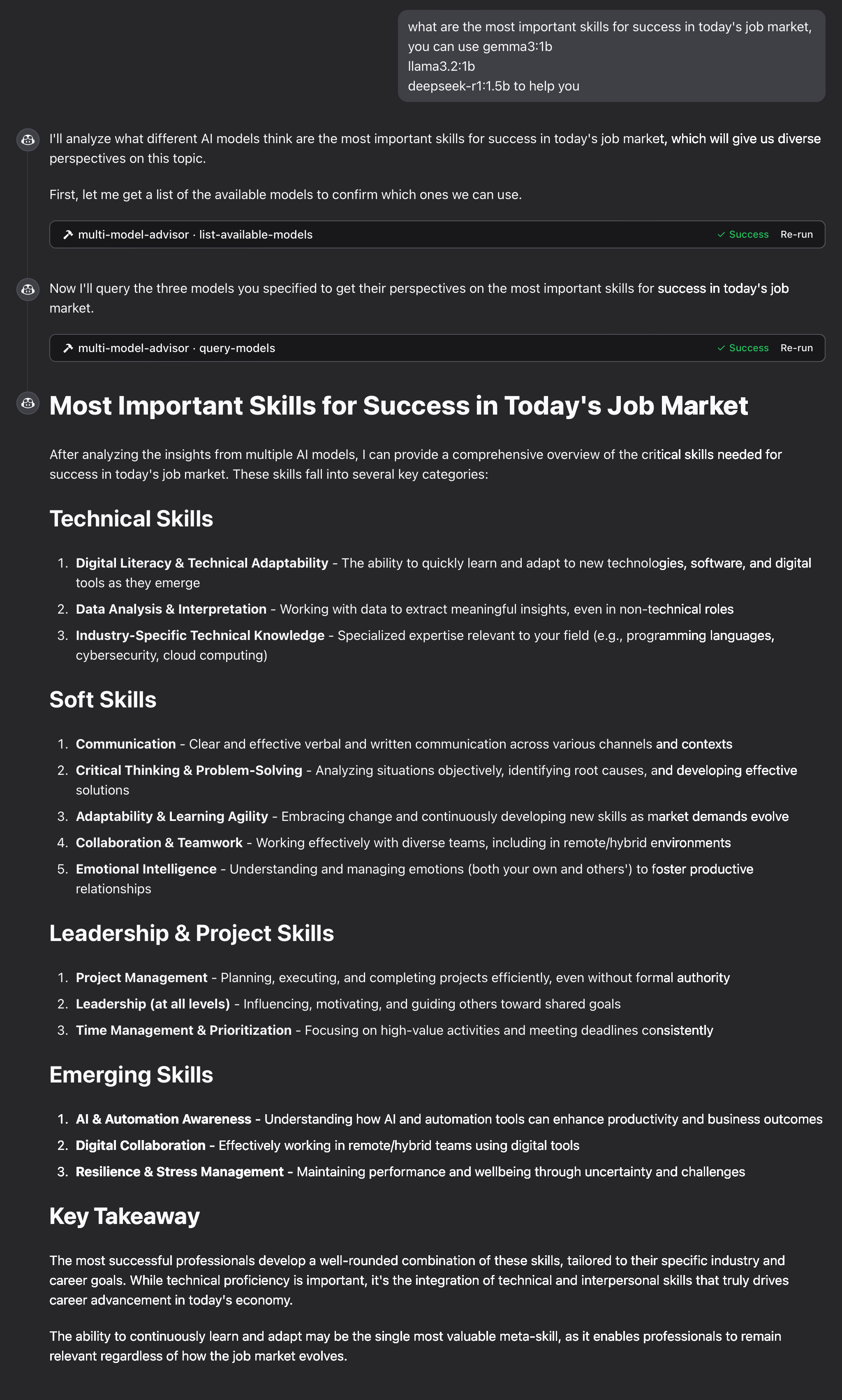
what are the most important skills for success in today's job market,
you can use gemma3:1b, llama3.2:1b, deepseek-r1:1.5b to help you Claude はすべてのデフォルト モデルを照会し、さまざまな観点に基づいて統合された応答を提供します。
仕組み
MCP サーバーは次の 2 つのツールを公開します。
list-available-models: システム上のすべてのOllamaモデルを表示しますquery-models: 質問で複数のモデルを照会する
マルチモデルアドバイザーに関してクロードに質問すると、次のようになります。
クロードは
query-modelsツールを使うことにしたサーバーはあなたの質問を複数のOllamaモデルに送信します
各モデルはそれぞれの視点で反応する
クロードはすべての回答を受け取り、包括的な回答をまとめる
各モデルには異なる「ペルソナ」または役割を割り当てることができるため、多様な視点が促進されます。
トラブルシューティング
Ollama 接続の問題
サーバーがOllamaに接続できない場合:
Ollama が実行中であることを確認する (
ollama serve).env ファイル内の OLLAMA_API_URL が正しいことを確認してください
ブラウザでhttp://localhost:11434にアクセスして、Ollama が応答していることを確認してください。
モデルが見つかりません
モデルが利用できないと報告された場合:
ollama pull <model-name>を使用してモデルをプルしたことを確認します。ollama listを使用して正確なモデル名を確認する利用可能なすべてのモデルを表示するには、
list-available-modelsツールを使用してください。
クロードがMCPツールを表示しない
Claude にツールが表示されない場合:
設定を更新した後、Claudeを再起動してください。
claude_desktop_config.json の絶対パスが正しいことを確認してください
クロードのログでエラーメッセージを確認する
RAMが足りない
一部のマネージャーのAIモデルでは、より大きなモデルが選択されている可能性がありますが、実行に必要なメモリが不足しています。より小さなモデルを指定するか(基本的な使用方法を参照)、メモリをアップグレードしてみてください。
ライセンス
MITライセンス
詳細については、このプロジェクトリポジトリのLICENSEファイルを参照してください。
貢献
貢献を歓迎します!お気軽にプルリクエストを送信してください。
Available Tools
2 toolslist-available-modelsB
List all available models in Ollama that can be used with query-models
| Name | Required | Description | Default |
|---|---|---|---|
No parameters | |||
TDQS
Does the description disclose side effects, auth requirements, rate limits, or destructive behavior?
No annotations are provided, so the description carries the full burden of behavioral disclosure. It states it 'List all available models' but doesn't describe what 'available' means (e.g., locally installed, remote, with status), how results are returned (e.g., format, pagination), or any constraints (e.g., permissions, rate limits). This leaves significant gaps in understanding the tool's behavior.
Agents need to know what a tool does to the world before calling it. Descriptions should go beyond structured annotations to explain consequences.
Is the description appropriately sized, front-loaded, and free of redundancy?
The description is a single, efficient sentence that directly states the tool's purpose and references the sibling tool. It is front-loaded with the core action and resource, with no wasted words or unnecessary elaboration, making it highly concise and well-structured.
Shorter descriptions cost fewer tokens and are easier for agents to parse. Every sentence should earn its place.
Given the tool's complexity, does the description cover enough for an agent to succeed on first attempt?
Given the tool has 0 parameters, no annotations, and no output schema, the description is minimally adequate by stating what it does. However, it lacks details on behavior (e.g., output format, what 'available' entails) and doesn't leverage the low complexity to provide more context, making it incomplete for fully informed use without additional assumptions.
Complex tools with many parameters or behaviors need more documentation. Simple tools need less. This dimension scales expectations accordingly.
Does the description clarify parameter syntax, constraints, interactions, or defaults beyond what the schema provides?
The input schema has 0 parameters with 100% coverage, so no parameter documentation is needed. The description doesn't add parameter details, which is appropriate here. A baseline of 4 is applied as it effectively handles the lack of parameters without introducing confusion or redundancy.
Input schemas describe structure but not intent. Descriptions should explain non-obvious parameter relationships and valid value ranges.
Does the description clearly state what the tool does and how it differs from similar tools?
The description clearly states the verb 'List' and the resource 'all available models in Ollama', which provides a specific purpose. It distinguishes from the sibling tool 'query-models' by indicating these models are 'used with' it, though it doesn't explicitly differentiate their functions beyond that implied relationship.
Agents choose between tools based on descriptions. A clear purpose with a specific verb and resource helps agents select the right tool.
Does the description explain when to use this tool, when not to, or what alternatives exist?
The description implies usage by mentioning the sibling tool 'query-models', suggesting this tool is for discovering models to use with it. However, it lacks explicit guidance on when to use this tool versus alternatives or any prerequisites, leaving usage context somewhat inferred rather than clearly stated.
Agents often have multiple tools that could apply. Explicit usage guidance like "use X instead of Y when Z" prevents misuse.
query-modelsB
Query multiple AI models via Ollama and get their responses to compare perspectives
| Name | Required | Description | Default |
|---|---|---|---|
| question | Yes | The question to ask all models | |
| models | No | Array of model names to query (defaults to configured models) | |
| system_prompt | No | Optional system prompt to provide context to all models (overridden by model_system_prompts if provided) | |
| model_system_prompts | No | Optional object mapping model names to specific system prompts |
TDQS
Does the description disclose side effects, auth requirements, rate limits, or destructive behavior?
No annotations are provided, so the description carries the full burden of behavioral disclosure. It mentions querying multiple models and getting responses for comparison, but fails to disclose critical behavioral traits such as whether this is a read-only operation, potential rate limits, authentication needs, error handling, or the format of responses. For a tool with no annotations and complex functionality, this is a significant gap.
Agents need to know what a tool does to the world before calling it. Descriptions should go beyond structured annotations to explain consequences.
Is the description appropriately sized, front-loaded, and free of redundancy?
The description is a single, well-structured sentence that efficiently conveys the core functionality without waste. It is front-loaded with the main action ('query multiple AI models') and includes essential context ('via Ollama', 'to compare perspectives'), making every word earn its place.
Shorter descriptions cost fewer tokens and are easier for agents to parse. Every sentence should earn its place.
Given the tool's complexity, does the description cover enough for an agent to succeed on first attempt?
Given the tool's complexity (querying multiple models with optional prompts), lack of annotations, and no output schema, the description is incomplete. It does not explain return values, error conditions, or behavioral constraints, leaving significant gaps for an AI agent to understand how to invoke and interpret results effectively.
Complex tools with many parameters or behaviors need more documentation. Simple tools need less. This dimension scales expectations accordingly.
Does the description clarify parameter syntax, constraints, interactions, or defaults beyond what the schema provides?
Schema description coverage is 100%, so the schema already documents all parameters thoroughly. The description adds minimal value beyond the schema by implying the tool queries 'multiple' models and compares responses, but does not provide additional semantics, syntax, or format details for parameters. Baseline 3 is appropriate when the schema does the heavy lifting.
Input schemas describe structure but not intent. Descriptions should explain non-obvious parameter relationships and valid value ranges.
Does the description clearly state what the tool does and how it differs from similar tools?
The description clearly states the tool's purpose with specific verbs ('query multiple AI models', 'get their responses') and resources ('via Ollama'), and distinguishes it from the sibling tool 'list-available-models' by focusing on querying rather than listing models. It explicitly mentions the comparative aspect ('to compare perspectives'), which adds valuable context beyond basic querying.
Agents choose between tools based on descriptions. A clear purpose with a specific verb and resource helps agents select the right tool.
Does the description explain when to use this tool, when not to, or what alternatives exist?
The description implies usage for comparing model responses to a question, but provides no explicit guidance on when to use this tool versus alternatives (e.g., querying a single model) or any prerequisites. It mentions 'defaults to configured models' for the models parameter, which offers some contextual hint, but lacks clear when/when-not directives or named alternatives.
Agents often have multiple tools that could apply. Explicit usage guidance like "use X instead of Y when Z" prevents misuse.
Tool Schema Changelog
Recent tool additions, removals, and schema changes observed during successful MCP inspections.
1 tool update
v1.0.0- Changed
list-available-models1 field changed- removed
Input schema / additionalPropertiesRemoved value: -false
2 tool updates
- First observed
list-available-models - First observed
query-models
TDQS
Scored across 2 tools
The two tools have clearly distinct purposes: one lists available models, while the other queries models for responses. There is no overlap in functionality, making it easy for an agent to choose the correct tool for each task without confusion.
Both tools use a verb_noun pattern (list-available-models and query-models), which is consistent and readable. However, the hyphenation in 'list-available-models' slightly deviates from the simpler 'query-models', but overall the naming is predictable and follows a clear convention.
With only 2 tools, the server feels thin for its purpose of advising on multiple models. While the tools cover listing and querying, the scope suggests potential gaps in operations like model management or comparison analysis, making the count too low for a comprehensive multi-model advisory system.
The tool surface is significantly incomplete for a multi-model advisor. It lacks operations such as managing models (e.g., adding or removing models), comparing responses in a structured way, or handling model configurations. This will likely cause agent failures when trying to perform full advisory workflows beyond basic listing and querying.
Maintenance
Related MCP Connectors
MCP server for AI dialogue using various LLM models via AceDataCloud
MCP server for building and testing AI agents with multi-model experimentation and insights.
MCP server for OpenAI API (chat completions, image generation, embeddings) via AceDataCloud
An MCP server that integrates with Discord to provide AI-powered features.
Related MCP Servers
- AlicenseAqualityAmaintenanceAn MCP server that acts as a bridge to query multiple OpenAI-compatible LLMs with MCP tool access. Just like rubber duck debugging, explain your problems to various AI "ducks" who can actually research and get different perspectives!12552 npm178MIT
- AlicenseNot gradedqualityDmaintenanceAn MCP server that queries a panel of LLMs from different providers via OpenRouter and returns their answers side by side, optionally synthesizing them to highlight disagreements.8 npm1MIT
- AlicenseBqualityDmaintenanceA universal MCP server that integrates with local Ollama instances, enabling AI-powered chat, model management, and text generation from any MCP-compatible IDE or application.676 npm3MIT
- AlicenseAqualityCmaintenanceAn MCP server that enables multiple AI models (ChatGPT, Gemini, Claude, Grok) to discuss, debate, and reach consensus via browser automation.71MIT