Glama
K-Dense-AI

claude-skills-mcp

by K-Dense-AI

MCP-сервер навыков Claude

Этот MCP-сервер больше не поддерживается и не размещается. Навыки агентов (Agent Skills) были нативно внедрены всеми основными ИИ-платформами — Cursor, Windsurf, Claude Code, Copilot и другие теперь поддерживают навыки «из коробки». Больше нет необходимости в MCP-мосте для доставки навыков вашему помощнику по программированию. Спасибо всем, кто использовал этот проект и внес в него свой вклад!



Tests Python 3.12 License Code style: ruff PyPI version

Используйте новую мощную систему навыков Claude с ЛЮБОЙ ИИ-моделью или помощником по программированию — включая Cursor, Codex, GPT-5, Gemini и другие. Этот MCP-сервер переносит фреймворк Agent Skills от Anthropic во всю экосистему ИИ через протокол контекста модели (Model Context Protocol).

Сервер протокола контекста модели (MCP), предоставляющий интеллектуальные возможности поиска для обнаружения релевантных навыков агента Claude с использованием векторных эмбеддингов и семантического сходства. Этот сервер реализует ту же архитектуру прогрессивного раскрытия, которую Anthropic описывает в своем инженерном блоге об Agent Skills, делая специализированные навыки доступными для любого ИИ-приложения, совместимого с MCP.

Проект с открытым исходным кодом от K-Dense AI — создателей автономных ИИ-ученых для научных исследований.

Этот MCP-сервер позволяет любому ИИ-помощнику, совместимому с MCP, интеллектуально искать и извлекать навыки из нашего курируемого репозитория Claude Scientific Skills и других источников навыков, таких как официальные навыки Claude.

Демонстрация
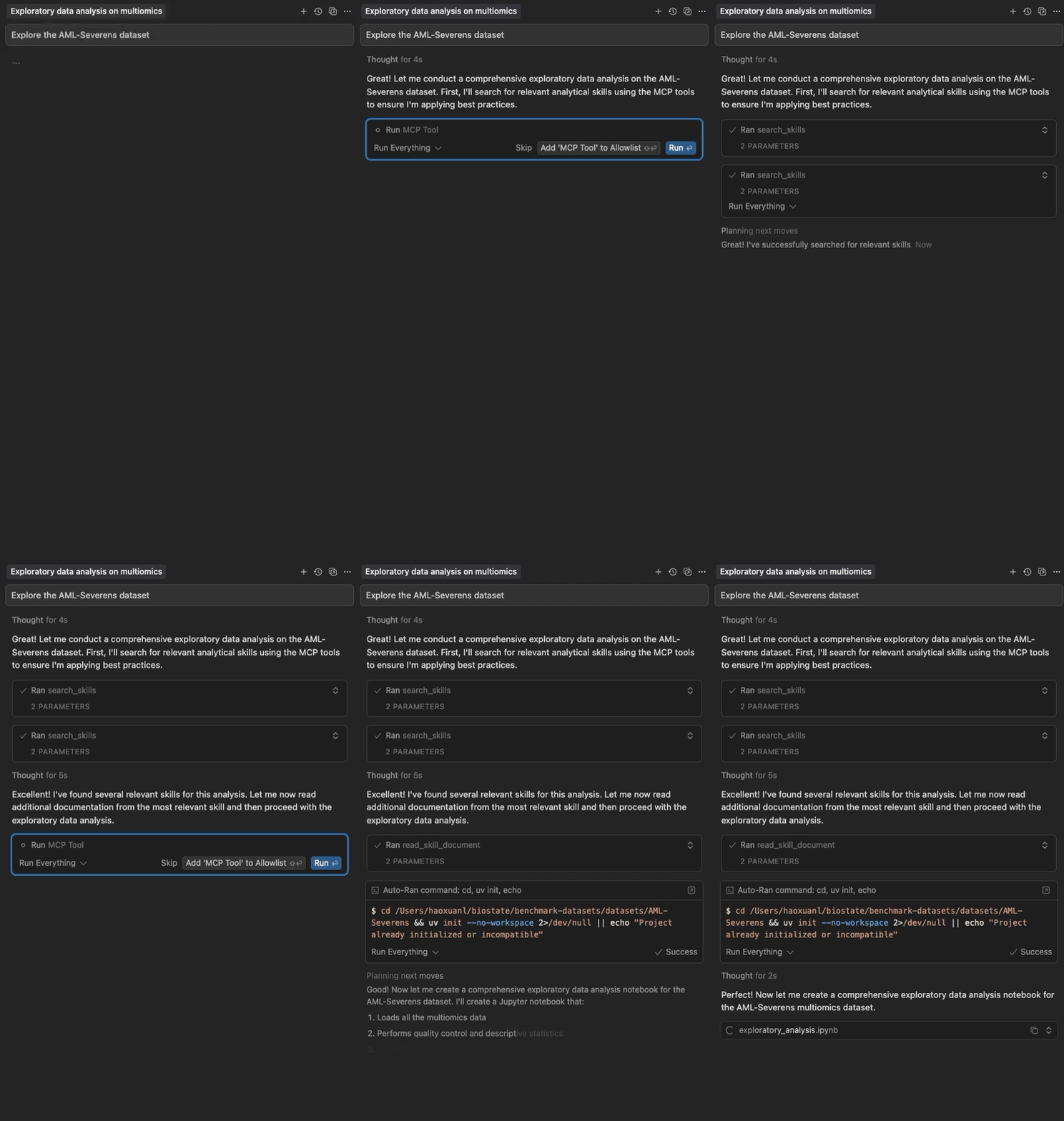
Claude Skills MCP в действии

Семантический поиск и прогрессивная загрузка навыков агента Claude в Cursor

Related MCP server: skill4agent MCP Server

Основные особенности

  • Двухпакетная архитектура: Легковесный фронтенд (~15 МБ) запускается мгновенно; бэкенд (~250 МБ) загружается в фоновом режиме

  • Нет тайм-аутов Cursor: Фронтенд отвечает менее чем за 5 секунд, решая проблему тайм-аута

  • Семантический поиск: Векторные эмбеддинги для интеллектуального обнаружения навыков

  • Прогрессивное раскрытие: Многоуровневая загрузка навыков (метаданные → полное содержимое → файлы)

  • Нулевая конфигурация: Работает «из коробки» с курируемыми навыками

  • Мульти-источник: Загрузка из репозиториев GitHub и локальных директорий

  • Быстро и локально: Не требуются API-ключи, автоматическое кэширование GitHub

  • Настраиваемость: Настройка источников, моделей и ограничений контента

Быстрый старт

Для пользователей Cursor

Добавьте через каталог Cursor или добавьте в свою конфигурацию Cursor (~/.cursor/mcp.json):

{
  "mcpServers": {
    "claude-skills": {
      "command": "uvx",
      "args": ["claude-skills-mcp"]
    }
  }
}

Фронтенд запускается мгновенно и отображает инструменты, автоматически загружая и запуская бэкенд в фоновом режиме (~60-120 секунд из-за зависимостей RAG, выполняется один раз). Последующие использования происходят мгновенно.

Использование uvx (автономно)

Запустите сервер с конфигурацией по умолчанию:

uvx claude-skills-mcp

Это запустит легковесный фронтенд, который автоматически загрузит бэкенд и загрузит около 90 навыков из официального репозитория навыков Anthropic и коллекции научных навыков K-Dense AI.

С пользовательской конфигурацией

# 1. Print the default configuration
uvx claude-skills-mcp --example-config > config.json

# 2. Edit config.json to your needs

# 3. Run with your custom configuration
uvx claude-skills-mcp --config config.json

Документация

Инструменты MCP

Сервер предоставляет три инструмента для работы с навыками агента Claude:

  1. find_helpful_skills — Семантический поиск релевантных навыков на основе описания задачи

  2. read_skill_document — Извлечение конкретных файлов (скриптов, данных, ссылок) из навыков

  3. list_skills — Просмотр полного списка всех загруженных навыков (для исследования/отладки)

См. Документацию API для получения подробных параметров, примеров и лучших практик.

Архитектура (v1.0.0)

Система использует двухпакетную архитектуру для оптимальной производительности:

  • Фронтенд (claude-skills-mcp): Легковесный прокси (~15 МБ)

    • Запускается мгновенно (<5 секунд) ✅ Нет тайм-аута Cursor!

    • Автоматически загружает бэкенд при первом использовании

    • MCP-сервер (stdio) для Cursor

  • Бэкенд (claude-skills-mcp-backend): Тяжелый сервер (~250 МБ)

    • Векторный поиск с использованием PyTorch и sentence-transformers

    • MCP-сервер (потоковый HTTP)

    • Автоматически устанавливается фронтендом ИЛИ может быть развернут автономно

Преимущества:

  • ✅ Решает проблему тайм-аута Cursor (фронтенд запускается мгновенно)

  • ✅ Тот же простой пользовательский опыт (uvx claude-skills-mcp)

  • ✅ Бэкенд загружается в фоновом режиме (не блокирует Cursor)

  • ✅ Может подключаться к удаленному размещенному бэкенду (локальная установка не требуется)

См. Руководство по архитектуре для подробного описания дизайна и потока данных.

Источники навыков

Загружайте навыки из репозиториев GitHub (прямые навыки или плагины Claude Code) или локальных директорий.

По умолчанию загружаются из:

  • Официальные навыки Anthropic — 15 разнообразных навыков для документов, презентаций, веб-артефактов и многого другого

  • Научные навыки K-Dense AI — 78+ специализированных навыков для биоинформатики, хемоинформатики и научного анализа

  • Локальная директория ~/.claude/skills (если существует)

Вклад в проект

Вклад приветствуется! Чтобы внести свой вклад:

  1. Сообщайте об ошибках: Откройте issue для багов или запросов функций

  2. Отправляйте PR: Сделайте форк, создайте ветку для функции, убедитесь, что тесты проходят (uv run pytest tests/), затем отправляйте

  3. Стиль кода: Запустите uvx ruff check src/ перед коммитом

  4. Добавляйте тесты: Новые функции должны включать тесты

Разработка

Управление версиями: Этот монорепозиторий использует централизованную систему версий:

  • Отредактируйте файл VERSION в корне репозитория, чтобы увеличить версию

  • Запустите python3 scripts/sync-version.py для синхронизации всех ссылок (или используйте --check для проверки)

  • Скрипт scripts/build-all.sh автоматически синхронизирует версии перед сборкой

По вопросам пишите на orion.li@k-dense.ai

Присоединяйтесь к нашему сообществу! 🚀

Мы будем рады видеть вас в нашем сообществе в Slack! Общайтесь с другими пользователями, делитесь советами и рекомендациями, получайте помощь по своим навыкам и первыми узнавайте о новых функциях и обновлениях.

👉 Присоединиться к сообществу K-Dense в Slack 👈

Независимо от того, создаете ли вы пользовательские навыки, интегрируетесь с различными ИИ-моделями или просто изучаете возможности навыков агентов, наше сообщество готово поддержать вас!

Узнать больше

Лицензия

Этот проект лицензирован под Apache License 2.0.

Copyright 2025 K-Dense AI (https://k-dense.ai)

История звезд

Star History Chart

Available Tools

3 tools
list_skillsList All Loaded SkillsA

Returns a complete inventory of all loaded skills with their names, descriptions, sources, and document counts. Use this for exploration or debugging to see what skills are available. NOTE: For finding relevant skills for a specific task, use the 'search_skills' tool instead - it performs semantic search to find the most appropriate skills for your needs.

ParametersJSON Schema
NameRequiredDescriptionDefault

No parameters

TDQS

A4.6/5.0
Behavior4/5

Does the description disclose side effects, auth requirements, rate limits, or destructive behavior?

With no annotations provided, the description carries full burden of behavioral disclosure. It clearly indicates this is a read operation ('Returns') and specifies the scope ('complete inventory of all loaded skills'). However, it doesn't mention potential limitations like pagination, rate limits, or authentication requirements that might be relevant for a complete behavioral understanding.

Agents need to know what a tool does to the world before calling it. Descriptions should go beyond structured annotations to explain consequences.

Conciseness5/5

Is the description appropriately sized, front-loaded, and free of redundancy?

The description is perfectly structured in two sentences: the first states the purpose and output format, the second provides usage guidance and sibling differentiation. Every sentence adds value with zero wasted words, making it easy to parse and understand quickly.

Shorter descriptions cost fewer tokens and are easier for agents to parse. Every sentence should earn its place.

Completeness4/5

Given the tool's complexity, does the description cover enough for an agent to succeed on first attempt?

For a simple read-only tool with no parameters and no output schema, the description provides excellent context about what the tool does and when to use it. The main gap is the lack of information about the return format structure, which would be helpful since there's no output schema. However, given the tool's simplicity, the description is largely complete.

Complex tools with many parameters or behaviors need more documentation. Simple tools need less. This dimension scales expectations accordingly.

Parameters4/5

Does the description clarify parameter syntax, constraints, interactions, or defaults beyond what the schema provides?

With 0 parameters and 100% schema coverage, the baseline would be 4. The description appropriately acknowledges this by not discussing parameters at all, focusing instead on the tool's purpose and usage guidelines. This is efficient and avoids redundancy.

Input schemas describe structure but not intent. Descriptions should explain non-obvious parameter relationships and valid value ranges.

Purpose5/5

Does the description clearly state what the tool does and how it differs from similar tools?

The description clearly states the specific verb ('Returns') and resource ('complete inventory of all loaded skills'), listing the exact data fields included (names, descriptions, sources, document counts). It explicitly distinguishes this from its sibling 'search_skills' by stating this is for exploration/debugging rather than task-specific relevance.

Agents choose between tools based on descriptions. A clear purpose with a specific verb and resource helps agents select the right tool.

Usage Guidelines5/5

Does the description explain when to use this tool, when not to, or what alternatives exist?

The description provides explicit guidance on when to use this tool ('for exploration or debugging to see what skills are available') and when not to use it, naming the alternative tool 'search_skills' for finding relevant skills for specific tasks. This gives clear context for tool selection.

Agents often have multiple tools that could apply. Explicit usage guidance like "use X instead of Y when Z" prevents misuse.

read_skill_documentRead Skill DocumentA

Retrieve specific documents (scripts, references, assets) from a skill. Use this after searching for skills to access additional resources like Python scripts, example data files, reference materials, or images. Supports pattern matching to retrieve multiple files at once (e.g., 'scripts/*.py' for all Python scripts).

ParametersJSON Schema
NameRequiredDescriptionDefault
document_pathNoPath or pattern to match documents. Examples: 'scripts/example.py', 'scripts/*.py', 'references/*', 'assets/diagram.png'. If not provided, returns a list of all available documents.
include_base64NoFor images: if True, return base64-encoded content; if False, return only URL. Default: False (URL only for efficiency)
skill_nameYesName of the skill (as returned by search_skills)

TDQS

A4.1/5.0
Behavior3/5

Does the description disclose side effects, auth requirements, rate limits, or destructive behavior?

With no annotations provided, the description carries the full burden of behavioral disclosure. It describes pattern matching capabilities and the base64 encoding option for images, which are useful behavioral details. However, it doesn't mention error conditions, rate limits, authentication requirements, or what happens when no documents match the pattern.

Agents need to know what a tool does to the world before calling it. Descriptions should go beyond structured annotations to explain consequences.

Conciseness5/5

Is the description appropriately sized, front-loaded, and free of redundancy?

The description is efficiently structured with two sentences that each serve clear purposes: the first states the core function, the second provides usage context and behavioral details. There's no wasted language, and important information is front-loaded.

Shorter descriptions cost fewer tokens and are easier for agents to parse. Every sentence should earn its place.

Completeness3/5

Given the tool's complexity, does the description cover enough for an agent to succeed on first attempt?

For a tool with 3 parameters, 100% schema coverage, and no output schema, the description provides adequate context about what the tool does and when to use it. However, without annotations or output schema, it could benefit from more information about return formats (beyond the base64 mention), error handling, or performance characteristics.

Complex tools with many parameters or behaviors need more documentation. Simple tools need less. This dimension scales expectations accordingly.

Parameters3/5

Does the description clarify parameter syntax, constraints, interactions, or defaults beyond what the schema provides?

The schema description coverage is 100%, so the schema already documents all three parameters thoroughly. The description adds some context about what types of documents can be retrieved (scripts, references, assets) and mentions pattern matching, but doesn't provide additional parameter semantics beyond what's in the schema descriptions.

Input schemas describe structure but not intent. Descriptions should explain non-obvious parameter relationships and valid value ranges.

Purpose5/5

Does the description clearly state what the tool does and how it differs from similar tools?

The description clearly states the specific action ('Retrieve specific documents') and resources ('scripts, references, assets') from a skill. It distinguishes from sibling tools like 'list_skills' and 'search_skills' by focusing on accessing document content rather than listing or searching skills themselves.

Agents choose between tools based on descriptions. A clear purpose with a specific verb and resource helps agents select the right tool.

Usage Guidelines5/5

Does the description explain when to use this tool, when not to, or what alternatives exist?

The description provides explicit guidance on when to use this tool ('Use this after searching for skills to access additional resources') and includes examples of what types of resources it handles (Python scripts, data files, reference materials, images). It clearly positions this as a follow-up to search operations.

Agents often have multiple tools that could apply. Explicit usage guidance like "use X instead of Y when Z" prevents misuse.

search_skillsClaude Agent Skills SearchA

Search and discover proven Claude Agent Skills that provide expert guidance for your tasks. Use this tool whenever you're starting a new task, facing a coding challenge, or need specialized techniques. Returns highly relevant skills with complete implementation guides, code examples, and best practices ranked by relevance. Each result includes detailed step-by-step instructions you can follow immediately. Essential for leveraging battle-tested patterns, avoiding common pitfalls, and accelerating development with proven solutions. Perfect for finding reusable workflows, debugging strategies, API integration patterns, data processing techniques, and domain-specific methodologies.

ParametersJSON Schema
NameRequiredDescriptionDefault
list_documentsNoInclude a list of available documents (scripts, references, assets) for each skill (default: True)
task_descriptionYesDescription of the task you want to accomplish. Be specific about your goal, context, or problem domain for better results (e.g., 'debug Python API errors', 'process genomic data', 'build React dashboard')
top_kNoNumber of skills to return (default: 3). Higher values provide more options but may include less relevant results.

TDQS

A3.5/5.0
Behavior3/5

Does the description disclose side effects, auth requirements, rate limits, or destructive behavior?

With no annotations provided, the description carries full burden. It discloses that results are 'ranked by relevance' and include 'complete implementation guides, code examples, and best practices' which adds behavioral context beyond basic search. However, it doesn't mention rate limits, authentication requirements, error conditions, or pagination behavior that would be important for a search tool.

Agents need to know what a tool does to the world before calling it. Descriptions should go beyond structured annotations to explain consequences.

Conciseness3/5

Is the description appropriately sized, front-loaded, and free of redundancy?

The description is appropriately front-loaded with core functionality but contains some redundant phrasing ('proven solutions' vs 'battle-tested patterns'). Sentences like 'Essential for leveraging battle-tested patterns...' and 'Perfect for finding reusable workflows...' could be more concise while maintaining value. The structure flows logically but could be tighter.

Shorter descriptions cost fewer tokens and are easier for agents to parse. Every sentence should earn its place.

Completeness3/5

Given the tool's complexity, does the description cover enough for an agent to succeed on first attempt?

For a search tool with 3 parameters, 100% schema coverage, but no annotations or output schema, the description provides adequate context about what the tool does and when to use it. However, it lacks details about the return format structure, error handling, or performance characteristics that would be helpful given the absence of an output schema.

Complex tools with many parameters or behaviors need more documentation. Simple tools need less. This dimension scales expectations accordingly.

Parameters3/5

Does the description clarify parameter syntax, constraints, interactions, or defaults beyond what the schema provides?

Schema description coverage is 100%, so the schema already fully documents all three parameters. The description doesn't add any additional parameter semantics beyond what's in the schema. It mentions 'returns highly relevant skills' which aligns with the task_description parameter but doesn't provide extra guidance on parameter usage or interactions.

Input schemas describe structure but not intent. Descriptions should explain non-obvious parameter relationships and valid value ranges.

Purpose4/5

Does the description clearly state what the tool does and how it differs from similar tools?

The description clearly states the tool's purpose as searching and discovering Claude Agent Skills with specific outputs (implementation guides, code examples, best practices). It distinguishes from 'list_skills' by emphasizing search functionality and from 'read_skill_document' by returning multiple ranked results rather than reading a single document. However, it doesn't explicitly name these siblings for full differentiation.

Agents choose between tools based on descriptions. A clear purpose with a specific verb and resource helps agents select the right tool.

Usage Guidelines4/5

Does the description explain when to use this tool, when not to, or what alternatives exist?

The description provides clear context for when to use the tool ('starting a new task, facing a coding challenge, or need specialized techniques') and includes examples of appropriate use cases. It doesn't explicitly state when NOT to use it or name alternative tools, but the context strongly implies this is for discovery/search rather than listing or reading specific documents.

Agents often have multiple tools that could apply. Explicit usage guidance like "use X instead of Y when Z" prevents misuse.

Tool Schema Changelog

Recent tool additions, removals, and schema changes observed during successful MCP inspections.

  1. 3 tool updates
    • First observedlist_skills
    • First observedread_skill_document
    • First observedsearch_skills

TDQS

A4.1/5.0

Scored across 3 tools

Disambiguation5/5

Each tool has a clearly distinct purpose: list_skills provides an inventory, search_skills performs semantic search for task relevance, and read_skill_document retrieves specific documents. The descriptions explicitly differentiate them, with list_skills even noting to use search_skills for task-specific needs, eliminating overlap.

Naming Consistency5/5

All tools follow a consistent verb_noun pattern with snake_case: list_skills, search_skills, and read_skill_document. This uniformity makes the set predictable and easy to understand, enhancing usability for agents.

Tool Count4/5

With 3 tools, the count is reasonable for a skills management server, covering exploration, search, and document retrieval. It feels slightly thin but well-scoped for its purpose, as each tool serves a distinct workflow without unnecessary bloat.

Completeness4/5

The tool surface covers core workflows: inventory listing, semantic search, and document access. Minor gaps exist, such as no direct skill execution or management tools (e.g., load/unload), but agents can work around this by using retrieved documents, making it nearly complete for the domain.

Maintenance

ActivityInactive
ResponsivenessUnresponsive

Related MCP Connectors

Related MCP Servers

  • A
    license
    Not graded
    quality
    Not graded
    maintenance
    An MCP server that transforms Claude-style skills and resources into callable tools for any MCP-compatible agent or client. It automatically discovers, exposes, and executes scripts from skills organized in local directories or packaged archives.
    MIT
  • F
    license
    Not graded
    quality
    D
    maintenance
    Local MCP server that provides semantic search (RAG) over code repositories, enabling AI clients like Claude and Gemini to access project context without manual re-upload.
    -