Claude Skills MCP Server
This MCP server is no longer hosted or maintained. Agent Skills have been natively adopted by all major AI platforms — Cursor, Windsurf, Claude Code, Copilot, and others now support skills out of the box. There is no longer a need for an MCP bridge to deliver skills to your coding assistant. The final release (v1.1.0) remains installable from PyPI. Thank you to everyone who used and contributed to this project!





Use Claude's powerful Skills system with ANY AI model or coding assistant - including Cursor, Codex, GPT-5, Gemini, and more. This MCP server brings Anthropic's Agent Skills framework to the entire AI ecosystem through the Model Context Protocol.
A Model Context Protocol (MCP) server that provides intelligent search capabilities for discovering relevant Claude Agent Skills using vector embeddings and semantic similarity. This server implements the same progressive disclosure architecture that Anthropic describes in their Agent Skills engineering blog, making specialized skills available to any MCP-compatible AI application.
An open-source project by K-Dense - creators of autonomous AI scientists for scientific research.
This MCP server enables any MCP-compatible AI assistant to intelligently search and retrieve skills from our curated Scientific Agent Skills repository and other skill sources like the Official Claude Skills.
Demo
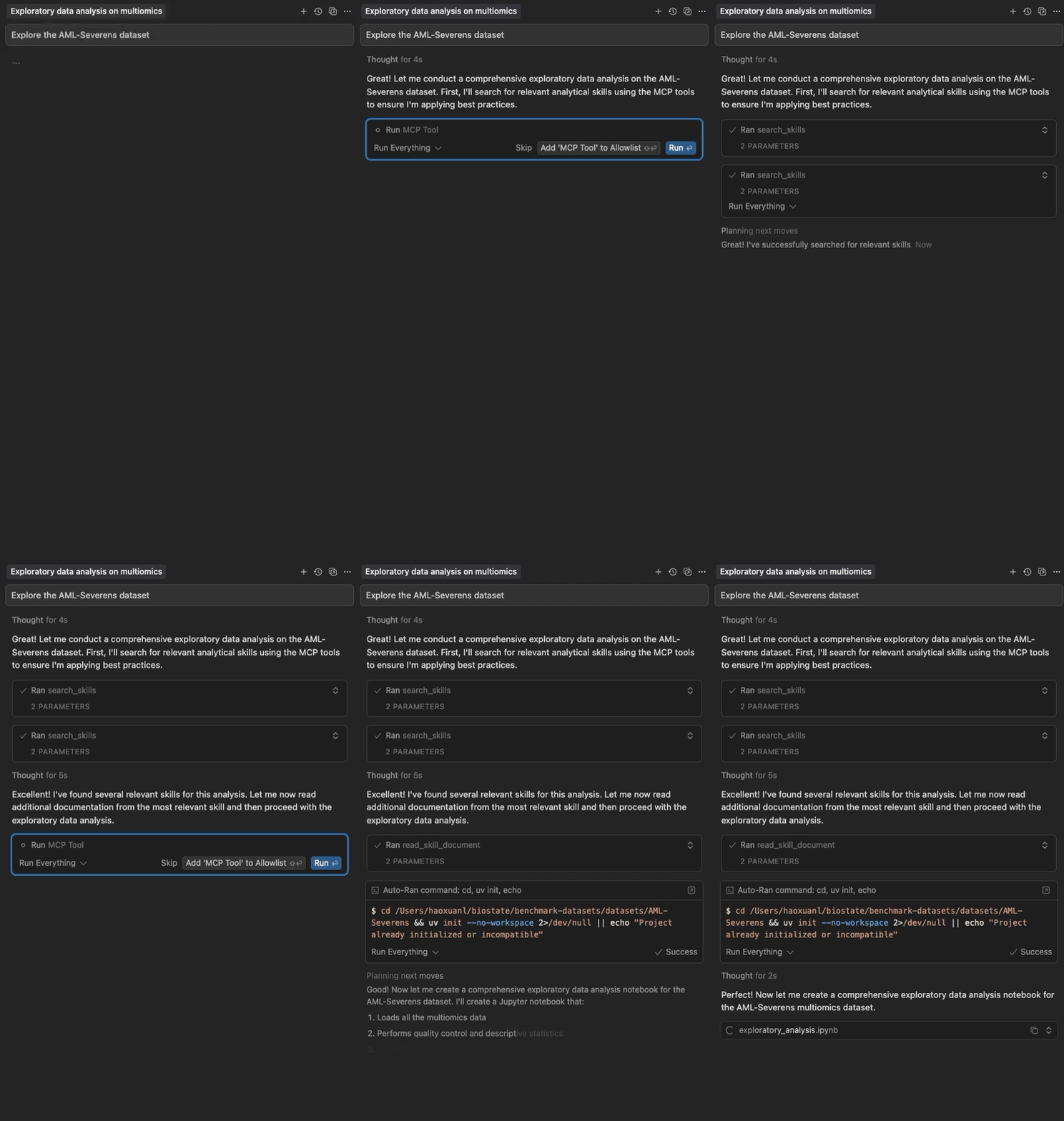
Semantic search and progressive loading of Claude Agent Skills in Cursor
Related MCP server: skill4agent MCP Server
Highlights
Two-Package Architecture: Lightweight frontend (~15 MB) starts instantly; backend (~250 MB) downloads in background
No Cursor Timeout: Frontend responds in <5 seconds, solving the timeout issue
Semantic Search: Vector embeddings for intelligent skill discovery
Progressive Disclosure: Multi-level skill loading (metadata → full content → files)
Zero Configuration: Works out of the box with curated skills
Multi-Source: Load from GitHub repositories and local directories
Auto-Updating: Checks skill sources hourly and re-indexes when they change
Fast & Local: No API keys needed, with automatic GitHub caching
Configurable: Customize sources, models, and content limits
Quick Start
For Cursor Users
Add through the Cursor Directory, or add to your Cursor config (~/.cursor/mcp.json):
{
  "mcpServers": {
    "claude-skills": {
      "command": "uvx",
      "args": ["claude-skills-mcp"]
    }
  }
}
The frontend starts instantly and displays tools, automatically downloading and starting the backend in the background (~60-120s due to RAG dependencies, one-time). Subsequent uses are instant.
Using uvx (Standalone)
Run the server with default configuration:
This starts the lightweight frontend which auto-downloads the backend and loads 160+ skills from Anthropic's official skills repository and K-Dense's Scientific Agent Skills collection.
With Custom Configuration
# 1. Print the default configuration
uvx claude-skills-mcp --example-config > config.json

# 2. Edit config.json to your needs

# 3. Run with your custom configuration
uvx claude-skills-mcp --config config.json
Documentation
Getting Started - Installation, Cursor setup, CLI usage, and troubleshooting
Architecture Guide - Two-package design, data flow, and components
API Documentation - Tool parameters, examples, and best practices
Usage Examples - Advanced configuration, real-world use cases, and custom skill creation
Auto-Update Feature - Automatic hourly skill source refresh and change detection
Testing Guide - Complete testing instructions, CI/CD, and coverage analysis
MCP Tools
The server provides three tools for working with Claude Agent Skills:
find_helpful_skills - Semantic search for relevant skills based on task description
read_skill_document - Retrieve specific files (scripts, data, references) from skills
list_skills - View complete inventory of all loaded skills (for exploration/debugging)
See API Documentation for detailed parameters, examples, and best practices.
Architecture
The system uses a two-package architecture for optimal performance:
Benefits:
✅ Solves Cursor timeout issue (frontend starts instantly)
✅ Same simple user experience (uvx claude-skills-mcp)
✅ Backend downloads in background (doesn't block Cursor)
✅ Can connect to remote hosted backend (no local install needed)
See Architecture Guide for detailed design and data flow.
Skill Sources
Load skills from GitHub repositories (direct skills or Claude Code plugins) or local directories.
By default, loads from:
Contributing
As this project is no longer maintained, new issues and pull requests may not be reviewed. If you'd like to build on it, please fork the repository. For reference, the original workflow was:
Report issues: Open an issue for bugs or feature requests
Submit PRs: Fork, create a feature branch, ensure tests pass (uv run pytest tests/), then submit
Code style: Run uvx ruff check src/ before committing
Add tests: New features should include tests
Development
Version Management: This monorepo uses a centralized version system:
Edit the VERSION file at the repo root to bump the version
Run python3 scripts/sync-version.py to sync all references (or use --check to verify)
The scripts/build-all.sh script automatically syncs versions before building
For questions, email orion.li@k-dense.ai
Learn More
License
This project is licensed under the Apache License 2.0.
Copyright 2025-2026 K-Dense (https://www.k-dense.ai)

