Glama
K-Dense-AI

claude-skills-mcp

by K-Dense-AI

Claude Skills MCP 서버

이 MCP 서버는 더 이상 호스팅되거나 유지 관리되지 않습니다. 에이전트 스킬은 Cursor, Windsurf, Claude Code, Copilot 등 모든 주요 AI 플랫폼에서 기본적으로 채택되었습니다. 이제 코딩 어시스턴트에게 스킬을 제공하기 위해 MCP 브릿지가 필요하지 않습니다. 이 프로젝트를 사용하고 기여해 주신 모든 분께 감사드립니다!



Tests Python 3.12 License Code style: ruff PyPI version

Claude의 강력한 새로운 스킬 시스템을 Cursor, Codex, GPT-5, Gemini 등을 포함한 모든 AI 모델 또는 코딩 어시스턴트와 함께 사용하세요. 이 MCP 서버는 Model Context Protocol을 통해 Anthropic의 에이전트 스킬 프레임워크를 전체 AI 생태계로 가져옵니다.

벡터 임베딩과 의미론적 유사성을 사용하여 관련 Claude 에이전트 스킬을 검색할 수 있는 지능형 검색 기능을 제공하는 MCP(Model Context Protocol) 서버입니다. 이 서버는 Anthropic이 에이전트 스킬 엔지니어링 블로그에서 설명한 것과 동일한 점진적 공개 아키텍처를 구현하여, MCP 호환 AI 애플리케이션이라면 무엇이든 전문화된 스킬을 사용할 수 있게 합니다.

K-Dense AI의 오픈 소스 프로젝트 - 과학 연구를 위한 자율 AI 과학자 제작자.

이 MCP 서버를 사용하면 모든 MCP 호환 AI 어시스턴트가 당사의 큐레이팅된 Claude Scientific Skills 저장소 및 공식 Claude Skills와 같은 기타 스킬 소스에서 지능적으로 스킬을 검색하고 가져올 수 있습니다.

데모
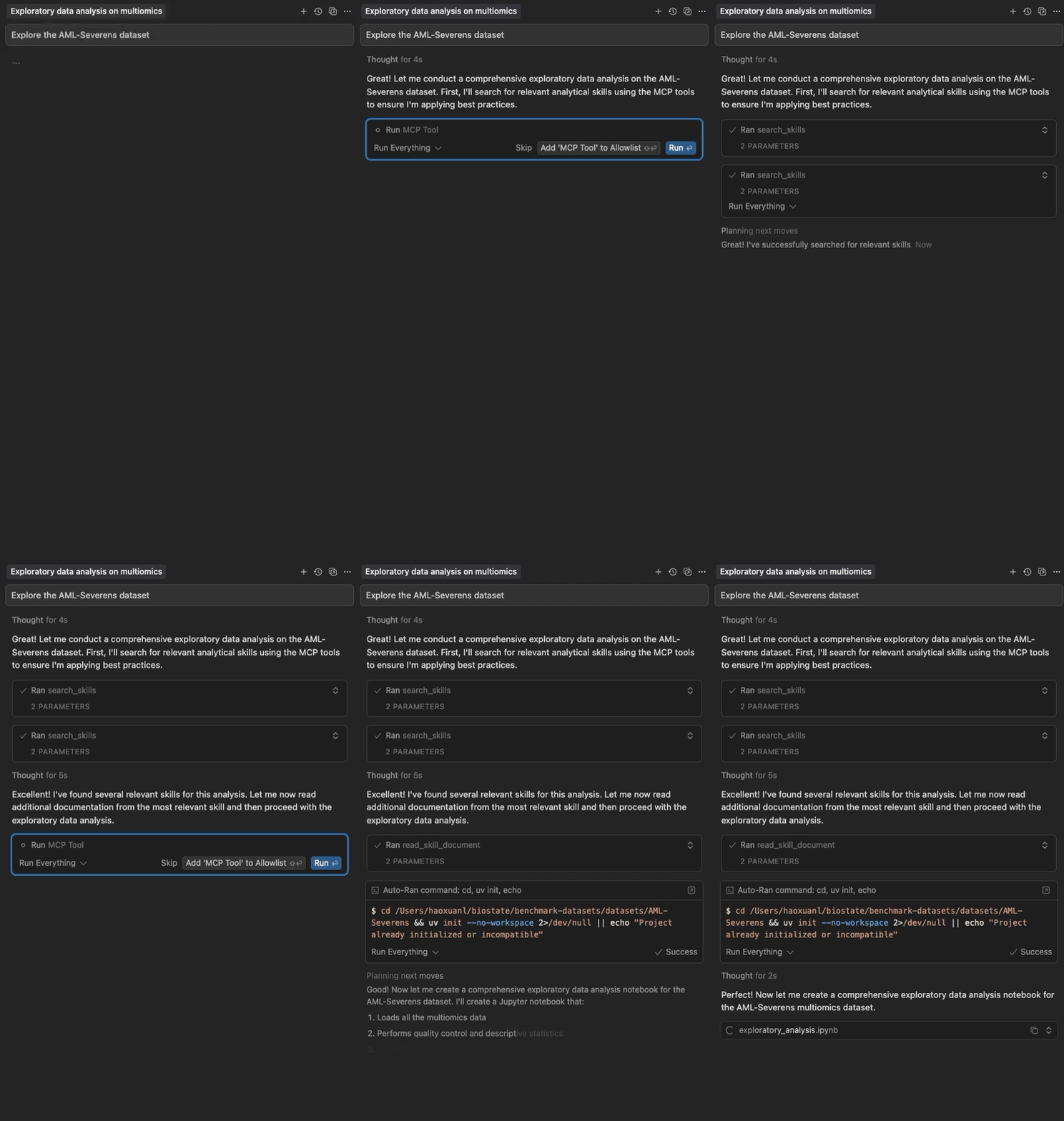
Claude Skills MCP 작동 모습

Cursor에서 Claude 에이전트 스킬의 의미론적 검색 및 점진적 로딩

Related MCP server: skill4agent MCP Server

주요 특징

  • 2-패키지 아키텍처: 경량 프론트엔드(~15MB)가 즉시 시작되며, 백엔드(~250MB)는 백그라운드에서 다운로드됨

  • Cursor 타임아웃 없음: 프론트엔드가 5초 이내에 응답하여 타임아웃 문제 해결

  • 의미론적 검색: 지능형 스킬 발견을 위한 벡터 임베딩

  • 점진적 공개: 다단계 스킬 로딩 (메타데이터 → 전체 콘텐츠 → 파일)

  • 제로 구성: 큐레이팅된 스킬로 즉시 사용 가능

  • 멀티 소스: GitHub 저장소 및 로컬 디렉토리에서 로드

  • 빠르고 로컬: API 키가 필요 없으며 자동 GitHub 캐싱 지원

  • 구성 가능: 소스, 모델 및 콘텐츠 제한 사용자 지정 가능

빠른 시작

Cursor 사용자용

Cursor 디렉토리를 통해 추가하거나 Cursor 설정(~/.cursor/mcp.json)에 추가하세요:

{
  "mcpServers": {
    "claude-skills": {
      "command": "uvx",
      "args": ["claude-skills-mcp"]
    }
  }
}

프론트엔드가 즉시 시작되어 도구를 표시하며, 백그라운드에서 자동으로 백엔드를 다운로드하고 시작합니다(RAG 종속성으로 인해 처음 1회 약 60-120초 소요). 이후 사용 시에는 즉시 실행됩니다.

uvx 사용 (독립형)

기본 구성으로 서버를 실행합니다:

uvx claude-skills-mcp

이 명령은 경량 프론트엔드를 시작하여 백엔드를 자동 다운로드하고, Anthropic의 공식 스킬 저장소와 K-Dense AI의 과학 스킬 컬렉션에서 약 90개의 스킬을 로드합니다.

사용자 지정 구성 사용

# 1. Print the default configuration
uvx claude-skills-mcp --example-config > config.json

# 2. Edit config.json to your needs

# 3. Run with your custom configuration
uvx claude-skills-mcp --config config.json

문서

MCP 도구

이 서버는 Claude 에이전트 스킬 작업을 위한 세 가지 도구를 제공합니다:

  1. find_helpful_skills - 작업 설명을 기반으로 관련 스킬을 의미론적으로 검색

  2. read_skill_document - 스킬에서 특정 파일(스크립트, 데이터, 참조)을 가져오기

  3. list_skills - 로드된 모든 스킬의 전체 목록 보기(탐색/디버깅용)

자세한 매개변수, 예제 및 모범 사례는 API 문서를 참조하세요.

아키텍처 (v1.0.0)

이 시스템은 최적의 성능을 위해 2-패키지 아키텍처를 사용합니다:

  • 프론트엔드 (claude-skills-mcp): 경량 프록시(~15MB)

    • 즉시 시작(<5초) ✅ Cursor 타임아웃 없음!

    • 첫 사용 시 백엔드 자동 다운로드

    • Cursor용 MCP 서버(stdio)

  • 백엔드 (claude-skills-mcp-backend): 헤비 서버(~250MB)

    • PyTorch 및 sentence-transformers를 사용한 벡터 검색

    • MCP 서버(스트리밍 가능 HTTP)

    • 프론트엔드에 의해 자동 설치되거나 독립적으로 배포 가능

장점:

  • ✅ Cursor 타임아웃 문제 해결(프론트엔드가 즉시 시작됨)

  • ✅ 동일한 간단한 사용자 경험(uvx claude-skills-mcp)

  • ✅ 백엔드가 백그라운드에서 다운로드됨(Cursor를 차단하지 않음)

  • ✅ 원격 호스팅 백엔드에 연결 가능(로컬 설치 불필요)

자세한 설계 및 데이터 흐름은 아키텍처 가이드를 참조하세요.

스킬 소스

GitHub 저장소(직접 스킬 또는 Claude Code 플러그인) 또는 로컬 디렉토리에서 스킬을 로드합니다.

기본적으로 다음에서 로드합니다:

  • 공식 Anthropic 스킬 - 문서, 프레젠테이션, 웹 아티팩트 등을 위한 15가지 다양한 스킬

  • K-Dense AI 과학 스킬 - 생물정보학, 화학정보학 및 과학 분석을 위한 78개 이상의 전문 스킬

  • 로컬 디렉토리 ~/.claude/skills (존재하는 경우)

기여하기

기여를 환영합니다! 기여 방법:

  1. 문제 보고: 버그나 기능 요청은 이슈를 생성하세요.

  2. PR 제출: 포크하고, 기능 브랜치를 생성하고, 테스트가 통과하는지 확인(uv run pytest tests/)한 후 제출하세요.

  3. 코드 스타일: 커밋하기 전에 uvx ruff check src/를 실행하세요.

  4. 테스트 추가: 새로운 기능에는 테스트가 포함되어야 합니다.

개발

버전 관리: 이 모노레포는 중앙 집중식 버전 시스템을 사용합니다:

  • 저장소 루트의 VERSION 파일을 편집하여 버전을 올리세요.

  • python3 scripts/sync-version.py를 실행하여 모든 참조를 동기화하세요(또는 --check를 사용하여 확인).

  • scripts/build-all.sh 스크립트는 빌드 전에 자동으로 버전을 동기화합니다.

질문이 있으시면 orion.li@k-dense.ai로 이메일을 보내주세요.

커뮤니티에 참여하세요! 🚀

Slack 커뮤니티에 참여해 주세요! 다른 사용자와 소통하고, 팁과 요령을 공유하고, 스킬에 대한 도움을 받고, 새로운 기능과 업데이트 소식을 가장 먼저 확인하세요.

👉 Slack에서 K-Dense 커뮤니티 참여하기 👈

사용자 지정 스킬을 구축하든, 다양한 AI 모델과 통합하든, 아니면 단순히 에이전트 스킬의 가능성을 탐색하든, 저희 커뮤니티가 여러분을 지원합니다!

더 알아보기

라이선스

이 프로젝트는 Apache License 2.0에 따라 라이선스가 부여됩니다.

Copyright 2025 K-Dense AI (https://k-dense.ai)

스타 히스토리

Star History Chart

Available Tools

3 tools
list_skillsList All Loaded SkillsA

Returns a complete inventory of all loaded skills with their names, descriptions, sources, and document counts. Use this for exploration or debugging to see what skills are available. NOTE: For finding relevant skills for a specific task, use the 'search_skills' tool instead - it performs semantic search to find the most appropriate skills for your needs.

ParametersJSON Schema
NameRequiredDescriptionDefault

No parameters

TDQS

A4.6/5.0
Behavior4/5

Does the description disclose side effects, auth requirements, rate limits, or destructive behavior?

With no annotations provided, the description carries full burden of behavioral disclosure. It clearly indicates this is a read operation ('Returns') and specifies the scope ('complete inventory of all loaded skills'). However, it doesn't mention potential limitations like pagination, rate limits, or authentication requirements that might be relevant for a complete behavioral understanding.

Agents need to know what a tool does to the world before calling it. Descriptions should go beyond structured annotations to explain consequences.

Conciseness5/5

Is the description appropriately sized, front-loaded, and free of redundancy?

The description is perfectly structured in two sentences: the first states the purpose and output format, the second provides usage guidance and sibling differentiation. Every sentence adds value with zero wasted words, making it easy to parse and understand quickly.

Shorter descriptions cost fewer tokens and are easier for agents to parse. Every sentence should earn its place.

Completeness4/5

Given the tool's complexity, does the description cover enough for an agent to succeed on first attempt?

For a simple read-only tool with no parameters and no output schema, the description provides excellent context about what the tool does and when to use it. The main gap is the lack of information about the return format structure, which would be helpful since there's no output schema. However, given the tool's simplicity, the description is largely complete.

Complex tools with many parameters or behaviors need more documentation. Simple tools need less. This dimension scales expectations accordingly.

Parameters4/5

Does the description clarify parameter syntax, constraints, interactions, or defaults beyond what the schema provides?

With 0 parameters and 100% schema coverage, the baseline would be 4. The description appropriately acknowledges this by not discussing parameters at all, focusing instead on the tool's purpose and usage guidelines. This is efficient and avoids redundancy.

Input schemas describe structure but not intent. Descriptions should explain non-obvious parameter relationships and valid value ranges.

Purpose5/5

Does the description clearly state what the tool does and how it differs from similar tools?

The description clearly states the specific verb ('Returns') and resource ('complete inventory of all loaded skills'), listing the exact data fields included (names, descriptions, sources, document counts). It explicitly distinguishes this from its sibling 'search_skills' by stating this is for exploration/debugging rather than task-specific relevance.

Agents choose between tools based on descriptions. A clear purpose with a specific verb and resource helps agents select the right tool.

Usage Guidelines5/5

Does the description explain when to use this tool, when not to, or what alternatives exist?

The description provides explicit guidance on when to use this tool ('for exploration or debugging to see what skills are available') and when not to use it, naming the alternative tool 'search_skills' for finding relevant skills for specific tasks. This gives clear context for tool selection.

Agents often have multiple tools that could apply. Explicit usage guidance like "use X instead of Y when Z" prevents misuse.

read_skill_documentRead Skill DocumentA

Retrieve specific documents (scripts, references, assets) from a skill. Use this after searching for skills to access additional resources like Python scripts, example data files, reference materials, or images. Supports pattern matching to retrieve multiple files at once (e.g., 'scripts/*.py' for all Python scripts).

ParametersJSON Schema
NameRequiredDescriptionDefault
document_pathNoPath or pattern to match documents. Examples: 'scripts/example.py', 'scripts/*.py', 'references/*', 'assets/diagram.png'. If not provided, returns a list of all available documents.
include_base64NoFor images: if True, return base64-encoded content; if False, return only URL. Default: False (URL only for efficiency)
skill_nameYesName of the skill (as returned by search_skills)

TDQS

A4.1/5.0
Behavior3/5

Does the description disclose side effects, auth requirements, rate limits, or destructive behavior?

With no annotations provided, the description carries the full burden of behavioral disclosure. It describes pattern matching capabilities and the base64 encoding option for images, which are useful behavioral details. However, it doesn't mention error conditions, rate limits, authentication requirements, or what happens when no documents match the pattern.

Agents need to know what a tool does to the world before calling it. Descriptions should go beyond structured annotations to explain consequences.

Conciseness5/5

Is the description appropriately sized, front-loaded, and free of redundancy?

The description is efficiently structured with two sentences that each serve clear purposes: the first states the core function, the second provides usage context and behavioral details. There's no wasted language, and important information is front-loaded.

Shorter descriptions cost fewer tokens and are easier for agents to parse. Every sentence should earn its place.

Completeness3/5

Given the tool's complexity, does the description cover enough for an agent to succeed on first attempt?

For a tool with 3 parameters, 100% schema coverage, and no output schema, the description provides adequate context about what the tool does and when to use it. However, without annotations or output schema, it could benefit from more information about return formats (beyond the base64 mention), error handling, or performance characteristics.

Complex tools with many parameters or behaviors need more documentation. Simple tools need less. This dimension scales expectations accordingly.

Parameters3/5

Does the description clarify parameter syntax, constraints, interactions, or defaults beyond what the schema provides?

The schema description coverage is 100%, so the schema already documents all three parameters thoroughly. The description adds some context about what types of documents can be retrieved (scripts, references, assets) and mentions pattern matching, but doesn't provide additional parameter semantics beyond what's in the schema descriptions.

Input schemas describe structure but not intent. Descriptions should explain non-obvious parameter relationships and valid value ranges.

Purpose5/5

Does the description clearly state what the tool does and how it differs from similar tools?

The description clearly states the specific action ('Retrieve specific documents') and resources ('scripts, references, assets') from a skill. It distinguishes from sibling tools like 'list_skills' and 'search_skills' by focusing on accessing document content rather than listing or searching skills themselves.

Agents choose between tools based on descriptions. A clear purpose with a specific verb and resource helps agents select the right tool.

Usage Guidelines5/5

Does the description explain when to use this tool, when not to, or what alternatives exist?

The description provides explicit guidance on when to use this tool ('Use this after searching for skills to access additional resources') and includes examples of what types of resources it handles (Python scripts, data files, reference materials, images). It clearly positions this as a follow-up to search operations.

Agents often have multiple tools that could apply. Explicit usage guidance like "use X instead of Y when Z" prevents misuse.

search_skillsClaude Agent Skills SearchA

Search and discover proven Claude Agent Skills that provide expert guidance for your tasks. Use this tool whenever you're starting a new task, facing a coding challenge, or need specialized techniques. Returns highly relevant skills with complete implementation guides, code examples, and best practices ranked by relevance. Each result includes detailed step-by-step instructions you can follow immediately. Essential for leveraging battle-tested patterns, avoiding common pitfalls, and accelerating development with proven solutions. Perfect for finding reusable workflows, debugging strategies, API integration patterns, data processing techniques, and domain-specific methodologies.

ParametersJSON Schema
NameRequiredDescriptionDefault
list_documentsNoInclude a list of available documents (scripts, references, assets) for each skill (default: True)
task_descriptionYesDescription of the task you want to accomplish. Be specific about your goal, context, or problem domain for better results (e.g., 'debug Python API errors', 'process genomic data', 'build React dashboard')
top_kNoNumber of skills to return (default: 3). Higher values provide more options but may include less relevant results.

TDQS

A3.5/5.0
Behavior3/5

Does the description disclose side effects, auth requirements, rate limits, or destructive behavior?

With no annotations provided, the description carries full burden. It discloses that results are 'ranked by relevance' and include 'complete implementation guides, code examples, and best practices' which adds behavioral context beyond basic search. However, it doesn't mention rate limits, authentication requirements, error conditions, or pagination behavior that would be important for a search tool.

Agents need to know what a tool does to the world before calling it. Descriptions should go beyond structured annotations to explain consequences.

Conciseness3/5

Is the description appropriately sized, front-loaded, and free of redundancy?

The description is appropriately front-loaded with core functionality but contains some redundant phrasing ('proven solutions' vs 'battle-tested patterns'). Sentences like 'Essential for leveraging battle-tested patterns...' and 'Perfect for finding reusable workflows...' could be more concise while maintaining value. The structure flows logically but could be tighter.

Shorter descriptions cost fewer tokens and are easier for agents to parse. Every sentence should earn its place.

Completeness3/5

Given the tool's complexity, does the description cover enough for an agent to succeed on first attempt?

For a search tool with 3 parameters, 100% schema coverage, but no annotations or output schema, the description provides adequate context about what the tool does and when to use it. However, it lacks details about the return format structure, error handling, or performance characteristics that would be helpful given the absence of an output schema.

Complex tools with many parameters or behaviors need more documentation. Simple tools need less. This dimension scales expectations accordingly.

Parameters3/5

Does the description clarify parameter syntax, constraints, interactions, or defaults beyond what the schema provides?

Schema description coverage is 100%, so the schema already fully documents all three parameters. The description doesn't add any additional parameter semantics beyond what's in the schema. It mentions 'returns highly relevant skills' which aligns with the task_description parameter but doesn't provide extra guidance on parameter usage or interactions.

Input schemas describe structure but not intent. Descriptions should explain non-obvious parameter relationships and valid value ranges.

Purpose4/5

Does the description clearly state what the tool does and how it differs from similar tools?

The description clearly states the tool's purpose as searching and discovering Claude Agent Skills with specific outputs (implementation guides, code examples, best practices). It distinguishes from 'list_skills' by emphasizing search functionality and from 'read_skill_document' by returning multiple ranked results rather than reading a single document. However, it doesn't explicitly name these siblings for full differentiation.

Agents choose between tools based on descriptions. A clear purpose with a specific verb and resource helps agents select the right tool.

Usage Guidelines4/5

Does the description explain when to use this tool, when not to, or what alternatives exist?

The description provides clear context for when to use the tool ('starting a new task, facing a coding challenge, or need specialized techniques') and includes examples of appropriate use cases. It doesn't explicitly state when NOT to use it or name alternative tools, but the context strongly implies this is for discovery/search rather than listing or reading specific documents.

Agents often have multiple tools that could apply. Explicit usage guidance like "use X instead of Y when Z" prevents misuse.

Tool Schema Changelog

Recent tool additions, removals, and schema changes observed during successful MCP inspections.

  1. 3 tool updates
    • First observedlist_skills
    • First observedread_skill_document
    • First observedsearch_skills

TDQS

A4.1/5.0

Scored across 3 tools

Disambiguation5/5

Each tool has a clearly distinct purpose: list_skills provides an inventory, search_skills performs semantic search for task relevance, and read_skill_document retrieves specific documents. The descriptions explicitly differentiate them, with list_skills even noting to use search_skills for task-specific needs, eliminating overlap.

Naming Consistency5/5

All tools follow a consistent verb_noun pattern with snake_case: list_skills, search_skills, and read_skill_document. This uniformity makes the set predictable and easy to understand, enhancing usability for agents.

Tool Count4/5

With 3 tools, the count is reasonable for a skills management server, covering exploration, search, and document retrieval. It feels slightly thin but well-scoped for its purpose, as each tool serves a distinct workflow without unnecessary bloat.

Completeness4/5

The tool surface covers core workflows: inventory listing, semantic search, and document access. Minor gaps exist, such as no direct skill execution or management tools (e.g., load/unload), but agents can work around this by using retrieved documents, making it nearly complete for the domain.

Maintenance

ActivityInactive
ResponsivenessUnresponsive

Related MCP Connectors

Related MCP Servers

  • A
    license
    Not graded
    quality
    Not graded
    maintenance
    An MCP server that transforms Claude-style skills and resources into callable tools for any MCP-compatible agent or client. It automatically discovers, exposes, and executes scripts from skills organized in local directories or packaged archives.
    MIT
  • F
    license
    Not graded
    quality
    D
    maintenance
    Local MCP server that provides semantic search (RAG) over code repositories, enabling AI clients like Claude and Gemini to access project context without manual re-upload.
    -