claude-skills-mcp
Claude Skills MCP-Server
Dieser MCP-Server wird nicht mehr gehostet oder gewartet. Agent Skills wurden nativ von allen großen KI-Plattformen übernommen — Cursor, Windsurf, Claude Code, Copilot und andere unterstützen Skills jetzt von Haus aus. Es besteht keine Notwendigkeit mehr für eine MCP-Brücke, um Skills an Ihren Coding-Assistenten zu liefern. Vielen Dank an alle, die dieses Projekt genutzt und dazu beigetragen haben!

Nutzen Sie Claudes leistungsstarkes neues Skills-System mit JEDEM KI-Modell oder Coding-Assistenten – einschließlich Cursor, Codex, GPT-5, Gemini und mehr. Dieser MCP-Server bringt das Agent Skills-Framework von Anthropic durch das Model Context Protocol in das gesamte KI-Ökosystem.
Ein Model Context Protocol (MCP)-Server, der intelligente Suchfunktionen zur Entdeckung relevanter Claude Agent Skills mittels Vektor-Embeddings und semantischer Ähnlichkeit bereitstellt. Dieser Server implementiert dieselbe Architektur der progressiven Offenlegung, die Anthropic in ihrem Agent Skills Engineering-Blog beschreibt, und macht spezialisierte Skills für jede MCP-kompatible KI-Anwendung verfügbar.
Ein Open-Source-Projekt von K-Dense AI – den Entwicklern autonomer KI-Wissenschaftler für die wissenschaftliche Forschung.
Dieser MCP-Server ermöglicht es jedem MCP-kompatiblen KI-Assistenten, intelligent Skills aus unserem kuratierten Repository Claude Scientific Skills und anderen Skill-Quellen wie den offiziellen Claude Skills zu suchen und abzurufen.
Demo
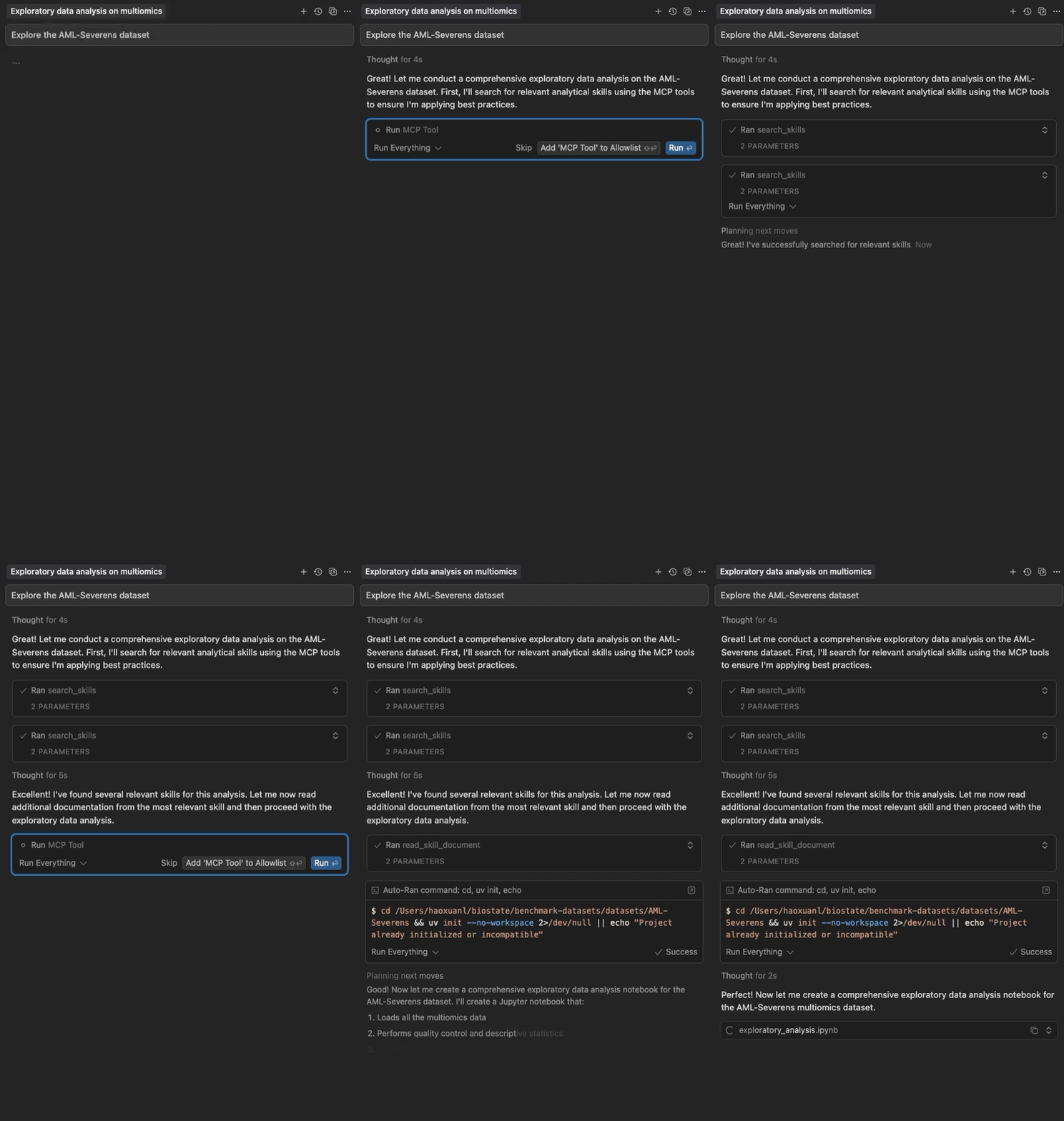
Semantische Suche und progressives Laden von Claude Agent Skills in Cursor
Related MCP server: skill4agent MCP Server
Highlights
Zwei-Paket-Architektur: Leichtgewichtiges Frontend (~15 MB) startet sofort; Backend (~250 MB) wird im Hintergrund heruntergeladen
Kein Cursor-Timeout: Frontend antwortet in <5 Sekunden, was das Timeout-Problem löst
Semantische Suche: Vektor-Embeddings für intelligente Skill-Entdeckung
Progressive Offenlegung: Mehrstufiges Laden von Skills (Metadaten → vollständiger Inhalt → Dateien)
Keine Konfiguration: Funktioniert sofort mit kuratierten Skills
Multi-Source: Laden aus GitHub-Repositories und lokalen Verzeichnissen
Schnell & Lokal: Keine API-Schlüssel erforderlich, mit automatischem GitHub-Caching
Konfigurierbar: Anpassung von Quellen, Modellen und Inhaltslimits
Schnellstart
Für Cursor-Benutzer
Fügen Sie es über das Cursor Directory hinzu oder fügen Sie es Ihrer Cursor-Konfiguration (~/.cursor/mcp.json) hinzu:
{
"mcpServers": {
"claude-skills": {
"command": "uvx",
"args": ["claude-skills-mcp"]
}
}
}Das Frontend startet sofort und zeigt Tools an, während das Backend im Hintergrund automatisch heruntergeladen und gestartet wird (~60-120s aufgrund von RAG-Abhängigkeiten, einmalig). Nachfolgende Nutzungen erfolgen sofort.
Verwendung von uvx (Standalone)
Starten Sie den Server mit der Standardkonfiguration:
uvx claude-skills-mcpDies startet das leichtgewichtige Frontend, das automatisch das Backend herunterlädt und ca. 90 Skills aus dem offiziellen Skills-Repository von Anthropic sowie der wissenschaftlichen Skill-Sammlung von K-Dense AI lädt.
Mit benutzerdefinierter Konfiguration
# 1. Print the default configuration
uvx claude-skills-mcp --example-config > config.json
# 2. Edit config.json to your needs
# 3. Run with your custom configuration
uvx claude-skills-mcp --config config.jsonDokumentation
Erste Schritte - Installation, Cursor-Einrichtung, CLI-Nutzung und Fehlerbehebung
Architektur-Leitfaden - Zwei-Paket-Design, Datenfluss und Komponenten
API-Dokumentation - Tool-Parameter, Beispiele und Best Practices
Nutzungsbeispiele - Erweiterte Konfiguration, reale Anwendungsfälle und Erstellung benutzerdefinierter Skills
Test-Leitfaden - Vollständige Testanweisungen, CI/CD und Abdeckungsanalyse
MCP-Tools
Der Server bietet drei Tools für die Arbeit mit Claude Agent Skills:
find_helpful_skills- Semantische Suche nach relevanten Skills basierend auf der Aufgabenbeschreibungread_skill_document- Abrufen spezifischer Dateien (Skripte, Daten, Referenzen) aus Skillslist_skills- Anzeigen des vollständigen Inventars aller geladenen Skills (zur Erkundung/Fehlersuche)
Siehe API-Dokumentation für detaillierte Parameter, Beispiele und Best Practices.
Architektur (v1.0.0)
Das System verwendet eine Zwei-Paket-Architektur für optimale Leistung:
Frontend (
claude-skills-mcp): Leichtgewichtiger Proxy (~15 MB)Startet sofort (<5 Sekunden) ✅ Kein Cursor-Timeout!
Lädt das Backend bei der ersten Verwendung automatisch herunter
MCP-Server (stdio) für Cursor
Backend (
claude-skills-mcp-backend): Schwerer Server (~250 MB)Vektorsuche mit PyTorch & sentence-transformers
MCP-Server (streambares HTTP)
Wird automatisch vom Frontend installiert ODER ist eigenständig bereitstellbar
Vorteile:
✅ Löst das Cursor-Timeout-Problem (Frontend startet sofort)
✅ Gleiche einfache Benutzererfahrung (
uvx claude-skills-mcp)✅ Backend wird im Hintergrund heruntergeladen (blockiert Cursor nicht)
✅ Kann mit einem remote gehosteten Backend verbunden werden (keine lokale Installation erforderlich)
Siehe Architektur-Leitfaden für detailliertes Design und Datenfluss.
Skill-Quellen
Laden Sie Skills aus GitHub-Repositories (direkte Skills oder Claude Code-Plugins) oder lokalen Verzeichnissen.
Standardmäßig wird geladen aus:
Offizielle Anthropic Skills - 15 verschiedene Skills für Dokumente, Präsentationen, Web-Artefakte und mehr
K-Dense AI Scientific Skills - 78+ spezialisierte Skills für Bioinformatik, Cheminformatik und wissenschaftliche Analysen
Lokales Verzeichnis
~/.claude/skills(falls vorhanden)
Mitwirken
Beiträge sind willkommen! So können Sie mitwirken:
Probleme melden: Öffnen Sie ein Issue für Fehler oder Funktionsanfragen
PRs einreichen: Forken, einen Feature-Branch erstellen, sicherstellen, dass die Tests bestehen (
uv run pytest tests/), dann einreichenCode-Stil: Führen Sie
uvx ruff check src/vor dem Commit ausTests hinzufügen: Neue Funktionen sollten Tests enthalten
Entwicklung
Versionsverwaltung: Dieses Monorepo verwendet ein zentralisiertes Versionssystem:
Bearbeiten Sie die
VERSION-Datei im Repo-Root, um die Version zu erhöhenFühren Sie
python3 scripts/sync-version.pyaus, um alle Referenzen zu synchronisieren (oder verwenden Sie--checkzur Überprüfung)Das Skript
scripts/build-all.shsynchronisiert die Versionen automatisch vor dem Build
Bei Fragen senden Sie eine E-Mail an orion.li@k-dense.ai
Treten Sie unserer Community bei! 🚀
Wir würden uns freuen, Sie in unserer Slack-Community begrüßen zu dürfen! Vernetzen Sie sich mit anderen Benutzern, teilen Sie Tipps und Tricks, erhalten Sie Hilfe bei Ihren Skills und erfahren Sie als Erster von neuen Funktionen und Updates.
👉 Treten Sie der K-Dense-Community auf Slack bei 👈
Egal, ob Sie benutzerdefinierte Skills erstellen, in verschiedene KI-Modelle integrieren oder einfach nur die Möglichkeiten von Agent Skills erkunden – unsere Community ist hier, um Sie zu unterstützen!
Mehr erfahren
Agent Skills-Dokumentation - Offizielle Anthropic-Dokumentation zum Skills-Format
Agent Skills-Blogbeitrag - Ankündigung und Übersicht
Model Context Protocol - Das Protokoll, das plattformübergreifende Skills ermöglicht
Engineering-Blog: Equipping Agents for the Real World - Technischer Deep-Dive in die Skills-Architektur
Lizenz
Dieses Projekt ist unter der Apache License 2.0 lizenziert.
Copyright 2025 K-Dense AI (https://k-dense.ai)
Star History
Available Tools
3 toolslist_skillsList All Loaded SkillsA
Returns a complete inventory of all loaded skills with their names, descriptions, sources, and document counts. Use this for exploration or debugging to see what skills are available. NOTE: For finding relevant skills for a specific task, use the 'search_skills' tool instead - it performs semantic search to find the most appropriate skills for your needs.
| Name | Required | Description | Default |
|---|---|---|---|
No parameters | |||
TDQS
Does the description disclose side effects, auth requirements, rate limits, or destructive behavior?
With no annotations provided, the description carries full burden of behavioral disclosure. It clearly indicates this is a read operation ('Returns') and specifies the scope ('complete inventory of all loaded skills'). However, it doesn't mention potential limitations like pagination, rate limits, or authentication requirements that might be relevant for a complete behavioral understanding.
Agents need to know what a tool does to the world before calling it. Descriptions should go beyond structured annotations to explain consequences.
Is the description appropriately sized, front-loaded, and free of redundancy?
The description is perfectly structured in two sentences: the first states the purpose and output format, the second provides usage guidance and sibling differentiation. Every sentence adds value with zero wasted words, making it easy to parse and understand quickly.
Shorter descriptions cost fewer tokens and are easier for agents to parse. Every sentence should earn its place.
Given the tool's complexity, does the description cover enough for an agent to succeed on first attempt?
For a simple read-only tool with no parameters and no output schema, the description provides excellent context about what the tool does and when to use it. The main gap is the lack of information about the return format structure, which would be helpful since there's no output schema. However, given the tool's simplicity, the description is largely complete.
Complex tools with many parameters or behaviors need more documentation. Simple tools need less. This dimension scales expectations accordingly.
Does the description clarify parameter syntax, constraints, interactions, or defaults beyond what the schema provides?
With 0 parameters and 100% schema coverage, the baseline would be 4. The description appropriately acknowledges this by not discussing parameters at all, focusing instead on the tool's purpose and usage guidelines. This is efficient and avoids redundancy.
Input schemas describe structure but not intent. Descriptions should explain non-obvious parameter relationships and valid value ranges.
Does the description clearly state what the tool does and how it differs from similar tools?
The description clearly states the specific verb ('Returns') and resource ('complete inventory of all loaded skills'), listing the exact data fields included (names, descriptions, sources, document counts). It explicitly distinguishes this from its sibling 'search_skills' by stating this is for exploration/debugging rather than task-specific relevance.
Agents choose between tools based on descriptions. A clear purpose with a specific verb and resource helps agents select the right tool.
Does the description explain when to use this tool, when not to, or what alternatives exist?
The description provides explicit guidance on when to use this tool ('for exploration or debugging to see what skills are available') and when not to use it, naming the alternative tool 'search_skills' for finding relevant skills for specific tasks. This gives clear context for tool selection.
Agents often have multiple tools that could apply. Explicit usage guidance like "use X instead of Y when Z" prevents misuse.
read_skill_documentRead Skill DocumentA
Retrieve specific documents (scripts, references, assets) from a skill. Use this after searching for skills to access additional resources like Python scripts, example data files, reference materials, or images. Supports pattern matching to retrieve multiple files at once (e.g., 'scripts/*.py' for all Python scripts).
| Name | Required | Description | Default |
|---|---|---|---|
| document_path | No | Path or pattern to match documents. Examples: 'scripts/example.py', 'scripts/*.py', 'references/*', 'assets/diagram.png'. If not provided, returns a list of all available documents. | |
| include_base64 | No | For images: if True, return base64-encoded content; if False, return only URL. Default: False (URL only for efficiency) | |
| skill_name | Yes | Name of the skill (as returned by search_skills) |
TDQS
Does the description disclose side effects, auth requirements, rate limits, or destructive behavior?
With no annotations provided, the description carries the full burden of behavioral disclosure. It describes pattern matching capabilities and the base64 encoding option for images, which are useful behavioral details. However, it doesn't mention error conditions, rate limits, authentication requirements, or what happens when no documents match the pattern.
Agents need to know what a tool does to the world before calling it. Descriptions should go beyond structured annotations to explain consequences.
Is the description appropriately sized, front-loaded, and free of redundancy?
The description is efficiently structured with two sentences that each serve clear purposes: the first states the core function, the second provides usage context and behavioral details. There's no wasted language, and important information is front-loaded.
Shorter descriptions cost fewer tokens and are easier for agents to parse. Every sentence should earn its place.
Given the tool's complexity, does the description cover enough for an agent to succeed on first attempt?
For a tool with 3 parameters, 100% schema coverage, and no output schema, the description provides adequate context about what the tool does and when to use it. However, without annotations or output schema, it could benefit from more information about return formats (beyond the base64 mention), error handling, or performance characteristics.
Complex tools with many parameters or behaviors need more documentation. Simple tools need less. This dimension scales expectations accordingly.
Does the description clarify parameter syntax, constraints, interactions, or defaults beyond what the schema provides?
The schema description coverage is 100%, so the schema already documents all three parameters thoroughly. The description adds some context about what types of documents can be retrieved (scripts, references, assets) and mentions pattern matching, but doesn't provide additional parameter semantics beyond what's in the schema descriptions.
Input schemas describe structure but not intent. Descriptions should explain non-obvious parameter relationships and valid value ranges.
Does the description clearly state what the tool does and how it differs from similar tools?
The description clearly states the specific action ('Retrieve specific documents') and resources ('scripts, references, assets') from a skill. It distinguishes from sibling tools like 'list_skills' and 'search_skills' by focusing on accessing document content rather than listing or searching skills themselves.
Agents choose between tools based on descriptions. A clear purpose with a specific verb and resource helps agents select the right tool.
Does the description explain when to use this tool, when not to, or what alternatives exist?
The description provides explicit guidance on when to use this tool ('Use this after searching for skills to access additional resources') and includes examples of what types of resources it handles (Python scripts, data files, reference materials, images). It clearly positions this as a follow-up to search operations.
Agents often have multiple tools that could apply. Explicit usage guidance like "use X instead of Y when Z" prevents misuse.
search_skillsClaude Agent Skills SearchA
Search and discover proven Claude Agent Skills that provide expert guidance for your tasks. Use this tool whenever you're starting a new task, facing a coding challenge, or need specialized techniques. Returns highly relevant skills with complete implementation guides, code examples, and best practices ranked by relevance. Each result includes detailed step-by-step instructions you can follow immediately. Essential for leveraging battle-tested patterns, avoiding common pitfalls, and accelerating development with proven solutions. Perfect for finding reusable workflows, debugging strategies, API integration patterns, data processing techniques, and domain-specific methodologies.
| Name | Required | Description | Default |
|---|---|---|---|
| list_documents | No | Include a list of available documents (scripts, references, assets) for each skill (default: True) | |
| task_description | Yes | Description of the task you want to accomplish. Be specific about your goal, context, or problem domain for better results (e.g., 'debug Python API errors', 'process genomic data', 'build React dashboard') | |
| top_k | No | Number of skills to return (default: 3). Higher values provide more options but may include less relevant results. |
TDQS
Does the description disclose side effects, auth requirements, rate limits, or destructive behavior?
With no annotations provided, the description carries full burden. It discloses that results are 'ranked by relevance' and include 'complete implementation guides, code examples, and best practices' which adds behavioral context beyond basic search. However, it doesn't mention rate limits, authentication requirements, error conditions, or pagination behavior that would be important for a search tool.
Agents need to know what a tool does to the world before calling it. Descriptions should go beyond structured annotations to explain consequences.
Is the description appropriately sized, front-loaded, and free of redundancy?
The description is appropriately front-loaded with core functionality but contains some redundant phrasing ('proven solutions' vs 'battle-tested patterns'). Sentences like 'Essential for leveraging battle-tested patterns...' and 'Perfect for finding reusable workflows...' could be more concise while maintaining value. The structure flows logically but could be tighter.
Shorter descriptions cost fewer tokens and are easier for agents to parse. Every sentence should earn its place.
Given the tool's complexity, does the description cover enough for an agent to succeed on first attempt?
For a search tool with 3 parameters, 100% schema coverage, but no annotations or output schema, the description provides adequate context about what the tool does and when to use it. However, it lacks details about the return format structure, error handling, or performance characteristics that would be helpful given the absence of an output schema.
Complex tools with many parameters or behaviors need more documentation. Simple tools need less. This dimension scales expectations accordingly.
Does the description clarify parameter syntax, constraints, interactions, or defaults beyond what the schema provides?
Schema description coverage is 100%, so the schema already fully documents all three parameters. The description doesn't add any additional parameter semantics beyond what's in the schema. It mentions 'returns highly relevant skills' which aligns with the task_description parameter but doesn't provide extra guidance on parameter usage or interactions.
Input schemas describe structure but not intent. Descriptions should explain non-obvious parameter relationships and valid value ranges.
Does the description clearly state what the tool does and how it differs from similar tools?
The description clearly states the tool's purpose as searching and discovering Claude Agent Skills with specific outputs (implementation guides, code examples, best practices). It distinguishes from 'list_skills' by emphasizing search functionality and from 'read_skill_document' by returning multiple ranked results rather than reading a single document. However, it doesn't explicitly name these siblings for full differentiation.
Agents choose between tools based on descriptions. A clear purpose with a specific verb and resource helps agents select the right tool.
Does the description explain when to use this tool, when not to, or what alternatives exist?
The description provides clear context for when to use the tool ('starting a new task, facing a coding challenge, or need specialized techniques') and includes examples of appropriate use cases. It doesn't explicitly state when NOT to use it or name alternative tools, but the context strongly implies this is for discovery/search rather than listing or reading specific documents.
Agents often have multiple tools that could apply. Explicit usage guidance like "use X instead of Y when Z" prevents misuse.
Tool Schema Changelog
Recent tool additions, removals, and schema changes observed during successful MCP inspections.
3 tool updates
- First observed
list_skills - First observed
read_skill_document - First observed
search_skills
TDQS
Scored across 3 tools
Each tool has a clearly distinct purpose: list_skills provides an inventory, search_skills performs semantic search for task relevance, and read_skill_document retrieves specific documents. The descriptions explicitly differentiate them, with list_skills even noting to use search_skills for task-specific needs, eliminating overlap.
All tools follow a consistent verb_noun pattern with snake_case: list_skills, search_skills, and read_skill_document. This uniformity makes the set predictable and easy to understand, enhancing usability for agents.
With 3 tools, the count is reasonable for a skills management server, covering exploration, search, and document retrieval. It feels slightly thin but well-scoped for its purpose, as each tool serves a distinct workflow without unnecessary bloat.
The tool surface covers core workflows: inventory listing, semantic search, and document access. Minor gaps exist, such as no direct skill execution or management tools (e.g., load/unload), but agents can work around this by using retrieved documents, making it nearly complete for the domain.
Maintenance
Related MCP Connectors
Capability registry for the agentic economy. Semantic search over verified MCP server listings.
Model Context Protocol server for the Apideck Unified API. Connect any MCP-compatible agent framework to 100+ accounting systems, HRIS platforms, file storage providers, and more through one integration. More information https://www.apideck.com/mcp-server
- UnifAPIOAuthcom.unifapi
Hosted MCP server for live public-data APIs and Skills for AI agents.
Related MCP Servers
- AlicenseNot gradedqualityNot gradedmaintenanceAn MCP server that transforms Claude-style skills and resources into callable tools for any MCP-compatible agent or client. It automatically discovers, exposes, and executes scripts from skills organized in local directories or packaged archives.MIT
- AlicenseBqualityCmaintenanceMCP (Model Context Protocol) Server for skill4agent - Search, view, and install AI skills in AI conversations.319 npm4MIT
- FlicenseNot gradedqualityDmaintenanceLocal MCP server that provides semantic search (RAG) over code repositories, enabling AI clients like Claude and Gemini to access project context without manual re-upload.-
- AlicenseNot gradedqualityDmaintenanceMCP Memory Server for Claude Code that provides persistent context across sessions using semantic search (RAG).Apache 2.0
