Glama

yade-mcp

English | 简体中文

PyPI Downloads GitHub stars Glama License: MIT Python 3.10+

O.engines += [LLM()] # 又一个引擎。

yade-mcp 通过 模型上下文协议 (Model Context Protocol) 将 AI 智能体连接到 YADE(开源离散元方法引擎)。通过自然对话即可浏览 API 文档、运行模拟并执行代码。

你的智能体不仅仅是调用工具,它就像坐在你的 YADE 控制台前,能够独立运行长时间的模拟,并与你的操作保持同步。
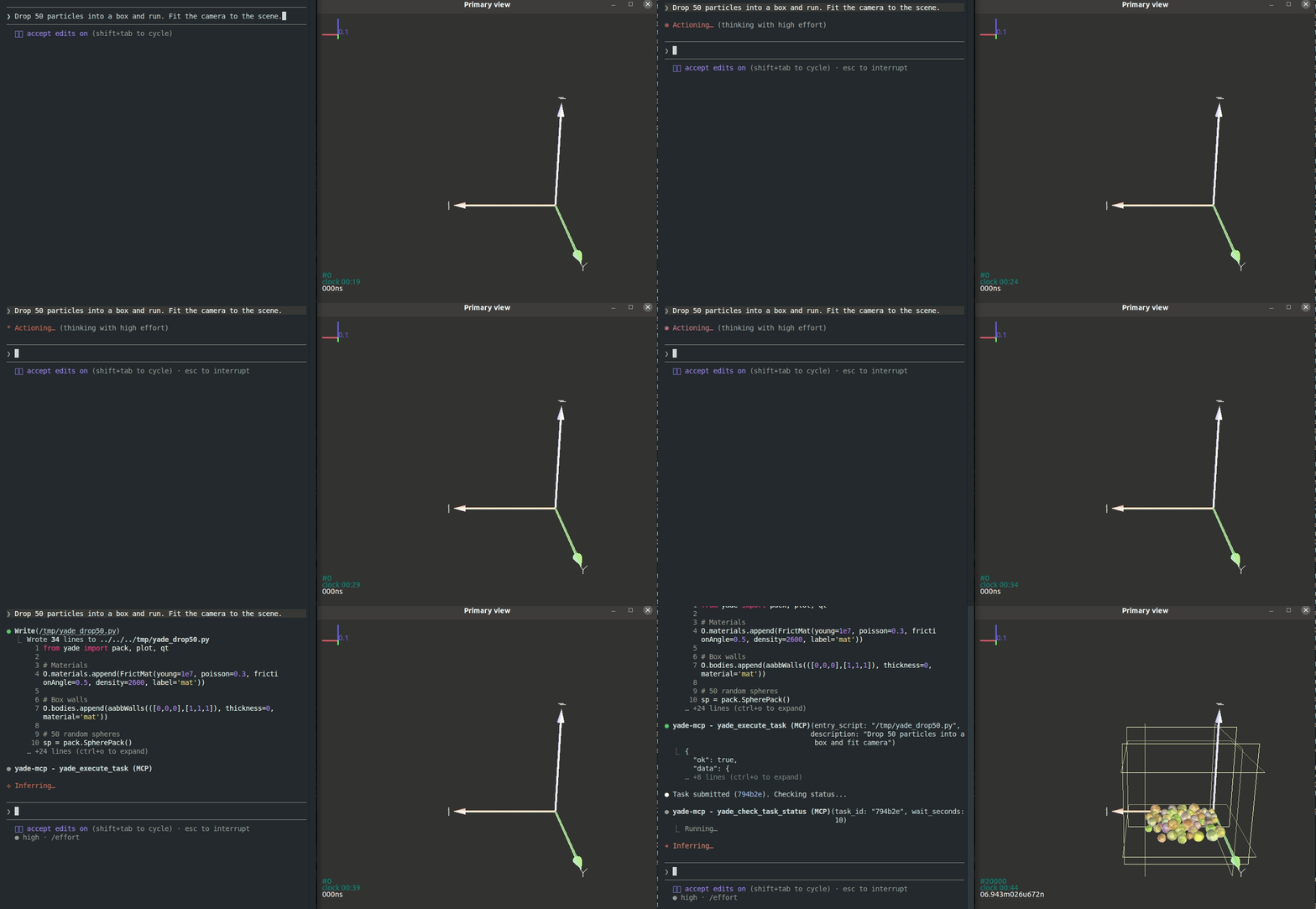
yade-mcp demo

功能特性

你输入指令,YADE 运行

yade_execute_code 驱动

用通俗的语言描述你的需求。智能体会在你的 YADE 控制台中输入命令——检查颗粒、调整参数、单步执行引擎、分析结果。它会像你亲自操作控制台一样,读取每次输出、调试并进行迭代。

启动任务,无需守候

yade_execute_task + yade_check_task_status + yade_interrupt_task 驱动

将完整的 YADE 脚本作为后台任务运行——就像执行 yade script.py 一样,但你无需时刻盯着它。智能体会自动监控:跟踪实时输出、捕获出现的错误、在发现异常时优雅地停止运行、修复脚本并重新提交——直到模拟真正完成。

新会话,无冷启动

yade_list_tasks + yade_check_task_status 驱动

你提交的每一个任务——脚本、实时输出、最终状态——都会被记录下来。当上下文窗口填满或你第二天回来时,新的智能体会进入一个已经“自我记忆”的项目:它会列出已运行的任务,读取每个任务的产出,并在无需你重新解释的情况下继续工作。

运行中模拟的实时 Shell

yade_execute_code 驱动

当任务运行时,智能体拥有一个进入模拟的实时 Shell——你可以要求它检查任何变量、转储任何对象的状态,或按需渲染新的绘图,而无需编辑脚本或停止运行。

你输入,智能体同步

除了提交的任务外,你在 YADE 控制台中输入的每一行内容——你查看的变量、测试的参数、尝试过的死胡同——也会流入智能体的上下文中。当你转而进行对话时,它已经掌握了你尝试过的路径。正在学习 YADE 并希望对刚才输入的内容获得反馈?被意外的错误困住了?直接问它——智能体看到了你输入的内容以及 YADE 的回答。

Related MCP server: itasca-mcp

工具 (7)

包含两个文档工具(无需桥接)和五个执行工具(需要桥接):

工具

用途

桥接

yade_browse_api

遍历 YADE Python 类树

yade_query_api

对 API 进行 BM25 关键词搜索

yade_execute_code

在实时 YADE 进程中运行 Python;同步返回

yade_execute_task

将脚本作为长时间运行的后台任务提交

yade_check_task_status

检查运行中或已完成的任务(输出、状态)

yade_interrupt_task

优雅地停止运行中的任务

yade_list_tasks

列出已提交的任务及其元数据

快速开始

前置要求

  • 已安装 YADE

  • 已安装 uv (用于 uvx)

智能体设置(推荐)

将其复制到你的 AI 智能体中,让它自动配置:

Fetch and follow this bootstrap guide end-to-end:
https://raw.githubusercontent.com/yusong652/yade-mcp/master/docs/agentic/yade-mcp-bootstrap.md

手动设置

1. 在你的客户端配置中注册 MCP 服务器

{
  "mcpServers": {
    "yade-mcp": {
      "command": "uvx",
      "args": ["yade-mcp"]
    }
  }
}

2. 在 YADE 内部启动桥接

pip install yade-mcp-bridge

然后在 YADE Python 控制台中:

import yade_mcp_bridge
yade_mcp_bridge.start()

验证

重启你的 AI 智能体(Claude Code、Codex CLI、Gemini CLI 等),并要求它调用 yade_execute_code 以验证连接。

贡献

请参阅 CONTRIBUTING.md 获取开发设置和指南。

许可证

MIT — 请参阅 LICENSE

Install Server
A
license - permissive license
A
quality
A
maintenance

Maintenance

Maintainers
Response time
3dRelease cycle
25Releases (12mo)
Commit activity

Resources

Unclaimed servers have limited discoverability.

Looking for Admin?

If you are the server author, to access and configure the admin panel.

Related MCP Servers

  • A
    license
    Not graded
    quality
    F
    maintenance
    This project provides a robust integration between AI assistants and FreeCAD CAD software using the Model Context Protocol (MCP). It allows external applications to interact with FreeCAD through a standardized interface, offering multiple connection methods and specialized tools.
    24
    MIT
  • A
    license
    A
    quality
    A
    maintenance
    MCP server that gives AI agents full access to ITASCA PFC - browse documentation, run simulations, capture plots, all through natural conversation. Built on the Model Context Protocol, pfc-mcp turns any MCP-compatible AI client (Claude Code, Codex CLI, Gemini CLI, OpenCode, toyoura-nagisa, etc.) into a PFC co-pilot that can look up commands, execute scripts, monitor long-running simulations.
    10
    157
    MIT
  • A
    license
    B
    quality
    C
    maintenance
    Enables AI agents to automate COMSOL Multiphysics simulations, including model management, geometry building, physics configuration, meshing, solving, and results visualization through the MCP protocol.
    78
    MIT
  • A
    license
    Not graded
    quality
    B
    maintenance
    Enables AI agents to automate COMSOL Multiphysics simulations, including model management, geometry building, physics configuration, meshing, solving, and results visualization via the MCP protocol.
    MIT

View all related MCP servers

Related MCP Connectors

  • A comprehensive Model Context Protocol (MCP) server that enables AI assistants to interact with yo…

  • Real-time chat hub for AI agents — Claude Code, Cursor, Cline, Codex over MCP or REST.

  • OCR, transcription, file extraction, and image generation for AI agents via MCP.

View all MCP Connectors

Latest Blog Posts

MCP directory API

We provide all the information about MCP servers via our MCP API.

curl -X GET 'https://glama.ai/api/mcp/v1/servers/yusong652/yade-mcp'

If you have feedback or need assistance with the MCP directory API, please join our Discord server