yade-mcp
yade-mcp
O.engines += [LLM()] # otro motor más.
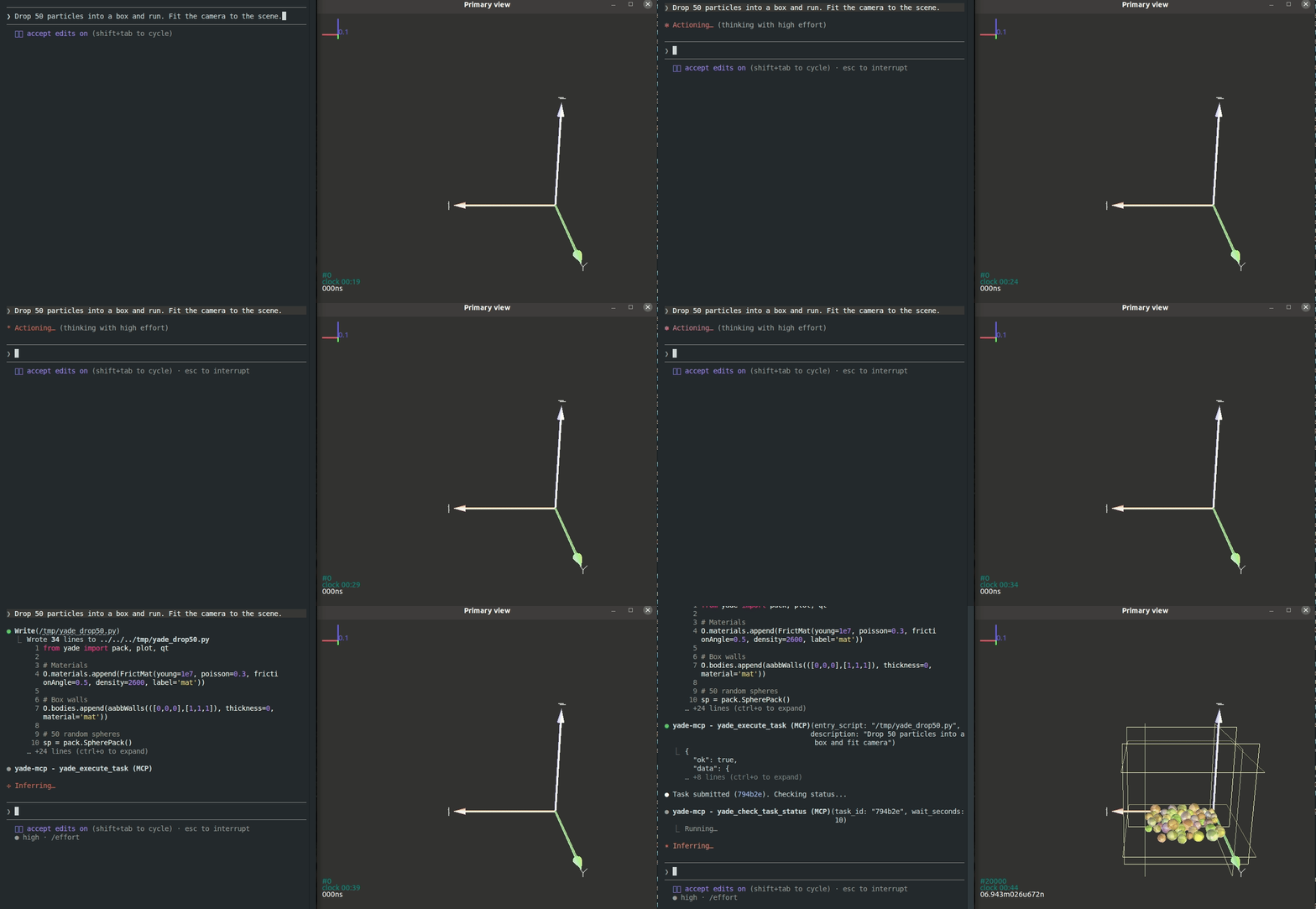
yade-mcp conecta agentes de IA a YADE — el motor de método de elementos discretos de código abierto — a través del Protocolo de Contexto de Modelo. Explora la documentación de la API, ejecuta simulaciones y ejecuta código, todo mediante una conversación natural.
Tu agente no solo llama a herramientas, sino que se sienta en tu consola de YADE, ejecuta simulaciones largas por sí mismo y se mantiene sincronizado con lo que estás haciendo.
Características
Tu agente escribe, YADE ejecuta
Impulsado por yade_execute_code
Describe lo que quieres en lenguaje sencillo. El agente escribe comandos en tu consola de YADE: inspeccionando partículas, ajustando parámetros, avanzando el motor, analizando resultados. Lee cada salida, depura e itera, de la misma manera que tú lo haces en la consola.
Ponlo en marcha, aléjate
Impulsado por yade_execute_task + yade_check_task_status + yade_interrupt_task
Ejecuta un script completo de YADE como una tarea en segundo plano, igual que al ejecutar yade script.py, excepto que no tienes que supervisarlo. El agente observa por sí mismo: siguiendo la salida en vivo, detectando errores a medida que aparecen, deteniendo la ejecución correctamente cuando algo parece incorrecto, corrigiendo el script y volviendo a enviarlo, hasta que la simulación realmente termina.
Nueva sesión, sin arranque en frío
Impulsado por yade_list_tasks + yade_check_task_status
Cada tarea que has enviado (el script, la salida en vivo, el estado final) permanece registrada. Cuando la ventana de contexto se llena o regresas al día siguiente, un agente nuevo entra en un proyecto que ya se recuerda a sí mismo: enumera lo que se ha ejecutado, lee lo que produjo cada tarea y continúa sin que tengas que explicar nada de nuevo.
Un shell en vivo dentro de la simulación en ejecución
Impulsado por yade_execute_code
Mientras se ejecuta una tarea, el agente tiene un shell en vivo dentro de la simulación: pídele que inspeccione cualquier variable, vuelque el estado de cualquier objeto o renderice un gráfico nuevo bajo demanda, sin editar el script ni detener la ejecución.
Tú escribes, el agente está sincronizado
Más allá de las tareas enviadas, cada línea que escribes en la consola de YADE (las variables que revisaste, los parámetros que probaste, los callejones sin salida que abandonaste) también fluye hacia el contexto del agente. Cuando pasas a chatear, ya tiene el rastro de lo que has estado intentando. ¿Aprendiendo YADE y quieres comentarios sobre lo que acabas de escribir? ¿Atascado en un error inesperado? Solo pregunta: el agente vio lo que escribiste y cómo respondió YADE.
Related MCP server: itasca-mcp
Herramientas (7)
Dos herramientas de documentación (sin puente) y cinco herramientas de ejecución (se requiere puente):
Herramienta | Propósito | Puente |
| Recorrer el árbol de clases de Python de YADE | No |
| Búsqueda por palabras clave BM25 en la API | No |
| Ejecutar Python en el proceso de YADE en vivo; devuelve sincrónicamente | Sí |
| Enviar un script como una tarea de larga duración en segundo plano | Sí |
| Inspeccionar una tarea en ejecución o finalizada (salida, estado) | Sí |
| Detener correctamente una tarea en ejecución | Sí |
| Listar tareas enviadas con metadatos | Sí |
Inicio rápido
Requisitos previos
Configuración del agente (Recomendado)
Copia esto a tu agente de IA y deja que se autoconfigure:
Fetch and follow this bootstrap guide end-to-end:
https://raw.githubusercontent.com/yusong652/yade-mcp/master/docs/agentic/yade-mcp-bootstrap.mdConfiguración manual
1. Registra el servidor MCP en la configuración de tu cliente:
{
"mcpServers": {
"yade-mcp": {
"command": "uvx",
"args": ["yade-mcp"]
}
}
}2. Inicia el puente dentro de YADE:
pip install yade-mcp-bridgeLuego, en una consola de Python de YADE:
import yade_mcp_bridge
yade_mcp_bridge.start()Verificar
Reinicia tu agente de IA (Claude Code, Codex CLI, Gemini CLI, etc.) y pídele que llame a yade_execute_code para verificar la conexión.
Contribuir
Consulta CONTRIBUTING.md para la configuración de desarrollo y las pautas.
Licencia
MIT — consulta LICENSE.
Available Tools
7 toolsyade_browse_apiA
Browse YADE's Python API as a YADE-native class tree.
The tree is rooted in YADE's real inheritance hierarchy: paths mirror the class's mro up to its category root. No shortcuts — always drill through parents.
Inputs: path. Returns: object
yade_check_task_statusC
Check status and output for a submitted YADE task.
Inputs: task_id (required), limit, filter, skip_newest, +1 more. Returns: object
yade_execute_codeA
Execute Python code synchronously in the running YADE process.
Returns stdout immediately. Code runs in the YADE Python environment where yade modules are already imported; side effects persist.
This tool remains responsive EVEN WHILE a simulation task is running (submitted via yade_execute_task). Use it as a live REPL to inspect simulation state in real time — no need to pre-script print statements.
Typical uses:
Query simulation state: O.bodies count, current iteration
Create/modify bodies, engines, interactions
Read or set material properties
Live inspection during a running simulation (e.g. check stress tensor, coordination number, energy balance, or capture viewport screenshots when GUI is available)
Development and REPL-style testing
O.engines[0] holds a PyRunner that belongs to the bridge (its command calls _mcpPyrunnerTick). Ignore it: assign O.engines as usual, the bridge re-adds the PyRunner before every O.run().
Unlike yade_execute_task, this tool is fire-and-return: the response contains the full output. It is NOT tracked by yade_list_tasks and cannot be interrupted or polled.
Timeout behaviour: on timeout the bridge attempts to abort the
running code. The response is an error envelope (ok=false)
whose error.code is one of:
interrupted— the code was running a simulation cycle (O.run) and was paused cleanly at an iteration boundary. For long simulations or solving to equilibrium, switch to yade_execute_task — it tracks progress and stops cleanly via yade_interrupt_task.terminated— a non-cycle abort succeeded (async exception injection); the pump thread is free, but YADE state may be partially modified by the code that ran before the abort fired. Inspect state before retrying.timeout— abort failed (code stuck in a C extension, or nested inside a running task's PyRunner tick); the bridge may still be blocked. Restart if unresponsive.
WARNING: For anything expected to take more than a few seconds,
use yade_execute_task instead — it has proper cancellation via
yade_interrupt_task and does not leave state drift on timeout.
Also, do NOT write except BaseException: in your code; it
defeats bridge-initiated cancellation.
Inputs: code (required), timeout. Returns: object
yade_execute_taskA
Submit a Python script for asynchronous execution in YADE.
Returns a task_id immediately; the script is queued and runs in the background. Tasks run one at a time in submit order (they share the YADE process and its single simulation state), so a multi-stage pipeline can be submitted in one go — each stage starts when the previous one finishes. Use the companion tools to manage the task lifecycle:
yade_check_task_status: poll output, progress, and final status
yade_interrupt_task: stop a running task or cancel a queued one
yade_list_tasks: browse task history (also shows queue order)
Use this for production simulation runs, long O.run() cycles, and any operation that may take minutes or longer. For quick queries and REPL-style testing, use yade_execute_code.
O.engines[0] holds a PyRunner that belongs to the bridge (its command calls _mcpPyrunnerTick). The script does not need to keep it: assign O.engines as usual, the bridge re-adds the PyRunner before every O.run().
Inputs: description (required), script_path (required). Returns: object
yade_interrupt_taskA
Stop a running YADE task, or cancel one still waiting in the queue.
A task that has not started yet is simply removed from the queue
and ends in status canceled (method reports
canceled_while_queued). For a running task, two cancellation
paths are applied together by the bridge:
flag_only— sets an interrupt flag that YADE's PyRunner tick observes between simulation iterations (graceful path forO.runtasks).flag_and_async_exc— in addition, injects aTaskInterruptexception into the script thread, so pure-Python deadloops with noO.runon the stack are terminated too.
The response method field reports which path ran. When
async-exc is refused (e.g. target thread is a Dummy-N
boost::python frame), async_exc_skipped_reason explains why.
Namespace after interrupt: the YADE __main__ namespace is
shared between tasks and yade_execute_code calls. Any
variables the interrupted script had already defined —
including O state — are preserved. There's no need to
re-run the whole script to continue work: inspect state with
yade_execute_code or resume via a fresh yade_execute_task
that only runs the remaining logic.
Inputs: task_id (required). Returns: object
yade_list_tasksA
List tracked YADE tasks with pagination.
Tasks are listed newest first. Queued (pending) tasks run one at a time in submit order, so among the pending entries the one furthest down the list runs next.
Inputs: limit, skip_newest. Returns: object
yade_query_apiA
Search YADE API documentation by keywords (like grep).
Returns matching class/function names with descriptions ranked by relevance. Use yade_browse_api for full documentation of a specific class.
When to use:
You have keywords but don't know the exact class name
Examples: "friction material", "gravity engine", "contact force", "triaxial stress", "sphere create", "hertz mindlin"
Related tools:
yade_browse_api: Get full documentation for a known class path
Inputs: query (required), limit. Returns: object
Tool Schema Changelog
Recent tool additions, removals, and schema changes observed during successful MCP inspections.
Loading tool schema changelog…
TDQS
Scored across 7 tools
The two execution tools are explicitly contrasted: yade_execute_task is async long-running tracked work, while yade_execute_code is a synchronous fire-and-return REPL, and both descriptions spell this out. The API tools are likewise distinct: yade_query_api is keyword search, yade_browse_api drills into the class tree, and the lifecycle tools (status/list/interrupt) each handle a clearly separate concern.
All seven tools share a uniform yade_ prefix followed by snake_case verb_noun (execute_task, execute_code, check_task_status, interrupt_task, list_tasks, browse_api, query_api). The pattern is predictable and readable throughout.
Seven tools is well-scoped for a simulation bridge: two execution modes, three async-lifecycle operations, and two API-discovery helpers. Each tool earns its place with no redundancy or filler.
The surface covers the core lifecycle (submit, poll, list, cancel) plus API discovery and live REPL inspection, which is a coherent workflow. Minor gaps exist — no explicit task cleanup/deletion or a dedicated bulk-output retrieval beyond status polling — but these are workable around.
Maintenance
Related MCP Connectors
A comprehensive Model Context Protocol (MCP) server that enables AI assistants to interact with yo…
Persistent memory, knowledge graph, task management and more for AI agents via MCP.
Task management your AI agents can actually run. One line becomes a context-ready task over MCP.
214 tools for AI agents over one MCP endpoint: image, video, audio, 3D, data, storage, mail, GPUs.
Related MCP Servers
- AlicenseNot gradedqualityDmaintenanceThis project provides a robust integration between AI assistants and FreeCAD CAD software using the Model Context Protocol (MCP). It allows external applications to interact with FreeCAD through a standardized interface, offering multiple connection methods and specialized tools.27MIT
- AlicenseAqualityAmaintenanceMCP server that gives AI agents full access to ITASCA PFC - browse documentation, run simulations, capture plots, all through natural conversation. Built on the Model Context Protocol, pfc-mcp turns any MCP-compatible AI client (Claude Code, Codex CLI, Gemini CLI, OpenCode, toyoura-nagisa, etc.) into a PFC co-pilot that can look up commands, execute scripts, monitor long-running simulations.7232MIT
- AlicenseBqualityCmaintenanceEnables AI agents to automate COMSOL Multiphysics simulations, including model management, geometry building, physics configuration, meshing, solving, and results visualization through the MCP protocol.78MIT
- AlicenseNot gradedqualityAmaintenanceAutomates OpenFOAM CFD simulations via MCP, enabling AI agents to mesh, run, and post-process cases from natural language prompts without any API keys.MIT