yade-mcp
yade-mcp
O.engines += [LLM()] # yet another engine.
yade-mcp подключает ИИ-агентов к YADE — движку для метода дискретных элементов с открытым исходным кодом — через Model Context Protocol. Просматривайте документацию API, запускайте симуляции и выполняйте код — всё это в ходе естественного общения.
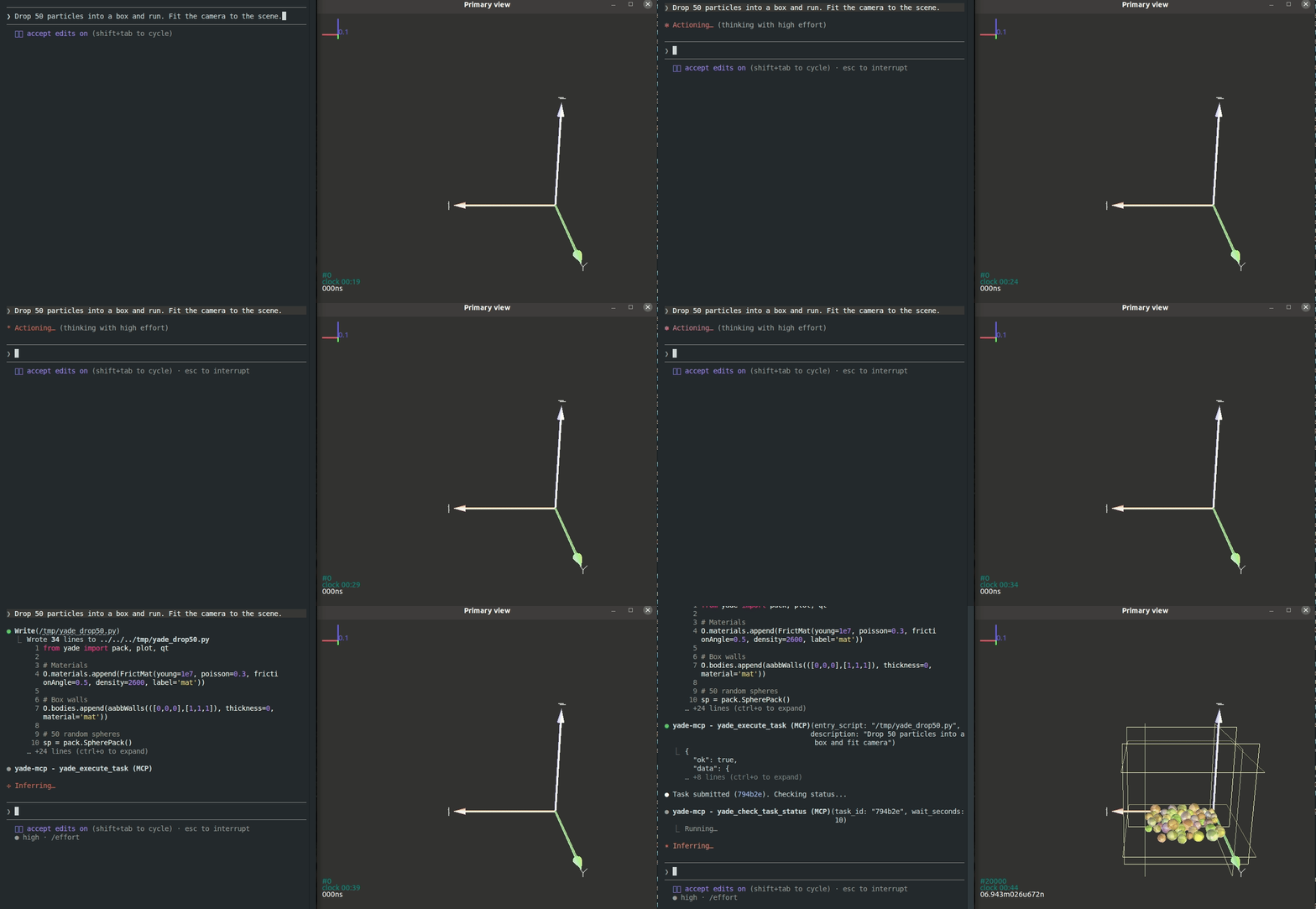
Ваш агент не просто вызывает инструменты — он работает прямо в вашей консоли YADE, самостоятельно запускает длительные симуляции и остается в курсе того, что вы делаете.
Возможности
Агент печатает, YADE работает
Работает на базе yade_execute_code
Опишите, что вы хотите, простым языком. Агент вводит команды в вашу консоль YADE: проверяет частицы, настраивает параметры, выполняет шаги движка, анализирует результаты. Он считывает каждый вывод, отлаживает и повторяет действия точно так же, как вы делали бы это в консоли самостоятельно.
Запустите и занимайтесь своими делами
Работает на базе yade_execute_task + yade_check_task_status + yade_interrupt_task
Запускайте полноценный скрипт YADE как фоновую задачу — точно так же, как при выполнении yade script.py, только вам не нужно следить за процессом. Агент наблюдает самостоятельно: отслеживает вывод в реальном времени, перехватывает ошибки по мере их появления, корректно останавливает выполнение, если что-то идет не так, исправляет скрипт и перезапускает его — до тех пор, пока симуляция не завершится.
Новая сессия, без «холодного старта»
Работает на базе yade_list_tasks + yade_check_task_status
Каждая запущенная вами задача — скрипт, вывод в реальном времени, конечное состояние — сохраняется в истории. Когда контекстное окно заполняется или вы возвращаетесь на следующий день, новый агент приступает к проекту, который «помнит» себя: он перечисляет, что было запущено, считывает результаты каждой задачи и продолжает работу без необходимости объяснять всё заново.
Интерактивная оболочка для работающей симуляции
Работает на базе yade_execute_code
Пока задача выполняется, у агента есть интерактивная оболочка для доступа к симуляции — попросите его проверить любую переменную, выгрузить состояние любого объекта или построить график по запросу, не редактируя скрипт и не останавливая выполнение.
Вы печатаете, агент синхронизирован
Помимо отправленных задач, каждая строка, которую вы вводите в консоли YADE — переменные, которые вы просматривали, параметры, которые тестировали, тупиковые пути, от которых отказались — также попадает в контекст агента. Когда вы переходите к чату, у него уже есть история того, что вы пытались сделать. Изучаете YADE и хотите получить обратную связь по тому, что только что ввели? Застряли на неожиданной ошибке? Просто спросите — агент видел, что вы ввели и как ответил YADE.
Related MCP server: itasca-mcp
Инструменты (7)
Два инструмента для документации (без моста) и пять инструментов для выполнения (требуется мост):
Инструмент | Назначение | Мост |
| Обход дерева классов Python в YADE | Нет |
| Поиск по ключевым словам BM25 в API | Нет |
| Выполнение Python в активном процессе YADE; синхронный возврат | Да |
| Отправка скрипта как длительной фоновой задачи | Да |
| Проверка запущенной или завершенной задачи (вывод, статус) | Да |
| Корректная остановка запущенной задачи | Да |
| Список отправленных задач с метаданными | Да |
Быстрый старт
Предварительные требования
Настройка агента (рекомендуется)
Скопируйте это своему ИИ-агенту и позвольте ему настроиться самостоятельно:
Fetch and follow this bootstrap guide end-to-end:
https://raw.githubusercontent.com/yusong652/yade-mcp/master/docs/agentic/yade-mcp-bootstrap.mdРучная настройка
1. Зарегистрируйте MCP-сервер в конфигурации вашего клиента:
{
"mcpServers": {
"yade-mcp": {
"command": "uvx",
"args": ["yade-mcp"]
}
}
}2. Запустите мост внутри YADE:
pip install yade-mcp-bridgeЗатем в консоли Python YADE:
import yade_mcp_bridge
yade_mcp_bridge.start()Проверка
Перезапустите своего ИИ-агента (Claude Code, Codex CLI, Gemini CLI и т.д.) и попросите его вызвать yade_execute_code для проверки соединения.
Участие в разработке
См. CONTRIBUTING.md для настройки среды разработки и руководств.
Лицензия
MIT — см. LICENSE.
Available Tools
7 toolsyade_browse_apiA
Browse YADE's Python API as a YADE-native class tree.
The tree is rooted in YADE's real inheritance hierarchy: paths mirror the class's mro up to its category root. No shortcuts — always drill through parents.
Inputs: path. Returns: object
yade_check_task_statusC
Check status and output for a submitted YADE task.
Inputs: task_id (required), limit, filter, skip_newest, +1 more. Returns: object
yade_execute_codeA
Execute Python code synchronously in the running YADE process.
Returns stdout immediately. Code runs in the YADE Python environment where yade modules are already imported; side effects persist.
This tool remains responsive EVEN WHILE a simulation task is running (submitted via yade_execute_task). Use it as a live REPL to inspect simulation state in real time — no need to pre-script print statements.
Typical uses:
Query simulation state: O.bodies count, current iteration
Create/modify bodies, engines, interactions
Read or set material properties
Live inspection during a running simulation (e.g. check stress tensor, coordination number, energy balance, or capture viewport screenshots when GUI is available)
Development and REPL-style testing
O.engines[0] holds a PyRunner that belongs to the bridge (its command calls _mcpPyrunnerTick). Ignore it: assign O.engines as usual, the bridge re-adds the PyRunner before every O.run().
Unlike yade_execute_task, this tool is fire-and-return: the response contains the full output. It is NOT tracked by yade_list_tasks and cannot be interrupted or polled.
Timeout behaviour: on timeout the bridge attempts to abort the
running code. The response is an error envelope (ok=false)
whose error.code is one of:
interrupted— the code was running a simulation cycle (O.run) and was paused cleanly at an iteration boundary. For long simulations or solving to equilibrium, switch to yade_execute_task — it tracks progress and stops cleanly via yade_interrupt_task.terminated— a non-cycle abort succeeded (async exception injection); the pump thread is free, but YADE state may be partially modified by the code that ran before the abort fired. Inspect state before retrying.timeout— abort failed (code stuck in a C extension, or nested inside a running task's PyRunner tick); the bridge may still be blocked. Restart if unresponsive.
WARNING: For anything expected to take more than a few seconds,
use yade_execute_task instead — it has proper cancellation via
yade_interrupt_task and does not leave state drift on timeout.
Also, do NOT write except BaseException: in your code; it
defeats bridge-initiated cancellation.
Inputs: code (required), timeout. Returns: object
yade_execute_taskA
Submit a Python script for asynchronous execution in YADE.
Returns a task_id immediately; the script is queued and runs in the background. Tasks run one at a time in submit order (they share the YADE process and its single simulation state), so a multi-stage pipeline can be submitted in one go — each stage starts when the previous one finishes. Use the companion tools to manage the task lifecycle:
yade_check_task_status: poll output, progress, and final status
yade_interrupt_task: stop a running task or cancel a queued one
yade_list_tasks: browse task history (also shows queue order)
Use this for production simulation runs, long O.run() cycles, and any operation that may take minutes or longer. For quick queries and REPL-style testing, use yade_execute_code.
O.engines[0] holds a PyRunner that belongs to the bridge (its command calls _mcpPyrunnerTick). The script does not need to keep it: assign O.engines as usual, the bridge re-adds the PyRunner before every O.run().
Inputs: description (required), script_path (required). Returns: object
yade_interrupt_taskA
Stop a running YADE task, or cancel one still waiting in the queue.
A task that has not started yet is simply removed from the queue
and ends in status canceled (method reports
canceled_while_queued). For a running task, two cancellation
paths are applied together by the bridge:
flag_only— sets an interrupt flag that YADE's PyRunner tick observes between simulation iterations (graceful path forO.runtasks).flag_and_async_exc— in addition, injects aTaskInterruptexception into the script thread, so pure-Python deadloops with noO.runon the stack are terminated too.
The response method field reports which path ran. When
async-exc is refused (e.g. target thread is a Dummy-N
boost::python frame), async_exc_skipped_reason explains why.
Namespace after interrupt: the YADE __main__ namespace is
shared between tasks and yade_execute_code calls. Any
variables the interrupted script had already defined —
including O state — are preserved. There's no need to
re-run the whole script to continue work: inspect state with
yade_execute_code or resume via a fresh yade_execute_task
that only runs the remaining logic.
Inputs: task_id (required). Returns: object
yade_list_tasksA
List tracked YADE tasks with pagination.
Tasks are listed newest first. Queued (pending) tasks run one at a time in submit order, so among the pending entries the one furthest down the list runs next.
Inputs: limit, skip_newest. Returns: object
yade_query_apiA
Search YADE API documentation by keywords (like grep).
Returns matching class/function names with descriptions ranked by relevance. Use yade_browse_api for full documentation of a specific class.
When to use:
You have keywords but don't know the exact class name
Examples: "friction material", "gravity engine", "contact force", "triaxial stress", "sphere create", "hertz mindlin"
Related tools:
yade_browse_api: Get full documentation for a known class path
Inputs: query (required), limit. Returns: object
Tool Schema Changelog
Recent tool additions, removals, and schema changes observed during successful MCP inspections.
Loading tool schema changelog…
TDQS
Scored across 7 tools
The two execution tools are explicitly contrasted: yade_execute_task is async long-running tracked work, while yade_execute_code is a synchronous fire-and-return REPL, and both descriptions spell this out. The API tools are likewise distinct: yade_query_api is keyword search, yade_browse_api drills into the class tree, and the lifecycle tools (status/list/interrupt) each handle a clearly separate concern.
All seven tools share a uniform yade_ prefix followed by snake_case verb_noun (execute_task, execute_code, check_task_status, interrupt_task, list_tasks, browse_api, query_api). The pattern is predictable and readable throughout.
Seven tools is well-scoped for a simulation bridge: two execution modes, three async-lifecycle operations, and two API-discovery helpers. Each tool earns its place with no redundancy or filler.
The surface covers the core lifecycle (submit, poll, list, cancel) plus API discovery and live REPL inspection, which is a coherent workflow. Minor gaps exist — no explicit task cleanup/deletion or a dedicated bulk-output retrieval beyond status polling — but these are workable around.
Maintenance
Related MCP Connectors
A comprehensive Model Context Protocol (MCP) server that enables AI assistants to interact with yo…
Persistent memory, knowledge graph, task management and more for AI agents via MCP.
Task management your AI agents can actually run. One line becomes a context-ready task over MCP.
214 tools for AI agents over one MCP endpoint: image, video, audio, 3D, data, storage, mail, GPUs.
Related MCP Servers
- AlicenseNot gradedqualityDmaintenanceThis project provides a robust integration between AI assistants and FreeCAD CAD software using the Model Context Protocol (MCP). It allows external applications to interact with FreeCAD through a standardized interface, offering multiple connection methods and specialized tools.27MIT
- AlicenseAqualityAmaintenanceMCP server that gives AI agents full access to ITASCA PFC - browse documentation, run simulations, capture plots, all through natural conversation. Built on the Model Context Protocol, pfc-mcp turns any MCP-compatible AI client (Claude Code, Codex CLI, Gemini CLI, OpenCode, toyoura-nagisa, etc.) into a PFC co-pilot that can look up commands, execute scripts, monitor long-running simulations.7232MIT
- AlicenseBqualityCmaintenanceEnables AI agents to automate COMSOL Multiphysics simulations, including model management, geometry building, physics configuration, meshing, solving, and results visualization through the MCP protocol.78MIT
- AlicenseNot gradedqualityAmaintenanceAutomates OpenFOAM CFD simulations via MCP, enabling AI agents to mesh, run, and post-process cases from natural language prompts without any API keys.MIT