Glama

yade-mcp

Englisch | 简体中文

PyPI Downloads GitHub stars Glama License: MIT Python 3.10+

O.engines += [LLM()] # yet another engine.

yade-mcp verbindet KI-Agenten mit YADE — der Open-Source-Engine für die Diskrete-Elemente-Methode — über das Model Context Protocol. Durchsuchen Sie API-Dokumentationen, führen Sie Simulationen aus und lassen Sie Code ausführen, alles durch natürliche Konversation.

Ihr Agent ruft nicht nur Tools auf — er sitzt direkt an Ihrer YADE-Konsole, führt eigenständig lange Simulationen aus und bleibt mit Ihren Aktivitäten synchron.
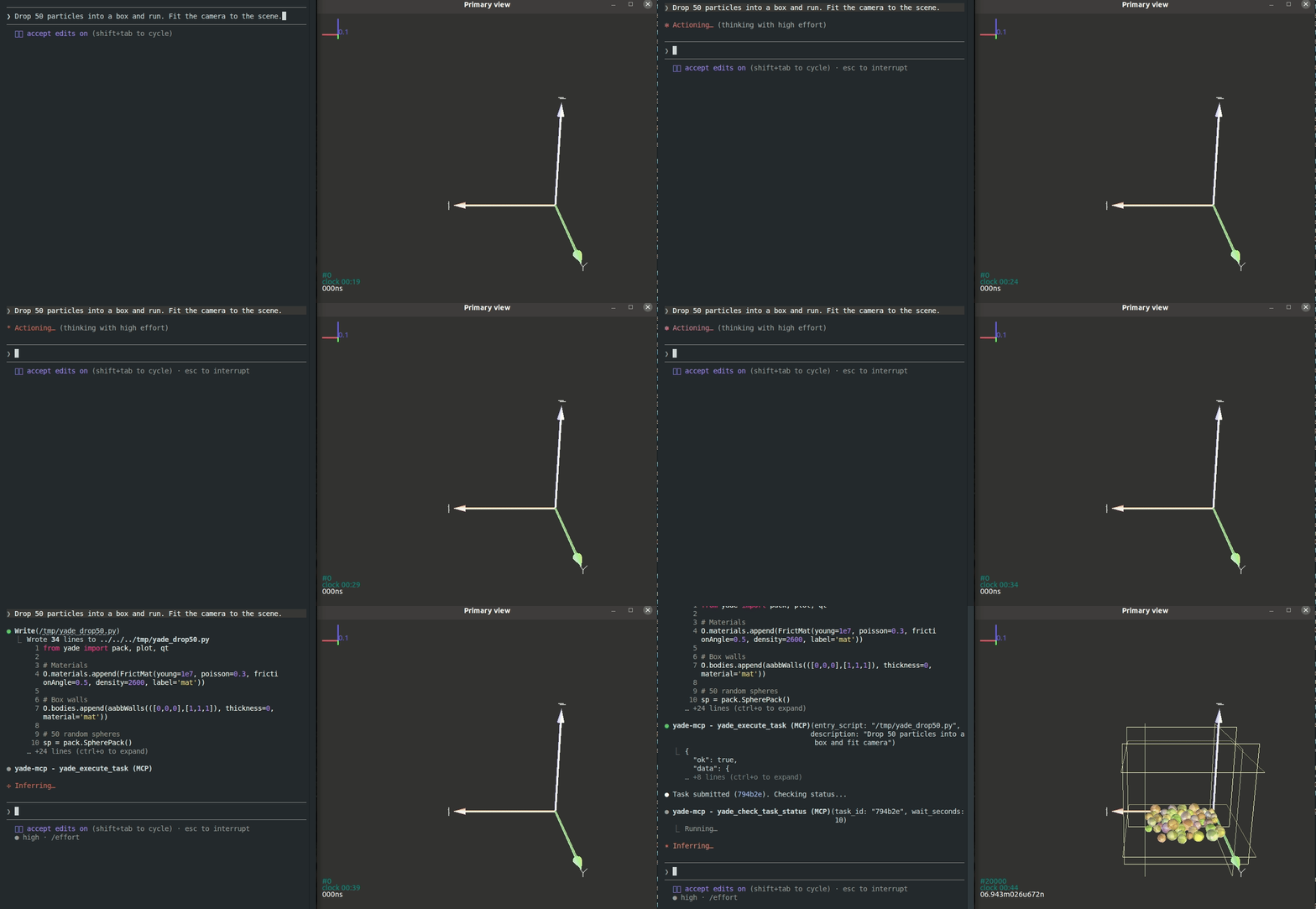
yade-mcp demo

Funktionen

Ihr Agent tippt, YADE führt aus

Unterstützt durch yade_execute_code

Beschreiben Sie in natürlicher Sprache, was Sie möchten. Der Agent gibt Befehle in Ihre YADE-Konsole ein — er inspiziert Partikel, passt Parameter an, lässt die Engine schrittweise laufen und analysiert Ergebnisse. Er liest jede Ausgabe, debuggt und iteriert, genau wie Sie es selbst an der Konsole tun würden.

Starten und zurücklehnen

Unterstützt durch yade_execute_task + yade_check_task_status + yade_interrupt_task

Führen Sie ein vollständiges YADE-Skript als Hintergrundaufgabe aus — genau wie beim Start von yade script.py, nur dass Sie nicht daneben sitzen müssen. Der Agent überwacht den Prozess selbstständig: Er verfolgt die Live-Ausgabe, erkennt auftretende Fehler, stoppt den Lauf bei Unregelmäßigkeiten, korrigiert das Skript und startet es neu — bis die Simulation tatsächlich abgeschlossen ist.

Neue Sitzung, kein Kaltstart

Unterstützt durch yade_list_tasks + yade_check_task_status

Jede Aufgabe, die Sie übermittelt haben — das Skript, die Live-Ausgabe, der Endzustand — bleibt gespeichert. Wenn das Kontextfenster voll ist oder Sie am nächsten Tag zurückkehren, findet ein neuer Agent ein Projekt vor, das sich selbst erinnert: Er listet auf, was ausgeführt wurde, liest die Ergebnisse jeder Aufgabe und macht dort weiter, ohne dass Sie etwas neu erklären müssen.

Eine Live-Shell in die laufende Simulation

Unterstützt durch yade_execute_code

Während eine Aufgabe läuft, hat der Agent eine Live-Shell in die Simulation — lassen Sie ihn beliebige Variablen inspizieren, den Zustand eines Objekts ausgeben oder bei Bedarf einen neuen Plot erstellen, ohne das Skript zu bearbeiten oder den Lauf zu stoppen.

Sie tippen, der Agent ist synchron

Über die übermittelten Aufgaben hinaus fließt jede Zeile, die Sie in die YADE-Konsole eingeben — die Variablen, die Sie geprüft haben, die Parameter, die Sie getestet haben, die Sackgassen, in denen Sie gelandet sind — ebenfalls in den Kontext des Agenten ein. Wenn Sie chatten, kennt er bereits den Pfad dessen, was Sie versucht haben. Lernen Sie YADE und möchten Feedback zu dem, was Sie gerade getippt haben? Hängen Sie bei einem unerwarteten Fehler fest? Fragen Sie einfach — der Agent hat gesehen, was Sie getippt haben und wie YADE geantwortet hat.

Related MCP server: itasca-mcp

Tools (7)

Zwei Dokumentations-Tools (keine Bridge erforderlich) und fünf Ausführungs-Tools (Bridge erforderlich):

Tool

Zweck

Bridge

yade_browse_api

Durchlaufen des YADE Python-Klassenbaums

Nein

yade_query_api

BM25-Stichwortsuche in der API

Nein

yade_execute_code

Python im laufenden YADE-Prozess ausführen; synchrone Rückgabe

Ja

yade_execute_task

Skript als lang laufende Hintergrundaufgabe übermitteln

Ja

yade_check_task_status

Laufende oder abgeschlossene Aufgabe inspizieren (Ausgabe, Status)

Ja

yade_interrupt_task

Laufende Aufgabe kontrolliert stoppen

Ja

yade_list_tasks

Übermittelte Aufgaben mit Metadaten auflisten

Ja

Schnellstart

Voraussetzungen

  • YADE installiert

  • uv installiert (für uvx)

Agenten-Einrichtung (Empfohlen)

Kopieren Sie dies in Ihren KI-Agenten und lassen Sie ihn sich selbst konfigurieren:

Fetch and follow this bootstrap guide end-to-end:
https://raw.githubusercontent.com/yusong652/yade-mcp/master/docs/agentic/yade-mcp-bootstrap.md

Manuelle Einrichtung

1. Registrieren Sie den MCP-Server in Ihrer Client-Konfiguration:

{
  "mcpServers": {
    "yade-mcp": {
      "command": "uvx",
      "args": ["yade-mcp"]
    }
  }
}

2. Starten Sie die Bridge innerhalb von YADE:

pip install yade-mcp-bridge

Dann in einer YADE Python-Konsole:

import yade_mcp_bridge
yade_mcp_bridge.start()

Überprüfung

Starten Sie Ihren KI-Agenten neu (Claude Code, Codex CLI, Gemini CLI, etc.) und bitten Sie ihn, yade_execute_code aufzurufen, um die Verbindung zu überprüfen.

Mitwirken

Siehe CONTRIBUTING.md für die Einrichtung der Entwicklungsumgebung und Richtlinien.

Lizenz

MIT — siehe LICENSE.

Available Tools

7 tools
yade_browse_apiA

Browse YADE's Python API as a YADE-native class tree.

The tree is rooted in YADE's real inheritance hierarchy: paths mirror the class's mro up to its category root. No shortcuts — always drill through parents.

Inputs: path. Returns: object

yade_check_task_statusC

Check status and output for a submitted YADE task.

Inputs: task_id (required), limit, filter, skip_newest, +1 more. Returns: object

yade_execute_codeA

Execute Python code synchronously in the running YADE process.

Returns stdout immediately. Code runs in the YADE Python environment where yade modules are already imported; side effects persist.

This tool remains responsive EVEN WHILE a simulation task is running (submitted via yade_execute_task). Use it as a live REPL to inspect simulation state in real time — no need to pre-script print statements.

Typical uses:

  • Query simulation state: O.bodies count, current iteration

  • Create/modify bodies, engines, interactions

  • Read or set material properties

  • Live inspection during a running simulation (e.g. check stress tensor, coordination number, energy balance, or capture viewport screenshots when GUI is available)

  • Development and REPL-style testing

O.engines[0] holds a PyRunner that belongs to the bridge (its command calls _mcpPyrunnerTick). Ignore it: assign O.engines as usual, the bridge re-adds the PyRunner before every O.run().

Unlike yade_execute_task, this tool is fire-and-return: the response contains the full output. It is NOT tracked by yade_list_tasks and cannot be interrupted or polled.

Timeout behaviour: on timeout the bridge attempts to abort the running code. The response is an error envelope (ok=false) whose error.code is one of:

  • interrupted — the code was running a simulation cycle (O.run) and was paused cleanly at an iteration boundary. For long simulations or solving to equilibrium, switch to yade_execute_task — it tracks progress and stops cleanly via yade_interrupt_task.

  • terminated — a non-cycle abort succeeded (async exception injection); the pump thread is free, but YADE state may be partially modified by the code that ran before the abort fired. Inspect state before retrying.

  • timeout — abort failed (code stuck in a C extension, or nested inside a running task's PyRunner tick); the bridge may still be blocked. Restart if unresponsive.

WARNING: For anything expected to take more than a few seconds, use yade_execute_task instead — it has proper cancellation via yade_interrupt_task and does not leave state drift on timeout. Also, do NOT write except BaseException: in your code; it defeats bridge-initiated cancellation.

Inputs: code (required), timeout. Returns: object

yade_execute_taskA

Submit a Python script for asynchronous execution in YADE.

Returns a task_id immediately; the script is queued and runs in the background. Tasks run one at a time in submit order (they share the YADE process and its single simulation state), so a multi-stage pipeline can be submitted in one go — each stage starts when the previous one finishes. Use the companion tools to manage the task lifecycle:

  • yade_check_task_status: poll output, progress, and final status

  • yade_interrupt_task: stop a running task or cancel a queued one

  • yade_list_tasks: browse task history (also shows queue order)

Use this for production simulation runs, long O.run() cycles, and any operation that may take minutes or longer. For quick queries and REPL-style testing, use yade_execute_code.

O.engines[0] holds a PyRunner that belongs to the bridge (its command calls _mcpPyrunnerTick). The script does not need to keep it: assign O.engines as usual, the bridge re-adds the PyRunner before every O.run().

Inputs: description (required), script_path (required). Returns: object

yade_interrupt_taskA

Stop a running YADE task, or cancel one still waiting in the queue.

A task that has not started yet is simply removed from the queue and ends in status canceled (method reports canceled_while_queued). For a running task, two cancellation paths are applied together by the bridge:

  • flag_only — sets an interrupt flag that YADE's PyRunner tick observes between simulation iterations (graceful path for O.run tasks).

  • flag_and_async_exc — in addition, injects a TaskInterrupt exception into the script thread, so pure-Python deadloops with no O.run on the stack are terminated too.

The response method field reports which path ran. When async-exc is refused (e.g. target thread is a Dummy-N boost::python frame), async_exc_skipped_reason explains why.

Namespace after interrupt: the YADE __main__ namespace is shared between tasks and yade_execute_code calls. Any variables the interrupted script had already defined — including O state — are preserved. There's no need to re-run the whole script to continue work: inspect state with yade_execute_code or resume via a fresh yade_execute_task that only runs the remaining logic.

Inputs: task_id (required). Returns: object

yade_list_tasksA

List tracked YADE tasks with pagination.

Tasks are listed newest first. Queued (pending) tasks run one at a time in submit order, so among the pending entries the one furthest down the list runs next.

Inputs: limit, skip_newest. Returns: object

yade_query_apiA

Search YADE API documentation by keywords (like grep).

Returns matching class/function names with descriptions ranked by relevance. Use yade_browse_api for full documentation of a specific class.

When to use:

  • You have keywords but don't know the exact class name

  • Examples: "friction material", "gravity engine", "contact force", "triaxial stress", "sphere create", "hertz mindlin"

Related tools:

  • yade_browse_api: Get full documentation for a known class path

Inputs: query (required), limit. Returns: object

Tool Schema Changelog

Recent tool additions, removals, and schema changes observed during successful MCP inspections.

Loading tool schema changelog…

    TDQS

    A4/5.0

    Scored across 7 tools

    Disambiguation5/5

    The two execution tools are explicitly contrasted: yade_execute_task is async long-running tracked work, while yade_execute_code is a synchronous fire-and-return REPL, and both descriptions spell this out. The API tools are likewise distinct: yade_query_api is keyword search, yade_browse_api drills into the class tree, and the lifecycle tools (status/list/interrupt) each handle a clearly separate concern.

    Naming Consistency5/5

    All seven tools share a uniform yade_ prefix followed by snake_case verb_noun (execute_task, execute_code, check_task_status, interrupt_task, list_tasks, browse_api, query_api). The pattern is predictable and readable throughout.

    Tool Count5/5

    Seven tools is well-scoped for a simulation bridge: two execution modes, three async-lifecycle operations, and two API-discovery helpers. Each tool earns its place with no redundancy or filler.

    Completeness4/5

    The surface covers the core lifecycle (submit, poll, list, cancel) plus API discovery and live REPL inspection, which is a coherent workflow. Minor gaps exist — no explicit task cleanup/deletion or a dedicated bulk-output retrieval beyond status polling — but these are workable around.

    Maintenance

    ActivityMaintained
    ResponsivenessNo recent community issues

    Related MCP Connectors

    Related MCP Servers

    • A
      license
      Not graded
      quality
      D
      maintenance
      This project provides a robust integration between AI assistants and FreeCAD CAD software using the Model Context Protocol (MCP). It allows external applications to interact with FreeCAD through a standardized interface, offering multiple connection methods and specialized tools.
      27
      MIT
    • A
      license
      A
      quality
      A
      maintenance
      MCP server that gives AI agents full access to ITASCA PFC - browse documentation, run simulations, capture plots, all through natural conversation. Built on the Model Context Protocol, pfc-mcp turns any MCP-compatible AI client (Claude Code, Codex CLI, Gemini CLI, OpenCode, toyoura-nagisa, etc.) into a PFC co-pilot that can look up commands, execute scripts, monitor long-running simulations.
      7
      232
      MIT
    • A
      license
      B
      quality
      C
      maintenance
      Enables AI agents to automate COMSOL Multiphysics simulations, including model management, geometry building, physics configuration, meshing, solving, and results visualization through the MCP protocol.
      78
      MIT
    • A
      license
      Not graded
      quality
      A
      maintenance
      Automates OpenFOAM CFD simulations via MCP, enabling AI agents to mesh, run, and post-process cases from natural language prompts without any API keys.
      MIT