Glama

yade-mcp

English | 简体中文

PyPI Downloads GitHub stars Glama License: MIT Python 3.10+

O.engines += [LLM()] # yet another engine.

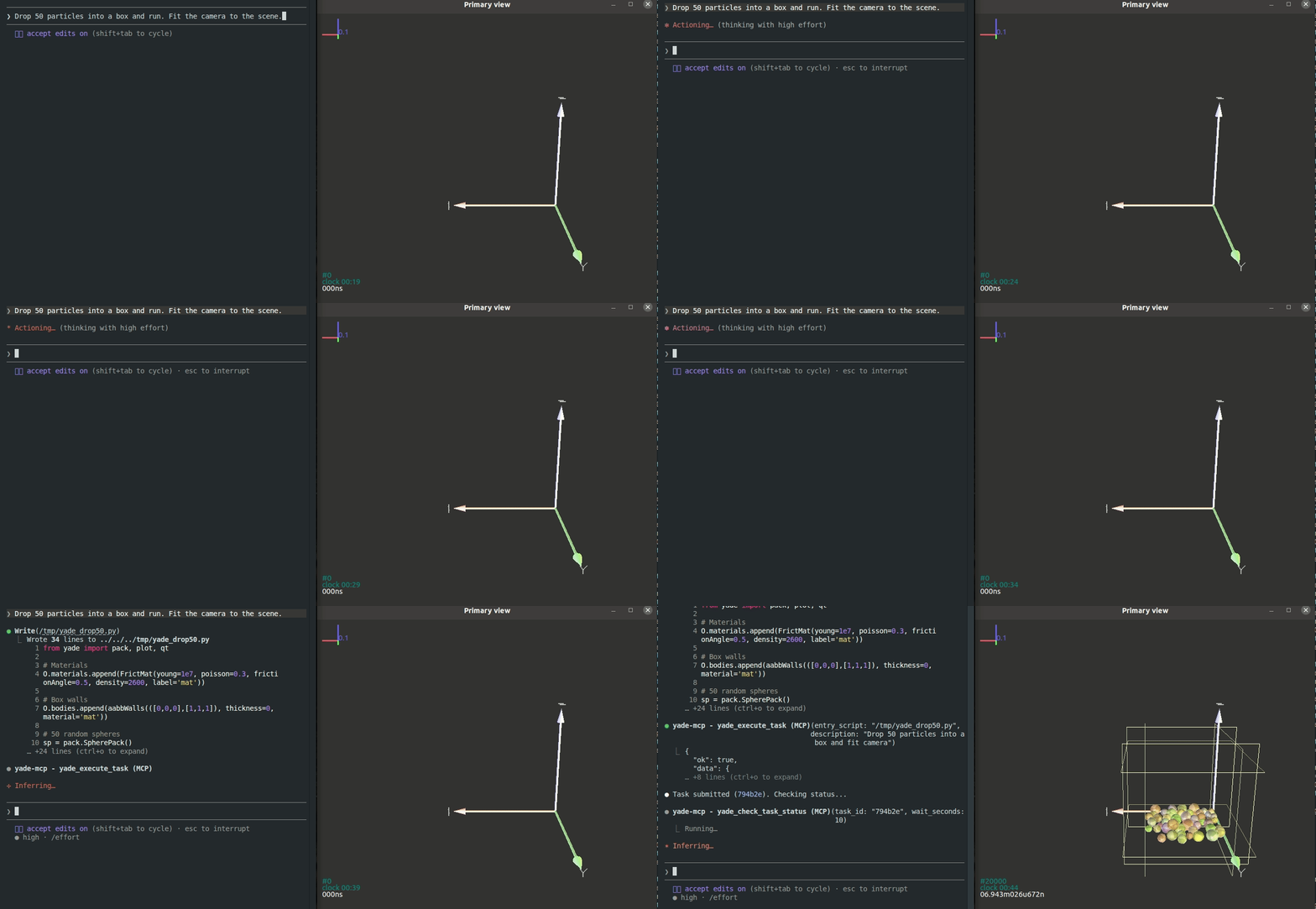
yade-mcp connects AI agents to YADE — the open-source discrete element method engine — through the Model Context Protocol. Browse API docs, run simulations, and execute code, all through natural conversation.

Your agent doesn't just call tools — it sits at your YADE console, runs long simulations on its own, and stays in sync with what you're doing.

yade-mcp demo

Works with any MCP client — verified with Claude Code, Codex CLI, Gemini CLI, GitHub Copilot CLI, OpenCode, and toyoura-nagisa.

Features

Your agent types, YADE runs

Powered by yade_execute_code

Describe what you want in plain language. The agent types commands into your YADE console — inspecting particles, tweaking parameters, stepping the engine, analyzing results. It reads each output, debugs, and iterates, the same way you do at the console yourself.

Set it running, walk away

Powered by yade_execute_task + yade_check_task_status + yade_interrupt_task

Run a full YADE script as a background task — just like firing off yade script.py, except you don't have to babysit it. The agent watches on its own: tailing the live output, catching errors as they appear, stopping the run gracefully when something looks off, fixing the script, and resubmitting — until the simulation actually finishes.

New session, no cold start

Powered by yade_list_tasks + yade_check_task_status

Every task you've submitted — the script, the live output, the final state — stays on record. When the context window fills up or you come back the next day, a fresh agent walks into a project that already remembers itself: it lists what's been run, reads what each task produced, and picks up without you re-explaining anything.

A live shell into the running simulation

Powered by yade_execute_code

While a task runs, the agent has a live shell into the simulation — ask it to inspect any variable, dump any object's state, or render a fresh plot on demand, without editing the script or stopping the run.

You type, the agent's in sync

Beyond submitted tasks, every line you type into the YADE console — the variables you peeked at, the parameters you tested, the dead ends you walked away from — flows into the agent's context too. When you turn to chat, it already has the trail of what you've been trying. Learning YADE and want feedback on what you just typed? Stuck on an unexpected error? Just ask — the agent saw what you typed and how YADE answered.

Related MCP server: itasca-mcp

Tools (7)

Two documentation tools (no bridge) and five execution tools (bridge required):

Tool

Purpose

Bridge

yade_browse_api

Walk the YADE Python class tree

No

yade_query_api

BM25 keyword search across the API

No

yade_execute_code

Run Python in the live YADE process; returns synchronously

Yes

yade_execute_task

Submit a script as a long-running background task

Yes

yade_check_task_status

Inspect a running or finished task (output, status)

Yes

yade_interrupt_task

Gracefully stop a running task

Yes

yade_list_tasks

List submitted tasks with metadata

Yes

Quick Start

Prerequisites

  • YADE installed

  • uv installed (for uvx)

Copy this to your AI agent and let it self-configure:

Fetch and follow this bootstrap guide end-to-end:
https://raw.githubusercontent.com/yusong652/yade-mcp/master/docs/agentic/yade-mcp-bootstrap.md

Manual Setup

1. Register the MCP server in your client config:

{
  "mcpServers": {
    "yade-mcp": {
      "command": "uvx",
      "args": ["yade-mcp"]
    }
  }
}

2. Start the bridge inside YADE:

In a YADE Python console, install the bridge using YADE's own interpreter:

import sys, subprocess
subprocess.check_call([sys.executable, "-m", "pip", "install", "--user", "yade-mcp-bridge"])

On PEP 668 externally-managed environments (pip refuses --user), see the bootstrap guide for a portable form.

Restart YADE, then in the Python console:

import yade_mcp_bridge
yade_mcp_bridge.start()

Verify

Restart your AI agent (Claude Code, Codex CLI, Gemini CLI, etc.) and ask it to call yade_execute_code to verify the connection.

Contributing

See CONTRIBUTING.md for development setup and guidelines.

License

MIT — see LICENSE.

Available Tools

7 tools
yade_browse_apiA

Browse YADE's Python API as a YADE-native class tree.

The tree is rooted in YADE's real inheritance hierarchy: paths mirror the class's mro up to its category root. No shortcuts — always drill through parents.

ParametersJSON Schema
NameRequiredDescriptionDefault
pathNoDot-separated path into YADE's class hierarchy. Navigation is tree-driven (no class-name shortcuts). - None or '': list top-level categories (engine / functor / material / shape / ...) - 'engine': list direct sub-trees of Engine (Dispatcher, GlobalEngine, PartialEngine, ...) - 'engine.GlobalEngine': list GlobalEngine's sub-trees (BoundaryController, Collider, PeriodicEngine, ...) plus its direct leaf classes (NewtonIntegrator, InteractionLoop, ...) - 'engine.GlobalEngine.NewtonIntegrator': full docs for NewtonIntegrator - 'functor.LawFunctor.Law2_ScGeom_FrictPhys_CundallStrack': full docs for a contact law functor Every leaf is reached via its parent-class chain.

Output Schema

ParametersJSON Schema
NameRequiredDescription

No output parameters

TDQS

A3.9/5.0
Behavior4/5

Does the description disclose side effects, auth requirements, rate limits, or destructive behavior?

No annotations are provided, so the description must disclose behavior. It states 'no shortcuts' and 'always drill through parents,' which is a behavioral constraint. As a browse tool, it is implicitly read-only, but this is not explicitly stated.

Agents need to know what a tool does to the world before calling it. Descriptions should go beyond structured annotations to explain consequences.

Conciseness4/5

Is the description appropriately sized, front-loaded, and free of redundancy?

The description is concise, consisting of two informative sentences. It is front-loaded with the main purpose. Could include a bit more detail, but overall efficient.

Shorter descriptions cost fewer tokens and are easier for agents to parse. Every sentence should earn its place.

Completeness4/5

Given the tool's complexity, does the description cover enough for an agent to succeed on first attempt?

Given the tool's simplicity (one parameter, browse-only) and the presence of an output schema, the description is complete enough. It explains the hierarchy and navigation rules. Minor omission: does not mention the response format, but output schema covers that.

Complex tools with many parameters or behaviors need more documentation. Simple tools need less. This dimension scales expectations accordingly.

Parameters3/5

Does the description clarify parameter syntax, constraints, interactions, or defaults beyond what the schema provides?

Schema description coverage is 100%, so the schema already provides detailed parameter semantics with examples. The tool description adds context about the tree structure, but the parameter description in the schema is sufficiently rich.

Input schemas describe structure but not intent. Descriptions should explain non-obvious parameter relationships and valid value ranges.

Purpose5/5

Does the description clearly state what the tool does and how it differs from similar tools?

The description clearly states the tool browses YADE's Python API as a class tree, and the parameter description further clarifies navigation. It is distinct from sibling tools which are task/execution related.

Agents choose between tools based on descriptions. A clear purpose with a specific verb and resource helps agents select the right tool.

Usage Guidelines3/5

Does the description explain when to use this tool, when not to, or what alternatives exist?

The description does not explicitly state when to use this tool vs alternatives. However, the siblings are clearly different in function, so the context provides implicit usage guidance. No exclusions or when-not-to-use are given.

Agents often have multiple tools that could apply. Explicit usage guidance like "use X instead of Y when Z" prevents misuse.

yade_check_task_statusB

Check status and output for a submitted YADE task.

ParametersJSON Schema
NameRequiredDescriptionDefault
limitNoOutput lines per page
filterNoOnly keep output lines containing this text
task_idYesTask ID returned by yade_execute_task
skip_newestNoSkip N newest output lines before pagination
wait_secondsNoDelay before querying (prevents polling too fast). Use 0 for immediate check.

Output Schema

ParametersJSON Schema
NameRequiredDescription

No output parameters

TDQS

B3.3/5.0
Behavior2/5

Does the description disclose side effects, auth requirements, rate limits, or destructive behavior?

With no annotations provided, the description bears full responsibility for disclosing behavior. It merely states the tool checks status and output, but does not explain that it performs a polling operation (as suggested by wait_seconds parameter), whether it waits for completion, or what the output format entails. This leaves significant gaps for an AI agent.

Agents need to know what a tool does to the world before calling it. Descriptions should go beyond structured annotations to explain consequences.

Conciseness4/5

Is the description appropriately sized, front-loaded, and free of redundancy?

The description is a single concise sentence with no superfluous words. It is front-loaded with the core action. However, it could be slightly longer to include essential usage context without compromising conciseness.

Shorter descriptions cost fewer tokens and are easier for agents to parse. Every sentence should earn its place.

Completeness2/5

Given the tool's complexity, does the description cover enough for an agent to succeed on first attempt?

Despite having a complex input schema with 5 parameters and an existing output schema, the description provides minimal context. It fails to explain the tool's role in the workflow (e.g., polling for task completion), the meaning of the output, or how parameters like wait_seconds affect behavior. This is insufficient for a tool of this complexity.

Complex tools with many parameters or behaviors need more documentation. Simple tools need less. This dimension scales expectations accordingly.

Parameters3/5

Does the description clarify parameter syntax, constraints, interactions, or defaults beyond what the schema provides?

Schema description coverage is 100%, so the baseline is 3. The description does not add any parameter-specific information beyond what is already in the input schema. While adequate, it does not enhance understanding of parameter semantics.

Input schemas describe structure but not intent. Descriptions should explain non-obvious parameter relationships and valid value ranges.

Purpose5/5

Does the description clearly state what the tool does and how it differs from similar tools?

The description uses a clear verb 'Check' and specific resource 'status and output for a submitted YADE task'. It distinguishes from sibling tools like yade_execute_task (submission) and yade_interrupt_task (interruption), making the tool's purpose unambiguous.

Agents choose between tools based on descriptions. A clear purpose with a specific verb and resource helps agents select the right tool.

Usage Guidelines3/5

Does the description explain when to use this tool, when not to, or what alternatives exist?

The description implies the tool should be used after submitting a YADE task ('for a submitted YADE task'), but it does not explicitly specify when to use this tool versus alternatives like yade_list_tasks or yade_interrupt_task, nor does it provide any exclusions or conditions.

Agents often have multiple tools that could apply. Explicit usage guidance like "use X instead of Y when Z" prevents misuse.

yade_execute_codeA

Execute Python code synchronously in the running YADE process.

Returns stdout immediately. Code runs in the YADE Python environment where yade modules are already imported; side effects persist.

This tool remains responsive EVEN WHILE a simulation task is running (submitted via yade_execute_task). Use it as a live REPL to inspect simulation state in real time — no need to pre-script print statements.

Typical uses:

  • Query simulation state: O.bodies count, current iteration

  • Create/modify bodies, engines, interactions

  • Read or set material properties

  • Live inspection during a running simulation (e.g. check stress tensor, coordination number, energy balance, or capture viewport screenshots when GUI is available)

  • Development and REPL-style testing

Unlike yade_execute_task, this tool is fire-and-return: the response contains the full output. It is NOT tracked by yade_list_tasks and cannot be interrupted or polled.

Timeout behaviour: on timeout the bridge attempts to abort the running code. The response is an error envelope (ok=false) whose error.code is one of:

  • interrupted — the code was running a simulation cycle (O.run) and was paused cleanly at an iteration boundary. For long simulations or solving to equilibrium, switch to yade_execute_task — it tracks progress and stops cleanly via yade_interrupt_task.

  • terminated — a non-cycle abort succeeded (async exception injection); the pump thread is free, but YADE state may be partially modified by the code that ran before the abort fired. Inspect state before retrying.

  • timeout — abort failed (code stuck in a C extension, or nested inside a running task's PyRunner tick); the bridge may still be blocked. Restart if unresponsive.

WARNING: For anything expected to take more than a few seconds, use yade_execute_task instead — it has proper cancellation via yade_interrupt_task and does not leave state drift on timeout. Also, do NOT write except BaseException: in your code; it defeats bridge-initiated cancellation.

ParametersJSON Schema
NameRequiredDescriptionDefault
codeYesPython code to execute in YADE process
timeoutNoConsole execution timeout in seconds

Output Schema

ParametersJSON Schema
NameRequiredDescription

No output parameters

TDQS

A4.6/5.0
Behavior5/5

Does the description disclose side effects, auth requirements, rate limits, or destructive behavior?

No annotations provided, so description carries full burden. Details side effects persistence, responsiveness during running simulations, timeout error codes (interrupted, terminated, timeout), and consequences of each. Also warns about state drift and unresponsiveness.

Agents need to know what a tool does to the world before calling it. Descriptions should go beyond structured annotations to explain consequences.

Conciseness4/5

Is the description appropriately sized, front-loaded, and free of redundancy?

Well-structured with front-loaded core purpose, bullet points for typical uses, and detailed timeout section. Every sentence adds value, though length could be slightly reduced for extreme conciseness.

Shorter descriptions cost fewer tokens and are easier for agents to parse. Every sentence should earn its place.

Completeness5/5

Given the tool's complexity, does the description cover enough for an agent to succeed on first attempt?

Covers all necessary aspects: what, when, alternatives, side effects, error handling, and warnings. Output schema exists but is not needed since tool behavior is fully described. Complete for a synchronous execution tool.

Complex tools with many parameters or behaviors need more documentation. Simple tools need less. This dimension scales expectations accordingly.

Parameters3/5

Does the description clarify parameter syntax, constraints, interactions, or defaults beyond what the schema provides?

Schema coverage is 100% with good descriptions. The description adds context about timeout behavior (error codes, suggestions) but does not significantly expand parameter meaning beyond what the schema already provides.

Input schemas describe structure but not intent. Descriptions should explain non-obvious parameter relationships and valid value ranges.

Purpose5/5

Does the description clearly state what the tool does and how it differs from similar tools?

The description clearly states the tool executes Python code synchronously in the YADE process and returns stdout immediately. It explicitly contrasts with yade_execute_task for long-running simulations, establishing a distinct purpose.

Agents choose between tools based on descriptions. A clear purpose with a specific verb and resource helps agents select the right tool.

Usage Guidelines5/5

Does the description explain when to use this tool, when not to, or what alternatives exist?

Provides explicit guidance: use for quick REPL-style inspection, not for tasks > a few seconds (use yade_execute_task). Warns against catching BaseException to avoid breaking cancellation. Includes alternative tools.

Agents often have multiple tools that could apply. Explicit usage guidance like "use X instead of Y when Z" prevents misuse.

yade_execute_taskA

Submit a Python script for asynchronous execution in YADE.

Returns a task_id immediately; the script is queued and runs in the background. Tasks run one at a time in submit order (they share the YADE process and its single simulation state), so a multi-stage pipeline can be submitted in one go — each stage starts when the previous one finishes. Use the companion tools to manage the task lifecycle:

  • yade_check_task_status: poll output, progress, and final status

  • yade_interrupt_task: stop a running task or cancel a queued one

  • yade_list_tasks: browse task history (also shows queue order)

Use this for production simulation runs, long O.run() cycles, and any operation that may take minutes or longer. For quick queries and REPL-style testing, use yade_execute_code.

ParametersJSON Schema
NameRequiredDescriptionDefault
descriptionYesBrief task purpose
script_pathYesAbsolute path to entry Python script for YADE

Output Schema

ParametersJSON Schema
NameRequiredDescription

No output parameters

TDQS

A4.7/5.0
Behavior4/5

Does the description disclose side effects, auth requirements, rate limits, or destructive behavior?

The description details asynchronous execution, immediate return, background queuing, and sequential ordering. No annotations provided, so the description carries full burden and does well, though it omits potential failure modes or authorization requirements.

Agents need to know what a tool does to the world before calling it. Descriptions should go beyond structured annotations to explain consequences.

Conciseness5/5

Is the description appropriately sized, front-loaded, and free of redundancy?

Concise and well-structured: tool purpose first, then behavior, companion tools, and usage guidance. Every sentence adds value.

Shorter descriptions cost fewer tokens and are easier for agents to parse. Every sentence should earn its place.

Completeness5/5

Given the tool's complexity, does the description cover enough for an agent to succeed on first attempt?

Given the tool's complexity (async, queue, lifecycle), the description covers the key aspects: single-threaded execution, queue ordering, companion tools, and use case differentiation. Presence of output schema (context) covers return format.

Complex tools with many parameters or behaviors need more documentation. Simple tools need less. This dimension scales expectations accordingly.

Parameters4/5

Does the description clarify parameter syntax, constraints, interactions, or defaults beyond what the schema provides?

Schema coverage is 100%, baseline 3. The description adds context: script_path is absolute, description is 'brief task purpose'. This enhances understanding beyond the schema field descriptions.

Input schemas describe structure but not intent. Descriptions should explain non-obvious parameter relationships and valid value ranges.

Purpose5/5

Does the description clearly state what the tool does and how it differs from similar tools?

The description clearly states the tool submits a Python script for asynchronous execution, returns a task_id, and distinguishes itself from sibling tools like yade_execute_code by specifying use cases.

Agents choose between tools based on descriptions. A clear purpose with a specific verb and resource helps agents select the right tool.

Usage Guidelines5/5

Does the description explain when to use this tool, when not to, or what alternatives exist?

Explicitly says use for production runs and long operations, and advises using yade_execute_code for quick testing. Also explains the sequential queue behavior and lifecycle management.

Agents often have multiple tools that could apply. Explicit usage guidance like "use X instead of Y when Z" prevents misuse.

yade_interrupt_taskA

Stop a running YADE task, or cancel one still waiting in the queue.

A task that has not started yet is simply removed from the queue and ends in status canceled (method reports canceled_while_queued). For a running task, two cancellation paths are applied together by the bridge:

  • flag_only — sets an interrupt flag that YADE's PyRunner tick observes between simulation iterations (graceful path for O.run tasks).

  • flag_and_async_exc — in addition, injects a TaskInterrupt exception into the script thread, so pure-Python deadloops with no O.run on the stack are terminated too.

The response method field reports which path ran. When async-exc is refused (e.g. target thread is a Dummy-N boost::python frame), async_exc_skipped_reason explains why.

Namespace after interrupt: the YADE __main__ namespace is shared between tasks and yade_execute_code calls. Any variables the interrupted script had already defined — including O state — are preserved. There's no need to re-run the whole script to continue work: inspect state with yade_execute_code or resume via a fresh yade_execute_task that only runs the remaining logic.

ParametersJSON Schema
NameRequiredDescriptionDefault
task_idYesTask ID returned by yade_execute_task

Output Schema

ParametersJSON Schema
NameRequiredDescription

No output parameters

TDQS

A4.8/5.0
Behavior5/5

Does the description disclose side effects, auth requirements, rate limits, or destructive behavior?

No annotations provided, so description fully discloses behavior: cancellation paths (flag_only, flag_and_async_exc), response method field, namespace preservation, and async exception handling. Very transparent.

Agents need to know what a tool does to the world before calling it. Descriptions should go beyond structured annotations to explain consequences.

Conciseness4/5

Is the description appropriately sized, front-loaded, and free of redundancy?

Front-loaded with main purpose, but subsequent paragraphs contain detailed technical explanations. While informative, some sentences could be condensed. Still well-structured for the complexity.

Shorter descriptions cost fewer tokens and are easier for agents to parse. Every sentence should earn its place.

Completeness5/5

Given the tool's complexity, does the description cover enough for an agent to succeed on first attempt?

Covers task states, cancellation paths, namespace impact, and response details. Given the tool's complexity and presence of an output schema, the description is thorough and complete.

Complex tools with many parameters or behaviors need more documentation. Simple tools need less. This dimension scales expectations accordingly.

Parameters4/5

Does the description clarify parameter syntax, constraints, interactions, or defaults beyond what the schema provides?

Schema coverage is 100% and description adds context: 'Task ID returned by yade_execute_task'. While schema already describes the parameter, the description clarifies its source and usage, adding value beyond the schema.

Input schemas describe structure but not intent. Descriptions should explain non-obvious parameter relationships and valid value ranges.

Purpose5/5

Does the description clearly state what the tool does and how it differs from similar tools?

Clearly states 'Stop a running YADE task, or cancel one still waiting in the queue.' Specific verb and resource, distinct from sibling tools like yade_execute_task or yade_list_tasks.

Agents choose between tools based on descriptions. A clear purpose with a specific verb and resource helps agents select the right tool.

Usage Guidelines5/5

Does the description explain when to use this tool, when not to, or what alternatives exist?

Provides when to use (interrupt/cancel tasks) and explicitly references alternatives for inspecting state (yade_execute_code) and resuming (yade_execute_task), offering clear guidance.

Agents often have multiple tools that could apply. Explicit usage guidance like "use X instead of Y when Z" prevents misuse.

yade_list_tasksA

List tracked YADE tasks with pagination.

Tasks are listed newest first. Queued (pending) tasks run one at a time in submit order, so among the pending entries the one furthest down the list runs next.

ParametersJSON Schema
NameRequiredDescriptionDefault
limitNoMax tasks to return
skip_newestNoSkip N most recent tasks before listing

Output Schema

ParametersJSON Schema
NameRequiredDescription

No output parameters

TDQS

A3.8/5.0
Behavior4/5

Does the description disclose side effects, auth requirements, rate limits, or destructive behavior?

Discloses ordering ('newest first') and queue behavior for pending tasks, adding value beyond the schema. However, with no annotations, it could further state that it is read-only.

Agents need to know what a tool does to the world before calling it. Descriptions should go beyond structured annotations to explain consequences.

Conciseness5/5

Is the description appropriately sized, front-loaded, and free of redundancy?

Two concise sentences, each valuable. No wasted words.

Shorter descriptions cost fewer tokens and are easier for agents to parse. Every sentence should earn its place.

Completeness4/5

Given the tool's complexity, does the description cover enough for an agent to succeed on first attempt?

Given an output schema exists, the description sufficiently covers listing, pagination, and ordering. Minor gap: no mention of return fields, but schema compensates.

Complex tools with many parameters or behaviors need more documentation. Simple tools need less. This dimension scales expectations accordingly.

Parameters3/5

Does the description clarify parameter syntax, constraints, interactions, or defaults beyond what the schema provides?

Schema coverage is 100%, and the description adds context about pagination ordering but no new meaning beyond param descriptions. Baseline 3 is appropriate.

Input schemas describe structure but not intent. Descriptions should explain non-obvious parameter relationships and valid value ranges.

Purpose5/5

Does the description clearly state what the tool does and how it differs from similar tools?

The description clearly states 'List tracked YADE tasks with pagination' with a specific verb and resource, and implicitly distinguishes from sibling tools like yade_check_task_status by focusing on listing.

Agents choose between tools based on descriptions. A clear purpose with a specific verb and resource helps agents select the right tool.

Usage Guidelines2/5

Does the description explain when to use this tool, when not to, or what alternatives exist?

No explicit guidance on when to use this tool versus alternatives (e.g., yade_check_task_status), nor when not to use it.

Agents often have multiple tools that could apply. Explicit usage guidance like "use X instead of Y when Z" prevents misuse.

yade_query_apiA

Search YADE API documentation by keywords (like grep).

Returns matching class/function names with descriptions ranked by relevance. Use yade_browse_api for full documentation of a specific class.

When to use:

  • You have keywords but don't know the exact class name

  • Examples: "friction material", "gravity engine", "contact force", "triaxial stress", "sphere create", "hertz mindlin"

Related tools:

  • yade_browse_api: Get full documentation for a known class path

ParametersJSON Schema
NameRequiredDescriptionDefault
limitNoMaximum number of results (1-20).
queryYesSearch keywords for YADE Python API. Examples: 'sphere body', 'triaxial compression', 'contact force'. Case-insensitive.

Output Schema

ParametersJSON Schema
NameRequiredDescription

No output parameters

TDQS

A4.7/5.0
Behavior4/5

Does the description disclose side effects, auth requirements, rate limits, or destructive behavior?

No annotations are provided, so the description carries the full burden. It states the tool returns ranked search results, implying a read-only operation. While it does not explicitly declare no side effects, the nature of a documentation search tool makes this clear. The description could be slightly more explicit about being non-destructive.

Agents need to know what a tool does to the world before calling it. Descriptions should go beyond structured annotations to explain consequences.

Conciseness5/5

Is the description appropriately sized, front-loaded, and free of redundancy?

The description is concise and well-structured: it opens with the primary action, then describes return values, then provides usage guidance with examples, and finally lists a related tool. Every sentence is informative and relevant.

Shorter descriptions cost fewer tokens and are easier for agents to parse. Every sentence should earn its place.

Completeness5/5

Given the tool's complexity, does the description cover enough for an agent to succeed on first attempt?

Given that an output schema exists (not shown, but indicated), the description does not need to detail return format. It covers purpose, usage scenarios, concrete query examples, and sibling tool differentiation. It is complete for an agent to decide when to invoke this tool.

Complex tools with many parameters or behaviors need more documentation. Simple tools need less. This dimension scales expectations accordingly.

Parameters4/5

Does the description clarify parameter syntax, constraints, interactions, or defaults beyond what the schema provides?

The input schema has 100% description coverage, so the baseline is 3. The description adds value by providing example queries (e.g., 'sphere body') and the analogy 'like grep', which helps the agent understand how to formulate the query. This enriches the schema's descriptions.

Input schemas describe structure but not intent. Descriptions should explain non-obvious parameter relationships and valid value ranges.

Purpose5/5

Does the description clearly state what the tool does and how it differs from similar tools?

The description clearly states the tool searches YADE API documentation by keywords, likening it to grep. It specifies that it returns class/function names with descriptions ranked by relevance. This differentiates it from the sibling yade_browse_api, which provides full documentation for a known class.

Agents choose between tools based on descriptions. A clear purpose with a specific verb and resource helps agents select the right tool.

Usage Guidelines5/5

Does the description explain when to use this tool, when not to, or what alternatives exist?

The description explicitly includes a 'When to use' section with concrete examples (e.g., 'friction material', 'gravity engine'). It also tells when to use the alternative tool (yade_browse_api for full documentation of a specific class). This provides clear guidance for the agent to select the correct tool.

Agents often have multiple tools that could apply. Explicit usage guidance like "use X instead of Y when Z" prevents misuse.

Tool Schema Changelog

Recent tool additions, removals, and schema changes observed during successful MCP inspections.

  1. 1 tool updatev0.2.3
    • Changedyade_execute_task3 fields changed
      • removedInput schema / properties / entry_script
        Removed value: -{
        -  "description": "Absolute path to entry Python script for YADE",
        -  "type": "string"
        -}
      • addedInput schema / properties / script_path
        Added value: +{
        +  "description": "Absolute path to entry Python script for YADE",
        +  "type": "string"
        +}
      • changedInput schema / required
        Previous value: -[
        -  "entry_script",
        -  "description"
        -]New value: +[
        +  "script_path",
        +  "description"
        +]
  2. 2 tool updates
    • Changedyade_browse_api1 field changed
      • changedInput schema / properties / path / description
        Previous value: -"Dot-separated API path to browse. Progressive disclosure:\n- None or '': Root — list all categories\n- 'engines': List all engine classes\n- 'engines.NewtonIntegrator': Full docs for NewtonIntegrator\n- 'materials': List all material classes\n- 'materials.FrictMat': Full docs for FrictMat\n- 'interactions.geometry': List contact geometry classes\n- 'interactions.laws.Law2_ScGeom_FrictPhys_CundallStrack': Full docs\n- 'utils': Utility functions\n- 'omega': Omega (O) simulation control"New value: +"Dot-separated path into YADE's class hierarchy. Navigation is tree-driven (no class-name shortcuts).\n- None or '': list top-level categories (engine / functor / material / shape / ...)\n- 'engine': list direct sub-trees of Engine (Dispatcher, GlobalEngine, PartialEngine, ...)\n- 'engine.GlobalEngine': list GlobalEngine's sub-trees (BoundaryController, Collider, PeriodicEngine, ...) plus its direct leaf classes (NewtonIntegrator, InteractionLoop, ...)\n- 'engine.GlobalEngine.NewtonIntegrator': full docs for NewtonIntegrator\n- 'functor.LawFunctor.Law2_ScGeom_FrictPhys_CundallStrack': full docs for a contact law functor\nEvery leaf is reached via its parent-class chain."
    • Changedyade_check_task_status2 fields changed
      • changedInput schema / properties / wait_seconds / description
        Previous value: -"Wait time before querying status"New value: +"Delay before querying (prevents polling too fast). Use 0 for immediate check."
      • changedInput schema / properties / wait_seconds / minimum
        Previous value: -1New value: +0
  3. 7 tool updatesv0.1.0
    • First observedyade_browse_api
    • First observedyade_check_task_status
    • First observedyade_execute_code
    • First observedyade_execute_task
    • First observedyade_interrupt_task
    • First observedyade_list_tasks
    • First observedyade_query_api

TDQS

A4.2/5.0

Scored across 7 tools

Disambiguation5/5

Each tool has a clear, distinct purpose: API browsing and searching are separate from code execution (sync vs async) and task management (status, interrupt, list). No overlap in functionality, and descriptions explicitly differentiate borderline cases (e.g., execute_code vs execute_task).

Naming Consistency5/5

All tools follow a consistent 'yade_verb_noun' pattern in snake_case. Verbs are descriptive (browse, check, execute, interrupt, list, query) and nouns are specific (api, task, code, tasks). No mixing of styles.

Tool Count5/5

With 7 tools, the surface is well-scoped for YADE interaction: API exploration (2 tools), code execution (2 tools for synchronous vs async), and task lifecycle management (3 tools). Not too many or too few.

Completeness5/5

The toolset covers the full lifecycle of interacting with a YADE simulation: discovering API, executing code synchronously for quick queries and asynchronously for long tasks, managing task queue (submit, interrupt, list, check status). No obvious gaps.

Maintenance

ActivityMaintained
ResponsivenessNo issues

Related MCP Connectors

Related MCP Servers

  • A
    license
    Not graded
    quality
    F
    maintenance
    This project provides a robust integration between AI assistants and FreeCAD CAD software using the Model Context Protocol (MCP). It allows external applications to interact with FreeCAD through a standardized interface, offering multiple connection methods and specialized tools.
    24
    MIT
  • A
    license
    A
    quality
    A
    maintenance
    MCP server that gives AI agents full access to ITASCA PFC - browse documentation, run simulations, capture plots, all through natural conversation. Built on the Model Context Protocol, pfc-mcp turns any MCP-compatible AI client (Claude Code, Codex CLI, Gemini CLI, OpenCode, toyoura-nagisa, etc.) into a PFC co-pilot that can look up commands, execute scripts, monitor long-running simulations.
    10
    193
    MIT
  • A
    license
    B
    quality
    C
    maintenance
    Enables AI agents to automate COMSOL Multiphysics simulations, including model management, geometry building, physics configuration, meshing, solving, and results visualization through the MCP protocol.
    78
    MIT
  • A
    license
    Not graded
    quality
    A
    maintenance
    Automates OpenFOAM CFD simulations via MCP, enabling AI agents to mesh, run, and post-process cases from natural language prompts without any API keys.
    MIT