Demo HTTP MCP Server
test-http-mcp
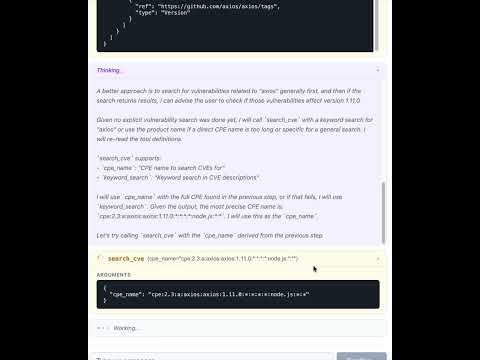
使用 http-mcp 包以 Python 实现的演示模型上下文协议 (MCP) 服务器。它可以通过 HTTP (Starlette/Uvicorn) 或 stdio 运行,向任何支持 MCP 的客户端公开示例工具和提示词。该项目包含一个 React 前端,提供聊天界面,用于通过 NVD(国家漏洞数据库)查询漏洞。

项目结构
test-http-mcp/
├── backend/ # Python backend (FastAPI + MCP server)
│ ├── app/ # Application source code
│ │ ├── app.py # FastAPI app, routes, MCP mount
│ │ ├── main.py # Entry points (HTTP / stdio)
│ │ ├── agen_memory.py # SQLite message persistence
│ │ ├── config.py # Settings via pydantic-settings
│ │ ├── auth0/ # Auth0 integration
│ │ │ ├── __init__.py # JWT token validator
│ │ │ └── client_store.py # Dynamic client registration (RFC 7591)
│ │ ├── tools/ # MCP tools (CPE/CVE search via NVD)
│ │ └── prompts/ # MCP prompt templates
│ ├── pyproject.toml # Python deps & scripts
│ ├── uv.lock # Locked dependencies
│ ├── ruff.toml # Linter config
│ ├── mypy.ini # Type-checker config
│ └── .envrc # direnv auto-activation
├── frontend/ # React + TypeScript frontend (Vite)
│ ├── src/
│ │ ├── components/ # ChatApp, ChatInput, MessageList, MessageBubble
│ │ ├── api.ts # API client (fetch history, stream messages)
│ │ ├── types.ts # Shared TypeScript types
│ │ ├── App.tsx # Root component
│ │ └── App.css # Styles
│ ├── vite.config.ts # Vite config with dev proxy
│ └── package.json # Node dependencies
├── AGENTS.md
├── LICENSE
└── README.md身份验证 (Auth0)
MCP 端点 (/mcp/) 受 Auth0 OAuth2 身份验证保护。工具需要访问令牌中包含作用域 (tool:search_cpe, tool:search_cve)。
所需环境变量
变量 | 描述 |
| Auth0 租户域 (例如 |
| 用于令牌验证的 API 标识符 |
| 用于 MCP 应用的 Auth0 应用程序客户端 ID |
| 管理 API 客户端 ID(用于动态注册) |
| 管理 API 客户端密钥 |
| 设置为 |
将这些变量放入 backend/.env(已在 git 中忽略)。
应用挂载结构
路径 | 应用 | 身份验证 |
| 受保护的 MCP 服务器 | 需要 Auth0 Bearer 令牌 |
| 动态客户端注册 (RFC 7591) | 未经身份验证 |
| OAuth/资源元数据 | 未经身份验证 |
| 聊天界面端点 | 未经身份验证(见说明) |
| 前端静态文件 | 未经身份验证 |
注意: 聊天端点在本地开发时特意未进行身份验证。在暴露到 localhost 之外之前,请添加身份验证。
要求
Python 3.13
Node.js 18+ 和 npm
uv(推荐)或pip
安装
后端(使用 uv):
cd backend
uv run python -V # creates a venv and syncs deps from pyproject后端(使用 pip):
cd backend
python3.13 -m venv .venv
source .venv/bin/activate
pip install .前端:
cd frontend
npm install运行
开发(前端 + 后端分别运行)
启动后端:
cd backend
uv run run-app
# → API on http://localhost:8000
# → MCP endpoint on http://localhost:8000/mcp/启动前端开发服务器(在单独的终端中):
cd frontend
npm run dev
# → UI on http://localhost:5173 (proxies /api/* → backend)生产(后端服务已构建的前端)
构建前端并启动后端:
cd frontend && npm run build && cd ..
cd backend && uv run run-app
# → Everything on http://localhost:8000运行 (stdio 模式)
与 Cursor 或其他 MCP 客户端一起使用
启用 Auth0 后,客户端必须获取 OAuth2 访问令牌。服务器支持 /register 处的 RFC 7591 动态客户端注册,因此实现 auth 规范的 MCP 客户端将自动注册。
HTTP 模式的 .cursor/mcp.json 示例:
{
"mcpServers": {
"test-http-mcp": {
"type": "http",
"url": "http://localhost:8000/mcp/"
}
}
}与 Gemini 一起使用:
{
"mcpServers": {
"test": {
"httpUrl": "http://localhost:8000/mcp/",
"timeout": 5000
}
}
}通过 stdio 连接的 .cursor/mcp.json 条目示例:
{
"mcpServers": {
"test_studio": {
"command": "uv",
"args": ["run", "--project", "backend", "run-stdio"],
"env": { "AUTHORIZATION_TOKEN": "Bearer TEST_TOKEN" }
}
}
}此服务器公开的内容
工具(见
backend/app/tools/):search_cpe(product, version, vendor)— 通过 NVD 搜索通用平台枚举 (CPE)search_cve(cpe_name)— 为给定的 CPE 搜索通用漏洞披露 (CVE)
提示词(见
backend/app/prompts/):sync_nvd_search(dependency, version)— 简单的漏洞搜索提示词async_nvd_search(dependency, version)— 带有预取 CVE 数据的高级提示词
项目脚本
backend/pyproject.toml 中定义了两个控制台入口点:
run-app→app.main:run_httprun-stdio→app.main:run_stdiorun-app-local→app.app:main(带有自动重载)
开发
常见任务(从 backend/ 目录运行):
uv run ruff check . # lint
uv run mypy . # type check
uv run pytest # tests
uv run mdformat . # format markdown前端任务(从 frontend/ 目录运行):
npm run dev # start dev server
npm run build # production build
npm run lint # lint with ESLint
npx tsc --noEmit # type check实现说明
根 ASGI 应用是由
auth_mcp创建的受 Auth0 保护的 MCP 应用,它将 FastAPI 子应用挂载在/api下。/mcp/处的 MCP 端点需要一个具有适当工具作用域的有效 Auth0 Bearer 令牌。/register处的动态客户端注册代理到一个预先创建的 Auth0 应用程序,更新其允许的回调 URL。重定向 URI 经过验证(需要 HTTPS;仅允许 localhost 使用 HTTP)。聊天界面使用带有 Ollama 代理的
pydantic-ai,该代理可以调用 MCP 工具来搜索漏洞。聊天记录通过
agen_memory.py持久化在本地 SQLite 数据库中。React 前端以换行符分隔的 JSON 流式传输响应,并使用
marked库渲染 Markdown。在生产环境中,后端从
frontend/dist/提供构建好的前端,并具有 SPA 后备路由(受路径遍历保护)。在开发环境中,Vite 将
/api/*请求代理到端口 8000 上的后端。
许可证
MIT — 见 LICENSE。
Available Tools
4 toolsget_called_toolsGet Called ToolsAIdempotent
Get the list of called tools.
| Name | Required | Description | Default |
|---|---|---|---|
No parameters | |||
Output Schema
| Name | Required | Description |
|---|---|---|
| called_tools | Yes | The list of called tools |
TDQS
Does the description disclose side effects, auth requirements, rate limits, or destructive behavior?
The description doesn't contradict annotations and adds some context by specifying 'list of called tools' (implying retrieval of historical tool usage data). However, annotations already provide rich behavioral information: readOnlyHint=false (potentially confusing for a 'get' operation), openWorldHint=true, idempotentHint=true, destructiveHint=false. The description doesn't add significant behavioral details beyond what annotations already cover, but it doesn't contradict them either.
Agents need to know what a tool does to the world before calling it. Descriptions should go beyond structured annotations to explain consequences.
Is the description appropriately sized, front-loaded, and free of redundancy?
The description is a single, clear sentence with zero wasted words. It's front-loaded with the essential information and perfectly sized for a simple tool. Every word earns its place.
Shorter descriptions cost fewer tokens and are easier for agents to parse. Every sentence should earn its place.
Given the tool's complexity, does the description cover enough for an agent to succeed on first attempt?
Given the tool's simplicity (0 parameters, rich annotations, output schema exists), the description is reasonably complete. The annotations cover safety and behavioral traits, and the output schema will document return values. The description could be more specific about what 'called tools' means in context, but for a simple retrieval tool, it's mostly adequate.
Complex tools with many parameters or behaviors need more documentation. Simple tools need less. This dimension scales expectations accordingly.
Does the description clarify parameter syntax, constraints, interactions, or defaults beyond what the schema provides?
With 0 parameters and 100% schema description coverage, the schema already fully documents the lack of inputs. The description doesn't need to explain parameters, and it correctly doesn't mention any. The baseline for 0 parameters is 4, as the description appropriately focuses on the tool's purpose rather than nonexistent parameters.
Input schemas describe structure but not intent. Descriptions should explain non-obvious parameter relationships and valid value ranges.
Does the description clearly state what the tool does and how it differs from similar tools?
The description 'Get the list of called tools' clearly states the verb ('Get') and resource ('list of called tools'), making the purpose understandable. However, it doesn't distinguish this tool from its siblings (get_time, get_weather, tool_that_access_request) - all are 'get' operations but for different data. The description is adequate but lacks sibling differentiation.
Agents choose between tools based on descriptions. A clear purpose with a specific verb and resource helps agents select the right tool.
Does the description explain when to use this tool, when not to, or what alternatives exist?
The description provides no guidance on when to use this tool versus alternatives. There's no mention of context, prerequisites, or comparison with sibling tools. The agent must infer usage from the tool name alone, which offers minimal guidance.
Agents often have multiple tools that could apply. Explicit usage guidance like "use X instead of Y when Z" prevents misuse.
get_timeGet TimeAIdempotent
Get the current time.
| Name | Required | Description | Default |
|---|---|---|---|
No parameters | |||
Output Schema
| Name | Required | Description |
|---|---|---|
| time | Yes | The current time |
TDQS
Does the description disclose side effects, auth requirements, rate limits, or destructive behavior?
Annotations already provide key behavioral hints (readOnlyHint=false, openWorldHint=true, idempotentHint=true, destructiveHint=false), so the description doesn't need to repeat these. The description adds minimal context about what 'current time' means, but doesn't elaborate on format, timezone, or other behavioral details beyond the annotations.
Agents need to know what a tool does to the world before calling it. Descriptions should go beyond structured annotations to explain consequences.
Is the description appropriately sized, front-loaded, and free of redundancy?
The description 'Get the current time' is a single, efficient sentence that front-loads the core purpose with zero wasted words. It's appropriately sized for a simple tool with no parameters.
Shorter descriptions cost fewer tokens and are easier for agents to parse. Every sentence should earn its place.
Given the tool's complexity, does the description cover enough for an agent to succeed on first attempt?
Given the tool's simplicity (0 parameters, annotations covering key behaviors, and an output schema that presumably handles return values), the description is reasonably complete. However, it could slightly improve by hinting at the output format (e.g., timestamp vs. string) since sibling tools suggest varied contexts.
Complex tools with many parameters or behaviors need more documentation. Simple tools need less. This dimension scales expectations accordingly.
Does the description clarify parameter syntax, constraints, interactions, or defaults beyond what the schema provides?
With 0 parameters and 100% schema description coverage, the schema fully documents the lack of inputs. The description doesn't need to add parameter information, so it appropriately avoids redundancy. A baseline of 4 is justified since no parameters exist to explain.
Input schemas describe structure but not intent. Descriptions should explain non-obvious parameter relationships and valid value ranges.
Does the description clearly state what the tool does and how it differs from similar tools?
The description 'Get the current time' clearly states the verb ('Get') and resource ('current time'), making the purpose immediately understandable. However, it doesn't distinguish this tool from potential sibling tools like 'get_called_tools' or 'get_weather', which prevents a perfect score.
Agents choose between tools based on descriptions. A clear purpose with a specific verb and resource helps agents select the right tool.
Does the description explain when to use this tool, when not to, or what alternatives exist?
The description provides no guidance on when to use this tool versus alternatives. There are sibling tools like 'get_weather' that might serve related time/weather queries, but the description doesn't mention any context, prerequisites, or exclusions for usage.
Agents often have multiple tools that could apply. Explicit usage guidance like "use X instead of Y when Z" prevents misuse.
get_weatherGet WeatherBIdempotent
Get the current weather in a given location.
| Name | Required | Description | Default |
|---|---|---|---|
| location | Yes | The location to get the weather for | |
| unit | No | The unit of temperature | celsius |
Output Schema
| Name | Required | Description |
|---|---|---|
| weather | Yes | The weather in the given location |
TDQS
Does the description disclose side effects, auth requirements, rate limits, or destructive behavior?
Annotations already provide key behavioral hints (readOnlyHint=false, openWorldHint=true, idempotentHint=true, destructiveHint=false), so the description doesn't need to repeat these. It adds minimal context by implying real-time data retrieval, but doesn't disclose additional traits like rate limits, error handling, or authentication needs, which would elevate the score.
Agents need to know what a tool does to the world before calling it. Descriptions should go beyond structured annotations to explain consequences.
Is the description appropriately sized, front-loaded, and free of redundancy?
The description is a single, efficient sentence that front-loads the core purpose without unnecessary details. Every word earns its place, making it highly concise and well-structured for quick understanding.
Shorter descriptions cost fewer tokens and are easier for agents to parse. Every sentence should earn its place.
Given the tool's complexity, does the description cover enough for an agent to succeed on first attempt?
Given the tool's low complexity (2 parameters, 100% schema coverage, annotations provided, and an output schema exists), the description is reasonably complete. It states what the tool does, though it could benefit from slight enhancements like mentioning the output includes current conditions, but the output schema likely covers return values, reducing the burden.
Complex tools with many parameters or behaviors need more documentation. Simple tools need less. This dimension scales expectations accordingly.
Does the description clarify parameter syntax, constraints, interactions, or defaults beyond what the schema provides?
Schema description coverage is 100%, so the schema fully documents the parameters (location and unit). The description mentions 'location' but adds no extra meaning beyond what the schema provides, such as format examples or usage nuances, meeting the baseline for high coverage.
Input schemas describe structure but not intent. Descriptions should explain non-obvious parameter relationships and valid value ranges.
Does the description clearly state what the tool does and how it differs from similar tools?
The description clearly states the tool's purpose with a specific verb ('Get') and resource ('current weather'), and it specifies the scope ('in a given location'). However, it doesn't distinguish this tool from potential siblings like 'get_forecast' or 'get_historical_weather', which would require explicit differentiation for a score of 5.
Agents choose between tools based on descriptions. A clear purpose with a specific verb and resource helps agents select the right tool.
Does the description explain when to use this tool, when not to, or what alternatives exist?
The description provides no guidance on when to use this tool versus alternatives. It lacks any mention of prerequisites, exclusions, or comparisons with sibling tools (e.g., 'get_time' or 'get_called_tools'), leaving the agent without context for tool selection.
Agents often have multiple tools that could apply. Explicit usage guidance like "use X instead of Y when Z" prevents misuse.
tool_that_access_requestTool That Access RequestCIdempotent
Access the request.
| Name | Required | Description | Default |
|---|---|---|---|
| username | Yes | The username of the user |
Output Schema
| Name | Required | Description |
|---|---|---|
| message | Yes | The message to the user |
TDQS
Does the description disclose side effects, auth requirements, rate limits, or destructive behavior?
Annotations provide significant behavioral information: readOnlyHint=false (implies mutation), openWorldHint=true (handles unknown inputs), idempotentHint=true (safe to retry), and destructiveHint=false (non-destructive). The description adds no behavioral context beyond these annotations—it doesn't explain what 'access' entails operationally, potential side effects, or any constraints like rate limits. However, it doesn't contradict the annotations, so it meets the lower bar with annotations present.
Agents need to know what a tool does to the world before calling it. Descriptions should go beyond structured annotations to explain consequences.
Is the description appropriately sized, front-loaded, and free of redundancy?
The description is extremely concise at just three words ('Access the request.'), with no wasted language or unnecessary elaboration. It is front-loaded and efficiently communicates the core idea, though this brevity contributes to its vagueness in other dimensions.
Shorter descriptions cost fewer tokens and are easier for agents to parse. Every sentence should earn its place.
Given the tool's complexity, does the description cover enough for an agent to succeed on first attempt?
Given the tool's moderate complexity (1 parameter, annotations provide behavioral hints, output schema exists), the description is minimally adequate but incomplete. It lacks context on what the tool actually does, usage scenarios, or output expectations. The presence of an output schema means return values needn't be explained, but the description should still clarify purpose and guidelines better to be fully helpful.
Complex tools with many parameters or behaviors need more documentation. Simple tools need less. This dimension scales expectations accordingly.
Does the description clarify parameter syntax, constraints, interactions, or defaults beyond what the schema provides?
The input schema has 100% description coverage, with the 'username' parameter fully documented in the schema. The description adds no parameter semantics beyond what the schema provides—it doesn't explain why the username is needed, how it relates to the request, or any contextual details about parameter usage. With high schema coverage, the baseline score of 3 is appropriate.
Input schemas describe structure but not intent. Descriptions should explain non-obvious parameter relationships and valid value ranges.
Does the description clearly state what the tool does and how it differs from similar tools?
The description 'Access the request' is a tautology that essentially restates the tool name 'tool_that_access_request' without adding meaningful specificity. It doesn't clarify what type of request is being accessed, what resource is involved, or what 'access' means in this context (read, modify, submit?). While it includes a verb ('access') and resource ('request'), it remains vague about the actual purpose.
Agents choose between tools based on descriptions. A clear purpose with a specific verb and resource helps agents select the right tool.
Does the description explain when to use this tool, when not to, or what alternatives exist?
The description provides no guidance on when to use this tool versus alternatives. There are sibling tools like 'get_called_tools', 'get_time', and 'get_weather', but the description doesn't explain how this tool differs from them or in what context it should be selected. No prerequisites, exclusions, or comparative context are mentioned.
Agents often have multiple tools that could apply. Explicit usage guidance like "use X instead of Y when Z" prevents misuse.
Tool Schema Changelog
Recent tool additions, removals, and schema changes observed during successful MCP inspections.
4 tool updates
v1.0.0- First observed
get_called_tools - First observed
get_time - First observed
get_weather - First observed
tool_that_access_request
TDQS
Scored across 4 tools
Each tool has a clearly distinct purpose: get_called_tools retrieves internal server usage data, get_time provides current time, get_weather fetches location-based weather, and tool_that_access_request handles request metadata. There is no overlap in functionality, making tool selection unambiguous.
Three tools follow a consistent 'get_*' verb_noun pattern, but tool_that_access_request deviates with a noun_verb structure and uses 'that' as a connector. This mixed convention reduces predictability, though the names remain readable.
With 4 tools, the count is reasonable for a demo HTTP server, covering basic utilities like time, weather, and request handling. It is slightly thin for broader HTTP operations but appropriate for a limited scope.
The server covers basic utilities but lacks core HTTP operations like making requests (GET, POST) or handling responses, which are expected for an HTTP server. The tools are standalone utilities rather than a cohesive HTTP interface, leaving notable gaps in functionality.
Maintenance
Related MCP Connectors
Nifty's MCP server — exposes tasks, projects, messages, and files as tools for AI agents.
MCP server for progressive tool usage at any scale (see https://klavis.ai)
Related MCP Servers
- AlicenseNot gradedqualityDmaintenanceA minimal Model Context Protocol server demo that exposes tools through HTTP API, including greeting, weather lookup, and HTTP request capabilities. Demonstrates MCP server implementation with stdio communication and HTTP gateway functionality.9 npmISC
- FlicenseBqualityDmaintenanceA demonstration server showcasing MCP capabilities with basic tools including addition calculations and weather API integration for fetching city weather data.2-
- FlicenseNot gradedqualityDmaintenanceA basic MCP server for testing with echo, datetime, and calculator tools.38 npm-
- AlicenseAqualityDmaintenanceA minimal MCP server example demonstrating Tools, Resources, and Prompts. It enables calculations, time queries, note management, and code review prompts via stdio transport.38 npmMIT