test-http-mcp
http-mcp パッケージを使用してPythonで実装されたデモ用Model Context Protocol (MCP) サーバーです。HTTP (Starlette/Uvicorn) または stdio 経由で実行でき、MCP対応クライアントに対してツールやプロンプトを公開します。このプロジェクトには、NVD (National Vulnerability Database) を介して脆弱性を照会するためのチャットインターフェースを提供するReactフロントエンドが含まれています。
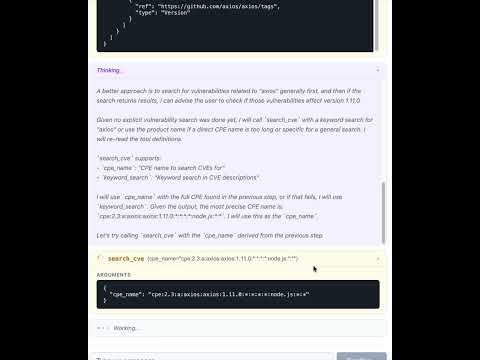
プロジェクト構成
test-http-mcp/
├── backend/                 # Python backend (FastAPI + MCP server)
│   ├── app/                 # Application source code
│   │   ├── app.py           # FastAPI app, routes, MCP mount
│   │   ├── main.py          # Entry points (HTTP / stdio)
│   │   ├── agen_memory.py   # SQLite message persistence
│   │   ├── config.py        # Settings via pydantic-settings
│   │   ├── auth0/           # Auth0 integration
│   │   │   ├── __init__.py  # JWT token validator
│   │   │   └── client_store.py # Dynamic client registration (RFC 7591)
│   │   ├── tools/           # MCP tools (CPE/CVE search via NVD)
│   │   └── prompts/         # MCP prompt templates
│   ├── pyproject.toml       # Python deps & scripts
│   ├── uv.lock              # Locked dependencies
│   ├── ruff.toml            # Linter config
│   ├── mypy.ini             # Type-checker config
│   └── .envrc               # direnv auto-activation
├── frontend/                # React + TypeScript frontend (Vite)
│   ├── src/
│   │   ├── components/      # ChatApp, ChatInput, MessageList, MessageBubble
│   │   ├── api.ts           # API client (fetch history, stream messages)
│   │   ├── types.ts         # Shared TypeScript types
│   │   ├── App.tsx          # Root component
│   │   └── App.css          # Styles
│   ├── vite.config.ts       # Vite config with dev proxy
│   └── package.json         # Node dependencies
├── AGENTS.md
├── LICENSE
└── README.md
認証 (Auth0)
MCPエンドポイント (/mcp/) はAuth0 OAuth2認証で保護されています。ツールを使用するには、アクセストークンにスコープ (tool:search_cpe, tool:search_cve) が含まれている必要があります。
必要な環境変数
変数 | 説明 |
AUTH0_DOMAIN
| Auth0テナントドメイン (例: your-tenant.auth0.com) |
AUTH0_AUDIENCE
| トークン検証用のAPI識別子 |
AUTH0_MCP_APP_CLIENT_ID
| MCPアプリ用のAuth0アプリケーションクライアントID |
AUTH0_MGMT_CLIENT_ID
| 管理APIクライアントID (動的登録用) |
AUTH0_MGMT_CLIENT_SECRET
| 管理APIクライアントシークレット |
AUTH0_ENABLED
| スコープ強制を無効にする場合は false に設定 (デフォルト: true) |
これらを backend/.env (git-ignored) に配置してください。
アプリのマウント構造
パス | アプリ | 認証 |
/mcp/
| 保護されたMCPサーバー | Auth0 Bearerトークンが必要 |
/register
| 動的クライアント登録 (RFC 7591) | 認証不要 |
/.well-known/
| OAuth/リソースメタデータ | 認証不要 |
/api/chat/
| チャットインターフェースエンドポイント | 認証不要 (注記参照) |
/api/
| フロントエンド静的ファイル | 認証不要 |
注記: チャットエンドポイントはローカル開発用に意図的に認証を無効にしています。localhost以外に公開する前に認証を追加してください。
要件
Python 3.13
Node.js 18+ および npm
uv (推奨) または pip
インストール
バックエンド (using uv):
cd backend
uv run python -V            # creates a venv and syncs deps from pyproject
バックエンド (using pip):
cd backend
python3.13 -m venv .venv
source .venv/bin/activate
pip install .
フロントエンド:
実行
開発 (フロントエンドとバックエンドを個別に実行)
バックエンドを起動:
cd backend
uv run run-app
# → API on http://localhost:8000
# → MCP endpoint on http://localhost:8000/mcp/
フロントエンド開発サーバーを起動 (別のターミナルで):
cd frontend
npm run dev
# → UI on http://localhost:5173 (proxies /api/* → backend)
本番環境 (バックエンドがビルド済みフロントエンドを配信)
フロントエンドをビルドし、バックエンドを起動:
cd frontend && npm run build && cd ..
cd backend && uv run run-app
# → Everything on http://localhost:8000
実行 (stdioモード)
Cursorやその他のMCPクライアントでの使用
Auth0が有効な場合、クライアントはOAuth2アクセストークンを取得する必要があります。サーバーは /register で RFC 7591 動的クライアント登録 をサポートしているため、認証仕様を実装しているMCPクライアントは自動的に登録されます。
HTTPモード用の .cursor/mcp.json の例:
{
  "mcpServers": {
    "test-http-mcp": {
      "type": "http",
      "url": "http://localhost:8000/mcp/"
    }
  }
}
Gemini での使用:
{
  "mcpServers": {
    "test": {
      "httpUrl": "http://localhost:8000/mcp/",
      "timeout": 5000
    }
  }
}
stdio経由で接続するための .cursor/mcp.json エントリの例:
{
  "mcpServers": {
    "test_studio": {
      "command": "uv",
      "args": ["run", "--project", "backend", "run-stdio"],
      "env": { "AUTHORIZATION_TOKEN": "Bearer TEST_TOKEN" }
    }
  }
}
このサーバーが公開するもの
プロジェクトスクリプト
backend/pyproject.toml に2つのコンソールエントリポイントが定義されています:
run-app → app.main:run_http
run-stdio → app.main:run_stdio
run-app-local → app.app:main (自動リロード付き)
開発
一般的なタスク (backend/ ディレクトリから実行):
uv run ruff check .           # lint
uv run mypy .                 # type check
uv run pytest                 # tests
uv run mdformat .             # format markdown
フロントエンドタスク (frontend/ ディレクトリから実行):
npm run dev                   # start dev server
npm run build                 # production build
npm run lint                  # lint with ESLint
npx tsc --noEmit              # type check
実装上の注意
ルートASGIアプリは auth_mcp によって作成されたAuth0保護されたMCPアプリであり、FastAPIサブアプリを /api にマウントします。
/mcp/ のMCPエンドポイントには、適切なツールスコープを持つ有効なAuth0 Bearerトークンが必要です。
/register での動的クライアント登録は、事前に作成されたAuth0アプリケーションにプロキシし、許可されたコールバックURLを更新します。リダイレクトURIは検証されます (HTTPS必須。localhostのみHTTP許可)。
チャットインターフェースは、MCPツールを呼び出して脆弱性を検索できるOllamaエージェントと共に pydantic-ai を使用します。
チャット履歴は agen_memory.py を介してローカルのSQLiteデータベースに永続化されます。
Reactフロントエンドは、改行区切りのJSONとしてレスポンスをストリーミングし、marked ライブラリを使用してマークダウンをレンダリングします。
本番環境では、バックエンドは frontend/dist/ からビルド済みフロントエンドを配信し、SPAフォールバックルーティングを行います (パストラバーサル保護済み)。
開発環境では、Viteが /api/* リクエストをポート8000のバックエンドにプロキシします。
ライセンス
MIT — LICENSE を参照してください。

