test-http-mcp
Demo Model Context Protocol (MCP) Server, implementiert in Python unter Verwendung des
http-mcp-Pakets. Er kann über HTTP (Starlette/Uvicorn) oder über stdio ausgeführt werden
und stellt Beispiel-Tools und Prompts für jeden MCP-fähigen Client bereit. Das Projekt
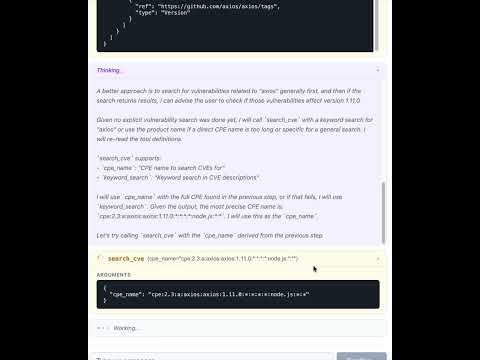
enthält ein React-Frontend, das eine Chat-Schnittstelle zur Abfrage von Schwachstellen
über die NVD (National Vulnerability Database) bietet.
Projektstruktur
test-http-mcp/
├── backend/                 # Python backend (FastAPI + MCP server)
│   ├── app/                 # Application source code
│   │   ├── app.py           # FastAPI app, routes, MCP mount
│   │   ├── main.py          # Entry points (HTTP / stdio)
│   │   ├── agen_memory.py   # SQLite message persistence
│   │   ├── config.py        # Settings via pydantic-settings
│   │   ├── auth0/           # Auth0 integration
│   │   │   ├── __init__.py  # JWT token validator
│   │   │   └── client_store.py # Dynamic client registration (RFC 7591)
│   │   ├── tools/           # MCP tools (CPE/CVE search via NVD)
│   │   └── prompts/         # MCP prompt templates
│   ├── pyproject.toml       # Python deps & scripts
│   ├── uv.lock              # Locked dependencies
│   ├── ruff.toml            # Linter config
│   ├── mypy.ini             # Type-checker config
│   └── .envrc               # direnv auto-activation
├── frontend/                # React + TypeScript frontend (Vite)
│   ├── src/
│   │   ├── components/      # ChatApp, ChatInput, MessageList, MessageBubble
│   │   ├── api.ts           # API client (fetch history, stream messages)
│   │   ├── types.ts         # Shared TypeScript types
│   │   ├── App.tsx          # Root component
│   │   └── App.css          # Styles
│   ├── vite.config.ts       # Vite config with dev proxy
│   └── package.json         # Node dependencies
├── AGENTS.md
├── LICENSE
└── README.md
Authentifizierung (Auth0)
Der MCP-Endpunkt (/mcp/) ist mit Auth0 OAuth2-Authentifizierung geschützt.
Tools erfordern Scopes (tool:search_cpe, tool:search_cve), die im
Zugriffstoken vorhanden sein müssen.
Erforderliche Umgebungsvariablen
Variable | Beschreibung |
AUTH0_DOMAIN
| Auth0-Tenant-Domain (z. B. your-tenant.auth0.com) |
AUTH0_AUDIENCE
| API-Bezeichner für die Token-Validierung |
AUTH0_MCP_APP_CLIENT_ID
| Auth0-Anwendungs-Client-ID für die MCP-App |
AUTH0_MGMT_CLIENT_ID
| Management-API-Client-ID (für dynamische Registrierung) |
AUTH0_MGMT_CLIENT_SECRET
| Management-API-Client-Secret |
AUTH0_ENABLED
| Auf false setzen, um die Scope-Durchsetzung zu deaktivieren (Standard: true) |
Platzieren Sie diese in backend/.env (git-ignored).
App-Mount-Struktur
Pfad | App | Auth |
/mcp/
| Geschützter MCP-Server | Auth0 Bearer-Token erforderlich |
/register
| Dynamische Client-Registrierung (RFC 7591) | Nicht authentifiziert |
/.well-known/
| OAuth/Ressourcen-Metadaten | Nicht authentifiziert |
/api/chat/
| Chat-Schnittstellen-Endpunkte | Nicht authentifiziert (siehe Hinweis) |
/api/
| Statische Frontend-Dateien | Nicht authentifiziert |
Hinweis: Die Chat-Endpunkte sind für die lokale
Entwicklung absichtlich nicht authentifiziert. Fügen Sie eine Authentifizierung hinzu, bevor Sie sie über localhost hinaus freigeben.
Anforderungen
Python 3.13
Node.js 18+ und npm
uv (empfohlen) oder pip
Installation
Backend (mit uv):
cd backend
uv run python -V            # creates a venv and syncs deps from pyproject
Backend (mit pip):
cd backend
python3.13 -m venv .venv
source .venv/bin/activate
pip install .
Frontend:
Ausführung
Entwicklung (Frontend + Backend separat)
Starten Sie das Backend:
cd backend
uv run run-app
# → API on http://localhost:8000
# → MCP endpoint on http://localhost:8000/mcp/
Starten Sie den Frontend-Dev-Server (in einem separaten Terminal):
cd frontend
npm run dev
# → UI on http://localhost:5173 (proxies /api/* → backend)
Produktion (Backend stellt das gebaute Frontend bereit)
Bauen Sie das Frontend und starten Sie das Backend:
cd frontend && npm run build && cd ..
cd backend && uv run run-app
# → Everything on http://localhost:8000
Ausführung (stdio-Modus)
Verwendung mit Cursor oder anderen MCP-Clients
Wenn Auth0 aktiviert ist, müssen Clients ein OAuth2-Zugriffstoken erhalten. Der Server
unterstützt RFC 7591 Dynamic Client Registration
unter /register, sodass MCP-Clients, die die Auth-Spezifikation implementieren, sich
automatisch registrieren.
Beispiel .cursor/mcp.json für den HTTP-Modus:
{
  "mcpServers": {
    "test-http-mcp": {
      "type": "http",
      "url": "http://localhost:8000/mcp/"
    }
  }
}
Verwendung mit Gemini:
{
  "mcpServers": {
    "test": {
      "httpUrl": "http://localhost:8000/mcp/",
      "timeout": 5000
    }
  }
}
Beispiel .cursor/mcp.json-Eintrag zur Verbindung über stdio:
{
  "mcpServers": {
    "test_studio": {
      "command": "uv",
      "args": ["run", "--project", "backend", "run-stdio"],
      "env": { "AUTHORIZATION_TOKEN": "Bearer TEST_TOKEN" }
    }
  }
}
Was dieser Server bereitstellt
Projekt-Skripte
Zwei Konsolen-Einstiegspunkte sind in backend/pyproject.toml definiert:
run-app → app.main:run_http
run-stdio → app.main:run_stdio
run-app-local → app.app:main (mit Auto-Reload)
Entwicklung
Allgemeine Aufgaben (auszuführen aus dem backend/-Verzeichnis):
uv run ruff check .           # lint
uv run mypy .                 # type check
uv run pytest                 # tests
uv run mdformat .             # format markdown
Frontend-Aufgaben (auszuführen aus dem frontend/-Verzeichnis):
npm run dev                   # start dev server
npm run build                 # production build
npm run lint                  # lint with ESLint
npx tsc --noEmit              # type check
Implementierungshinweise
Die Root-ASGI-App ist eine Auth0-geschützte MCP-App, die von auth_mcp erstellt wurde
und die FastAPI-Sub-App unter /api mountet.
Der MCP-Endpunkt unter /mcp/ erfordert ein gültiges Auth0 Bearer-Token mit
den entsprechenden Tool-Scopes.
Die dynamische Client-Registrierung unter /register leitet an eine vorab erstellte
Auth0-Anwendung weiter und aktualisiert deren erlaubte Callback-URLs. Redirect-URIs
werden validiert (HTTPS erforderlich; HTTP nur für localhost erlaubt).
Die Chat-Schnittstelle verwendet pydantic-ai mit einem Ollama-Agenten, der
MCP-Tools aufrufen kann, um nach Schwachstellen zu suchen.
Der Chat-Verlauf wird in einer lokalen SQLite-Datenbank über agen_memory.py gespeichert.
Das React-Frontend streamt Antworten als zeilengetrenntes JSON und rendert
Markdown mit der marked-Bibliothek.
In der Produktion stellt das Backend das gebaute Frontend aus frontend/dist/
mit SPA-Fallback-Routing bereit (Pfad-Traversal geschützt).
In der Entwicklung leitet Vite /api/*-Anfragen an das Backend auf Port 8000 weiter.
Lizenz
MIT — siehe LICENSE.

