
Demo HTTP MCP Server
The Demo HTTP MCP Server provides tools for data fetching, request handling, and session tracking, plus advice generation capabilities.
• Get Weather: Retrieve current weather for any location with customizable temperature units (celsius default)
• Get Current Time: Obtain the current time in standardized format
• Access Request Context: Interact with request headers (e.g., Authorization) using a username parameter
• Track Tool Usage: View a list of all tools called during the current session
• Generate Advice: Get structured advice on topics with optional actionable steps
• Multiple Connectivity: Operates over HTTP (Starlette/Uvicorn) or stdio for broad MCP client compatibility
Click on "Install Server".
Wait a few minutes for the server to deploy. Once ready, it will show a "Started" state.
In the chat, type
@followed by the MCP server name and your instructions, e.g., "@Demo HTTP MCP Serverwhat's the weather in London right now?"
That's it! The server will respond to your query, and you can continue using it as needed.
Here is a step-by-step guide with screenshots.
test-http-mcp
Demo Model Context Protocol (MCP) server implemented in Python using the
http-mcp package. It can run over HTTP (Starlette/Uvicorn) or over stdio,
exposing example Tools and Prompts to any MCP-capable client. The project
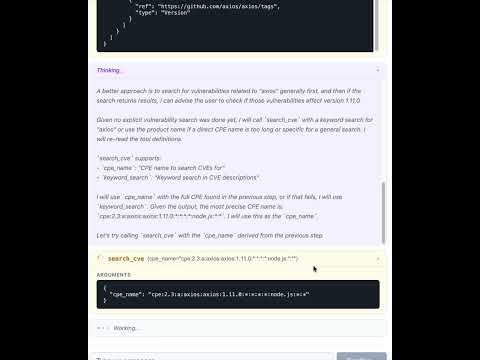
includes a React frontend that provides a chat interface for querying
vulnerabilities via the NVD (National Vulnerability Database).
Project structure
test-http-mcp/
├── backend/                 # Python backend (FastAPI + MCP server)
│   ├── app/                 # Application source code
│   │   ├── app.py           # FastAPI app, routes, MCP mount
│   │   ├── main.py          # Entry points (HTTP / stdio)
│   │   ├── agen_memory.py   # SQLite message persistence
│   │   ├── config.py        # Settings via pydantic-settings
│   │   ├── tools/           # MCP tools (CPE/CVE search via NVD)
│   │   └── prompts/         # MCP prompt templates
│   ├── pyproject.toml       # Python deps & scripts
│   ├── uv.lock              # Locked dependencies
│   ├── ruff.toml            # Linter config
│   ├── mypy.ini             # Type-checker config
│   └── .envrc               # direnv auto-activation
├── frontend/                # React + TypeScript frontend (Vite)
│   ├── src/
│   │   ├── components/      # ChatApp, ChatInput, MessageList, MessageBubble
│   │   ├── api.ts           # API client (fetch history, stream messages)
│   │   ├── types.ts         # Shared TypeScript types
│   │   ├── App.tsx          # Root component
│   │   └── App.css          # Styles
│   ├── vite.config.ts       # Vite config with dev proxy
│   └── package.json         # Node dependencies
├── AGENTS.md
├── LICENSE
└── README.md
Requirements
Python 3.13
Node.js 18+ and npm
uv(recommended) orpip
Install
Backend (using uv):
cd backend
uv run python -V            # creates a venv and syncs deps from pyproject
Backend (using pip):
cd backend
python3.13 -m venv .venv
source .venv/bin/activate
pip install .
Frontend:
cd frontend
npm install
Run
Development (frontend + backend separately)
Start the backend:
cd backend
uv run run-app
# → API on http://localhost:8000
# → MCP endpoint on http://localhost:8000/mcp/
Start the frontend dev server (in a separate terminal):
cd frontend
npm run dev
# → UI on http://localhost:5173 (proxies /api/* → backend)
Production (backend serves the built frontend)
Build the frontend and start the backend:
cd frontend && npm run build && cd ..
cd backend && uv run run-app
# → Everything on http://localhost:8000
Run (stdio mode)
Use with Cursor or other MCP clients
Example .cursor/mcp.json for HTTP mode:
{
  "mcpServers": {
    "test-http-mcp": {
      "type": "http",
      "url": "http://localhost:8000/mcp/",
      "headers": {
        "Authorization": "Bearer $TEST_TOKEN"
      }
    }
  }
}
Usage with Gemini:
{
  "mcpServers": {
    "test": {
      "httpUrl": "http://localhost:8000/mcp/",
      "timeout": 5000,
      "headers": {
        "Authorization": "Bearer TEST_TOKEN"
      }
    }
  }
}
Example .cursor/mcp.json entry to connect via stdio:
{
  "mcpServers": {
    "test_studio": {
      "command": "uv",
      "args": ["run", "--project", "backend", "run-stdio"],
      "env": { "AUTHORIZATION_TOKEN": "Bearer TEST_TOKEN" }
    }
  }
}
What this server exposes
Tools (see
backend/app/tools/):search_cpe(product, version, vendor)— search Common Platform Enumerations via NVDsearch_cve(cpe_name)— search Common Vulnerabilities and Exposures for a given CPE
Prompts (see
backend/app/prompts/):sync_nvd_search(dependency, version)— simple vulnerability search promptasync_nvd_search(dependency, version)— advanced prompt with pre-fetched CVE data
Project scripts
Two console entry points are defined in backend/pyproject.toml:
run-app→app.main:run_httprun-stdio→app.main:run_stdiorun-app-local→app.app:main(with auto-reload)
Development
Common tasks (run from the backend/ directory):
uv run ruff check .           # lint
uv run mypy .                 # type check
uv run pytest                 # tests
uv run mdformat .             # format markdown
Frontend tasks (run from the frontend/ directory):
npm run dev                   # start dev server
npm run build                 # production build
npm run lint                  # lint with ESLint
npx tsc --noEmit              # type check
Implementation notes
The FastAPI app is defined in
backend/app/app.pyand mountshttp_mcp.server.MCPServerat/mcp.The chat interface uses
pydantic-aiwith a Gemini agent that can call MCP tools to search for vulnerabilities.Chat history is persisted in a local SQLite database via
agen_memory.py.The React frontend streams responses as newline-delimited JSON and renders markdown with the
markedlibrary.In production, the backend serves the built frontend from
frontend/dist/with SPA fallback routing.In development, Vite proxies
/api/*requests to the backend on port 8000.
License
MIT — see LICENSE.
Resources
Unclaimed servers have limited discoverability.
Looking for Admin?
If you are the server author, to access and configure the admin panel.
Latest Blog Posts
MCP directory API
We provide all the information about MCP servers via our MCP API.
curl -X GET 'https://glama.ai/api/mcp/v1/servers/yeison-liscano/demo_http_mcp'
If you have feedback or need assistance with the MCP directory API, please join our Discord server