


A
licenseNot graded
qualityD
maintenanceAllows the AI to read from your Bear Notes
10 npm
45
MIT



通过任何 AI 助手搜索、阅读、创建和更新您的 Bear 笔记。既可作为一键式 Claude Desktop 扩展使用,也可作为适用于任何 MCP 客户端的独立 npm 包使用。
此仅限本地的 MCP 服务器读取 Bear 的 SQLite 数据库以实现支持 OCR 的快速搜索,并使用 Bear 的原生 API 进行写入。完全隐私:无外部连接,所有处理均在您的 Mac 上完成。
示例提示词:
总结我们的对话并用它创建一个新的 Bear 笔记
就我的副业想法对我进行采访,并将要点记录在 Bear 笔记中
帮我重构“产品发布”笔记中的大纲
让我们头脑风暴一下博客文章的想法 —— 将最好的想法保存到我的 Bear 笔记中,并随着我们的进行不断完善
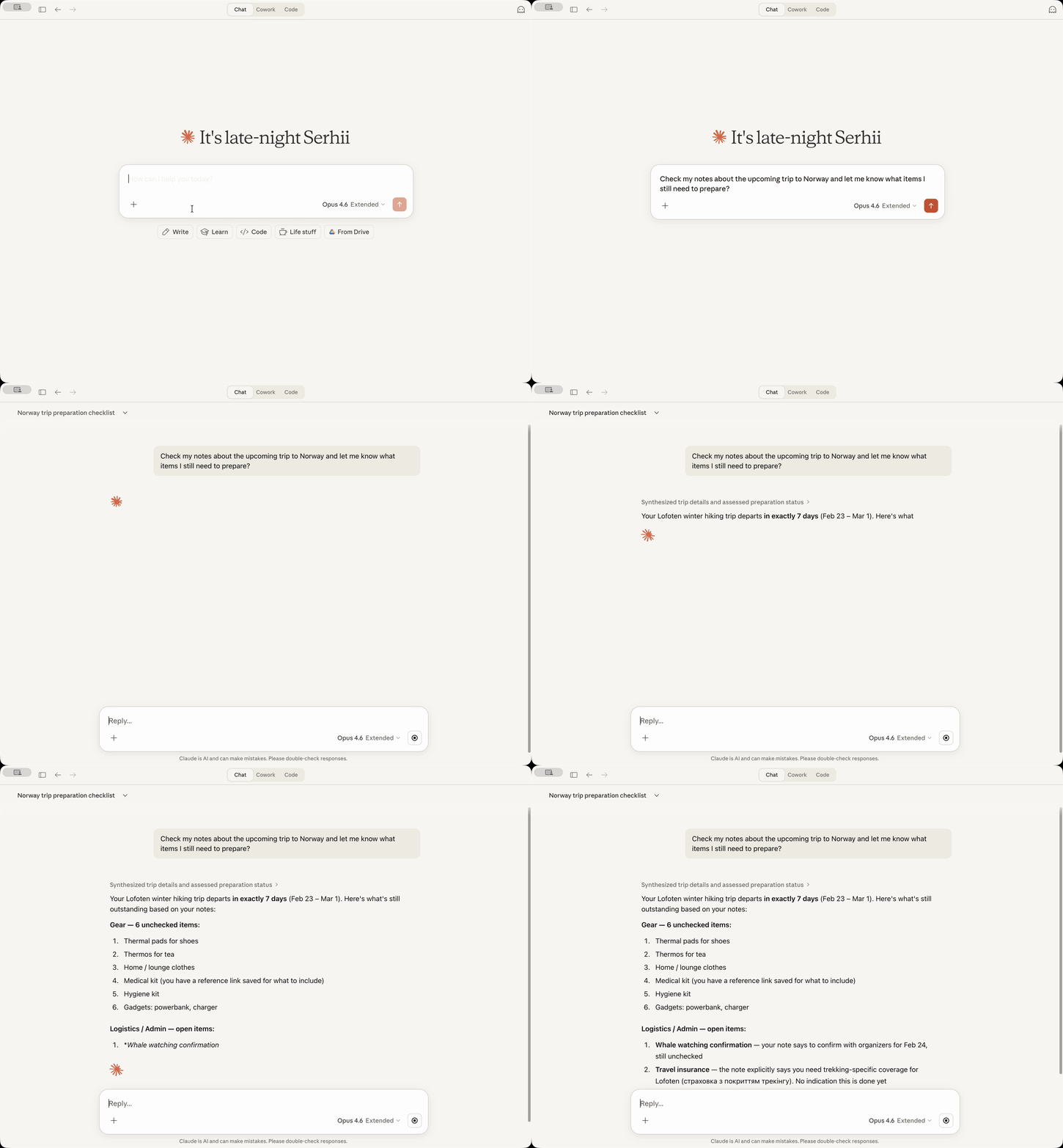
13 个 MCP 工具,用于搜索、阅读、创建、更新、标记和归档笔记
OCR 搜索 —— 查找附加图片和 PDF 中的文本
基于日期的搜索,支持相对日期(“昨天”、“上周”、“上个月初”)
标签管理 —— 以树状结构列出标签、查找未标记的笔记、为笔记添加标签
新笔记约定(可选)—— 将标签放在标题之后,而不是底部
内容替换(可选)—— 替换整个笔记正文或特定部分
仅限本地 —— 无网络调用,所有数据保留在您的 Mac 上
[!NOTE] 完全隐私(当然,使用 AI 助手时发送给 AI 提供商的数据除外):此服务器不进行任何外部连接。所有处理都在您的 Mac 上使用 Bear 自身的数据库和 API 本地完成。没有额外的遥测、使用统计信息或类似内容。
Related MCP server: Bear MCP Server
先决条件:必须安装 Bear 应用 和 Claude Desktop。
从 Releases 下载最新的 bear-notes-mcpb-*.mcpb 扩展文件
确保您的 Claude Desktop 正在运行(如果未运行请启动)
双击扩展文件 —— Claude Desktop 应会显示安装提示
如果双击因某种原因无效,请打开 Claude -> Settings -> Extensions -> Advanced Settings -> 点击 "Install Extension"。
完成!
让 Claude 使用类似“在我的 Bear 笔记中搜索‘会议’”的查询来搜索您的 Bear 笔记 —— 您应该会在回复中看到您的笔记!
想要将此 Bear Notes MCP 服务器与 Claude Code、Cursor、Codex 或其他 AI 助手一起使用吗?
要求:Node.js 24.13.0+
claude mcp add bear-notes --transport stdio -- npx -y bear-notes-mcp@latest添加到您的 MCP 配置文件中:
{
  "mcpServers": {
    "bear-notes": {
      "command": "npx",
      "args": ["-y", "bear-notes-mcp@latest"]
    }
  }
}
更多安装选项和本地开发设置 — NPM.md
bear-open-note - 读取 Bear 笔记的全文内容,包括来自附加图片和 PDF 的 OCR 文本
bear-create-note - 在您的 Bear 库中创建一个带有可选标题、内容和标签的新笔记
bear-search-notes - 通过搜索文本内容、按标签过滤或日期范围来查找笔记。包括附件中的 OCR 搜索
bear-add-text - 在 Bear 笔记的开头或结尾,或在由标题标识的特定部分内插入文本
bear-replace-text - 替换现有 Bear 笔记中的内容 —— 可以是全文或特定部分。需要在设置中启用内容替换功能。
bear-add-file - 将文件附加到现有的 Bear 笔记。提供本地文件路径(首选)或 base64 编码的内容。
bear-list-tags - 以带有笔记计数的层级树形式列出 Bear 库中的所有标签
bear-find-untagged-notes - 查找 Bear 库中未分配标签的笔记
bear-add-tag - 为现有的 Bear 笔记添加一个或多个标签
bear-archive-note - 归档 Bear 笔记,将其从活动列表中移除而不删除它
bear-rename-tag - 重命名 Bear 库中所有笔记中的标签
bear-delete-tag - 从 Bear 库中的所有笔记中删除标签,而不影响笔记本身
bear-grab-url - 将网页保存为 Bear 笔记。Bear 会获取页面并将其转换为 markdown。
启用详细日志记录以进行故障排除。
Claude Desktop:Settings → Extensions → Configure (在 Bear Notes 旁边) → 切换 "Debug Logging" → Save → 重启 Claude
独立 MCP 服务器:设置环境变量 UI_DEBUG_TOGGLE=true
默认情况下,通过 API 创建笔记时,Bear 会将标签放在笔记底部。启用此选项可将标签放在标题之后,并用水平线分隔。
┌──────────────────────────────┐
│ # Meeting Notes              │  ← Note title
│ #work #meetings              │  ← Tags right after title
│                              │
│ ---                          │  ← Separator
│                              │
│ Lorem Ipsum...               │  ← Note body
└──────────────────────────────┘[!TIP] 此约定默认禁用 —— 它是可选的,以保留现有行为。
Claude Desktop:Settings → Extensions → Configure (在 Bear Notes 旁边) → 切换 "New Note Convention" → Save → 重启 Claude
独立 MCP 服务器:设置环境变量 UI_ENABLE_NEW_NOTE_CONVENTION=true
启用该约定的独立配置示例:
{
  "mcpServers": {
    "bear-notes": {
      "command": "npx",
      "args": ["-y", "bear-notes-mcp@latest"],
      "env": {
        "UI_ENABLE_NEW_NOTE_CONVENTION": "true"
      }
    }
  }
}启用 bear-replace-text 工具以替换现有笔记中的内容 —— 可以是整个笔记正文,也可以是标题下的特定部分。
[!TIP] 此功能默认禁用 —— 它是可选的,因为替换是一种破坏性操作。
Claude Desktop:Settings → Extensions → Configure (在 Bear Notes 旁边) → 切换 "Content Replacement" → Save → 重启 Claude
独立 MCP 服务器:设置环境变量 UI_ENABLE_CONTENT_REPLACEMENT=true
启用内容替换功能的独立配置示例:
{
  "mcpServers": {
    "bear-notes": {
      "command": "npx",
      "args": ["-y", "bear-notes-mcp@latest"],
      "env": {
        "UI_ENABLE_CONTENT_REPLACEMENT": "true"
      }
    }
  }
}此服务器直接读取您的 Bear Notes SQLite 数据库进行搜索/读取操作,并使用 Bear 的 X-callback-URL API 进行写入操作。所有数据处理都在您的机器上本地完成,没有外部网络调用。
仅限 macOS,因为 Bear 桌面版仅在 macOS 上运行。
Claude Desktop:
MCP 服务器日志位于 ~/Library/Logs/Claude/main.log,查找 bear-notes-mcp
MCP 传输日志位于 ~/Library/Logs/Claude/mcp-server-Bear\ Notes.log
独立 MCP 服务器:
日志写入 stderr;使用 UI_DEBUG_TOGGLE=true 启用调试日志记录
不会。服务器仅读取 Bear 的本地数据库(Bear 应用向您显示的数据)并使用 Bear 的原生 API 向笔记添加文本。没有网络传输,没有外部服务器。
对于读取操作(搜索/打开),x-callback-url API 在 x-success 响应中返回笔记数据:这需要服务器或自定义二进制文件来处理 x-success 响应 —— 这既有风险又脆弱。直接的 SQLite 只读访问对于搜索和阅读笔记来说更简单、更可靠。
这避免了从第三方节点包中分发 SQLite 二进制文件,这会带来供应链风险,并阻止 Claude Desktop 扩展在 macOS 上运行。
Anthropic 不会签署第三方 SQLite 二进制文件(显然),导致 macOS 安全系统标记由 Anthropic 签署的 Claude 进程试图运行由第三方签署的另一个二进制文件。因此,Claude Desktop 无法运行该扩展。
这是 Claude for Desktop 对此扩展需要访问您 Mac 上的 Bear SQLite 数据库这一事实的反应。
Claude 警告系统无法区分仅访问一个文件(扩展所做的)与访问所有文件(这不是扩展所做的)的需求。
验证这一点的方法之一是在安装扩展之前让您的 Claude 分析代码库(它非常小)并告诉您。
使用 issues 或 discussions!我很乐意看到您的反馈或建议,或者您帮助使这个项目变得更好!❤️
考虑订阅发布公告,以便在新版本发布时获知:
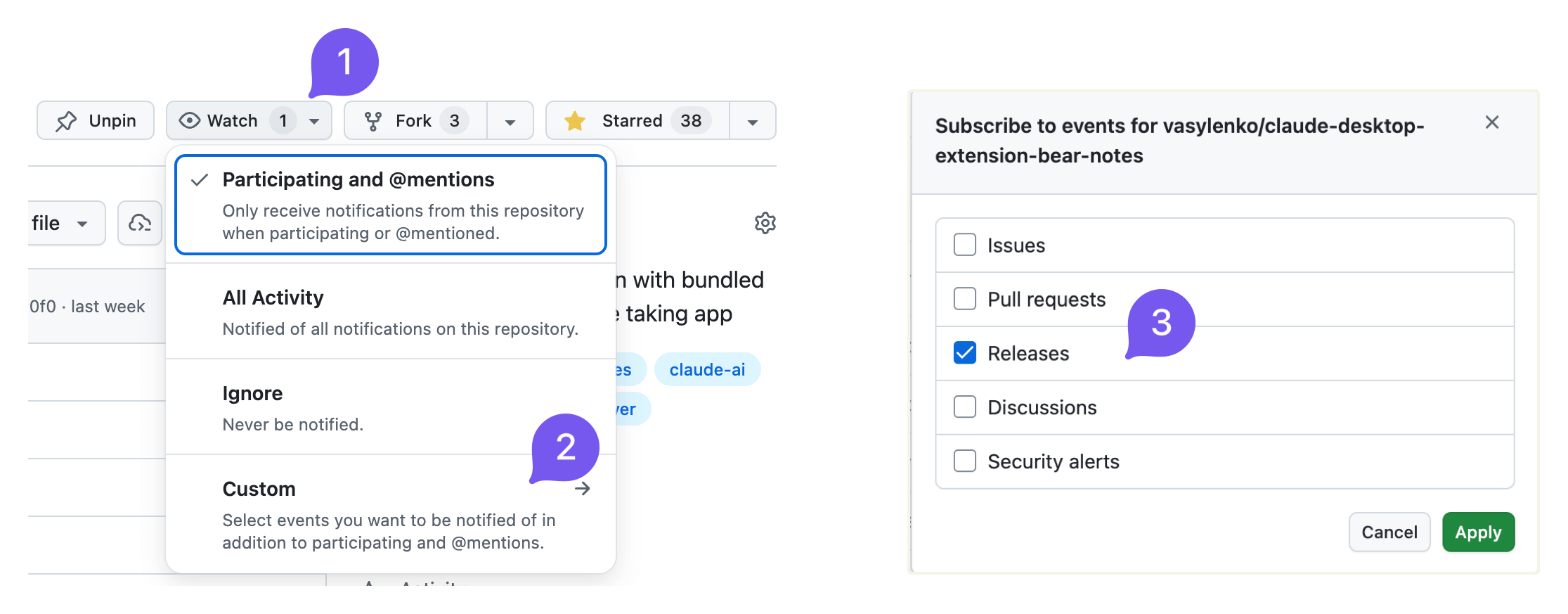
当有新版本发布时,我也会发布到 reddit.com/r/bearapp/。
Report the current Bear Notes MCP server mode and how to unlock additional capabilities. Call this when the user asks what you can do with their Bear notes, when a write operation appears unavailable, or when the user wants to enable note creation, editing, or tag management.
| Name | Required | Description | Default |
|---|---|---|---|
No parameters | |||
Does the description disclose side effects, auth requirements, rate limits, or destructive behavior?
Annotations indicate readOnlyHint=true and idempotentHint=true. Description adds context that the tool reports current mode and unlock instructions, which goes beyond annotations. It does not contradict annotations and clarifies the tool is informational.
Agents need to know what a tool does to the world before calling it. Descriptions should go beyond structured annotations to explain consequences.
Is the description appropriately sized, front-loaded, and free of redundancy?
Description is two sentences with no filler. It is front-loaded with the core action and then adds usage guidance. Every sentence earns its place.
Shorter descriptions cost fewer tokens and are easier for agents to parse. Every sentence should earn its place.
Given the tool's complexity, does the description cover enough for an agent to succeed on first attempt?
Given no parameters, no output schema, and a simple task, the description is sufficient. It explains the tool's purpose and when to use it. Could mention what specifically 'reporting mode' outputs, but it is adequate.
Complex tools with many parameters or behaviors need more documentation. Simple tools need less. This dimension scales expectations accordingly.
Does the description clarify parameter syntax, constraints, interactions, or defaults beyond what the schema provides?
Tool has no parameters, so the schema coverage is effectively 100%. Description adds no parameter info, but with zero parameters this is not needed. The baseline for 0 parameters is 4, and the description meets it.
Input schemas describe structure but not intent. Descriptions should explain non-obvious parameter relationships and valid value ranges.
Does the description clearly state what the tool does and how it differs from similar tools?
Description explicitly states the tool reports the current mood and how to unlock additional capabilities. Verb 'Report' and resource 'Bear Notes MCP server mode' are specific and distinct from sibling tools like bear-search-notes or bear-list-tags.
Agents choose between tools based on descriptions. A clear purpose with a specific verb and resource helps agents select the right tool.
Does the description explain when to use this tool, when not to, or what alternatives exist?
Description provides explicit scenarios for when to call: when user asks what can be done with Bear notes, when write operations seem unavailable, or when user wants to enable note creation/editing/tag management. This clarity helps the agent choose this tool over alternatives.
Agents often have multiple tools that could apply. Explicit usage guidance like "use X instead of Y when Z" prevents misuse.
Find notes in your Bear library that have no tags. Useful for organizing and categorizing notes. Trashed and archived notes are not included.
| Name | Required | Description | Default |
|---|---|---|---|
| limit | No | Maximum number of results (default: 50, min: 1) |
Does the description disclose side effects, auth requirements, rate limits, or destructive behavior?
Annotations already indicate read-only and idempotent behavior. The description adds valuable context by stating that trashed and archived notes are excluded, which is beyond the annotations. No contradictions and the added behavioral detail is clear.
Agents need to know what a tool does to the world before calling it. Descriptions should go beyond structured annotations to explain consequences.
Is the description appropriately sized, front-loaded, and free of redundancy?
The description is extremely concise, consisting of three short sentences. The first sentence immediately communicates the action, the second adds context, and the third provides an important scope exclusion. No superfluous information.
Shorter descriptions cost fewer tokens and are easier for agents to parse. Every sentence should earn its place.
Given the tool's complexity, does the description cover enough for an agent to succeed on first attempt?
The description covers the tool's purpose, use case, and exclusion of trashed/archived notes. It does not mention return format or the limit parameter, but given the tool's simplicity and the schema covering limit, it is mostly complete. A minor gap is the lack of output format hints.
Complex tools with many parameters or behaviors need more documentation. Simple tools need less. This dimension scales expectations accordingly.
Does the description clarify parameter syntax, constraints, interactions, or defaults beyond what the schema provides?
With 100% schema coverage for the single parameter 'limit', the schema already documents its type, range, and default. The description does not add any additional semantic meaning for the parameter, so baseline score of 3 is appropriate.
Input schemas describe structure but not intent. Descriptions should explain non-obvious parameter relationships and valid value ranges.
Does the description clearly state what the tool does and how it differs from similar tools?
The description clearly states the tool finds notes without tags in Bear library, explicitly excluding trashed and archived notes. It distinguishes itself from sibling tools like bear-search-notes by focusing on untagged notes, providing a specific verb-resource-scope.
Agents choose between tools based on descriptions. A clear purpose with a specific verb and resource helps agents select the right tool.
Does the description explain when to use this tool, when not to, or what alternatives exist?
The description mentions 'useful for organizing and categorizing notes' but does not provide explicit guidance on when to use this tool versus alternatives like bear-search-notes or bear-list-tags. No when-not-to-use or direct comparisons are given.
Agents often have multiple tools that could apply. Explicit usage guidance like "use X instead of Y when Z" prevents misuse.
List all tags in your Bear library as a hierarchical tree. Shows tag names with note counts. Useful for understanding your tag structure and finding tags to apply to untagged notes. Counts include only active notes (trashed and archived are excluded). Tags with zero active notes are not shown.
| Name | Required | Description | Default |
|---|---|---|---|
No parameters | |||
Does the description disclose side effects, auth requirements, rate limits, or destructive behavior?
Annotations already indicate readOnlyHint, openWorldHint, and idempotentHint. The description adds behavioral details beyond annotations: counts exclude trashed/archived notes and tags with zero active notes. No contradictions.
Agents need to know what a tool does to the world before calling it. Descriptions should go beyond structured annotations to explain consequences.
Is the description appropriately sized, front-loaded, and free of redundancy?
Three sentences that are well-structured and front-loaded. Each sentence provides essential information without redundancy or unnecessary detail.
Shorter descriptions cost fewer tokens and are easier for agents to parse. Every sentence should earn its place.
Given the tool's complexity, does the description cover enough for an agent to succeed on first attempt?
For a zero-parameter read-only tool with good annotations, the description is complete. It explains the output format, what's included/excluded, and the tool's utility.
Complex tools with many parameters or behaviors need more documentation. Simple tools need less. This dimension scales expectations accordingly.
Does the description clarify parameter syntax, constraints, interactions, or defaults beyond what the schema provides?
With zero parameters, the schema coverage is 100%. The description adds value by explaining what the output contains (hierarchical tree, note counts), which is helpful given no output schema.
Input schemas describe structure but not intent. Descriptions should explain non-obvious parameter relationships and valid value ranges.
Does the description clearly state what the tool does and how it differs from similar tools?
The description clearly states the tool lists all tags as a hierarchical tree with note counts, and explicitly excludes trashed/archived notes and tags with zero active notes. This is a specific verb+resource that distinguishes it from siblings like bear-find-untagged-notes.
Agents choose between tools based on descriptions. A clear purpose with a specific verb and resource helps agents select the right tool.
Does the description explain when to use this tool, when not to, or what alternatives exist?
The description says it is useful for understanding tag structure and finding tags for untagged notes, implying when to use it. However, it does not explicitly state when not to use it or mention alternatives, though siblings provide context.
Agents often have multiple tools that could apply. Explicit usage guidance like "use X instead of Y when Z" prevents misuse.
Read the full text content of a Bear note by its ID or title. Supports direct title lookup as an alternative to searching first. Always includes text extracted from attached images and PDFs (aka OCR search) with clear labeling.
| Name | Required | Description | Default |
|---|---|---|---|
| id | No | Note identifier (ID) for an existing Bear note. Either id or title must be provided. | |
| title | No | Exact note title for direct lookup (case-insensitive). Either id or title must be provided. If multiple notes share the same title, returns a list for disambiguation. |
Does the description disclose side effects, auth requirements, rate limits, or destructive behavior?
Beyond annotations (readOnlyHint=true, idempotentHint=true), description discloses that OCR text from images/PDFs is included and clearly labeled. No contradictions with annotations.
Agents need to know what a tool does to the world before calling it. Descriptions should go beyond structured annotations to explain consequences.
Is the description appropriately sized, front-loaded, and free of redundancy?
Two sentences, no waste. Front-loaded with main action. Every sentence adds value.
Shorter descriptions cost fewer tokens and are easier for agents to parse. Every sentence should earn its place.
Given the tool's complexity, does the description cover enough for an agent to succeed on first attempt?
For a simple tool with two parameters and no output schema, the description covers purpose, parameter usage, and important behavioral detail (OCR inclusion). Complete.
Complex tools with many parameters or behaviors need more documentation. Simple tools need less. This dimension scales expectations accordingly.
Does the description clarify parameter syntax, constraints, interactions, or defaults beyond what the schema provides?
Schema has 100% coverage, and description adds extra meaning: title is case-insensitive, and if multiple notes share the same title, returns a list for disambiguation. This is valuable beyond the schema.
Input schemas describe structure but not intent. Descriptions should explain non-obvious parameter relationships and valid value ranges.
Does the description clearly state what the tool does and how it differs from similar tools?
Clearly states it reads full text content of a Bear note by ID or title. Explicitly mentions direct title lookup as alternative to searching, and includes OCR text from images/PDFs. Distinguishes from sibling tools like bear-search-notes.
Agents choose between tools based on descriptions. A clear purpose with a specific verb and resource helps agents select the right tool.
Does the description explain when to use this tool, when not to, or what alternatives exist?
Provides guidance on when to use direct title lookup versus searching first. Does not explicitly exclude use cases or mention siblings for comparison, but the context is clear.
Agents often have multiple tools that could apply. Explicit usage guidance like "use X instead of Y when Z" prevents misuse.
Search your Bear notes for words or phrases. The search looks across note titles, body content, and OCR text in attached images and PDFs, returning matching notes ranked by relevance with a snippet of the matching context — so you can see what matched without opening the note. For best results, search with a phrase or several words from what you're looking for; a single word also works. Also supports filtering by tag, by creation/modification date range, or by pinned status — combine these with a search term, or use them on their own to browse without searching. Trashed and archived notes are not included.
| Name | Required | Description | Default |
|---|---|---|---|
| tag | No | Tag to filter notes by (leading # is stripped if present) | |
| term | No | Words to search for. Results are ranked by relevance — notes covering more of what you typed rank higher. Pass natural keywords for the typical case (e.g., "quarterly planning notes"). Hyphenated or punctuated identifiers like "bear-notes-mcp" or "2026-04-15" are matched as a phrase when used alone; in multi-word queries they are treated like any other word. | |
| limit | No | Maximum number of results to return (default: 30, min: 1) | |
| pinned | No | Set to true to return only pinned notes: if combined with tag, will return pinned notes with that tag, otherwise only globally pinned notes. | |
| createdAfter | No | Filter notes created on or after this date. Supports: relative dates ("today", "yesterday", "last week", "start of last month"), ISO format (YYYY-MM-DD). Use "start of last month" for the beginning of the previous month. | |
| createdBefore | No | Filter notes created on or before this date. Supports: relative dates ("today", "yesterday", "last week", "end of last month"), ISO format (YYYY-MM-DD). Use "end of last month" for the end of the previous month. | |
| modifiedAfter | No | Filter notes modified on or after this date. Supports: relative dates ("today", "yesterday", "last week", "start of last month"), ISO format (YYYY-MM-DD). Use "start of last month" for the beginning of the previous month. | |
| modifiedBefore | No | Filter notes modified on or before this date. Supports: relative dates ("today", "yesterday", "last week", "end of last month"), ISO format (YYYY-MM-DD). Use "end of last month" for the end of the previous month. |
Does the description disclose side effects, auth requirements, rate limits, or destructive behavior?
Annotations indicate read-only, idempotent behavior. Description adds context: notes are ranked by relevance, returns snippets, and excludes trashed/archived notes. No contradictions with annotations.
Agents need to know what a tool does to the world before calling it. Descriptions should go beyond structured annotations to explain consequences.
Is the description appropriately sized, front-loaded, and free of redundancy?
Structured in a logical flow: purpose, return format, usage tips, then filter details. Front-loaded with the core function. All sentences add value, though slightly verbose for a summary.
Shorter descriptions cost fewer tokens and are easier for agents to parse. Every sentence should earn its place.
Given the tool's complexity, does the description cover enough for an agent to succeed on first attempt?
Given 8 optional parameters and no output schema, the description thoroughly covers search scope, result format, filter options, and exclusions (trashed/archived). Provides sufficient context for an agent to use effectively.
Complex tools with many parameters or behaviors need more documentation. Simple tools need less. This dimension scales expectations accordingly.
Does the description clarify parameter syntax, constraints, interactions, or defaults beyond what the schema provides?
Schema covers 100% of parameters with descriptions. The tool description adds extra context: explains term matching with hyphenated identifiers, that tag strips leading #, and relative date formats. That adds value beyond the schema.
Input schemas describe structure but not intent. Descriptions should explain non-obvious parameter relationships and valid value ranges.
Does the description clearly state what the tool does and how it differs from similar tools?
The description clearly states the tool searches Bear notes for words or phrases, covering titles, body, and OCR content. It distinguishes itself from siblings (e.g., bear-list-tags, bear-open-note) by focusing on search and retrieval.
Agents choose between tools based on descriptions. A clear purpose with a specific verb and resource helps agents select the right tool.
Does the description explain when to use this tool, when not to, or what alternatives exist?
Provides explicit guidance on best practices (phrase or several words for best results) and explains how to combine filters or use them independently. Notes that trashed/archived notes are excluded, but does not explicitly mention alternatives among siblings.
Agents often have multiple tools that could apply. Explicit usage guidance like "use X instead of Y when Z" prevents misuse.
Recent tool additions, removals, and schema changes observed during successful MCP inspections.
v3.0.1bear-add-filebear-add-tagbear-add-textbear-archive-notebear-capabilitiesbear-create-notebear-delete-tagbear-find-untagged-notes4 fields changedInput schema / properties / limit / descriptionPrevious value: -"Maximum number of results (default: 50)"New value: +"Maximum number of results (default: 50, min: 1)"Input schema / properties / limit / maximumAdded value: +9007199254740991Input schema / properties / limit / minimumAdded value: +1Input schema / properties / limit / typePrevious value: -"number"New value: +"integer"bear-open-note1 field changedInput schema / properties / id / descriptionPrevious value: -"Note identifier (ID) from bear-search-notes. Either id or title must be provided."New value: +"Note identifier (ID) for an existing Bear note. Either id or title must be provided."bear-rename-tagbear-replace-textbear-search-notes6 fields changedInput schema / properties / limit / descriptionPrevious value: -"Maximum number of results to return (default: 50)"New value: +"Maximum number of results to return (default: 30, min: 1)"Input schema / properties / limit / maximumAdded value: +9007199254740991Input schema / properties / limit / minimumAdded value: +1Input schema / properties / limit / typePrevious value: -"number"New value: +"integer"Input schema / properties / tag / descriptionPrevious value: -"Tag to filter notes by (without # symbol)"New value: +"Tag to filter notes by (leading # is stripped if present)"Input schema / properties / term / descriptionPrevious value: -"Text to search for in note titles and content"New value: +"Words to search for. Results are ranked by relevance — notes covering more of what you typed rank higher. Pass natural keywords for the typical case (e.g., \"quarterly planning notes\"). Hyphenated or punctuated identifiers like \"bear-notes-mcp\" or \"2026-04-15\" are matched as a phrase when used alone; in multi-word queries they are treated like any other word."Scored across 5 tools
Each tool has a clearly distinct purpose: capabilities for mode info, find-untagged-notes for organizing, list-tags for hierarchy, open-note for reading, search-notes for searching. No overlap.
All tools follow a consistent 'bear-verb-noun' pattern (bear-capabilities, bear-find-untagged-notes, bear-list-tags, bear-open-note, bear-search-notes). Camel-case and hyphens are used uniformly.
5 tools is well-scoped for a note-taking assistant. Covers core read and organization tasks without being excessive or thin.
The server lacks create, update, and delete operations for notes and tags. It is read-only and search-focused, with no ability to modify notes or manage tags beyond listing. Significant gaps for a full note-management tool.
Persistent memory layer for AI tools. Save and recall notes across Claude and other MCP clients.
MCP-native notes and memory for ChatGPT, Claude, and other AI tools.
Markdown-based note-taking with a hosted MCP server. Your notes serve you and your AI.
MCP server unifying ERPs, CRMs, APIs and knowledge base for Claude, ChatGPT and Gemini.