


A
licenseNot graded
qualityD
maintenanceAllows the AI to read from your Bear Notes
10 npm
45
MIT



Durchsuche, lies, erstelle und aktualisiere deine Bear-Notizen von jedem KI-Assistenten aus. Verfügbar als Claude Desktop-Erweiterung mit nur einem Klick und als eigenständiges npm-Paket für jeden MCP-Client.
Dieser lokale MCP-Server liest die SQLite-Datenbank von Bear für eine schnelle Suche mit OCR-Unterstützung und verwendet die native API von Bear für Schreibvorgänge. Vollständiger Datenschutz: keine externen Verbindungen, die gesamte Verarbeitung erfolgt auf deinem Mac.
Beispiel-Prompts:
Fasse unser Gespräch zusammen und erstelle eine neue Bear-Notiz daraus
Interviewe mich zu meiner Idee für ein Nebenprojekt und halte die wichtigsten Punkte in einer Bear-Notiz fest
Hilf mir, die Gliederung in meiner "Produkteinführung"-Notiz umzustrukturieren
Lass uns Ideen für Blogbeiträge sammeln – speichere die besten in meiner Bear-Notiz und verfeinere sie während wir arbeiten
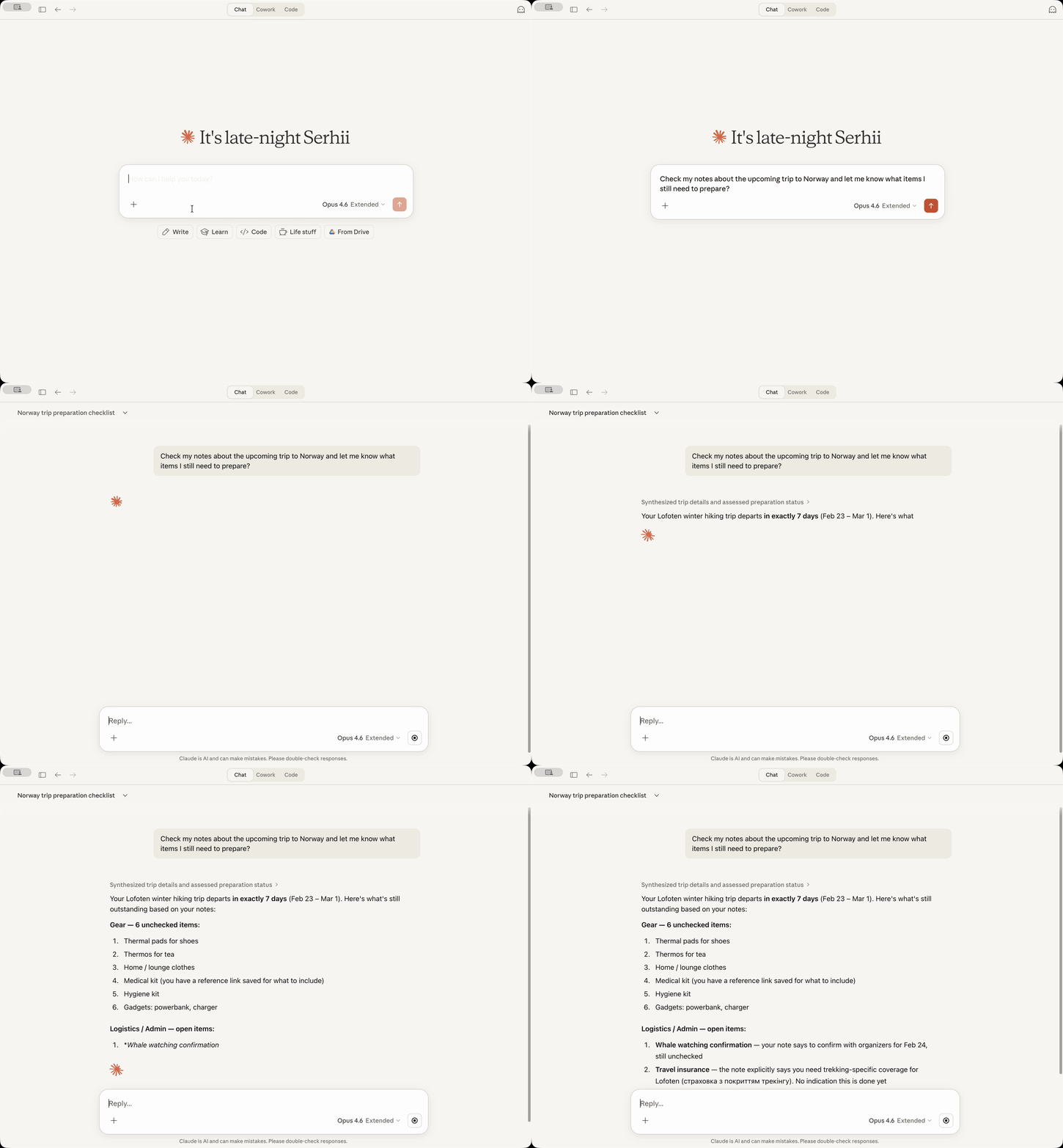
13 MCP-Tools zum Suchen, Lesen, Erstellen, Aktualisieren, Taggen und Archivieren von Notizen
OCR-Suche – findet Text in angehängten Bildern und PDFs
Datumsbasierte Suche mit relativen Datumsangaben ("gestern", "letzte Woche", "Anfang letzten Monats")
Tag-Verwaltung – Tags als Baumstruktur auflisten, nicht getaggte Notizen finden, Tags zu Notizen hinzufügen
Konvention für neue Notizen (optional) – Tags direkt nach dem Titel platzieren, anstatt am Ende
Inhaltsersetzung (optional) – den gesamten Notizinhalt oder einen bestimmten Abschnitt ersetzen
Nur lokal – keine Netzwerkaufrufe, alle Daten bleiben auf deinem Mac
[!NOTE] Vollständiger Datenschutz (abgesehen von den Daten, die du bei der Nutzung eines KI-Assistenten an deinen KI-Anbieter sendest): Dieser Server stellt keine externen Verbindungen her. Die gesamte Verarbeitung erfolgt lokal auf deinem Mac unter Verwendung der eigenen Datenbank und API von Bear. Es gibt keine zusätzliche Telemetrie, Nutzungsstatistiken oder Ähnliches.
Related MCP server: Bear MCP Server
Voraussetzungen: Die Bear-App muss installiert sein und Claude Desktop muss installiert sein.
Lade die neueste bear-notes-mcpb-*.mcpb Erweiterungsdatei von Releases herunter
Stelle sicher, dass dein Claude Desktop läuft (starte es, falls nicht)
Doppelklicke auf die Erweiterungsdatei – Claude Desktop sollte dir die Installationsaufforderung anzeigen
Falls der Doppelklick aus irgendeinem Grund nicht funktioniert, öffne Claude -> Einstellungen -> Erweiterungen -> Erweiterte Einstellungen -> klicke auf "Erweiterung installieren".
FERTIG!
Bitte Claude, deine Bear-Notizen mit einer Abfrage wie "Suche in meinen Bear-Notizen nach 'Meeting'" zu durchsuchen – du solltest sehen, wie deine Notizen in der Antwort erscheinen!
Du möchtest diesen Bear Notes MCP-Server mit Claude Code, Cursor, Codex oder anderen KI-Assistenten verwenden?
Anforderungen: Node.js 24.13.0+
claude mcp add bear-notes --transport stdio -- npx -y bear-notes-mcp@latestFüge dies zu deiner MCP-Konfigurationsdatei hinzu:
{
  "mcpServers": {
    "bear-notes": {
      "command": "npx",
      "args": ["-y", "bear-notes-mcp@latest"]
    }
  }
}
Weitere Installationsoptionen und Einrichtung für die lokale Entwicklung — NPM.md
bear-open-note - Liest den vollständigen Textinhalt einer Bear-Notiz, einschließlich OCR-Text aus angehängten Bildern und PDFs
bear-create-note - Erstellt eine neue Notiz in deiner Bear-Bibliothek mit optionalem Titel, Inhalt und Tags
bear-search-notes - Findet Notizen durch Durchsuchen von Textinhalten, Filtern nach Tags oder Datumsbereichen. Beinhaltet OCR-Suche in Anhängen
bear-add-text - Fügt Text am Anfang oder Ende einer Bear-Notiz oder innerhalb eines bestimmten, durch seine Überschrift identifizierten Abschnitts ein
bear-replace-text - Ersetzt Inhalte in einer bestehenden Bear-Notiz – entweder den gesamten Textkörper oder einen bestimmten Abschnitt. Erfordert, dass die Inhaltsersetzung in den Einstellungen aktiviert ist.
bear-add-file - Hängt eine Datei an eine bestehende Bear-Notiz an. Gib einen lokalen Dateipfad (bevorzugt) oder base64-kodierten Inhalt an.
bear-list-tags - Listet alle Tags in deiner Bear-Bibliothek als hierarchischen Baum mit Notizanzahlen auf
bear-find-untagged-notes - Findet Notizen in deiner Bear-Bibliothek, denen keine Tags zugewiesen sind
bear-add-tag - Fügt einer bestehenden Bear-Notiz ein oder mehrere Tags hinzu
bear-archive-note - Archiviert eine Bear-Notiz, um sie aus aktiven Listen zu entfernen, ohne sie zu löschen
bear-rename-tag - Benennt ein Tag in allen Notizen deiner Bear-Bibliothek um
bear-delete-tag - Löscht ein Tag aus allen Notizen deiner Bear-Bibliothek, ohne die Notizen zu beeinflussen
bear-grab-url - Speichert eine Webseite als Bear-Notiz. Bear ruft die Seite ab und konvertiert sie in Markdown.
Aktivieren der ausführlichen Protokollierung zur Fehlerbehebung.
Claude Desktop: Einstellungen → Erweiterungen → Konfigurieren (neben Bear Notes) → "Debug-Protokollierung" umschalten → Speichern → Claude neu starten
Eigenständiger MCP-Server: Umgebungsvariable UI_DEBUG_TOGGLE=true setzen
Standardmäßig platziert Bear Tags am Ende einer Notiz, wenn sie über die API erstellt wird. Aktiviere diese Option, um Tags stattdessen direkt nach dem Titel zu platzieren, getrennt durch eine horizontale Linie.
┌──────────────────────────────┐
│ # Meeting Notes              │  ← Note title
│ #work #meetings              │  ← Tags right after title
│                              │
│ ---                          │  ← Separator
│                              │
│ Lorem Ipsum...               │  ← Note body
└──────────────────────────────┘[!TIP] Diese Konvention ist standardmäßig deaktiviert – sie ist optional, damit das bestehende Verhalten erhalten bleibt.
Claude Desktop: Einstellungen → Erweiterungen → Konfigurieren (neben Bear Notes) → "Konvention für neue Notizen" umschalten → Speichern → Claude neu starten
Eigenständiger MCP-Server: Umgebungsvariable UI_ENABLE_NEW_NOTE_CONVENTION=true setzen
Beispiel für eine eigenständige Konfiguration mit aktivierter Konvention:
{
  "mcpServers": {
    "bear-notes": {
      "command": "npx",
      "args": ["-y", "bear-notes-mcp@latest"],
      "env": {
        "UI_ENABLE_NEW_NOTE_CONVENTION": "true"
      }
    }
  }
}Aktiviert das Tool bear-replace-text, um Inhalte in bestehenden Notizen zu ersetzen – entweder den gesamten Notizkörper oder einen bestimmten Abschnitt unter einer Überschrift.
[!TIP] Diese Funktion ist standardmäßig deaktiviert – sie ist optional, da das Ersetzen ein destruktiver Vorgang ist.
Claude Desktop: Einstellungen → Erweiterungen → Konfigurieren (neben Bear Notes) → "Inhaltsersetzung" umschalten → Speichern → Claude neu starten
Eigenständiger MCP-Server: Umgebungsvariable UI_ENABLE_CONTENT_REPLACEMENT=true setzen
Beispiel für eine eigenständige Konfiguration mit aktivierter Inhaltsersetzung:
{
  "mcpServers": {
    "bear-notes": {
      "command": "npx",
      "args": ["-y", "bear-notes-mcp@latest"],
      "env": {
        "UI_ENABLE_CONTENT_REPLACEMENT": "true"
      }
    }
  }
}Dieser Server liest deine Bear Notes SQLite-Datenbank direkt für Such-/Lesevorgänge und verwendet die X-callback-URL-API von Bear für Schreibvorgänge. Die gesamte Datenverarbeitung erfolgt lokal auf deinem Computer ohne externe Netzwerkaufrufe.
Nur macOS, da die Bear-Desktop-App nur unter macOS funktioniert.
Claude Desktop:
MCP-Server-Protokolle befinden sich in ~/Library/Logs/Claude/main.log, suche nach bear-notes-mcp
MCP-Transport-Protokolle befinden sich in ~/Library/Logs/Claude/mcp-server-Bear\ Notes.log
Eigenständiger MCP-Server:
Protokolle werden nach stderr geschrieben; aktiviere die Debug-Protokollierung mit UI_DEBUG_TOGGLE=true
Nein. Der Server liest nur die lokale Datenbank von Bear (dieselben Daten, die dir die Bear-App anzeigt) und verwendet die native API von Bear, um Text zu den Notizen hinzuzufügen. Keine Netzwerkübertragung, keine externen Server.
Für Lesevorgänge (Suchen/Öffnen) gibt die x-callback-url API die Notizdaten in der x-success-Antwort zurück: Das würde einen Server oder eine benutzerdefinierte Binärdatei erfordern, um x-success-Antworten zu verarbeiten – beides riskant und fehleranfällig. Der direkte schreibgeschützte SQLite-Zugriff ist einfacher und zuverlässiger für das Suchen und Lesen von Notizen.
Dies vermeidet die Auslieferung einer SQLite-Binärdatei aus Drittanbieter-Node-Paketen, was Lieferkettenrisiken birgt und verhindert, dass die Claude Desktop-Erweiterung unter macOS läuft.
Anthropic signiert keine SQLite-Binärdateien von Drittanbietern (offensichtlich), was dazu führt, dass macOS-Sicherheitssysteme melden, dass der Claude-Prozess, der von einer von Anthropic signierten Binärdatei stammt, versucht, eine andere von einem Drittanbieter signierte Binärdatei auszuführen. Infolgedessen kann Claude Desktop die Erweiterung nicht ausführen.
So reagiert Claude for Desktop auf die Tatsache, dass diese Erweiterung Zugriff auf die Bear SQLite-Datenbank auf deinem Mac benötigt.
Das Warnsystem von Claude unterscheidet nicht zwischen der Notwendigkeit, nur auf eine Datei zuzugreifen (was die Erweiterung tut) und der Notwendigkeit, auf alle Dateien zuzugreifen (das ist NICHT, was die Erweiterung tut).
Eine Möglichkeit, dies zu validieren, besteht darin, deinen Claude zu bitten, die Codebasis (sie ist ziemlich klein) zu analysieren, bevor du die Erweiterung installierst.
Nutze Issues oder Diskussionen! Ich würde mich über dein Feedback oder deine Vorschläge freuen, oder über deine Hilfe, dieses Projekt zu verbessern! ❤️
Erwäge, Release-Ankündigungen zu abonnieren, um zu erfahren, wann eine neue Version veröffentlicht wird:
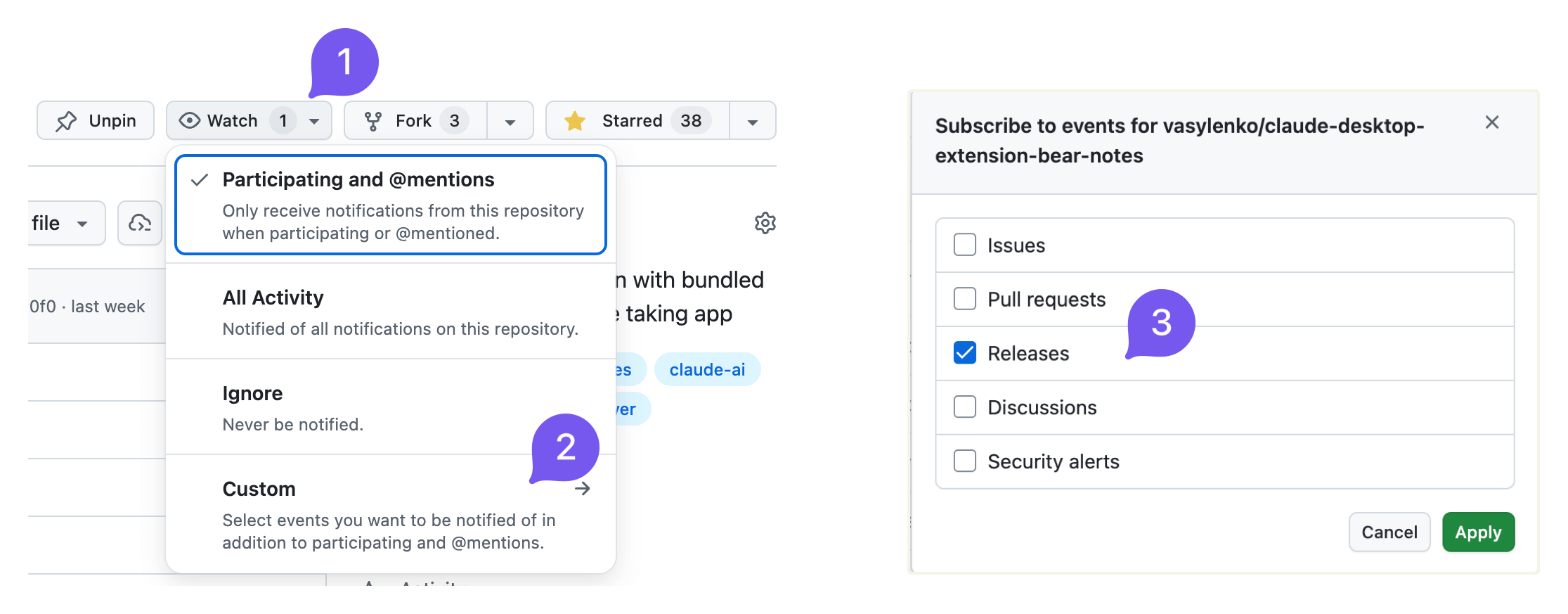
Ich poste auch auf reddit.com/r/bearapp/, wenn es eine neue Version gibt.
Report the current Bear Notes MCP server mode and how to unlock additional capabilities. Call this when the user asks what you can do with their Bear notes, when a write operation appears unavailable, or when the user wants to enable note creation, editing, or tag management.
| Name | Required | Description | Default |
|---|---|---|---|
No parameters | |||
Does the description disclose side effects, auth requirements, rate limits, or destructive behavior?
Annotations indicate readOnlyHint=true and idempotentHint=true. Description adds context that the tool reports current mode and unlock instructions, which goes beyond annotations. It does not contradict annotations and clarifies the tool is informational.
Agents need to know what a tool does to the world before calling it. Descriptions should go beyond structured annotations to explain consequences.
Is the description appropriately sized, front-loaded, and free of redundancy?
Description is two sentences with no filler. It is front-loaded with the core action and then adds usage guidance. Every sentence earns its place.
Shorter descriptions cost fewer tokens and are easier for agents to parse. Every sentence should earn its place.
Given the tool's complexity, does the description cover enough for an agent to succeed on first attempt?
Given no parameters, no output schema, and a simple task, the description is sufficient. It explains the tool's purpose and when to use it. Could mention what specifically 'reporting mode' outputs, but it is adequate.
Complex tools with many parameters or behaviors need more documentation. Simple tools need less. This dimension scales expectations accordingly.
Does the description clarify parameter syntax, constraints, interactions, or defaults beyond what the schema provides?
Tool has no parameters, so the schema coverage is effectively 100%. Description adds no parameter info, but with zero parameters this is not needed. The baseline for 0 parameters is 4, and the description meets it.
Input schemas describe structure but not intent. Descriptions should explain non-obvious parameter relationships and valid value ranges.
Does the description clearly state what the tool does and how it differs from similar tools?
Description explicitly states the tool reports the current mood and how to unlock additional capabilities. Verb 'Report' and resource 'Bear Notes MCP server mode' are specific and distinct from sibling tools like bear-search-notes or bear-list-tags.
Agents choose between tools based on descriptions. A clear purpose with a specific verb and resource helps agents select the right tool.
Does the description explain when to use this tool, when not to, or what alternatives exist?
Description provides explicit scenarios for when to call: when user asks what can be done with Bear notes, when write operations seem unavailable, or when user wants to enable note creation/editing/tag management. This clarity helps the agent choose this tool over alternatives.
Agents often have multiple tools that could apply. Explicit usage guidance like "use X instead of Y when Z" prevents misuse.
Find notes in your Bear library that have no tags. Useful for organizing and categorizing notes. Trashed and archived notes are not included.
| Name | Required | Description | Default |
|---|---|---|---|
| limit | No | Maximum number of results (default: 50, min: 1) |
Does the description disclose side effects, auth requirements, rate limits, or destructive behavior?
Annotations already indicate read-only and idempotent behavior. The description adds valuable context by stating that trashed and archived notes are excluded, which is beyond the annotations. No contradictions and the added behavioral detail is clear.
Agents need to know what a tool does to the world before calling it. Descriptions should go beyond structured annotations to explain consequences.
Is the description appropriately sized, front-loaded, and free of redundancy?
The description is extremely concise, consisting of three short sentences. The first sentence immediately communicates the action, the second adds context, and the third provides an important scope exclusion. No superfluous information.
Shorter descriptions cost fewer tokens and are easier for agents to parse. Every sentence should earn its place.
Given the tool's complexity, does the description cover enough for an agent to succeed on first attempt?
The description covers the tool's purpose, use case, and exclusion of trashed/archived notes. It does not mention return format or the limit parameter, but given the tool's simplicity and the schema covering limit, it is mostly complete. A minor gap is the lack of output format hints.
Complex tools with many parameters or behaviors need more documentation. Simple tools need less. This dimension scales expectations accordingly.
Does the description clarify parameter syntax, constraints, interactions, or defaults beyond what the schema provides?
With 100% schema coverage for the single parameter 'limit', the schema already documents its type, range, and default. The description does not add any additional semantic meaning for the parameter, so baseline score of 3 is appropriate.
Input schemas describe structure but not intent. Descriptions should explain non-obvious parameter relationships and valid value ranges.
Does the description clearly state what the tool does and how it differs from similar tools?
The description clearly states the tool finds notes without tags in Bear library, explicitly excluding trashed and archived notes. It distinguishes itself from sibling tools like bear-search-notes by focusing on untagged notes, providing a specific verb-resource-scope.
Agents choose between tools based on descriptions. A clear purpose with a specific verb and resource helps agents select the right tool.
Does the description explain when to use this tool, when not to, or what alternatives exist?
The description mentions 'useful for organizing and categorizing notes' but does not provide explicit guidance on when to use this tool versus alternatives like bear-search-notes or bear-list-tags. No when-not-to-use or direct comparisons are given.
Agents often have multiple tools that could apply. Explicit usage guidance like "use X instead of Y when Z" prevents misuse.
List all tags in your Bear library as a hierarchical tree. Shows tag names with note counts. Useful for understanding your tag structure and finding tags to apply to untagged notes. Counts include only active notes (trashed and archived are excluded). Tags with zero active notes are not shown.
| Name | Required | Description | Default |
|---|---|---|---|
No parameters | |||
Does the description disclose side effects, auth requirements, rate limits, or destructive behavior?
Annotations already indicate readOnlyHint, openWorldHint, and idempotentHint. The description adds behavioral details beyond annotations: counts exclude trashed/archived notes and tags with zero active notes. No contradictions.
Agents need to know what a tool does to the world before calling it. Descriptions should go beyond structured annotations to explain consequences.
Is the description appropriately sized, front-loaded, and free of redundancy?
Three sentences that are well-structured and front-loaded. Each sentence provides essential information without redundancy or unnecessary detail.
Shorter descriptions cost fewer tokens and are easier for agents to parse. Every sentence should earn its place.
Given the tool's complexity, does the description cover enough for an agent to succeed on first attempt?
For a zero-parameter read-only tool with good annotations, the description is complete. It explains the output format, what's included/excluded, and the tool's utility.
Complex tools with many parameters or behaviors need more documentation. Simple tools need less. This dimension scales expectations accordingly.
Does the description clarify parameter syntax, constraints, interactions, or defaults beyond what the schema provides?
With zero parameters, the schema coverage is 100%. The description adds value by explaining what the output contains (hierarchical tree, note counts), which is helpful given no output schema.
Input schemas describe structure but not intent. Descriptions should explain non-obvious parameter relationships and valid value ranges.
Does the description clearly state what the tool does and how it differs from similar tools?
The description clearly states the tool lists all tags as a hierarchical tree with note counts, and explicitly excludes trashed/archived notes and tags with zero active notes. This is a specific verb+resource that distinguishes it from siblings like bear-find-untagged-notes.
Agents choose between tools based on descriptions. A clear purpose with a specific verb and resource helps agents select the right tool.
Does the description explain when to use this tool, when not to, or what alternatives exist?
The description says it is useful for understanding tag structure and finding tags for untagged notes, implying when to use it. However, it does not explicitly state when not to use it or mention alternatives, though siblings provide context.
Agents often have multiple tools that could apply. Explicit usage guidance like "use X instead of Y when Z" prevents misuse.
Read the full text content of a Bear note by its ID or title. Supports direct title lookup as an alternative to searching first. Always includes text extracted from attached images and PDFs (aka OCR search) with clear labeling.
| Name | Required | Description | Default |
|---|---|---|---|
| id | No | Note identifier (ID) for an existing Bear note. Either id or title must be provided. | |
| title | No | Exact note title for direct lookup (case-insensitive). Either id or title must be provided. If multiple notes share the same title, returns a list for disambiguation. |
Does the description disclose side effects, auth requirements, rate limits, or destructive behavior?
Beyond annotations (readOnlyHint=true, idempotentHint=true), description discloses that OCR text from images/PDFs is included and clearly labeled. No contradictions with annotations.
Agents need to know what a tool does to the world before calling it. Descriptions should go beyond structured annotations to explain consequences.
Is the description appropriately sized, front-loaded, and free of redundancy?
Two sentences, no waste. Front-loaded with main action. Every sentence adds value.
Shorter descriptions cost fewer tokens and are easier for agents to parse. Every sentence should earn its place.
Given the tool's complexity, does the description cover enough for an agent to succeed on first attempt?
For a simple tool with two parameters and no output schema, the description covers purpose, parameter usage, and important behavioral detail (OCR inclusion). Complete.
Complex tools with many parameters or behaviors need more documentation. Simple tools need less. This dimension scales expectations accordingly.
Does the description clarify parameter syntax, constraints, interactions, or defaults beyond what the schema provides?
Schema has 100% coverage, and description adds extra meaning: title is case-insensitive, and if multiple notes share the same title, returns a list for disambiguation. This is valuable beyond the schema.
Input schemas describe structure but not intent. Descriptions should explain non-obvious parameter relationships and valid value ranges.
Does the description clearly state what the tool does and how it differs from similar tools?
Clearly states it reads full text content of a Bear note by ID or title. Explicitly mentions direct title lookup as alternative to searching, and includes OCR text from images/PDFs. Distinguishes from sibling tools like bear-search-notes.
Agents choose between tools based on descriptions. A clear purpose with a specific verb and resource helps agents select the right tool.
Does the description explain when to use this tool, when not to, or what alternatives exist?
Provides guidance on when to use direct title lookup versus searching first. Does not explicitly exclude use cases or mention siblings for comparison, but the context is clear.
Agents often have multiple tools that could apply. Explicit usage guidance like "use X instead of Y when Z" prevents misuse.
Search your Bear notes for words or phrases. The search looks across note titles, body content, and OCR text in attached images and PDFs, returning matching notes ranked by relevance with a snippet of the matching context — so you can see what matched without opening the note. For best results, search with a phrase or several words from what you're looking for; a single word also works. Also supports filtering by tag, by creation/modification date range, or by pinned status — combine these with a search term, or use them on their own to browse without searching. Trashed and archived notes are not included.
| Name | Required | Description | Default |
|---|---|---|---|
| tag | No | Tag to filter notes by (leading # is stripped if present) | |
| term | No | Words to search for. Results are ranked by relevance — notes covering more of what you typed rank higher. Pass natural keywords for the typical case (e.g., "quarterly planning notes"). Hyphenated or punctuated identifiers like "bear-notes-mcp" or "2026-04-15" are matched as a phrase when used alone; in multi-word queries they are treated like any other word. | |
| limit | No | Maximum number of results to return (default: 30, min: 1) | |
| pinned | No | Set to true to return only pinned notes: if combined with tag, will return pinned notes with that tag, otherwise only globally pinned notes. | |
| createdAfter | No | Filter notes created on or after this date. Supports: relative dates ("today", "yesterday", "last week", "start of last month"), ISO format (YYYY-MM-DD). Use "start of last month" for the beginning of the previous month. | |
| createdBefore | No | Filter notes created on or before this date. Supports: relative dates ("today", "yesterday", "last week", "end of last month"), ISO format (YYYY-MM-DD). Use "end of last month" for the end of the previous month. | |
| modifiedAfter | No | Filter notes modified on or after this date. Supports: relative dates ("today", "yesterday", "last week", "start of last month"), ISO format (YYYY-MM-DD). Use "start of last month" for the beginning of the previous month. | |
| modifiedBefore | No | Filter notes modified on or before this date. Supports: relative dates ("today", "yesterday", "last week", "end of last month"), ISO format (YYYY-MM-DD). Use "end of last month" for the end of the previous month. |
Does the description disclose side effects, auth requirements, rate limits, or destructive behavior?
Annotations indicate read-only, idempotent behavior. Description adds context: notes are ranked by relevance, returns snippets, and excludes trashed/archived notes. No contradictions with annotations.
Agents need to know what a tool does to the world before calling it. Descriptions should go beyond structured annotations to explain consequences.
Is the description appropriately sized, front-loaded, and free of redundancy?
Structured in a logical flow: purpose, return format, usage tips, then filter details. Front-loaded with the core function. All sentences add value, though slightly verbose for a summary.
Shorter descriptions cost fewer tokens and are easier for agents to parse. Every sentence should earn its place.
Given the tool's complexity, does the description cover enough for an agent to succeed on first attempt?
Given 8 optional parameters and no output schema, the description thoroughly covers search scope, result format, filter options, and exclusions (trashed/archived). Provides sufficient context for an agent to use effectively.
Complex tools with many parameters or behaviors need more documentation. Simple tools need less. This dimension scales expectations accordingly.
Does the description clarify parameter syntax, constraints, interactions, or defaults beyond what the schema provides?
Schema covers 100% of parameters with descriptions. The tool description adds extra context: explains term matching with hyphenated identifiers, that tag strips leading #, and relative date formats. That adds value beyond the schema.
Input schemas describe structure but not intent. Descriptions should explain non-obvious parameter relationships and valid value ranges.
Does the description clearly state what the tool does and how it differs from similar tools?
The description clearly states the tool searches Bear notes for words or phrases, covering titles, body, and OCR content. It distinguishes itself from siblings (e.g., bear-list-tags, bear-open-note) by focusing on search and retrieval.
Agents choose between tools based on descriptions. A clear purpose with a specific verb and resource helps agents select the right tool.
Does the description explain when to use this tool, when not to, or what alternatives exist?
Provides explicit guidance on best practices (phrase or several words for best results) and explains how to combine filters or use them independently. Notes that trashed/archived notes are excluded, but does not explicitly mention alternatives among siblings.
Agents often have multiple tools that could apply. Explicit usage guidance like "use X instead of Y when Z" prevents misuse.
Recent tool additions, removals, and schema changes observed during successful MCP inspections.
v3.0.1bear-add-filebear-add-tagbear-add-textbear-archive-notebear-capabilitiesbear-create-notebear-delete-tagbear-find-untagged-notes4 fields changedInput schema / properties / limit / descriptionPrevious value: -"Maximum number of results (default: 50)"New value: +"Maximum number of results (default: 50, min: 1)"Input schema / properties / limit / maximumAdded value: +9007199254740991Input schema / properties / limit / minimumAdded value: +1Input schema / properties / limit / typePrevious value: -"number"New value: +"integer"bear-open-note1 field changedInput schema / properties / id / descriptionPrevious value: -"Note identifier (ID) from bear-search-notes. Either id or title must be provided."New value: +"Note identifier (ID) for an existing Bear note. Either id or title must be provided."bear-rename-tagbear-replace-textbear-search-notes6 fields changedInput schema / properties / limit / descriptionPrevious value: -"Maximum number of results to return (default: 50)"New value: +"Maximum number of results to return (default: 30, min: 1)"Input schema / properties / limit / maximumAdded value: +9007199254740991Input schema / properties / limit / minimumAdded value: +1Input schema / properties / limit / typePrevious value: -"number"New value: +"integer"Input schema / properties / tag / descriptionPrevious value: -"Tag to filter notes by (without # symbol)"New value: +"Tag to filter notes by (leading # is stripped if present)"Input schema / properties / term / descriptionPrevious value: -"Text to search for in note titles and content"New value: +"Words to search for. Results are ranked by relevance — notes covering more of what you typed rank higher. Pass natural keywords for the typical case (e.g., \"quarterly planning notes\"). Hyphenated or punctuated identifiers like \"bear-notes-mcp\" or \"2026-04-15\" are matched as a phrase when used alone; in multi-word queries they are treated like any other word."Scored across 5 tools
Each tool has a clearly distinct purpose: capabilities for mode info, find-untagged-notes for organizing, list-tags for hierarchy, open-note for reading, search-notes for searching. No overlap.
All tools follow a consistent 'bear-verb-noun' pattern (bear-capabilities, bear-find-untagged-notes, bear-list-tags, bear-open-note, bear-search-notes). Camel-case and hyphens are used uniformly.
5 tools is well-scoped for a note-taking assistant. Covers core read and organization tasks without being excessive or thin.
The server lacks create, update, and delete operations for notes and tags. It is read-only and search-focused, with no ability to modify notes or manage tags beyond listing. Significant gaps for a full note-management tool.
Persistent memory layer for AI tools. Save and recall notes across Claude and other MCP clients.
MCP-native notes and memory for ChatGPT, Claude, and other AI tools.
Markdown-based note-taking with a hosted MCP server. Your notes serve you and your AI.
MCP server unifying ERPs, CRMs, APIs and knowledge base for Claude, ChatGPT and Gemini.