


A
licenseNot graded
qualityD
maintenanceAllows the AI to read from your Bear Notes
10 npm
45
MIT



모든 AI 어시스턴트에서 Bear 메모를 검색, 읽기, 생성 및 업데이트하세요. 클릭 한 번으로 설치 가능한 Claude Desktop 확장 프로그램 및 모든 MCP 클라이언트를 위한 독립형 npm 패키지로 제공됩니다.
이 로컬 전용 MCP 서버는 빠른 OCR 지원 검색을 위해 Bear의 SQLite 데이터베이스를 읽고, 쓰기 작업에는 Bear의 기본 API를 사용합니다. 완벽한 개인정보 보호: 외부 연결이 없으며 모든 처리는 Mac에서 이루어집니다.
프롬프트 예시:
우리 대화를 요약해서 새로운 Bear 메모로 만들어줘
내 사이드 프로젝트 아이디어에 대해 인터뷰하고 핵심 내용을 Bear 메모에 기록해줘
내 "제품 출시" 메모의 개요를 재구성하는 것을 도와줘
블로그 포스트 아이디어를 브레인스토밍하자 — 가장 좋은 아이디어를 내 Bear 메모에 저장하고 진행하면서 다듬어보자
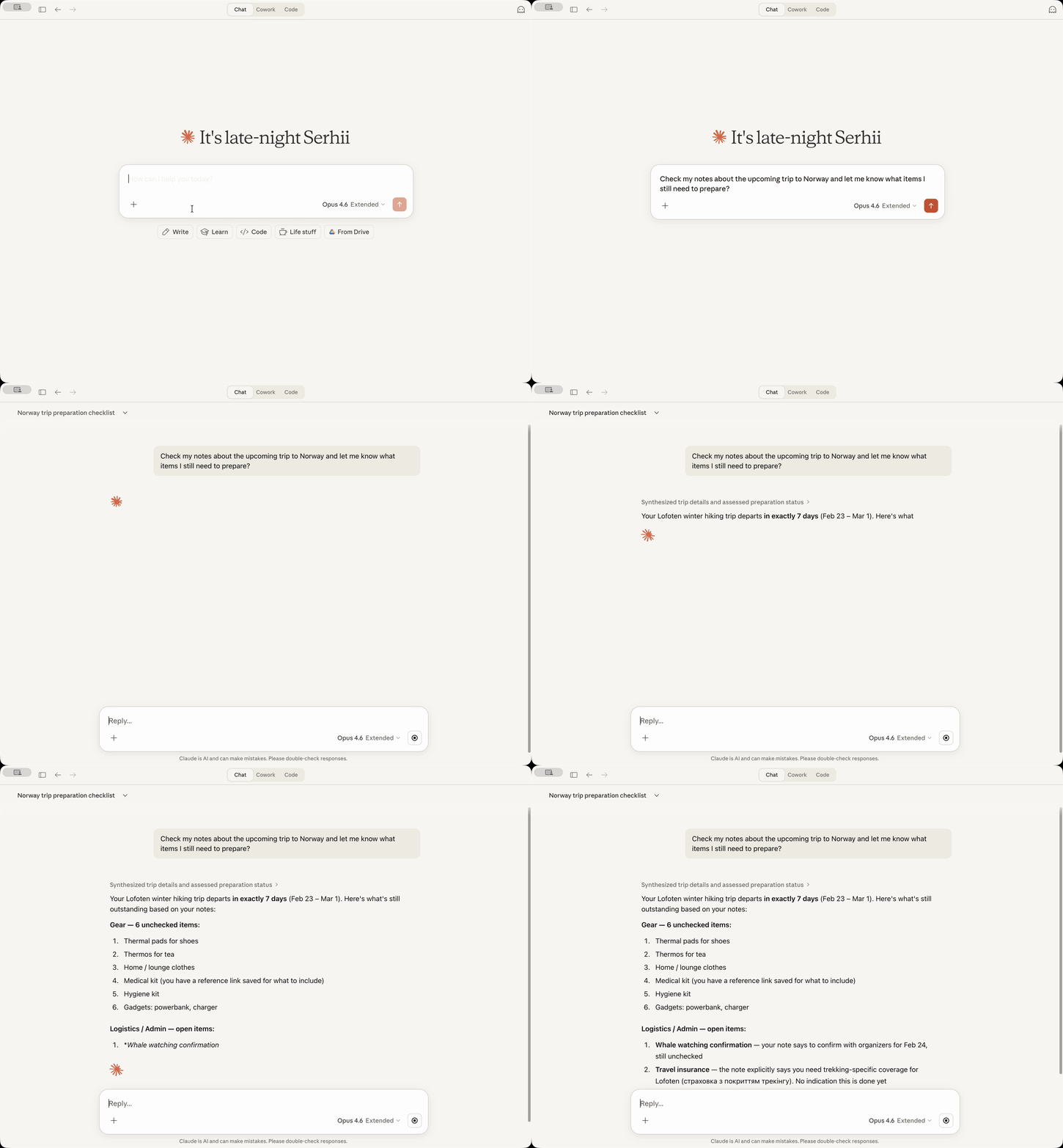
13개의 MCP 도구: 메모 검색, 읽기, 생성, 업데이트, 태그 지정 및 보관
OCR 검색 — 첨부된 이미지와 PDF 내부의 텍스트를 찾습니다
날짜 기반 검색 — 상대적 날짜 지원 ("어제", "지난주", "지난달 초")
태그 관리 — 태그를 트리 구조로 나열, 태그 없는 메모 찾기, 메모에 태그 추가
새 메모 규칙 (선택 사항) — 태그를 하단이 아닌 제목 바로 아래에 배치
콘텐츠 교체 (선택 사항) — 전체 메모 본문 또는 특정 섹션 교체
로컬 전용 — 네트워크 호출 없음, 모든 데이터는 Mac에 유지
[!NOTE] 완벽한 개인정보 보호 (물론 AI 어시스턴트를 사용할 때 AI 제공업체로 전송하는 데이터는 제외): 이 서버는 외부 연결을 만들지 않습니다. 모든 처리는 Bear의 자체 데이터베이스와 API를 사용하여 Mac에서 로컬로 수행됩니다. 추가적인 원격 측정, 사용 통계 등은 없습니다.
Related MCP server: Bear MCP Server
전제 조건: Bear 앱이 설치되어 있어야 하며 Claude Desktop이 설치되어 있어야 합니다.
Releases에서 최신 bear-notes-mcpb-*.mcpb 확장 파일 다운로드
Claude Desktop이 실행 중인지 확인 (실행 중이 아니라면 시작)
확장 파일을 더블 클릭 — Claude Desktop에 설치 프롬프트가 표시됩니다
어떤 이유로 더블 클릭이 작동하지 않으면, Claude -> 설정 -> 확장 프로그램 -> 고급 설정 -> "확장 프로그램 설치"를 클릭하세요.
완료!
Claude에게 "'회의'에 대한 내 Bear 메모 검색해줘"와 같은 쿼리로 Bear 메모를 검색하도록 요청하세요. 응답에 메모가 나타날 것입니다!
이 Bear Notes MCP 서버를 Claude Code, Cursor, Codex 또는 다른 AI 어시스턴트와 함께 사용하고 싶으신가요?
요구 사항: Node.js 24.13.0+
claude mcp add bear-notes --transport stdio -- npx -y bear-notes-mcp@latestMCP 구성 파일에 추가:
{
  "mcpServers": {
    "bear-notes": {
      "command": "npx",
      "args": ["-y", "bear-notes-mcp@latest"]
    }
  }
}
더 많은 설치 옵션 및 로컬 개발 설정 — NPM.md
bear-open-note - 첨부된 이미지와 PDF의 OCR 텍스트를 포함하여 Bear 메모의 전체 텍스트 콘텐츠 읽기
bear-create-note - 제목, 콘텐츠, 태그를 선택적으로 포함하여 Bear 라이브러리에 새 메모 생성
bear-search-notes - 텍스트 콘텐츠 검색, 태그 또는 날짜 범위로 필터링하여 메모 찾기. 첨부 파일의 OCR 검색 포함
bear-add-text - Bear 메모의 시작이나 끝, 또는 헤더로 식별된 특정 섹션 내에 텍스트 삽입
bear-replace-text - 기존 Bear 메모의 콘텐츠 교체 — 전체 본문 또는 특정 섹션. 설정에서 콘텐츠 교체 기능이 활성화되어 있어야 함.
bear-add-file - 기존 Bear 메모에 파일 첨부. 로컬 파일 경로(권장) 또는 base64 인코딩 콘텐츠 제공.
bear-list-tags - Bear 라이브러리의 모든 태그를 메모 개수가 포함된 계층적 트리로 나열
bear-find-untagged-notes - Bear 라이브러리에서 태그가 지정되지 않은 메모 찾기
bear-add-tag - 기존 Bear 메모에 하나 이상의 태그 추가
bear-archive-note - Bear 메모를 삭제하지 않고 활성 목록에서 제거하기 위해 보관
bear-rename-tag - Bear 라이브러리의 모든 메모에서 태그 이름 변경
bear-delete-tag - 메모에 영향을 주지 않고 Bear 라이브러리의 모든 메모에서 태그 삭제
bear-grab-url - 웹 페이지를 Bear 메모로 저장. Bear가 페이지를 가져와 마크다운으로 변환.
문제 해결을 위해 상세 로깅을 활성화합니다.
Claude Desktop: 설정 → 확장 프로그램 → 구성 (Bear Notes 옆) → "디버그 로깅" 토글 → 저장 → Claude 재시작
독립형 MCP 서버: 환경 변수 UI_DEBUG_TOGGLE=true 설정
기본적으로 Bear는 API를 통해 생성될 때 메모 하단에 태그를 배치합니다. 이 옵션을 활성화하면 태그를 하단 대신 제목 바로 아래에 가로 구분선과 함께 배치합니다.
┌──────────────────────────────┐
│ # Meeting Notes              │  ← Note title
│ #work #meetings              │  ← Tags right after title
│                              │
│ ---                          │  ← Separator
│                              │
│ Lorem Ipsum...               │  ← Note body
└──────────────────────────────┘[!TIP] 이 규칙은 기본적으로 비활성화되어 있습니다 — 기존 동작을 유지하기 위해 선택적으로 활성화해야 합니다.
Claude Desktop: 설정 → 확장 프로그램 → 구성 (Bear Notes 옆) → "새 메모 규칙" 토글 → 저장 → Claude 재시작
독립형 MCP 서버: 환경 변수 UI_ENABLE_NEW_NOTE_CONVENTION=true 설정
규칙이 활성화된 독립형 구성 예시:
{
  "mcpServers": {
    "bear-notes": {
      "command": "npx",
      "args": ["-y", "bear-notes-mcp@latest"],
      "env": {
        "UI_ENABLE_NEW_NOTE_CONVENTION": "true"
      }
    }
  }
}bear-replace-text 도구를 활성화하여 기존 메모의 콘텐츠(전체 본문 또는 헤더 아래의 특정 섹션)를 교체합니다.
[!TIP] 이 기능은 기본적으로 비활성화되어 있습니다 — 교체는 파괴적인 작업이므로 선택적으로 활성화해야 합니다.
Claude Desktop: 설정 → 확장 프로그램 → 구성 (Bear Notes 옆) → "콘텐츠 교체" 토글 → 저장 → Claude 재시작
독립형 MCP 서버: 환경 변수 UI_ENABLE_CONTENT_REPLACEMENT=true 설정
콘텐츠 교체가 활성화된 독립형 구성 예시:
{
  "mcpServers": {
    "bear-notes": {
      "command": "npx",
      "args": ["-y", "bear-notes-mcp@latest"],
      "env": {
        "UI_ENABLE_CONTENT_REPLACEMENT": "true"
      }
    }
  }
}이 서버는 검색/읽기 작업을 위해 Bear Notes SQLite 데이터베이스를 직접 읽고, 쓰기 작업에는 Bear의 X-callback-URL API를 사용합니다. 모든 데이터 처리는 외부 네트워크 호출 없이 로컬 기기에서 수행됩니다.
Bear 데스크톱은 macOS에서만 작동하므로 macOS만 지원합니다.
Claude Desktop:
MCP 서버 로그는 ~/Library/Logs/Claude/main.log에 저장되며 bear-notes-mcp를 찾으세요
MCP 전송 로그는 ~/Library/Logs/Claude/mcp-server-Bear\ Notes.log에 저장됩니다
독립형 MCP 서버:
로그는 stderr에 기록됩니다; UI_DEBUG_TOGGLE=true로 디버그 로깅을 활성화하세요
아니요. 서버는 Bear의 로컬 데이터베이스(Bear 앱이 보여주는 데이터와 동일)만 읽고 Bear의 기본 API를 사용하여 메모에 텍스트를 추가합니다. 네트워크 전송이나 외부 서버는 없습니다.
읽기 작업(검색/열기)의 경우, x-callback-url API는 x-success 응답으로 메모 데이터를 반환합니다. 이는 응답을 처리하기 위해 서버나 사용자 정의 바이너리가 필요한데, 이는 위험하고 불안정합니다. 직접적인 SQLite 읽기 전용 액세스가 메모를 검색하고 읽는 데 더 간단하고 안정적입니다.
이는 타사 노드 패키지에서 SQLite 바이너리를 제공하는 것을 방지합니다. 이는 공급망 위험을 초래하고 Claude Desktop 확장 프로그램이 macOS에서 실행되는 것을 차단합니다.
Anthropic은 타사 SQLite 바이너리에 서명하지 않으므로, macOS 보안 시스템은 Anthropic이 서명한 Claude 프로세스가 타사가 서명한 다른 바이너리를 실행하려고 한다고 판단하여 차단합니다. 결과적으로 Claude Desktop은 확장 프로그램을 실행할 수 없습니다.
이는 이 확장 프로그램이 Mac의 Bear SQLite 데이터베이스에 액세스해야 한다는 사실에 대해 Claude for Desktop이 반응하는 방식입니다.
Claude 경고 시스템은 단일 파일에 대한 액세스 필요성(확장 프로그램이 수행하는 작업)과 모든 파일에 대한 액세스 필요성(확장 프로그램이 수행하지 않는 작업)을 구분하지 않습니다.
이를 검증하는 방법 중 하나는 확장 프로그램을 설치하기 전에 Claude에게 코드베이스(매우 작음)를 분석하도록 요청하는 것입니다.
이슈나 토론을 사용하세요! 피드백이나 제안을 환영하며, 이 프로젝트를 더 좋게 만드는 데 도움을 주시면 감사하겠습니다! ❤️
새 버전이 출시될 때 알림을 받으려면 릴리스 공지를 구독하세요:
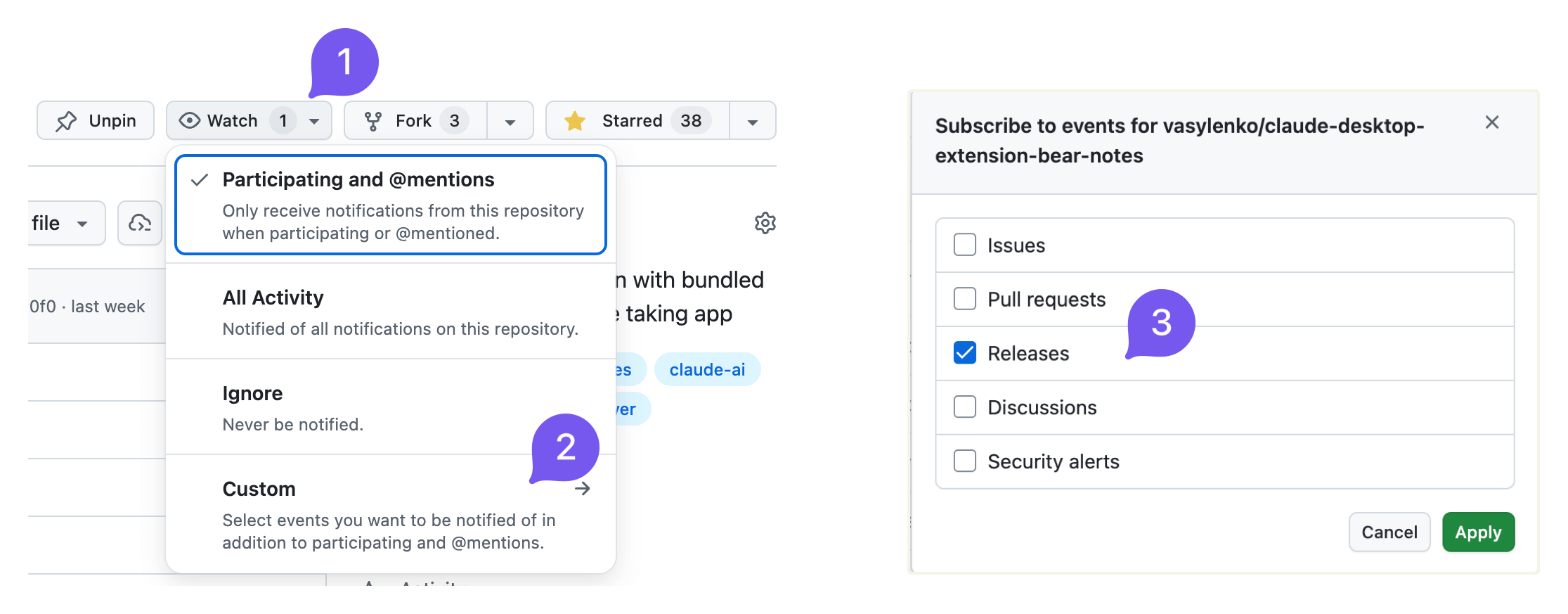
새 릴리스가 있을 때 reddit.com/r/bearapp/에도 게시합니다.
Report the current Bear Notes MCP server mode and how to unlock additional capabilities. Call this when the user asks what you can do with their Bear notes, when a write operation appears unavailable, or when the user wants to enable note creation, editing, or tag management.
| Name | Required | Description | Default |
|---|---|---|---|
No parameters | |||
Does the description disclose side effects, auth requirements, rate limits, or destructive behavior?
Annotations indicate readOnlyHint=true and idempotentHint=true. Description adds context that the tool reports current mode and unlock instructions, which goes beyond annotations. It does not contradict annotations and clarifies the tool is informational.
Agents need to know what a tool does to the world before calling it. Descriptions should go beyond structured annotations to explain consequences.
Is the description appropriately sized, front-loaded, and free of redundancy?
Description is two sentences with no filler. It is front-loaded with the core action and then adds usage guidance. Every sentence earns its place.
Shorter descriptions cost fewer tokens and are easier for agents to parse. Every sentence should earn its place.
Given the tool's complexity, does the description cover enough for an agent to succeed on first attempt?
Given no parameters, no output schema, and a simple task, the description is sufficient. It explains the tool's purpose and when to use it. Could mention what specifically 'reporting mode' outputs, but it is adequate.
Complex tools with many parameters or behaviors need more documentation. Simple tools need less. This dimension scales expectations accordingly.
Does the description clarify parameter syntax, constraints, interactions, or defaults beyond what the schema provides?
Tool has no parameters, so the schema coverage is effectively 100%. Description adds no parameter info, but with zero parameters this is not needed. The baseline for 0 parameters is 4, and the description meets it.
Input schemas describe structure but not intent. Descriptions should explain non-obvious parameter relationships and valid value ranges.
Does the description clearly state what the tool does and how it differs from similar tools?
Description explicitly states the tool reports the current mood and how to unlock additional capabilities. Verb 'Report' and resource 'Bear Notes MCP server mode' are specific and distinct from sibling tools like bear-search-notes or bear-list-tags.
Agents choose between tools based on descriptions. A clear purpose with a specific verb and resource helps agents select the right tool.
Does the description explain when to use this tool, when not to, or what alternatives exist?
Description provides explicit scenarios for when to call: when user asks what can be done with Bear notes, when write operations seem unavailable, or when user wants to enable note creation/editing/tag management. This clarity helps the agent choose this tool over alternatives.
Agents often have multiple tools that could apply. Explicit usage guidance like "use X instead of Y when Z" prevents misuse.
Find notes in your Bear library that have no tags. Useful for organizing and categorizing notes. Trashed and archived notes are not included.
| Name | Required | Description | Default |
|---|---|---|---|
| limit | No | Maximum number of results (default: 50, min: 1) |
Does the description disclose side effects, auth requirements, rate limits, or destructive behavior?
Annotations already indicate read-only and idempotent behavior. The description adds valuable context by stating that trashed and archived notes are excluded, which is beyond the annotations. No contradictions and the added behavioral detail is clear.
Agents need to know what a tool does to the world before calling it. Descriptions should go beyond structured annotations to explain consequences.
Is the description appropriately sized, front-loaded, and free of redundancy?
The description is extremely concise, consisting of three short sentences. The first sentence immediately communicates the action, the second adds context, and the third provides an important scope exclusion. No superfluous information.
Shorter descriptions cost fewer tokens and are easier for agents to parse. Every sentence should earn its place.
Given the tool's complexity, does the description cover enough for an agent to succeed on first attempt?
The description covers the tool's purpose, use case, and exclusion of trashed/archived notes. It does not mention return format or the limit parameter, but given the tool's simplicity and the schema covering limit, it is mostly complete. A minor gap is the lack of output format hints.
Complex tools with many parameters or behaviors need more documentation. Simple tools need less. This dimension scales expectations accordingly.
Does the description clarify parameter syntax, constraints, interactions, or defaults beyond what the schema provides?
With 100% schema coverage for the single parameter 'limit', the schema already documents its type, range, and default. The description does not add any additional semantic meaning for the parameter, so baseline score of 3 is appropriate.
Input schemas describe structure but not intent. Descriptions should explain non-obvious parameter relationships and valid value ranges.
Does the description clearly state what the tool does and how it differs from similar tools?
The description clearly states the tool finds notes without tags in Bear library, explicitly excluding trashed and archived notes. It distinguishes itself from sibling tools like bear-search-notes by focusing on untagged notes, providing a specific verb-resource-scope.
Agents choose between tools based on descriptions. A clear purpose with a specific verb and resource helps agents select the right tool.
Does the description explain when to use this tool, when not to, or what alternatives exist?
The description mentions 'useful for organizing and categorizing notes' but does not provide explicit guidance on when to use this tool versus alternatives like bear-search-notes or bear-list-tags. No when-not-to-use or direct comparisons are given.
Agents often have multiple tools that could apply. Explicit usage guidance like "use X instead of Y when Z" prevents misuse.
List all tags in your Bear library as a hierarchical tree. Shows tag names with note counts. Useful for understanding your tag structure and finding tags to apply to untagged notes. Counts include only active notes (trashed and archived are excluded). Tags with zero active notes are not shown.
| Name | Required | Description | Default |
|---|---|---|---|
No parameters | |||
Does the description disclose side effects, auth requirements, rate limits, or destructive behavior?
Annotations already indicate readOnlyHint, openWorldHint, and idempotentHint. The description adds behavioral details beyond annotations: counts exclude trashed/archived notes and tags with zero active notes. No contradictions.
Agents need to know what a tool does to the world before calling it. Descriptions should go beyond structured annotations to explain consequences.
Is the description appropriately sized, front-loaded, and free of redundancy?
Three sentences that are well-structured and front-loaded. Each sentence provides essential information without redundancy or unnecessary detail.
Shorter descriptions cost fewer tokens and are easier for agents to parse. Every sentence should earn its place.
Given the tool's complexity, does the description cover enough for an agent to succeed on first attempt?
For a zero-parameter read-only tool with good annotations, the description is complete. It explains the output format, what's included/excluded, and the tool's utility.
Complex tools with many parameters or behaviors need more documentation. Simple tools need less. This dimension scales expectations accordingly.
Does the description clarify parameter syntax, constraints, interactions, or defaults beyond what the schema provides?
With zero parameters, the schema coverage is 100%. The description adds value by explaining what the output contains (hierarchical tree, note counts), which is helpful given no output schema.
Input schemas describe structure but not intent. Descriptions should explain non-obvious parameter relationships and valid value ranges.
Does the description clearly state what the tool does and how it differs from similar tools?
The description clearly states the tool lists all tags as a hierarchical tree with note counts, and explicitly excludes trashed/archived notes and tags with zero active notes. This is a specific verb+resource that distinguishes it from siblings like bear-find-untagged-notes.
Agents choose between tools based on descriptions. A clear purpose with a specific verb and resource helps agents select the right tool.
Does the description explain when to use this tool, when not to, or what alternatives exist?
The description says it is useful for understanding tag structure and finding tags for untagged notes, implying when to use it. However, it does not explicitly state when not to use it or mention alternatives, though siblings provide context.
Agents often have multiple tools that could apply. Explicit usage guidance like "use X instead of Y when Z" prevents misuse.
Read the full text content of a Bear note by its ID or title. Supports direct title lookup as an alternative to searching first. Always includes text extracted from attached images and PDFs (aka OCR search) with clear labeling.
| Name | Required | Description | Default |
|---|---|---|---|
| id | No | Note identifier (ID) for an existing Bear note. Either id or title must be provided. | |
| title | No | Exact note title for direct lookup (case-insensitive). Either id or title must be provided. If multiple notes share the same title, returns a list for disambiguation. |
Does the description disclose side effects, auth requirements, rate limits, or destructive behavior?
Beyond annotations (readOnlyHint=true, idempotentHint=true), description discloses that OCR text from images/PDFs is included and clearly labeled. No contradictions with annotations.
Agents need to know what a tool does to the world before calling it. Descriptions should go beyond structured annotations to explain consequences.
Is the description appropriately sized, front-loaded, and free of redundancy?
Two sentences, no waste. Front-loaded with main action. Every sentence adds value.
Shorter descriptions cost fewer tokens and are easier for agents to parse. Every sentence should earn its place.
Given the tool's complexity, does the description cover enough for an agent to succeed on first attempt?
For a simple tool with two parameters and no output schema, the description covers purpose, parameter usage, and important behavioral detail (OCR inclusion). Complete.
Complex tools with many parameters or behaviors need more documentation. Simple tools need less. This dimension scales expectations accordingly.
Does the description clarify parameter syntax, constraints, interactions, or defaults beyond what the schema provides?
Schema has 100% coverage, and description adds extra meaning: title is case-insensitive, and if multiple notes share the same title, returns a list for disambiguation. This is valuable beyond the schema.
Input schemas describe structure but not intent. Descriptions should explain non-obvious parameter relationships and valid value ranges.
Does the description clearly state what the tool does and how it differs from similar tools?
Clearly states it reads full text content of a Bear note by ID or title. Explicitly mentions direct title lookup as alternative to searching, and includes OCR text from images/PDFs. Distinguishes from sibling tools like bear-search-notes.
Agents choose between tools based on descriptions. A clear purpose with a specific verb and resource helps agents select the right tool.
Does the description explain when to use this tool, when not to, or what alternatives exist?
Provides guidance on when to use direct title lookup versus searching first. Does not explicitly exclude use cases or mention siblings for comparison, but the context is clear.
Agents often have multiple tools that could apply. Explicit usage guidance like "use X instead of Y when Z" prevents misuse.
Search your Bear notes for words or phrases. The search looks across note titles, body content, and OCR text in attached images and PDFs, returning matching notes ranked by relevance with a snippet of the matching context — so you can see what matched without opening the note. For best results, search with a phrase or several words from what you're looking for; a single word also works. Also supports filtering by tag, by creation/modification date range, or by pinned status — combine these with a search term, or use them on their own to browse without searching. Trashed and archived notes are not included.
| Name | Required | Description | Default |
|---|---|---|---|
| tag | No | Tag to filter notes by (leading # is stripped if present) | |
| term | No | Words to search for. Results are ranked by relevance — notes covering more of what you typed rank higher. Pass natural keywords for the typical case (e.g., "quarterly planning notes"). Hyphenated or punctuated identifiers like "bear-notes-mcp" or "2026-04-15" are matched as a phrase when used alone; in multi-word queries they are treated like any other word. | |
| limit | No | Maximum number of results to return (default: 30, min: 1) | |
| pinned | No | Set to true to return only pinned notes: if combined with tag, will return pinned notes with that tag, otherwise only globally pinned notes. | |
| createdAfter | No | Filter notes created on or after this date. Supports: relative dates ("today", "yesterday", "last week", "start of last month"), ISO format (YYYY-MM-DD). Use "start of last month" for the beginning of the previous month. | |
| createdBefore | No | Filter notes created on or before this date. Supports: relative dates ("today", "yesterday", "last week", "end of last month"), ISO format (YYYY-MM-DD). Use "end of last month" for the end of the previous month. | |
| modifiedAfter | No | Filter notes modified on or after this date. Supports: relative dates ("today", "yesterday", "last week", "start of last month"), ISO format (YYYY-MM-DD). Use "start of last month" for the beginning of the previous month. | |
| modifiedBefore | No | Filter notes modified on or before this date. Supports: relative dates ("today", "yesterday", "last week", "end of last month"), ISO format (YYYY-MM-DD). Use "end of last month" for the end of the previous month. |
Does the description disclose side effects, auth requirements, rate limits, or destructive behavior?
Annotations indicate read-only, idempotent behavior. Description adds context: notes are ranked by relevance, returns snippets, and excludes trashed/archived notes. No contradictions with annotations.
Agents need to know what a tool does to the world before calling it. Descriptions should go beyond structured annotations to explain consequences.
Is the description appropriately sized, front-loaded, and free of redundancy?
Structured in a logical flow: purpose, return format, usage tips, then filter details. Front-loaded with the core function. All sentences add value, though slightly verbose for a summary.
Shorter descriptions cost fewer tokens and are easier for agents to parse. Every sentence should earn its place.
Given the tool's complexity, does the description cover enough for an agent to succeed on first attempt?
Given 8 optional parameters and no output schema, the description thoroughly covers search scope, result format, filter options, and exclusions (trashed/archived). Provides sufficient context for an agent to use effectively.
Complex tools with many parameters or behaviors need more documentation. Simple tools need less. This dimension scales expectations accordingly.
Does the description clarify parameter syntax, constraints, interactions, or defaults beyond what the schema provides?
Schema covers 100% of parameters with descriptions. The tool description adds extra context: explains term matching with hyphenated identifiers, that tag strips leading #, and relative date formats. That adds value beyond the schema.
Input schemas describe structure but not intent. Descriptions should explain non-obvious parameter relationships and valid value ranges.
Does the description clearly state what the tool does and how it differs from similar tools?
The description clearly states the tool searches Bear notes for words or phrases, covering titles, body, and OCR content. It distinguishes itself from siblings (e.g., bear-list-tags, bear-open-note) by focusing on search and retrieval.
Agents choose between tools based on descriptions. A clear purpose with a specific verb and resource helps agents select the right tool.
Does the description explain when to use this tool, when not to, or what alternatives exist?
Provides explicit guidance on best practices (phrase or several words for best results) and explains how to combine filters or use them independently. Notes that trashed/archived notes are excluded, but does not explicitly mention alternatives among siblings.
Agents often have multiple tools that could apply. Explicit usage guidance like "use X instead of Y when Z" prevents misuse.
Recent tool additions, removals, and schema changes observed during successful MCP inspections.
v3.0.1bear-add-filebear-add-tagbear-add-textbear-archive-notebear-capabilitiesbear-create-notebear-delete-tagbear-find-untagged-notes4 fields changedInput schema / properties / limit / descriptionPrevious value: -"Maximum number of results (default: 50)"New value: +"Maximum number of results (default: 50, min: 1)"Input schema / properties / limit / maximumAdded value: +9007199254740991Input schema / properties / limit / minimumAdded value: +1Input schema / properties / limit / typePrevious value: -"number"New value: +"integer"bear-open-note1 field changedInput schema / properties / id / descriptionPrevious value: -"Note identifier (ID) from bear-search-notes. Either id or title must be provided."New value: +"Note identifier (ID) for an existing Bear note. Either id or title must be provided."bear-rename-tagbear-replace-textbear-search-notes6 fields changedInput schema / properties / limit / descriptionPrevious value: -"Maximum number of results to return (default: 50)"New value: +"Maximum number of results to return (default: 30, min: 1)"Input schema / properties / limit / maximumAdded value: +9007199254740991Input schema / properties / limit / minimumAdded value: +1Input schema / properties / limit / typePrevious value: -"number"New value: +"integer"Input schema / properties / tag / descriptionPrevious value: -"Tag to filter notes by (without # symbol)"New value: +"Tag to filter notes by (leading # is stripped if present)"Input schema / properties / term / descriptionPrevious value: -"Text to search for in note titles and content"New value: +"Words to search for. Results are ranked by relevance — notes covering more of what you typed rank higher. Pass natural keywords for the typical case (e.g., \"quarterly planning notes\"). Hyphenated or punctuated identifiers like \"bear-notes-mcp\" or \"2026-04-15\" are matched as a phrase when used alone; in multi-word queries they are treated like any other word."Scored across 5 tools
Each tool has a clearly distinct purpose: capabilities for mode info, find-untagged-notes for organizing, list-tags for hierarchy, open-note for reading, search-notes for searching. No overlap.
All tools follow a consistent 'bear-verb-noun' pattern (bear-capabilities, bear-find-untagged-notes, bear-list-tags, bear-open-note, bear-search-notes). Camel-case and hyphens are used uniformly.
5 tools is well-scoped for a note-taking assistant. Covers core read and organization tasks without being excessive or thin.
The server lacks create, update, and delete operations for notes and tags. It is read-only and search-focused, with no ability to modify notes or manage tags beyond listing. Significant gaps for a full note-management tool.
Persistent memory layer for AI tools. Save and recall notes across Claude and other MCP clients.
MCP-native notes and memory for ChatGPT, Claude, and other AI tools.
Markdown-based note-taking with a hosted MCP server. Your notes serve you and your AI.
MCP server unifying ERPs, CRMs, APIs and knowledge base for Claude, ChatGPT and Gemini.