


A
licenseNot graded
qualityD
maintenanceAllows the AI to read from your Bear Notes
10 npm
45
MIT



Busca, lee, crea y actualiza tus notas de Bear desde cualquier asistente de IA. Disponible como extensión de Claude Desktop de un solo clic y como paquete npm independiente para cualquier cliente MCP.
Este servidor MCP solo local lee la base de datos SQLite de Bear para búsquedas rápidas con soporte OCR, y utiliza la API nativa de Bear para las escrituras. Privacidad total: sin conexiones externas, todo el procesamiento se realiza en tu Mac.
Ejemplos de prompts:
Resume nuestra conversación y crea una nueva nota en Bear con ella
Entrevístame sobre la idea de mi proyecto paralelo y captura los puntos clave en una nota de Bear
Ayúdame a reestructurar el esquema de mi nota "Lanzamiento de producto"
Hagamos una lluvia de ideas para publicaciones de blog: guarda las mejores en mi nota de Bear y refínalas a medida que avanzamos
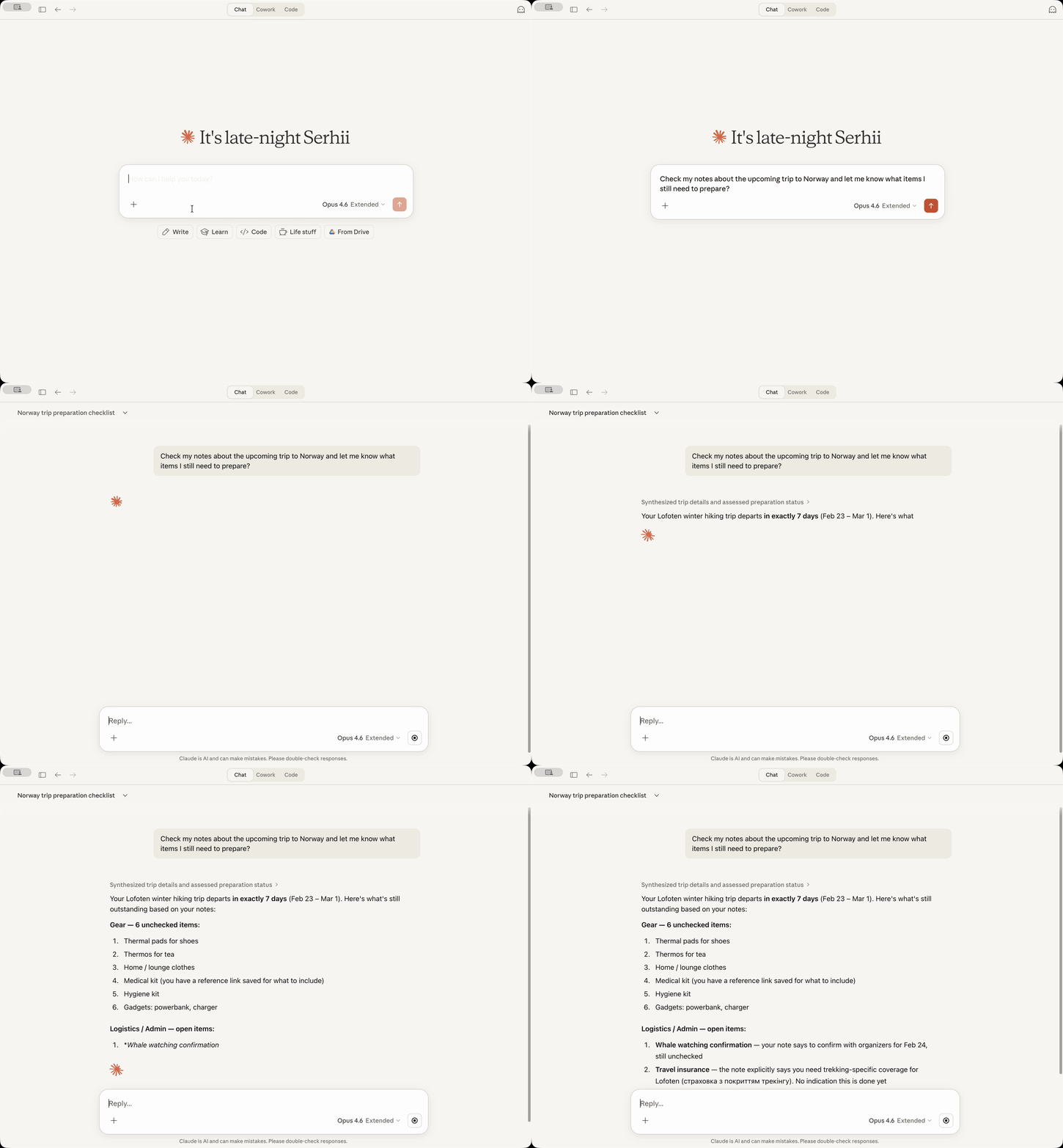
13 herramientas MCP para buscar, leer, crear, actualizar, etiquetar y archivar notas
Búsqueda OCR — encuentra texto dentro de imágenes y archivos PDF adjuntos
Búsqueda basada en fechas con fechas relativas ("ayer", "la semana pasada", "inicio del mes pasado")
Gestión de etiquetas — lista las etiquetas como un árbol, encuentra notas sin etiquetas, añade etiquetas a las notas
Convención de nueva nota (opcional) — coloca las etiquetas justo después del título en lugar de al final
Reemplazo de contenido (opcional) — reemplaza todo el cuerpo de la nota o una sección específica
Solo local — sin llamadas de red, todos los datos permanecen en tu Mac
[!NOTE] Privacidad total (excepto los datos que envías a tu proveedor de IA cuando usas un asistente de IA, por supuesto): este servidor no realiza conexiones externas. Todo el procesamiento ocurre localmente en tu Mac utilizando la propia base de datos y API de Bear. No hay telemetría adicional, estadísticas de uso ni nada parecido.
Related MCP server: Bear MCP Server
Requisitos previos: Debes tener instalada la aplicación Bear y Claude Desktop.
Descarga el archivo de extensión bear-notes-mcpb-*.mcpb más reciente desde Releases
Asegúrate de que Claude Desktop esté ejecutándose (inícialo si no lo está)
Haz doble clic en el archivo de extensión: Claude Desktop debería mostrarte el aviso de instalación
Si el doble clic no funciona por alguna razón, abre Claude -> Settings -> Extensions -> Advanced Settings -> haz clic en "Install Extension".
¡LISTO!
Pídele a Claude que busque en tus notas de Bear con una consulta como "Busca en mis notas de Bear 'reunión'" - ¡deberías ver tus notas aparecer en la respuesta!
¿Quieres usar este servidor MCP de Bear Notes con Claude Code, Cursor, Codex u otros asistentes de IA?
Requisitos: Node.js 24.13.0+
claude mcp add bear-notes --transport stdio -- npx -y bear-notes-mcp@latestAñade a tu archivo de configuración MCP:
{
  "mcpServers": {
    "bear-notes": {
      "command": "npx",
      "args": ["-y", "bear-notes-mcp@latest"]
    }
  }
}
Más opciones de instalación y configuración de desarrollo local — NPM.md
bear-open-note - Lee el contenido de texto completo de una nota de Bear, incluido el texto OCR de imágenes y archivos PDF adjuntos
bear-create-note - Crea una nueva nota en tu biblioteca de Bear con título, contenido y etiquetas opcionales
bear-search-notes - Encuentra notas buscando en el contenido de texto, filtrando por etiquetas o rangos de fechas. Incluye búsqueda OCR en archivos adjuntos
bear-add-text - Inserta texto al principio o al final de una nota de Bear, o dentro de una sección específica identificada por su encabezado
bear-replace-text - Reemplaza contenido en una nota de Bear existente, ya sea todo el cuerpo o una sección específica. Requiere que el reemplazo de contenido esté habilitado en la configuración.
bear-add-file - Adjunta un archivo a una nota de Bear existente. Proporciona una ruta de archivo local (preferido) o contenido codificado en base64.
bear-list-tags - Lista todas las etiquetas en tu biblioteca de Bear como un árbol jerárquico con recuentos de notas
bear-find-untagged-notes - Encuentra notas en tu biblioteca de Bear que no tienen etiquetas asignadas
bear-add-tag - Añade una o más etiquetas a una nota de Bear existente
bear-archive-note - Archiva una nota de Bear para eliminarla de las listas activas sin borrarla
bear-rename-tag - Cambia el nombre de una etiqueta en todas las notas de tu biblioteca de Bear
bear-delete-tag - Elimina una etiqueta de todas las notas de tu biblioteca de Bear sin afectar a las notas
bear-grab-url - Guarda una página web como una nota de Bear. Bear obtiene la página y la convierte a markdown.
Habilita el registro detallado para la resolución de problemas.
Claude Desktop: Settings → Extensions → Configure (junto a Bear Notes) → activa "Debug Logging" → Save → Reinicia Claude
Servidor MCP independiente: establece la variable de entorno UI_DEBUG_TOGGLE=true
Por defecto, Bear coloca las etiquetas al final de una nota cuando se crea a través de la API. Habilita esta opción para colocar las etiquetas justo después del título, separadas por una línea horizontal.
┌──────────────────────────────┐
│ # Meeting Notes              │  ← Note title
│ #work #meetings              │  ← Tags right after title
│                              │
│ ---                          │  ← Separator
│                              │
│ Lorem Ipsum...               │  ← Note body
└──────────────────────────────┘[!TIP] Esta convención está deshabilitada por defecto: es opcional para preservar el comportamiento existente.
Claude Desktop: Settings → Extensions → Configure (junto a Bear Notes) → activa "New Note Convention" → Save → Reinicia Claude
Servidor MCP independiente: establece la variable de entorno UI_ENABLE_NEW_NOTE_CONVENTION=true
Ejemplo de configuración independiente con la convención habilitada:
{
  "mcpServers": {
    "bear-notes": {
      "command": "npx",
      "args": ["-y", "bear-notes-mcp@latest"],
      "env": {
        "UI_ENABLE_NEW_NOTE_CONVENTION": "true"
      }
    }
  }
}Habilita la herramienta bear-replace-text para reemplazar contenido en notas existentes, ya sea todo el cuerpo de la nota o una sección específica bajo un encabezado.
[!TIP] Esta función está deshabilitada por defecto: es opcional porque el reemplazo es una operación destructiva.
Claude Desktop: Settings → Extensions → Configure (junto a Bear Notes) → activa "Content Replacement" → Save → Reinicia Claude
Servidor MCP independiente: establece la variable de entorno UI_ENABLE_CONTENT_REPLACEMENT=true
Ejemplo de configuración independiente con el reemplazo de contenido habilitado:
{
  "mcpServers": {
    "bear-notes": {
      "command": "npx",
      "args": ["-y", "bear-notes-mcp@latest"],
      "env": {
        "UI_ENABLE_CONTENT_REPLACEMENT": "true"
      }
    }
  }
}Este servidor lee la base de datos SQLite de Bear Notes directamente para operaciones de búsqueda/lectura y utiliza la API X-callback-URL de Bear para operaciones de escritura. Todo el procesamiento de datos ocurre localmente en tu máquina sin llamadas de red externas.
Solo macOS, ya que la versión de escritorio de Bear solo funciona en macOS.
Claude Desktop:
Los registros del servidor MCP van a ~/Library/Logs/Claude/main.log, busca bear-notes-mcp
Los registros de transporte MCP van a ~/Library/Logs/Claude/mcp-server-Bear\ Notes.log
Servidor MCP independiente:
Los registros se escriben en stderr; habilita el registro de depuración con UI_DEBUG_TOGGLE=true
No. El servidor solo lee la base de datos local de Bear (los mismos datos que te muestra la aplicación Bear) y utiliza la API nativa de Bear para añadir texto a las notas. Sin transmisión de red, sin servidores externos.
Para las operaciones de lectura (buscar/abrir), la API x-callback-url devuelve los datos de la nota en la respuesta x-success: eso requeriría un servidor o un binario personalizado para manejar las respuestas x-success, lo cual es arriesgado y frágil. El acceso directo de solo lectura a SQLite es más simple y fiable para buscar y leer notas.
Esto evita enviar un binario SQLite de paquetes de nodo de terceros, lo que plantea riesgos en la cadena de suministro y bloquea la ejecución de la extensión de Claude Desktop en macOS.
Anthropic no firma binarios SQLite de terceros (obviamente), lo que provoca que los sistemas de seguridad de macOS marquen que el proceso de Claude, firmado por Anthropic, está intentando ejecutar otro binario firmado por un tercero. Como resultado, Claude Desktop no puede ejecutar la extensión.
Así es como Claude para Desktop reacciona al hecho de que esta extensión necesita acceso a la base de datos SQLite de Bear en tu Mac.
El sistema de advertencia de Claude no distingue entre la necesidad de acceder a un solo archivo (lo que hace la extensión) frente a la necesidad de acceder a todos los archivos (esto NO es lo que hace la extensión).
Una de las formas de validar esto es pedirle a tu Claude que analice el código fuente (es bastante pequeño) antes de instalar la extensión y te lo diga.
¡Usa los issues o las discusiones! ¡Estaré encantado de ver tus comentarios o sugerencias, o tu ayuda para mejorar este proyecto! ❤️
Considera suscribirte a los anuncios de versiones para saber cuándo se lanza una nueva versión:
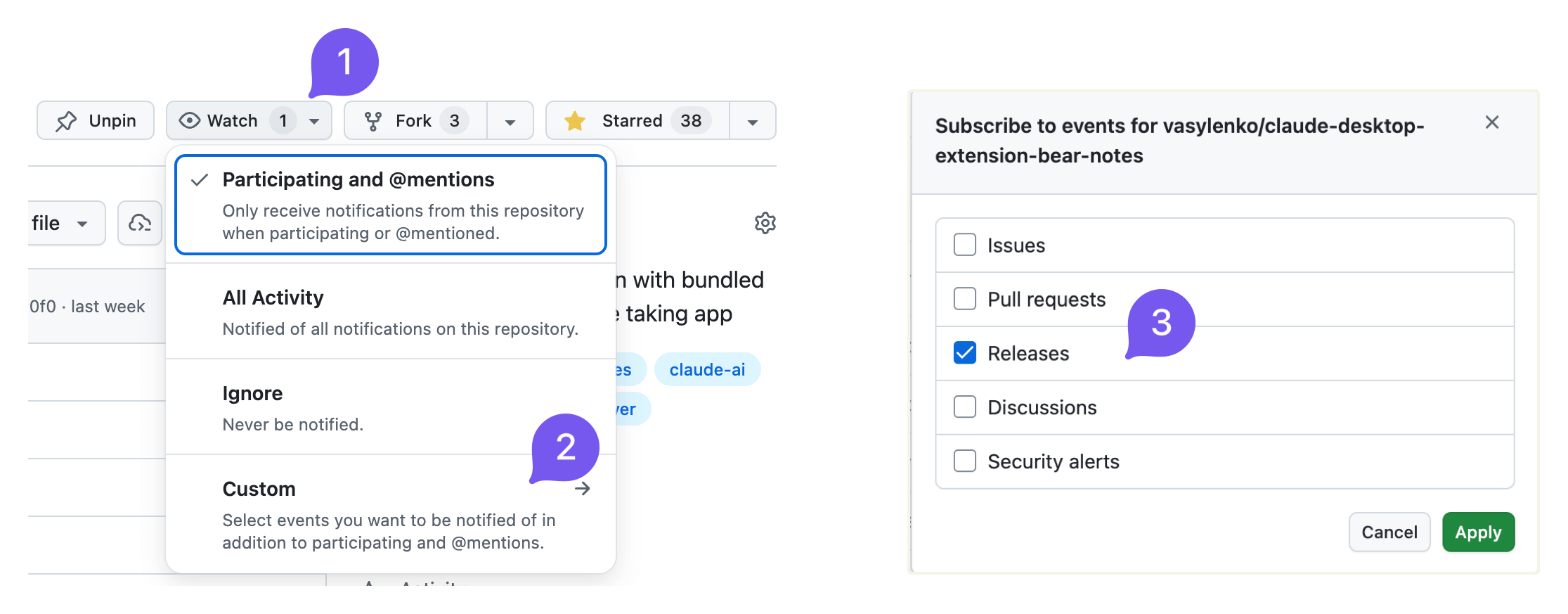
También publico en reddit.com/r/bearapp/ cuando hay una nueva versión.
Report the current Bear Notes MCP server mode and how to unlock additional capabilities. Call this when the user asks what you can do with their Bear notes, when a write operation appears unavailable, or when the user wants to enable note creation, editing, or tag management.
| Name | Required | Description | Default |
|---|---|---|---|
No parameters | |||
Does the description disclose side effects, auth requirements, rate limits, or destructive behavior?
Annotations indicate readOnlyHint=true and idempotentHint=true. Description adds context that the tool reports current mode and unlock instructions, which goes beyond annotations. It does not contradict annotations and clarifies the tool is informational.
Agents need to know what a tool does to the world before calling it. Descriptions should go beyond structured annotations to explain consequences.
Is the description appropriately sized, front-loaded, and free of redundancy?
Description is two sentences with no filler. It is front-loaded with the core action and then adds usage guidance. Every sentence earns its place.
Shorter descriptions cost fewer tokens and are easier for agents to parse. Every sentence should earn its place.
Given the tool's complexity, does the description cover enough for an agent to succeed on first attempt?
Given no parameters, no output schema, and a simple task, the description is sufficient. It explains the tool's purpose and when to use it. Could mention what specifically 'reporting mode' outputs, but it is adequate.
Complex tools with many parameters or behaviors need more documentation. Simple tools need less. This dimension scales expectations accordingly.
Does the description clarify parameter syntax, constraints, interactions, or defaults beyond what the schema provides?
Tool has no parameters, so the schema coverage is effectively 100%. Description adds no parameter info, but with zero parameters this is not needed. The baseline for 0 parameters is 4, and the description meets it.
Input schemas describe structure but not intent. Descriptions should explain non-obvious parameter relationships and valid value ranges.
Does the description clearly state what the tool does and how it differs from similar tools?
Description explicitly states the tool reports the current mood and how to unlock additional capabilities. Verb 'Report' and resource 'Bear Notes MCP server mode' are specific and distinct from sibling tools like bear-search-notes or bear-list-tags.
Agents choose between tools based on descriptions. A clear purpose with a specific verb and resource helps agents select the right tool.
Does the description explain when to use this tool, when not to, or what alternatives exist?
Description provides explicit scenarios for when to call: when user asks what can be done with Bear notes, when write operations seem unavailable, or when user wants to enable note creation/editing/tag management. This clarity helps the agent choose this tool over alternatives.
Agents often have multiple tools that could apply. Explicit usage guidance like "use X instead of Y when Z" prevents misuse.
Find notes in your Bear library that have no tags. Useful for organizing and categorizing notes. Trashed and archived notes are not included.
| Name | Required | Description | Default |
|---|---|---|---|
| limit | No | Maximum number of results (default: 50, min: 1) |
Does the description disclose side effects, auth requirements, rate limits, or destructive behavior?
Annotations already indicate read-only and idempotent behavior. The description adds valuable context by stating that trashed and archived notes are excluded, which is beyond the annotations. No contradictions and the added behavioral detail is clear.
Agents need to know what a tool does to the world before calling it. Descriptions should go beyond structured annotations to explain consequences.
Is the description appropriately sized, front-loaded, and free of redundancy?
The description is extremely concise, consisting of three short sentences. The first sentence immediately communicates the action, the second adds context, and the third provides an important scope exclusion. No superfluous information.
Shorter descriptions cost fewer tokens and are easier for agents to parse. Every sentence should earn its place.
Given the tool's complexity, does the description cover enough for an agent to succeed on first attempt?
The description covers the tool's purpose, use case, and exclusion of trashed/archived notes. It does not mention return format or the limit parameter, but given the tool's simplicity and the schema covering limit, it is mostly complete. A minor gap is the lack of output format hints.
Complex tools with many parameters or behaviors need more documentation. Simple tools need less. This dimension scales expectations accordingly.
Does the description clarify parameter syntax, constraints, interactions, or defaults beyond what the schema provides?
With 100% schema coverage for the single parameter 'limit', the schema already documents its type, range, and default. The description does not add any additional semantic meaning for the parameter, so baseline score of 3 is appropriate.
Input schemas describe structure but not intent. Descriptions should explain non-obvious parameter relationships and valid value ranges.
Does the description clearly state what the tool does and how it differs from similar tools?
The description clearly states the tool finds notes without tags in Bear library, explicitly excluding trashed and archived notes. It distinguishes itself from sibling tools like bear-search-notes by focusing on untagged notes, providing a specific verb-resource-scope.
Agents choose between tools based on descriptions. A clear purpose with a specific verb and resource helps agents select the right tool.
Does the description explain when to use this tool, when not to, or what alternatives exist?
The description mentions 'useful for organizing and categorizing notes' but does not provide explicit guidance on when to use this tool versus alternatives like bear-search-notes or bear-list-tags. No when-not-to-use or direct comparisons are given.
Agents often have multiple tools that could apply. Explicit usage guidance like "use X instead of Y when Z" prevents misuse.
List all tags in your Bear library as a hierarchical tree. Shows tag names with note counts. Useful for understanding your tag structure and finding tags to apply to untagged notes. Counts include only active notes (trashed and archived are excluded). Tags with zero active notes are not shown.
| Name | Required | Description | Default |
|---|---|---|---|
No parameters | |||
Does the description disclose side effects, auth requirements, rate limits, or destructive behavior?
Annotations already indicate readOnlyHint, openWorldHint, and idempotentHint. The description adds behavioral details beyond annotations: counts exclude trashed/archived notes and tags with zero active notes. No contradictions.
Agents need to know what a tool does to the world before calling it. Descriptions should go beyond structured annotations to explain consequences.
Is the description appropriately sized, front-loaded, and free of redundancy?
Three sentences that are well-structured and front-loaded. Each sentence provides essential information without redundancy or unnecessary detail.
Shorter descriptions cost fewer tokens and are easier for agents to parse. Every sentence should earn its place.
Given the tool's complexity, does the description cover enough for an agent to succeed on first attempt?
For a zero-parameter read-only tool with good annotations, the description is complete. It explains the output format, what's included/excluded, and the tool's utility.
Complex tools with many parameters or behaviors need more documentation. Simple tools need less. This dimension scales expectations accordingly.
Does the description clarify parameter syntax, constraints, interactions, or defaults beyond what the schema provides?
With zero parameters, the schema coverage is 100%. The description adds value by explaining what the output contains (hierarchical tree, note counts), which is helpful given no output schema.
Input schemas describe structure but not intent. Descriptions should explain non-obvious parameter relationships and valid value ranges.
Does the description clearly state what the tool does and how it differs from similar tools?
The description clearly states the tool lists all tags as a hierarchical tree with note counts, and explicitly excludes trashed/archived notes and tags with zero active notes. This is a specific verb+resource that distinguishes it from siblings like bear-find-untagged-notes.
Agents choose between tools based on descriptions. A clear purpose with a specific verb and resource helps agents select the right tool.
Does the description explain when to use this tool, when not to, or what alternatives exist?
The description says it is useful for understanding tag structure and finding tags for untagged notes, implying when to use it. However, it does not explicitly state when not to use it or mention alternatives, though siblings provide context.
Agents often have multiple tools that could apply. Explicit usage guidance like "use X instead of Y when Z" prevents misuse.
Read the full text content of a Bear note by its ID or title. Supports direct title lookup as an alternative to searching first. Always includes text extracted from attached images and PDFs (aka OCR search) with clear labeling.
| Name | Required | Description | Default |
|---|---|---|---|
| id | No | Note identifier (ID) for an existing Bear note. Either id or title must be provided. | |
| title | No | Exact note title for direct lookup (case-insensitive). Either id or title must be provided. If multiple notes share the same title, returns a list for disambiguation. |
Does the description disclose side effects, auth requirements, rate limits, or destructive behavior?
Beyond annotations (readOnlyHint=true, idempotentHint=true), description discloses that OCR text from images/PDFs is included and clearly labeled. No contradictions with annotations.
Agents need to know what a tool does to the world before calling it. Descriptions should go beyond structured annotations to explain consequences.
Is the description appropriately sized, front-loaded, and free of redundancy?
Two sentences, no waste. Front-loaded with main action. Every sentence adds value.
Shorter descriptions cost fewer tokens and are easier for agents to parse. Every sentence should earn its place.
Given the tool's complexity, does the description cover enough for an agent to succeed on first attempt?
For a simple tool with two parameters and no output schema, the description covers purpose, parameter usage, and important behavioral detail (OCR inclusion). Complete.
Complex tools with many parameters or behaviors need more documentation. Simple tools need less. This dimension scales expectations accordingly.
Does the description clarify parameter syntax, constraints, interactions, or defaults beyond what the schema provides?
Schema has 100% coverage, and description adds extra meaning: title is case-insensitive, and if multiple notes share the same title, returns a list for disambiguation. This is valuable beyond the schema.
Input schemas describe structure but not intent. Descriptions should explain non-obvious parameter relationships and valid value ranges.
Does the description clearly state what the tool does and how it differs from similar tools?
Clearly states it reads full text content of a Bear note by ID or title. Explicitly mentions direct title lookup as alternative to searching, and includes OCR text from images/PDFs. Distinguishes from sibling tools like bear-search-notes.
Agents choose between tools based on descriptions. A clear purpose with a specific verb and resource helps agents select the right tool.
Does the description explain when to use this tool, when not to, or what alternatives exist?
Provides guidance on when to use direct title lookup versus searching first. Does not explicitly exclude use cases or mention siblings for comparison, but the context is clear.
Agents often have multiple tools that could apply. Explicit usage guidance like "use X instead of Y when Z" prevents misuse.
Search your Bear notes for words or phrases. The search looks across note titles, body content, and OCR text in attached images and PDFs, returning matching notes ranked by relevance with a snippet of the matching context — so you can see what matched without opening the note. For best results, search with a phrase or several words from what you're looking for; a single word also works. Also supports filtering by tag, by creation/modification date range, or by pinned status — combine these with a search term, or use them on their own to browse without searching. Trashed and archived notes are not included.
| Name | Required | Description | Default |
|---|---|---|---|
| tag | No | Tag to filter notes by (leading # is stripped if present) | |
| term | No | Words to search for. Results are ranked by relevance — notes covering more of what you typed rank higher. Pass natural keywords for the typical case (e.g., "quarterly planning notes"). Hyphenated or punctuated identifiers like "bear-notes-mcp" or "2026-04-15" are matched as a phrase when used alone; in multi-word queries they are treated like any other word. | |
| limit | No | Maximum number of results to return (default: 30, min: 1) | |
| pinned | No | Set to true to return only pinned notes: if combined with tag, will return pinned notes with that tag, otherwise only globally pinned notes. | |
| createdAfter | No | Filter notes created on or after this date. Supports: relative dates ("today", "yesterday", "last week", "start of last month"), ISO format (YYYY-MM-DD). Use "start of last month" for the beginning of the previous month. | |
| createdBefore | No | Filter notes created on or before this date. Supports: relative dates ("today", "yesterday", "last week", "end of last month"), ISO format (YYYY-MM-DD). Use "end of last month" for the end of the previous month. | |
| modifiedAfter | No | Filter notes modified on or after this date. Supports: relative dates ("today", "yesterday", "last week", "start of last month"), ISO format (YYYY-MM-DD). Use "start of last month" for the beginning of the previous month. | |
| modifiedBefore | No | Filter notes modified on or before this date. Supports: relative dates ("today", "yesterday", "last week", "end of last month"), ISO format (YYYY-MM-DD). Use "end of last month" for the end of the previous month. |
Does the description disclose side effects, auth requirements, rate limits, or destructive behavior?
Annotations indicate read-only, idempotent behavior. Description adds context: notes are ranked by relevance, returns snippets, and excludes trashed/archived notes. No contradictions with annotations.
Agents need to know what a tool does to the world before calling it. Descriptions should go beyond structured annotations to explain consequences.
Is the description appropriately sized, front-loaded, and free of redundancy?
Structured in a logical flow: purpose, return format, usage tips, then filter details. Front-loaded with the core function. All sentences add value, though slightly verbose for a summary.
Shorter descriptions cost fewer tokens and are easier for agents to parse. Every sentence should earn its place.
Given the tool's complexity, does the description cover enough for an agent to succeed on first attempt?
Given 8 optional parameters and no output schema, the description thoroughly covers search scope, result format, filter options, and exclusions (trashed/archived). Provides sufficient context for an agent to use effectively.
Complex tools with many parameters or behaviors need more documentation. Simple tools need less. This dimension scales expectations accordingly.
Does the description clarify parameter syntax, constraints, interactions, or defaults beyond what the schema provides?
Schema covers 100% of parameters with descriptions. The tool description adds extra context: explains term matching with hyphenated identifiers, that tag strips leading #, and relative date formats. That adds value beyond the schema.
Input schemas describe structure but not intent. Descriptions should explain non-obvious parameter relationships and valid value ranges.
Does the description clearly state what the tool does and how it differs from similar tools?
The description clearly states the tool searches Bear notes for words or phrases, covering titles, body, and OCR content. It distinguishes itself from siblings (e.g., bear-list-tags, bear-open-note) by focusing on search and retrieval.
Agents choose between tools based on descriptions. A clear purpose with a specific verb and resource helps agents select the right tool.
Does the description explain when to use this tool, when not to, or what alternatives exist?
Provides explicit guidance on best practices (phrase or several words for best results) and explains how to combine filters or use them independently. Notes that trashed/archived notes are excluded, but does not explicitly mention alternatives among siblings.
Agents often have multiple tools that could apply. Explicit usage guidance like "use X instead of Y when Z" prevents misuse.
Recent tool additions, removals, and schema changes observed during successful MCP inspections.
v3.0.1bear-add-filebear-add-tagbear-add-textbear-archive-notebear-capabilitiesbear-create-notebear-delete-tagbear-find-untagged-notes4 fields changedInput schema / properties / limit / descriptionPrevious value: -"Maximum number of results (default: 50)"New value: +"Maximum number of results (default: 50, min: 1)"Input schema / properties / limit / maximumAdded value: +9007199254740991Input schema / properties / limit / minimumAdded value: +1Input schema / properties / limit / typePrevious value: -"number"New value: +"integer"bear-open-note1 field changedInput schema / properties / id / descriptionPrevious value: -"Note identifier (ID) from bear-search-notes. Either id or title must be provided."New value: +"Note identifier (ID) for an existing Bear note. Either id or title must be provided."bear-rename-tagbear-replace-textbear-search-notes6 fields changedInput schema / properties / limit / descriptionPrevious value: -"Maximum number of results to return (default: 50)"New value: +"Maximum number of results to return (default: 30, min: 1)"Input schema / properties / limit / maximumAdded value: +9007199254740991Input schema / properties / limit / minimumAdded value: +1Input schema / properties / limit / typePrevious value: -"number"New value: +"integer"Input schema / properties / tag / descriptionPrevious value: -"Tag to filter notes by (without # symbol)"New value: +"Tag to filter notes by (leading # is stripped if present)"Input schema / properties / term / descriptionPrevious value: -"Text to search for in note titles and content"New value: +"Words to search for. Results are ranked by relevance — notes covering more of what you typed rank higher. Pass natural keywords for the typical case (e.g., \"quarterly planning notes\"). Hyphenated or punctuated identifiers like \"bear-notes-mcp\" or \"2026-04-15\" are matched as a phrase when used alone; in multi-word queries they are treated like any other word."Scored across 5 tools
Each tool has a clearly distinct purpose: capabilities for mode info, find-untagged-notes for organizing, list-tags for hierarchy, open-note for reading, search-notes for searching. No overlap.
All tools follow a consistent 'bear-verb-noun' pattern (bear-capabilities, bear-find-untagged-notes, bear-list-tags, bear-open-note, bear-search-notes). Camel-case and hyphens are used uniformly.
5 tools is well-scoped for a note-taking assistant. Covers core read and organization tasks without being excessive or thin.
The server lacks create, update, and delete operations for notes and tags. It is read-only and search-focused, with no ability to modify notes or manage tags beyond listing. Significant gaps for a full note-management tool.
Persistent memory layer for AI tools. Save and recall notes across Claude and other MCP clients.
MCP-native notes and memory for ChatGPT, Claude, and other AI tools.
Markdown-based note-taking with a hosted MCP server. Your notes serve you and your AI.
MCP server unifying ERPs, CRMs, APIs and knowledge base for Claude, ChatGPT and Gemini.