


A
licenseB
qualityD
maintenanceConnects Ableton Live to Claude AI via the Model Context Protocol, enabling prompt-assisted music production, track creation, and Live session manipulation.
16
MIT

This is a read-only MCP server that lets an AI client like Claude Desktop inspect your Reaper projects and audio without ever modifying them.
Find Reaper projects: Discover all .RPP files in the directory configured via --reaper-projects-dir.
Parse a project: Read tempo, tracks, FX chains, and audio items — including track routing (folder/send/receive, channel count, MIDI hardware out), mixer state (volume, pan, mute, solo), and per-item position, length, playrate, fades, and takes with the active take marked.
List installed FX/plugins: Enumerate plugins from Reaper's cache, optionally filtered by type (VST2, VST3, AU, JS, CLAP) or by a search query across name, manufacturer, or type.
Analyze audio for mixing feedback: Get peak/RMS levels, clipping and DC offset detection, band-energy frequency breakdown, stereo width and phase coherence, and LUFS/true-peak/crest-factor loudness, with warnings against known thresholds — optionally limited to a track-name filter or expanded to whole source files.
Note: audio analysis is pre-FX and pre-fader (read from source files on disk), and parse_reaper_project and analyze_audio_files only accept project paths inside the configured projects directory.
Click on "Deploy Server".
Wait a few minutes for the server to deploy. Once ready, it will show a "Started" state.
In the chat, type @ followed by the MCP server name and your instructions, e.g., "@Reaper MCP Server parse my latest project and list all audio tracks"
That's it! The server will respond to your query, and you can continue using it as needed.
Here is a step-by-step guide with screenshots.
This is an MCP server that connects Reaper projects to an MCP client like Claude Desktop, enabling you to ask questions about your projects and get comprehensive audio analysis for mixing feedback.
This server is read-only by design. It exposes no tools that lets AI modify your project. What it's good for is understanding what you've already made and learning how to improve it. Let AI suggest some ideas and you can try tweaking the knobs and understand how it affects your music by doing.
find_reaper_projects: Finds all Reaper projects in the directory you specified in the config.
parse_reaper_project: Parses a Reaper project file (.RPP) and returns detailed information including tempo, tracks, FX chains, and audio items.
Each track carries its position and identity (track_number matching Reaper's display order, guid), its routing (is_folder/folder_depth, main_send, receives, num_channels, midi_hardware_out), and its mixer state (volume, pan, mute, solo). Each item carries position, length, start_offset, playrate, mute, fades, and every take — with the active take marked, since that is the one that plays.
receives entries name the source track by index and by name, which is what distinguishes a live signal path from a leftover track: a track with main_send: false does not reach the master, and its audio is only audible through whatever receives from it.
These tools work in tandem. When you ask Claude a question about a specific Reaper project, it will use the find_reaper_projects tool to find the project, then use the parse_reaper_project tool to parse the project and answer your question.
list_installed_fx(plugin_type=None, search_query=None): Lists all installed FX/plugins available in Reaper.
Parameters:
plugin_type (optional): Filter by plugin type (VST2, VST3, AU, JS, CLAP)
search_query (optional): Search plugins by name, manufacturer, or type
Returns: List of installed plugins including:
Plugin name
Plugin type (VST2, VST3, AU, JS, CLAP)
File path
Manufacturer (when available)
Example Questions:
"What synth plugins do I have installed?"
"Show me all my Waves plugins"
"I'm looking for a warbly synth. What options do I have from my already installed plugins?"
"List all my VST3 plugins"
"Do I have any reverb plugins?"
"What iZotope plugins do I have?"
"Show me all my Audio Unit plugins"
Note: This tool scans your Reaper plugin cache files. If you recently installed new plugins and haven't scanned them in Reaper yet, they won't appear in the results. Make sure to open Reaper and let it scan for new plugins first.
analyze_audio_files(project_path, track_filter=None, whole_file=False): Analyzes the audio in a Reaper project for mixing feedback.
Parameters:
project_path (required): Path to the .RPP project file. Must be inside --reaper-projects-dir.
track_filter (optional): Filter tracks by name (e.g., "Vocal" to analyze only vocal tracks)
whole_file (optional): Analyze entire source files instead of only the region each item plays. Off by default.
Returns: Comprehensive audio analysis including:
Level Analysis: Peak levels, RMS, clipping detection, DC offset
Frequency Analysis: Spectral centroid, and each band's share of total energy
Stereo Imaging: Stereo width, phase coherence, mono compatibility
Dynamic Range & Loudness: LUFS (loudness standards), true peak, crest factor
Example Questions:
"Analyze all audio in my Rock Song project"
"Check the vocal tracks for clipping"
"Is my mix too loud for streaming platforms?"
"Are there any phase issues in my drum tracks?"
What is measured: By default each item is analyzed over exactly the region it plays — its source start offset, length, and playrate — not its whole source file. Distinct regions are analyzed once and reused, so an item repeated across the arrangement costs one measurement. MIDI items have no audio source and are listed under skipped rather than reported as errors.
Frequency figures are relative. Each band is reported as a share of that region's total spectral power (and the same share in dB). Absolute band energy scales with clip length, which makes a long file look tens of dB "hotter" than a short one of identical material and makes cross-file comparison meaningless.
These numbers are pre-FX. Analysis reads the source files from disk, so it reflects neither the track's FX chain nor its fader. On a track running an amp sim or heavy EQ, the analysis describes the raw DI, not what you hear. Every response is labelled signal_stage: pre-fx.
Warning Thresholds:
Peak > -0.3 dBFS: Risk of clipping
Clipping detected: Digital distortion present
200–500 Hz more than 10 dB above 500–2000 Hz: Boxy low mids. Comparing these two bands to each other, rather than one band against the whole spectrum, is what keeps a bass part from being flagged simply for being a bass.
Mean sample value > 0.001: DC offset
Phase coherence < 0.5: Phase cancellation issues
LUFS > -8: Too loud for streaming (Spotify target: -14 LUFS)
Crest factor < 6 dB: Possibly over-compressed
Loudness is reported as null rather than a stand-in value when it cannot be measured (regions shorter than 400 ms), and regions under 50 ms are measured but not warned about.
To see all data structures parsed from projects, check out the src/reaper_mcp_server/reaper_dataclasses.py file.
Related MCP server: reaper-mcp-server
You need uv installed. You do not need to clone this repo or create a virtualenv — uvx fetches, builds, and runs the server for you, and it manages its own Python.
Follow the instructions to configure Claude Desktop for a custom MCP server, then use the sample in setup/claude_desktop_config.json:
{
    "mcpServers": {
        "reaper": {
            "command": "/path/to/your/uv-installation/uvx",
            "args": [
                "--from",
                "git+https://github.com/dschuler36/reaper-mcp-server",
                "reaper-mcp-server",
                "--reaper-projects-dir",
                "/path/to/your/reaper/projects"
            ]
        }
    }
}
Two paths to fill in:
uvx — use the absolute path, not bare uvx. Claude Desktop does not inherit your shell's PATH, so a bare command name will fail to launch. Run which uvx to find it (typically ~/.local/bin/uvx).
--reaper-projects-dir — the directory holding your Reaper projects. The server only opens .RPP files inside it.
To pick up new commits later, run uvx --refresh --from git+https://github.com/dschuler36/reaper-mcp-server reaper-mcp-server --help once, or restart Claude Desktop after clearing the uv cache.
claude mcp add reaper -- \
  uvx --from git+https://github.com/dschuler36/reaper-mcp-server \
reaper-mcp-server --reaper-projects-dir /path/to/your/reaper/projectsOpen Claude Desktop
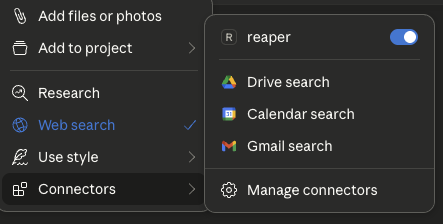
Click the '+' icon on the chat box
Click on 'Connectors' and you should see the 'reaper' connector enabled
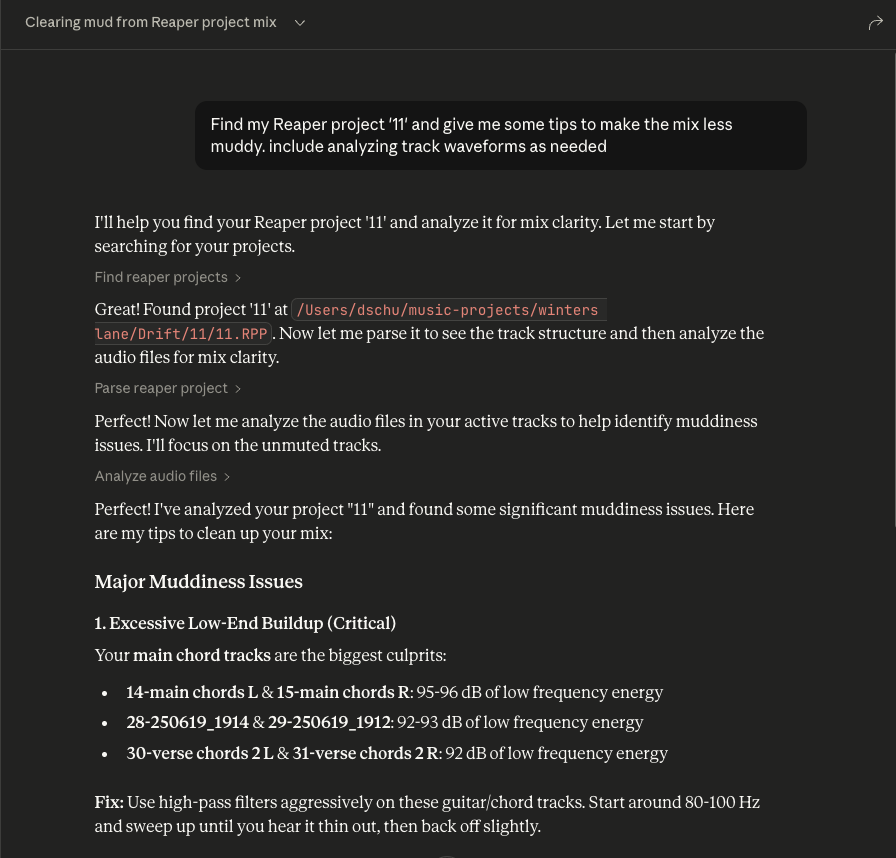
Ask questions about your Reaper project
Always include the name of the specific Reaper project you're asking about
You can expand the tool boxes to see the raw project data being passed to Claude
If you want to modify the server, clone it and point Claude at your working copy. uv run syncs the locked dependencies on every launch, so there is no separate install step:
git clone https://github.com/dschuler36/reaper-mcp-server
cd reaper-mcp-server
uv sync                       # optional — only needed for running tests
uv run --group dev pytest
Then use setup/claude_desktop_config_local.json, which runs the server out of your clone:
{
    "mcpServers": {
        "reaper": {
            "command": "/path/to/your/uv-installation/uv",
            "args": [
                "--directory",
                "/path/to/this/repo/reaper-mcp-server/",
                "run",
                "reaper-mcp-server",
                "--reaper-projects-dir",
                "/path/to/your/reaper/projects"
            ]
        }
    }
}Analyze audio in a Reaper project for mixing feedback.
    Measurements are taken from the source files on disk, so they are
    pre-FX and pre-fader: a track running an amp sim or EQ will sound
    nothing like its analysis.

    Args:
        project_path: Path to .RPP file
        track_filter: Optional substring to filter track names
        whole_file: Analyze entire source files instead of only the region
            each item actually plays. Off by default.

    Returns:
        JSON with per-item analysis, warnings, and skipped items
| Name | Required | Description | Default |
|---|---|---|---|
| whole_file | No | ||
| project_path | Yes | ||
| track_filter | No |
Does the description disclose side effects, auth requirements, rate limits, or destructive behavior?
With no annotations, the description must carry the behavioral burden. It does so by explaining that measurements are taken from source files on disk, hence pre-FX and pre-fader, and that the whole_file parameter changes the analysis scope. It also indicates the return shape (JSON with per-item analysis, warnings, skipped items). This gives an agent a clear sense of what happens when the tool runs, beyond a simple read operation.
Agents need to know what a tool does to the world before calling it. Descriptions should go beyond structured annotations to explain consequences.
Is the description appropriately sized, front-loaded, and free of redundancy?
The description is well-structured: a one-sentence purpose, a short paragraph clarifying the measurement source, a bulleted Args list, and a Returns line. Every part earns its place, and the most important scoping caveat (pre-FX) is front-loaded. It is detailed without being verbose.
Shorter descriptions cost fewer tokens and are easier for agents to parse. Every sentence should earn its place.
Given the tool's complexity, does the description cover enough for an agent to succeed on first attempt?
For a moderately complex analysis tool with no output schema, the description covers the purpose, all parameters, and the essential behavioral context. It hints at the return structure but does not specify the exact fields within the per-item analysis (e.g., peak, RMS). This is a minor gap; the description is otherwise sufficient for an agent to call it correctly.
Complex tools with many parameters or behaviors need more documentation. Simple tools need less. This dimension scales expectations accordingly.
Does the description clarify parameter syntax, constraints, interactions, or defaults beyond what the schema provides?
Schema description coverage is 0%, but the description's Args section fully compensates. It explains each parameter: project_path ('Path to .RPP file'), track_filter ('Optional substring to filter track names'), and whole_file ('Analyze entire source files instead of only the region each item actually plays. Off by default.'). This is thorough, clear, and adds semantic meaning the schema lacks.
Input schemas describe structure but not intent. Descriptions should explain non-obvious parameter relationships and valid value ranges.
Does the description clearly state what the tool does and how it differs from similar tools?
The description opens with a clear verb-resource combination: 'Analyze audio in a Reaper project for mixing feedback.' This directly distinguishes it from siblings like find_reaper_projects (finding projects), parse_reaper_project (parsing structure), and list_installed_fx (listing FX). The purpose is specific and actionable.
Agents choose between tools based on descriptions. A clear purpose with a specific verb and resource helps agents select the right tool.
Does the description explain when to use this tool, when not to, or what alternatives exist?
The description provides no explicit when-to-use guidance or alternative routing. It does not mention that for project structure one should use parse_reaper_project, or that for finding projects one should use find_reaper_projects. The pre-FX note implies a constraint but does not state 'use this when you need pre-FX analysis' or list alternatives. This leaves the agent to infer when to select this tool.
Agents often have multiple tools that could apply. Explicit usage guidance like "use X instead of Y when Z" prevents misuse.
| Name | Required | Description | Default |
|---|---|---|---|
No parameters | |||
Does the description disclose side effects, auth requirements, rate limits, or destructive behavior?
Tool has no description.
Agents need to know what a tool does to the world before calling it. Descriptions should go beyond structured annotations to explain consequences.
Is the description appropriately sized, front-loaded, and free of redundancy?
Tool has no description.
Shorter descriptions cost fewer tokens and are easier for agents to parse. Every sentence should earn its place.
Given the tool's complexity, does the description cover enough for an agent to succeed on first attempt?
Tool has no description.
Complex tools with many parameters or behaviors need more documentation. Simple tools need less. This dimension scales expectations accordingly.
Does the description clarify parameter syntax, constraints, interactions, or defaults beyond what the schema provides?
Tool has no description.
Input schemas describe structure but not intent. Descriptions should explain non-obvious parameter relationships and valid value ranges.
Does the description clearly state what the tool does and how it differs from similar tools?
Tool has no description.
Agents choose between tools based on descriptions. A clear purpose with a specific verb and resource helps agents select the right tool.
Does the description explain when to use this tool, when not to, or what alternatives exist?
Tool has no description.
Agents often have multiple tools that could apply. Explicit usage guidance like "use X instead of Y when Z" prevents misuse.
List all installed FX/plugins available in Reaper.
    Args:
        plugin_type: Optional filter by plugin type (VST2, VST3, AU, JS, CLAP)
        search_query: Optional search query to filter by name, manufacturer, or type

    Returns:
        JSON with list of installed plugins including name, type, path, and manufacturer
| Name | Required | Description | Default |
|---|---|---|---|
| plugin_type | No | ||
| search_query | No |
Does the description disclose side effects, auth requirements, rate limits, or destructive behavior?
With no annotations provided, the description carries the full burden of behavioral disclosure. It describes the return JSON structure (name, type, path, manufacturer), which is useful, but it does not state that the operation is read-only, nor does it mention any potential side effects, prerequisites (e.g., Reaper must be running), or error conditions. For a simple list operation, this is acceptable, but the description could have explicitly stated non-destructiveness and any environment assumptions.
Agents need to know what a tool does to the world before calling it. Descriptions should go beyond structured annotations to explain consequences.
Is the description appropriately sized, front-loaded, and free of redundancy?
The description is concise and well-structured with a Google-style docstring. The purpose is front-loaded, followed by parameter explanations and return format. Every sentence adds value; there is no fluff or redundancy. It is easy to scan and parse.
Shorter descriptions cost fewer tokens and are easier for agents to parse. Every sentence should earn its place.
Given the tool's complexity, does the description cover enough for an agent to succeed on first attempt?
For a simple read-only list tool with no output schema and no annotations, the description is complete. It covers the purpose, both parameters with their allowable values, and the return JSON fields. It does not over-explain or omit essential details. The tool's context (installed plugins in Reaper) is adequately covered.
Complex tools with many parameters or behaviors need more documentation. Simple tools need less. This dimension scales expectations accordingly.
Does the description clarify parameter syntax, constraints, interactions, or defaults beyond what the schema provides?
The schema provides only titles and nullability, with 0% description coverage. The description fully compensates by explaining each parameter: plugin_type restricts to specific types (VST2, VST3, AU, JS, CLAP) and search_query filters by name, manufacturer, or type. This adds clear meaning beyond the raw schema and gives the agent actionable guidance.
Input schemas describe structure but not intent. Descriptions should explain non-obvious parameter relationships and valid value ranges.
Does the description clearly state what the tool does and how it differs from similar tools?
The description clearly states a specific verb ('List') and resource ('all installed FX/plugins in Reaper'). It is unambiguous and distinct from the sibling tools (find_reaper_projects, parse_reaper_project, analyze_audio_files), which deal with projects and audio analysis rather than plugin discovery. No further clarification needed.
Agents choose between tools based on descriptions. A clear purpose with a specific verb and resource helps agents select the right tool.
Does the description explain when to use this tool, when not to, or what alternatives exist?
The description implies usage by demonstrating filter options (plugin_type, search_query), but does not explicitly state when to use this tool versus alternatives. Since there are no closely related sibling tools, the lack of explicit routing is not critical, but it still does not offer clear context on when one would invoke this function (e.g., 'Use this to discover available plugins before processing'). It is adequate but not explicit.
Agents often have multiple tools that could apply. Explicit usage guidance like "use X instead of Y when Z" prevents misuse.
| Name | Required | Description | Default |
|---|---|---|---|
| project_path | Yes |
Does the description disclose side effects, auth requirements, rate limits, or destructive behavior?
Tool has no description.
Agents need to know what a tool does to the world before calling it. Descriptions should go beyond structured annotations to explain consequences.
Is the description appropriately sized, front-loaded, and free of redundancy?
Tool has no description.
Shorter descriptions cost fewer tokens and are easier for agents to parse. Every sentence should earn its place.
Given the tool's complexity, does the description cover enough for an agent to succeed on first attempt?
Tool has no description.
Complex tools with many parameters or behaviors need more documentation. Simple tools need less. This dimension scales expectations accordingly.
Does the description clarify parameter syntax, constraints, interactions, or defaults beyond what the schema provides?
Tool has no description.
Input schemas describe structure but not intent. Descriptions should explain non-obvious parameter relationships and valid value ranges.
Does the description clearly state what the tool does and how it differs from similar tools?
Tool has no description.
Agents choose between tools based on descriptions. A clear purpose with a specific verb and resource helps agents select the right tool.
Does the description explain when to use this tool, when not to, or what alternatives exist?
Tool has no description.
Agents often have multiple tools that could apply. Explicit usage guidance like "use X instead of Y when Z" prevents misuse.
Recent tool additions, removals, and schema changes observed during successful MCP inspections.
v0.1.0analyze_audio_filesfind_reaper_projectslist_installed_fxparse_reaper_projectScored across 4 tools
Each tool has a clearly distinct purpose: finding projects, parsing a project file, analyzing audio content, and listing installed plugins. There is no overlap or ambiguity between them.
All tool names follow a consistent verb_noun snake_case pattern (find_reaper_projects, parse_reaper_project, analyze_audio_files, list_installed_fx). The naming is predictable and uniform.
With only 4 tools, the server is tightly scoped to its apparent focus on Reaper project analysis and audio inspection. Each tool earns its place and the count feels appropriately minimal for the purpose.
The tool surface covers the core analysis workflow well: discovering projects, parsing their structure, analyzing audio files, and listing available FX. Minor gaps exist (e.g., no direct tool for editing or rendering), but for an analysis-oriented server the coverage is solid.
Share one project context across ChatGPT, Claude, Telegram and any MCP client.
Stop copy-pasting client context into your AI. 47 connectable providers via MCP.
Talk to your public-facing AI from any MCP client — Claude, ChatGPT, Cursor, Cline, Windsurf.
Remote MCP server for audio stem separation, denoise, reverb, and MIDI export.