


A
licenseB
qualityD
maintenanceConnects Ableton Live to Claude AI via the Model Context Protocol, enabling prompt-assisted music production, track creation, and Live session manipulation.
16
MIT

Este es un servidor MCP que conecta proyectos de Reaper con un cliente MCP como Claude Desktop, permitiéndote hacer preguntas sobre tus proyectos y obtener un análisis de audio completo para recibir comentarios sobre la mezcla.
Este servidor es de solo lectura por diseño. No expone ninguna herramienta que permita a la IA modificar tu proyecto. Para lo que sirve es para entender lo que ya has creado y aprender cómo mejorarlo. Deja que la IA sugiera algunas ideas y tú puedes probar a ajustar los controles y entender cómo afecta a tu música haciéndolo.
find_reaper_projects: Encuentra todos los proyectos de Reaper en el directorio que especificaste en la configuración.
parse_reaper_project: Analiza un archivo de proyecto de Reaper (.RPP) y devuelve información detallada, incluyendo tempo, pistas, cadenas de efectos (FX) y elementos de audio.
Cada pista lleva su posición e identidad (track_number que coincide con el orden de visualización de Reaper, guid), su enrutamiento (is_folder/folder_depth, main_send, receives, num_channels, midi_hardware_out) y su estado en el mezclador (volume, pan, mute, solo). Cada elemento lleva position, length, start_offset, playrate, mute, fades y cada toma (take), con la toma activa marcada, ya que es la que se reproduce.
Las entradas de receives nombran la pista de origen por índice y por nombre, que es lo que distingue una ruta de señal en vivo de una pista sobrante: una pista con main_send: false no llega al master, y su audio solo se escucha a través de lo que recibe de ella.
Estas herramientas funcionan en conjunto. Cuando le hagas una pregunta a Claude sobre un proyecto específico de Reaper, usará la herramienta find_reaper_projects para encontrar el proyecto y luego parse_reaper_project para analizarlo y responder tu pregunta.
list_installed_fx(plugin_type=None, search_query=None): Lista todos los FX/plugins instalados disponibles en Reaper.
Parámetros:
plugin_type (opcional): Filtra por tipo de plugin (VST2, VST3, AU, JS, CLAP)
search_query (opcional): Busca plugins por nombre, fabricante o tipo
Devuelve: Lista de plugins instalados, incluyendo:
Nombre del plugin
Tipo de plugin (VST2, VST3, AU, JS, CLAP)
Ruta del archivo
Fabricante (cuando esté disponible)
Preguntas de ejemplo:
"¿Qué plugins de sintetizador tengo instalados?"
"Muéstrame todos mis plugins de Waves"
"Estoy buscando un sintetizador con sonido vibrante. ¿Qué opciones tengo de mis plugins ya instalados?"
"Enumera todos mis plugins VST3"
"¿Tengo algún plugin de reverberación?"
"¿Qué plugins de iZotope tengo?"
"Muéstrame todos mis plugins de Audio Unit"
Nota: Esta herramienta escanea los archivos de caché de plugins de Reaper. Si instalaste plugins recientemente y aún no los has escaneado en Reaper, no aparecerán en los resultados. Asegúrate de abrir Reaper y dejar que escanee los nuevos plugins primero.
analyze_audio_files(project_path, track_filter=None, whole_file=False): Analiza el audio en un proyecto de Reaper para obtener comentarios sobre la mezcla.
Parámetros:
project_path (obligatorio): Ruta al archivo de proyecto .RPP
track_filter (opcional): Filtra las pistas por nombre (p. ej., "Vocal" para analizar solo las pistas vocales)
whole_file (opcional): Analizar archivos de origen completos en lugar de solo la región que reproduce cada elemento. Desactivado por defecto.
Devuelve: Análisis de audio completo, incluyendo:
Análisis de nivel: Niveles de pico, RMS, detección de recorte (clipping), offset de CD
Análisis de frecuencia: Centroide espectral y la parte de cada banda en la energía total
Imagen estéreo: Ancho estéreo, coherencia de fase, compatibilidad mono
Rango dinámico y sonoridad: LUFS (estándares de sonoridad), pico real, factor de cresta
Preguntas de ejemplo:
"Analiza todo el audio de mi proyecto Rock Song"
"Comprueba si hay recortes en las pistas de voz"
"¿Mi mezcla está demasiado alta para las plataformas de streaming?"
"¿Hay algún problema de fase en mis pistas de batería?"
Qué se mide: Por defecto, cada elemento se analiza exactamente en la región que reproduce — su offset de inicio en la fuente, su duración y su velocidad de reproducción —, no en todo el archivo fuente. Las regiones distintas se analizan una vez y se reutilizan, de modo que un elemento repetido en el arreglo cuenta como una sola medición. Los elementos MIDI no tienen fuente de audio y aparecen en skipped en lugar de reportarse como errores.
Las frecuencias son relativas. Cada banda se reporta como una proporción de la potencia espectral total de esa región (y la misma proporción en dB). La energía absoluta de la banda escala con la duración del archivo, lo que hace que un archivo largo parezca decenas de dB "más caliente" que uno corto con el mismo material, y hace que comparar archivos entre sí no tenga sentido.
Estos números son pre-FX. El análisis lee los archivos fuente directamente del disco, por lo que no refleja ni la cadena de efectos de la pista ni su fader. En una pista con un simulador de amplificador o un EQ fuerte, el análisis describe la señal cruda, no lo que escuchas. Cada respuesta está etiquetada como signal_stage: pre-fx.
Umbrales de advertencia:
Pico > -0.3 dBFS: Riesgo de recorte
Recorte detectado: Distorsión digital presente
200-500 Hz más de 10 dB por encima de 500-2000 Hz: Medios graves embotados. Comparar estas dos bandas entre sí, en lugar de una banda contra el espectro completo, es lo que evita que una pista de bajo se marque simplemente por ser un bajo.
Offset de CC medio > 0: Desplazamiento de CC
Coherencia de fase < 0.5: Problemas de cancelación de fase
LUFS > -8: Demasiado alto para streaming (objetivo de Spotify: -14 LUFS)
Factor de cresta < 6 dB: Posible sobrecompresión
La sonoridad se informa como null en lugar de un valor provisional cuando no se puede medir (regiones de menos de 400 ms), y las regiones de menos de 50 ms se miden pero no generan advertencias.
Para ver todas las estructuras de datos analizadas de los proyectos, consulta el archivo src/reaper_mcp_server/reaper_dataclasses.py.
Related MCP server: reaper-mcp-server
Instalar dependencias
uv venv
source .venv/bin/activate

uv pip install .
Configurar Claude Desktop
Sigue las instrucciones para configurar Claude Desktop para usarlo con un servidor MCP personalizado
Encuentra la configuración de ejemplo en setup/claude_desktop_config.json
Actualiza las siguientes rutas en la configuración:
La ruta de tu instalación de uv
El directorio de tu proyecto de Reaper
El directorio de este servidor
Inicia el servidor
Abre Claude Desktop
Haz clic en el icono de 'Conectores' para ver los servidores MCP disponibles
Deberías ver el conector 'reaper' habilitado
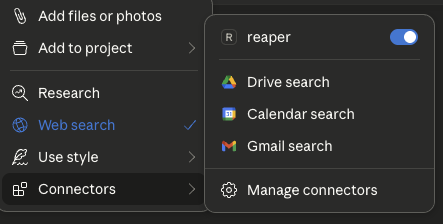
Prueba la conexión
Haz una pregunta sobre uno de tus proyectos de Reaper, por ejemplo:
"¿Qué proyectos de Reaper tengo?"
"Analiza el proyecto 'Mi Canción' y dime cuál es su BPM"
"¿Hay algún recorte en las pistas vocales de mi proyecto?"
Instalar dependencias
uv venv
source .venv/bin/activate

uv pip install .
Configurar Claude Desktop
Sigue las instrucciones para configurar Claude Desktop para usarlo con un servidor MCP personalizado
Encuentra la configuración de ejemplo en setup/claude_desktop_config.json
Actualiza las siguientes rutas en la configuración:
La ruta de instalación de uv
El directorio de tus proyectos de Reaper
El directorio de este servidor

Una vez configurado, reinicia Claude Desktop
Aquí tienes algunos ejemplos de preguntas que puedes hacer:
"¿Qué proyectos de Reaper tengo?"
"Analiza el proyecto 'Mi Canción' y dime cuáles son sus pistas"
"Muéstrame la cadena de FX de la pista de voz en mi proyecto 'Mi Canción'"
"¿Hay algún recorte en los elementos de audio de mi proyecto?"
"¿Qué tan fuerte es mi mezcla en LUFS?"
"¿Mi mezcla tiene problemas de fase en las pistas de batería?"
"¿Qué plugins de sintetizador tengo instalados?"
"Muéstrame todos mis plugins de iZotope"
Instala las dependencias
uv venv
source .venv/bin/activate

uv pip install .
Configura Claude Desktop
Sigue las instrucciones para configurar Claude Desktop para usarlo con un servidor MCP personalizado
Encuentra la configuración de ejemplo en setup/claude_desktop_config.json
Actualiza las siguientes rutas en la configuración:
La ruta de tu instalación de uv
El directorio de tu proyecto de Reaper
Inicia y usa
Abre Claude Desktop
Haz clic en el icono '+' en el cuadro de chat
Haz clic en el conector 'reaper' para activarlo
Haz preguntas sobre tu proyecto de Reaper

¡Las contribuciones son bienvenidas! Por favor, lee CONTRIBUTING.md para obtener más información sobre cómo contribuir a este proyecto.
Este proyecto está licenciado bajo la Licencia MIT - consulta el archivo LICENSE para más detalles.
Analyze audio in a Reaper project for mixing feedback.
    Measurements are taken from the source files on disk, so they are
    pre-FX and pre-fader: a track running an amp sim or EQ will sound
    nothing like its analysis.

    Args:
        project_path: Path to .RPP file
        track_filter: Optional substring to filter track names
        whole_file: Analyze entire source files instead of only the region
            each item actually plays. Off by default.

    Returns:
        JSON with per-item analysis, warnings, and skipped items
| Name | Required | Description | Default |
|---|---|---|---|
| whole_file | No | ||
| project_path | Yes | ||
| track_filter | No |
Does the description disclose side effects, auth requirements, rate limits, or destructive behavior?
With no annotations, the description must carry the behavioral burden. It does so by explaining that measurements are taken from source files on disk, hence pre-FX and pre-fader, and that the whole_file parameter changes the analysis scope. It also indicates the return shape (JSON with per-item analysis, warnings, skipped items). This gives an agent a clear sense of what happens when the tool runs, beyond a simple read operation.
Agents need to know what a tool does to the world before calling it. Descriptions should go beyond structured annotations to explain consequences.
Is the description appropriately sized, front-loaded, and free of redundancy?
The description is well-structured: a one-sentence purpose, a short paragraph clarifying the measurement source, a bulleted Args list, and a Returns line. Every part earns its place, and the most important scoping caveat (pre-FX) is front-loaded. It is detailed without being verbose.
Shorter descriptions cost fewer tokens and are easier for agents to parse. Every sentence should earn its place.
Given the tool's complexity, does the description cover enough for an agent to succeed on first attempt?
For a moderately complex analysis tool with no output schema, the description covers the purpose, all parameters, and the essential behavioral context. It hints at the return structure but does not specify the exact fields within the per-item analysis (e.g., peak, RMS). This is a minor gap; the description is otherwise sufficient for an agent to call it correctly.
Complex tools with many parameters or behaviors need more documentation. Simple tools need less. This dimension scales expectations accordingly.
Does the description clarify parameter syntax, constraints, interactions, or defaults beyond what the schema provides?
Schema description coverage is 0%, but the description's Args section fully compensates. It explains each parameter: project_path ('Path to .RPP file'), track_filter ('Optional substring to filter track names'), and whole_file ('Analyze entire source files instead of only the region each item actually plays. Off by default.'). This is thorough, clear, and adds semantic meaning the schema lacks.
Input schemas describe structure but not intent. Descriptions should explain non-obvious parameter relationships and valid value ranges.
Does the description clearly state what the tool does and how it differs from similar tools?
The description opens with a clear verb-resource combination: 'Analyze audio in a Reaper project for mixing feedback.' This directly distinguishes it from siblings like find_reaper_projects (finding projects), parse_reaper_project (parsing structure), and list_installed_fx (listing FX). The purpose is specific and actionable.
Agents choose between tools based on descriptions. A clear purpose with a specific verb and resource helps agents select the right tool.
Does the description explain when to use this tool, when not to, or what alternatives exist?
The description provides no explicit when-to-use guidance or alternative routing. It does not mention that for project structure one should use parse_reaper_project, or that for finding projects one should use find_reaper_projects. The pre-FX note implies a constraint but does not state 'use this when you need pre-FX analysis' or list alternatives. This leaves the agent to infer when to select this tool.
Agents often have multiple tools that could apply. Explicit usage guidance like "use X instead of Y when Z" prevents misuse.
| Name | Required | Description | Default |
|---|---|---|---|
No parameters | |||
Does the description disclose side effects, auth requirements, rate limits, or destructive behavior?
Tool has no description.
Agents need to know what a tool does to the world before calling it. Descriptions should go beyond structured annotations to explain consequences.
Is the description appropriately sized, front-loaded, and free of redundancy?
Tool has no description.
Shorter descriptions cost fewer tokens and are easier for agents to parse. Every sentence should earn its place.
Given the tool's complexity, does the description cover enough for an agent to succeed on first attempt?
Tool has no description.
Complex tools with many parameters or behaviors need more documentation. Simple tools need less. This dimension scales expectations accordingly.
Does the description clarify parameter syntax, constraints, interactions, or defaults beyond what the schema provides?
Tool has no description.
Input schemas describe structure but not intent. Descriptions should explain non-obvious parameter relationships and valid value ranges.
Does the description clearly state what the tool does and how it differs from similar tools?
Tool has no description.
Agents choose between tools based on descriptions. A clear purpose with a specific verb and resource helps agents select the right tool.
Does the description explain when to use this tool, when not to, or what alternatives exist?
Tool has no description.
Agents often have multiple tools that could apply. Explicit usage guidance like "use X instead of Y when Z" prevents misuse.
List all installed FX/plugins available in Reaper.
    Args:
        plugin_type: Optional filter by plugin type (VST2, VST3, AU, JS, CLAP)
        search_query: Optional search query to filter by name, manufacturer, or type

    Returns:
        JSON with list of installed plugins including name, type, path, and manufacturer
| Name | Required | Description | Default |
|---|---|---|---|
| plugin_type | No | ||
| search_query | No |
Does the description disclose side effects, auth requirements, rate limits, or destructive behavior?
With no annotations provided, the description carries the full burden of behavioral disclosure. It describes the return JSON structure (name, type, path, manufacturer), which is useful, but it does not state that the operation is read-only, nor does it mention any potential side effects, prerequisites (e.g., Reaper must be running), or error conditions. For a simple list operation, this is acceptable, but the description could have explicitly stated non-destructiveness and any environment assumptions.
Agents need to know what a tool does to the world before calling it. Descriptions should go beyond structured annotations to explain consequences.
Is the description appropriately sized, front-loaded, and free of redundancy?
The description is concise and well-structured with a Google-style docstring. The purpose is front-loaded, followed by parameter explanations and return format. Every sentence adds value; there is no fluff or redundancy. It is easy to scan and parse.
Shorter descriptions cost fewer tokens and are easier for agents to parse. Every sentence should earn its place.
Given the tool's complexity, does the description cover enough for an agent to succeed on first attempt?
For a simple read-only list tool with no output schema and no annotations, the description is complete. It covers the purpose, both parameters with their allowable values, and the return JSON fields. It does not over-explain or omit essential details. The tool's context (installed plugins in Reaper) is adequately covered.
Complex tools with many parameters or behaviors need more documentation. Simple tools need less. This dimension scales expectations accordingly.
Does the description clarify parameter syntax, constraints, interactions, or defaults beyond what the schema provides?
The schema provides only titles and nullability, with 0% description coverage. The description fully compensates by explaining each parameter: plugin_type restricts to specific types (VST2, VST3, AU, JS, CLAP) and search_query filters by name, manufacturer, or type. This adds clear meaning beyond the raw schema and gives the agent actionable guidance.
Input schemas describe structure but not intent. Descriptions should explain non-obvious parameter relationships and valid value ranges.
Does the description clearly state what the tool does and how it differs from similar tools?
The description clearly states a specific verb ('List') and resource ('all installed FX/plugins in Reaper'). It is unambiguous and distinct from the sibling tools (find_reaper_projects, parse_reaper_project, analyze_audio_files), which deal with projects and audio analysis rather than plugin discovery. No further clarification needed.
Agents choose between tools based on descriptions. A clear purpose with a specific verb and resource helps agents select the right tool.
Does the description explain when to use this tool, when not to, or what alternatives exist?
The description implies usage by demonstrating filter options (plugin_type, search_query), but does not explicitly state when to use this tool versus alternatives. Since there are no closely related sibling tools, the lack of explicit routing is not critical, but it still does not offer clear context on when one would invoke this function (e.g., 'Use this to discover available plugins before processing'). It is adequate but not explicit.
Agents often have multiple tools that could apply. Explicit usage guidance like "use X instead of Y when Z" prevents misuse.
| Name | Required | Description | Default |
|---|---|---|---|
| project_path | Yes |
Does the description disclose side effects, auth requirements, rate limits, or destructive behavior?
Tool has no description.
Agents need to know what a tool does to the world before calling it. Descriptions should go beyond structured annotations to explain consequences.
Is the description appropriately sized, front-loaded, and free of redundancy?
Tool has no description.
Shorter descriptions cost fewer tokens and are easier for agents to parse. Every sentence should earn its place.
Given the tool's complexity, does the description cover enough for an agent to succeed on first attempt?
Tool has no description.
Complex tools with many parameters or behaviors need more documentation. Simple tools need less. This dimension scales expectations accordingly.
Does the description clarify parameter syntax, constraints, interactions, or defaults beyond what the schema provides?
Tool has no description.
Input schemas describe structure but not intent. Descriptions should explain non-obvious parameter relationships and valid value ranges.
Does the description clearly state what the tool does and how it differs from similar tools?
Tool has no description.
Agents choose between tools based on descriptions. A clear purpose with a specific verb and resource helps agents select the right tool.
Does the description explain when to use this tool, when not to, or what alternatives exist?
Tool has no description.
Agents often have multiple tools that could apply. Explicit usage guidance like "use X instead of Y when Z" prevents misuse.
Recent tool additions, removals, and schema changes observed during successful MCP inspections.
v0.1.0analyze_audio_filesfind_reaper_projectslist_installed_fxparse_reaper_projectScored across 4 tools
Each tool has a clearly distinct purpose: finding projects, parsing a project file, analyzing audio content, and listing installed plugins. There is no overlap or ambiguity between them.
All tool names follow a consistent verb_noun snake_case pattern (find_reaper_projects, parse_reaper_project, analyze_audio_files, list_installed_fx). The naming is predictable and uniform.
With only 4 tools, the server is tightly scoped to its apparent focus on Reaper project analysis and audio inspection. Each tool earns its place and the count feels appropriately minimal for the purpose.
The tool surface covers the core analysis workflow well: discovering projects, parsing their structure, analyzing audio files, and listing available FX. Minor gaps exist (e.g., no direct tool for editing or rendering), but for an analysis-oriented server the coverage is solid.
Share one project context across ChatGPT, Claude, Telegram and any MCP client.
Talk to your public-facing AI from any MCP client — Claude, ChatGPT, Cursor, Cline, Windsurf.
Remote MCP server for audio stem separation, denoise, reverb, and MIDI export.
Generate AI music via the Lacuna Music API from MCP clients like Claude Desktop & Code.