


A
licenseB
qualityD
maintenanceConnects Ableton Live to Claude AI via the Model Context Protocol, enabling prompt-assisted music production, track creation, and Live session manipulation.
16
MIT

이것은 Reaper 프로젝트를 Claude Desktop과 같은 MCP 클라이언트에 연결하는 MCP 서버로, 프로젝트에 대해 질문하고 믹싱 피드백을 위한 종합적인 오디오 분석을 받을 수 있게 해줍니다.
이 서버는 설계상 읽기 전용입니다. AI가 프로젝트를 수정할 수 있게 하는 도구는 노출하지 않습니다. 이 서버가 유용한 점은 이미 만든 것을 이해하고 개선 방법을 배우는 데 있습니다. AI가 아이디어를 제안하게 하고, 직접 노브를 조정하면서 음악에 어떤 영향을 미치는지 직접 체험해 보세요.
find_reaper_projects: 설정에서 지정한 디렉토리의 모든 Reaper 프로젝트를 찾습니다.
parse_reaper_project: Reaper 프로젝트 파일(.RPP)을 파싱하여 템포, 트랙, FX 체인, 오디오 아이템을 포함한 상세 정보를 반환합니다.
각 트랙은 위치와 식별자(track_number는 Reaper의 표시 순서와 일치, guid), 라우팅(is_folder/folder_depth, main_send, receives, num_channels, midi_hardware_out), 그리고 믹서 상태(volume, pan, mute, solo)를 담고 있습니다. 각 아이템은 position, length, start_offset, playrate, mute, 페이드, 그리고 모든 테이크를 담고 있으며, 활성 테이크가 표시됩니다(실제로 재생되는 것이 활성 테이크이기 때문입니다).
receives 항목은 소스 트랙을 인덱스와 이름으로 지정하는데, 이것이 실제 신호 경로와 잔여 트랙을 구분하는 기준입니다. main_send: false인 트랙은 마스터에 도달하지 않으며, 그 오디오는 해당 트랙에서 수신하는 경로를 통해서만 들을 수 있습니다.
이 도구들은 함께 작동합니다. 특정 Reaper 프로젝트에 대해 Claude에게 질문하면, find_reaper_projects 도구로 프로젝트를 찾은 다음 parse_reaper_project 도구로 프로젝트를 파싱하여 질문에 답합니다.
list_installed_fx(plugin_type=None, search_query=None): Reaper에서 사용 가능한 모든 설치된 FX/플러그인을 나열합니다.
매개변수:
plugin_type (선택): 플러그인 유형으로 필터링 (VST2, VST3, AU, JS, CLAP)
search_query (선택): 이름, 제조사 또는 유형으로 플러그인 검색
반환값: 다음을 포함한 설치된 플러그인 목록:
플러그인 이름
플러그인 유형 (VST2, VST3, AU, JS, CLAP)
파일 경로
제조사 (가능한 경우)
예시 질문:
"내가 설치한 신스 플러그인은 무엇인가요?"
"내 Waves 플러그인을 모두 보여줘"
"떨리는 느낌의 신스를 찾고 있어요. 이미 설치된 플러그인 중 어떤 옵션이 있나요?"
"내 VST3 플러그인을 모두 나열해줘"
"리버브 플러그인이 있나요?"
"어떤 iZotope 플러그인이 있나요?"
"내 Audio Unit 플러그인을 모두 보여줘"
참고: 이 도구는 Reaper 플러그인 캐시 파일을 스캔합니다. 최근에 새 플러그인을 설치했지만 아직 Reaper에서 스캔하지 않았다면 결과에 나타나지 않습니다. 먼저 Reaper를 열고 새 플러그인을 스캔하도록 하세요.
analyze_audio_files(project_path, track_filter=None, whole_file=False): 믹싱 피드백을 위해 Reaper 프로젝트의 오디오를 분석합니다.
매개변수:
project_path (필수): .RPP 프로젝트 파일의 경로
track_filter (선택): 이름으로 트랙 필터링 (예: "Vocal"로 보컬 트랙만 분석)
whole_file (선택): 각 아이템이 재생되는 영역 대신 전체 소스 파일을 분석합니다. 기본값은 꺼짐.
반환값: 다음을 포함한 종합적인 오디오 분석:
레벨 분석: 피크 레벨, RMS, 클리핑 감지, DC 오프셋
주파수 분석: 스펙트럼 중심값, 각 대역의 전체 에너지 비중
스테레오 이미징: 스테레오 폭, 위상 일관성, 모노 호환성
다이내믹 레인지 및 라우드니스: LUFS(라우드니스 표준), 트루 피크, 크레스트 팩터
예시 질문:
"내 Rock Song 프로젝트의 모든 오디오를 분석해줘"
"보컬 트랙에 클리핑이 있는지 확인해줘"
"내 믹스가 스트리밍 플랫폼에 너무 시끄러운가요?"
"드럼 트랙에 위상 문제가 있나요?"
측정 대상: 기본적으로 각 아이템은 전체 소스 파일이 아니라 정확히 재생되는 영역(소스 시작 오프셋, 길이, 플레이레이트)에 대해 분석됩니다. 서로 다른 영역은 한 번 분석되고 재사용되므로, 편곡에서 반복되는 아이템은 한 번의 측정으로 처리됩니다. MIDI 아이템은 오디오 소스가 없으며 오류로 보고되지 않고 skipped 아래에 나열됩니다.
주파수 수치는 상대적입니다. 각 대역은 해당 영역의 전체 스펙트럼 전력 대비 비중으로 보고됩니다(동일한 비중을 dB로도 표시). 절대 대역 에너지는 클립 길이에 따라 달라지므로, 동일한 소재의 짧은 파일보다 긴 파일이 수십 dB "더 뜨겁게" 보여 파일 간 비교가 무의미해집니다.
이 수치는 FX 이전 값입니다. 분석은 디스크에서 소스 파일을 읽으므로 트랙의 FX 체인이나 페이더를 반영하지 않습니다. 앰프 시뮬레이터나 강한 EQ가 걸린 트랙에서 분석은 실제로 들리는 소리가 아닌 원본 DI를 설명합니다. 모든 응답에는 signal_stage: pre-fx로 표시됩니다.
경고 임계값:
피크 > -0.3 dBFS: 클리핑 위험
클리핑 감지: 디지털 왜곡 존재
200–500 Hz가 500–2000 Hz보다 10 dB 이상 높음: 박스감 있는 로우 미드. 한 대역을 전체 스펙트럼과 비교하는 대신 이 두 대역을 서로 비교하는 것이 베이스 파트가 단지 베이스라는 이유만으로 플래그되는 것을 방지합니다.
평균 샘플 값 > 0.001: DC 오프셋
위상 일관성 < 0.5: 위상 상쇄 문제
LUFS > -8: 스트리밍에 너무 큼 (Spotify 목표: -14 LUFS)
크레스트 팩터 < 6 dB: 과도한 압축 가능성
라우드니스는 측정할 수 없을 때(400ms 미만의 영역) 대체 값 대신 null로 보고되며, 50ms 미만의 영역은 측정되지만 경고하지 않습니다.
프로젝트에서 파싱된 모든 데이터 구조를 보려면 src/reaper_mcp_server/reaper_dataclasses.py 파일을 확인하세요.
Related MCP server: reaper-mcp-server
의존성 설치
uv venv
source .venv/bin/activate

uv pip install .
Claude Desktop 구성
Claude Desktop 구성 지침에 따라 사용자 지정 MCP 서버용으로 설정합니다.
샘플 구성은 setup/claude_desktop_config.json에서 찾을 수 있습니다.
구성에서 다음 경로를 업데이트하세요:
uv 설치 경로
Reaper 프로젝트 디렉토리
이 서버의 디렉토리
실행 및 구성
Claude Desktop을 엽니다.
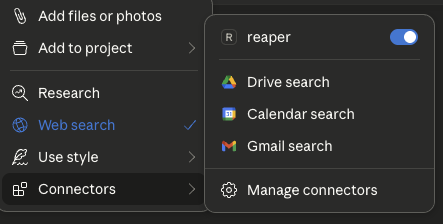
채팅 상자의 '+' 아이콘을 클릭합니다.
'Connectors'를 클릭하면 'reaper' 커넥터가 활성화된 것을 볼 수 있습니다.
자유롭게 질문하세요!
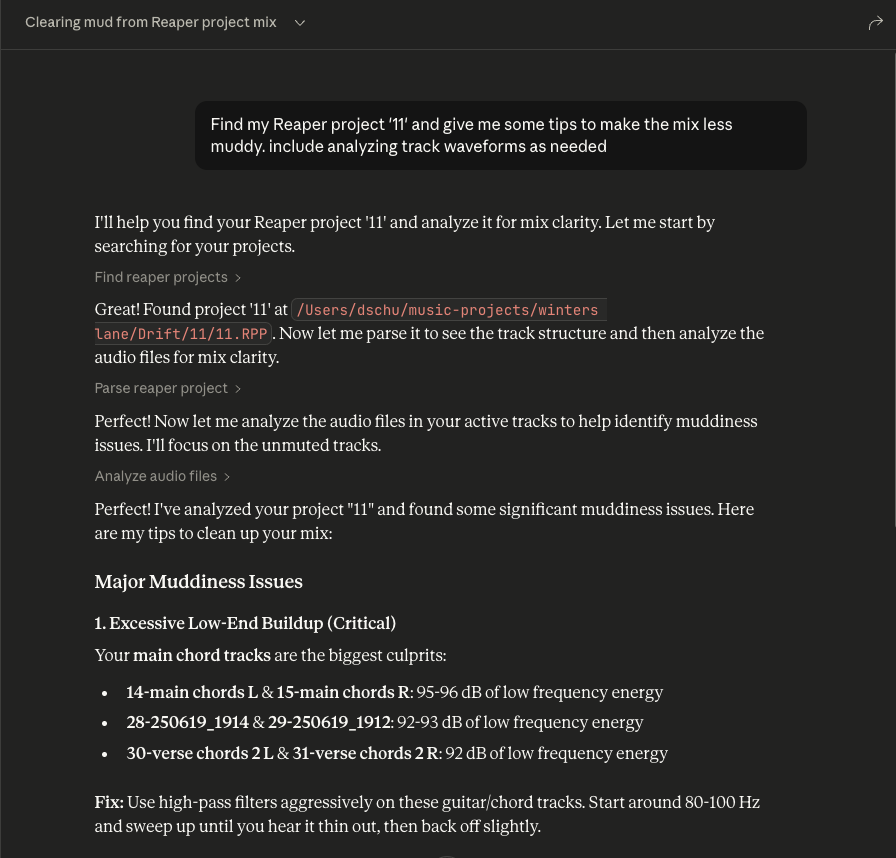
Reaper 프로젝트에 대해 질문하세요.
질문할 때 항상 특정 Reaper 프로젝트의 이름을 포함하세요.
도구 상자를 확장하여 Claude에게 전달되는 원시 프로젝트 데이터를 볼 수 있습니다.
Analyze audio in a Reaper project for mixing feedback.
    Measurements are taken from the source files on disk, so they are
    pre-FX and pre-fader: a track running an amp sim or EQ will sound
    nothing like its analysis.

    Args:
        project_path: Path to .RPP file
        track_filter: Optional substring to filter track names
        whole_file: Analyze entire source files instead of only the region
            each item actually plays. Off by default.

    Returns:
        JSON with per-item analysis, warnings, and skipped items
| Name | Required | Description | Default |
|---|---|---|---|
| whole_file | No | ||
| project_path | Yes | ||
| track_filter | No |
Does the description disclose side effects, auth requirements, rate limits, or destructive behavior?
With no annotations, the description must carry the behavioral burden. It does so by explaining that measurements are taken from source files on disk, hence pre-FX and pre-fader, and that the whole_file parameter changes the analysis scope. It also indicates the return shape (JSON with per-item analysis, warnings, skipped items). This gives an agent a clear sense of what happens when the tool runs, beyond a simple read operation.
Agents need to know what a tool does to the world before calling it. Descriptions should go beyond structured annotations to explain consequences.
Is the description appropriately sized, front-loaded, and free of redundancy?
The description is well-structured: a one-sentence purpose, a short paragraph clarifying the measurement source, a bulleted Args list, and a Returns line. Every part earns its place, and the most important scoping caveat (pre-FX) is front-loaded. It is detailed without being verbose.
Shorter descriptions cost fewer tokens and are easier for agents to parse. Every sentence should earn its place.
Given the tool's complexity, does the description cover enough for an agent to succeed on first attempt?
For a moderately complex analysis tool with no output schema, the description covers the purpose, all parameters, and the essential behavioral context. It hints at the return structure but does not specify the exact fields within the per-item analysis (e.g., peak, RMS). This is a minor gap; the description is otherwise sufficient for an agent to call it correctly.
Complex tools with many parameters or behaviors need more documentation. Simple tools need less. This dimension scales expectations accordingly.
Does the description clarify parameter syntax, constraints, interactions, or defaults beyond what the schema provides?
Schema description coverage is 0%, but the description's Args section fully compensates. It explains each parameter: project_path ('Path to .RPP file'), track_filter ('Optional substring to filter track names'), and whole_file ('Analyze entire source files instead of only the region each item actually plays. Off by default.'). This is thorough, clear, and adds semantic meaning the schema lacks.
Input schemas describe structure but not intent. Descriptions should explain non-obvious parameter relationships and valid value ranges.
Does the description clearly state what the tool does and how it differs from similar tools?
The description opens with a clear verb-resource combination: 'Analyze audio in a Reaper project for mixing feedback.' This directly distinguishes it from siblings like find_reaper_projects (finding projects), parse_reaper_project (parsing structure), and list_installed_fx (listing FX). The purpose is specific and actionable.
Agents choose between tools based on descriptions. A clear purpose with a specific verb and resource helps agents select the right tool.
Does the description explain when to use this tool, when not to, or what alternatives exist?
The description provides no explicit when-to-use guidance or alternative routing. It does not mention that for project structure one should use parse_reaper_project, or that for finding projects one should use find_reaper_projects. The pre-FX note implies a constraint but does not state 'use this when you need pre-FX analysis' or list alternatives. This leaves the agent to infer when to select this tool.
Agents often have multiple tools that could apply. Explicit usage guidance like "use X instead of Y when Z" prevents misuse.
| Name | Required | Description | Default |
|---|---|---|---|
No parameters | |||
Does the description disclose side effects, auth requirements, rate limits, or destructive behavior?
Tool has no description.
Agents need to know what a tool does to the world before calling it. Descriptions should go beyond structured annotations to explain consequences.
Is the description appropriately sized, front-loaded, and free of redundancy?
Tool has no description.
Shorter descriptions cost fewer tokens and are easier for agents to parse. Every sentence should earn its place.
Given the tool's complexity, does the description cover enough for an agent to succeed on first attempt?
Tool has no description.
Complex tools with many parameters or behaviors need more documentation. Simple tools need less. This dimension scales expectations accordingly.
Does the description clarify parameter syntax, constraints, interactions, or defaults beyond what the schema provides?
Tool has no description.
Input schemas describe structure but not intent. Descriptions should explain non-obvious parameter relationships and valid value ranges.
Does the description clearly state what the tool does and how it differs from similar tools?
Tool has no description.
Agents choose between tools based on descriptions. A clear purpose with a specific verb and resource helps agents select the right tool.
Does the description explain when to use this tool, when not to, or what alternatives exist?
Tool has no description.
Agents often have multiple tools that could apply. Explicit usage guidance like "use X instead of Y when Z" prevents misuse.
List all installed FX/plugins available in Reaper.
    Args:
        plugin_type: Optional filter by plugin type (VST2, VST3, AU, JS, CLAP)
        search_query: Optional search query to filter by name, manufacturer, or type

    Returns:
        JSON with list of installed plugins including name, type, path, and manufacturer
| Name | Required | Description | Default |
|---|---|---|---|
| plugin_type | No | ||
| search_query | No |
Does the description disclose side effects, auth requirements, rate limits, or destructive behavior?
With no annotations provided, the description carries the full burden of behavioral disclosure. It describes the return JSON structure (name, type, path, manufacturer), which is useful, but it does not state that the operation is read-only, nor does it mention any potential side effects, prerequisites (e.g., Reaper must be running), or error conditions. For a simple list operation, this is acceptable, but the description could have explicitly stated non-destructiveness and any environment assumptions.
Agents need to know what a tool does to the world before calling it. Descriptions should go beyond structured annotations to explain consequences.
Is the description appropriately sized, front-loaded, and free of redundancy?
The description is concise and well-structured with a Google-style docstring. The purpose is front-loaded, followed by parameter explanations and return format. Every sentence adds value; there is no fluff or redundancy. It is easy to scan and parse.
Shorter descriptions cost fewer tokens and are easier for agents to parse. Every sentence should earn its place.
Given the tool's complexity, does the description cover enough for an agent to succeed on first attempt?
For a simple read-only list tool with no output schema and no annotations, the description is complete. It covers the purpose, both parameters with their allowable values, and the return JSON fields. It does not over-explain or omit essential details. The tool's context (installed plugins in Reaper) is adequately covered.
Complex tools with many parameters or behaviors need more documentation. Simple tools need less. This dimension scales expectations accordingly.
Does the description clarify parameter syntax, constraints, interactions, or defaults beyond what the schema provides?
The schema provides only titles and nullability, with 0% description coverage. The description fully compensates by explaining each parameter: plugin_type restricts to specific types (VST2, VST3, AU, JS, CLAP) and search_query filters by name, manufacturer, or type. This adds clear meaning beyond the raw schema and gives the agent actionable guidance.
Input schemas describe structure but not intent. Descriptions should explain non-obvious parameter relationships and valid value ranges.
Does the description clearly state what the tool does and how it differs from similar tools?
The description clearly states a specific verb ('List') and resource ('all installed FX/plugins in Reaper'). It is unambiguous and distinct from the sibling tools (find_reaper_projects, parse_reaper_project, analyze_audio_files), which deal with projects and audio analysis rather than plugin discovery. No further clarification needed.
Agents choose between tools based on descriptions. A clear purpose with a specific verb and resource helps agents select the right tool.
Does the description explain when to use this tool, when not to, or what alternatives exist?
The description implies usage by demonstrating filter options (plugin_type, search_query), but does not explicitly state when to use this tool versus alternatives. Since there are no closely related sibling tools, the lack of explicit routing is not critical, but it still does not offer clear context on when one would invoke this function (e.g., 'Use this to discover available plugins before processing'). It is adequate but not explicit.
Agents often have multiple tools that could apply. Explicit usage guidance like "use X instead of Y when Z" prevents misuse.
| Name | Required | Description | Default |
|---|---|---|---|
| project_path | Yes |
Does the description disclose side effects, auth requirements, rate limits, or destructive behavior?
Tool has no description.
Agents need to know what a tool does to the world before calling it. Descriptions should go beyond structured annotations to explain consequences.
Is the description appropriately sized, front-loaded, and free of redundancy?
Tool has no description.
Shorter descriptions cost fewer tokens and are easier for agents to parse. Every sentence should earn its place.
Given the tool's complexity, does the description cover enough for an agent to succeed on first attempt?
Tool has no description.
Complex tools with many parameters or behaviors need more documentation. Simple tools need less. This dimension scales expectations accordingly.
Does the description clarify parameter syntax, constraints, interactions, or defaults beyond what the schema provides?
Tool has no description.
Input schemas describe structure but not intent. Descriptions should explain non-obvious parameter relationships and valid value ranges.
Does the description clearly state what the tool does and how it differs from similar tools?
Tool has no description.
Agents choose between tools based on descriptions. A clear purpose with a specific verb and resource helps agents select the right tool.
Does the description explain when to use this tool, when not to, or what alternatives exist?
Tool has no description.
Agents often have multiple tools that could apply. Explicit usage guidance like "use X instead of Y when Z" prevents misuse.
Recent tool additions, removals, and schema changes observed during successful MCP inspections.
v0.1.0analyze_audio_filesfind_reaper_projectslist_installed_fxparse_reaper_projectScored across 4 tools
Each tool has a clearly distinct purpose: finding projects, parsing a project file, analyzing audio content, and listing installed plugins. There is no overlap or ambiguity between them.
All tool names follow a consistent verb_noun snake_case pattern (find_reaper_projects, parse_reaper_project, analyze_audio_files, list_installed_fx). The naming is predictable and uniform.
With only 4 tools, the server is tightly scoped to its apparent focus on Reaper project analysis and audio inspection. Each tool earns its place and the count feels appropriately minimal for the purpose.
The tool surface covers the core analysis workflow well: discovering projects, parsing their structure, analyzing audio files, and listing available FX. Minor gaps exist (e.g., no direct tool for editing or rendering), but for an analysis-oriented server the coverage is solid.
Share one project context across ChatGPT, Claude, Telegram and any MCP client.
Stop copy-pasting client context into your AI. 47 connectable providers via MCP.
Talk to your public-facing AI from any MCP client — Claude, ChatGPT, Cursor, Cline, Windsurf.
Remote MCP server for audio stem separation, denoise, reverb, and MIDI export.