


A
licenseB
qualityD
maintenanceConnects Ableton Live to Claude AI via the Model Context Protocol, enabling prompt-assisted music production, track creation, and Live session manipulation.
16
MIT

これは、ReaperプロジェクトをClaude DesktopなどのMCPクライアントに接続するMCPサーバーです。プロジェクトについて質問したり、ミキシングのフィードバックに役立つ包括的なオーディオ分析を行ったりすることができます。
このサーバーは設計上読み取り専用です。AIがプロジェクトを変更できるツールは公開していません。このサーバーが得意とするのは、すでに作ったものを理解し、それを改善する方法を学ぶことです。AIにアイデアを提案させ、実際にツマミを調整しながら、その操作が音楽にどう影響するかを体験して理解することができます。
find_reaper_projects: 設定で指定したディレクトリ内のすべてのReaperプロジェクトを検索します。
parse_reaper_project: Reaperプロジェクトファイル(.RPP)を解析し、テンポ、トラック、FXチェーン、オーディオアイテムなどの詳細情報を返します。
各トラックは、位置と識別情報(track_numberはReaperの表示順に一致、guid)、ルーティング(is_folder/folder_depth、main_send、receives、num_channels、midi_hardware_out)、およびミキサーの状態(volume、pan、mute、solo)を保持します。各アイテムは、position、length、start_offset、playrate、mute、フェード、そしてすべてのテイクを保持します。アクティブなテイクは再生されるものなので、それがマークされます。
receivesエントリは、ソーストラックをインデックスと名前の両方で指定します。これが、実際の信号経路と残されたトラックを区別するポイントです。main_send: falseのトラックはマスターに到達せず、そのオーディオは、そこから受信しているものを通してのみ聞こえます。
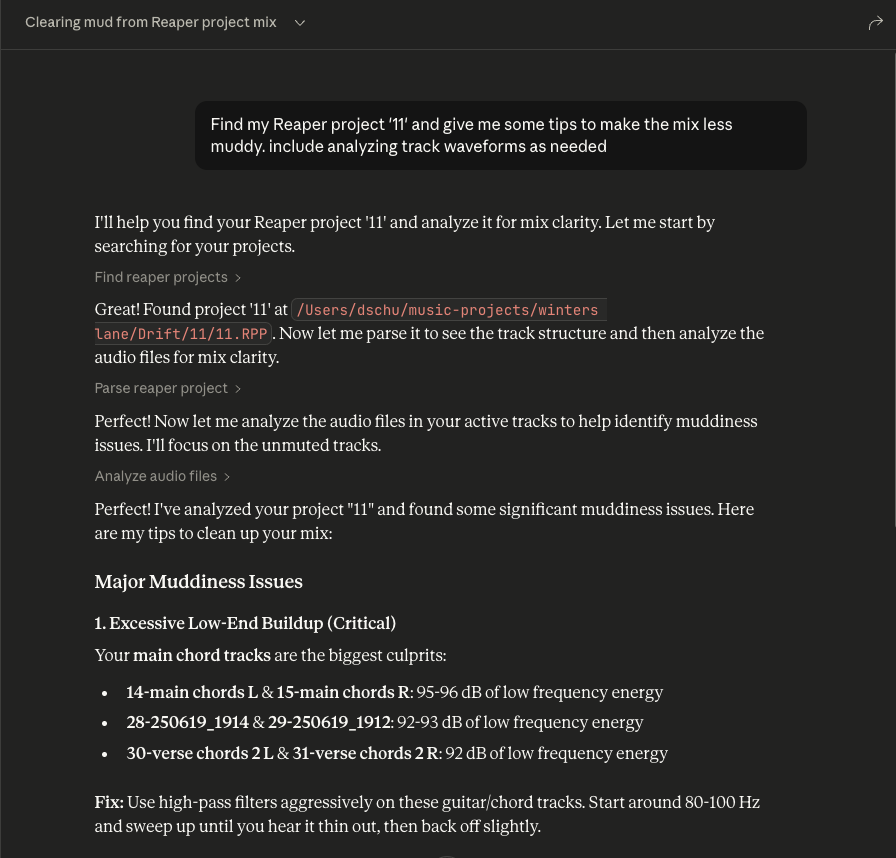
これらのツールは連携して動作します。Claudeに特定のReaperプロジェクトについて質問すると、find_reaper_projectsツールを使ってプロジェクトを見つけ、次にparse_reaper_projectツールを使ってプロジェクトを解析して質問に答えます。
list_installed_fx(plugin_type=None, search_query=None): Reaperで利用可能なインストール済みのFX/プラグインをすべて一覧表示します。
パラメータ:
plugin_type (オプション): プラグインタイプ(VST2、VST3、AU、JS、CLAP)で絞り込みます。
search_query (オプション): プラグインを名前、メーカー、タイプで検索します。
戻り値: インストール済みプラグインの一覧。次のものを含みます。
プラグイン名
プラグインタイプ(VST2、VST3、AU、JS、CLAP)
ファイルパス
メーカー(利用可能な場合)
質問例:
"インストールされているシンセプラグインはどれですか?"
"Wavesのプラグインをすべて表示して"
"ワンールなシンセを探しています。インストール済みのプラグインでどんな選択肢がありますか?"
"VST3プラグインをすべて一覧表示して"
"リバーブプラグインはありますか?"
"iZotopeのプラグインは何を持っていますか?"
"Audio Unitプラグインをすべて表示して"
注: このツールはReaperのプラグインキャッシュファイルをスキャンします。最近新しいプラグインをインストールして、まだReaperでスキャンしていない場合は、結果に表示されません。まずReaperを開いて新しいプラグインをスキャンさせてください。
analyze_audio_files(project_path, track_filter=None, whole_file=False): Reaperプロジェクト内のオーディオを解析し、ミキシングのフィードバックを返します。
パラメータ:
project_path (必須): .RPPプロジェクトファイルへのパス
track_filter (オプション): トラックを名前で絞り込みます(例: "Vocal"を指定するとボーカルトラックのみを分析)。
whole_file (オプション): 各アイテムが再生する領域だけでなく、ソースファイル全体を解析します。デフォルトはオフです。
戻り値: 包括的なオーディオ分析を返します。
レベル分析: ピークレベル、RMS、クリッピング検出、DCオフセット
周波数分析: スペクトラル焦点、各バンドの全体エネルギーに占める割合
ステレオイメージング: ステレオ感、位相干渉、モノラル互換性
ダイナミックレンジとラウドネス: LUFS(ラウドネス規格)、トゥルーピーク、クレストファクター
質問例:
"私のRock Songプロジェクトのすべてのオーディオを分析して"
"ボーカルトラックのクリッピングを確認して"
"ミックスはストリーミング配信に大きすぎませんか?"
"ドラムトラックに位相の問題はありますか?"
測定されるもの: デフォルトでは、各アイテムが再生される領域(ソースの開始オフセット、長さ、プレート)のみが分析され、ソースファイル全体ではありません。異なる領域は一度だけ分析されて再利用されるため、アレンジの中で反復されるアイテムは1回の測定で済みます。MIDIアイテムにはオーディオソースがないため、エラーではなくskippedとしてリストされます。
周波数の数字は相対的です。 各バンドは、その領域の総周波数パワーに対する割合(また、同じ割合をdBで表したもの)として報告されます。絶対的的なバンドエネルギーはクリップ長に依存するため、同一の素材の短いファイルに比べて長いファイルは数十dB「ホット」に見え、ファイル間の比較は無意味になります。
これらの数値はpre-FXです。 分析はソースファイルをディスクから読み取るため、トラックのFXチェーンもフェーダーも反映していません。アンプシミュレータや重めのEQがかかったトラックでは、分析結果のものは生のDIであり、あなたが聞いている音ではありません。すべての応答にはsignal_stage: pre-fxと書かれています。
警告条件:
ピーク>-0.3 dBFS: クリッピングのリスク
クリッピング検出: デジタルの歪みが存在します
200–500 Hzが500–2000 Hzより10 dB以上大きい: 箱こもっていてズンの低域です。これらの2つのバンドをスペクトル全体ではなく互いに比較することで、ベースパートが単にベースであるだけで警告されないようにします。
平均サンプル値 > 0.001: DCオフセット
位相整合性 < 0.5: 位相キャンセルの問題
LUFS > -8: ストリーミング配信には大きすぎます(Spotifyの目標: -14 LUFS)
クレストファクター < 6 dB: 過剰に圧縮されている可能性があります
ラウドネスが測定できない場合、代替値ではなくnullとして報告されます(400 ms未満の領域)。50 ms未満の領域は測定されますが、警告は出されません。
プロジェクトから解析されるすべてのデータ構造を確認するには、src/reaper_mcp_server/reaper_dataclasses.pyファイルを参照してください。
Related MCP server: reaper-mcp-server
依存関係のインストール
uv venv
source .venv/bin/activate

uv pip install .
Claude Desktopの設定
Claude Desktopの設定手順に従って、カスタムMCPサーバーで使用します。
サンプル設定はsetup/claude_desktop_config.jsonにあります。
設定の次のパスを更新します。
あなたのuvのインストールパス
あなたのReaperプロジェクトディレクトリ
このサーバーのディレクトリ
起動と設定
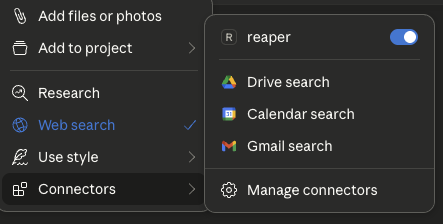
Claude Desktopを開きます。
チャットボックスの「+」アイコンをクリックします。
「Connectors」をクリックすると、「reaper」コネクタが有効になっているのが表示されます。
さあ、質問しましょう
Reaperプロジェクトについて質問します。
質問する特定のReaperプロジェクトの名前を必ず含めてください。
ツールボックスを展開すると、Claudeに渡される生のプロジェクトデータを表示できます。
Analyze audio in a Reaper project for mixing feedback.
    Measurements are taken from the source files on disk, so they are
    pre-FX and pre-fader: a track running an amp sim or EQ will sound
    nothing like its analysis.

    Args:
        project_path: Path to .RPP file
        track_filter: Optional substring to filter track names
        whole_file: Analyze entire source files instead of only the region
            each item actually plays. Off by default.

    Returns:
        JSON with per-item analysis, warnings, and skipped items
| Name | Required | Description | Default |
|---|---|---|---|
| whole_file | No | ||
| project_path | Yes | ||
| track_filter | No |
Does the description disclose side effects, auth requirements, rate limits, or destructive behavior?
With no annotations, the description must carry the behavioral burden. It does so by explaining that measurements are taken from source files on disk, hence pre-FX and pre-fader, and that the whole_file parameter changes the analysis scope. It also indicates the return shape (JSON with per-item analysis, warnings, skipped items). This gives an agent a clear sense of what happens when the tool runs, beyond a simple read operation.
Agents need to know what a tool does to the world before calling it. Descriptions should go beyond structured annotations to explain consequences.
Is the description appropriately sized, front-loaded, and free of redundancy?
The description is well-structured: a one-sentence purpose, a short paragraph clarifying the measurement source, a bulleted Args list, and a Returns line. Every part earns its place, and the most important scoping caveat (pre-FX) is front-loaded. It is detailed without being verbose.
Shorter descriptions cost fewer tokens and are easier for agents to parse. Every sentence should earn its place.
Given the tool's complexity, does the description cover enough for an agent to succeed on first attempt?
For a moderately complex analysis tool with no output schema, the description covers the purpose, all parameters, and the essential behavioral context. It hints at the return structure but does not specify the exact fields within the per-item analysis (e.g., peak, RMS). This is a minor gap; the description is otherwise sufficient for an agent to call it correctly.
Complex tools with many parameters or behaviors need more documentation. Simple tools need less. This dimension scales expectations accordingly.
Does the description clarify parameter syntax, constraints, interactions, or defaults beyond what the schema provides?
Schema description coverage is 0%, but the description's Args section fully compensates. It explains each parameter: project_path ('Path to .RPP file'), track_filter ('Optional substring to filter track names'), and whole_file ('Analyze entire source files instead of only the region each item actually plays. Off by default.'). This is thorough, clear, and adds semantic meaning the schema lacks.
Input schemas describe structure but not intent. Descriptions should explain non-obvious parameter relationships and valid value ranges.
Does the description clearly state what the tool does and how it differs from similar tools?
The description opens with a clear verb-resource combination: 'Analyze audio in a Reaper project for mixing feedback.' This directly distinguishes it from siblings like find_reaper_projects (finding projects), parse_reaper_project (parsing structure), and list_installed_fx (listing FX). The purpose is specific and actionable.
Agents choose between tools based on descriptions. A clear purpose with a specific verb and resource helps agents select the right tool.
Does the description explain when to use this tool, when not to, or what alternatives exist?
The description provides no explicit when-to-use guidance or alternative routing. It does not mention that for project structure one should use parse_reaper_project, or that for finding projects one should use find_reaper_projects. The pre-FX note implies a constraint but does not state 'use this when you need pre-FX analysis' or list alternatives. This leaves the agent to infer when to select this tool.
Agents often have multiple tools that could apply. Explicit usage guidance like "use X instead of Y when Z" prevents misuse.
| Name | Required | Description | Default |
|---|---|---|---|
No parameters | |||
Does the description disclose side effects, auth requirements, rate limits, or destructive behavior?
Tool has no description.
Agents need to know what a tool does to the world before calling it. Descriptions should go beyond structured annotations to explain consequences.
Is the description appropriately sized, front-loaded, and free of redundancy?
Tool has no description.
Shorter descriptions cost fewer tokens and are easier for agents to parse. Every sentence should earn its place.
Given the tool's complexity, does the description cover enough for an agent to succeed on first attempt?
Tool has no description.
Complex tools with many parameters or behaviors need more documentation. Simple tools need less. This dimension scales expectations accordingly.
Does the description clarify parameter syntax, constraints, interactions, or defaults beyond what the schema provides?
Tool has no description.
Input schemas describe structure but not intent. Descriptions should explain non-obvious parameter relationships and valid value ranges.
Does the description clearly state what the tool does and how it differs from similar tools?
Tool has no description.
Agents choose between tools based on descriptions. A clear purpose with a specific verb and resource helps agents select the right tool.
Does the description explain when to use this tool, when not to, or what alternatives exist?
Tool has no description.
Agents often have multiple tools that could apply. Explicit usage guidance like "use X instead of Y when Z" prevents misuse.
List all installed FX/plugins available in Reaper.
    Args:
        plugin_type: Optional filter by plugin type (VST2, VST3, AU, JS, CLAP)
        search_query: Optional search query to filter by name, manufacturer, or type

    Returns:
        JSON with list of installed plugins including name, type, path, and manufacturer
| Name | Required | Description | Default |
|---|---|---|---|
| plugin_type | No | ||
| search_query | No |
Does the description disclose side effects, auth requirements, rate limits, or destructive behavior?
With no annotations provided, the description carries the full burden of behavioral disclosure. It describes the return JSON structure (name, type, path, manufacturer), which is useful, but it does not state that the operation is read-only, nor does it mention any potential side effects, prerequisites (e.g., Reaper must be running), or error conditions. For a simple list operation, this is acceptable, but the description could have explicitly stated non-destructiveness and any environment assumptions.
Agents need to know what a tool does to the world before calling it. Descriptions should go beyond structured annotations to explain consequences.
Is the description appropriately sized, front-loaded, and free of redundancy?
The description is concise and well-structured with a Google-style docstring. The purpose is front-loaded, followed by parameter explanations and return format. Every sentence adds value; there is no fluff or redundancy. It is easy to scan and parse.
Shorter descriptions cost fewer tokens and are easier for agents to parse. Every sentence should earn its place.
Given the tool's complexity, does the description cover enough for an agent to succeed on first attempt?
For a simple read-only list tool with no output schema and no annotations, the description is complete. It covers the purpose, both parameters with their allowable values, and the return JSON fields. It does not over-explain or omit essential details. The tool's context (installed plugins in Reaper) is adequately covered.
Complex tools with many parameters or behaviors need more documentation. Simple tools need less. This dimension scales expectations accordingly.
Does the description clarify parameter syntax, constraints, interactions, or defaults beyond what the schema provides?
The schema provides only titles and nullability, with 0% description coverage. The description fully compensates by explaining each parameter: plugin_type restricts to specific types (VST2, VST3, AU, JS, CLAP) and search_query filters by name, manufacturer, or type. This adds clear meaning beyond the raw schema and gives the agent actionable guidance.
Input schemas describe structure but not intent. Descriptions should explain non-obvious parameter relationships and valid value ranges.
Does the description clearly state what the tool does and how it differs from similar tools?
The description clearly states a specific verb ('List') and resource ('all installed FX/plugins in Reaper'). It is unambiguous and distinct from the sibling tools (find_reaper_projects, parse_reaper_project, analyze_audio_files), which deal with projects and audio analysis rather than plugin discovery. No further clarification needed.
Agents choose between tools based on descriptions. A clear purpose with a specific verb and resource helps agents select the right tool.
Does the description explain when to use this tool, when not to, or what alternatives exist?
The description implies usage by demonstrating filter options (plugin_type, search_query), but does not explicitly state when to use this tool versus alternatives. Since there are no closely related sibling tools, the lack of explicit routing is not critical, but it still does not offer clear context on when one would invoke this function (e.g., 'Use this to discover available plugins before processing'). It is adequate but not explicit.
Agents often have multiple tools that could apply. Explicit usage guidance like "use X instead of Y when Z" prevents misuse.
| Name | Required | Description | Default |
|---|---|---|---|
| project_path | Yes |
Does the description disclose side effects, auth requirements, rate limits, or destructive behavior?
Tool has no description.
Agents need to know what a tool does to the world before calling it. Descriptions should go beyond structured annotations to explain consequences.
Is the description appropriately sized, front-loaded, and free of redundancy?
Tool has no description.
Shorter descriptions cost fewer tokens and are easier for agents to parse. Every sentence should earn its place.
Given the tool's complexity, does the description cover enough for an agent to succeed on first attempt?
Tool has no description.
Complex tools with many parameters or behaviors need more documentation. Simple tools need less. This dimension scales expectations accordingly.
Does the description clarify parameter syntax, constraints, interactions, or defaults beyond what the schema provides?
Tool has no description.
Input schemas describe structure but not intent. Descriptions should explain non-obvious parameter relationships and valid value ranges.
Does the description clearly state what the tool does and how it differs from similar tools?
Tool has no description.
Agents choose between tools based on descriptions. A clear purpose with a specific verb and resource helps agents select the right tool.
Does the description explain when to use this tool, when not to, or what alternatives exist?
Tool has no description.
Agents often have multiple tools that could apply. Explicit usage guidance like "use X instead of Y when Z" prevents misuse.
Recent tool additions, removals, and schema changes observed during successful MCP inspections.
v0.1.0analyze_audio_filesfind_reaper_projectslist_installed_fxparse_reaper_projectScored across 4 tools
Each tool has a clearly distinct purpose: finding projects, parsing a project file, analyzing audio content, and listing installed plugins. There is no overlap or ambiguity between them.
All tool names follow a consistent verb_noun snake_case pattern (find_reaper_projects, parse_reaper_project, analyze_audio_files, list_installed_fx). The naming is predictable and uniform.
With only 4 tools, the server is tightly scoped to its apparent focus on Reaper project analysis and audio inspection. Each tool earns its place and the count feels appropriately minimal for the purpose.
The tool surface covers the core analysis workflow well: discovering projects, parsing their structure, analyzing audio files, and listing available FX. Minor gaps exist (e.g., no direct tool for editing or rendering), but for an analysis-oriented server the coverage is solid.
Share one project context across ChatGPT, Claude, Telegram and any MCP client.
Talk to your public-facing AI from any MCP client — Claude, ChatGPT, Cursor, Cline, Windsurf.
Remote MCP server for audio stem separation, denoise, reverb, and MIDI export.
Generate AI music via the Lacuna Music API from MCP clients like Claude Desktop & Code.