


A
licenseB
qualityD
maintenanceConnects Claude AI to Ableton Live via the Model Context Protocol, enabling prompt-assisted music production, track and clip manipulation, and session control.
16
MIT

{"type": "text"}
Это MCP-сервер, который подключает проекты Reaper к MCP-клиенту, такому как Claude Desktop, позволяя вам задавать вопросы о ваших проектах и получать комплексный анализ звука для обратной связи по микшированию.
Этот сервер по своей конструкции доступен только для чтения. Он не предоставляет инструментов, которые позволяют ИИ изменять ваш проект. Он хорош для понимания того, что вы уже сделали, и для обучения тому, как его улучшить. Позвольте ИИ предложить идеи, и вы сможете попробовать покрутить ручки и понять, как это влияет на вашу музыку.
find_reaper_projects: Находит все проекты Reaper в указанной вами в конфигурации директории.
parse_reaper_project: Разбирает файл проекта Reaper (.RPP) и возвращает подробную информацию, включая темп, дорожки, цепочки FX и аудио-элементы.
Каждая дорожка несет свою позицию и идентичность (track_number соответствует порядку отображения в Reaper, guid), маршрутизацию (is_folder/folder_depth, main_send, receives, num_channels, midi_hardware_out) и состояние микшера (volume, pan, mute, solo). Каждый элемент несет position, length, start_offset, playrate, mute, фейды и каждый тейк — с пометкой активного тейка, поскольку именно он воспроизводится.
Записи receives называют исходную дорожку по индексу и по имени, что отличает живой сигнальный путь от оставшейся дорожки: дорожка с main_send: false не достигает мастера, и ее звук слышен только через то, что получает от нее.
Эти инструменты работают в тандеме. Когда вы задаете Клоду вопрос о конкретном проекте Reaper, он использует инструмент find_reaper_projects для поиска проекта, а затем использует инструмент parse_reaper_project для разбора проекта и ответа на ваш вопрос.
list_installed_fx(plugin_type=None, search_query=None): Перечисляет все установленные FX/плагины, доступные в Reaper.
Параметры:
plugin_type (необязательно): Фильтр по типу плагина (VST2, VST3, AU, JS, CLAP)
search_query (необязательно): Поиск плагинов по имени, производителю или типу
Возвращает: Список установленных плагинов, включая:
Название плагина
Тип плагина (VST2, VST3, AU, JS, CLAP)
Путь к файлу
Производитель (если доступен)
Примеры вопросов:
"Какие синтезаторные плагины у меня установлены?"
"Покажи все мои плагины Waves"
"Я ищу вибрирующий синтезатор. Какие варианты есть из уже установленных плагинов?"
"Перечисли все мои плагины VST3"
"Есть ли у меня плагины реверберации?"
"Какие плагины iZotope у меня есть?"
"Покажи все мои плагины Audio Unit"
Примечание: Этот инструмент сканирует файлы кэша плагинов Reaper. Если вы недавно установили новые плагины и еще не просканировали их в Reaper, они не появятся в результатах. Убедитесь, что вы открыли Reaper и позволили ему сначала просканировать новые плагины.
analyze_audio_files(project_path, track_filter=None, whole_file=False): Анализирует звук в проекте Reaper для обратной связи по микшированию.
Параметры:
project_path (обязательно): Путь к файлу проекта .RPP
track_filter (необязательно): Фильтр дорожек по имени (например, "Vocal" для анализа только вокальных дорожек)
whole_file (необязательно): Анализировать весь исходный файл вместо только той области, которую воспроизводит каждый элемент. По умолчанию выключено.
Возвращает: Комплексный анализ звука, включая:
Анализ уровня: Пиковые уровни, RMS, обнаружение клиппинга, постоянное смещение (DC offset)
Частотный анализ: Спектральный центроид и доля каждой полосы в общей энергии
Стерео-изображение: Ширина стерео, фазовая когерентность, совместимость с моно
Динамический диапазон и громкость: LUFS (стандарты громкости), истинный пик, пик-фактор
Примеры вопросов:
"Проанализируй весь звук в моем проекте Rock Song"
"Проверь вокальные дорожки на клиппинг"
"Не слишком ли громкий мой микс для стриминговых платформ?"
"Есть ли проблемы с фазой в моих барабанных дорожках?"
Что измеряется: По умолчанию каждый элемент анализируется точно по области, которую он воспроизводит — его смещение начала источника, длина и скорость воспроизведения — а не весь исходный файл. Различные области анализируются один раз и используются повторно, поэтому элемент, повторяющийся в аранжировке, стоит одного измерения. MIDI-элементы не имеют аудиоисточника и перечислены в разделе skipped, а не сообщаются как ошибки.
Частотные показатели относительны. Каждая полоса сообщается как доля общей спектральной мощности этой области (и та же доля в дБ). Абсолютная энергия полосы масштабируется с длиной клипа, из-за чего длинный файл выглядит на десятки дБ «горячее», чем короткий с идентичным материалом, и делает сравнение между файлами бессмысленным.
Эти числа до FX. Анализ читает исходные файлы с диска, поэтому он не отражает ни цепочку FX дорожки, ни ее фейдер. На дорожке с эмулятором усилителя или тяжелым эквалайзером анализ описывает сырой DI, а не то, что вы слышите. Каждый ответ помечен как signal_stage: pre-fx.
Пороговые значения предупреждений:
Пик > -0.3 дБFS: Риск клиппинга
Обнаружен клиппинг: присутствуют цифровые искажения
200–500 Гц более чем на 10 дБ выше 500–2000 Гц: Глухие низкие середины. Сравнение этих двух полос друг с другом, а не одной полосы со всем спектром, позволяет не помечать басовую партию просто за то, что она басовая.
Среднее значение сэмпла > 0.001: Постоянное смещение (DC offset)
Фазовая когерентность < 0.5: Проблемы с фазовым подавлением
LUFS > -8: Слишком громко для стриминга (цель Spotify: -14 LUFS)
Пик-фактор < 6 дБ: Возможно, пережато
Громкость сообщается как null, а не как заменитель, когда ее невозможно измерить (области короче 400 мс), а области короче 50 мс измеряются, но не предупреждаются.
Чтобы увидеть все структуры данных, извлекаемые из проектов, посмотрите файл src/reaper_mcp_server/reaper_dataclasses.py.
Related MCP server: AbletonMCP
Установка зависимостей
uv venv
source .venv/bin/activate

uv pip install .
Настройка Claude Desktop
Следуйте инструкциям по настройке Claude Desktop для использования с пользовательским MCP-сервером
Найдите пример конфигурации в setup/claude_desktop_config.json
Обновите следующие пути в конфигурации:
Путь к вашей установке uv
Каталог ваших проектов Reaper
Каталог этого сервера
Запуск и настройка
Откройте Claude Desktop
Нажмите значок '+' в поле чата
Нажмите «Connectors», и вы должны увидеть включенный коннектор 'reaper'
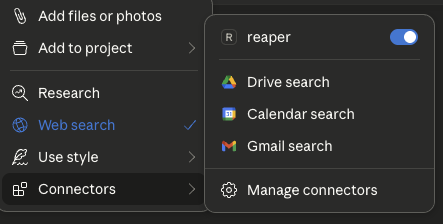
Задавайте вопросы!
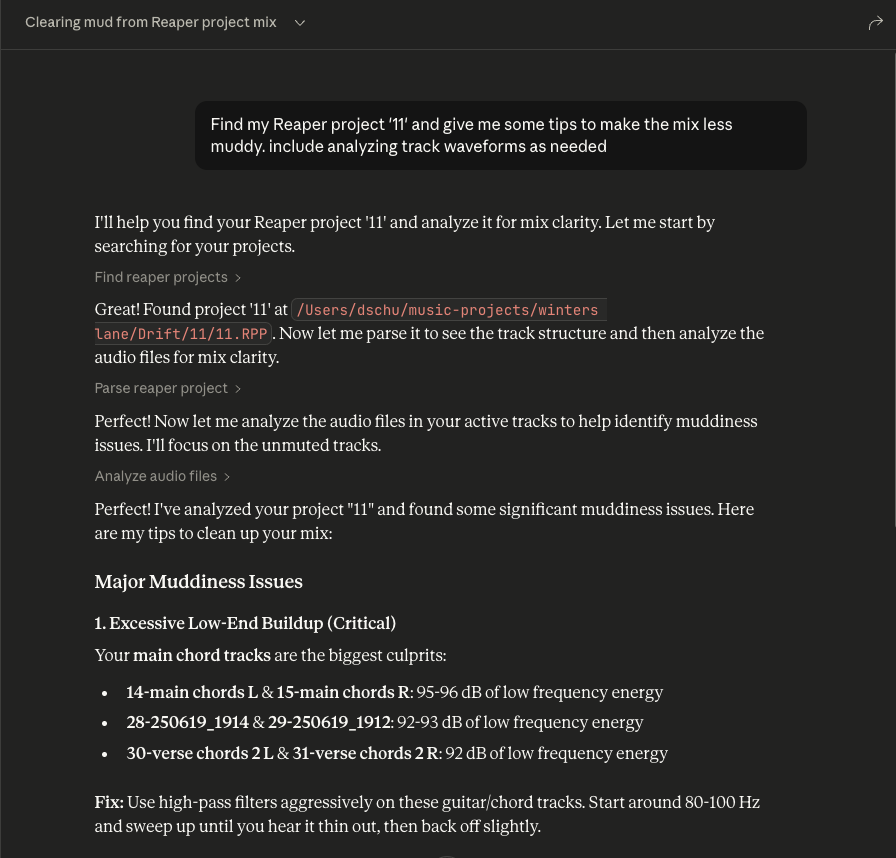
Задавайте вопросы о вашем проекте Reaper
Всегда указывайте название конкретного проекта Reaper, о котором вы спрашиваете
Вы можете развернуть панели инструментов, чтобы увидеть необработанные данные проекта, передаваемые Клоду
Analyze audio in a Reaper project for mixing feedback.
    Measurements are taken from the source files on disk, so they are
    pre-FX and pre-fader: a track running an amp sim or EQ will sound
    nothing like its analysis.

    Args:
        project_path: Path to .RPP file
        track_filter: Optional substring to filter track names
        whole_file: Analyze entire source files instead of only the region
            each item actually plays. Off by default.

    Returns:
        JSON with per-item analysis, warnings, and skipped items
| Name | Required | Description | Default |
|---|---|---|---|
| whole_file | No | ||
| project_path | Yes | ||
| track_filter | No |
Does the description disclose side effects, auth requirements, rate limits, or destructive behavior?
With no annotations, the description must carry the behavioral burden. It does so by explaining that measurements are taken from source files on disk, hence pre-FX and pre-fader, and that the whole_file parameter changes the analysis scope. It also indicates the return shape (JSON with per-item analysis, warnings, skipped items). This gives an agent a clear sense of what happens when the tool runs, beyond a simple read operation.
Agents need to know what a tool does to the world before calling it. Descriptions should go beyond structured annotations to explain consequences.
Is the description appropriately sized, front-loaded, and free of redundancy?
The description is well-structured: a one-sentence purpose, a short paragraph clarifying the measurement source, a bulleted Args list, and a Returns line. Every part earns its place, and the most important scoping caveat (pre-FX) is front-loaded. It is detailed without being verbose.
Shorter descriptions cost fewer tokens and are easier for agents to parse. Every sentence should earn its place.
Given the tool's complexity, does the description cover enough for an agent to succeed on first attempt?
For a moderately complex analysis tool with no output schema, the description covers the purpose, all parameters, and the essential behavioral context. It hints at the return structure but does not specify the exact fields within the per-item analysis (e.g., peak, RMS). This is a minor gap; the description is otherwise sufficient for an agent to call it correctly.
Complex tools with many parameters or behaviors need more documentation. Simple tools need less. This dimension scales expectations accordingly.
Does the description clarify parameter syntax, constraints, interactions, or defaults beyond what the schema provides?
Schema description coverage is 0%, but the description's Args section fully compensates. It explains each parameter: project_path ('Path to .RPP file'), track_filter ('Optional substring to filter track names'), and whole_file ('Analyze entire source files instead of only the region each item actually plays. Off by default.'). This is thorough, clear, and adds semantic meaning the schema lacks.
Input schemas describe structure but not intent. Descriptions should explain non-obvious parameter relationships and valid value ranges.
Does the description clearly state what the tool does and how it differs from similar tools?
The description opens with a clear verb-resource combination: 'Analyze audio in a Reaper project for mixing feedback.' This directly distinguishes it from siblings like find_reaper_projects (finding projects), parse_reaper_project (parsing structure), and list_installed_fx (listing FX). The purpose is specific and actionable.
Agents choose between tools based on descriptions. A clear purpose with a specific verb and resource helps agents select the right tool.
Does the description explain when to use this tool, when not to, or what alternatives exist?
The description provides no explicit when-to-use guidance or alternative routing. It does not mention that for project structure one should use parse_reaper_project, or that for finding projects one should use find_reaper_projects. The pre-FX note implies a constraint but does not state 'use this when you need pre-FX analysis' or list alternatives. This leaves the agent to infer when to select this tool.
Agents often have multiple tools that could apply. Explicit usage guidance like "use X instead of Y when Z" prevents misuse.
| Name | Required | Description | Default |
|---|---|---|---|
No parameters | |||
Does the description disclose side effects, auth requirements, rate limits, or destructive behavior?
Tool has no description.
Agents need to know what a tool does to the world before calling it. Descriptions should go beyond structured annotations to explain consequences.
Is the description appropriately sized, front-loaded, and free of redundancy?
Tool has no description.
Shorter descriptions cost fewer tokens and are easier for agents to parse. Every sentence should earn its place.
Given the tool's complexity, does the description cover enough for an agent to succeed on first attempt?
Tool has no description.
Complex tools with many parameters or behaviors need more documentation. Simple tools need less. This dimension scales expectations accordingly.
Does the description clarify parameter syntax, constraints, interactions, or defaults beyond what the schema provides?
Tool has no description.
Input schemas describe structure but not intent. Descriptions should explain non-obvious parameter relationships and valid value ranges.
Does the description clearly state what the tool does and how it differs from similar tools?
Tool has no description.
Agents choose between tools based on descriptions. A clear purpose with a specific verb and resource helps agents select the right tool.
Does the description explain when to use this tool, when not to, or what alternatives exist?
Tool has no description.
Agents often have multiple tools that could apply. Explicit usage guidance like "use X instead of Y when Z" prevents misuse.
List all installed FX/plugins available in Reaper.
    Args:
        plugin_type: Optional filter by plugin type (VST2, VST3, AU, JS, CLAP)
        search_query: Optional search query to filter by name, manufacturer, or type

    Returns:
        JSON with list of installed plugins including name, type, path, and manufacturer
| Name | Required | Description | Default |
|---|---|---|---|
| plugin_type | No | ||
| search_query | No |
Does the description disclose side effects, auth requirements, rate limits, or destructive behavior?
With no annotations provided, the description carries the full burden of behavioral disclosure. It describes the return JSON structure (name, type, path, manufacturer), which is useful, but it does not state that the operation is read-only, nor does it mention any potential side effects, prerequisites (e.g., Reaper must be running), or error conditions. For a simple list operation, this is acceptable, but the description could have explicitly stated non-destructiveness and any environment assumptions.
Agents need to know what a tool does to the world before calling it. Descriptions should go beyond structured annotations to explain consequences.
Is the description appropriately sized, front-loaded, and free of redundancy?
The description is concise and well-structured with a Google-style docstring. The purpose is front-loaded, followed by parameter explanations and return format. Every sentence adds value; there is no fluff or redundancy. It is easy to scan and parse.
Shorter descriptions cost fewer tokens and are easier for agents to parse. Every sentence should earn its place.
Given the tool's complexity, does the description cover enough for an agent to succeed on first attempt?
For a simple read-only list tool with no output schema and no annotations, the description is complete. It covers the purpose, both parameters with their allowable values, and the return JSON fields. It does not over-explain or omit essential details. The tool's context (installed plugins in Reaper) is adequately covered.
Complex tools with many parameters or behaviors need more documentation. Simple tools need less. This dimension scales expectations accordingly.
Does the description clarify parameter syntax, constraints, interactions, or defaults beyond what the schema provides?
The schema provides only titles and nullability, with 0% description coverage. The description fully compensates by explaining each parameter: plugin_type restricts to specific types (VST2, VST3, AU, JS, CLAP) and search_query filters by name, manufacturer, or type. This adds clear meaning beyond the raw schema and gives the agent actionable guidance.
Input schemas describe structure but not intent. Descriptions should explain non-obvious parameter relationships and valid value ranges.
Does the description clearly state what the tool does and how it differs from similar tools?
The description clearly states a specific verb ('List') and resource ('all installed FX/plugins in Reaper'). It is unambiguous and distinct from the sibling tools (find_reaper_projects, parse_reaper_project, analyze_audio_files), which deal with projects and audio analysis rather than plugin discovery. No further clarification needed.
Agents choose between tools based on descriptions. A clear purpose with a specific verb and resource helps agents select the right tool.
Does the description explain when to use this tool, when not to, or what alternatives exist?
The description implies usage by demonstrating filter options (plugin_type, search_query), but does not explicitly state when to use this tool versus alternatives. Since there are no closely related sibling tools, the lack of explicit routing is not critical, but it still does not offer clear context on when one would invoke this function (e.g., 'Use this to discover available plugins before processing'). It is adequate but not explicit.
Agents often have multiple tools that could apply. Explicit usage guidance like "use X instead of Y when Z" prevents misuse.
| Name | Required | Description | Default |
|---|---|---|---|
| project_path | Yes |
Does the description disclose side effects, auth requirements, rate limits, or destructive behavior?
Tool has no description.
Agents need to know what a tool does to the world before calling it. Descriptions should go beyond structured annotations to explain consequences.
Is the description appropriately sized, front-loaded, and free of redundancy?
Tool has no description.
Shorter descriptions cost fewer tokens and are easier for agents to parse. Every sentence should earn its place.
Given the tool's complexity, does the description cover enough for an agent to succeed on first attempt?
Tool has no description.
Complex tools with many parameters or behaviors need more documentation. Simple tools need less. This dimension scales expectations accordingly.
Does the description clarify parameter syntax, constraints, interactions, or defaults beyond what the schema provides?
Tool has no description.
Input schemas describe structure but not intent. Descriptions should explain non-obvious parameter relationships and valid value ranges.
Does the description clearly state what the tool does and how it differs from similar tools?
Tool has no description.
Agents choose between tools based on descriptions. A clear purpose with a specific verb and resource helps agents select the right tool.
Does the description explain when to use this tool, when not to, or what alternatives exist?
Tool has no description.
Agents often have multiple tools that could apply. Explicit usage guidance like "use X instead of Y when Z" prevents misuse.
Recent tool additions, removals, and schema changes observed during successful MCP inspections.
v0.1.0analyze_audio_filesfind_reaper_projectslist_installed_fxparse_reaper_projectScored across 4 tools
Each tool has a clearly distinct purpose: finding projects, parsing a project file, analyzing audio content, and listing installed plugins. There is no overlap or ambiguity between them.
All tool names follow a consistent verb_noun snake_case pattern (find_reaper_projects, parse_reaper_project, analyze_audio_files, list_installed_fx). The naming is predictable and uniform.
With only 4 tools, the server is tightly scoped to its apparent focus on Reaper project analysis and audio inspection. Each tool earns its place and the count feels appropriately minimal for the purpose.
The tool surface covers the core analysis workflow well: discovering projects, parsing their structure, analyzing audio files, and listing available FX. Minor gaps exist (e.g., no direct tool for editing or rendering), but for an analysis-oriented server the coverage is solid.
Share one project context across ChatGPT, Claude, Telegram and any MCP client.
Talk to your public-facing AI from any MCP client — Claude, ChatGPT, Cursor, Cline, Windsurf.
Generate AI music via the Lacuna Music API from MCP clients like Claude Desktop & Code.
Use AI models for chat, image, and video generation from Claude Code and other MCP hosts.