


A
licenseB
qualityD
maintenanceConnects Ableton Live to Claude AI via the Model Context Protocol, enabling prompt-assisted music production, track creation, and Live session manipulation.
16
MIT

这是一个 MCP 服务器,可将 Reaper 项目连接到 MCP 客户端(如 Claude Desktop),使您能够询问有关项目的问题,并获得用于混音反馈的全面音频分析。
该服务器在设计上是只读的。它不提供任何让 AI 修改您项目的工具。它的价值在于帮助您理解已创作的内容,并学习如何改进。让 AI 提出一些建议,然后您可以尝试调整旋钮,通过实践来理解它对音乐的影响。
find_reaper_projects:在您在配置中指定的目录中查找所有 Reaper 项目。
parse_reaper_project:解析 Reaper 项目文件(.RPP)并返回详细信息,包括速度、轨道、FX 链和音频片段。
每个轨道都带有其位置和标识(track_number 与 Reaper 的显示顺序一致、guid)、路由(is_folder/folder_depth、main_send、receives、num_channels、midi_hardware_out)以及调音台状态(volume、pan、mute、solo)。每个片段都带有 position、length、start_offset、playrate、mute、淡入淡出以及每个 take——并标记出活动 take,因为播放的是它。
receives 条目按索引和名称标识源轨道,这正是区分活动信号路径与遗留轨道的依据:main_send: false 的轨道不会到达主输出,其音频只能通过接收它的轨道才能被听到。
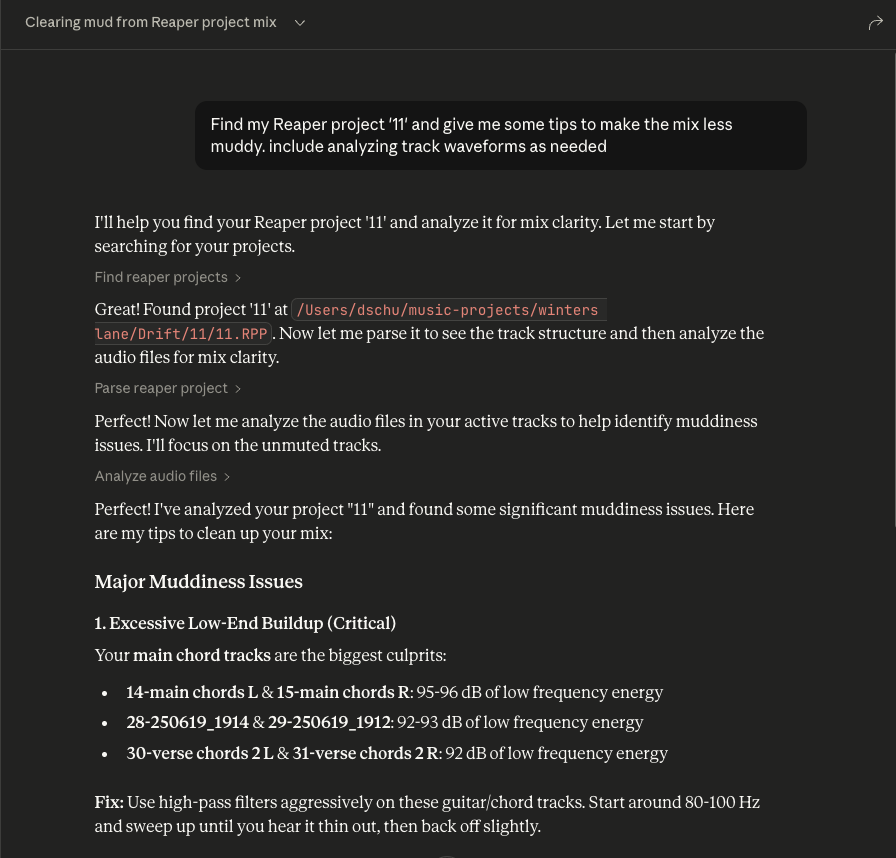
这些工具协同工作。当您向 Claude 询问有关特定 Reaper 项目的问题时,它会使用 find_reaper_projects 工具查找项目,然后使用 parse_reaper_project 工具解析项目并回答您的问题。
list_installed_fx(plugin_type=None, search_query=None):列出 Reaper 中所有已安装的 FX/插件。
参数:
plugin_type(可选):按插件类型筛选(VST2、VST3、AU、JS、CLAP)
search_query(可选):按名称、制造商或类型搜索插件
返回: 已安装插件列表,包括:
插件名称
插件类型(VST2、VST3、AU、JS、CLAP)
文件路径
制造商(如可用)
示例问题:
"我安装了哪些合成器插件?"
"显示我所有的 Waves 插件"
"我在找一个颤音合成器。我已安装的插件中有哪些选择?"
"列出我所有的 VST3 插件"
"我有混响插件吗?"
"我有哪些 iZotope 插件?"
"显示我所有的 Audio Unit 插件"
注意: 此工具会扫描您的 Reaper 插件缓存文件。如果您最近安装了新插件但尚未在 Reaper 中扫描,它们不会出现在结果中。请先打开 Reaper 并让它扫描新插件。
analyze_audio_files(project_path, track_filter=None, whole_file=False):分析 Reaper 项目中的音频以提供混音反馈。
参数:
project_path(必填):.RPP 项目文件的路径
track_filter(可选):按名称筛选轨道(例如,"Vocal" 仅分析人声轨道)
whole_file(可选):分析整个源文件,而非仅分析每个片段播放的区域。默认关闭。
返回: 全面的音频分析,包括:
电平分析:峰值电平、RMS、削波检测、直流偏移
频率分析:频谱质心,以及每个频段占总能量的比例
立体声成像:立体声宽度、相位相干性、单声道兼容性
动态范围与响度:LUFS(响度标准)、真实峰值、波峰因数
示例问题:
"分析我 Rock Song 项目中的所有音频"
"检查人声轨道是否有削波"
"我的混音对流媒体平台来说太响了吗?"
"我的鼓轨道有相位问题吗?"
测量内容: 默认情况下,每个片段仅在其播放的精确区域内被分析——即其源起始偏移、长度和播放速率——而非整个源文件。不同的区域只测量一次并复用,因此排列中重复出现的片段只计一次测量。MIDI 片段没有音频源,会列在 skipped 下,而不会作为错误报告。
频率数据是相对的。 每个频段报告为该区域总频谱功率的占比(以及相同的 dB 占比)。绝对频段能量会随片段长度缩放,这使得一个长文件看起来比内容相同但更短的文件"热"几十 dB,并使跨文件比较失去意义。
这些数字是 FX 前的。 分析从磁盘读取源文件,因此既不反映轨道的 FX 链,也不反映其推子。在运行放大器模拟器或重度 EQ 的轨道上,分析描述的是原始 DI 信号,而非您听到的声音。每个响应都标记为 signal_stage: pre-fx。
警告阈值:
峰值 > -0.3 dBFS:削波风险
检测到削波:存在数字失真
200–500 Hz 比 500–2000 Hz 高出 10 dB 以上:闷闷的低中频。将这两个频段相互比较,而不是将一个频段与整个频谱比较,这样才能避免贝斯声部仅仅因为是贝斯就被标记。
平均采样值 > 0.001:直流偏移
相位相干性 < 0.5:相位抵消问题
LUFS > -8:对流媒体来说太响(Spotify 目标:-14 LUFS)
波峰因数 < 6 dB:可能过度压缩
当无法测量响度时(短于 400 ms 的区域),响度报告为 null 而非替代值;短于 50 ms 的区域会被测量但不会发出警告。
要查看从项目中解析出的所有数据结构,请查看 src/reaper_mcp_server/reaper_dataclasses.py 文件。
Related MCP server: reaper-mcp-server
安装依赖
uv venv
source .venv/bin/activate

uv pip install .
配置 Claude Desktop
按照配置 Claude Desktop 的说明将其用于自定义 MCP 服务器
在 setup/claude_desktop_config.json 中找到示例配置
更新配置中的以下路径:
您的 uv 安装路径
您的 Reaper 项目目录
此服务器的目录
启动并配置
打开 Claude Desktop
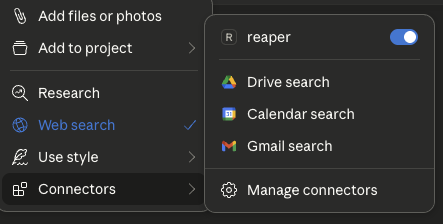
点击聊天框上的 '+' 图标
点击 'Connectors',您应该会看到 'reaper' 连接器已启用
尽情提问!
询问有关您的 Reaper 项目的问题
始终包含您所询问的特定 Reaper 项目的名称
您可以展开工具框以查看传递给 Claude 的原始项目数据
Analyze audio in a Reaper project for mixing feedback.
    Measurements are taken from the source files on disk, so they are
    pre-FX and pre-fader: a track running an amp sim or EQ will sound
    nothing like its analysis.

    Args:
        project_path: Path to .RPP file
        track_filter: Optional substring to filter track names
        whole_file: Analyze entire source files instead of only the region
            each item actually plays. Off by default.

    Returns:
        JSON with per-item analysis, warnings, and skipped items
| Name | Required | Description | Default |
|---|---|---|---|
| whole_file | No | ||
| project_path | Yes | ||
| track_filter | No |
Does the description disclose side effects, auth requirements, rate limits, or destructive behavior?
With no annotations, the description must carry the behavioral burden. It does so by explaining that measurements are taken from source files on disk, hence pre-FX and pre-fader, and that the whole_file parameter changes the analysis scope. It also indicates the return shape (JSON with per-item analysis, warnings, skipped items). This gives an agent a clear sense of what happens when the tool runs, beyond a simple read operation.
Agents need to know what a tool does to the world before calling it. Descriptions should go beyond structured annotations to explain consequences.
Is the description appropriately sized, front-loaded, and free of redundancy?
The description is well-structured: a one-sentence purpose, a short paragraph clarifying the measurement source, a bulleted Args list, and a Returns line. Every part earns its place, and the most important scoping caveat (pre-FX) is front-loaded. It is detailed without being verbose.
Shorter descriptions cost fewer tokens and are easier for agents to parse. Every sentence should earn its place.
Given the tool's complexity, does the description cover enough for an agent to succeed on first attempt?
For a moderately complex analysis tool with no output schema, the description covers the purpose, all parameters, and the essential behavioral context. It hints at the return structure but does not specify the exact fields within the per-item analysis (e.g., peak, RMS). This is a minor gap; the description is otherwise sufficient for an agent to call it correctly.
Complex tools with many parameters or behaviors need more documentation. Simple tools need less. This dimension scales expectations accordingly.
Does the description clarify parameter syntax, constraints, interactions, or defaults beyond what the schema provides?
Schema description coverage is 0%, but the description's Args section fully compensates. It explains each parameter: project_path ('Path to .RPP file'), track_filter ('Optional substring to filter track names'), and whole_file ('Analyze entire source files instead of only the region each item actually plays. Off by default.'). This is thorough, clear, and adds semantic meaning the schema lacks.
Input schemas describe structure but not intent. Descriptions should explain non-obvious parameter relationships and valid value ranges.
Does the description clearly state what the tool does and how it differs from similar tools?
The description opens with a clear verb-resource combination: 'Analyze audio in a Reaper project for mixing feedback.' This directly distinguishes it from siblings like find_reaper_projects (finding projects), parse_reaper_project (parsing structure), and list_installed_fx (listing FX). The purpose is specific and actionable.
Agents choose between tools based on descriptions. A clear purpose with a specific verb and resource helps agents select the right tool.
Does the description explain when to use this tool, when not to, or what alternatives exist?
The description provides no explicit when-to-use guidance or alternative routing. It does not mention that for project structure one should use parse_reaper_project, or that for finding projects one should use find_reaper_projects. The pre-FX note implies a constraint but does not state 'use this when you need pre-FX analysis' or list alternatives. This leaves the agent to infer when to select this tool.
Agents often have multiple tools that could apply. Explicit usage guidance like "use X instead of Y when Z" prevents misuse.
| Name | Required | Description | Default |
|---|---|---|---|
No parameters | |||
Does the description disclose side effects, auth requirements, rate limits, or destructive behavior?
Tool has no description.
Agents need to know what a tool does to the world before calling it. Descriptions should go beyond structured annotations to explain consequences.
Is the description appropriately sized, front-loaded, and free of redundancy?
Tool has no description.
Shorter descriptions cost fewer tokens and are easier for agents to parse. Every sentence should earn its place.
Given the tool's complexity, does the description cover enough for an agent to succeed on first attempt?
Tool has no description.
Complex tools with many parameters or behaviors need more documentation. Simple tools need less. This dimension scales expectations accordingly.
Does the description clarify parameter syntax, constraints, interactions, or defaults beyond what the schema provides?
Tool has no description.
Input schemas describe structure but not intent. Descriptions should explain non-obvious parameter relationships and valid value ranges.
Does the description clearly state what the tool does and how it differs from similar tools?
Tool has no description.
Agents choose between tools based on descriptions. A clear purpose with a specific verb and resource helps agents select the right tool.
Does the description explain when to use this tool, when not to, or what alternatives exist?
Tool has no description.
Agents often have multiple tools that could apply. Explicit usage guidance like "use X instead of Y when Z" prevents misuse.
List all installed FX/plugins available in Reaper.
    Args:
        plugin_type: Optional filter by plugin type (VST2, VST3, AU, JS, CLAP)
        search_query: Optional search query to filter by name, manufacturer, or type

    Returns:
        JSON with list of installed plugins including name, type, path, and manufacturer
| Name | Required | Description | Default |
|---|---|---|---|
| plugin_type | No | ||
| search_query | No |
Does the description disclose side effects, auth requirements, rate limits, or destructive behavior?
With no annotations provided, the description carries the full burden of behavioral disclosure. It describes the return JSON structure (name, type, path, manufacturer), which is useful, but it does not state that the operation is read-only, nor does it mention any potential side effects, prerequisites (e.g., Reaper must be running), or error conditions. For a simple list operation, this is acceptable, but the description could have explicitly stated non-destructiveness and any environment assumptions.
Agents need to know what a tool does to the world before calling it. Descriptions should go beyond structured annotations to explain consequences.
Is the description appropriately sized, front-loaded, and free of redundancy?
The description is concise and well-structured with a Google-style docstring. The purpose is front-loaded, followed by parameter explanations and return format. Every sentence adds value; there is no fluff or redundancy. It is easy to scan and parse.
Shorter descriptions cost fewer tokens and are easier for agents to parse. Every sentence should earn its place.
Given the tool's complexity, does the description cover enough for an agent to succeed on first attempt?
For a simple read-only list tool with no output schema and no annotations, the description is complete. It covers the purpose, both parameters with their allowable values, and the return JSON fields. It does not over-explain or omit essential details. The tool's context (installed plugins in Reaper) is adequately covered.
Complex tools with many parameters or behaviors need more documentation. Simple tools need less. This dimension scales expectations accordingly.
Does the description clarify parameter syntax, constraints, interactions, or defaults beyond what the schema provides?
The schema provides only titles and nullability, with 0% description coverage. The description fully compensates by explaining each parameter: plugin_type restricts to specific types (VST2, VST3, AU, JS, CLAP) and search_query filters by name, manufacturer, or type. This adds clear meaning beyond the raw schema and gives the agent actionable guidance.
Input schemas describe structure but not intent. Descriptions should explain non-obvious parameter relationships and valid value ranges.
Does the description clearly state what the tool does and how it differs from similar tools?
The description clearly states a specific verb ('List') and resource ('all installed FX/plugins in Reaper'). It is unambiguous and distinct from the sibling tools (find_reaper_projects, parse_reaper_project, analyze_audio_files), which deal with projects and audio analysis rather than plugin discovery. No further clarification needed.
Agents choose between tools based on descriptions. A clear purpose with a specific verb and resource helps agents select the right tool.
Does the description explain when to use this tool, when not to, or what alternatives exist?
The description implies usage by demonstrating filter options (plugin_type, search_query), but does not explicitly state when to use this tool versus alternatives. Since there are no closely related sibling tools, the lack of explicit routing is not critical, but it still does not offer clear context on when one would invoke this function (e.g., 'Use this to discover available plugins before processing'). It is adequate but not explicit.
Agents often have multiple tools that could apply. Explicit usage guidance like "use X instead of Y when Z" prevents misuse.
| Name | Required | Description | Default |
|---|---|---|---|
| project_path | Yes |
Does the description disclose side effects, auth requirements, rate limits, or destructive behavior?
Tool has no description.
Agents need to know what a tool does to the world before calling it. Descriptions should go beyond structured annotations to explain consequences.
Is the description appropriately sized, front-loaded, and free of redundancy?
Tool has no description.
Shorter descriptions cost fewer tokens and are easier for agents to parse. Every sentence should earn its place.
Given the tool's complexity, does the description cover enough for an agent to succeed on first attempt?
Tool has no description.
Complex tools with many parameters or behaviors need more documentation. Simple tools need less. This dimension scales expectations accordingly.
Does the description clarify parameter syntax, constraints, interactions, or defaults beyond what the schema provides?
Tool has no description.
Input schemas describe structure but not intent. Descriptions should explain non-obvious parameter relationships and valid value ranges.
Does the description clearly state what the tool does and how it differs from similar tools?
Tool has no description.
Agents choose between tools based on descriptions. A clear purpose with a specific verb and resource helps agents select the right tool.
Does the description explain when to use this tool, when not to, or what alternatives exist?
Tool has no description.
Agents often have multiple tools that could apply. Explicit usage guidance like "use X instead of Y when Z" prevents misuse.
Recent tool additions, removals, and schema changes observed during successful MCP inspections.
v0.1.0analyze_audio_filesfind_reaper_projectslist_installed_fxparse_reaper_projectScored across 4 tools
Each tool has a clearly distinct purpose: finding projects, parsing a project file, analyzing audio content, and listing installed plugins. There is no overlap or ambiguity between them.
All tool names follow a consistent verb_noun snake_case pattern (find_reaper_projects, parse_reaper_project, analyze_audio_files, list_installed_fx). The naming is predictable and uniform.
With only 4 tools, the server is tightly scoped to its apparent focus on Reaper project analysis and audio inspection. Each tool earns its place and the count feels appropriately minimal for the purpose.
The tool surface covers the core analysis workflow well: discovering projects, parsing their structure, analyzing audio files, and listing available FX. Minor gaps exist (e.g., no direct tool for editing or rendering), but for an analysis-oriented server the coverage is solid.
Share one project context across ChatGPT, Claude, Telegram and any MCP client.
Stop copy-pasting client context into your AI. 47 connectable providers via MCP.
Talk to your public-facing AI from any MCP client — Claude, ChatGPT, Cursor, Cline, Windsurf.
Remote MCP server for audio stem separation, denoise, reverb, and MIDI export.