MCP-Delete
@qpd-v/mcp-删除
提供文件删除功能的模型上下文协议 (MCP) 服务器。该服务器允许 AI 助手在需要时安全地删除文件,并支持相对路径和绝对路径。
特征
使用相对或绝对路径删除文件
尝试多条潜在路径的智能路径解析
清晰的错误信息,包含详细的路径解析信息
删除前进行安全文件存在性检查
与 Claude 和其他兼容 MCP 的 AI 助手配合使用
Related MCP server: File MCP Server
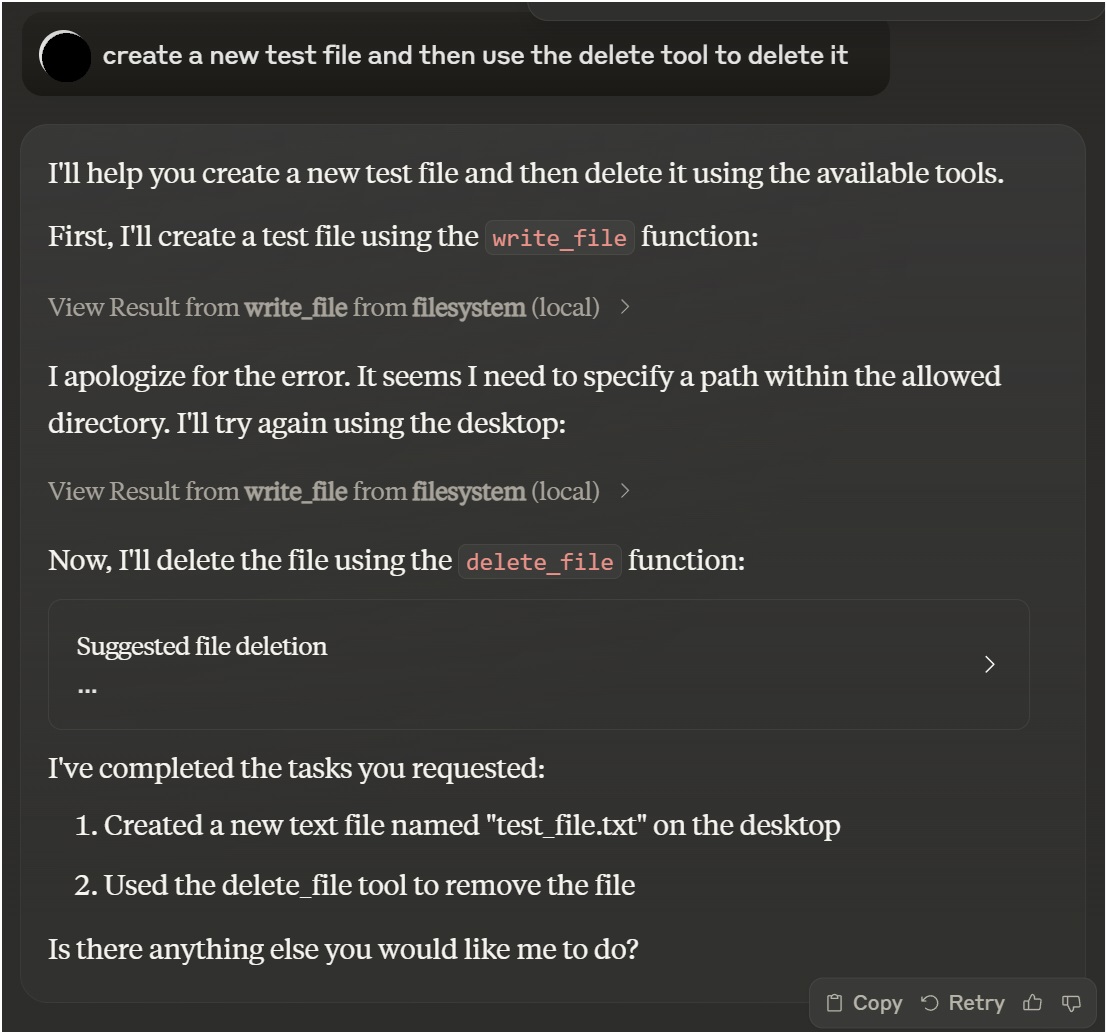
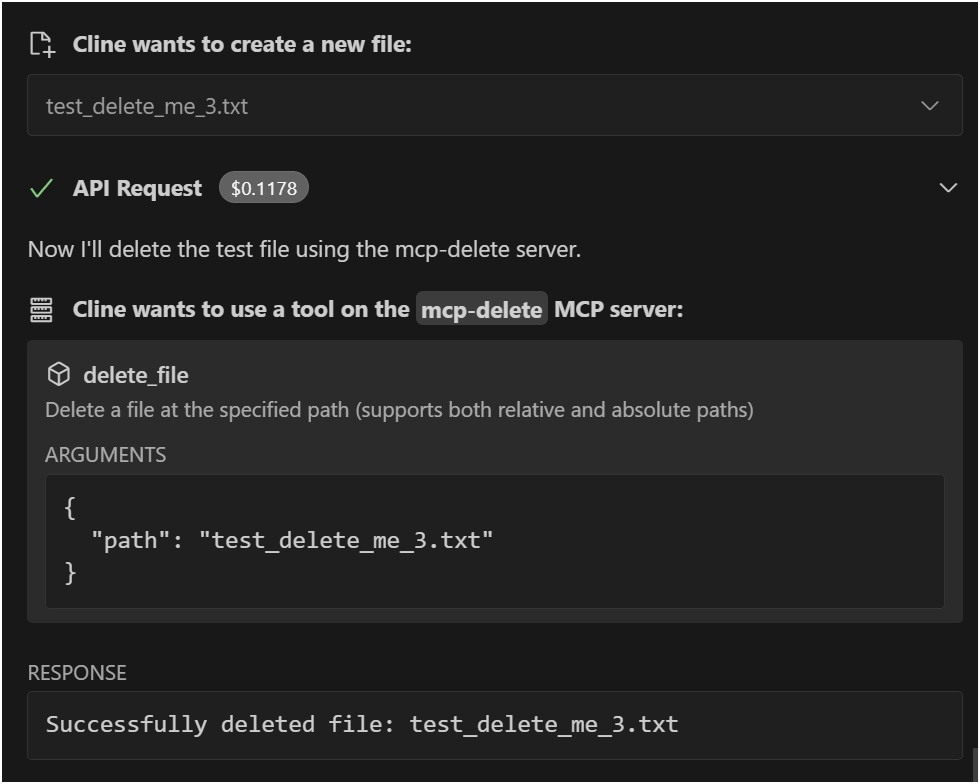
示例
与 Claude Desktop 一起使用

与 VSCode Roo Cline 扩展一起使用

安装
通过 Smithery 安装
要通过Smithery自动安装 Claude Desktop 的文件删除功能:
npx -y @smithery/cli install @qpd-v/mcp-delete --client claude手动安装
npx @qpd-v/mcp-delete或者全局安装:
npm install -g @qpd-v/mcp-delete配置
克劳德桌面
将服务器配置添加到您的 Claude Desktop 配置文件:
视窗:
// %APPDATA%/Claude/claude_desktop_config.json
{
"mcpServers": {
"mcp-delete": {
"command": "npx",
"args": ["@qpd-v/mcp-delete"]
}
}
}MacOS:
// ~/Library/Application Support/Claude/claude_desktop_config.json
{
"mcpServers": {
"mcp-delete": {
"command": "npx",
"args": ["@qpd-v/mcp-delete"]
}
}
}
}VSCode 扩展
将服务器配置添加到您的 Cline 设置中:
视窗:
// %APPDATA%/Code/User/globalStorage/rooveterinaryinc.roo-cline/settings/cline_mcp_settings.json
{
"mcpServers": {
"mcp-delete": {
"command": "npx",
"args": ["@qpd-v/mcp-delete"]
}
}
}MacOS:
// ~/Library/Application Support/Code/User/globalStorage/rooveterinaryinc.roo-cline/settings/cline_mcp_settings.json
{
"mcpServers": {
"mcp-delete": {
"command": "npx",
"args": ["@qpd-v/mcp-delete"]
}
}
}
}可用工具
删除文件
删除指定路径下的文件。
参数:
path(字符串,必需):要删除的文件的路径(相对于工作目录或绝对路径)
Claude 中的用法示例:
You can ask me to delete a file like this:
"Please delete the file example.txt"
I will use the delete_file tool to safely remove the file.路径解析
服务器通过尝试多种方法智能地处理路径解析:
提供的确切路径
相对于当前工作目录的路径
相对于指定基目录的路径
这使得它更加用户友好,因为文件可以通过相对路径引用,并且服务器将尝试正确定位它们。
发展
克隆存储库:
git clone https://github.com/qpd-v/mcp-delete.git
cd mcp-delete安装依赖项:
npm install构建服务器:
npm run build对于使用自动重建的开发:
npm run watch调试
由于 MCP 服务器通过 stdio 进行通信,调试起来可能比较困难。请使用 MCP Inspector 进行调试:
npm run inspector这将提供一个 URL 来访问浏览器中的调试工具。
执照
麻省理工学院
作者
qpd-v
Available Tools
1 tooldelete_fileC
Delete a file at the specified path (supports both relative and absolute paths)
| Name | Required | Description | Default |
|---|---|---|---|
| path | Yes | Path to the file to delete (relative to working directory or absolute) |
TDQS
Does the description disclose side effects, auth requirements, rate limits, or destructive behavior?
With no annotations provided, the description carries full burden but only states the basic action. It doesn't disclose critical behavioral traits like whether deletion is permanent, irreversible, requires specific permissions, has confirmation prompts, or affects linked resources. 'Delete' implies destructive, but details are missing.
Agents need to know what a tool does to the world before calling it. Descriptions should go beyond structured annotations to explain consequences.
Is the description appropriately sized, front-loaded, and free of redundancy?
The description is a single, efficient sentence with zero waste—it states the action, resource, and a key parameter detail. It's appropriately sized and front-loaded with the core purpose.
Shorter descriptions cost fewer tokens and are easier for agents to parse. Every sentence should earn its place.
Given the tool's complexity, does the description cover enough for an agent to succeed on first attempt?
For a destructive tool with no annotations and no output schema, the description is incomplete. It lacks information on behavioral consequences (e.g., permanence, error handling), usage context, and expected outcomes. Given the complexity of file deletion, more guidance is needed.
Complex tools with many parameters or behaviors need more documentation. Simple tools need less. This dimension scales expectations accordingly.
Does the description clarify parameter syntax, constraints, interactions, or defaults beyond what the schema provides?
The schema description coverage is 100%, so the parameter 'path' is fully documented in the schema. The description adds minimal value by reiterating path support (relative/absolute), which is already in the schema description. Baseline 3 is appropriate as the schema does the heavy lifting.
Input schemas describe structure but not intent. Descriptions should explain non-obvious parameter relationships and valid value ranges.
Does the description clearly state what the tool does and how it differs from similar tools?
The description clearly states the action ('Delete') and the resource ('a file at the specified path'), making the purpose unambiguous. It doesn't need to differentiate from siblings since none exist, but it could be more specific about what 'delete' entails (e.g., permanent removal vs. moving to trash).
Agents choose between tools based on descriptions. A clear purpose with a specific verb and resource helps agents select the right tool.
Does the description explain when to use this tool, when not to, or what alternatives exist?
The description provides no guidance on when to use this tool versus alternatives (e.g., move_file, archive_file) or any prerequisites (e.g., permissions needed). It mentions path types (relative/absolute) but this is parameter guidance, not usage context.
Agents often have multiple tools that could apply. Explicit usage guidance like "use X instead of Y when Z" prevents misuse.
Tool Schema Changelog
Recent tool additions, removals, and schema changes observed during successful MCP inspections.
1 tool update
v1.0.0- First observed
delete_file
TDQS
Scored across 1 tool
With only one tool, there is no possibility of ambiguity or overlap with other tools. The tool's purpose is singular and clearly defined.
A single tool inherently has perfect naming consistency, as there are no other tools to compare against. The tool name 'delete_file' follows a clear verb_noun pattern.
One tool is too few for a server named 'MCP-Delete', which suggests a broader deletion domain. A single file deletion tool feels thin and incomplete for the implied scope.
The server name implies deletion operations, but only file deletion is covered. There are significant gaps, such as deleting directories, database entries, or other resources, which will likely cause agent failures.
Related MCP Connectors
A comprehensive Model Context Protocol (MCP) server that enables AI assistants to interact with yo…
Nifty's MCP server — exposes tasks, projects, messages, and files as tools for AI agents.
Model Context Protocol server for the Apideck Unified API. Connect any MCP-compatible agent framework to 100+ accounting systems, HRIS platforms, file storage providers, and more through one integration. More information https://www.apideck.com/mcp-server
Remote MCP server exposing your Node Command fleet (files, shell, processes, browser) to AI hosts.
1
Related MCP Servers
- AlicenseNot gradedqualityDmaintenanceA Model Context Protocol (MCP) server that allows AI models to safely access and interact with local file systems, enabling reading file contents, listing directories, and retrieving file metadata.13 npm10MIT
- FlicenseAqualityDmaintenanceA Model Context Protocol (MCP) server that enables AI assistants to perform comprehensive file operations including finding, reading, writing, editing, searching, moving, and copying files with security validations.71-
- FlicenseNot gradedqualityDmaintenanceA model-agnostic Model Context Protocol server implementation that works with any compatible AI model or client, allowing tools like file operations to be accessed through the MCP standard.1-
- AlicenseAqualityAmaintenanceMCP Server that enables LLMs to interact with the local filesystem.4131,191 npm24MIT