MCP-Delete
@qpd-v/mcp-eliminar
Un servidor de Protocolo de Contexto de Modelo (MCP) que ofrece funciones de eliminación de archivos. Este servidor permite a los asistentes de IA eliminar archivos de forma segura cuando sea necesario, con compatibilidad con rutas relativas y absolutas.
Características
Eliminar archivos usando rutas relativas o absolutas
Resolución de ruta inteligente que prueba múltiples rutas potenciales
Mensajes de error claros con información detallada de resolución de ruta
Comprobaciones de existencia de archivos seguros antes de la eliminación
Funciona con Claude y otros asistentes de IA compatibles con MCP
Related MCP server: File MCP Server
Ejemplos
Uso con Claude Desktop
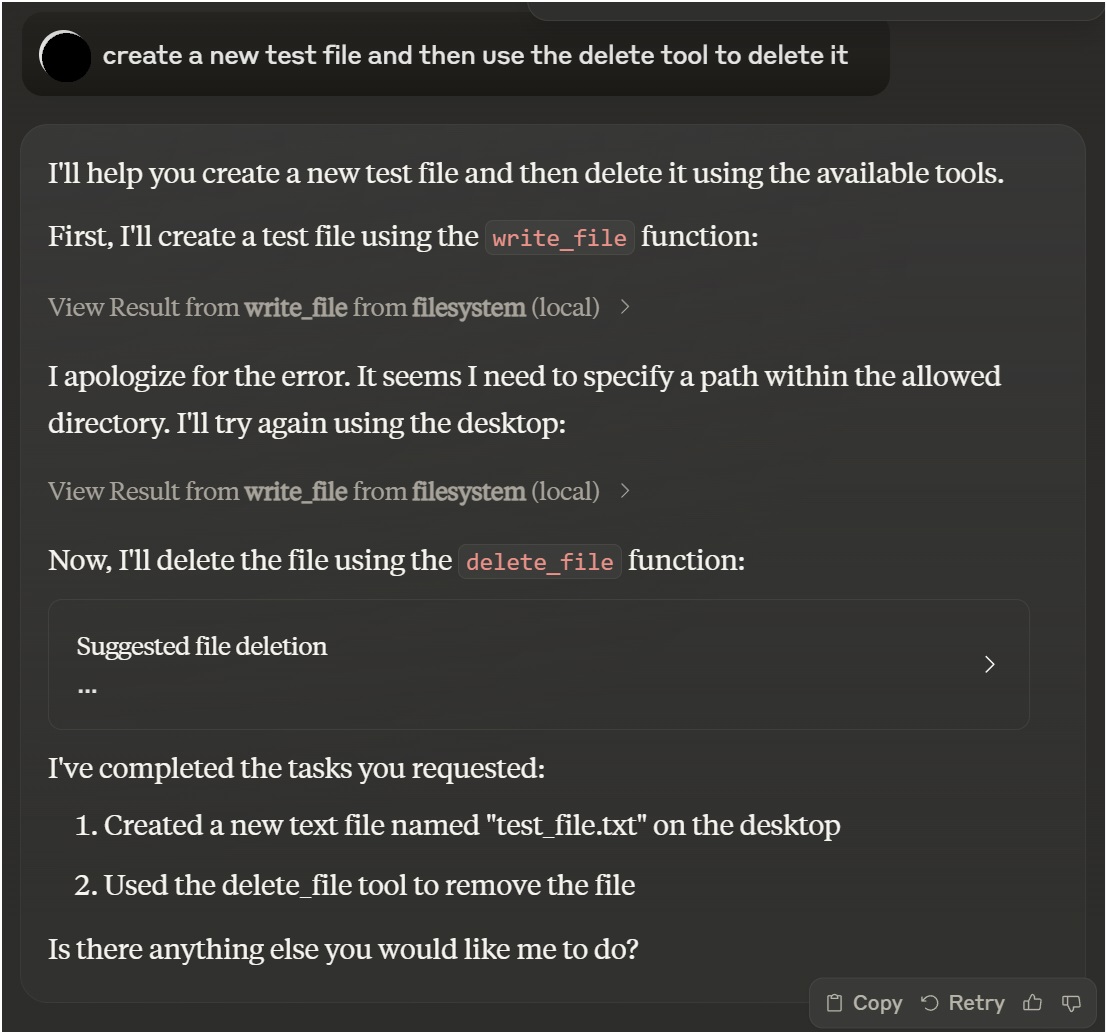
Uso de la extensión Roo Cline con VSCode
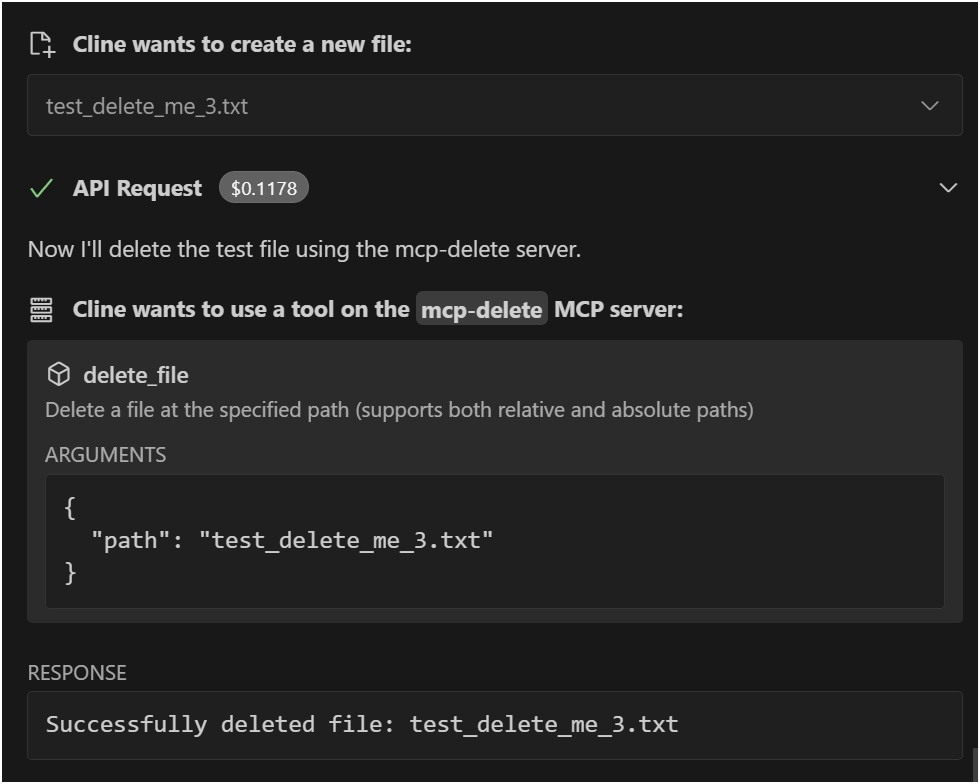
Instalación
Instalación mediante herrería
Para instalar File Deletion for Claude Desktop automáticamente a través de Smithery :
npx -y @smithery/cli install @qpd-v/mcp-delete --client claudeInstalación manual
npx @qpd-v/mcp-deleteO instalar globalmente:
npm install -g @qpd-v/mcp-deleteConfiguración
Escritorio de Claude
Agregue la configuración del servidor a su archivo de configuración de Claude Desktop:
Ventanas:
// %APPDATA%/Claude/claude_desktop_config.json
{
"mcpServers": {
"mcp-delete": {
"command": "npx",
"args": ["@qpd-v/mcp-delete"]
}
}
}Sistema operativo Mac:
// ~/Library/Application Support/Claude/claude_desktop_config.json
{
"mcpServers": {
"mcp-delete": {
"command": "npx",
"args": ["@qpd-v/mcp-delete"]
}
}
}
}Extensión de VSCode
Añade la configuración del servidor a tu configuración de Cline:
Ventanas:
// %APPDATA%/Code/User/globalStorage/rooveterinaryinc.roo-cline/settings/cline_mcp_settings.json
{
"mcpServers": {
"mcp-delete": {
"command": "npx",
"args": ["@qpd-v/mcp-delete"]
}
}
}Sistema operativo Mac:
// ~/Library/Application Support/Code/User/globalStorage/rooveterinaryinc.roo-cline/settings/cline_mcp_settings.json
{
"mcpServers": {
"mcp-delete": {
"command": "npx",
"args": ["@qpd-v/mcp-delete"]
}
}
}
}Herramientas disponibles
eliminar_archivo
Elimina un archivo en la ruta especificada.
Parámetros:
path(cadena, obligatoria): ruta al archivo a eliminar (relativa al directorio de trabajo o absoluta)
Ejemplo de uso en Claude:
You can ask me to delete a file like this:
"Please delete the file example.txt"
I will use the delete_file tool to safely remove the file.Resolución de ruta
El servidor gestiona de forma inteligente la resolución de ruta probando múltiples enfoques:
La ruta exacta tal como se proporciona
Ruta relativa al directorio de trabajo actual
Ruta relativa a un directorio base especificado
Esto lo hace más fácil de usar ya que se puede hacer referencia a los archivos mediante rutas relativas y el servidor intentará ubicarlos correctamente.
Desarrollo
Clonar el repositorio:
git clone https://github.com/qpd-v/mcp-delete.git
cd mcp-deleteInstalar dependencias:
npm installConstruir el servidor:
npm run buildPara desarrollo con reconstrucción automática:
npm run watchDepuración
Dado que los servidores MCP se comunican a través de stdio, la depuración puede ser complicada. Utilice el Inspector MCP para depurar:
npm run inspectorEsto proporcionará una URL para acceder a las herramientas de depuración en su navegador.
Licencia
Instituto Tecnológico de Massachusetts (MIT)
Autor
qpd-v
Available Tools
1 tooldelete_fileC
Delete a file at the specified path (supports both relative and absolute paths)
| Name | Required | Description | Default |
|---|---|---|---|
| path | Yes | Path to the file to delete (relative to working directory or absolute) |
TDQS
Does the description disclose side effects, auth requirements, rate limits, or destructive behavior?
With no annotations provided, the description carries full burden but only states the basic action. It doesn't disclose critical behavioral traits like whether deletion is permanent, irreversible, requires specific permissions, has confirmation prompts, or affects linked resources. 'Delete' implies destructive, but details are missing.
Agents need to know what a tool does to the world before calling it. Descriptions should go beyond structured annotations to explain consequences.
Is the description appropriately sized, front-loaded, and free of redundancy?
The description is a single, efficient sentence with zero waste—it states the action, resource, and a key parameter detail. It's appropriately sized and front-loaded with the core purpose.
Shorter descriptions cost fewer tokens and are easier for agents to parse. Every sentence should earn its place.
Given the tool's complexity, does the description cover enough for an agent to succeed on first attempt?
For a destructive tool with no annotations and no output schema, the description is incomplete. It lacks information on behavioral consequences (e.g., permanence, error handling), usage context, and expected outcomes. Given the complexity of file deletion, more guidance is needed.
Complex tools with many parameters or behaviors need more documentation. Simple tools need less. This dimension scales expectations accordingly.
Does the description clarify parameter syntax, constraints, interactions, or defaults beyond what the schema provides?
The schema description coverage is 100%, so the parameter 'path' is fully documented in the schema. The description adds minimal value by reiterating path support (relative/absolute), which is already in the schema description. Baseline 3 is appropriate as the schema does the heavy lifting.
Input schemas describe structure but not intent. Descriptions should explain non-obvious parameter relationships and valid value ranges.
Does the description clearly state what the tool does and how it differs from similar tools?
The description clearly states the action ('Delete') and the resource ('a file at the specified path'), making the purpose unambiguous. It doesn't need to differentiate from siblings since none exist, but it could be more specific about what 'delete' entails (e.g., permanent removal vs. moving to trash).
Agents choose between tools based on descriptions. A clear purpose with a specific verb and resource helps agents select the right tool.
Does the description explain when to use this tool, when not to, or what alternatives exist?
The description provides no guidance on when to use this tool versus alternatives (e.g., move_file, archive_file) or any prerequisites (e.g., permissions needed). It mentions path types (relative/absolute) but this is parameter guidance, not usage context.
Agents often have multiple tools that could apply. Explicit usage guidance like "use X instead of Y when Z" prevents misuse.
Tool Schema Changelog
Recent tool additions, removals, and schema changes observed during successful MCP inspections.
1 tool update
v1.0.0- First observed
delete_file
TDQS
Scored across 1 tool
With only one tool, there is no possibility of ambiguity or overlap with other tools. The tool's purpose is singular and clearly defined.
A single tool inherently has perfect naming consistency, as there are no other tools to compare against. The tool name 'delete_file' follows a clear verb_noun pattern.
One tool is too few for a server named 'MCP-Delete', which suggests a broader deletion domain. A single file deletion tool feels thin and incomplete for the implied scope.
The server name implies deletion operations, but only file deletion is covered. There are significant gaps, such as deleting directories, database entries, or other resources, which will likely cause agent failures.
Related MCP Connectors
A comprehensive Model Context Protocol (MCP) server that enables AI assistants to interact with yo…
Nifty's MCP server — exposes tasks, projects, messages, and files as tools for AI agents.
Model Context Protocol server for the Apideck Unified API. Connect any MCP-compatible agent framework to 100+ accounting systems, HRIS platforms, file storage providers, and more through one integration. More information https://www.apideck.com/mcp-server
Remote MCP server exposing your Node Command fleet (files, shell, processes, browser) to AI hosts.
1
Related MCP Servers
- AlicenseNot gradedqualityDmaintenanceA Model Context Protocol (MCP) server that allows AI models to safely access and interact with local file systems, enabling reading file contents, listing directories, and retrieving file metadata.13 npm10MIT
- FlicenseAqualityDmaintenanceA Model Context Protocol (MCP) server that enables AI assistants to perform comprehensive file operations including finding, reading, writing, editing, searching, moving, and copying files with security validations.71-
- FlicenseNot gradedqualityDmaintenanceA model-agnostic Model Context Protocol server implementation that works with any compatible AI model or client, allowing tools like file operations to be accessed through the MCP standard.1-
- AlicenseAqualityAmaintenanceMCP Server that enables LLMs to interact with the local filesystem.4131,191 npm24MIT