Glama
qpd-v

MCP-Delete

by qpd-v

@qpd-v/mcp-삭제

대장간 배지

파일 삭제 기능을 제공하는 모델 컨텍스트 프로토콜(MCP) 서버입니다. 이 서버는 상대 경로와 절대 경로를 모두 지원하여 AI 비서가 필요할 때 안전하게 파일을 삭제할 수 있도록 합니다.

특징

  • 상대 경로 또는 절대 경로를 사용하여 파일 삭제

  • 여러 개의 잠재적 경로를 시도하는 스마트 경로 해결

  • 자세한 경로 확인 정보가 포함된 명확한 오류 메시지

  • 삭제 전 안전한 파일 존재 여부 확인

  • Claude 및 기타 MCP 호환 AI 어시스턴트와 함께 작동합니다.

Related MCP server: File MCP Server

예시

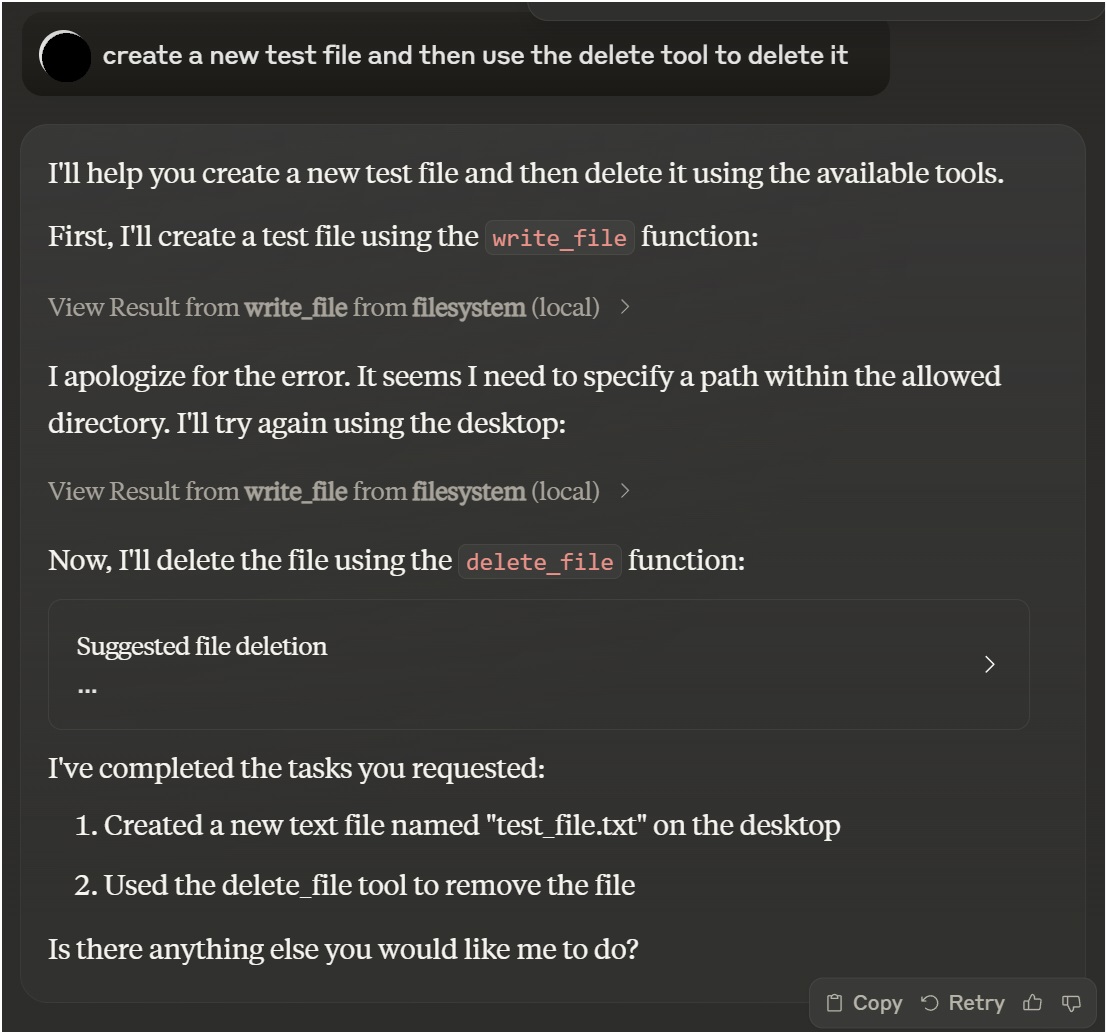
Claude Desktop과 함께 사용

클로드 데스크톱 예제

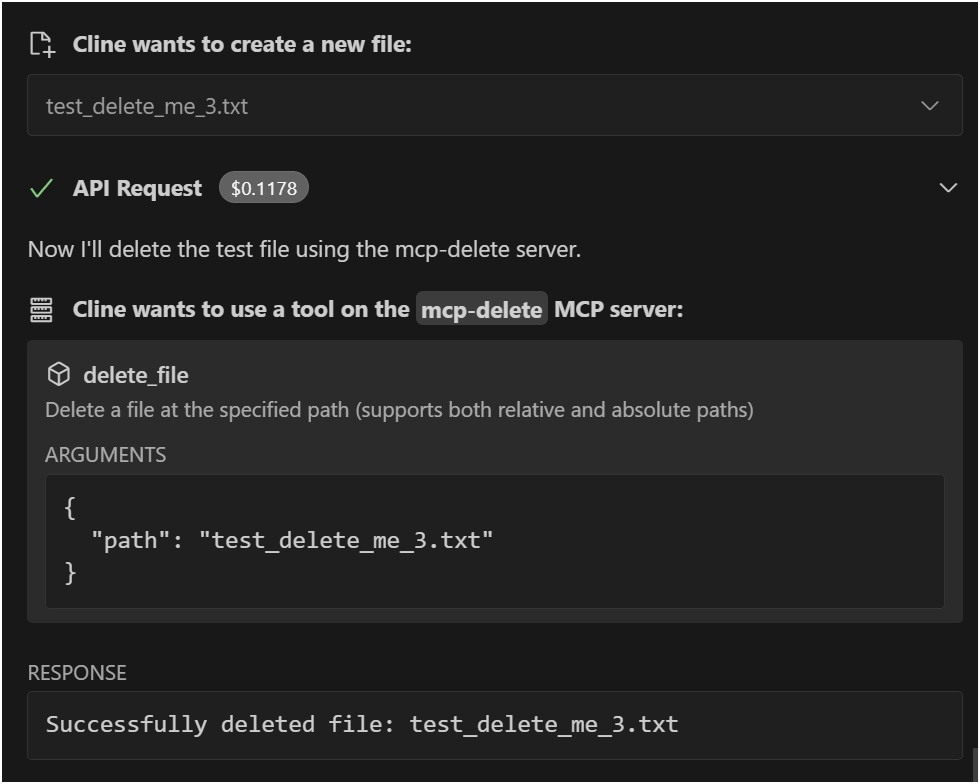
VSCode Roo Cline 확장 프로그램과 함께 사용

VSCode Roo Cline 예제

설치

Smithery를 통해 설치

Smithery를 통해 Claude Desktop용 File Deletion을 자동으로 설치하려면:

지엑스피1

수동 설치

npx @qpd-v/mcp-delete

또는 전역적으로 설치:

npm install -g @qpd-v/mcp-delete

구성

클로드 데스크탑

Claude Desktop 구성 파일에 서버 구성을 추가합니다.

윈도우:

// %APPDATA%/Claude/claude_desktop_config.json
{
  "mcpServers": {
    "mcp-delete": {
      "command": "npx",
      "args": ["@qpd-v/mcp-delete"]
    }
  }
}

맥OS:

// ~/Library/Application Support/Claude/claude_desktop_config.json
{
  "mcpServers": {
    "mcp-delete": {
      "command": "npx",
      "args": ["@qpd-v/mcp-delete"]
    }
  }
}
}

VSCode 확장

Cline 설정에 서버 구성을 추가합니다.

윈도우:

// %APPDATA%/Code/User/globalStorage/rooveterinaryinc.roo-cline/settings/cline_mcp_settings.json
{
  "mcpServers": {
    "mcp-delete": {
      "command": "npx",
      "args": ["@qpd-v/mcp-delete"]
    }
  }
}

맥OS:

// ~/Library/Application Support/Code/User/globalStorage/rooveterinaryinc.roo-cline/settings/cline_mcp_settings.json
{
  "mcpServers": {
    "mcp-delete": {
      "command": "npx",
      "args": ["@qpd-v/mcp-delete"]
    }
  }
}
}

사용 가능한 도구

파일 삭제

지정된 경로의 파일을 삭제합니다.

매개변수:

  • path (문자열, 필수): 삭제할 파일의 경로(작업 디렉토리를 기준으로 하거나 절대 경로)

Claude에서의 사용 예:

You can ask me to delete a file like this:
"Please delete the file example.txt"

I will use the delete_file tool to safely remove the file.

경로 해결

서버는 여러 가지 접근 방식을 시도하여 지능적으로 경로 확인을 처리합니다.

  1. 제공된 정확한 경로

  2. 현재 작업 디렉토리를 기준으로 한 경로

  3. 지정된 기본 디렉토리에 대한 상대 경로

이렇게 하면 상대 경로로 파일을 참조할 수 있고 서버가 해당 파일을 올바르게 찾으려고 시도하므로 사용자 친화적인 환경이 됩니다.

개발

저장소를 복제합니다.

git clone https://github.com/qpd-v/mcp-delete.git
cd mcp-delete

종속성 설치:

npm install

서버를 빌드하세요:

npm run build

자동 재빌드를 사용한 개발의 경우:

npm run watch

디버깅

MCP 서버는 stdio를 통해 통신하므로 디버깅이 어려울 수 있습니다. 디버깅에는 MCP Inspector를 사용하세요.

npm run inspector

이렇게 하면 브라우저에서 디버깅 도구에 액세스할 수 있는 URL이 제공됩니다.

특허

MIT

작가

qpd-v

Available Tools

1 tool
delete_fileC

Delete a file at the specified path (supports both relative and absolute paths)

ParametersJSON Schema
NameRequiredDescriptionDefault
pathYesPath to the file to delete (relative to working directory or absolute)

TDQS

C2.9/5.0
Behavior2/5

Does the description disclose side effects, auth requirements, rate limits, or destructive behavior?

With no annotations provided, the description carries full burden but only states the basic action. It doesn't disclose critical behavioral traits like whether deletion is permanent, irreversible, requires specific permissions, has confirmation prompts, or affects linked resources. 'Delete' implies destructive, but details are missing.

Agents need to know what a tool does to the world before calling it. Descriptions should go beyond structured annotations to explain consequences.

Conciseness5/5

Is the description appropriately sized, front-loaded, and free of redundancy?

The description is a single, efficient sentence with zero waste—it states the action, resource, and a key parameter detail. It's appropriately sized and front-loaded with the core purpose.

Shorter descriptions cost fewer tokens and are easier for agents to parse. Every sentence should earn its place.

Completeness2/5

Given the tool's complexity, does the description cover enough for an agent to succeed on first attempt?

For a destructive tool with no annotations and no output schema, the description is incomplete. It lacks information on behavioral consequences (e.g., permanence, error handling), usage context, and expected outcomes. Given the complexity of file deletion, more guidance is needed.

Complex tools with many parameters or behaviors need more documentation. Simple tools need less. This dimension scales expectations accordingly.

Parameters3/5

Does the description clarify parameter syntax, constraints, interactions, or defaults beyond what the schema provides?

The schema description coverage is 100%, so the parameter 'path' is fully documented in the schema. The description adds minimal value by reiterating path support (relative/absolute), which is already in the schema description. Baseline 3 is appropriate as the schema does the heavy lifting.

Input schemas describe structure but not intent. Descriptions should explain non-obvious parameter relationships and valid value ranges.

Purpose4/5

Does the description clearly state what the tool does and how it differs from similar tools?

The description clearly states the action ('Delete') and the resource ('a file at the specified path'), making the purpose unambiguous. It doesn't need to differentiate from siblings since none exist, but it could be more specific about what 'delete' entails (e.g., permanent removal vs. moving to trash).

Agents choose between tools based on descriptions. A clear purpose with a specific verb and resource helps agents select the right tool.

Usage Guidelines2/5

Does the description explain when to use this tool, when not to, or what alternatives exist?

The description provides no guidance on when to use this tool versus alternatives (e.g., move_file, archive_file) or any prerequisites (e.g., permissions needed). It mentions path types (relative/absolute) but this is parameter guidance, not usage context.

Agents often have multiple tools that could apply. Explicit usage guidance like "use X instead of Y when Z" prevents misuse.

Tool Schema Changelog

Recent tool additions, removals, and schema changes observed during successful MCP inspections.

  1. 1 tool updatev1.0.0
    • First observeddelete_file

TDQS

B3.1/5.0

Scored across 1 tool

Disambiguation5/5

With only one tool, there is no possibility of ambiguity or overlap with other tools. The tool's purpose is singular and clearly defined.

Naming Consistency5/5

A single tool inherently has perfect naming consistency, as there are no other tools to compare against. The tool name 'delete_file' follows a clear verb_noun pattern.

Tool Count2/5

One tool is too few for a server named 'MCP-Delete', which suggests a broader deletion domain. A single file deletion tool feels thin and incomplete for the implied scope.

Completeness2/5

The server name implies deletion operations, but only file deletion is covered. There are significant gaps, such as deleting directories, database entries, or other resources, which will likely cause agent failures.

Related MCP Connectors

Related MCP Servers

  • A
    license
    Not graded
    quality
    D
    maintenance
    A Model Context Protocol (MCP) server that allows AI models to safely access and interact with local file systems, enabling reading file contents, listing directories, and retrieving file metadata.
    13 npm
    10
    MIT
  • F
    license
    A
    quality
    D
    maintenance
    A Model Context Protocol (MCP) server that enables AI assistants to perform comprehensive file operations including finding, reading, writing, editing, searching, moving, and copying files with security validations.
    7
    1
    -
  • F
    license
    Not graded
    quality
    D
    maintenance
    A model-agnostic Model Context Protocol server implementation that works with any compatible AI model or client, allowing tools like file operations to be accessed through the MCP standard.
    1
    -