MCP-Delete
The MCP-Delete server provides a tool to safely delete files using both relative and absolute paths. It features intelligent path resolution that tries multiple approaches to locate files, performs existence checks before deletion, and returns clear error messages with path resolution details if deletion fails. The server works with Claude and other MCP-compatible AI assistants.
Provides specific configuration paths and instructions for macOS users to enable file deletion capabilities.
Click on "Install Server".
Wait a few minutes for the server to deploy. Once ready, it will show a "Started" state.
In the chat, type
@followed by the MCP server name and your instructions, e.g., "@MCP-Deletedelete the temporary file test_output.log"
That's it! The server will respond to your query, and you can continue using it as needed.
Here is a step-by-step guide with screenshots.
@qpd-v/mcp-delete
A Model Context Protocol (MCP) server that provides file deletion capabilities. This server allows AI assistants to safely delete files when needed, with support for both relative and absolute paths.
Features
Delete files using relative or absolute paths
Smart path resolution that tries multiple potential paths
Clear error messages with detailed path resolution information
Safe file existence checks before deletion
Works with Claude and other MCP-compatible AI assistants
Related MCP server: File MCP Server
Examples
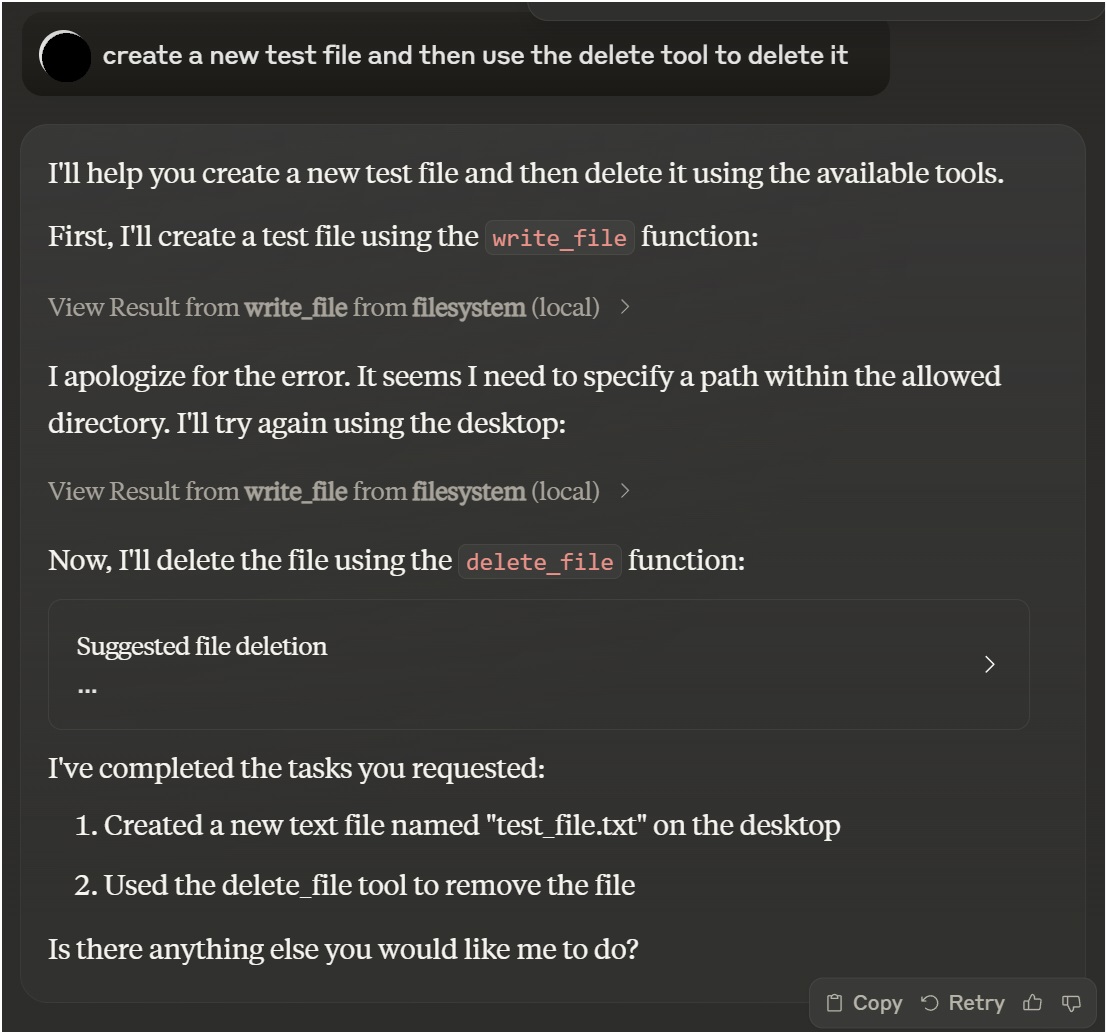
Using with Claude Desktop
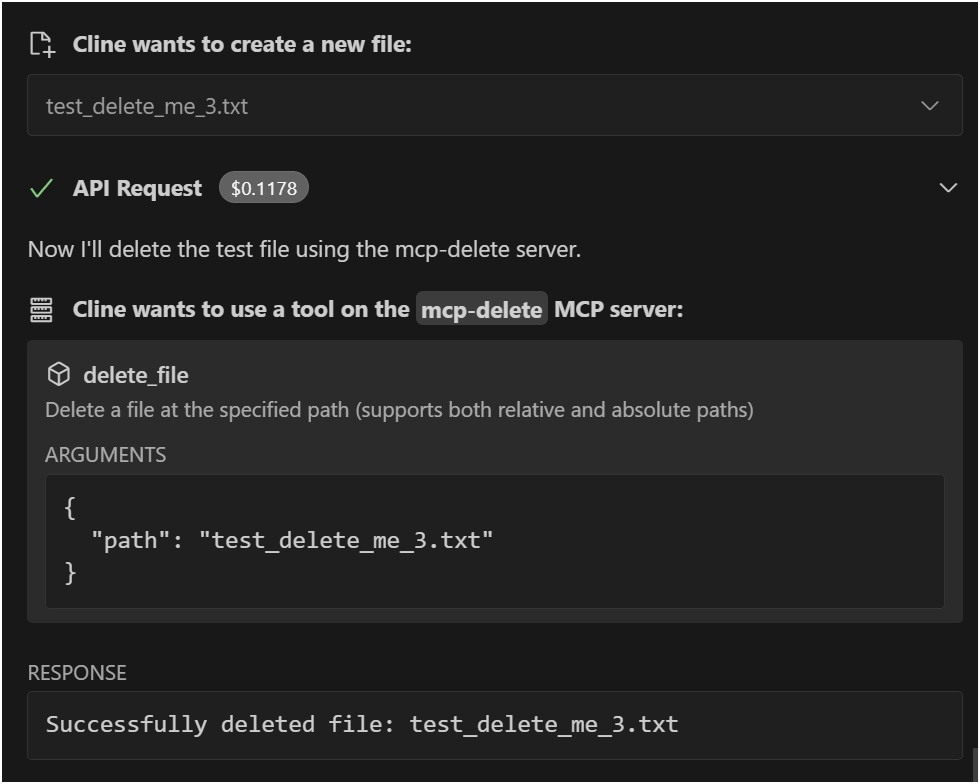
Using with VSCode Roo Cline Extension
Installation
Installing via Smithery
To install File Deletion for Claude Desktop automatically via Smithery:
npx -y @smithery/cli install @qpd-v/mcp-delete --client claudeManual Installation
npx @qpd-v/mcp-deleteOr install globally:
npm install -g @qpd-v/mcp-deleteConfiguration
Claude Desktop
Add the server configuration to your Claude Desktop config file:
Windows:
// %APPDATA%/Claude/claude_desktop_config.json
{
"mcpServers": {
"mcp-delete": {
"command": "npx",
"args": ["@qpd-v/mcp-delete"]
}
}
}MacOS:
// ~/Library/Application Support/Claude/claude_desktop_config.json
{
"mcpServers": {
"mcp-delete": {
"command": "npx",
"args": ["@qpd-v/mcp-delete"]
}
}
}
}VSCode Extension
Add the server configuration to your Cline settings:
Windows:
// %APPDATA%/Code/User/globalStorage/rooveterinaryinc.roo-cline/settings/cline_mcp_settings.json
{
"mcpServers": {
"mcp-delete": {
"command": "npx",
"args": ["@qpd-v/mcp-delete"]
}
}
}MacOS:
// ~/Library/Application Support/Code/User/globalStorage/rooveterinaryinc.roo-cline/settings/cline_mcp_settings.json
{
"mcpServers": {
"mcp-delete": {
"command": "npx",
"args": ["@qpd-v/mcp-delete"]
}
}
}
}Available Tools
delete_file
Deletes a file at the specified path.
Parameters:
path(string, required): Path to the file to delete (relative to working directory or absolute)
Example usage in Claude:
You can ask me to delete a file like this:
"Please delete the file example.txt"
I will use the delete_file tool to safely remove the file.Path Resolution
The server intelligently handles path resolution by trying multiple approaches:
The exact path as provided
Path relative to the current working directory
Path relative to a specified base directory
This makes it more user-friendly as files can be referenced by relative paths and the server will attempt to locate them correctly.
Development
Clone the repository:
git clone https://github.com/qpd-v/mcp-delete.git
cd mcp-deleteInstall dependencies:
npm installBuild the server:
npm run buildFor development with auto-rebuild:
npm run watchDebugging
Since MCP servers communicate over stdio, debugging can be challenging. Use the MCP Inspector for debugging:
npm run inspectorThis will provide a URL to access debugging tools in your browser.
License
MIT
Author
qpd-v
Available Tools
1 tooldelete_fileC
Delete a file at the specified path (supports both relative and absolute paths)
| Name | Required | Description | Default |
|---|---|---|---|
| path | Yes | Path to the file to delete (relative to working directory or absolute) |
TDQS
Does the description disclose side effects, auth requirements, rate limits, or destructive behavior?
With no annotations provided, the description carries full burden but only states the basic action. It doesn't disclose critical behavioral traits like whether deletion is permanent, irreversible, requires specific permissions, has confirmation prompts, or affects linked resources. 'Delete' implies destructive, but details are missing.
Agents need to know what a tool does to the world before calling it. Descriptions should go beyond structured annotations to explain consequences.
Is the description appropriately sized, front-loaded, and free of redundancy?
The description is a single, efficient sentence with zero waste—it states the action, resource, and a key parameter detail. It's appropriately sized and front-loaded with the core purpose.
Shorter descriptions cost fewer tokens and are easier for agents to parse. Every sentence should earn its place.
Given the tool's complexity, does the description cover enough for an agent to succeed on first attempt?
For a destructive tool with no annotations and no output schema, the description is incomplete. It lacks information on behavioral consequences (e.g., permanence, error handling), usage context, and expected outcomes. Given the complexity of file deletion, more guidance is needed.
Complex tools with many parameters or behaviors need more documentation. Simple tools need less. This dimension scales expectations accordingly.
Does the description clarify parameter syntax, constraints, interactions, or defaults beyond what the schema provides?
The schema description coverage is 100%, so the parameter 'path' is fully documented in the schema. The description adds minimal value by reiterating path support (relative/absolute), which is already in the schema description. Baseline 3 is appropriate as the schema does the heavy lifting.
Input schemas describe structure but not intent. Descriptions should explain non-obvious parameter relationships and valid value ranges.
Does the description clearly state what the tool does and how it differs from similar tools?
The description clearly states the action ('Delete') and the resource ('a file at the specified path'), making the purpose unambiguous. It doesn't need to differentiate from siblings since none exist, but it could be more specific about what 'delete' entails (e.g., permanent removal vs. moving to trash).
Agents choose between tools based on descriptions. A clear purpose with a specific verb and resource helps agents select the right tool.
Does the description explain when to use this tool, when not to, or what alternatives exist?
The description provides no guidance on when to use this tool versus alternatives (e.g., move_file, archive_file) or any prerequisites (e.g., permissions needed). It mentions path types (relative/absolute) but this is parameter guidance, not usage context.
Agents often have multiple tools that could apply. Explicit usage guidance like "use X instead of Y when Z" prevents misuse.
TDQS
With only one tool, there is no possibility of ambiguity or overlap with other tools. The tool's purpose is singular and clearly defined.
A single tool inherently has perfect naming consistency, as there are no other tools to compare against. The tool name 'delete_file' follows a clear verb_noun pattern.
One tool is too few for a server named 'MCP-Delete', which suggests a broader deletion domain. A single file deletion tool feels thin and incomplete for the implied scope.
The server name implies deletion operations, but only file deletion is covered. There are significant gaps, such as deleting directories, database entries, or other resources, which will likely cause agent failures.
Maintenance
Resources
Unclaimed servers have limited discoverability.
Looking for Admin?
If you are the server author, to access and configure the admin panel.
Related MCP Connectors
A comprehensive Model Context Protocol (MCP) server that enables AI assistants to interact with yo…
Nifty's MCP server — exposes tasks, projects, messages, and files as tools for AI agents.
Model Context Protocol server for the Apideck Unified API. Connect any MCP-compatible agent framework to 100+ accounting systems, HRIS platforms, file storage providers, and more through one integration. More information https://www.apideck.com/mcp-server
Persistent file storage for AI agents via MCP and curl. Upload, download, and version files.
Related MCP Servers
- AlicenseNot gradedqualityDmaintenanceA Model Context Protocol (MCP) server that allows AI models to safely access and interact with local file systems, enabling reading file contents, listing directories, and retrieving file metadata.1910MIT
- FlicenseAqualityDmaintenanceA Model Context Protocol (MCP) server that enables AI assistants to perform comprehensive file operations including finding, reading, writing, editing, searching, moving, and copying files with security validations.71
- FlicenseNot gradedqualityDmaintenanceA model-agnostic Model Context Protocol server implementation that works with any compatible AI model or client, allowing tools like file operations to be accessed through the MCP standard.1
- AlicenseAqualityBmaintenanceMCP Server that enables LLMs to interact with the local filesystem.1379614MIT
Latest Blog Posts
- Who's Calling? MCP Hosts Are an Identity Blind Spot (And the Spec Knows It)By Om-Shree-0709 on .mcpAgent IdentityOAuth 2.1
- Your AI Chatbot Just Exposed Your CEO's Salary to an InternBy Om-Shree-0709 on .Agent IdentityMCP SecurityOAuth Delegation
- Why MCP Servers Need Execution Sandboxing (And Why Your Current Stack Isn't Enough)By Om-Shree-0709 on .Agentic AiPrompt InjectionWebAssembly
MCP directory API
We provide all the information about MCP servers via our MCP API.
curl -X GET 'https://glama.ai/api/mcp/v1/servers/qpd-v/mcp-delete'
If you have feedback or need assistance with the MCP directory API, please join our Discord server