


F
licenseNot graded
qualityD
maintenanceA Model Context Protocol server that provides stock technical analysis tools (moving averages, RSI, trade recommendations) for AI assistants to analyze stocks and offer trading signals.
-

Enables pulling recent ticker-specific financial news headlines from Google News RSS feeds.
Aggregates financial news from multiple RSS sources in real-time to provide agents with live market context.
Provides tools to screen the stock market for stocks based on presets such as most active, volume spikes, and technical conditions like overbought or oversold status.
Click on "Deploy Server".
Wait a few minutes for the server to deploy. Once ready, it will show a "Started" state.
In the chat, type @ followed by the MCP server name and your instructions, e.g., "@momentum-mcp Analyze the technicals for NVDA and show me a candlestick chart"
That's it! The server will respond to your query, and you can continue using it as needed.
Here is a step-by-step guide with screenshots.
This toolkit shares its lineage with Vesper, a LangGraph trading agent for Webull — its
mcp_server/is a separate, credential-heavier superset (adds a live-account owner mode and, eventually, an order path). This repo stays the standalone version: point any MCP host at it, no broker anywhere near it. It's also part of the mphinance AI trading stack — if you want packaged Claude/Gemini Skills (screeners, regime detection, backtesting playbooks) that can call these tools instead of a paid API, see alpha-skills; if you want to act on what these tools tell you, see awesome-broker-mcp for which broker an AI can actually trade through.
October 21, 2026 — SCANLINE Merged In
28 new tools, 4 prompts, 3 resources, all scan_-prefixed and credential-free: the
full TradingView screen engine from mphinance/scanline
now lives in mcp_server/scanline/. Six markets (stocks, crypto, forex, futures, bonds,
CFDs), the 1000+ field universe with scan_search_fields to discover it, cross-field
filters (SMA50 crosses_above SMA200), sandboxed computed columns, cross-sectional stats,
factor scoring, 47 preset scans, a multi-timeframe scan_analyze, and a dozen market studies
(breadth, sector rotation, gap scanner, earnings radar, dividend quality). OTC shells are
excluded by default on america; pass include_otc=True to lift it. See
docs/SCANLINE.md.
First test suite in the repo: python -m pytest tests/ -q -m "not live" runs offline and
covers the analytics math, the presets, the OTC guard, the market-study reducers and the
tool registration.
tradingview-screener was already a dependency, so nothing new to install.
Fixed a fresh install that did not start. server.py imported mcp.server.fastmcp.FastMCP,
the mcp 1.x SDK's copy of FastMCP, while requirements.txt asks for fastmcp>=3.0, which now
pulls mcp 2.x where that module is gone. The server is on the standalone fastmcp package it
declares; MCP_TRANSPORT, MCP_HOST, MCP_PORT and MCP_SSE_PATH behave as before.
September 13, 2026 — SEC EDGAR + TickerTrace, and a Docs Catch-Up
21 new tools, both credential-free: get_sec_filings, get_sec_financials,
get_shares_outstanding, get_stakes_held (SEC EDGAR — no API key, just a SEC_USER_AGENT
contact string) and 17 etf_* tools (TickerTrace — daily institutional ETF holdings across 71
funds, deliberately open with no key at all). Neither needs a TraderDaddy Pro subscription.
Tools table and Claude Desktop instructions were still describing 6-35 tools; corrected to the
actual 73 now registered in mcp_server/server.py, grouped by category.
Fixed a License section that said MIT while the committed LICENSE file is Apache-2.0 — the
README now matches the file.
April 26, 2026 — The "Constellation" Update
Massive 35-Tool Expansion: Merged in the complete Phase 2 toolset from the internal workspace.
Options (VoPR™ Engine): Added analyze_options_setup, find_best_to_sell, find_best_to_buy, and sweep_setups for intelligent options grading.
Institutional Flow: Native TraderDaddy integration for real-time unusual activity, Gamma Exposure (GEX), and sector rotation.
Backtesting Suite: 6 technical presets with walk-forward validation and multi-ticker sweeping via backtest_strategy and sweep_strategy.
Macro & Environment: Added detect_macro_regime, analyze_breadth, detect_bubble_risk, and get_market_environment.
Knowledge Base: Added search_knowledge RAG tool to search across 139 trading books.
Related MCP server: Financial Analysis MCP Server
momentum-mcp turns any MCP-compatible AI assistant into a quantitative trading analyst. Instead of copy-pasting tickers into Yahoo Finance and screenshotting charts, your AI agent has access to 101 institutional-grade tools to:
🔍 Screen the entire market in seconds — find overbought stocks, unusual volume spikes, new 52-week highs
🧮 Run the SCANLINE engine — 1000+ TradingView fields across 6 markets, cross-field filters, computed columns, factor ranks, and market studies like breadth, sector rotation and gap fill tracking
📊 Pull clean OHLCV data for any ticker, any timeframe — ready for analysis, no CSV wrangling
📈 Compute technical indicators — RSI, MACD with plain-English interpretation, not just raw numbers
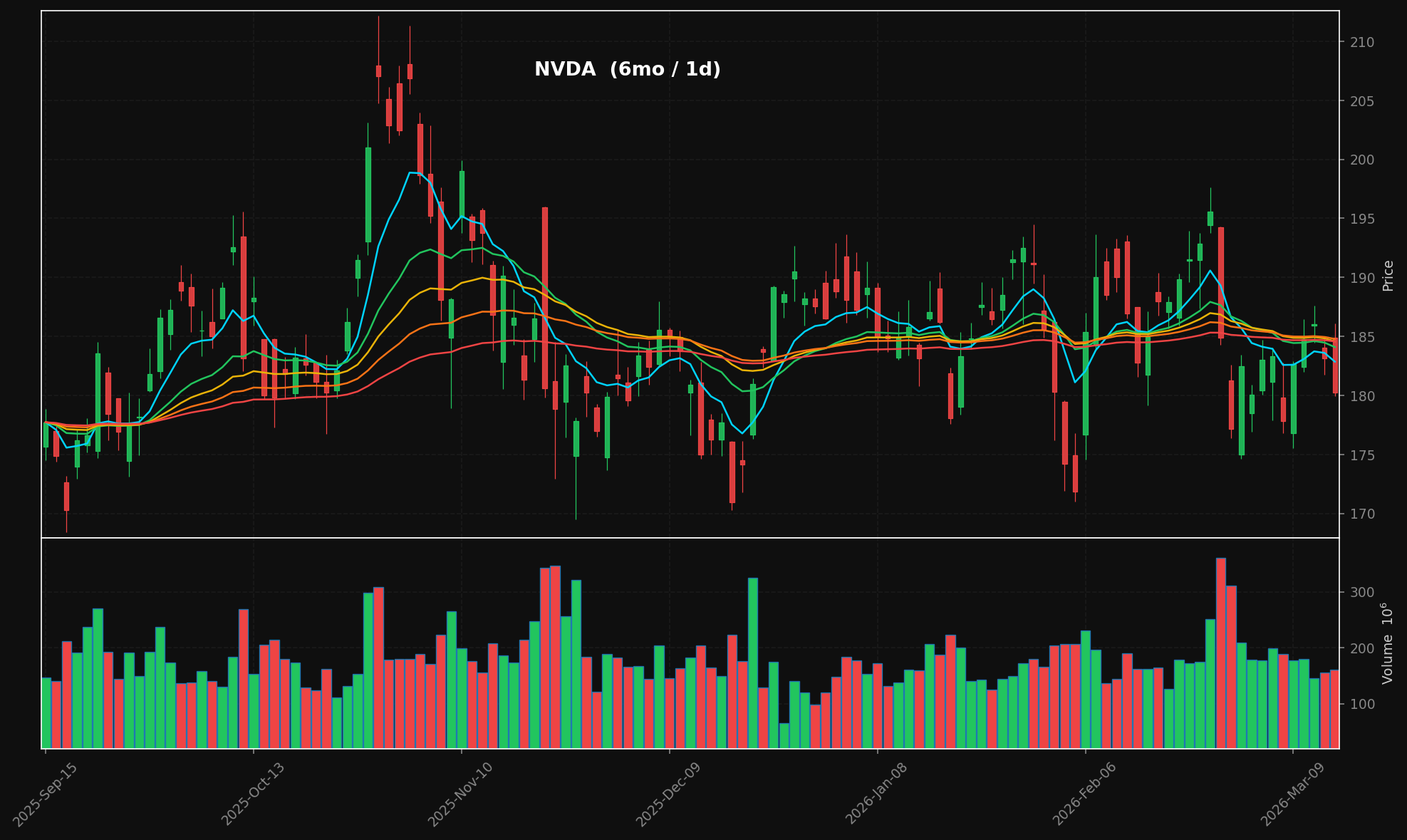
🕯️ Generate professional candlestick charts — dark-themed with stacked EMA overlays (8/21/34/55/89), volume panels, publication-ready PNGs
📰 Aggregate financial news from multiple RSS sources in real-time
📄 Extract full article text from any URL — your agent reads the actual article, not just the headline
All of this happens through the Model Context Protocol, so your AI assistant calls these tools natively — no API keys, no REST endpoints, no configuration hell.
generate_chart("NVDA", period="6mo") → candlestick + volume + stacked EMAs:
101 tools across thirteen groups:
Group | Tools |
Screening & Data |
|
SCANLINE TradingView Screener (no API key, see docs/SCANLINE.md) |
|
Technicals & Charts |
|
Options — VoPR™ Engine |
|
Institutional Flow & Gamma |
|
Pattern Screeners |
|
Market Structure & Regime |
|
Scenario & Modeling |
|
Backtesting |
|
Knowledge & Journal |
|
News |
|
SEC EDGAR (no API key — see below) |
|
Institutional ETF Flow (no API key at all) |
|
SEC EDGAR needs one free env var, no subscription: SEC's User-Agent header IS the
credential, and it just has to identify you.
export SEC_USER_AGENT="Your Project Name (contact: you@example.com)"Without it, get_sec_filings and friends return a clean {"error": ...} naming the missing
variable rather than crashing. The 17 etf_* tools need nothing at all —
api.tickertrace.pro is deliberately open, no key or account.
The 28 scan_* tools need nothing either: TradingView serves delayed data to anyone. A
TradingView sessionid cookie in SCANLINE_TV_SESSIONID upgrades them to whatever real-time
feeds that account has; the cookie never appears in a response, a log line or a cache key.
git clone https://github.com/mphinance/momentum-mcp.git
cd momentum-mcp
python3 -m venv .venv
source .venv/bin/activate
# Three-step install: pandas-ta hard-pins numba==0.61.2 which doesn't support
# Python 3.14, so we install it separately and override numba.
pip install fastmcp tradingview-screener yfinance pandas mplfinance matplotlib feedparser trafilatura scipy tradingview-ta chromadb requests httpx
pip install pandas-ta --no-deps
pip install 'numba>=0.62'
Why three steps?
pandas-ta==0.4.71b0declaresnumba==0.61.2as a hard dependency, but thatnumbaversion only supports Python<3.14. Installingpandas-tawith--no-depsskips the pin, andnumba>=0.62(which has Python 3.14 wheels) is fully compatible at runtime — verified working.
Test that everything works:
python -c "from mcp_server.server import mcp; print('✓ Ready')"Run the server:
python -m mcp_server.serverThe most popular MCP client. Add to your claude_desktop_config.json (located at ~/Library/Application Support/Claude/ on macOS or %APPDATA%\Claude\ on Windows):
{
  "mcpServers": {
    "momentum": {
      "command": "python",
      "args": ["-m", "mcp_server.server"],
      "cwd": "/absolute/path/to/momentum-mcp",
      "env": {
        "VIRTUAL_ENV": "/absolute/path/to/momentum-mcp/.venv",
        "PATH": "/absolute/path/to/momentum-mcp/.venv/bin:$PATH"
      }
    }
  }
}
Restart Claude Desktop. You'll see the 🔨 tools icon — click it to verify all 101 tools are loaded.
Add to .cursor/mcp.json in your project root (or global config at ~/.cursor/mcp.json):
{
  "mcpServers": {
    "momentum": {
      "command": "/absolute/path/to/momentum-mcp/.venv/bin/python",
      "args": ["-m", "mcp_server.server"],
      "cwd": "/absolute/path/to/momentum-mcp"
    }
  }
}
The tools will be available in Cursor's Agent mode. Ask it to "screen for overbought stocks" or "chart NVDA over the last 6 months."
MCP is generally available in GitHub Copilot (VS Code 1.86+). Add to your .vscode/mcp.json:
{
  "servers": {
    "momentum": {
      "command": "/absolute/path/to/momentum-mcp/.venv/bin/python",
      "args": ["-m", "mcp_server.server"],
      "cwd": "/absolute/path/to/momentum-mcp"
    }
  }
}
Enable Agent mode in the Copilot Chat panel — momentum tools will appear in the tool picker.
Add to your Windsurf MCP config at ~/.codeium/windsurf/mcp_config.json:
{
  "mcpServers": {
    "momentum": {
      "command": "/absolute/path/to/momentum-mcp/.venv/bin/python",
      "args": ["-m", "mcp_server.server"],
      "cwd": "/absolute/path/to/momentum-mcp"
    }
  }
}
Cascade will automatically discover the tools. Use them in any Windsurf chat.
Open Cline's MCP settings (gear icon → MCP Servers → "Edit MCP Settings") and add:
{
  "mcpServers": {
    "momentum": {
      "command": "/absolute/path/to/momentum-mcp/.venv/bin/python",
      "args": ["-m", "mcp_server.server"],
      "cwd": "/absolute/path/to/momentum-mcp"
    }
  }
}
Cline will list the tools in its server panel. Enable them and they're ready to use.
Add the server directly from the terminal:
claude mcp add momentum \
  /absolute/path/to/momentum-mcp/.venv/bin/python \
  -m mcp_server.server \
  --cwd /absolute/path/to/momentum-mcp
Verify it's connected:
claude mcp listmomentum-mcp uses the stdio transport (the MCP default). Any client that supports stdio can connect by running:
/path/to/.venv/bin/python -m mcp_server.serverThat's it. No HTTP server, no ports, no auth — just stdin/stdout.
momentum-mcp/
├── requirements.txt         # Pinned dependencies
├── README.md
└── mcp_server/
    ├── __init__.py
    ├── server.py            # FastMCP entry point — registers all 101 tools
    ├── screener.py          # TradingView stock scanner
    ├── data.py              # yfinance OHLCV with async wrapper
    ├── technicals.py        # pandas-ta indicator suite
    ├── charts.py            # mplfinance candlestick + volume charts
    ├── news.py              # feedparser RSS + trafilatura extraction
    ├── edgar.py             # SEC EDGAR client — no API key, User-Agent only
    ├── edgar_tools.py        # get_sec_filings/financials/shares_outstanding/stakes_held
    ├── tickertrace.py       # api.tickertrace.pro client — no key, no account
    ├── tickertrace_tools.py # 17 etf_* institutional ETF holdings tools
    ├── scanline/            # the SCANLINE engine: pipeline, analytics, fields, presets
    │   └── tools.py         # 28 scan_* tools, 4 prompts, 3 resources
└── ... # options, backtest, screeners, macro/regime, knowledge baseLibrary | Role |
MCP server framework (v3.x) | |
Stock screening via TradingView's API | |
Yahoo Finance OHLCV data | |
130+ technical indicators | |
Financial chart rendering | |
RSS/Atom feed parsing | |
Web article text extraction | |
SEC EDGAR client (no API key, just a User-Agent) | |
TickerTrace client (api.tickertrace.pro, no key) |
Once connected, try asking your AI assistant:
"Screen the market for stocks with high relative volume today"
"Get me 6 months of daily data for NVDA and analyze the technicals"
"Generate a candlestick chart for AAPL over the past year"
"What's the latest news on TSLA? Pull the full text of the most interesting article."
"Find oversold stocks, then analyze the technicals on the top 3 results"
"Screen US mega caps with RSI under 35, add a dollar-volume column, rank them by the Value factor, then scan_analyze the top 3"
"Which sectors are rotating in right now, and what gapped up this morning that is still holding the gap?"
Apache-2.0 — see LICENSE.
This server cannot be deployed
Research-only MCP server: your AI as a quant research desk. 90 tools, no trades, no brokers.
Stock research for AI assistants: scan US stocks, ETFs and futures, cite SEC filings, save queries.
The Octagon MCP server provides specialized AI-powered financial research and analysis by integrating with the Octagon Market Intelligence API. It enables users to analyze public market data (SEC filings, earnings transcripts, financial metrics, and stock data for 8000+ companies), private market data (3M+ companies, 500k+ funding rounds, 2M+ M&A/IPO transactions), and conduct deep research including web scraping capabilities. The server also features autonomous research agents that search hundreds of sources and return fully cited reports in approximately one minute.
Market analyst tools + AI agent: crypto, US equities, options, Korea, fundamentals, macro, backtests