F
licenseNot graded
qualityD
maintenanceA Model Context Protocol server that provides stock technical analysis tools (moving averages, RSI, trade recommendations) for AI assistants to analyze stocks and offer trading signals.

2026년 4월 26일 — "Constellation" 업데이트
35개 도구 대규모 확장: 내부 워크스페이스의 2단계 도구 세트를 완전히 통합했습니다.
옵션 (VoPR™ 엔진): 지능형 옵션 등급 평가를 위해 analyze_options_setup, find_best_to_sell, find_best_to_buy, sweep_setups를 추가했습니다.
기관 흐름: 실시간 비정상 활동, 감마 익스포저(GEX) 및 섹터 로테이션을 위한 네이티브 TraderDaddy 통합.
백테스팅 제품군: backtest_strategy 및 sweep_strategy를 통한 워크포워드 검증 및 다중 티커 스윕이 포함된 6가지 기술적 프리셋.
매크로 및 환경: detect_macro_regime, analyze_breadth, detect_bubble_risk, get_market_environment를 추가했습니다.
지식 베이스: 139권의 트레이딩 서적을 검색할 수 있는 search_knowledge RAG 도구를 추가했습니다.
Related MCP server: Financial Analysis MCP Server
momentum-mcp는 MCP 호환 AI 어시스턴트를 정량적 트레이딩 분석가로 변신시킵니다. Yahoo Finance에 티커를 복사해서 붙여넣고 차트를 스크린샷 찍는 대신, AI 에이전트가 35개의 기관급 도구에 액세스하여 다음을 수행할 수 있습니다:
🔍 전체 시장 스크리닝 — 과매수 주식, 비정상적인 거래량 급증, 새로운 52주 신고가 등을 몇 초 만에 찾습니다.
📊 깔끔한 OHLCV 데이터 추출 — 모든 티커, 모든 기간에 대해 분석 준비가 완료된 데이터를 가져옵니다 (CSV 정리 불필요).
📈 기술적 지표 계산 — 단순한 수치가 아닌, 평이한 영어로 해석된 RSI, MACD 분석을 제공합니다.
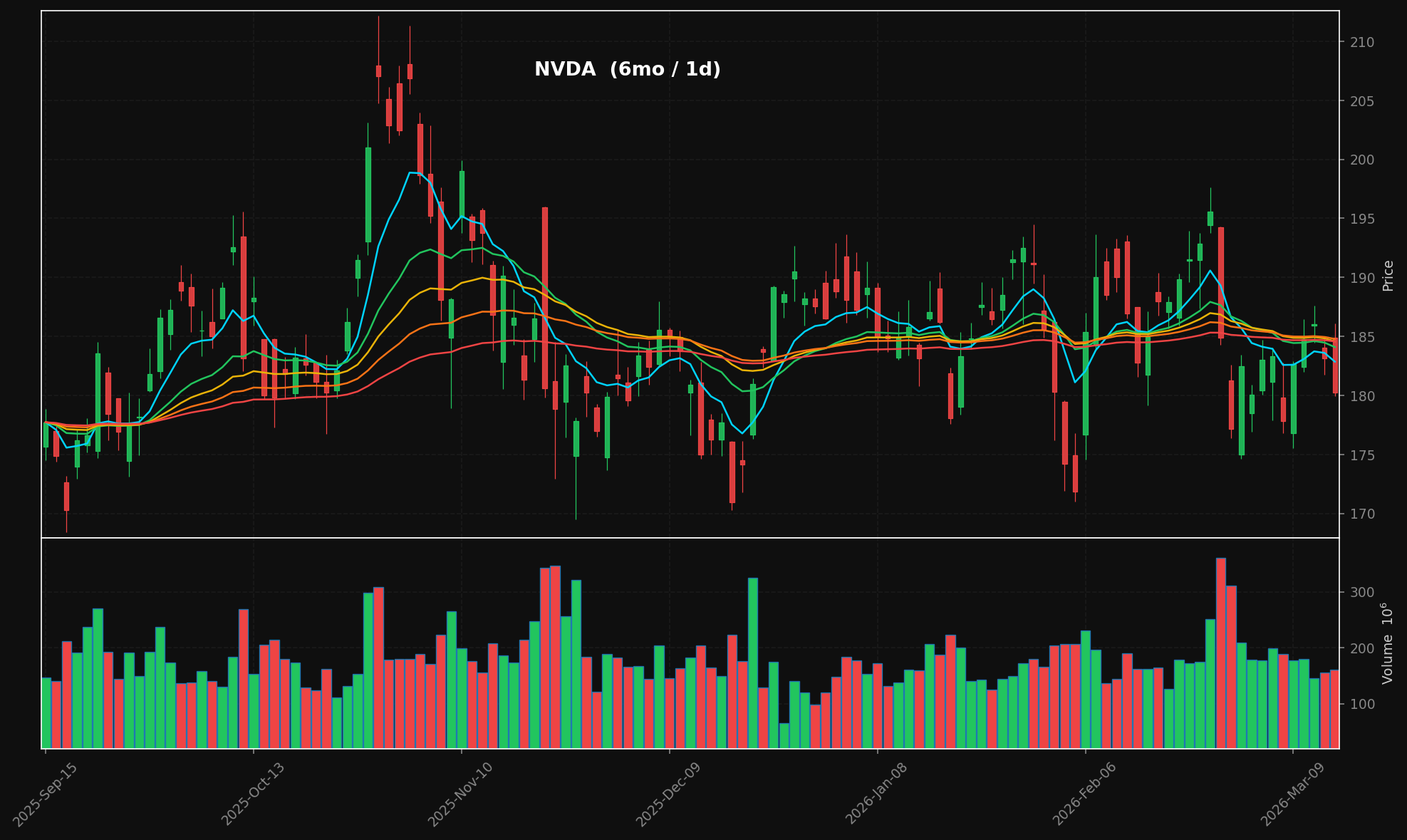
🕯️ 전문적인 캔들스틱 차트 생성 — 다크 테마, 누적 EMA 오버레이(8/21/34/55/89), 거래량 패널이 포함된 출판용 PNG를 생성합니다.
📰 금융 뉴스 수집 — 여러 RSS 소스에서 실시간으로 헤드라인을 가져옵니다.
📄 전체 기사 텍스트 추출 — 모든 URL에서 전체 기사 본문을 추출합니다 (광고, 내비게이션, 페이월 제거).
이 모든 과정은 Model Context Protocol을 통해 이루어지므로, AI 어시스턴트가 API 키, REST 엔드포인트, 복잡한 설정 없이 도구를 네이티브로 호출합니다.
generate_chart("NVDA", period="6mo") → 캔들스틱 + 거래량 + 누적 EMA:
도구 | 기능 |
| 프리셋별 주식 스캔: 가장 활발한 종목, 신고가/신저가, 과매수, 과매도, 높은 상대 거래량 |
| OHLCV 캔들스틱 데이터 가져오기 — 모든 티커, 기간, 간격 |
| RSI(14) + MACD(12,26,9) 계산 및 평이한 영어로 된 분석 요약 제공 |
| 누적 EMA 오버레이(8/21/34/55/89) + 거래량이 포함된 캔들스틱 차트 렌더링 → PNG + base64 |
| Yahoo Finance 및 Google News RSS 피드에서 최근 헤드라인 가져오기 |
| 모든 URL에서 전체 기사 본문 추출 (광고, 내비게이션, 페이월 제거) |
git clone https://github.com/mphinance/momentum-mcp.git
cd momentum-mcp
python3 -m venv .venv
source .venv/bin/activate
pip install -r requirements.txt
모든 것이 작동하는지 테스트:
python -c "from mcp_server.server import mcp; print('✓ Ready')"서버 실행:
python -m mcp_server.server가장 인기 있는 MCP 클라이언트입니다. claude_desktop_config.json (macOS의 경우 ~/Library/Application Support/Claude/, Windows의 경우 %APPDATA%\Claude\에 위치)에 추가하세요:
{
  "mcpServers": {
    "momentum": {
      "command": "python",
      "args": ["-m", "mcp_server.server"],
      "cwd": "/absolute/path/to/momentum-mcp",
      "env": {
        "VIRTUAL_ENV": "/absolute/path/to/momentum-mcp/.venv",
        "PATH": "/absolute/path/to/momentum-mcp/.venv/bin:$PATH"
      }
    }
  }
}
Claude Desktop을 재시작하세요. 🔨 도구 아이콘이 보이면 클릭하여 6개의 도구가 모두 로드되었는지 확인하세요.
프로젝트 루트의 .cursor/mcp.json (또는 ~/.cursor/mcp.json의 전역 설정)에 추가하세요:
{
  "mcpServers": {
    "momentum": {
      "command": "/absolute/path/to/momentum-mcp/.venv/bin/python",
      "args": ["-m", "mcp_server.server"],
      "cwd": "/absolute/path/to/momentum-mcp"
    }
  }
}
Cursor의 에이전트 모드에서 도구를 사용할 수 있습니다. "과매수 주식 스크리닝" 또는 "지난 6개월간 NVDA 차트 분석"과 같이 요청하세요.
MCP는 GitHub Copilot(VS Code 1.86 이상)에서 일반적으로 사용할 수 있습니다. .vscode/mcp.json에 추가하세요:
{
  "servers": {
    "momentum": {
      "command": "/absolute/path/to/momentum-mcp/.venv/bin/python",
      "args": ["-m", "mcp_server.server"],
      "cwd": "/absolute/path/to/momentum-mcp"
    }
  }
}
Copilot 채팅 패널에서 에이전트 모드를 활성화하면 도구 선택기에서 모멘텀 도구가 나타납니다.
~/.codeium/windsurf/mcp_config.json의 Windsurf MCP 설정에 추가하세요:
{
  "mcpServers": {
    "momentum": {
      "command": "/absolute/path/to/momentum-mcp/.venv/bin/python",
      "args": ["-m", "mcp_server.server"],
      "cwd": "/absolute/path/to/momentum-mcp"
    }
  }
}
Cascade가 자동으로 도구를 검색합니다. 모든 Windsurf 채팅에서 사용하세요.
Cline의 MCP 설정(톱니바퀴 아이콘 → MCP Servers → "Edit MCP Settings")을 열고 추가하세요:
{
  "mcpServers": {
    "momentum": {
      "command": "/absolute/path/to/momentum-mcp/.venv/bin/python",
      "args": ["-m", "mcp_server.server"],
      "cwd": "/absolute/path/to/momentum-mcp"
    }
  }
}
Cline의 서버 패널에 도구가 나열됩니다. 활성화하면 바로 사용할 수 있습니다.
터미널에서 직접 서버를 추가하세요:
claude mcp add momentum \
  /absolute/path/to/momentum-mcp/.venv/bin/python \
  -m mcp_server.server \
  --cwd /absolute/path/to/momentum-mcp
연결 확인:
claude mcp listmomentum-mcp는 stdio 전송(MCP 기본값)을 사용합니다. stdio를 지원하는 모든 클라이언트는 다음을 실행하여 연결할 수 있습니다:
/path/to/.venv/bin/python -m mcp_server.server이것으로 끝입니다. HTTP 서버, 포트, 인증이 필요 없습니다. 오직 stdin/stdout만 사용합니다.
momentum-mcp/
├── requirements.txt         # Pinned dependencies
├── README.md
└── mcp_server/
    ├── __init__.py
    ├── server.py            # FastMCP entry point — registers all tools
    ├── screener.py          # TradingView stock scanner (6 presets)
    ├── data.py              # yfinance OHLCV with async wrapper
    ├── technicals.py        # pandas-ta RSI(14) & MACD(12,26,9)
    ├── charts.py            # mplfinance candlestick + volume charts
└── news.py # feedparser RSS + trafilatura extraction라이브러리 | 역할 |
MCP 서버 프레임워크 (v3.x) | |
TradingView API를 통한 주식 스크리닝 | |
Yahoo Finance OHLCV 데이터 | |
130개 이상의 기술적 지표 | |
금융 차트 렌더링 | |
RSS/Atom 피드 파싱 | |
웹 기사 텍스트 추출 |
연결 후 AI 어시스턴트에게 다음과 같이 요청해 보세요:
"오늘 상대 거래량이 높은 주식을 시장에서 스크리닝해 줘"
"NVDA의 6개월 일일 데이터를 가져와서 기술적 분석을 해 줘"
"지난 1년간 AAPL의 캔들스틱 차트를 생성해 줘"
"TSLA에 대한 최신 뉴스는 뭐야? 가장 흥미로운 기사의 전체 텍스트를 가져와 줘."
"과매도 주식을 찾고, 상위 3개 결과에 대해 기술적 분석을 수행해 줘"
MIT — 자유롭게 사용하세요.
This server cannot be installed
Unclaimed servers have limited discoverability.
If you are the server author, to access and configure the admin panel.
Build, backtest, and deploy quantitative trading strategies from your AI agent.
Real SEC, 13F, insider, congress & macro data your AI agent can cite. Hosted MCP, 24 tools.
AI-enriched financial news for AI agents & trading bots: search, trending, insider, scored 1-10.
We provide all the information about MCP servers via our MCP API.
curl -X GET 'https://glama.ai/api/mcp/v1/servers/mphinance/momentum-mcp'
If you have feedback or need assistance with the MCP directory API, please join our Discord server