F
licenseNot graded
qualityD
maintenanceA Model Context Protocol server that provides stock technical analysis tools (moving averages, RSI, trade recommendations) for AI assistants to analyze stocks and offer trading signals.

2026 年 4 月 26 日 — “星座”更新
大规模 35 个工具扩展: 合并了来自内部工作区的完整第二阶段工具集。
期权 (VoPR™ 引擎): 增加了 analyze_options_setup、find_best_to_sell、find_best_to_buy 和 sweep_setups,用于智能期权评级。
机构资金流: 原生集成 TraderDaddy,用于实时监控异常活动、Gamma 敞口 (GEX) 和行业轮动。
回测套件: 6 个技术预设,支持前向验证,并通过 backtest_strategy 和 sweep_strategy 进行多股票扫描。
宏观与环境: 增加了 detect_macro_regime、analyze_breadth、detect_bubble_risk 和 get_market_environment。
知识库: 增加了 search_knowledge RAG 工具,用于搜索 139 本交易书籍。
Related MCP server: Financial Analysis MCP Server
momentum-mcp 将任何兼容 MCP 的 AI 助手转变为量化交易分析师。无需再将股票代码复制粘贴到雅虎财经并截图,你的 AI 智能体现在可以访问 35 个机构级工具来:
🔍 秒级扫描整个市场 — 查找超买股票、异常成交量激增、创 52 周新高股票
📊 获取干净的 OHLCV 数据 — 适用于任何股票代码、任何时间周期 — 直接用于分析,无需处理 CSV
📈 计算技术指标 — RSI、MACD,并提供通俗易懂的解读,而不仅仅是原始数字
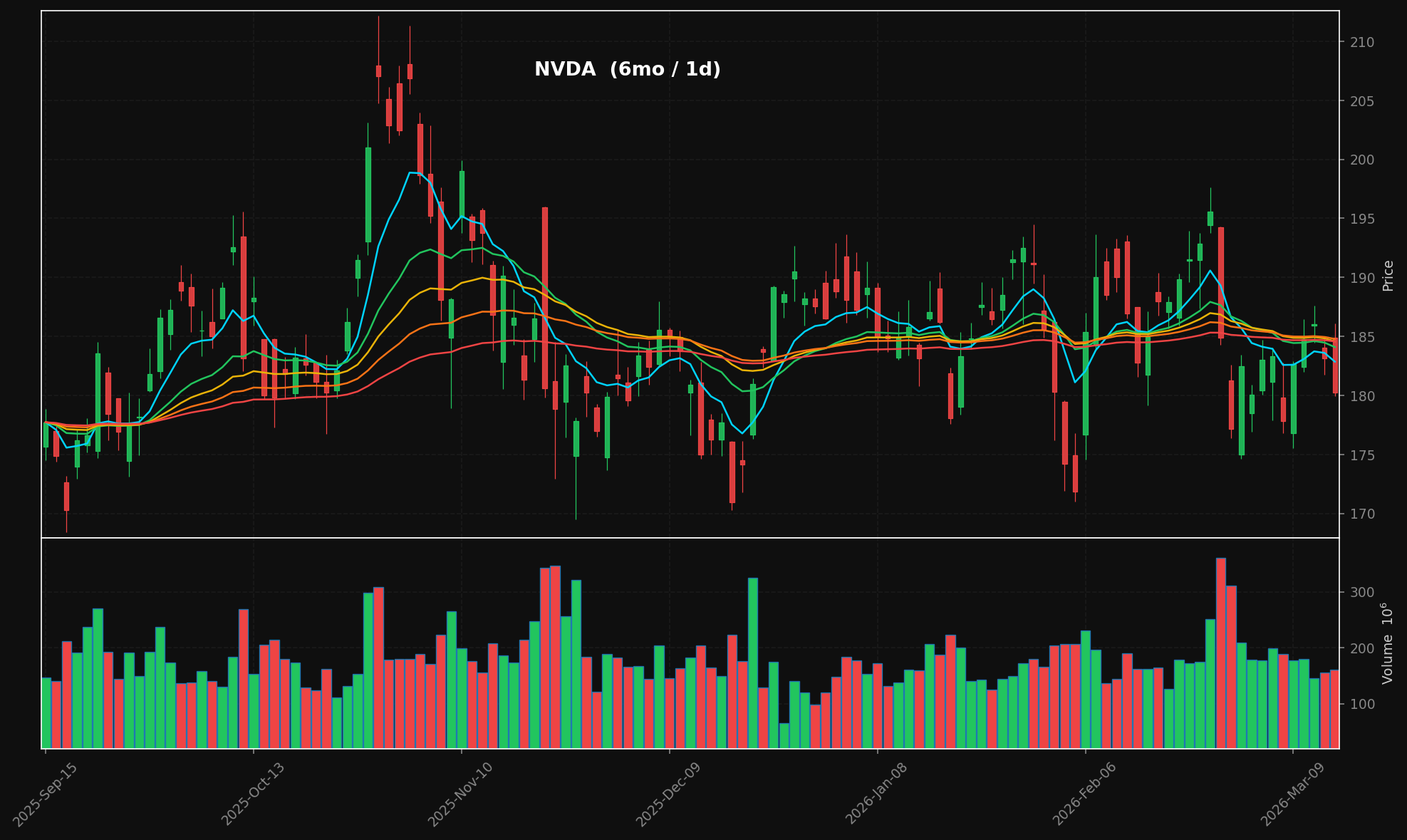
🕯️ 生成专业 K 线图 — 深色主题,带有堆叠 EMA 叠加层 (8/21/34/55/89)、成交量面板,可直接发布的 PNG 图片
📰 聚合财经新闻 — 实时从多个 RSS 源获取新闻
📄 提取全文 — 从任何 URL 提取完整文章内容 — 你的智能体阅读的是实际文章,而不仅仅是标题
所有这些都通过 模型上下文协议 (Model Context Protocol) 实现,因此你的 AI 助手可以原生调用这些工具 — 无需 API 密钥,无需 REST 端点,无需复杂的配置。
generate_chart("NVDA", period="6mo") → K 线图 + 成交量 + 堆叠 EMA:
工具 | 功能 |
| 按预设扫描股票:最活跃、新高/新低、超买、超卖、高相对成交量 |
| 获取 OHLCV K 线数据 — 任何股票代码、任何周期、任何间隔 |
| 计算 RSI(14) + MACD(12,26,9) 并获取通俗易懂的分析摘要 |
| 渲染带有堆叠 EMA 叠加层 (8/21/34/55/89) + 成交量的 K 线图 → PNG + base64 |
| 从雅虎财经和谷歌新闻 RSS 源拉取最新头条 |
| 从任何 URL 提取完整文章正文(去除广告、导航、付费墙) |
git clone https://github.com/mphinance/momentum-mcp.git
cd momentum-mcp
python3 -m venv .venv
source .venv/bin/activate
pip install -r requirements.txt
测试一切是否正常:
python -c "from mcp_server.server import mcp; print('✓ Ready')"运行服务器:
python -m mcp_server.server最受欢迎的 MCP 客户端。添加到你的 claude_desktop_config.json(macOS 位于 ~/Library/Application Support/Claude/,Windows 位于 %APPDATA%\Claude\):
{
  "mcpServers": {
    "momentum": {
      "command": "python",
      "args": ["-m", "mcp_server.server"],
      "cwd": "/absolute/path/to/momentum-mcp",
      "env": {
        "VIRTUAL_ENV": "/absolute/path/to/momentum-mcp/.venv",
        "PATH": "/absolute/path/to/momentum-mcp/.venv/bin:$PATH"
      }
    }
  }
}
重启 Claude Desktop。你将看到 🔨 工具图标 — 点击它以验证所有 6 个工具是否已加载。
添加到项目根目录下的 .cursor/mcp.json(或全局配置 ~/.cursor/mcp.json):
{
  "mcpServers": {
    "momentum": {
      "command": "/absolute/path/to/momentum-mcp/.venv/bin/python",
      "args": ["-m", "mcp_server.server"],
      "cwd": "/absolute/path/to/momentum-mcp"
    }
  }
}
这些工具将在 Cursor 的 Agent 模式下可用。尝试让它“筛选超买股票”或“绘制 NVDA 过去 6 个月的图表”。
MCP 在 GitHub Copilot (VS Code 1.86+) 中已普遍可用。添加到你的 .vscode/mcp.json:
{
  "servers": {
    "momentum": {
      "command": "/absolute/path/to/momentum-mcp/.venv/bin/python",
      "args": ["-m", "mcp_server.server"],
      "cwd": "/absolute/path/to/momentum-mcp"
    }
  }
}
在 Copilot Chat 面板中启用 Agent 模式 — momentum 工具将出现在工具选择器中。
添加到你的 Windsurf MCP 配置 ~/.codeium/windsurf/mcp_config.json:
{
  "mcpServers": {
    "momentum": {
      "command": "/absolute/path/to/momentum-mcp/.venv/bin/python",
      "args": ["-m", "mcp_server.server"],
      "cwd": "/absolute/path/to/momentum-mcp"
    }
  }
}
Cascade 将自动发现这些工具。在任何 Windsurf 对话中使用它们。
打开 Cline 的 MCP 设置(齿轮图标 → MCP Servers → "Edit MCP Settings")并添加:
{
  "mcpServers": {
    "momentum": {
      "command": "/absolute/path/to/momentum-mcp/.venv/bin/python",
      "args": ["-m", "mcp_server.server"],
      "cwd": "/absolute/path/to/momentum-mcp"
    }
  }
}
Cline 将在其服务器面板中列出这些工具。启用它们即可使用。
直接从终端添加服务器:
claude mcp add momentum \
  /absolute/path/to/momentum-mcp/.venv/bin/python \
  -m mcp_server.server \
  --cwd /absolute/path/to/momentum-mcp
验证连接状态:
claude mcp listmomentum-mcp 使用 stdio 传输(MCP 默认)。任何支持 stdio 的客户端都可以通过运行以下命令连接:
/path/to/.venv/bin/python -m mcp_server.server就是这样。没有 HTTP 服务器,没有端口,没有身份验证 — 只有 stdin/stdout。
momentum-mcp/
├── requirements.txt         # Pinned dependencies
├── README.md
└── mcp_server/
    ├── __init__.py
    ├── server.py            # FastMCP entry point — registers all tools
    ├── screener.py          # TradingView stock scanner (6 presets)
    ├── data.py              # yfinance OHLCV with async wrapper
    ├── technicals.py        # pandas-ta RSI(14) & MACD(12,26,9)
    ├── charts.py            # mplfinance candlestick + volume charts
└── news.py # feedparser RSS + trafilatura extraction库 | 角色 |
MCP 服务器框架 (v3.x) | |
通过 TradingView API 进行股票筛选 | |
雅虎财经 OHLCV 数据 | |
130+ 技术指标 | |
金融图表渲染 | |
RSS/Atom 订阅源解析 | |
网络文章文本提取 |
连接后,尝试询问你的 AI 助手:
"筛选今天相对成交量较高的股票"
"获取 NVDA 6 个月的日线数据并进行技术分析"
"生成 AAPL 过去一年的 K 线图"
"TSLA 的最新消息是什么?提取最有趣文章的全文。"
"查找超卖股票,然后对前 3 个结果进行技术分析"
MIT — 随你所用。
This server cannot be installed
Unclaimed servers have limited discoverability.
If you are the server author, to access and configure the admin panel.
Build, backtest, and deploy quantitative trading strategies from your AI agent.
Real SEC, 13F, insider, congress & macro data your AI agent can cite. Hosted MCP, 24 tools.
AI-enriched financial news for AI agents & trading bots: search, trending, insider, scored 1-10.
We provide all the information about MCP servers via our MCP API.
curl -X GET 'https://glama.ai/api/mcp/v1/servers/mphinance/momentum-mcp'
If you have feedback or need assistance with the MCP directory API, please join our Discord server