F
licenseNot graded
qualityD
maintenanceA Model Context Protocol server that provides stock technical analysis tools (moving averages, RSI, trade recommendations) for AI assistants to analyze stocks and offer trading signals.

26 de abril de 2026 — La actualización "Constellation"
Expansión masiva de 35 herramientas: Se ha integrado el conjunto completo de herramientas de la Fase 2 desde el espacio de trabajo interno.
Opciones (Motor VoPR™): Se añadieron analyze_options_setup, find_best_to_sell, find_best_to_buy y sweep_setups para una clasificación inteligente de opciones.
Flujo institucional: Integración nativa con TraderDaddy para actividad inusual en tiempo real, exposición gamma (GEX) y rotación sectorial.
Suite de backtesting: 6 preajustes técnicos con validación walk-forward y barrido multi-ticker mediante backtest_strategy y sweep_strategy.
Macro y entorno: Se añadieron detect_macro_regime, analyze_breadth, detect_bubble_risk y get_market_environment.
Base de conocimientos: Se añadió la herramienta RAG search_knowledge para buscar en 139 libros de trading.
Related MCP server: Financial Analysis MCP Server
momentum-mcp convierte a cualquier asistente de IA compatible con MCP en un analista de trading cuantitativo. En lugar de copiar y pegar tickers en Yahoo Finance y hacer capturas de pantalla de gráficos, tu agente de IA tiene acceso a 35 herramientas de nivel institucional para:
🔍 Escanear todo el mercado en segundos: encuentra acciones sobrecompradas, picos de volumen inusuales, nuevos máximos de 52 semanas
📊 Obtener datos OHLCV limpios para cualquier ticker, cualquier marco temporal: listos para el análisis, sin complicaciones con CSV
📈 Calcular indicadores técnicos: RSI, MACD con interpretación en lenguaje sencillo, no solo números brutos
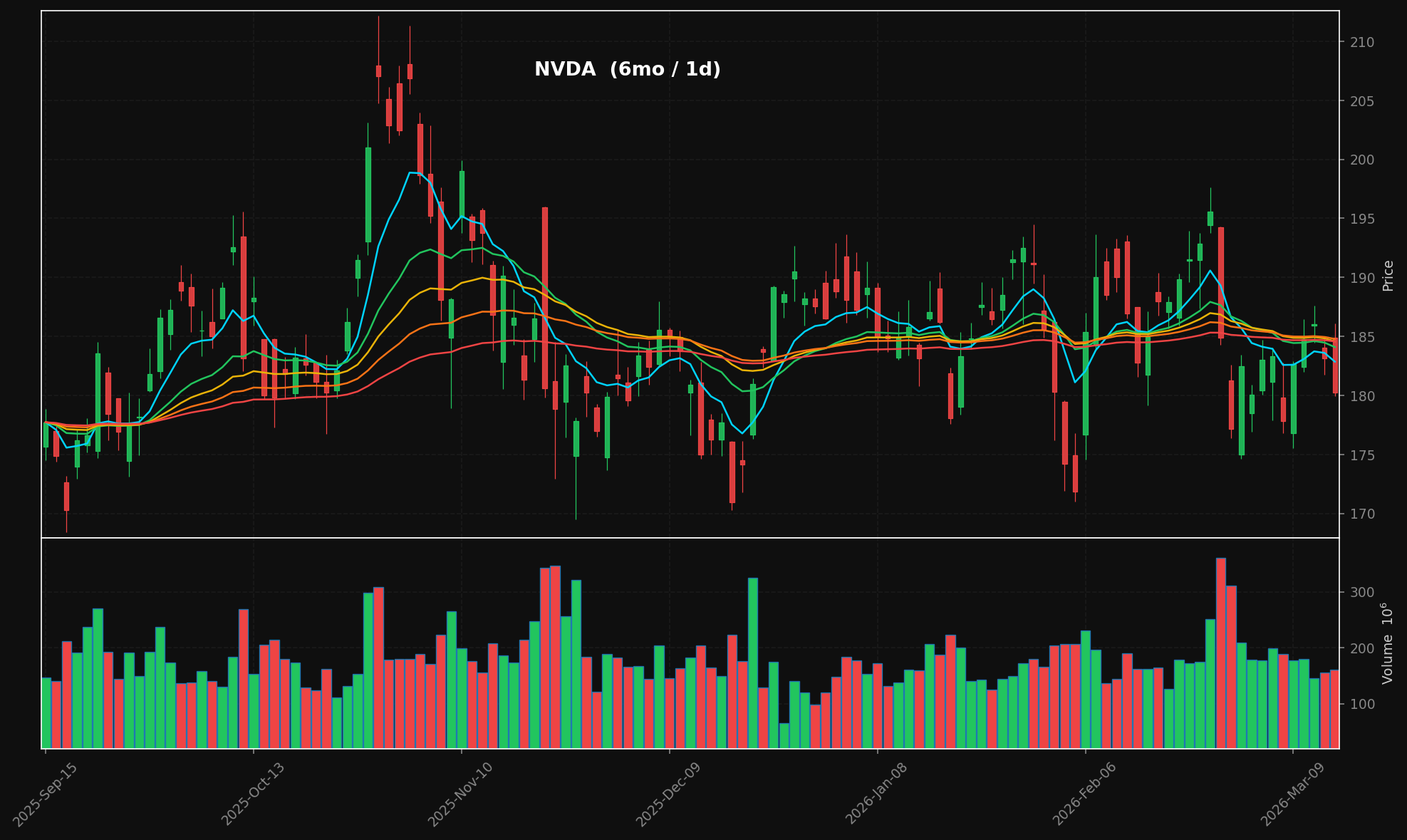
🕯️ Generar gráficos de velas profesionales: tema oscuro con superposiciones de EMA apiladas (8/21/34/55/89), paneles de volumen, PNG listos para publicación
📰 Agregar noticias financieras de múltiples fuentes RSS en tiempo real
📄 Extraer el texto completo de artículos desde cualquier URL: tu agente lee el artículo real, no solo el titular
Todo esto sucede a través del Model Context Protocol, por lo que tu asistente de IA llama a estas herramientas de forma nativa: sin claves API, sin endpoints REST, sin el infierno de la configuración.
generate_chart("NVDA", period="6mo") → velas + volumen + EMAs apiladas:
Herramienta | Qué hace |
| Escanea acciones por preajuste: más activas, nuevos máximos/mínimos, sobrecompradas, sobrevendidas, alto volumen relativo |
| Obtiene datos de velas OHLCV: cualquier ticker, cualquier periodo, cualquier intervalo |
| Calcula RSI(14) + MACD(12,26,9) y obtiene un resumen de análisis en lenguaje sencillo |
| Renderiza un gráfico de velas con superposiciones de EMA apiladas (8/21/34/55/89) + volumen → PNG + base64 |
| Obtiene titulares recientes de fuentes RSS de Yahoo Finance y Google News |
| Extrae el cuerpo completo del artículo de cualquier URL (elimina anuncios, navegación, muros de pago) |
git clone https://github.com/mphinance/momentum-mcp.git
cd momentum-mcp
python3 -m venv .venv
source .venv/bin/activate
pip install -r requirements.txt
Prueba que todo funcione:
python -c "from mcp_server.server import mcp; print('✓ Ready')"Ejecuta el servidor:
python -m mcp_server.serverEl cliente MCP más popular. Añádelo a tu claude_desktop_config.json (ubicado en ~/Library/Application Support/Claude/ en macOS o %APPDATA%\Claude\ en Windows):
{
  "mcpServers": {
    "momentum": {
      "command": "python",
      "args": ["-m", "mcp_server.server"],
      "cwd": "/absolute/path/to/momentum-mcp",
      "env": {
        "VIRTUAL_ENV": "/absolute/path/to/momentum-mcp/.venv",
        "PATH": "/absolute/path/to/momentum-mcp/.venv/bin:$PATH"
      }
    }
  }
}
Reinicia Claude Desktop. Verás el icono de herramientas 🔨: haz clic en él para verificar que las 6 herramientas estén cargadas.
Añádelo a .cursor/mcp.json en la raíz de tu proyecto (o en la configuración global en ~/.cursor/mcp.json):
{
  "mcpServers": {
    "momentum": {
      "command": "/absolute/path/to/momentum-mcp/.venv/bin/python",
      "args": ["-m", "mcp_server.server"],
      "cwd": "/absolute/path/to/momentum-mcp"
    }
  }
}
Las herramientas estarán disponibles en el modo Agente de Cursor. Pídele que "busque acciones sobrecompradas" o "grafique NVDA durante los últimos 6 meses".
MCP está disponible generalmente en GitHub Copilot (VS Code 1.86+). Añádelo a tu .vscode/mcp.json:
{
  "servers": {
    "momentum": {
      "command": "/absolute/path/to/momentum-mcp/.venv/bin/python",
      "args": ["-m", "mcp_server.server"],
      "cwd": "/absolute/path/to/momentum-mcp"
    }
  }
}
Activa el modo Agente en el panel de chat de Copilot: las herramientas de momentum aparecerán en el selector de herramientas.
Añádelo a tu configuración de MCP de Windsurf en ~/.codeium/windsurf/mcp_config.json:
{
  "mcpServers": {
    "momentum": {
      "command": "/absolute/path/to/momentum-mcp/.venv/bin/python",
      "args": ["-m", "mcp_server.server"],
      "cwd": "/absolute/path/to/momentum-mcp"
    }
  }
}
Cascade descubrirá automáticamente las herramientas. Úsalas en cualquier chat de Windsurf.
Abre la configuración de MCP de Cline (icono de engranaje → MCP Servers → "Edit MCP Settings") y añade:
{
  "mcpServers": {
    "momentum": {
      "command": "/absolute/path/to/momentum-mcp/.venv/bin/python",
      "args": ["-m", "mcp_server.server"],
      "cwd": "/absolute/path/to/momentum-mcp"
    }
  }
}
Cline listará las herramientas en su panel de servidor. Actívalas y estarán listas para usar.
Añade el servidor directamente desde la terminal:
claude mcp add momentum \
  /absolute/path/to/momentum-mcp/.venv/bin/python \
  -m mcp_server.server \
  --cwd /absolute/path/to/momentum-mcp
Verifica que esté conectado:
claude mcp listmomentum-mcp utiliza el transporte stdio (el valor predeterminado de MCP). Cualquier cliente que admita stdio puede conectarse ejecutando:
/path/to/.venv/bin/python -m mcp_server.serverEso es todo. Sin servidor HTTP, sin puertos, sin autenticación: solo stdin/stdout.
momentum-mcp/
├── requirements.txt         # Pinned dependencies
├── README.md
└── mcp_server/
    ├── __init__.py
    ├── server.py            # FastMCP entry point — registers all tools
    ├── screener.py          # TradingView stock scanner (6 presets)
    ├── data.py              # yfinance OHLCV with async wrapper
    ├── technicals.py        # pandas-ta RSI(14) & MACD(12,26,9)
    ├── charts.py            # mplfinance candlestick + volume charts
└── news.py # feedparser RSS + trafilatura extractionBiblioteca | Rol |
Framework de servidor MCP (v3.x) | |
Filtrado de acciones mediante la API de TradingView | |
Datos OHLCV de Yahoo Finance | |
Más de 130 indicadores técnicos | |
Renderizado de gráficos financieros | |
Análisis de feeds RSS/Atom | |
Extracción de texto de artículos web |
Una vez conectado, intenta preguntarle a tu asistente de IA:
"Escanea el mercado en busca de acciones con alto volumen relativo hoy"
"Obtén 6 meses de datos diarios de NVDA y analiza los aspectos técnicos"
"Genera un gráfico de velas para AAPL durante el último año"
"¿Cuáles son las últimas noticias sobre TSLA? Extrae el texto completo del artículo más interesante."
"Encuentra acciones sobrevendidas y luego analiza los aspectos técnicos de los 3 mejores resultados"
MIT: haz lo que quieras con él.
This server cannot be installed
Unclaimed servers have limited discoverability.
If you are the server author, to access and configure the admin panel.
Build, backtest, and deploy quantitative trading strategies from your AI agent.
Real SEC, 13F, insider, congress & macro data your AI agent can cite. Hosted MCP, 24 tools.
AI-enriched financial news for AI agents & trading bots: search, trending, insider, scored 1-10.
We provide all the information about MCP servers via our MCP API.
curl -X GET 'https://glama.ai/api/mcp/v1/servers/mphinance/momentum-mcp'
If you have feedback or need assistance with the MCP directory API, please join our Discord server