


F
licenseNot graded
qualityD
maintenanceA Model Context Protocol server that provides stock technical analysis tools (moving averages, RSI, trade recommendations) for AI assistants to analyze stocks and offer trading signals.

2026年4月26日 — 「Constellation」アップデート
35個のツールへ大幅拡充: 内部ワークスペースのフェーズ2ツールセットをすべて統合しました。
オプション (VoPR™エンジン): インテリジェントなオプション評価のために analyze_options_setup、find_best_to_sell、find_best_to_buy、sweep_setups を追加しました。
機関投資家のフロー: リアルタイムの異常なアクティビティ、ガンマ・エクスポージャー (GEX)、セクターローテーションのためのTraderDaddy統合をネイティブサポートしました。
バックテストスイート: backtest_strategy と sweep_strategy を通じた、ウォークフォワード検証とマルチティッカー・スイープを備えた6つのテクニカルプリセットを追加しました。
マクロと環境: detect_macro_regime、analyze_breadth、detect_bubble_risk、get_market_environment を追加しました。
ナレッジベース: 139冊の取引関連書籍を検索できるRAGツール search_knowledge を追加しました。
Related MCP server: Financial Analysis MCP Server
momentum-mcp は、MCP互換のAIアシスタントをクオンツ取引アナリストに変身させます。Yahoo Financeにティッカーをコピー&ペーストしてチャートのスクリーンショットを撮る代わりに、AIエージェントは以下の35個の機関投資家レベルのツールにアクセスできます:
🔍 市場全体を数秒でスクリーニング — 買われすぎの銘柄、異常な出来高急増、52週高値更新銘柄などを発見
📊 クリーンなOHLCVデータを取得 — あらゆるティッカー、あらゆる期間のデータを分析用に取得(CSVの加工は不要)
📈 テクニカル指標を計算 — RSIやMACDを、単なる数値ではなく、平易な英語で解釈して提示
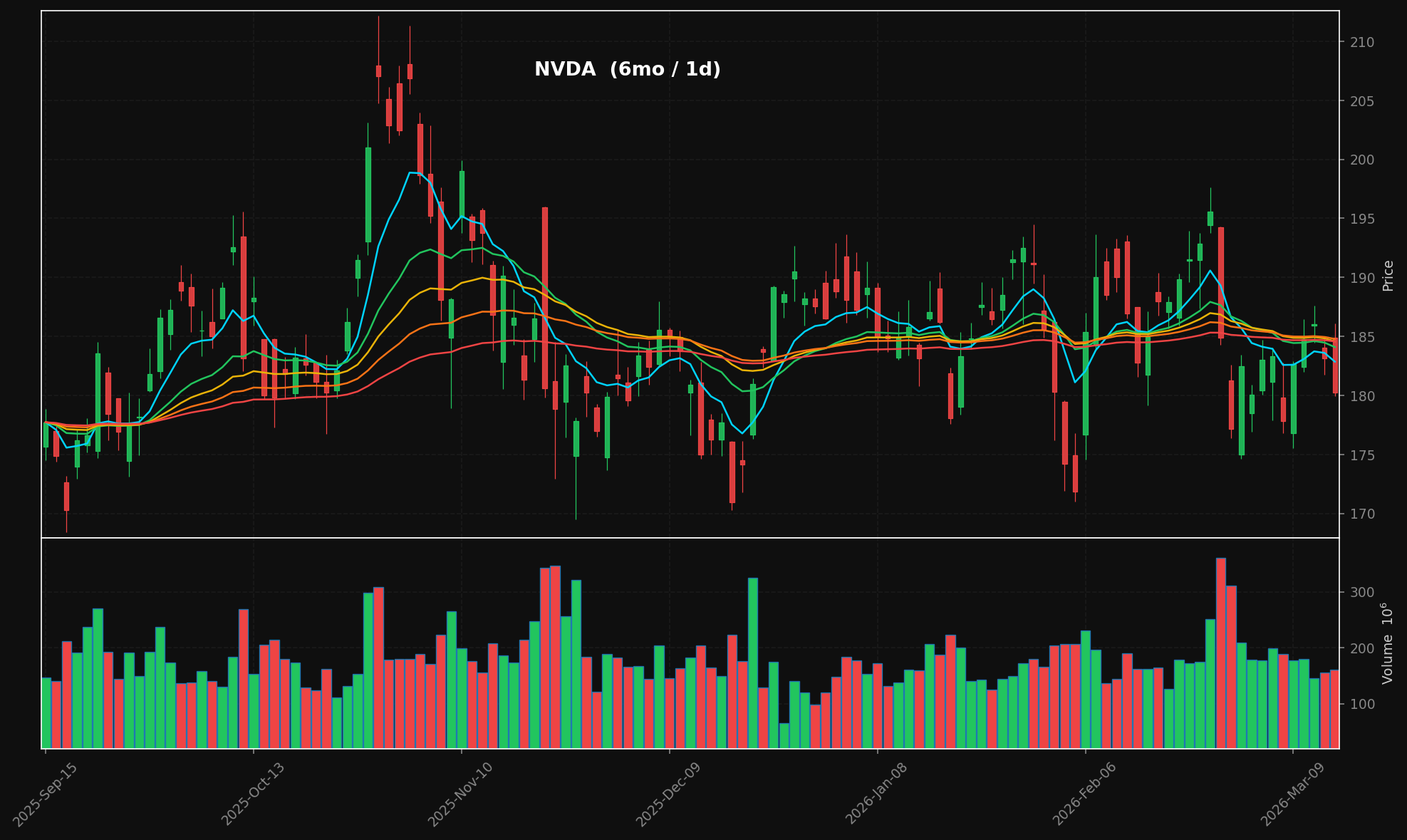
🕯️ プロフェッショナルなローソク足チャートを生成 — ダークテーマ、スタック型EMAオーバーレイ(8/21/34/55/89)、出来高パネルを備えた、出版品質のPNG画像
📰 金融ニュースを集約 — 複数のRSSソースからリアルタイムで取得
📄 記事全文を抽出 — あらゆるURLから記事本文を抽出(広告、ナビゲーション、ペイウォールを除去)
これらすべてが Model Context Protocol を通じて行われるため、AIアシスタントはこれらのツールをネイティブに呼び出せます。APIキーやRESTエンドポイント、複雑な設定は不要です。
generate_chart("NVDA", period="6mo") → ローソク足 + 出来高 + スタック型EMA:
ツール | 機能 |
| プリセット(活発な銘柄、新高値/安値、買われすぎ/売られすぎ、高い相対出来高など)で銘柄をスキャン |
| OHLCVローソク足データを取得 — あらゆるティッカー、期間、間隔に対応 |
| RSI(14) + MACD(12,26,9)を計算し、平易な英語で分析サマリーを取得 |
| スタック型EMAオーバーレイ(8/21/34/55/89)と出来高を備えたローソク足チャートをレンダリング → PNG + base64 |
| Yahoo FinanceおよびGoogle NewsのRSSフィードから最新のヘッドラインを取得 |
| あらゆるURLから記事本文を抽出(広告、ナビゲーション、ペイウォールを除去) |
git clone https://github.com/mphinance/momentum-mcp.git
cd momentum-mcp
python3 -m venv .venv
source .venv/bin/activate
pip install -r requirements.txt
すべてが動作することを確認します:
python -c "from mcp_server.server import mcp; print('✓ Ready')"サーバーを実行します:
python -m mcp_server.server最も人気のあるMCPクライアントです。claude_desktop_config.json(macOSでは ~/Library/Application Support/Claude/、Windowsでは %APPDATA%\Claude\ にあります)に追加してください:
{
  "mcpServers": {
    "momentum": {
      "command": "python",
      "args": ["-m", "mcp_server.server"],
      "cwd": "/absolute/path/to/momentum-mcp",
      "env": {
        "VIRTUAL_ENV": "/absolute/path/to/momentum-mcp/.venv",
        "PATH": "/absolute/path/to/momentum-mcp/.venv/bin:$PATH"
      }
    }
  }
}
Claude Desktopを再起動します。🔨 ツールアイコンが表示されるので、クリックして6つのツールがすべて読み込まれていることを確認してください。
プロジェクトルートの .cursor/mcp.json(またはグローバル設定 ~/.cursor/mcp.json)に追加してください:
{
  "mcpServers": {
    "momentum": {
      "command": "/absolute/path/to/momentum-mcp/.venv/bin/python",
      "args": ["-m", "mcp_server.server"],
      "cwd": "/absolute/path/to/momentum-mcp"
    }
  }
}
ツールはCursorのAgentモードで使用可能になります。「買われすぎの銘柄をスクリーニングして」や「NVDAの過去6ヶ月のチャートを表示して」と指示してください。
MCPはGitHub Copilot(VS Code 1.86以降)で一般的に利用可能です。.vscode/mcp.json に追加してください:
{
  "servers": {
    "momentum": {
      "command": "/absolute/path/to/momentum-mcp/.venv/bin/python",
      "args": ["-m", "mcp_server.server"],
      "cwd": "/absolute/path/to/momentum-mcp"
    }
  }
}
CopilotチャットパネルでAgentモードを有効にすると、ツールピッカーにmomentumツールが表示されます。
WindsurfのMCP設定ファイル ~/.codeium/windsurf/mcp_config.json に追加してください:
{
  "mcpServers": {
    "momentum": {
      "command": "/absolute/path/to/momentum-mcp/.venv/bin/python",
      "args": ["-m", "mcp_server.server"],
      "cwd": "/absolute/path/to/momentum-mcp"
    }
  }
}
Cascadeが自動的にツールを検出します。Windsurfのチャットで使用してください。
ClineのMCP設定(歯車アイコン → MCP Servers → "Edit MCP Settings")を開き、以下を追加してください:
{
  "mcpServers": {
    "momentum": {
      "command": "/absolute/path/to/momentum-mcp/.venv/bin/python",
      "args": ["-m", "mcp_server.server"],
      "cwd": "/absolute/path/to/momentum-mcp"
    }
  }
}
Clineのサーバーパネルにツールがリストされます。有効にすればすぐに使用できます。
ターミナルから直接サーバーを追加します:
claude mcp add momentum \
  /absolute/path/to/momentum-mcp/.venv/bin/python \
  -m mcp_server.server \
  --cwd /absolute/path/to/momentum-mcp
接続を確認します:
claude mcp listmomentum-mcpは stdio トランスポート(MCPのデフォルト)を使用します。stdioをサポートするクライアントであれば、以下を実行して接続できます:
/path/to/.venv/bin/python -m mcp_server.server以上です。HTTPサーバーもポートも認証も不要。stdin/stdoutのみです。
momentum-mcp/
├── requirements.txt         # Pinned dependencies
├── README.md
└── mcp_server/
    ├── __init__.py
    ├── server.py            # FastMCP entry point — registers all tools
    ├── screener.py          # TradingView stock scanner (6 presets)
    ├── data.py              # yfinance OHLCV with async wrapper
    ├── technicals.py        # pandas-ta RSI(14) & MACD(12,26,9)
    ├── charts.py            # mplfinance candlestick + volume charts
└── news.py # feedparser RSS + trafilatura extractionライブラリ | 役割 |
MCPサーバーフレームワーク (v3.x) | |
TradingView API経由の株式スクリーニング | |
Yahoo Finance OHLCVデータ | |
130以上のテクニカル指標 | |
金融チャートのレンダリング | |
RSS/Atomフィードの解析 | |
Web記事のテキスト抽出 |
接続後、AIアシスタントに以下のように尋ねてみてください:
"今日、相対出来高が高い銘柄を市場からスクリーニングして"
"NVDAの過去6ヶ月の日次データを取得して、テクニカル分析をして"
"AAPLの過去1年間のローソク足チャートを生成して"
"TSLAの最新ニュースは何?興味深い記事の全文を抽出して"
"売られすぎの銘柄を見つけて、上位3件のテクニカル分析をして"
MIT — 自由にご利用ください。
This server cannot be installed
Unclaimed servers have limited discoverability.
If you are the server author, to access and configure the admin panel.
The Octagon MCP server provides specialized AI-powered financial research and analysis by integrating with the Octagon Market Intelligence API. It enables users to analyze public market data (SEC filings, earnings transcripts, financial metrics, and stock data for 8000+ companies), private market data (3M+ companies, 500k+ funding rounds, 2M+ M&A/IPO transactions), and conduct deep research including web scraping capabilities. The server also features autonomous research agents that search hundreds of sources and return fully cited reports in approximately one minute.
Build, backtest, and deploy quantitative trading strategies from your AI agent.
27 live market-research tools for trading agents: scans, options flow, sentiment, valuation, alerts
Crypto market signals, technical indicators, and sentiment analysis for AI agents.
We provide all the information about MCP servers via our MCP API.
curl -X GET 'https://glama.ai/api/mcp/v1/servers/mphinance/momentum-mcp'
If you have feedback or need assistance with the MCP directory API, please join our Discord server