

F
licenseNot graded
qualityD
maintenanceA Model Context Protocol server that provides stock technical analysis tools (moving averages, RSI, trade recommendations) for AI assistants to analyze stocks and offer trading signals.
-

Enables pulling recent ticker-specific financial news headlines from Google News RSS feeds.
Aggregates financial news from multiple RSS sources in real-time to provide agents with live market context.
Provides tools to screen the stock market for stocks based on presets such as most active, volume spikes, and technical conditions like overbought or oversold status.
Click on "Deploy Server".
Wait a few minutes for the server to deploy. Once ready, it will show a "Started" state.
In the chat, type @ followed by the MCP server name and your instructions, e.g., "@momentum-mcp Analyze the technicals for NVDA and show me a candlestick chart"
That's it! The server will respond to your query, and you can continue using it as needed.
Here is a step-by-step guide with screenshots.
This toolkit shares its lineage with Vesper, a LangGraph trading agent for Webull — its
mcp_server/is a separate, credential-heavier superset (adds a live-account owner mode and, eventually, an order path). This repo stays the standalone version: point any MCP host at it, no broker anywhere near it. It's also part of the mphinance AI trading stack — if you want packaged Claude/Gemini Skills (screeners, regime detection, backtesting playbooks) that can call these tools instead of a paid API, see alpha-skills; if you want to act on what these tools tell you, see awesome-broker-mcp for which broker an AI can actually trade through.
September 13, 2026 — SEC EDGAR + TickerTrace, and a Docs Catch-Up
21 new tools, both credential-free: get_sec_filings, get_sec_financials,
get_shares_outstanding, get_stakes_held (SEC EDGAR — no API key, just a SEC_USER_AGENT
contact string) and 17 etf_* tools (TickerTrace — daily institutional ETF holdings across 71
funds, deliberately open with no key at all). Neither needs a TraderDaddy Pro subscription.
Tools table and Claude Desktop instructions were still describing 6-35 tools; corrected to the
actual 73 now registered in mcp_server/server.py, grouped by category.
Fixed a License section that said MIT while the committed LICENSE file is Apache-2.0 — the
README now matches the file.
April 26, 2026 — The "Constellation" Update
Massive 35-Tool Expansion: Merged in the complete Phase 2 toolset from the internal workspace.
Options (VoPR™ Engine): Added analyze_options_setup, find_best_to_sell, find_best_to_buy, and sweep_setups for intelligent options grading.
Institutional Flow: Native TraderDaddy integration for real-time unusual activity, Gamma Exposure (GEX), and sector rotation.
Backtesting Suite: 6 technical presets with walk-forward validation and multi-ticker sweeping via backtest_strategy and sweep_strategy.
Macro & Environment: Added detect_macro_regime, analyze_breadth, detect_bubble_risk, and get_market_environment.
Knowledge Base: Added search_knowledge RAG tool to search across 139 trading books.
Related MCP server: Financial Analysis MCP Server
momentum-mcp turns any MCP-compatible AI assistant into a quantitative trading analyst. Instead of copy-pasting tickers into Yahoo Finance and screenshotting charts, your AI agent has access to 73 institutional-grade tools to:
🔍 Screen the entire market in seconds — find overbought stocks, unusual volume spikes, new 52-week highs
📊 Pull clean OHLCV data for any ticker, any timeframe — ready for analysis, no CSV wrangling
📈 Compute technical indicators — RSI, MACD with plain-English interpretation, not just raw numbers
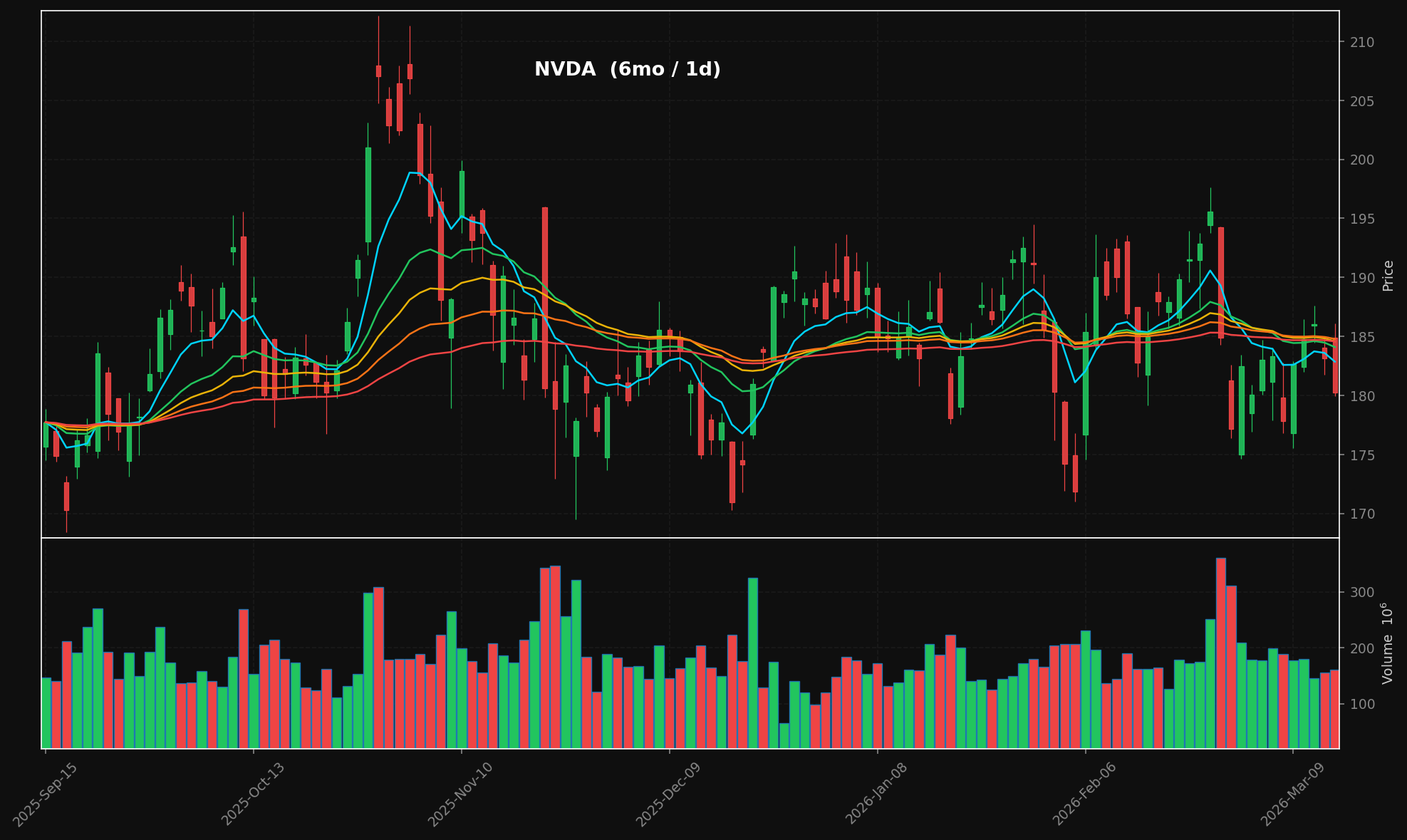
🕯️ Generate professional candlestick charts — dark-themed with stacked EMA overlays (8/21/34/55/89), volume panels, publication-ready PNGs
📰 Aggregate financial news from multiple RSS sources in real-time
📄 Extract full article text from any URL — your agent reads the actual article, not just the headline
All of this happens through the Model Context Protocol, so your AI assistant calls these tools natively — no API keys, no REST endpoints, no configuration hell.
generate_chart("NVDA", period="6mo") → candlestick + volume + stacked EMAs:
73 tools across twelve groups:
Group | Tools |
Screening & Data |
|
Technicals & Charts |
|
Options — VoPR™ Engine |
|
Institutional Flow & Gamma |
|
Pattern Screeners |
|
Market Structure & Regime |
|
Scenario & Modeling |
|
Backtesting |
|
Knowledge & Journal |
|
News |
|
SEC EDGAR (no API key — see below) |
|
Institutional ETF Flow (no API key at all) |
|
SEC EDGAR needs one free env var, no subscription: SEC's User-Agent header IS the
credential, and it just has to identify you.
export SEC_USER_AGENT="Your Project Name (contact: you@example.com)"Without it, get_sec_filings and friends return a clean {"error": ...} naming the missing
variable rather than crashing. The 17 etf_* tools need nothing at all —
api.tickertrace.pro is deliberately open, no key or account.
git clone https://github.com/mphinance/momentum-mcp.git
cd momentum-mcp
python3 -m venv .venv
source .venv/bin/activate
# Three-step install: pandas-ta hard-pins numba==0.61.2 which doesn't support
# Python 3.14, so we install it separately and override numba.
pip install fastmcp tradingview-screener yfinance pandas mplfinance matplotlib feedparser trafilatura scipy tradingview-ta chromadb requests httpx
pip install pandas-ta --no-deps
pip install 'numba>=0.62'
Why three steps?
pandas-ta==0.4.71b0declaresnumba==0.61.2as a hard dependency, but thatnumbaversion only supports Python<3.14. Installingpandas-tawith--no-depsskips the pin, andnumba>=0.62(which has Python 3.14 wheels) is fully compatible at runtime — verified working.
Test that everything works:
python -c "from mcp_server.server import mcp; print('✓ Ready')"Run the server:
python -m mcp_server.serverThe most popular MCP client. Add to your claude_desktop_config.json (located at ~/Library/Application Support/Claude/ on macOS or %APPDATA%\Claude\ on Windows):
{
  "mcpServers": {
    "momentum": {
      "command": "python",
      "args": ["-m", "mcp_server.server"],
      "cwd": "/absolute/path/to/momentum-mcp",
      "env": {
        "VIRTUAL_ENV": "/absolute/path/to/momentum-mcp/.venv",
        "PATH": "/absolute/path/to/momentum-mcp/.venv/bin:$PATH"
      }
    }
  }
}
Restart Claude Desktop. You'll see the 🔨 tools icon — click it to verify all 73 tools are loaded.
Add to .cursor/mcp.json in your project root (or global config at ~/.cursor/mcp.json):
{
  "mcpServers": {
    "momentum": {
      "command": "/absolute/path/to/momentum-mcp/.venv/bin/python",
      "args": ["-m", "mcp_server.server"],
      "cwd": "/absolute/path/to/momentum-mcp"
    }
  }
}
The tools will be available in Cursor's Agent mode. Ask it to "screen for overbought stocks" or "chart NVDA over the last 6 months."
MCP is generally available in GitHub Copilot (VS Code 1.86+). Add to your .vscode/mcp.json:
{
  "servers": {
    "momentum": {
      "command": "/absolute/path/to/momentum-mcp/.venv/bin/python",
      "args": ["-m", "mcp_server.server"],
      "cwd": "/absolute/path/to/momentum-mcp"
    }
  }
}
Enable Agent mode in the Copilot Chat panel — momentum tools will appear in the tool picker.
Add to your Windsurf MCP config at ~/.codeium/windsurf/mcp_config.json:
{
  "mcpServers": {
    "momentum": {
      "command": "/absolute/path/to/momentum-mcp/.venv/bin/python",
      "args": ["-m", "mcp_server.server"],
      "cwd": "/absolute/path/to/momentum-mcp"
    }
  }
}
Cascade will automatically discover the tools. Use them in any Windsurf chat.
Open Cline's MCP settings (gear icon → MCP Servers → "Edit MCP Settings") and add:
{
  "mcpServers": {
    "momentum": {
      "command": "/absolute/path/to/momentum-mcp/.venv/bin/python",
      "args": ["-m", "mcp_server.server"],
      "cwd": "/absolute/path/to/momentum-mcp"
    }
  }
}
Cline will list the tools in its server panel. Enable them and they're ready to use.
Add the server directly from the terminal:
claude mcp add momentum \
  /absolute/path/to/momentum-mcp/.venv/bin/python \
  -m mcp_server.server \
  --cwd /absolute/path/to/momentum-mcp
Verify it's connected:
claude mcp listmomentum-mcp uses the stdio transport (the MCP default). Any client that supports stdio can connect by running:
/path/to/.venv/bin/python -m mcp_server.serverThat's it. No HTTP server, no ports, no auth — just stdin/stdout.
momentum-mcp/
├── requirements.txt         # Pinned dependencies
├── README.md
└── mcp_server/
    ├── __init__.py
    ├── server.py            # FastMCP entry point — registers all 73 tools
    ├── screener.py          # TradingView stock scanner
    ├── data.py              # yfinance OHLCV with async wrapper
    ├── technicals.py        # pandas-ta indicator suite
    ├── charts.py            # mplfinance candlestick + volume charts
    ├── news.py              # feedparser RSS + trafilatura extraction
    ├── edgar.py             # SEC EDGAR client — no API key, User-Agent only
    ├── edgar_tools.py        # get_sec_filings/financials/shares_outstanding/stakes_held
    ├── tickertrace.py       # api.tickertrace.pro client — no key, no account
    ├── tickertrace_tools.py # 17 etf_* institutional ETF holdings tools
└── ... # options, backtest, screeners, macro/regime, knowledge baseLibrary | Role |
MCP server framework (v3.x) | |
Stock screening via TradingView's API | |
Yahoo Finance OHLCV data | |
130+ technical indicators | |
Financial chart rendering | |
RSS/Atom feed parsing | |
Web article text extraction | |
SEC EDGAR client (no API key, just a User-Agent) | |
TickerTrace client (api.tickertrace.pro, no key) |
Once connected, try asking your AI assistant:
"Screen the market for stocks with high relative volume today"
"Get me 6 months of daily data for NVDA and analyze the technicals"
"Generate a candlestick chart for AAPL over the past year"
"What's the latest news on TSLA? Pull the full text of the most interesting article."
"Find oversold stocks, then analyze the technicals on the top 3 results"
Apache-2.0 — see LICENSE.
This server cannot be deployed
Research-only MCP server: your AI as a quant research desk. 90 tools, no trades, no brokers.
Stock market data for AI agents: real-time quotes, financials, options, SEC filings and news.
The Octagon MCP server provides specialized AI-powered financial research and analysis by integrating with the Octagon Market Intelligence API. It enables users to analyze public market data (SEC filings, earnings transcripts, financial metrics, and stock data for 8000+ companies), private market data (3M+ companies, 500k+ funding rounds, 2M+ M&A/IPO transactions), and conduct deep research including web scraping capabilities. The server also features autonomous research agents that search hundreds of sources and return fully cited reports in approximately one minute.
Market analyst tools + AI agent: crypto, US equities, options, Korea, fundamentals, macro, backtests