A
licenseC
qualityC
maintenanceMCP server for local compression of various image formats
1
16 npm
34
MIT

Служба протокола контекста модели (MCP) для получения размеров изображений и сжатия изображений, поддерживающая как URL-адреса, так и локальные источники файлов.
Извлечение размеров изображения из URL-адресов
Получить размеры изображения из локальных файлов
Сжатие изображений из URL-адресов с помощью API TinyPNG
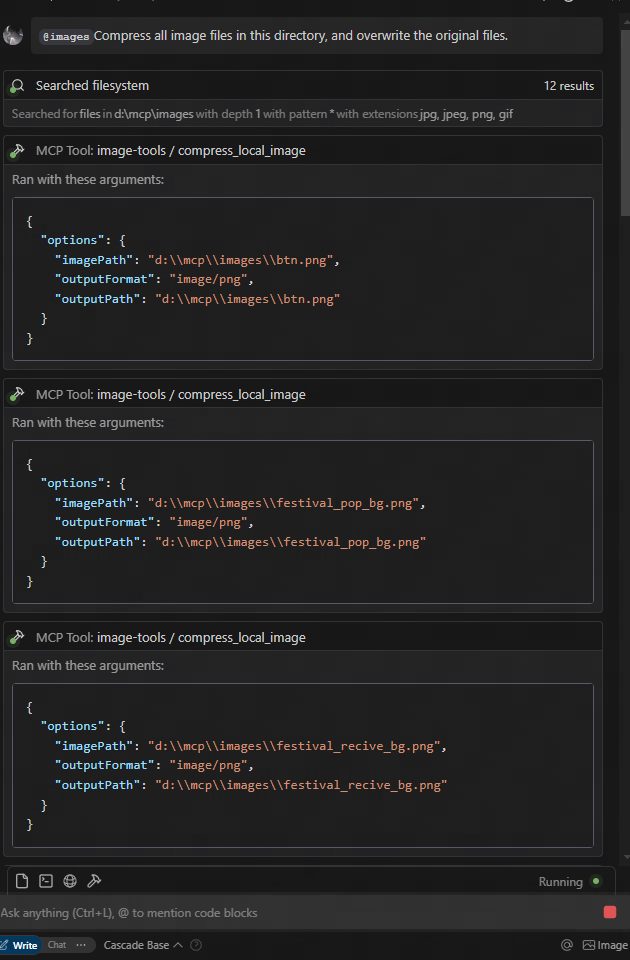
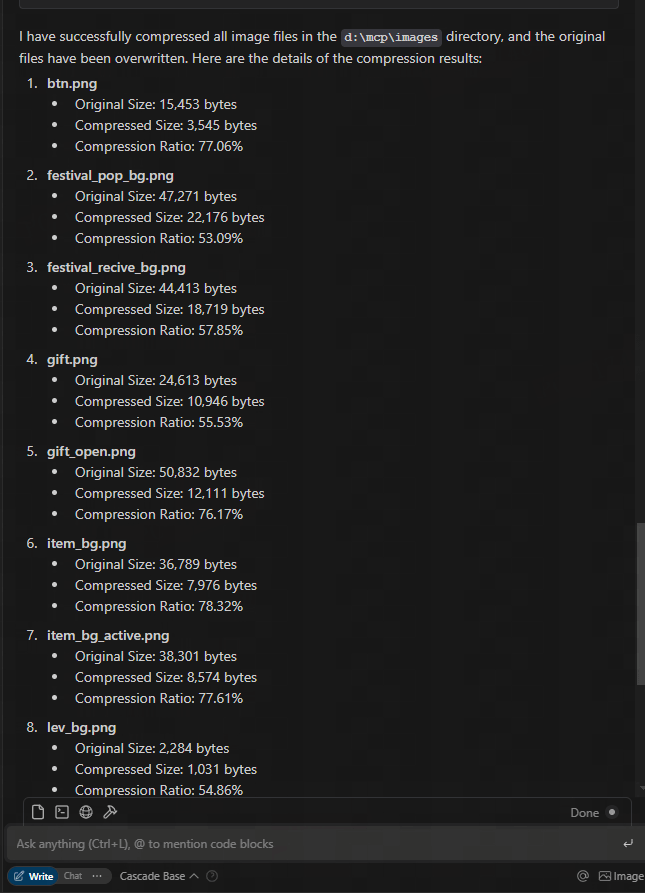
Сжатие локальных изображений с помощью API TinyPNG
Конвертируйте изображения в различные форматы (webp, jpeg/jpg, png)
Возвращает ширину, высоту, тип, тип MIME и информацию о сжатии.
скачать с figma url и сжать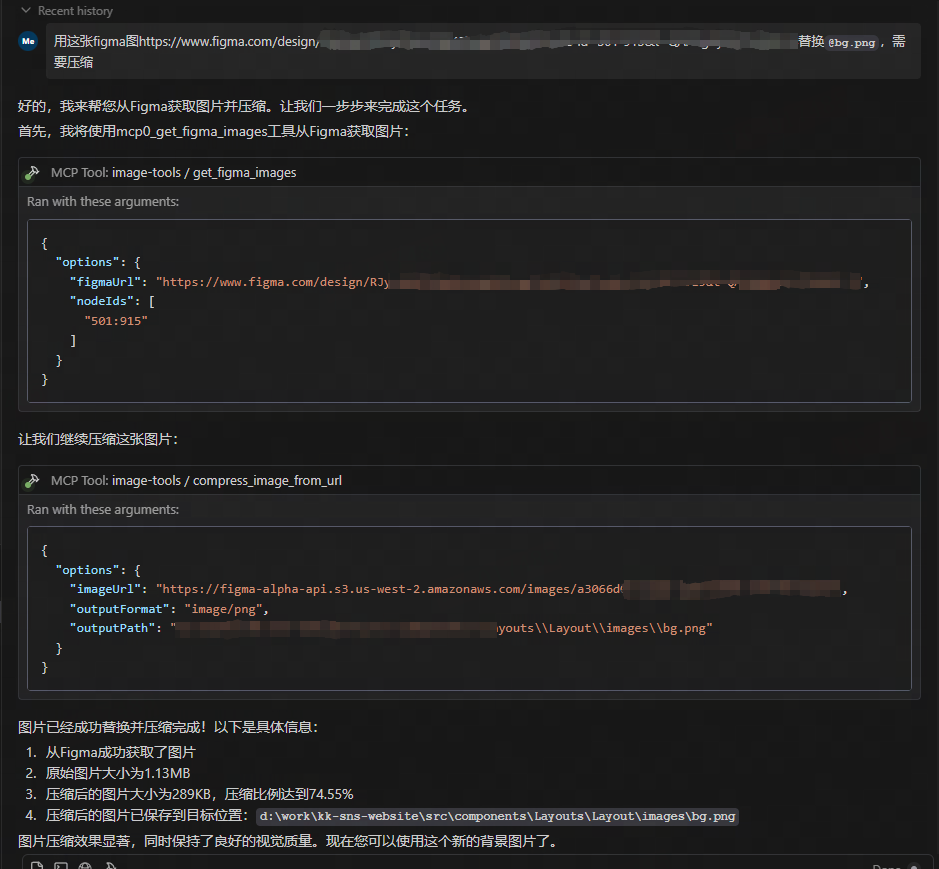
Related MCP server: test-1
Этот сервис предоставляет пять функций инструмента:
get_image_size — Получить размеры удаленных изображений
get_local_image_size — Получить размеры локальных изображений
compress_image_from_url — сжатие удаленных изображений с помощью API TinyPNG
compress_local_image — сжатие локальных изображений с помощью API TinyPNG
figma — извлекайте ссылки на изображения из API Figma и сжимайте их с помощью API TinyPNG
Чтобы использовать эту службу MCP, вам необходимо подключиться к ней с клиента MCP. Вот примеры того, как интегрироваться с разными клиентами:
Установите Claude Desktop с claude.ai/download
Получите ключ API TinyPNG: посетите TinyPNG и получите свой ключ API
Настройте Claude Desktop для использования этого сервера MCP, отредактировав файл конфигурации:
{
  "mcpServers": {
    "image-tools": {
      "command": "npx",
      "args": ["image-tools-mcp"],
      "env": {
        "TINIFY_API_KEY": "<YOUR_TINIFY_API_KEY>",
        "FIGMA_API_TOKEN": "<YOUR_FIGMA_API_TOKEN>"
      }
    }
  }
}
Перезагрузить рабочий стол Клода
Попросите Клода узнать размеры изображения: «Можете ли вы сказать мне размеры этого изображения: https://example.com/image.jpg »
Попросите Клода сжать изображение: «Можете ли вы сжать это изображение: https://example.com/image.jpg »
Попросите Клода сжать локальное изображение: «Можете ли вы сжать это изображение: D:/path/to/image.png»
Попросите Клода сжать локальную папку с изображениями: «Можете ли вы сжать эту папку: D:/imageFolder»
Попросите Клода получить ссылки на изображения из API Figma: «Можете ли вы получить ссылки на изображения из API Figma: https://www.figma.com/file/XXXXXXX »
import { McpClient } from "@modelcontextprotocol/client";

// Initialize the client
const client = new McpClient({
  transport: "stdio" // or other transport options
});

// Connect to the server
await client.connect();

// Get image dimensions from URL
const urlResult = await client.callTool("get_image_size", {
  options: {
    imageUrl: "https://example.com/image.jpg"
  }
});
console.log(JSON.parse(urlResult.content[0].text));
// Output: { width: 800, height: 600, type: "jpg", mime: "image/jpeg" }

// Get image dimensions from local file
const localResult = await client.callTool("get_local_image_size", {
  options: {
    imagePath: "D:/path/to/image.png"
  }
});
console.log(JSON.parse(localResult.content[0].text));
// Output: { width: 1024, height: 768, type: "png", mime: "image/png", path: "D:/path/to/image.png" }

// Compress image from URL
const compressUrlResult = await client.callTool("compress_image_from_url", {
  options: {
    imageUrl: "https://example.com/image.jpg",
    outputFormat: "webp" // Optional: convert to webp, jpeg/jpg, or png
  }
});
console.log(JSON.parse(compressUrlResult.content[0].text));
// Output: { originalSize: 102400, compressedSize: 51200, compressionRatio: "50.00%", tempFilePath: "/tmp/compressed_1615456789.webp", format: "webp" }

// Compress local image
const compressLocalResult = await client.callTool("compress_local_image", {
  options: {
    imagePath: "D:/path/to/image.png",
    outputPath: "D:/path/to/compressed.webp", // Optional
    outputFormat: "image/webp" // Optional: convert to image/webp, image/jpeg, or image/png
  }
});
console.log(JSON.parse(compressLocalResult.content[0].text));
// Output: { originalSize: 102400, compressedSize: 51200, compressionRatio: "50.00%", outputPath: "D:/path/to/compressed.webp", format: "webp" }

// Fetch image links from Figma API

const figmaResult = await client.callTool("figma", {
  options: {
    figmaUrl: "https://www.figma.com/file/XXXXXXX"
  }
});
console.log(JSON.parse(figmaResult.content[0].text));
// Output: { imageLinks: ["https://example.com/image1.jpg", "https://example.com/image2.jpg"] }

### Tool Schemas

#### get_image_size

```typescript
{
  options: {
    imageUrl: string // URL of the image to retrieve dimensions for
  }
}{
options: {
imagePath: string; // Absolute path to the local image file
}
}{
options: {
imageUrl: string // URL of the image to compress
outputFormat?: "image/webp" | "image/jpeg" | "image/jpg" | "image/png" // Optional output format
}
}{
options: {
imagePath: string // Absolute path to the local image file
outputPath?: string // Optional absolute path for the compressed output image
outputFormat?: "image/webp" | "image/jpeg" | "image/jpg" | "image/png" // Optional output format
}
}{
options: {
figmaUrl: string; // URL of the Figma file to fetch image links from
}
}2025-05-12: Обновлен API Figma для поддержки дополнительных параметров, включая двукратное масштабирование изображения.
Этот проект построен на следующих библиотеках:
probe-image-size — для определения размера изображения
tinify — для сжатия изображений с помощью API TinyPNG
figma-api — для получения ссылок на изображения из API Figma
TINIFY_API_KEY — Требуется для функциональности сжатия изображений. Получите свой ключ API от TinyPNG
Если не указано иное, инструменты сжатия ( compress_image_from_url и compress_local_image ) не будут зарегистрированы.
FIGMA_API_TOKEN - Требуется для получения ссылок на изображения из Figma API. Получите свой API-токен из Figma
Если не указано иное, инструмент Figma ( figma ) не будет зарегистрирован.
Примечание: основные инструменты измерения размеров изображения ( get_image_size и get_local_image_size ) всегда доступны независимо от ключей API.
Массачусетский технологический институт
Get the size of an image from URL
| Name | Required | Description | Default |
|---|---|---|---|
| options | Yes | Options for retrieving image size |
Does the description disclose side effects, auth requirements, rate limits, or destructive behavior?
With no annotations provided, the description carries the full burden of behavioral disclosure. It states what the tool does but lacks details on performance (e.g., network timeouts, rate limits), error handling (e.g., invalid URLs, unsupported formats), or output format (e.g., dimensions in pixels). This leaves significant gaps for a tool that performs network operations.
Agents need to know what a tool does to the world before calling it. Descriptions should go beyond structured annotations to explain consequences.
Is the description appropriately sized, front-loaded, and free of redundancy?
The description is a single, direct sentence with zero wasted words. It front-loads the core purpose ('Get the size of an image') and efficiently specifies the source ('from URL'). Every word earns its place, making it highly concise and well-structured.
Shorter descriptions cost fewer tokens and are easier for agents to parse. Every sentence should earn its place.
Given the tool's complexity, does the description cover enough for an agent to succeed on first attempt?
Given the tool's network-based operation and lack of annotations or output schema, the description is incomplete. It doesn't address critical context like what 'size' means (e.g., dimensions, file size), potential errors, or response format. For a tool with no structured output documentation, this leaves too much unspecified.
Complex tools with many parameters or behaviors need more documentation. Simple tools need less. This dimension scales expectations accordingly.
Does the description clarify parameter syntax, constraints, interactions, or defaults beyond what the schema provides?
Schema description coverage is 100%, so the schema fully documents the single parameter 'imageUrl'. The description adds no additional semantic context beyond implying the URL is for an image, which is already clear from the parameter name. This meets the baseline for high schema coverage but doesn't enhance understanding.
Input schemas describe structure but not intent. Descriptions should explain non-obvious parameter relationships and valid value ranges.
Does the description clearly state what the tool does and how it differs from similar tools?
The description clearly states the action ('Get the size') and resource ('an image from URL'), making the purpose immediately understandable. It distinguishes from the sibling tool 'get_local_image_size' by specifying the image source as 'from URL' rather than local. However, it doesn't explicitly contrast with the sibling, so it's not a perfect 5.
Agents choose between tools based on descriptions. A clear purpose with a specific verb and resource helps agents select the right tool.
Does the description explain when to use this tool, when not to, or what alternatives exist?
The description provides no guidance on when to use this tool versus its sibling 'get_local_image_size'. There's no mention of prerequisites, alternative scenarios, or exclusion criteria. The agent must infer usage from the name and description alone without explicit direction.
Agents often have multiple tools that could apply. Explicit usage guidance like "use X instead of Y when Z" prevents misuse.
Get the size of a local image
| Name | Required | Description | Default |
|---|---|---|---|
| options | Yes | Options for retrieving local image size |
Does the description disclose side effects, auth requirements, rate limits, or destructive behavior?
With no annotations provided, the description carries the full burden of behavioral disclosure. It states what the tool does but doesn't add context beyond the basic action—missing details like error handling, performance implications, or what the output looks like (e.g., dimensions in pixels). This leaves significant gaps for a tool that interacts with local files.
Agents need to know what a tool does to the world before calling it. Descriptions should go beyond structured annotations to explain consequences.
Is the description appropriately sized, front-loaded, and free of redundancy?
The description is a single, efficient sentence with zero waste, front-loading the core purpose without unnecessary details. It's appropriately sized for a simple tool, making it easy to parse quickly.
Shorter descriptions cost fewer tokens and are easier for agents to parse. Every sentence should earn its place.
Given the tool's complexity, does the description cover enough for an agent to succeed on first attempt?
Given the lack of annotations and output schema, the description is incomplete for a tool that reads local files. It doesn't explain the return value (e.g., width and height), error cases, or security considerations, leaving the agent with insufficient context to use it effectively beyond the basic parameter.
Complex tools with many parameters or behaviors need more documentation. Simple tools need less. This dimension scales expectations accordingly.
Does the description clarify parameter syntax, constraints, interactions, or defaults beyond what the schema provides?
The input schema has 100% description coverage, documenting the 'imagePath' parameter as an absolute path. The description doesn't add any meaning beyond this, such as format examples or constraints, so it meets the baseline of 3 where the schema does the heavy lifting without extra value from the description.
Input schemas describe structure but not intent. Descriptions should explain non-obvious parameter relationships and valid value ranges.
Does the description clearly state what the tool does and how it differs from similar tools?
The description clearly states the verb 'Get' and the resource 'size of a local image', making the purpose specific and understandable. However, it doesn't explicitly differentiate from its sibling 'get_image_size', which might handle remote images or have different scope, leaving room for ambiguity in sibling distinction.
Agents choose between tools based on descriptions. A clear purpose with a specific verb and resource helps agents select the right tool.
Does the description explain when to use this tool, when not to, or what alternatives exist?
The description provides no guidance on when to use this tool versus alternatives, such as its sibling 'get_image_size'. It lacks context on prerequisites, exclusions, or specific scenarios, offering only a basic statement of function without usage instructions.
Agents often have multiple tools that could apply. Explicit usage guidance like "use X instead of Y when Z" prevents misuse.
Recent tool additions, removals, and schema changes observed during successful MCP inspections.
v1.0.0get_image_sizeget_local_image_sizeScored across 2 tools
The two tools have overlapping purposes—both retrieve image sizes—with only the source (URL vs. local) differing. This creates ambiguity as an agent might misselect between them if the input context is unclear, such as when 'image' could refer to either type. The descriptions help slightly by specifying the source, but the core functionality is identical, leading to potential confusion.
The tool names follow a consistent verb_noun pattern with 'get_image_size' and 'get_local_image_size', both using snake_case and starting with 'get'. This predictability makes it easy for an agent to understand the naming convention and infer tool purposes without deviation or mixed styles.
With only 2 tools, the server feels thin and under-scoped for an 'image-tools' domain, which typically implies a broader set of operations like resizing, converting, or analyzing images. The limited count suggests incomplete coverage, as basic image manipulation tasks beyond size retrieval are missing, making it inadequate for comprehensive image handling.
The tool set is severely incomplete for an image processing domain, covering only size retrieval from two sources. There are significant gaps in common operations such as resizing, cropping, format conversion, or metadata extraction, which will likely cause agent failures when attempting typical image-related tasks. The surface lacks core functionality needed for a coherent image tools server.
Convert images to PNG, JPEG, WebP, or AVIF through one public remote MCP tool.
Image toolkit: resize, convert, compress, crop, metadata, hashes, favicons, OCR, QR codes, barcodes.
Image & PDF tools for AI agents: compress, convert, resize, PDF, AI vision, pipeline.
Image processing over MCP: compress and split images, generate images and QR codes.