

A
licenseC
qualityC
maintenanceMCP server for local compression of various image formats
1
18
33
MIT

用于检索图像尺寸和压缩图像的模型上下文协议 (MCP) 服务,支持 URL 和本地文件源。
从 URL 中检索图像尺寸
从本地文件获取图像尺寸
使用 TinyPNG API 压缩来自 URL 的图像
使用 TinyPNG API 压缩本地图像
将图像转换为不同的格式(webp、jpeg/jpg、png)
返回宽度、高度、类型、MIME 类型和压缩信息
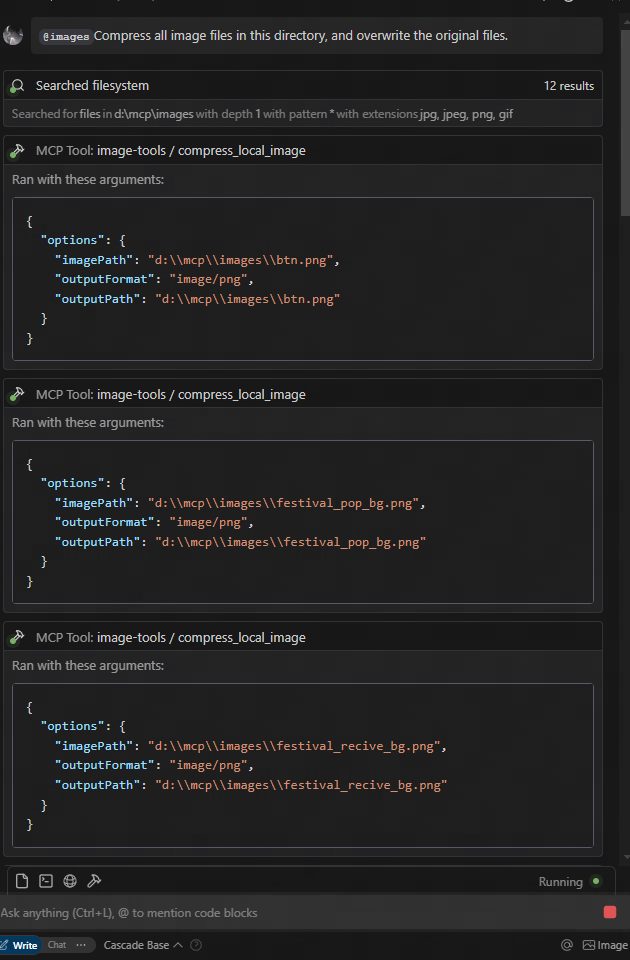
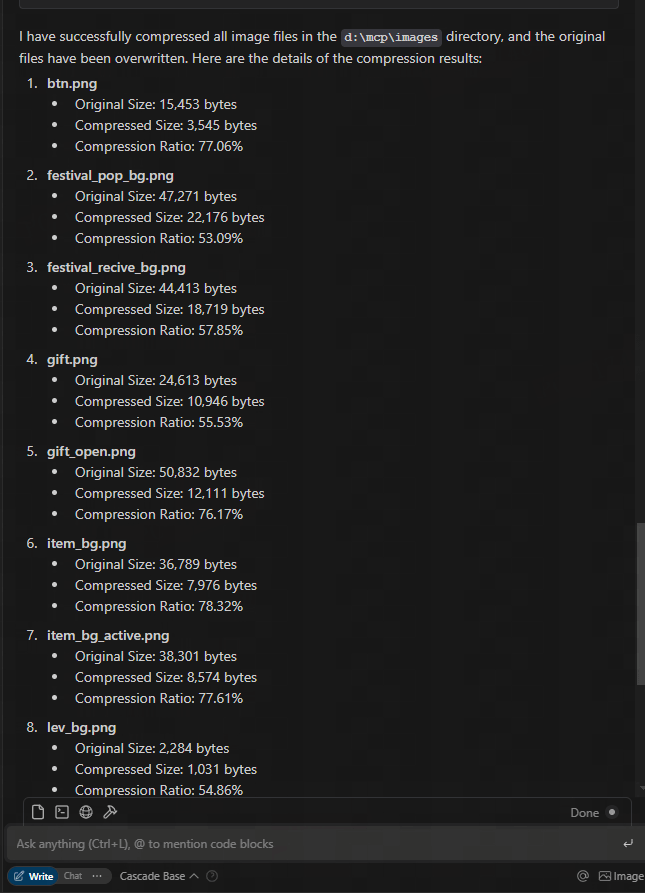
从 figma url 下载并压缩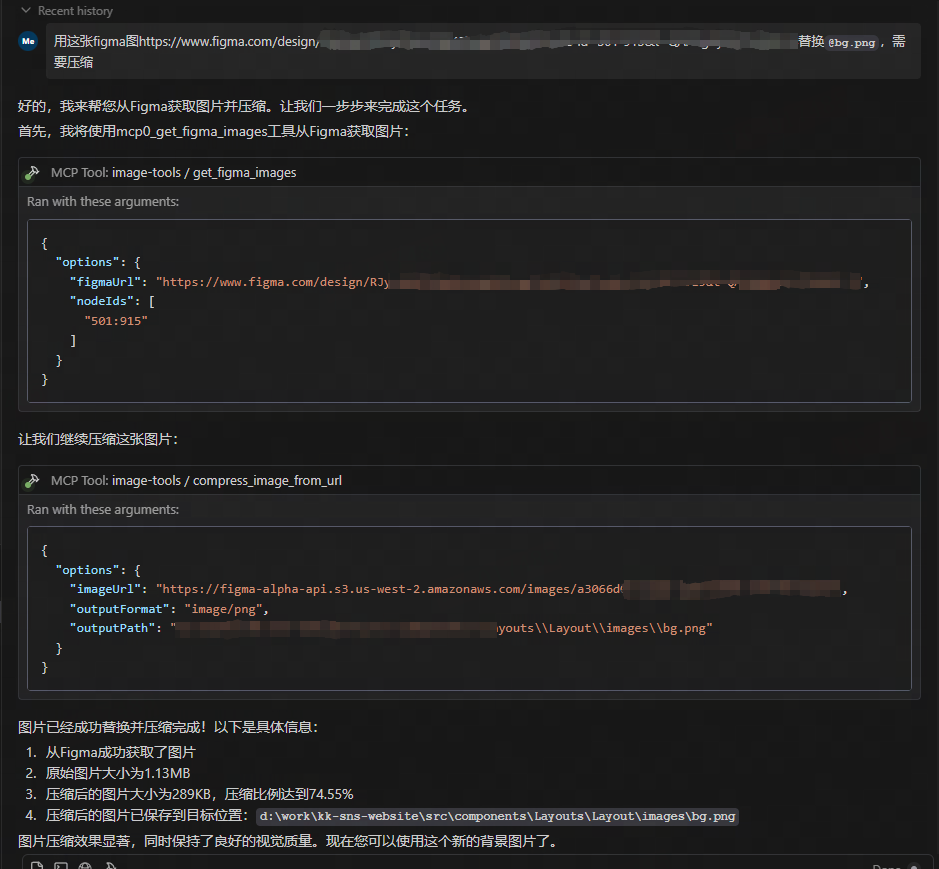
Related MCP server: test-1
该服务提供五种工具功能:
get_image_size - 获取远程图像的尺寸
get_local_image_size - 获取本地图像的尺寸
compress_image_from_url - 使用 TinyPNG API 压缩远程图像
compress_local_image - 使用 TinyPNG API 压缩本地图像
figma - 从 Figma API 获取图像链接并使用 TinyPNG API 压缩它们
要使用此 MCP 服务,您需要从 MCP 客户端连接到它。以下是如何与不同客户端集成的示例:
从claude.ai/download安装 Claude Desktop
获取 TinyPNG API 密钥:访问TinyPNG并获取您的 API 密钥
通过编辑配置文件来配置 Claude Desktop 以使用此 MCP 服务器:
{
  "mcpServers": {
    "image-tools": {
      "command": "npx",
      "args": ["image-tools-mcp"],
      "env": {
        "TINIFY_API_KEY": "<YOUR_TINIFY_API_KEY>",
        "FIGMA_API_TOKEN": "<YOUR_FIGMA_API_TOKEN>"
      }
    }
  }
}
重启Claude桌面
要求 Claude 获取图像尺寸:“你能告诉我这张图片的尺寸吗: https://example.com/image.jpg ”
要求 Claude 压缩图像:“您能压缩这张图片吗: https://example.com/image.jpg ”
要求 Claude 压缩本地图像:“您能压缩此图像吗:D:/path/to/image.png”
要求 Claude 压缩本地图像文件夹:“您能压缩这个文件夹吗:D:/imageFolder”
要求 Claude 从 Figma API 获取图像链接:“您能从 Figma API 获取图像链接吗: https://www.figma.com/file/XXXXXXX ”
import { McpClient } from "@modelcontextprotocol/client";

// Initialize the client
const client = new McpClient({
  transport: "stdio" // or other transport options
});

// Connect to the server
await client.connect();

// Get image dimensions from URL
const urlResult = await client.callTool("get_image_size", {
  options: {
    imageUrl: "https://example.com/image.jpg"
  }
});
console.log(JSON.parse(urlResult.content[0].text));
// Output: { width: 800, height: 600, type: "jpg", mime: "image/jpeg" }

// Get image dimensions from local file
const localResult = await client.callTool("get_local_image_size", {
  options: {
    imagePath: "D:/path/to/image.png"
  }
});
console.log(JSON.parse(localResult.content[0].text));
// Output: { width: 1024, height: 768, type: "png", mime: "image/png", path: "D:/path/to/image.png" }

// Compress image from URL
const compressUrlResult = await client.callTool("compress_image_from_url", {
  options: {
    imageUrl: "https://example.com/image.jpg",
    outputFormat: "webp" // Optional: convert to webp, jpeg/jpg, or png
  }
});
console.log(JSON.parse(compressUrlResult.content[0].text));
// Output: { originalSize: 102400, compressedSize: 51200, compressionRatio: "50.00%", tempFilePath: "/tmp/compressed_1615456789.webp", format: "webp" }

// Compress local image
const compressLocalResult = await client.callTool("compress_local_image", {
  options: {
    imagePath: "D:/path/to/image.png",
    outputPath: "D:/path/to/compressed.webp", // Optional
    outputFormat: "image/webp" // Optional: convert to image/webp, image/jpeg, or image/png
  }
});
console.log(JSON.parse(compressLocalResult.content[0].text));
// Output: { originalSize: 102400, compressedSize: 51200, compressionRatio: "50.00%", outputPath: "D:/path/to/compressed.webp", format: "webp" }

// Fetch image links from Figma API

const figmaResult = await client.callTool("figma", {
  options: {
    figmaUrl: "https://www.figma.com/file/XXXXXXX"
  }
});
console.log(JSON.parse(figmaResult.content[0].text));
// Output: { imageLinks: ["https://example.com/image1.jpg", "https://example.com/image2.jpg"] }

### Tool Schemas

#### get_image_size

```typescript
{
  options: {
    imageUrl: string // URL of the image to retrieve dimensions for
  }
}{
options: {
imagePath: string; // Absolute path to the local image file
}
}{
options: {
imageUrl: string // URL of the image to compress
outputFormat?: "image/webp" | "image/jpeg" | "image/jpg" | "image/png" // Optional output format
}
}{
options: {
imagePath: string // Absolute path to the local image file
outputPath?: string // Optional absolute path for the compressed output image
outputFormat?: "image/webp" | "image/jpeg" | "image/jpg" | "image/png" // Optional output format
}
}{
options: {
figmaUrl: string; // URL of the Figma file to fetch image links from
}
}**2025-05-12:**更新 Figma API 以支持其他参数,包括 2 倍图像缩放。
该项目基于以下库构建:
TINIFY_API_KEY - 图像压缩功能所需。从TinyPNG获取 API 密钥
如果未提供,则压缩工具( compress_image_from_url和compress_local_image )将不会被注册
FIGMA_API_TOKEN - 从 Figma API 获取图片链接时需要。获取Figma的 API 令牌
若未提供,则 Figma 工具( figma )将不会被注册
注意:无论 API 密钥如何,基本图像尺寸工具( get_image_size和get_local_image_size )始终可用。
麻省理工学院
Get the size of an image from URL
| Name | Required | Description | Default |
|---|---|---|---|
| options | Yes | Options for retrieving image size |
Does the description disclose side effects, auth requirements, rate limits, or destructive behavior?
With no annotations provided, the description carries the full burden of behavioral disclosure. It states what the tool does but lacks details on performance (e.g., network timeouts, rate limits), error handling (e.g., invalid URLs, unsupported formats), or output format (e.g., dimensions in pixels). This leaves significant gaps for a tool that performs network operations.
Agents need to know what a tool does to the world before calling it. Descriptions should go beyond structured annotations to explain consequences.
Is the description appropriately sized, front-loaded, and free of redundancy?
The description is a single, direct sentence with zero wasted words. It front-loads the core purpose ('Get the size of an image') and efficiently specifies the source ('from URL'). Every word earns its place, making it highly concise and well-structured.
Shorter descriptions cost fewer tokens and are easier for agents to parse. Every sentence should earn its place.
Given the tool's complexity, does the description cover enough for an agent to succeed on first attempt?
Given the tool's network-based operation and lack of annotations or output schema, the description is incomplete. It doesn't address critical context like what 'size' means (e.g., dimensions, file size), potential errors, or response format. For a tool with no structured output documentation, this leaves too much unspecified.
Complex tools with many parameters or behaviors need more documentation. Simple tools need less. This dimension scales expectations accordingly.
Does the description clarify parameter syntax, constraints, interactions, or defaults beyond what the schema provides?
Schema description coverage is 100%, so the schema fully documents the single parameter 'imageUrl'. The description adds no additional semantic context beyond implying the URL is for an image, which is already clear from the parameter name. This meets the baseline for high schema coverage but doesn't enhance understanding.
Input schemas describe structure but not intent. Descriptions should explain non-obvious parameter relationships and valid value ranges.
Does the description clearly state what the tool does and how it differs from similar tools?
The description clearly states the action ('Get the size') and resource ('an image from URL'), making the purpose immediately understandable. It distinguishes from the sibling tool 'get_local_image_size' by specifying the image source as 'from URL' rather than local. However, it doesn't explicitly contrast with the sibling, so it's not a perfect 5.
Agents choose between tools based on descriptions. A clear purpose with a specific verb and resource helps agents select the right tool.
Does the description explain when to use this tool, when not to, or what alternatives exist?
The description provides no guidance on when to use this tool versus its sibling 'get_local_image_size'. There's no mention of prerequisites, alternative scenarios, or exclusion criteria. The agent must infer usage from the name and description alone without explicit direction.
Agents often have multiple tools that could apply. Explicit usage guidance like "use X instead of Y when Z" prevents misuse.
Get the size of a local image
| Name | Required | Description | Default |
|---|---|---|---|
| options | Yes | Options for retrieving local image size |
Does the description disclose side effects, auth requirements, rate limits, or destructive behavior?
With no annotations provided, the description carries the full burden of behavioral disclosure. It states what the tool does but doesn't add context beyond the basic action—missing details like error handling, performance implications, or what the output looks like (e.g., dimensions in pixels). This leaves significant gaps for a tool that interacts with local files.
Agents need to know what a tool does to the world before calling it. Descriptions should go beyond structured annotations to explain consequences.
Is the description appropriately sized, front-loaded, and free of redundancy?
The description is a single, efficient sentence with zero waste, front-loading the core purpose without unnecessary details. It's appropriately sized for a simple tool, making it easy to parse quickly.
Shorter descriptions cost fewer tokens and are easier for agents to parse. Every sentence should earn its place.
Given the tool's complexity, does the description cover enough for an agent to succeed on first attempt?
Given the lack of annotations and output schema, the description is incomplete for a tool that reads local files. It doesn't explain the return value (e.g., width and height), error cases, or security considerations, leaving the agent with insufficient context to use it effectively beyond the basic parameter.
Complex tools with many parameters or behaviors need more documentation. Simple tools need less. This dimension scales expectations accordingly.
Does the description clarify parameter syntax, constraints, interactions, or defaults beyond what the schema provides?
The input schema has 100% description coverage, documenting the 'imagePath' parameter as an absolute path. The description doesn't add any meaning beyond this, such as format examples or constraints, so it meets the baseline of 3 where the schema does the heavy lifting without extra value from the description.
Input schemas describe structure but not intent. Descriptions should explain non-obvious parameter relationships and valid value ranges.
Does the description clearly state what the tool does and how it differs from similar tools?
The description clearly states the verb 'Get' and the resource 'size of a local image', making the purpose specific and understandable. However, it doesn't explicitly differentiate from its sibling 'get_image_size', which might handle remote images or have different scope, leaving room for ambiguity in sibling distinction.
Agents choose between tools based on descriptions. A clear purpose with a specific verb and resource helps agents select the right tool.
Does the description explain when to use this tool, when not to, or what alternatives exist?
The description provides no guidance on when to use this tool versus alternatives, such as its sibling 'get_image_size'. It lacks context on prerequisites, exclusions, or specific scenarios, offering only a basic statement of function without usage instructions.
Agents often have multiple tools that could apply. Explicit usage guidance like "use X instead of Y when Z" prevents misuse.
Recent tool additions, removals, and schema changes observed during successful MCP inspections. Dates show when Glama detected each change.
v1.0.0get_image_sizeget_local_image_sizeThe two tools have overlapping purposes—both retrieve image sizes—with only the source (URL vs. local) differing. This creates ambiguity as an agent might misselect between them if the input context is unclear, such as when 'image' could refer to either type. The descriptions help slightly by specifying the source, but the core functionality is identical, leading to potential confusion.
The tool names follow a consistent verb_noun pattern with 'get_image_size' and 'get_local_image_size', both using snake_case and starting with 'get'. This predictability makes it easy for an agent to understand the naming convention and infer tool purposes without deviation or mixed styles.
With only 2 tools, the server feels thin and under-scoped for an 'image-tools' domain, which typically implies a broader set of operations like resizing, converting, or analyzing images. The limited count suggests incomplete coverage, as basic image manipulation tasks beyond size retrieval are missing, making it inadequate for comprehensive image handling.
The tool set is severely incomplete for an image processing domain, covering only size retrieval from two sources. There are significant gaps in common operations such as resizing, cropping, format conversion, or metadata extraction, which will likely cause agent failures when attempting typical image-related tasks. The surface lacks core functionality needed for a coherent image tools server.
Unclaimed servers have limited discoverability.
If you are the server author, to access and configure the admin panel.
Convert images to PNG, JPEG, WebP, or AVIF through one public remote MCP tool.
Resize, convert, compress, crop, thumbnail and watermark images from your AI chat.
Resize, compress, convert, watermark and SEO-tag e-commerce product images from a public URL.
AI-powered image processing via GPU. Remove backgrounds and upscale images (2x/4x) directly from any MCP client. OAuth 2.1 authenticated, returns processed images inline with download links. Free credits on signup at maskr.io.
We provide all the information about MCP servers via our MCP API.
curl -X GET 'https://glama.ai/api/mcp/v1/servers/kshern/image-tools-mcp'
If you have feedback or need assistance with the MCP directory API, please join our Discord server