
A
licenseC
qualityD
maintenanceMCP server for local compression of various image formats
1
19 npm
34
MIT

The Image Tools MCP server allows you to retrieve image dimensions and compress images, supporting both URL and local file sources.
Retrieve image dimensions: Get width, height, type, and MIME type from both URLs and local image files
Compress images: Compress images from URLs or local files using the TinyPNG API (requires TINIFY_API_KEY)
Format conversion: Convert images to webp, jpeg/jpg, or png during compression
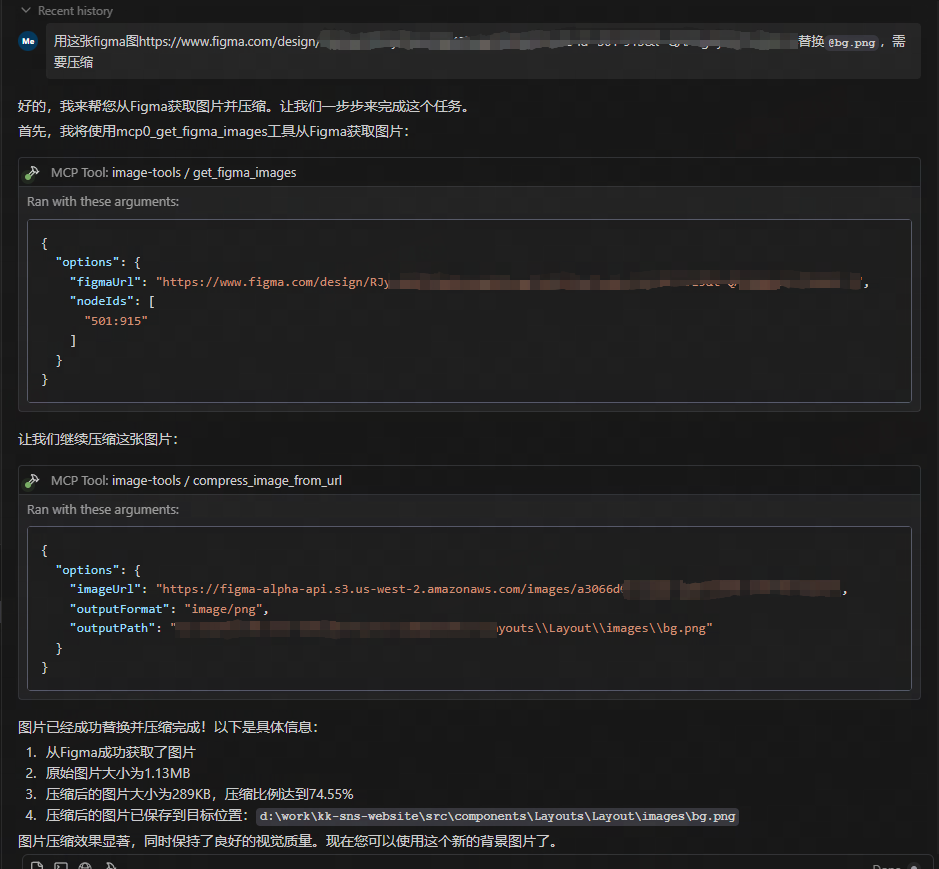
Figma integration: Fetch and compress images directly from Figma files (requires FIGMA_API_TOKEN)
Provides TypeScript interfaces for tool schemas, allowing type-safe integration with the MCP client library.
Click on "Deploy Server".
Wait a few minutes for the server to deploy. Once ready, it will show a "Started" state.
In the chat, type @ followed by the MCP server name and your instructions, e.g., "@image-tools-mcp compress this image to webp format: https://example.com/photo.jpg"
That's it! The server will respond to your query, and you can continue using it as needed.
Here is a step-by-step guide with screenshots.
A Model Context Protocol (MCP) service for retrieving image dimensions and compressing images, supporting both URL and local file sources.
Retrieve image dimensions from URLs
Get image dimensions from local files
Compress images from URLs using TinyPNG API
Compress local images using TinyPNG API
Convert images to different formats (webp, jpeg/jpg, png)
Returns width, height, type, MIME type, and compression information


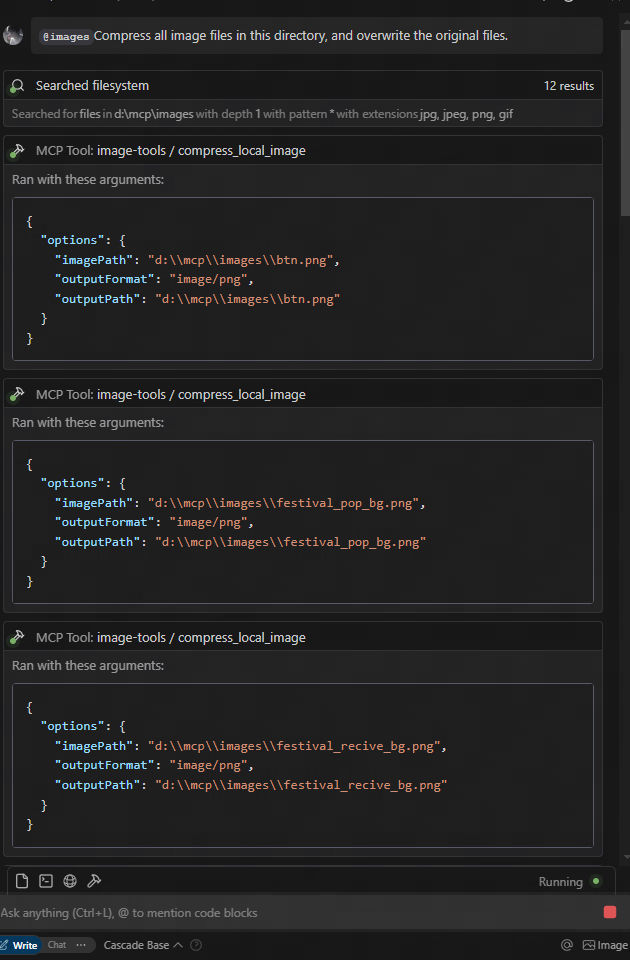
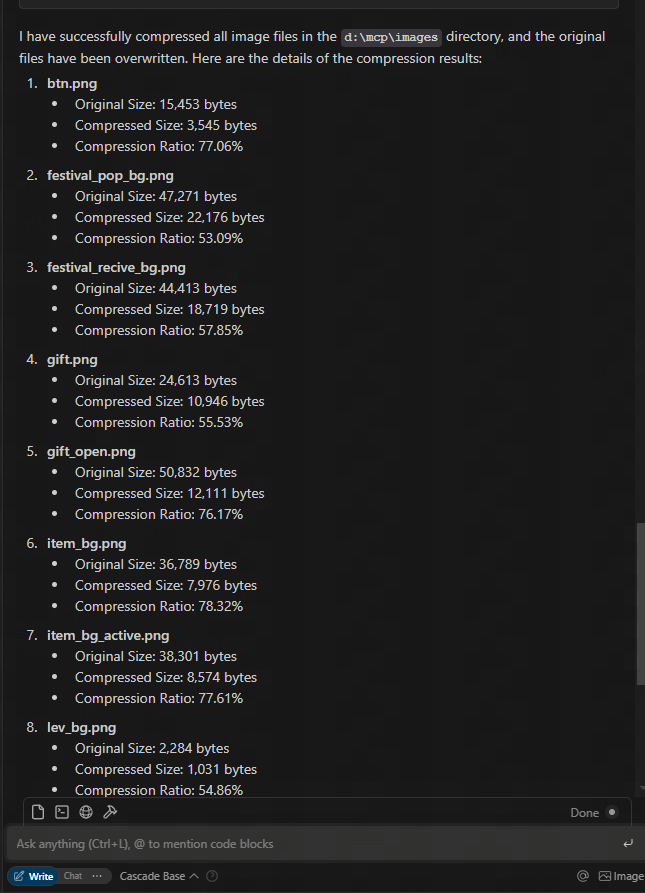
download from figma url and compress
Related MCP server: test-1
This service provides five tool functions:
get_image_size - Get dimensions of remote images
get_local_image_size - Get dimensions of local images
compress_image_from_url - Compress remote images using TinyPNG API
compress_local_image - Compress local images using TinyPNG API
figma - Fetch image links from Figma API and compress them using TinyPNG API
To use this MCP service, you need to connect to it from an MCP client. Here are examples of how to integrate with different clients:
{
  "mcpServers": {
    "image-tools": {
      "command": "npx",
      "args": ["image-tools-mcp"],
      "env": {
        "TINIFY_API_KEY": "<YOUR_TINIFY_API_KEY>",
        "FIGMA_API_TOKEN": "<YOUR_FIGMA_API_TOKEN>"
      }
    }
  }
}import { McpClient } from "@modelcontextprotocol/client";
// Initialize the client
const client = new McpClient({
transport: "stdio" // or other transport options
});
// Connect to the server
await client.connect();
// Get image dimensions from URL
const urlResult = await client.callTool("get_image_size", {
options: {
imageUrl: "https://example.com/image.jpg"
}
});
console.log(JSON.parse(urlResult.content[0].text));
// Output: { width: 800, height: 600, type: "jpg", mime: "image/jpeg" }
// Get image dimensions from local file
const localResult = await client.callTool("get_local_image_size", {
options: {
imagePath: "D:/path/to/image.png"
}
});
console.log(JSON.parse(localResult.content[0].text));
// Output: { width: 1024, height: 768, type: "png", mime: "image/png", path: "D:/path/to/image.png" }
// Compress image from URL
const compressUrlResult = await client.callTool("compress_image_from_url", {
options: {
imageUrl: "https://example.com/image.jpg",
outputFormat: "webp" // Optional: convert to webp, jpeg/jpg, or png
}
});
console.log(JSON.parse(compressUrlResult.content[0].text));
// Output: { originalSize: 102400, compressedSize: 51200, compressionRatio: "50.00%", tempFilePath: "/tmp/compressed_1615456789.webp", format: "webp" }
// Compress local image
const compressLocalResult = await client.callTool("compress_local_image", {
options: {
imagePath: "D:/path/to/image.png",
outputPath: "D:/path/to/compressed.webp", // Optional
outputFormat: "image/webp" // Optional: convert to image/webp, image/jpeg, or image/png
}
});
console.log(JSON.parse(compressLocalResult.content[0].text));
// Output: { originalSize: 102400, compressedSize: 51200, compressionRatio: "50.00%", outputPath: "D:/path/to/compressed.webp", format: "webp" }
// Fetch image links from Figma API
const figmaResult = await client.callTool("figma", {
options: {
figmaUrl: "https://www.figma.com/file/XXXXXXX"
}
});
console.log(JSON.parse(figmaResult.content[0].text));
// Output: { imageLinks: ["https://example.com/image1.jpg", "https://example.com/image2.jpg"] }
### Tool Schemas
#### get_image_size
```typescript
{
options: {
imageUrl: string // URL of the image to retrieve dimensions for
}
}{
options: {
imagePath: string; // Absolute path to the local image file
}
}{
options: {
imageUrl: string // URL of the image to compress
outputFormat?: "image/webp" | "image/jpeg" | "image/jpg" | "image/png" // Optional output format
}
}{
options: {
imagePath: string // Absolute path to the local image file
outputPath?: string // Optional absolute path for the compressed output image
outputFormat?: "image/webp" | "image/jpeg" | "image/jpg" | "image/png" // Optional output format
}
}{
options: {
figmaUrl: string; // URL of the Figma file to fetch image links from
}
}2025-05-12: Updated Figma API to support additional parameters, including 2x image scaling.
This project is built on the following libraries:
probe-image-size - For image dimension detection
tinify - For image compression via the TinyPNG API
figma-api - For fetching image links from Figma API
TINIFY_API_KEY - Required for image compression functionality. Get your API key from TinyPNG
When not provided, the compression tools (compress_image_from_url and compress_local_image) will not be registered
FIGMA_API_TOKEN - Required for fetching image links from Figma API. Get your API token from Figma
When not provided, the Figma tool (figma) will not be registered
Note: The basic image dimension tools (get_image_size and get_local_image_size) are always available regardless of API keys.
MIT
Get the size of an image from URL
Inputs: options (required).
Get the size of a local image
Inputs: options (required).
Recent tool additions, removals, and schema changes observed during successful MCP inspections.
Loading tool schema changelog…
Scored across 2 tools
The two tools have overlapping purposes—both retrieve image sizes—with only the source (URL vs. local) differing. This creates ambiguity as an agent might misselect between them if the input context is unclear, such as when 'image' could refer to either type. The descriptions help slightly by specifying the source, but the core functionality is identical, leading to potential confusion.
The tool names follow a consistent verb_noun pattern with 'get_image_size' and 'get_local_image_size', both using snake_case and starting with 'get'. This predictability makes it easy for an agent to understand the naming convention and infer tool purposes without deviation or mixed styles.
With only 2 tools, the server feels thin and under-scoped for an 'image-tools' domain, which typically implies a broader set of operations like resizing, converting, or analyzing images. The limited count suggests incomplete coverage, as basic image manipulation tasks beyond size retrieval are missing, making it inadequate for comprehensive image handling.
The tool set is severely incomplete for an image processing domain, covering only size retrieval from two sources. There are significant gaps in common operations such as resizing, cropping, format conversion, or metadata extraction, which will likely cause agent failures when attempting typical image-related tasks. The surface lacks core functionality needed for a coherent image tools server.
Convert images to PNG, JPEG, WebP, or AVIF through one public remote MCP tool.
Image & PDF tools for AI agents: compress, convert, resize, PDF, AI vision, pipeline.
Resize, compress, convert, crop, rotate, strip EXIF and watermark one image or a whole zip. Handles HEIC; outputs JPEG, PNG, WebP or AVIF; reports which metadata was removed. Free within a daily quota, no API key. The same tools run free in the browser at byondr.co/image-tools.
Compress, convert, resize, crop, upscale, OCR and remove backgrounds from images.