A
licenseC
qualityC
maintenanceMCP server for local compression of various image formats
1
38 npm
34
MIT

URL과 로컬 파일 소스를 모두 지원하며 이미지 크기를 검색하고 이미지를 압축하는 모델 컨텍스트 프로토콜(MCP) 서비스입니다.
URL에서 이미지 크기 검색
로컬 파일에서 이미지 크기 가져오기
TinyPNG API를 사용하여 URL에서 이미지 압축
TinyPNG API를 사용하여 로컬 이미지 압축
이미지를 다양한 형식(webp, jpeg/jpg, png)으로 변환합니다.
너비, 높이, 유형, MIME 유형 및 압축 정보를 반환합니다.
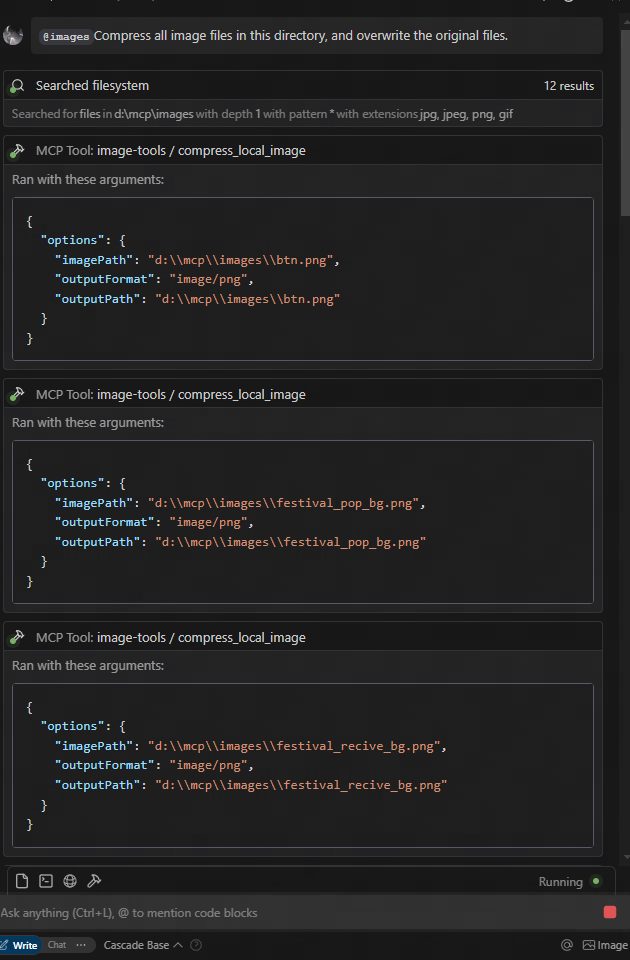
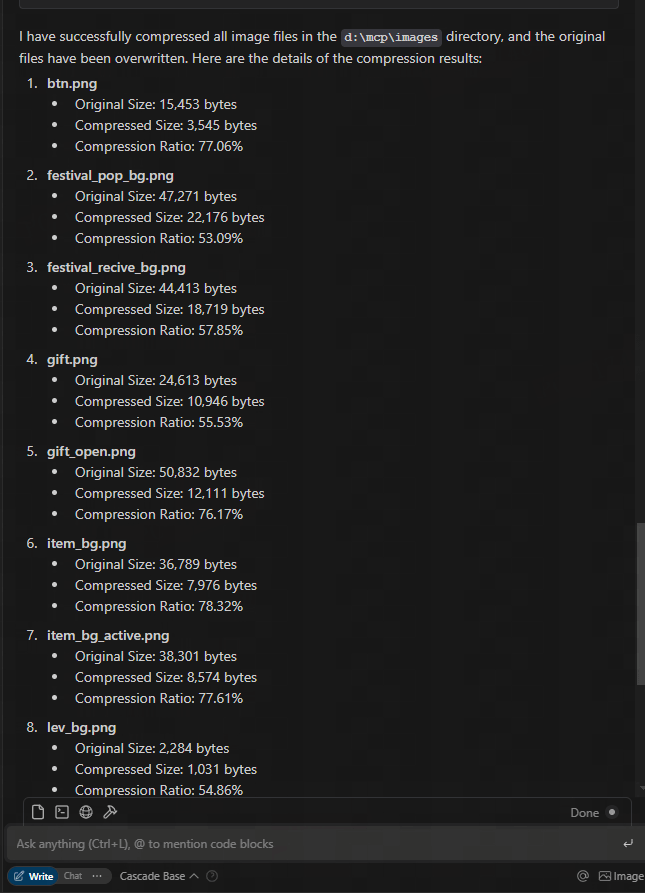
figma url에서 다운로드하고 압축하세요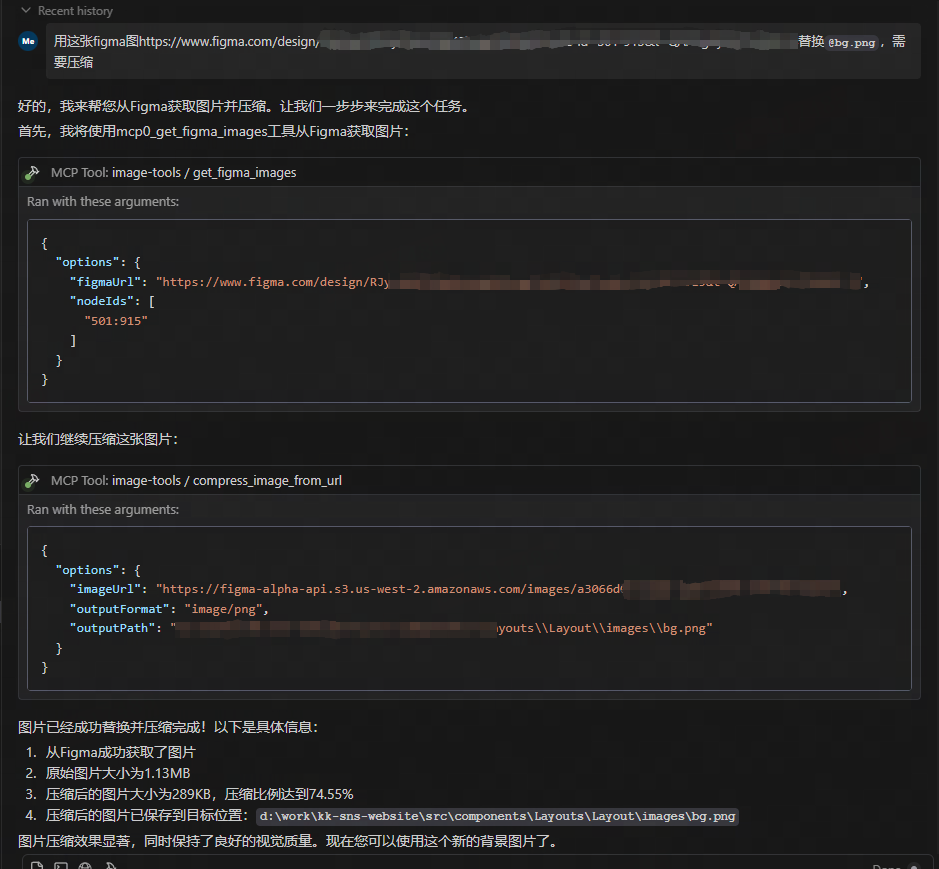
Related MCP server: test-1
이 서비스는 5가지 도구 기능을 제공합니다.
get_image_size - 원격 이미지의 크기 가져오기
get_local_image_size - 로컬 이미지의 크기 가져오기
compress_image_from_url - TinyPNG API를 사용하여 원격 이미지 압축
compress_local_image - TinyPNG API를 사용하여 로컬 이미지 압축
figma - Figma API에서 이미지 링크를 가져와 TinyPNG API를 사용하여 압축합니다.
이 MCP 서비스를 사용하려면 MCP 클라이언트에서 연결해야 합니다. 다양한 클라이언트와 통합하는 방법의 예는 다음과 같습니다.
claude.ai/download 에서 Claude Desktop을 설치하세요
TinyPNG API 키 받기: TinyPNG를 방문하여 API 키를 받으세요.
다음 구성 파일을 편집하여 Claude Desktop이 이 MCP 서버를 사용하도록 구성합니다.
지엑스피1
Claude Desktop을 다시 시작하세요
Claude에게 이미지 크기를 알려달라고 요청하세요: " https://example.com/image.jpg 이 이미지의 크기를 알려주시겠습니까?"
Claude에게 이미지를 압축해 달라고 요청하세요: " https://example.com/image.jpg 이미지를 압축해 주시겠습니까?"
Claude에게 로컬 이미지를 압축해 달라고 요청하세요: "이 이미지를 압축할 수 있나요: D:/path/to/image.png"
Claude에게 로컬 이미지 폴더를 압축하도록 요청하세요: "이 폴더를 압축할 수 있나요: D:/imageFolder"
Claude에게 Figma API에서 이미지 링크를 가져오도록 요청하세요: "Figma API에서 이미지 링크를 가져올 수 있나요? https://www.figma.com/file/XXXXXXX "
import { McpClient } from "@modelcontextprotocol/client";

// Initialize the client
const client = new McpClient({
  transport: "stdio" // or other transport options
});

// Connect to the server
await client.connect();

// Get image dimensions from URL
const urlResult = await client.callTool("get_image_size", {
  options: {
    imageUrl: "https://example.com/image.jpg"
  }
});
console.log(JSON.parse(urlResult.content[0].text));
// Output: { width: 800, height: 600, type: "jpg", mime: "image/jpeg" }

// Get image dimensions from local file
const localResult = await client.callTool("get_local_image_size", {
  options: {
    imagePath: "D:/path/to/image.png"
  }
});
console.log(JSON.parse(localResult.content[0].text));
// Output: { width: 1024, height: 768, type: "png", mime: "image/png", path: "D:/path/to/image.png" }

// Compress image from URL
const compressUrlResult = await client.callTool("compress_image_from_url", {
  options: {
    imageUrl: "https://example.com/image.jpg",
    outputFormat: "webp" // Optional: convert to webp, jpeg/jpg, or png
  }
});
console.log(JSON.parse(compressUrlResult.content[0].text));
// Output: { originalSize: 102400, compressedSize: 51200, compressionRatio: "50.00%", tempFilePath: "/tmp/compressed_1615456789.webp", format: "webp" }

// Compress local image
const compressLocalResult = await client.callTool("compress_local_image", {
  options: {
    imagePath: "D:/path/to/image.png",
    outputPath: "D:/path/to/compressed.webp", // Optional
    outputFormat: "image/webp" // Optional: convert to image/webp, image/jpeg, or image/png
  }
});
console.log(JSON.parse(compressLocalResult.content[0].text));
// Output: { originalSize: 102400, compressedSize: 51200, compressionRatio: "50.00%", outputPath: "D:/path/to/compressed.webp", format: "webp" }

// Fetch image links from Figma API

const figmaResult = await client.callTool("figma", {
  options: {
    figmaUrl: "https://www.figma.com/file/XXXXXXX"
  }
});
console.log(JSON.parse(figmaResult.content[0].text));
// Output: { imageLinks: ["https://example.com/image1.jpg", "https://example.com/image2.jpg"] }

### Tool Schemas

#### get_image_size

```typescript
{
  options: {
    imageUrl: string // URL of the image to retrieve dimensions for
  }
}{
options: {
imagePath: string; // Absolute path to the local image file
}
}{
options: {
imageUrl: string // URL of the image to compress
outputFormat?: "image/webp" | "image/jpeg" | "image/jpg" | "image/png" // Optional output format
}
}{
options: {
imagePath: string // Absolute path to the local image file
outputPath?: string // Optional absolute path for the compressed output image
outputFormat?: "image/webp" | "image/jpeg" | "image/jpg" | "image/png" // Optional output format
}
}{
options: {
figmaUrl: string; // URL of the Figma file to fetch image links from
}
}2025-05-12: 2배 이미지 크기 조정을 포함한 추가 매개변수를 지원하도록 Figma API를 업데이트했습니다.
이 프로젝트는 다음 라이브러리를 기반으로 구축되었습니다.
probe-image-size - 이미지 차원 감지용
tinify - TinyPNG API를 통한 이미지 압축
figma-api - Figma API에서 이미지 링크를 가져오는 데 사용
TINIFY_API_KEY - 이미지 압축 기능에 필요합니다. TinyPNG 에서 API 키를 받으세요.
제공되지 않으면 압축 도구( compress_image_from_url 및 compress_local_image )가 등록되지 않습니다.
FIGMA_API_TOKEN - Figma API에서 이미지 링크를 가져오는 데 필요합니다. Figma 에서 API 토큰을 받으세요.
제공되지 않을 경우 Figma 도구( figma )가 등록되지 않습니다.
참고: 기본 이미지 크기 도구( get_image_size 및 get_local_image_size )는 API 키와 관계없이 항상 사용할 수 있습니다.
MIT
Get the size of an image from URL
| Name | Required | Description | Default |
|---|---|---|---|
| options | Yes | Options for retrieving image size |
Does the description disclose side effects, auth requirements, rate limits, or destructive behavior?
With no annotations provided, the description carries the full burden of behavioral disclosure. It states what the tool does but lacks details on performance (e.g., network timeouts, rate limits), error handling (e.g., invalid URLs, unsupported formats), or output format (e.g., dimensions in pixels). This leaves significant gaps for a tool that performs network operations.
Agents need to know what a tool does to the world before calling it. Descriptions should go beyond structured annotations to explain consequences.
Is the description appropriately sized, front-loaded, and free of redundancy?
The description is a single, direct sentence with zero wasted words. It front-loads the core purpose ('Get the size of an image') and efficiently specifies the source ('from URL'). Every word earns its place, making it highly concise and well-structured.
Shorter descriptions cost fewer tokens and are easier for agents to parse. Every sentence should earn its place.
Given the tool's complexity, does the description cover enough for an agent to succeed on first attempt?
Given the tool's network-based operation and lack of annotations or output schema, the description is incomplete. It doesn't address critical context like what 'size' means (e.g., dimensions, file size), potential errors, or response format. For a tool with no structured output documentation, this leaves too much unspecified.
Complex tools with many parameters or behaviors need more documentation. Simple tools need less. This dimension scales expectations accordingly.
Does the description clarify parameter syntax, constraints, interactions, or defaults beyond what the schema provides?
Schema description coverage is 100%, so the schema fully documents the single parameter 'imageUrl'. The description adds no additional semantic context beyond implying the URL is for an image, which is already clear from the parameter name. This meets the baseline for high schema coverage but doesn't enhance understanding.
Input schemas describe structure but not intent. Descriptions should explain non-obvious parameter relationships and valid value ranges.
Does the description clearly state what the tool does and how it differs from similar tools?
The description clearly states the action ('Get the size') and resource ('an image from URL'), making the purpose immediately understandable. It distinguishes from the sibling tool 'get_local_image_size' by specifying the image source as 'from URL' rather than local. However, it doesn't explicitly contrast with the sibling, so it's not a perfect 5.
Agents choose between tools based on descriptions. A clear purpose with a specific verb and resource helps agents select the right tool.
Does the description explain when to use this tool, when not to, or what alternatives exist?
The description provides no guidance on when to use this tool versus its sibling 'get_local_image_size'. There's no mention of prerequisites, alternative scenarios, or exclusion criteria. The agent must infer usage from the name and description alone without explicit direction.
Agents often have multiple tools that could apply. Explicit usage guidance like "use X instead of Y when Z" prevents misuse.
Get the size of a local image
| Name | Required | Description | Default |
|---|---|---|---|
| options | Yes | Options for retrieving local image size |
Does the description disclose side effects, auth requirements, rate limits, or destructive behavior?
With no annotations provided, the description carries the full burden of behavioral disclosure. It states what the tool does but doesn't add context beyond the basic action—missing details like error handling, performance implications, or what the output looks like (e.g., dimensions in pixels). This leaves significant gaps for a tool that interacts with local files.
Agents need to know what a tool does to the world before calling it. Descriptions should go beyond structured annotations to explain consequences.
Is the description appropriately sized, front-loaded, and free of redundancy?
The description is a single, efficient sentence with zero waste, front-loading the core purpose without unnecessary details. It's appropriately sized for a simple tool, making it easy to parse quickly.
Shorter descriptions cost fewer tokens and are easier for agents to parse. Every sentence should earn its place.
Given the tool's complexity, does the description cover enough for an agent to succeed on first attempt?
Given the lack of annotations and output schema, the description is incomplete for a tool that reads local files. It doesn't explain the return value (e.g., width and height), error cases, or security considerations, leaving the agent with insufficient context to use it effectively beyond the basic parameter.
Complex tools with many parameters or behaviors need more documentation. Simple tools need less. This dimension scales expectations accordingly.
Does the description clarify parameter syntax, constraints, interactions, or defaults beyond what the schema provides?
The input schema has 100% description coverage, documenting the 'imagePath' parameter as an absolute path. The description doesn't add any meaning beyond this, such as format examples or constraints, so it meets the baseline of 3 where the schema does the heavy lifting without extra value from the description.
Input schemas describe structure but not intent. Descriptions should explain non-obvious parameter relationships and valid value ranges.
Does the description clearly state what the tool does and how it differs from similar tools?
The description clearly states the verb 'Get' and the resource 'size of a local image', making the purpose specific and understandable. However, it doesn't explicitly differentiate from its sibling 'get_image_size', which might handle remote images or have different scope, leaving room for ambiguity in sibling distinction.
Agents choose between tools based on descriptions. A clear purpose with a specific verb and resource helps agents select the right tool.
Does the description explain when to use this tool, when not to, or what alternatives exist?
The description provides no guidance on when to use this tool versus alternatives, such as its sibling 'get_image_size'. It lacks context on prerequisites, exclusions, or specific scenarios, offering only a basic statement of function without usage instructions.
Agents often have multiple tools that could apply. Explicit usage guidance like "use X instead of Y when Z" prevents misuse.
Recent tool additions, removals, and schema changes observed during successful MCP inspections.
v1.0.0get_image_sizeget_local_image_sizeScored across 2 tools
The two tools have overlapping purposes—both retrieve image sizes—with only the source (URL vs. local) differing. This creates ambiguity as an agent might misselect between them if the input context is unclear, such as when 'image' could refer to either type. The descriptions help slightly by specifying the source, but the core functionality is identical, leading to potential confusion.
The tool names follow a consistent verb_noun pattern with 'get_image_size' and 'get_local_image_size', both using snake_case and starting with 'get'. This predictability makes it easy for an agent to understand the naming convention and infer tool purposes without deviation or mixed styles.
With only 2 tools, the server feels thin and under-scoped for an 'image-tools' domain, which typically implies a broader set of operations like resizing, converting, or analyzing images. The limited count suggests incomplete coverage, as basic image manipulation tasks beyond size retrieval are missing, making it inadequate for comprehensive image handling.
The tool set is severely incomplete for an image processing domain, covering only size retrieval from two sources. There are significant gaps in common operations such as resizing, cropping, format conversion, or metadata extraction, which will likely cause agent failures when attempting typical image-related tasks. The surface lacks core functionality needed for a coherent image tools server.
Convert images to PNG, JPEG, WebP, or AVIF through one public remote MCP tool.
Image toolkit: resize, convert, compress, crop, metadata, hashes, favicons, OCR, QR codes, barcodes.
Image & PDF tools for AI agents: compress, convert, resize, PDF, AI vision, pipeline.
Image processing over MCP: compress and split images, generate images and QR codes.